1
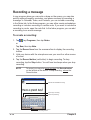
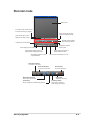
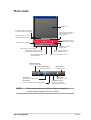
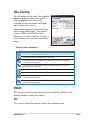
Photo mode
Display area
In recorder mode, moves forward
to indicate recording in progress
Tap and slide right or left to
adjust the image contrast
and brightness
Tap and slide right or left to
adjust the recording volume
Photo function buttons
(see descriptions below)
Indicates the camera status
Indicates the elapsed
recording time
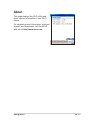
Tap to display a list of media files
Tap to display information on
ASUS Camera functions
Tap to display settings screen for
playback/video image/photo image
Tap to display playback, video,
or photo statistics
Tap to turn the camera flash on or off
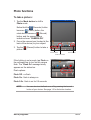
Photo Viewer button
no function in this mode
Photo Album button
no function in this mode
Photo button
Tap to shift to playback mode
Zoom button
Tap to change from 1X/2X/4X magnification
NOTE
Record button
Tap to take a photo
Stop button
Tap to stop recording
[Play/Pause button)
Tap to play a media file;
while playing, tap to pause
When capturing photos, the ideal distance between the
camera and the subject is 60 cm to infinity.
ASUS programs
4-15