1
MAINTENANCE
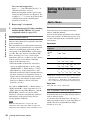
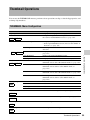
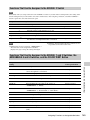
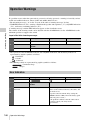
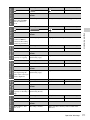
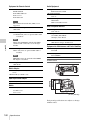
Menu items
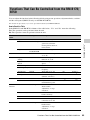
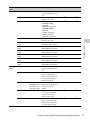
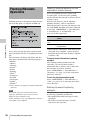
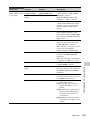
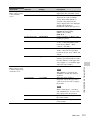
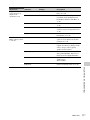
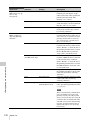
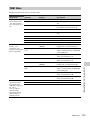
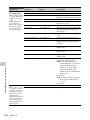
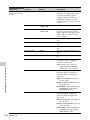
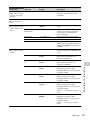
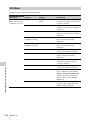
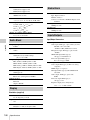
Clock Set
Sub-item
Date/Time
Sets the internal clock. 12H/24H
Language
Settings
12H/24H
Date Mode
YYMMDD/MMDDYY/
DDMMYY
Language
English/Chinese
Selects the language for
messages.
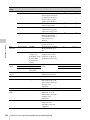
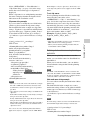
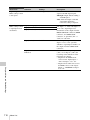
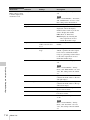
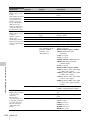
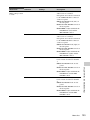
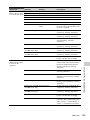
Hours Meter
Hours(Sys)
Makes settings related
to the digital hours
meter.
Hours(Reset)
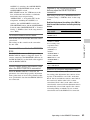
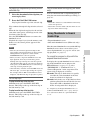
Menu Scroll
Reset
Execute/Cancel
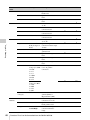
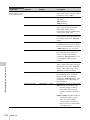
Menu Scroll
Normal/Loop
Selects the scroll
method for the menu.
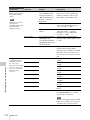
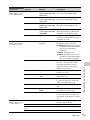
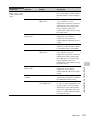
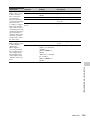
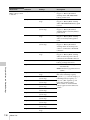
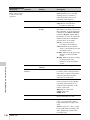
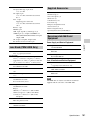
Version
Version
Execute/Cancel
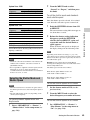
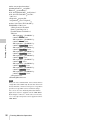
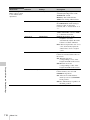
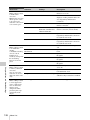
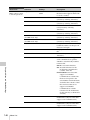
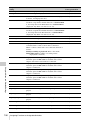
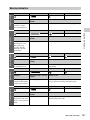
Displays the cumulative hours of
use (cannot be reset).
Displays the hours of use (can be
reset).
Resets “Hours(Reset)” to “0.”
(Execute by selecting “Execute”.)
Selects the scroll method for the
menu.
Normal: The cursor stops when it
reaches to the top or bottom
while scrolling.
Loop: The cursor continues
scrolling from the bottom when
it reaches to the top, or from the
top when it reaches to the
bottom.
Displays the software version of the
camcorder (Vx.xx).
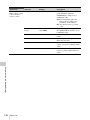
Updates the camcorder (execute by
selecting “Execute”).
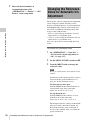
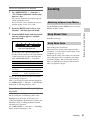
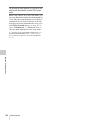
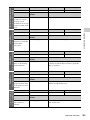
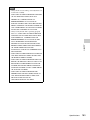
Note
This cannot be selected unless an SxS
memory card is inserted.
Menu List
Chapter 6 Menu and Detailed Settings
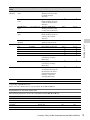
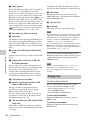
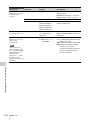
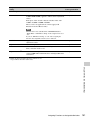
Displays the version of
the camcorder, and
Version Up
updates the camcorder.
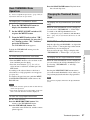
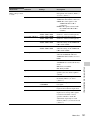
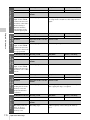
Description
Sets the current date and time.
Selects the 12-hour format (“12H”)
or the 24-hour format (“24H”) for
display of times.
Selects the display format for dates.
YYMMDD: Year, Month, Day
MMDDYY: Month, Day, Year
DDMMYY: Day, Month Year
Selects the language for messages
from “English” or “Chinese.”
143