1
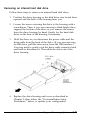
Keep the screw to secure the option card to the computer. Store
the slot cover in case you remove the card later.
3.
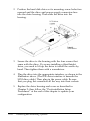
Insert the card into the slot as shown below. For a full-length
card, insert its front end into the appropriate card guide
inside the front of the computer. Then firmly push the card
into the slot as far as it will go.
4.
Secure the end of the card to the back of the computer with
the retaining screw. Push the card’s bracket upward against
the screw as you tighten it so it is firmly secured.
5.
If you installed a high-resolution graphics adapter card that
uses a VGA feature connector, see “Using the VGA Feature
Connector” below.
Removing Option Cards
If you need to remove an option card, reverse the steps outlined
above. Hold the card at each end and gently rock it back and
forth to remove it. Be sure to replace the slot cover over the
empty option slot to ensure proper airflow inside the computer.
Installing and Removing Options
3-7