1
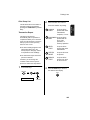
MODEL
UX-465L
FACSIMILE
OPERATION MANUAL
1.
2.
3.
4.
5.
6.
7.
8.
9.
10.
11.
Installation
Setting Up and Using OpenLCR
Using the Answering Machine
Sending Documents
Receiving Documents
Making Copies
Making Telephone Calls
Special Functions
Printing Lists
Maintenance
Troubleshooting
WARNING - FCC Regulations state that any unauthorized changes or modifications to this equipment
not expressly approved by the manufacturer could void the user’s authority to operate this equipment.
Note: This equipment has been tested and found to comply with the limits for a Class B digital
device, pursuant to Part 15 of the FCC Rules.
These limits are designed to provide reasonable protection against harmful interference in a
residential installation.
This equipment generates, uses and can radiate radio frequency energy and, if not installed
and used in accordance with the instructions, may cause harmful interference to radio
communications. However, there is no guarantee that interference will not occur in a
particular installation. If this equipment does cause harmful interference to radio or television
reception, which can be determined by turning the equipment off and on, the user is
encouraged to try to correct the interference by one or more of the following measures:
- Reorient or relocate the receiving antenna.
- Increase the separation between the equipment and the receiver.
- Connect the equipment into an outlet on a circuit different from that to which the receiver is
connected.
- Consult the dealer or an experienced radio/TV technician for help.
ABOUT THE TELEPHONE CONSUMER PROTECTION ACT OF 1991
"The Telephone Consumer Protection Act of 1991 makes it unlawful for any person to use a
computer or other electronic device to send any message via a telephone facsimile machine
unless such message clearly contains in a margin at the top or bottom of each transmitted
page or on the first page of the transmission the following information:
(1) The date and time of transmission.
(2) Identification of either the business, business entity or individual sending the message.
(3) Telephone number of either the sending machine, business, business entity or individual.
In order to program this information into your facsimile machine, please refer to the
appropriate instructions in the operation manual."
As an ENERGY STAR partner, SHARP has
determined that this product meets the ENERGY
STAR guidelines for energy efficiency.
FOR YOUR RECORDS
Please record the model number and serial number below, for easy
reference, in case of loss or theft. These numbers are located on the
rear side of the unit.Space is also provided for other relevant
information.
Model Number
Serial Number
Date of Purchase
Place of Purchase
Introduction
Welcome, and thank you for
choosing a Sharp facsimile
machine! The features and
specifications of your new Sharp
fax are shown below.
Automatic dialing
Rapid Key Dialing: 4 numbers
Speed Dialing: 40 numbers
Imaging film
Initial starter roll (included with machine):
32 ft. (10 m) (approx. 30 letter-size pages)
Replacement roll:
UX-3CR 98 ft. (30 m) (two rolls in
package, one roll yields approx. 100
letter-size pages)
Memory size*
512 KB (approx. 30 pages with no voice
messages recorded and ECM turned off, or
24 minutes of voice messages (including
OGMs) with no documents in memory)
Modem speed
14,400 bps with automatic fallback to lower
speeds.
Transmission time*
Approx. 6 seconds (only when ECM is on)
Resolution
Horizontal: 203 pels/inch (8 pels/mm)
Vertical:
Standard: 98 lines/inch (3.85 lines/mm)
Fine /Halftone:
196 lines/inch (7.7 lines/mm)
Super fine:
391 lines/inch (15.4 lines/mm)
Automatic document
feeder
10 pages max. (20 lb paper)
Recording system
Thermal transfer recording
*Based on ITU-T Test Chart #1 at standard resolution, excluding time for
protocol signals (i.e., ITU-T phase C time only).
1
Halftone (grayscale)
64 levels
Display
16-digit LCD display
Paper tray capacity
(16- to 20-lb. paper)
Letter: 60 sheets
Legal: 30 sheets
Compression scheme
MR, MH, MMR
Applicable telephone line Public switched telephone network
2
Compatibility
ITU-T (CCITT) G3 mode
Input document size
Automatic feeding:
Width: 5.8 to 8.5" (148 to 216 mm)
Length: 5.5 to 11" (140 to 279 mm)
Manual feeding:
Width: 5.8 to 8.5" (148 to 216 mm)
Length: 5.5 to 23.6" (140 to 600 mm)
Effective scanning width
8.3" (210 mm) max.
Effective printing width
8.3" (210 mm) max.
Contrast control
Automatic/Dark selectable
Reception modes
TEL/FAX/TAD
Copy function
Single/Multi/Sort (99 copies/page)
Telephone function
Yes (cannot be used if power fails)
Power requirements
120 V AC, 60 Hz
Operating temperature
41 - 95°F (5 - 35°C)
Humidity
Maximum: 85% RH
Power consumption
Standby: 4.0 W
Maximum: 100 W
Dimensions
Width: 13.5" (343 mm)
Depth: 10.1" (256 mm)
Height: 7.2" (182 mm)
Weight
Approx. 7.7 lbs. (3.5 kg)
As a part of our policy of continuous improvement, SHARP reserves the right to
make design and specification changes for product improvement without prior
notice. The performance specification figures indicated are nominal values of
production units. There may be some deviations from these values in individual
units.
Important safety information
Do not disassemble this machine or attempt any procedures not described in this
manual. Refer all servicing to qualified service personnel.
Do not install or use the machine near water, or when you are wet. For example, do
not use the machine near a bath tub, wash bowl, kitchen sink or laundry tub, in a
wet basement, or near a swimming pool. Take care not to spill any liquids on the
machine.
Unplug the machine from the power outlet and telephone jack and consult a
qualified service representative if any of the following situations occur:
- Liquid has been spilled into the machine or the machine has been
exposed to rain or water.
- The machine produces odors, smoke, or unusual noises.
- The power cord is frayed or damaged.
- The machine has been dropped or the housing damaged.
Do not allow anything to rest on the power cord, and do not install the machine
where people may walk on the power cord.
This machine must only be connected to a 120 V, 60 Hz, grounded (3-prong) outlet.
Connecting it to any other kind of outlet will damage the machine and invalidate the
warranty.
Never insert objects of any kind into slots or openings on the machine. This could
create a risk of fire or electric shock. If an object falls into the machine that you
cannot remove, unplug the machine and consult a qualified service representative.
Do not place this machine on an unstable cart, stand or table. The machine could be
seriously damaged if it falls.
Never install telephone wiring during a lightning storm.
3
Never install telephone jacks in wet locations unless the jack is specifically designed
for wet locations.
Never touch bare telephone wires or terminals unless the telephone line has been
disconnected at the network interface.
Use caution when installing or modifying telephone lines.
Avoid using a telephone (other than a cordless type) during an electrical storm.
There may be a remote risk of electric shock from lightning.
Do not use a telephone to report a gas leak in the vicinity of the leak.
The power outlet must be installed near the equipment and must be easily
accessible.
Important:
♦This facsimile machine is not designed for use on a line which has call waiting,
call forwarding, or certain other special services offered by your telephone
company. If you attempt to use the fax machine in conjunction with any of these
services, you may experience errors during transmission and reception of
facsimile messages.
♦This facsimile machine is not compatible with digital telephone systems.
4
Table of Contents
Introduction
1
Important safety information . . . . . . . . . . . . . . . . . . . . . . . . . . . . . . . . 3
Table of Contents
5
A Look at the Operation Panel
7
1. Installation
9
Unpacking Checklist . . . . . . . . . . . . . . . . . . . . . . . . . . . . . . . . . . . . . . 9
Connections . . . . . . . . . . . . . . . . . . . . . . . . . . . . . . . . . . . . . . . . . . . 10
Loading the Imaging Film . . . . . . . . . . . . . . . . . . . . . . . . . . . . . . . . . 13
Loading Printing Paper . . . . . . . . . . . . . . . . . . . . . . . . . . . . . . . . . . . 17
Entering Your Name and Fax Number . . . . . . . . . . . . . . . . . . . . . . . 20
Setting the Date and Time . . . . . . . . . . . . . . . . . . . . . . . . . . . . . . . . 22
Setting the Reception Mode . . . . . . . . . . . . . . . . . . . . . . . . . . . . . . . 24
Volume Adjustment . . . . . . . . . . . . . . . . . . . . . . . . . . . . . . . . . . . . . 25
2. Setting Up and Using OpenLCR
27
3. Using the Answering Machine
37
Recording an Outgoing Message . . . . . . . . . . . . . . . . . . . . . . . . . . .
Operating the Answering Machine . . . . . . . . . . . . . . . . . . . . . . . . . .
Optional Answering Machine Settings . . . . . . . . . . . . . . . . . . . . . . .
Transfer Function . . . . . . . . . . . . . . . . . . . . . . . . . . . . . . . . . . . . . . .
Override Ringing. . . . . . . . . . . . . . . . . . . . . . . . . . . . . . . . . . . . . . . .
Remote Operations . . . . . . . . . . . . . . . . . . . . . . . . . . . . . . . . . . . . .
4. Sending Documents
Transmittable Documents. . . . . . . . . . . . . . . . . . . . . . . . . . . . . . . . .
Loading the Document . . . . . . . . . . . . . . . . . . . . . . . . . . . . . . . . . . .
Adjusting the Resolution and Contrast . . . . . . . . . . . . . . . . . . . . . . .
Sending a Fax by Normal Dialing . . . . . . . . . . . . . . . . . . . . . . . . . . .
Sending a Fax by Automatic Dialing. . . . . . . . . . . . . . . . . . . . . . . . .
37
39
42
45
47
49
55
55
56
58
60
62
5
Table of Contents
5. Receiving Documents
71
Using FAX Mode . . . . . . . . . . . . . . . . . . . . . . . . . . . . . . . . . . . . . . . . 71
Using TEL Mode . . . . . . . . . . . . . . . . . . . . . . . . . . . . . . . . . . . . . . . . 73
Substitute Reception to Memory. . . . . . . . . . . . . . . . . . . . . . . . . . . . 78
6. Making Copies
79
7. Making Telephone Calls
81
8. Special Functions
83
Caller ID (Requires Subscription to Service) . . . . . . . . . . . . . . . . . . 83
Distinctive Ring (Requires Subscription to Service) . . . . . . . . . . . . . 87
Broadcasting . . . . . . . . . . . . . . . . . . . . . . . . . . . . . . . . . . . . . . . . . . . 89
Cover Sheet . . . . . . . . . . . . . . . . . . . . . . . . . . . . . . . . . . . . . . . . . . . 90
Batch Page Numbering . . . . . . . . . . . . . . . . . . . . . . . . . . . . . . . . . . . 92
Blocking Reception of Unwanted Faxes . . . . . . . . . . . . . . . . . . . . . . 93
Sending Documents From Memory . . . . . . . . . . . . . . . . . . . . . . . . . 95
Polling (Requesting a Fax Transmission) . . . . . . . . . . . . . . . . . . . . . 97
Timer Operations . . . . . . . . . . . . . . . . . . . . . . . . . . . . . . . . . . . . . . 100
9. Printing Lists
102
10. Maintenance
106
11. Troubleshooting
109
Problems and Solutions . . . . . . . . . . . . . . . . . . . . . . . . . . . . . . . . . 109
Messages and Signals . . . . . . . . . . . . . . . . . . . . . . . . . . . . . . . . . . 114
Clearing Paper Jams . . . . . . . . . . . . . . . . . . . . . . . . . . . . . . . . . . . 117
Ordering Parts. . . . . . . . . . . . . . . . . . . . . . . . . . . . . . . . . . . . . . . . . 120
FCC Regulatory Information . . . . . . . . . . . . . . . . . . . . . . . . . . . . . . 121
Quick Reference Guide
122
Guía de referencia rápida
124
Index
130
6
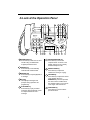
A Look at the Operation Panel
1
2 3
4
5
7
6
8
9 10
FACE DOWN
(MAX 10 SHEETS)
TEL FAX
TAD
ABC
1
GHI
2
JKL
7
3
MNO
4
PQRS
SPEED
DIAL
DEF
5
REDIAL
8
RECEPTION
MODE
VOLUME
DOWN
UP
RESOLUTION
FUNCTION
REC/MEMO PLAY/SKIP
DELETE
6
WXYZ
TUV
REPEAT
HOLD/
SEARCH
COPY/HELP
9
STOP
SPEAKER
01
02
03
0
04/POLL OpenLCR
OpenLCR
START/MEMORY
11
12 13 14
1 SPEED DIAL key
Press this key to dial a fax or voice
number using an abbreviated
2-digit Speed Dial number.
2 REDIAL key
Press this key to automatically
redial the last number dialed.
3 REPEAT key
Press this key to repeat playback of
a message.
4 Display
This displays messages and
prompts during operation and
programming.
5 PLAY/SKIP key
Press this key to play recorded
messages. During playback, press
it to skip forward to the next
message.
15
16 17 18
19
20
6 RECEPTION MODE key
Press this key to select the
reception mode. An arrow in the
display will point to the currently
selected reception mode.
7 RESOLUTION key
Press this key to adjust the
resolution for faxing or copying.
8 VOLUME key
Press this key to adjust the volume
of the speaker when the
SPEAKER key has been pressed,
the volume of the handset when
the handset is lifted, or the volume
of the ringer at all other times.
9 FUNCTION key
Press this key to select various
special functions.
7
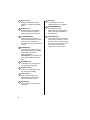
10 Panel release
Grasp this finger hold and pull
toward you to open the operation
panel.
11 Number keys
Use these keys to dial numbers,
and enter numbers and letters
when storing auto-dial numbers.
12 HOLD/SEARCH key
When dialing, press this key to
search for an auto-dial fax number.
During a phone conversation,
press this key to put the other party
on hold.
13 SPEAKER key
Press this key to listen to the line
and fax tones through the speaker
when faxing a document.
Note: This is not a
speakerphone. You must pick up
the handset to talk with the other
party.
14 REC/MEMO key
Press this key to record a phone
conversation or a message.
15 Rapid Dial Keys
Press one of these keys to dial a
fax number automatically.
16 OpenLCR key
Press this key to register for
OpenLCR service and receive
carrier rate data to your fax.
17 DELETE key
Press this key to erase recorded
messages.
8
18 STOP key
Press this key to cancel an
operation before it is completed.
19 START/MEMORY key
Press this key to begin
transmission when using Speed
Dialing, Direct Keypad Dialing, or
Normal Dialing.
20 COPY/HELP key
When a document is in the feeder,
press this key to make a copy of a
document. At any other time, press
this key to print out the Help List, a
quick reference guide to the
operation of your fax machine.
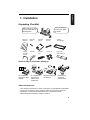
1. Installation
1. Installation
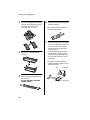
Unpacking Checklist
If any are missing,
contact your dealer
or retailer.
Before setting up, make
sure you have all of the
following items.
Paper tray
extension
Original
document
support
Rapid key
labels
Handset
Operation
manual
Handset
cord
Telephone
line cord
Gears (4)
Imaging
film cartridge
Imaging film
(initial starter roll)
Points to keep in mind when setting up
Do not place the
machine in direct
sunlight.
Do not place the
machine near
heaters or air
conditioners.
Keep dust away from
the machine.
Keep the area
around the
machine clear.
About condensation
If the machine is moved from a cold to a warm place, it is possible that condensation
may form on the scanning glass, preventing proper scanning of documents for
transmission. To remove the condensation, turn on the power and wait
approximately two hours before using the machine.
9
Connections
Connections
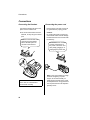
Connecting the Handset
Connect the handset as shown and
place it on the handset rest.
Plug the power cord into a 120 V, 60
Hz, grounded AC (3-prong) outlet.
♦The ends of the handset cord are
Caution!
Do not plug the power cord into any
other kind of outlet. This will damage
the machine and is not covered under
the warranty.
identical, so they will go into either
jack.
Make sure the handset cord
goes into the jack marked
with a handset symbol on
the side of the machine!
Use the handset to make ordinary
phone calls, or to transmit and
receive faxes manually.
10
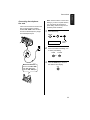
Connecting the power cord
The machine does not have
a power on/off switch, so
the power is turned on and
off by simply plugging in or
unplugging the power cord.
Note: If your area experiences a high
incidence of lightning or power
surges, we recommend that you
install surge protectors for the power
and telephone lines. Surge protectors
can be purchased at most telephone
specialty stores.
Connecting the telephone
line cord
Insert one end of the line cord into the
jack on the back of the machine
marked TEL. LINE. Insert the other
end into a standard (RJ11C) singleline wall telephone jack.
Note: The fax machine is set for tone
dialing. If you are on a pulse dial line,
you must set the fax machine for
pulse dialing. Press the keys on the
operation panel as follows:
1
Press these keys:
FUNCTION
4
Press 8
times
DIAL MODE
2
TE
SEL. T
T EL
LI .
NE
Press 1 to select tone dialing, or 2
to select pulse dialing.
1
3
Be sure to insert the
line into the TEL. LINE
jack. Do not insert it
into the TEL. SET jack.
PULSE
TONE
or
2
Press the STOP key to return to
the date and time display.
STOP
11
1. Installation
Connections
Connections
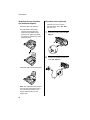
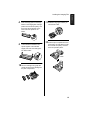
Attaching the tray extension
and document support
Extension phone (optional)
If desired, you can connect an
extension phone to the TEL. SET
jack on the fax.
Attach the paper tray extension.
♦Pull the paper release plate
forward. Insert the paper tray
extension horizontally into the
notches in the paper tray. Rotate
the paper tray extension up until it
snaps into place.
1
2
Remove the seal covering the TEL.
SET jack.
Connect the extension phone line
to the TEL. SET jack.
Attach the original document support.
TE
SEL. T
T EL
LIN .
E
Note: The original document support
has a top side and a bottom side. If
you cannot insert the tabs on the
support into the holes, turn the
support over.
12
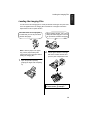
Loading the Imaging Film
Your fax uses a roll of imaging film to create printed text and images. The print head
in the fax applies heat to the imaging film to transfer ink to the paper. Follow the
steps below to load or replace the film.
The initial starter roll of imaging film
included with your fax can print about
30 letter-size pages.
Note: If there is paper in the paper
tray, pull the paper release plate
forward and remove the paper before
loading the imaging film.
1
When replacing the film, use a roll of
Sharp UX-3CR imaging film. One roll
can print about 100 letter-size pages.
2
Pull the green release on the right
side of the machine forward, and
open the print compartment cover.
Open the operation panel by
grasping the finger hold and pulling
up.
If you are installing the imaging film
for the first time, go to Step 6.
13
1. Installation
Loading the Imaging Film
Loading the Imaging Film
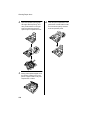
3
Remove the imaging film cartridge
from the print compartment (grasp
the handle at the front of the
cartridge) and turn it over.
6
Remove the new roll of imaging film
from its packaging.
• Do not yet remove the band that
holds the rolls together.
7
4
Remove the used film from the
cartridge.
Insert the large gear into the green
end of the empty spool. Make sure
the two protrusions on the large
gear fit firmly into the slots in the
end of the spool.
Insert the remaining three gears
into the spools, making sure the
protrusion on each gear fits firmly
into one of the slots in the end of
each spool.
• If needed, pull the spools apart
slightly to allow the gears to fit (the
band will stretch).
Slot
5
14
Remove the four green gears from
the used film.
DO NOT DISCARD THE FOUR
GREEN GEARS!
Protrusion
Large gear
8
Insert the large gear into the large
holder on the imaging film cartridge
(make sure it clicks into place), and
then insert the small gear on the
other end of the spool into its
holder.
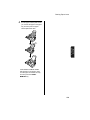
11 Rotate the large gear toward you
until the film is taut.
12 Close the print compartment cover
9
Cut the band that holds the two
spools together. Unroll the film
slightly and insert the small gears
into their holders.
(press down on both sides to make
sure it clicks into place), and then
close the operation panel.
Click!
10 Turn the cartridge over, grasp the
handle, and insert the cartridge into
the print compartment.
15
1. Installation
Loading the Imaging Film
Loading the Imaging Film
13 Load paper in the paper tray and
then press the following keys to
initialize the film.
Note: Paper must be loaded before
the film can be initialized. To load
paper, see Loading the Printing
Paper on page page 17.
FUNCTION
6
INITIALIZE FILM
START/MEMORY
When to replace the imaging
film
Replace the imaging film when the
display shows:
FILM END
Use the following imaging film, which
is available from your dealer or
retailer:
Sharp UX-3CR Imaging Film
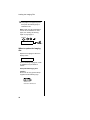
Caution!
Be sure to use only genuine Sharp
supplies with the following logo:
UX-3CR
IMAGING FILM
ROULEAU D’ IMPRESSION
16
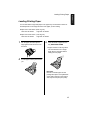
Loading Printing Paper
You can load letter or legal size paper in the paper tray. The maximum number of
sheets depends on the weight and size of the paper you are loading.
♦Paper from 16 to 20 lbs. (60 to 75 g/m2):
Letter size: 60 sheets
Legal size: 30 sheets
♦Paper from 20 to 24 lbs. (75 to 90 g/m2):
Letter size: 50 sheets
1
Legal size: 25 sheets
Fan the paper, and then tap the
edge against a flat surface to even
the stack.
3
Insert the stack of paper into the
tray, PRINT SIDE DOWN.
• If paper remains in the tray, take it
out and combine it into a single
stack with the new paper before
adding the new paper.
2
Pull the paper release plate toward
you.
Important:
Be sure to load the paper so that
printing takes place on the print side
of the paper. Printing on the reverse
side may result in poor print quality.
17
1. Installation
Loading Printing Paper
Loading Printing Paper
4
Push the paper release plate back
down.
• If the paper release plate is not
pushed down, paper feed errors
will result.
5
The fax has been set at the factory
to scale the size of received faxes
to letter size paper. If you have
loaded legal paper, you must
change the paper size setting to
legal. Press these keys:
FUNCTION
6
Press
twice
PAPER SIZE SET
Note: When receiving faxes or
copying documents, do not allow a
large number of pages to accumulate
in the output tray. This may obstruct
the outlet and cause paper jams.
Note: If the display shows the
following alternating messages when
making a copy or receiving a fax,
check the paper tray. If the tray is
empty, add paper and then press the
START/MEMORY key. If there is
paper, make sure it is inserted
correctly and then press the START/
MEMORY key.
SET PAPER &
PRESS START KEY
18
Press 1 to select LETTER or 2 to
select LEGAL.
LETTER
LEGAL
1
2
or
COPY CUT-OFF
Press the STOP key to return to
the date and time display.
STOP
6
Your fax has been set at the
factory to print at normal contrast.
Depending on the type of paper
you have loaded, you may find that
you obtain better print quality by
changing the setting to LIGHT.
Press these keys:
FUNCTION
6
Press 3
times
PRINT CONTRAST
Press 1 to select NORMAL or 2 to
select LIGHT.
NORMAL LIGHT
1
or
2
PAPER SIZE SET
Press the STOP key to return to
the date and time display.
STOP
19
1. Installation
Loading Printing Paper
Entering Your Name and Fax Number
Entering Your Name and Fax Number
Before you can begin using
your fax, you must enter
your name and fax
(telephone) number. You
also need to set the date
and time.
Once you enter this information,
it will automatically appear at
the top of each fax page you
send.
Important!
FCC regulations require that your
name, telephone/fax number, and the
date and time appear on each fax
message you send. Enter your name
and fax number here and set the date
and time as explained in the following
section to have the fax machine
include this information automatically
at the top of your fax messages.
Note: The imaging film and printing
paper must be loaded before your
name and fax number can be
entered.
1
Press these keys:
FUNCTION
3
The display will show:
3 key
OWN NUMBER SET
FUNCTION key
Press
twice
open
LCR
1
2
3
4
5
6
7
8
9
2
Press the START/MEMORY key.
0
# key
STOP key
START/
MEMORY
key
START/MEMORY
The display will show:
ENTER FAX #
20
3
♦To enter two letters in succession
Enter your fax number by pressing
the number keys (max. of 20
digits).
3
1
4
that require the same key, press
the SPEAKER key after entering
the first letter.
(The SPEAKER key moves the
cursor forward, and the HOLD/
SEARCH key moves the cursor
backward.)
2
4
2
4
4
1
1
♦To clear a mistake, press the
(Example)
SPEED DIAL key.
• To insert a space between digits,
♦To change case, press the
press the # key.
REDIAL key.
• If you make a mistake, press the
♦To enter one of the following
SPEED DIAL key to backspace
and clear the mistake.
4
symbols, press the # key or the *
key repeatedly:
./!"#$%&’()++,-:;<=>?
@[¥]^_'{|}→←
Press the START/MEMORY key to
enter the fax number in memory.
Cursor: A dark square mark in the
display that indicates where a
number or letter will be entered.
START/MEMORY
The display will show:
6
ENTER YOUR NAME
5
Enter your name by pressing
number keys for each letter as
shown in the chart below. Up to 24
characters can be entered.
Example:
SHARP = 77777 444 22 7777
77
SPACE =
J=
T=
A=
K=
U=
B=
C=
D=
E=
F=
G=
L=
V=
M=
W=
N=
X=
O=
Y=
P=
Z=
R=
I=
S=
START/MEMORY
The display will show:
SECURITY SELECT
7
Press the STOP key to return to the
date and time display.
STOP
Q=
H=
SPEAKER
Press the START/MEMORY key.
SPEAKER
move
=
move
=
HOLD/
SEARCH
21
1. Installation
Entering Your Name and Fax Number
Setting the Date and Time
Setting the Date and Time
The date and time appear in
the display and are printed at
the top of every page you fax.
Set the date and time by pressing the
keys on the operation panel as shown
below.
Do not set the date and time if
you are using OpenLCR!
OpenLCR automatically sets the
date and time each time your fax
calls OpenLCR and receives rate
data. To ensure accurate use of the
rate data, do not change the date
and time setting yourself. OpenLCR
also sets the date and time for you if
you perform the fax transmission
test (see page page 30).
3 key
Note: The imaging film and printing
paper must be loaded before the date
and time can be set.
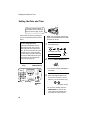
1
FUNCTION
3
The display will show:
DATE & TIME SET
2
FUNCTION key
3
4
5
6
7
8
9
* key
the display.
3
0
STOP key
START/
MEMORY
key
Press the START/MEMORY key.
• The currently set date will appear in
LCR
2
Press 4
times
START/MEMORY
open
1
Press these keys:
Enter a two-digit number for the
month (“01” for January, “02” for
February, “12” for December, etc.).
0
1
Example: January
• To correct a mistake, press the
SPEED DIAL key to move the
cursor back to the mistake and
then enter the correct number.
22
4
Daylight Saving Time
Enter a two-digit number for the
day (“01” to “31”).
0
If desired, you can set the clock to
move forward and backward
automatically at the beginning and
end of Daylight Saving Time. To turn
on this function, press the panel keys
as follows:
5
Example: the 5th
5
Enter the year (four digits).
2
0
0
1
1
Example: 2001
Press these keys:
FUNCTION
3
6
Enter a two-digit number for the
hour (“01” to “12”) and a two-digit
number for the minute (“00” to
“59”).
0
9
2
DAY LIGHT SAVING
Press 3
times
5
Example: 9:25
7
The display will show:
2
Press the * key to select A.M. or
the # key to select P.M.
P.M.
A.M.
Press 1 to turn on the Daylight
Saving Time function, or 2 to turn it
off.
YES
NO
1
or
2
or
8
Press the START/MEMORY key to
start the clock.
3
Press the STOP key to return to
the date and time display.
STOP
START/MEMORY
The display will show:
DAY LIGHT SAVING
9
Press the STOP key to return to the
date and time display.
STOP
23
1. Installation
Setting the Date and Time
Setting the Reception Mode
Setting the Reception Mode
Your fax has three modes for receiving incoming calls and faxes:
TEL mode:
Select this mode when you want to
receive both phone calls and faxes on
the line connected to the fax machine.
All calls, including faxes, must be
answered by picking up the fax
machine's handset or an extension
phone connected to the same line.
FAX mode:
Select this mode when you only want
to receive faxes on your line. The fax
machine will automatically answer all
calls on four rings and receive
incoming faxes.
TAD mode:
Select this mode when you are out
and want the built-in answerig
machine to answer all calls. Voice
messages will be recorded, and fax
messages will be receive
automatically ("TAD" is an acronym
for "Telephone Answering Device".)
Setting the reception mode
Press the RECEPTION MODE key
until the arrow in the display points to
the desired mode.
RECEPTION MODE key
open
LCR
1
2
3
4
5
6
8
9
7
0
TEL
FAX
FEB 1 10:30
TAD
RECEPTION
MODE
TEL
FAX
FEB 1 10:30
TAD
TEL
FAX
FEB 1 10:30
TAD
Note: TAD mode cannot be selected
unless a general outgoing message
has been record as explained in
Chapter 3 (see page 37).
For more information on receiving
faxes in TEL and FAX modes, see
Chapter 5, Receiving Documents
(page 71). For more information on
using TAD mode, see Chapter 3,
Using the Answering Machine (page
37).
24
Volume Adjustment
You can adjust the volume of the speaker, handset, and ringer using the UP and
DOWN keys.
DOWN key UP key
1
2
3
4
5
6
7
8
9
Handset
1
Lift the handset.
2
Press the UP or DOWN key.
0
Speaker
1
UP
DOWN
or
Press the SPEAKER key.
SPEAKER
RECEIVER: HIGH
RECEIVER: MIDDLE
2
Press the UP or DOWN key.
RECEIVER: LOW
UP
DOWN
or
3
3
When the display shows the
desired volume level, press the
SPEAKER key to turn off the
speaker.
When the display shows the
desired volume level, replace the
handset.
SPEAKER
25
1. Installation
Volume Adjustment
Volume Adjustment
Ringer
1
Press the UP or DOWN key. (Make
sure the SPEAKER key has not
been pressed and the handset is
not lifted.)
UP
DOWN
or
RINGER: HIGH
RINGER: MIDDLE
RINGER: LOW
RINGER: OFF OK?
The ringer will ring once at the
selected level, then the date and time
will reappear in the display.
2
If you selected RINGER: OFF OK?,
press the START/MEMORY key.
START/MEMORY
26
Your fax machine features OpenLCR technology, which helps you save money on
long distance and international phone calls (both fax and voice) by automatically
routing each call for the best available rate.
♦OpenLCR service is free of charge. The only cost to you is that of a periodic call
(usually once every three months) to OpenLCR to receive the latest rate data.
(Once you have registered with OpenLCR, your fax machine automatically makes
this call.)
♦All calls routed by OpenLCR are consolidated on your monthly phone bill.
To take advantage of this
feature, you will need to register
with OpenLCR and download the
rate data to your fax machine.
You can register with OpenLCR by fax, phone, or through OpenLCR’s Web site
(www.OpenLCR.com).
♦Before registering, be sure to read the information on the Fax Transmission
Test and OpenLCR Line Activation Form and Terms of Service sheet
included with your fax machine. If you have any questions, call OpenLCR at 970206-1207.
♦OpenLCR uses Caller ID for identification purposes when your fax calls OpenLCR
to receive rate information. Even if you have requested your telephone company
to withhold your Caller ID information when you place calls, your fax will still
automatically transmit this information only when it calls OpenLCR.
♦It is possible to register for and use OpenLCR if you do not subscribe to a Caller
ID service; however, in some instances where rate data must be changed on an
emergency basis, your fax may not be able to respond automatically to
OpenLCR’s call to notify your fax that it must receive new rate data. If this occurs,
old, incorrect data will continue to be used.
♦Please note that the agreement you enter into by registering is between you and
OpenLCR; it is not between you and any carriers. OpenLCR service is only
available in the U.S.A.
27
2. Setting Up
OpenLCR
2. Setting Up and Using OpenLCR
Setting Up and Using OpenLCR
Registering by phone
Registering by fax
To register by fax, fill in the Fax
Transmission Test and OpenLCR
Line Activation Form, and then fax
the form as follows:
1
Place the form with the side you
wrote on face down, and push it
gently into the document feeder of
the fax machine.
To register by phone, follow these
steps:
1
2
Pick up the handset on the fax
machine.
Press the OpenLCR key and then
the 1 key.
OpenLCR
3
READY TO SEND
2
Press the OpenLCR key, the 5 key,
and then the START/MEMORY
key.
5
OpenLCR
If the display shows the alternating
messages at right, press the
number keys to enter your fax/
phone number, including the area
code (the number must be 10 digits
long). When finished, press the
START/MEMORY key.
(If the message at right doesn’t
appear, this step is not necessary.)
START/MEMORY
• Your fax automatically calls
OpenLCR and sends the form.
After the form is sent, your fax will
automatically receive the rate data.
This lasts one or two minutes.
When downloading is completed,
the display will briefly show
DOWNLOAD OK!! and then revert
to the date and time. Your fax will
print out the registration form to
confirm that it was received.
• OpenLCR will also program the
date and time and your fax number
in your fax machine.
28
1
SET OWN NUMBER
10 DIGITS
Enter your
phone number
(with area code)
START/MEMORY
Important!
Be sure that you enter your correct
area code and fax number. If not,
your fax may not dial the correct
number to connect to OpenLCR.
4
Follow the instructions you hear.
Note: If you are on a pulse dial line,
press the * key before pressing
the number keys to respond.
(This makes your fax temporarily
issue tone signals when you press
the number keys.)
• When registration is completed,
your fax machine will receive the
rate data from OpenLCR. This will
last one or two minutes. When
downloading is completed, the
display will briefly show
DOWNLOAD OK!! and then revert
to the date and time.
• OpenLCR will also program the
date and time and your fax number
in your fax machine.
Registering through
OpenLCR’s Web site
You can also register at OpenLCR’s
Web site, www.OpenLCR.com. After
registering you will need to receive
the rate data manually (service is not
activated until your fax receives the
rate data). See Downloading
(receiving) the rate data manually on
the following page.
If you move, you
must re-register!
The rate data that you receive is based
on the address you provide when
registering with OpenLCR. If you
move, the rate data will not be correct
for your new location. In this case,
repeat the registration procedure to
give OpenLCR your new address.
Note: If you wish to connect more
than one OpenLCR-enabled device to
the same line, please call OpenLCR
at 970-206-1207. If you replace an
old OpenLCR-enabled device with a
new one, you must re-register with
OpenLCR to use the new device.
Note: OpenLCR cannot be used if
your fax machine is connected to a
Private Branch Exchange (PBX).
Downloading (receiving) the
rate data manually
Your fax machine will automatically
call OpenLCR and download updated
rate data about once every three
months. Normally you will not need to
download the rate data manually.
♦If you register through OpenLCR’s
Web site, you must manually
download the rate data to activate
service.
♦If the fax machine is unplugged or
some other interruption occurs in
the power, you will need to
manually download the rate data.
Press these keys to call OpenLCR
and initiate downloading:
2
OpenLCR
29
2. Setting Up
OpenLCR
Setting Up and Using OpenLCR
Setting Up and Using OpenLCR
Downloading lasts one or two
minutes. During this time the display
will show:
1
LCR DOWNLOADING
Place the form with Section A face
down, and push it gently into the
document feeder of the fax
machine.
When downloading is completed, the
display will briefly show DOWNLOAD
OK!! and then revert to the date and
time. OpenLCR will also program the
date and time and your fax number in
your fax machine.
READY TO SEND
Fax transmission test
Even if you are not ready to register
for OpenLCR service, we recommend
that you test your fax setup by filling
out Section A of the Fax
Transmission Test and OpenLCR
Line Activation Form and faxing it to
OpenLCR as shown below. The test
is free of charge and does not place
you under any obligation to register
with OpenLCR.
2
Press the OpenLCR key, the 5
key, and then the START/
MEMORY key.
OpenLCR
5
START/MEMORY
• Your fax machine will automatically
call OpenLCR and send the form.
The form will then be faxed back to
you, and the current date and time
programmed in your fax machine.
♦If the test sheet is successfully
transmitted, it will be faxed back to
you on the same connection. This
lets you confirm that your setup is
okay.
♦After receiving the test sheet, the
current date and time will
automatically be programmed in
your fax machine. This saves you
the trouble of setting the date and
time in the fax yourself.
Using OpenLCR
When you have registered with
OpenLCR and downloaded the rate
data to your fax machine, a
highlighted “C” will appear in the date
and time display to indicate that the
OpenLCR feature is activated.
TEL FAX
JAN-19 02:16
TAD
“C” indicates that
OpenLCR is activated
30
Setting Up and Using OpenLCR
The following table shows marks
related to OpenLCR that may appear
in the display.
Mark
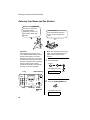
OpenLCR has been
activated and is ready for
use.
Don’t unplug the
fax, or the rate
data will be lost!
Caution!
If you unplug the fax machine or an
interruption occurs in your power
supply, the rate data will be erased. If
this happens, the highlighted “C” in
the display will blink to alert you.
The fax machine will automatically
call OpenLCR within the next 24
hours to receive new rate data;
however, if you want to use OpenLCR
service before that time, you should
download the rate table manually as
explained on page 29.
♦We recommend that you do not
unplug the fax machine on a
regular basis (for example at night
or on the weekends), as this will
result in a large number of calls to
OpenLCR and a higher phone bill
depending on where you live.
Meaning
(Blinking)
OpenLCR cannot be used
because the rate data has
been erased. Your fax will
automatically call OpenLCR
within the next 24 hours to
receive new data, or you
can download the data
manually if you need to use
OpenLCR immediately.
See Downloading
(receiving) the rate data
manually on page 29.
The rate data in the fax is
no longer correct and the
fax cannot connect to
OpenLCR to obtain new
data. See What to do if “E”
appears in the display on
page 33.
OpenLCR has been
temporarily turned off. See
Temporarily turning off
OpenLCR below.
Rate data was not yet
available when your fax
called OpenLCR. Your fax
will automatically call
OpenLCR again when the
rate data is available. Until
that time, long distance
calls will be routed through
your primary carrier.
31
2. Setting Up
OpenLCR
Each time you make a long distance
phone or fax call, the fax machine will
automatically route the call through
the least expensive carrier based on
the downloaded rate information.
Setting Up and Using OpenLCR
Your fax will automatically
call OpenLCR within the
(Blinking) next 24 hours to learn when
correct rate data will be
available.
Your fax did not receive
rate data because
OpenLCR was unable to
identify it by Caller ID. To
remove the “H” display,
press the OpenLCR key
followed by #, 1, 8, 4, and #.
To receive OpenLCR
service, you will need to
contact your phone
company and allow it to
send your Caller ID
information when you place
calls. After this, register
once again with OpenLCR.
Temporarily turning off
OpenLCR
If needed, you can temporarily turn
off OpenLCR.
♦When you temporarily turn off
OpenLCR, long distance and
international calls will not be routed
by OpenLCR. However, your fax
will still call OpenLCR periodically
to receive rate data.
1
Press these keys:
FUNCTION
7
LCR DIAL SELECT
32
2
Press 2 (NO) to turn off OpenLCR.
(Press 1 (YES) to turn it back on.)
2
• When you turn off OpenLCR, the
highlighted “C” in the display will
change to “-”.
3
Press the STOP key to return to the
date and time display.
STOP
To stop using OpenLCR
Press the following sequence of keys
if you want to stop using the Open
LCR feature.
1
8
4
OpenLCR
♦Calls will not be routed by
OpenLCR and the fax machine will
not call OpenLCR to update data.
To resume use of OpenLCR, press
these keys:
1
OpenLCR
8
6
Setting Up and Using OpenLCR
To call OpenLCR to change your user
profile, follow these steps:
1
2
Pick up the handset on the fax
machine.
Press the OpenLCR key and then
the 3 key.
3
OpenLCR
3
If the display shows the alternating
messages at right, press the
number keys to enter your fax/
phone number, including the area
code (the number must be 10 digits
long). When finished, press the
START/MEMORY key.
(Note: If the message at right
doesn’t appear, this step is not
necessary.)
SET OWN NUMBER
Follow the instructions you hear.
♦Note: If you are on a pulse dial line,
press the * key before pressing
the number keys to respond.
(This makes your fax temporarily
issue tone signals when you press
the number keys.)
What to do if “E” appears in
the display
A highlighted “E” will appear in the
display in place of “C” if the rate data
in the fax is out-of-date and the fax is
unable to obtain new data. When this
happens, OpenLCR routing will not
take place.
TEL FAX
JAN-19 02:16
TAD
“E” indicates that the
rate data is out-of-date.
This will only occur if the fax machine
is unable for some reason to make its
periodic call to OpenLCR to receive
new rate data.
10 DIGITS
Enter your
phone number
(with area code)
4
START/MEMORY
Important!
Be sure that you enter your correct
area code and fax number. If not,
your fax may not dial the correct
number to connect to OpenLCR.
First try downloading the rate data
manually by pressing the OpenLCR
key and 2 key as explained in
Downloading (receiving) the rate data
manually on page 29. If this doesn’t
work, proceed to the following
section, What to do if you cannot
connect to OpenLCR.
33
2. Setting Up
OpenLCR
Changing your user profile
Setting Up and Using OpenLCR
What to do if you cannot
connect to OpenLCR
If you are unable to connect to
OpenLCR when you use the
OpenLCR key to register or manually
download data, it is likely that the
phone number that the fax machine
dials when you press the OpenLCR
key is no longer correct.
To obtain the correct phone number,
call OpenLCR at 970-206-1207, and
then program the number into the fax
machine as explained on the
following page.
Note: The number that you will obtain
is the number for manually
downloading rate data (dialed by
pressing the OpenLCR key and 2).
When you manually download the
rate data, the new numbers for
registering (dialed by pressing the
OpenLCR key and 1, 3, or 5) will also
be programmed in your fax machine.
1
Press these keys:
FUNCTION
7
CENTER # MODE
2
Press 1 (SET) to set the new phone
number.
Note: If you want to restore the
factory-set number, press 2 for
CLEAR and then go to Step 4.
34
3
4
Press the number keys to enter the
new phone number.
Press the START/MEMORY key to
store the number.
START/MEMORY
5
Press the STOP key to return to
the date and time display.
STOP
6
Press the OpenLCR key and 2 to
download new rate data.
2
OpenLCR
• If you have not yet registered with
OpenLCR, your fax will receive
new phone numbers that will allow
you to connect to OpenLCR.
Register using one of the
procedures described at the
beginning of this chapter.
Note: The following settings are not
required as of the printing
of this manual. OpenLCR will inform
you through its Web site
(www.OpenLCR.com) if the settings
become necessary in the future.
Setting Up and Using OpenLCR
Changing the SHORT TIME
and LONG TIME settings
Before you make a long distance or
international phone/fax call, select
whether the call will be a long call or a
short call.
The initial SHORT TIME setting is 2
minutes, and the initial LONG TIME
setting is 4 minutes. If the typical
durations of your short and long calls
are different, you should change the
time settings to ensure that OpenLCR
routes your calls for the best rate.
Your fax needs to
know whether the call
will be long or short to
route it for the best
rate.
1
♦For example, if your fax
transmissions normally last about 3
minutes and your phone calls last
about 5 minutes, set 03 for the
SHORT TIME and 05 for the LONG
TIME. Before sending a fax, select
the SHORT TIME setting (03MIN)
in the procedure on the preceding
page. Before making a phone call,
select the LONG TIME setting
(05MIN).
Press these keys:
FUNCTION
OpenLCR
LCR TABLE SELECT
1=02MIN, 2=04MIN
♦When you change the SHORT
Note: If the display shows TABLE
NOT EXIST, you must first download
the rate data.
2
Press 1 to select the SHORT TIME
setting, or 2 to select the LONG
TIME setting.
SHORT
1
LONG
or
TIME and/or LONG TIME setting,
the fax machine will automatically
call OpenLCR and receive rate data
for the new times.
1
Press these keys:
FUNCTION
7
2
• The initial SHORT TIME setting is 2
minutes, and the initial LONG TIME
setting is 4 minutes. If desired, you
can change these settings as
explained on the following page.
LCR TIME SELECT
Press
twice
PRESS START KEY
• The short/long time selection will
remain in effect for all calls until you
change it.
35
2. Setting Up
OpenLCR
Selecting a long or short call
Setting Up and Using OpenLCR
2
Press the START/MEMORY key.
4
START/MEMORY
SHORT TIME
Enter a 2-digit number for the
number of minutes of the LONG
TIME setting. (The number must be
greater than the SHORT TIME
setting and no more than 30.)
0
5
Example: 5 minutes
ENTER (01-29) 02
The display will show your
selection. If the settings were
changed, it will then show:
The current setting
appears here.
START: DOWNLOAD
3
Enter a 2-digit number (01 to 29)
for the number of minutes of the
SHORT TIME setting. (If the
number is less than 10, enter a 0
before the number.)
0
3
STOP: CANCEL
Note: If the display shows NO
SERVICE, you must first download the
rate data.
Example: 3 minutes
The display will show your selection
and then show:
5
Press the START/MEMORY key to
begin receiving the rate data for the
new settings.
LONG TIME
START/MEMORY
ENTER (03-30) 04
• Your fax calls OpenLCR and
receives the data. This lasts one or
two minutes.
• Note: If you do not press the
START/MEMORY key to receive
new data, the settings will revert to
their previous state.
36
3. Using the Answering Machine
The UX-465L's built-in answering machine allows you to receive both voice
messages and fax transmissions while you are out.
3. Answering
Machine
To use the answering machine,
record an outgoing message
and then set the reception
mode to TAD when you go out.
Recording an Outgoing Message
The outgoing message (OGM) is the greeting that the machine plays after
answering a call to inform callers that they can leave a message or send a fax.
Example:
"Hello. You've reached ______ . No one is available to take your call right now.
Please leave a message after the beep or press your facsimile Start key to send a
fax. Thank you for calling."
1
4
Press these keys:
0
FUNCTION
Pick up the handset, press the
START/MEMORY key, and speak
into the handset.
OGM RECORDING
2
Press the START/MEMORY key.
• The outgoing message can be up
START/MEMORY
3
Press 1 to select GENERAL. (If
you are recording a message for
the Transfer function explained
later in this chapter (see page 45),
press 2 for TRANSFER.)
GENERAL
1
START/MEMORY
to 60 seconds long. The outgoing
message for the Transfer function
can be up to 15 seconds long.
• While recording, the display will
show the time remaining to record.
TRANSFER
or
2
37
Recording an Outgoing Message
5
When finished, press the STOP
key and then replace the handset.
STOP
6
Press the STOP key twice to return
to the date and time display.
STOP
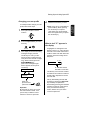
STOP
To listen to the outgoing
message
To listen to the outgoing message,
follow Steps 1 through 4 of the above
procedure to select the message, and
then press the PLAY/SKIP key to
listen to it. To return to the date and
time display, press the STOP key
twice. Note that the general outgoing
message cannot be erased. If you
need to change it, simply repeat the
recording procedure. (The Transfer
message can be deleted by pressing
the DELETE key after selecting it as
explained above.)
Note: If an extension phone is
connected to the UX-465L, an
outgoing message cannot be
recorded, played, or deleted while the
extension phone is being used (while
LINE IS IN USE appers in the
display).
38
Operating the Answering Machine
Operating the Answering Machine
Activate the answering machine
before you go out as follows:
Press the RECEPTION MODE key
until the arrow in the display points to
TAD.
RECEPTION
MODE
TEL
FAX
Listening to received
messages
When you return, the display will
show the number of messages
recorded. Listen to the messages as
follows:
TAD
♦The outgoing message will play
(you can stop playback by pressing
the STOP key).
♦It will not be possible to set the
reception mode to TAD if a general
outgoing message has not been
recorded.
When the reception mode is set to
TAD, the UX-465L will answer
incoming calls after two rings if it has
received at least one incoming
message, or after four rings if no
messages have been received. (For
more information, see Toll Saver in
Remote Operations on page 49.)
Note: If the memory is full from
messages previously recorded,
MEMORY IS FULL will appear in the
display. To set the reception mode to
TAD, you must first erase some or all
of the stored messages.
1
Press the PLAY/SKIP key.
PLAY/SKIP
• If you only want to listen to new
messages (messages not
previously listened to), continue to
hold the PLAY/SKIP key down for
at least two seconds.
2
The messages will play.
• As each message plays, the date
and time of recording will appear
briefly in the display. If no
messages were received, NO
MESSAGES will appear.
• To listen to a message a second
time, press the REPEAT key before
playback of that message ends.
REPEAT
39
3. Answering
Machine
Note: In TAD mode, the machine will
automatically switch to fax reception
if it detects a period of silence longer
than six seconds after answering a
call. For this reason, if a caller pauses
for this length of time while leaving a
message, they will be cut off.
Activating the answering
machine
Operating the Answering Machine
• To move back to the previous
message, press the REPEAT key
within 3 seconds of the beginning of
the current message.
REPEAT
• To skip forward to the next
message, press the PLAY/SKIP
key.
PLAY/SKIP
Note: Playback will stop if you
receive a call, lift the handset, or
press the STOP key.
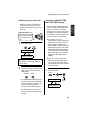
Erasing received messages
It is important to erase received
messages after you listen to them to
ensure that the memory does not
become full.
• Erasing all messages: To erase
all messages, press and hold down
the DELETE key for at least 2
seconds.
• Erasing a single message: To
erase only a single message, press
the DELETE key while the
message is being played.
DELETE
40
Using the REC/MEMO key
You can use the REC/MEMO key to
record telephone conversations and
messages for other users of the UX465L. These will be played back
together with any incoming
messages when the PLAY/SKIP key
is pressed.
• Recording messages: To record a
message, press the REC/MEMO
key and then pick up the handset,
press the START/MEMORY key,
and speak into the handset. When
you have finished speaking,
replace the handset or press the
STOP key.
• Recording phone conversations:
To record a phone conversation,
hold down the REC/MEMO key
during the conversation you want
to record. When you are finished,
release the key.
REC/MEMO
Operating the Answering Machine
You can check the date and time of
your received messages by pressing
the panel keys as shown below.
♦The dates and times are also
shown in the Message List, which
can be printed out as described in
Chapter 9 (see page 104).
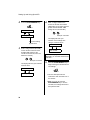
1
Press the STOP key.
STOP
Note: The recorded dates and times
are cleared each time you erase the
messages.
Press these keys:
0
FUNCTION
ICM CONFIRMATION
2
4
3. Answering
Machine
Date and time of ICMs
Press
4 times
Press the START/MEMORY key.
The number of messages recorded
will appear in the display.
START/MEMORY
3
Press # or * one or more times to
show the date and time of each of
the messages.
or
• The message number will appear
first, and then the date and time
several seconds later.
41
Optional Answering Machine Settings
Optional Answering Machine Settings
Fax reception on TAD failure
Setting ICM time
Incoming messages (ICMs) are the
messages which callers leave for you
on the built-in answering machine.
The answering machine is set at the
factory to allow each caller a
maximum of 4 minutes to leave a
message. If desired, you can change
this setting to 15, 30, or 60 seconds.
1
♦Automatic fax reception NO: The
Press these keys:
0
FUNCTION
Press
3 times
ICM RECORD TIME
2
3
Press a numeric key to select the
desired ICM recording time:
• 1: 15 seconds
1
• 2: 30 seconds
2
• 3: 60 seconds
3
• 4: 4 minutes
4
Press the STOP key.
STOP
42
If the memory for recording incoming
messages becomes full while you are
out, the answering machine will no
longer be able to record messages.
The ON TAD FAILURE setting is
used to choose the response of the
machine to incoming calls when this
happens:
UX-465L will answer after 20 rings,
after which it will wait to receive a
remote command. Most callers will
hang up before it answers;
however, when you call the UX465L from a remote location, you
can wait until it answers, listen to
your messages, and then erase
them (see Remote Operations on
page 49).
♦Automatic fax reception YES: The
reception mode will switch to FAX
mode, allowing the UX-465L to
continue to receive faxes
automatically. With this setting, you
can still use the remote commands
to listen to your messages and
erase the message memory (see
Remote Operations on page 52).
Automatic fax reception is set to NO
at the factory before shipping. If you
want to set it to YES, press the panel
keys as follows:
Optional Answering Machine Settings
Press these keys:
0
FUNCTION
Press 3
times
ON TAD FAILURE
2
or
0
2
STOP
Press 1 to turn CPC detection on,
or 2 to turn it off.
YES
1
Calling Party Control
detection
When a caller hangs up, the cenral
telephone exchange will issue a
signal called a Calling Party Control
(CPC) signal. The built-in answering
machine has been set to detet this
signal, and this allows it to
immediately stop recording when a
caller hangs up, thereby saving
memory space and freeing you from
having to listen to long periods of
silence when you play back your
messages.
Press
twice
CPC DETECTION
2
Press the STOP key.
Press these keys:
FUNCTION
Press 1 to turn automatic fax
reception on, or 2 to turn it off.
YES
NO
1
3
1
3
3. Answering
Machine
1
Note: CPC detection may not operate
properly in some telephone
exchanges. For this reason, periods
of silence and/or telephone company
signals may be recorded even if CPC
detection is turned on.
NO
or
2
Press the STOP key.
STOP
However, if you are a subscriber to
such telephone services as Call
Waiting or Call Forwarding, signals
used by these services may be
mistaken for a CPC signal, causing
the machine to hang up during a call.
In this case, follow the steps below
turn off CPC detection.
43
Optional Answering Machine Settings
OGM only mode
If needed, you can turn off recording
of incoming messages. In this case,
your outgoing message will play, but
callers will not be able to leave a
message. (The machine will still
receive faxes sent by automatic
dialing.)
1
Press these keys:
0
FUNCTION
OGM ONLY MODE
2
Press 1 to turn on OGM only mode,
or 2 to turn it off.
YES
1
3
NO
or
Press the STOP key.
STOP
44
2
Transfer Function
Transfer Function
When you answer the telephone, you will hear your recorded message telling you
that the call is a transfer call. Enter "#", your remote code number, and "#". The
answering machine will then play back your messages. You can also perform any of
the remote operations described in Remote operations later in this chapter (see
page 49).
Note: When you hang up after a transfer call, the UX-465L will not immediately
resume normal operation. If you want the UX-465L to accept calls immediately after
a transfer call, enter "*
*" twice before hanging up (if you want to hang up during
message playback, first enter " 0" and " #" to stop playback, then enter "*
*" twice).
Programming the transfer
number
3
To use the Transfer function, you
must first give the UX-465L the
number to call (the transfer number).
This is done by pressing the panel
keys as follows:
Enter a transfer number (max. of 32
digits including pauses) by pressing
the number keys.
ABC
1
GHI
4
PQRS
7
1
2
JKL
5
TUV
8
DEF
3
MNO
6
WXYZ
9
Press these keys:
FUNCTION
0
• To insert a pause between any two
digits of the number, press
REDIAL key.
TRANSFER # ENTRY
Press 6
times
4
2
Press the START/MEMORY key
and then the STOP key.
Press the START/MEMORY key.
STOP
START/MEMORY
START/MEMORY
45
3. Answering
Machine
The Transfer function is used to make the UX-465L automatically call you at a
specified number every time it receives an incoming message. This lets you hear
your messages immediately after they come in, even when you are at a remote
location.
Transfer Function
Recording the transfer
message
The transfer message plays when
you answer the telephone, and
informs you that the call is a transfer
call. It can be up to 15 seconds long.
To record a transfer message, follow
the steps described in Recording an
Outgoing Message in this chapter
(see page 37). The following is an
example:
"Hello. This is a transfer call for
(YOUR NAME). Enter your remote
code number now."
Turning the Transfer function
on and off
1
Press these keys:
0
FUNCTION
Press 5
times
TRANSFER FUNC
2
Press 1 to turn the Transfer
function on, or 2 to turn it off.
YES
NO
1
3
or
Press the STOP key.
STOP
46
2
Override Ringing
Override Ringing
This function allows selected callers using a touch-tone telephone to override the
answering machine's outgoing message and cause the UX-465L to make a special
ringing sound, alerting you that they are calling. This is useful when you are near the
machine but only want to talk with certain callers, taking all other calls on the
answering machine.
To override the answering machine,
your callers must enter a 3-digit
override code from their telephone.
This code has been set to "009" at
the factory. If you want to change it,
press the panel keys as shown
below.
Important!
3
STOP
START/MEMORY
Overriding the answering
machine
♦Make sure the override code is
Your callers should follow the steps
below to override the answering
machine.
different from the remote code
used for remote operations.
1
1
Press these keys:
0
FUNCTION
Press the START/MEMORY key
and then the STOP key.
3. Answering
Machine
Programming the override
code
Your caller calls the UX-465L from
a touch-tone telephone. When the
outgoing message begins, they
should press the "#" key on their
telephone.
Press 5
times
ICM RECORD TIME
• The caller will hear a short beep,
2
Enter a 3-digit code number by
pressing the number keys.
5
5
and the outgoing message will
stop.
4
(Example)
47
Override Ringing
2
The caller should enter the override
code and "#" by pressing the
appropriate keys on their
telephone.
5
5
4
(Example)
• If an incorrect code is entered, the
caller will hear four beeps. He or
she must re-enter the correct code
within 10 seconds or the line will be
disconnected.
3
The UX-465L will make a special
ringing sound. Pick up the handset
to answer the call.
• If you do not answer within 30
seconds, the outgoing message
will play again and the caller can
then leave a message.
48
Remote Operations
Remote Operations
You can call the UX-465L from any touch-tone telephone and play back your
messages using the remote commands. You can also use these commands to
change the reception mode and other settings.
Toll Saver
To perform remote operations, you
must first program a remote code
number. This number is used to
prevent unauthorized people from
listening to your messages or
changing the settings of your
machine.
When you call the UX-465L to listen
to your messages, it will answer after
two rings if it has received at least
one message, or after four rings if it
has not received any messages.
This allows you to save money on
telephone charges, particularly if you
are calling long distance. If the
machine does not answer after the
second ring, you can simply hang up
before it answers, saving yourself the
cost of that call.
The remote code number has been
set to "001" at the factory. If you want
to change it, press the panel keys as
shown below.
1
0
FUNCTION
Press 4
times
REMOTE CODE
2
If you do not want to use the Toll
Saver function, you can turn it off by
following the steps below. In this
case, the UX-465L will answer after
the number of rings set in Changing
the number of rings (see page 49),
the ring setting for FAX reception
mode.
Press these keys:
Enter a 3-digit number by pressing
the number keys.
1
Press these keys:
FUNCTION
2
2
0
2
(Example)
TOLL SAVER
3
Press
twice
Press the START/MEMORY key
and then the STOP key.
STOP
START/MEMORY
49
3. Answering
Machine
Remote code number
Remote Operations
2
Press 1 to turn Toll Saver on, or 2
to turn it off.
YES
NO
1
or
2
2
Enter your remote code number
and then # by pressing the keys on
the telephone.
2
2
2
(Example)
3
Press the STOP key.
STOP
Retrieving your messages
Note: You can also access the UX465L for remote operation when the
reception mode is set to FAX. In this
case, call the UX-465L, press the "#"
key immediately after it answers
(before you hear the fax tone), and
then continue from Step 2 below.
1
Call the UX-465L from a touch-tone
telephone. When your outgoing
message begins, press the "#" key
on the telephone.
• You will hear a short beep, and the
outgoing message will stop.
50
• You will hear a series of beeps
equal to the number of messages
recorded, or one long beep if four
or more messages have been
received. The machine will then
play back the messages, beeping
once at the end of each message.
When all messages have been
played back, you will hear a long
beep.
• If no messages have been
received, you will hear a short
beep. You can either hang up, or
perform any of the operations
described in the following section
Other remote operations (see page
52).
Remote Operations
While the messages are playing,
you can do any of the following:
• Repeat: To listen to a message a
second time, press "2" and "#" on
the telephone before that message
ends. To move back to the
previous message, press "2" and
"#" within the first 3 seconds of the
current message.
When you have finished listening to
your messages, you can do any of
the following:
• Erase all messages: To erase all
of your messages, press "3", "3",
and "#".
3
3
• Repeat playback: To listen to your
messages again, press "7" and "#".
2
• Skip forward: To skip forward to
the next message, press "5" and
"#" on the telephone.
5
• Stop: To stop playback, press "0"
and "#" on the telephone. After this,
you can enter any of the
commands described in the
following section, Other remote
operations (see page 52).
0
• Play new messages: To listen to
only your new messages, first stop
playback by pressing "0" and "#",
and then press "6" and "#".
0
4
6
7
• Perform other operations: You
can enter any of the commands
described in the following section,
Other remote operations (see page
52).
• Hang up: If you do not erase your
messages first, they will be saved
and any new messages will be
recorded after them. If you want
the UX-465L to resume normal
operation immediately, press "*"
twice before hanging up (in some
cases, particularly when the
Transfer function is used, the UX465L may not accept new calls for
one or two minutes after you hang
up unless you first press "*"
twice).
• Erase a message: To erase the
message you are currently
listening to, press "3" and "#"
before it ends.
3
51
3. Answering
Machine
3
Remote Operations
Comments:
♦When a remote command is
accepted by the machine, you will
hear one beep. If an incorrect
command is entered, you will hear
four beeps. In the latter case, reenter the correct command.
♦When entering a command, do not
pause longer than 10 seconds
between each digit. If you do, a 4beep error signal will be issued and
the digits entered up to that point
will be disregarded. In this case, reenter the command from the
beginning.
♦If you make two errors (causing
two 4-beep signals to be issued)
while entering your remote code
number, the line will be
disconnected. This prevents
unauthorized people from
attempting to guess your remote
code number.
♦If you pause for longer than 10
seconds before entering a
command, you will be
disconnected.
Other remote operations
After listening to your messages, you
can do any of the operations
described below by pressing the
appropriate keys on the telephone.
Note: The following commands
cannot be entered while messages
are being played back. If you do not
want to wait until playback ends to
enter a command, first stop playback
by pressing "0" and "#", and then
enter the command.
Changing the fax reception
mode
Select a new reception mode by
pressing the keys as follows:
• TAD mode: "8", "1", and "#".
• FAX mode: "8", "2", and "#".
• TEL mode: "8", "3", and "#".
Caution: In TEL mode, you will not
be able to further change the
reception mode.
8
1
(Example)
52
Remote Operations
Recording a new outgoing
message
Changing the transfer
telephone number
1
1
9
4
2
Press "9", "0", and "#" on the
telephone.
When you hear a short beep, speak
into the telephone to record the
new message.
2
0
After you hear a short beep, enter
the new telephone number. When
finished, press "#".
ABC
• The message can be up to 15
seconds long. After 15 seconds (or
earlier if the machine detects
silence after you finish speaking),
you will hear a beep, and the new
message will be played back.
Turning the Transfer function
on or off
1
GHI
4
PQRS
7
2
JKL
5
TUV
8
DEF
3
MNO
6
WXYZ
9
• To insert a pause between any two
digits of the number, press "*".
To turn Transfer on: Press "9", "1",
and "#" on the telephone.
To turn Transfer off: Press "9", "2",
and "#" on the telephone.
9
1
(Example)
53
3. Answering
Machine
Press "4" and "*" on the
telephone.
Remote Operations
Recording a new transfer
message
1
Press "9", "3", and "#" on the
telephone.
9
2
3
When you hear a short beep,
speak into the telephone to record
the new message.
• The time for the transfer message
is fixed at 15 seconds. After 15
seconds (or earlier if the machine
detects silence after you finish
speaking), you will hear a beep,
and the new message will be
played back automatically.
3
When you are finished, press "0"
and "#".
0
• If the UX-465L detects a certain
period of silence, it will stop
recording automatically.
OGM only mode
To turn on OGM only mode, press
"1", "1", and "#". (Your outgoing
message will play, but callers will not
be able to record a message. Faxes
sent by automatic dialling will be
received).
1
Recording a "Memo"
You can record a "memo" for yourself
or other users of the UX-465L. The
memo will be played back when
incoming messages are listened to.
1
2
54
Press "*" and "#" on the
telephone.
When you hear a short beep,
speak into the telephone to record
the memo.
1
To turn off OGM only mode, press
"1", "2", and "#".
1
2
4. Sending Documents
Transmittable Documents
Size and weight
The size and weight of documents
that you can load in the document
feeder depend on whether you load
one page at a time or several pages
at once.
Note: Letters or graphics on the
edges of a document will not be
scanned.
Letters in the
shaded area
will not be
scanned.
5 mm
Loading one page at a time:
Maximum size
8.5"
(216 mm)
5.8"
(148 mm)
4 mm
4 mm
4. Sending
Documents
Minimum size
5.5"
(140 mm)
23.6"
(600 mm)
5 mm
Other restrictions
Minimum weight
Maximum weight
♦The scanner cannot recognize
yellow, greenish yellow, or light
blue ink.
42 lbs.
(157 g/m²)
14 lbs.
(52 g/m² )
♦Ink, glue, and correcting fluid on
Loading several pages at once:
Minimum size
Maximum size
8.5"
(216 mm)
5.8"
(148 mm)
5.5"
(140 mm)
11"
(279 mm)
documents must be dry before they
pass through the document feeder.
♦All clips, staples, and pins must be
removed from documents before
loading in the feeder. If these are
not removed, they may damage the
machine.
♦Documents which are patched,
Minimum weight
Maximum weight
14 lbs.
(52 g/m² )
21.5 lbs.
(80 g/m²)
taped, torn, smaller than the
minimum size, carbon backed,
easily smudged, or have a slippery
coated surface should be
photocopied, and the copy loaded
in the feeder.
55
Loading the Document
Loading the Document
Up to 10 pages can be placed in the feeder at one time. The pages will
automatically feed into the machine starting from the bottom page.
♦If you need to send or copy more than 10 pages, place the additional pages gently
and carefully in the feeder just before the last page is scanned. Do not try to force
them in, as this may cause double-feeding or jamming.
♦If your document consists of several large or thick pages which must be loaded
one at a time, insert each page into the feeder as the previous page is being
scanned. Insert gently to prevent double-feeding.
1
Adjust the document guides to the
width of your document.
3
Adjust the resolution and/or
contrast settings (if desired) as
explained in Resolution and
Contraston on page 58, then dial
the receiving machine as explained
in Sending a Fax by Normal Dialing
on page 60.
RESOLUTION
2
Place the document face down and
push it gently into the document
feeder. The top edge of the
document should enter the
machine first.
• The feeder will draw the leading
edge of the document into the
machine. The display will show:
READY TO SEND
56
Loading the Document
Removing a document from
the feeder
If you need to remove
a document from the
feeder, open the
operation panel.
3
Close the operation panel, making
sure it clicks into place.
1
2
4. Sending
Documents
Important!
Do not try to remove a document
without opening the operation panel.
This may damage the feeder
mechanism.
Grasp the finger hold and pull up to
open the operation panel.
Remove the document.
57
Adjusting the Resolution and Contrast
Adjusting the Resolution and Contrast
If desired, you can adjust the resolution and contrast before sending a document.
The default resolution
setting is STANDARD
and the default contrast
setting is AUTO.
You must adjust the
settings each time you
don’t want to use the
default settings.
Note: The resolution and contrast settings are only effective for sending a
document. They are not effective for receiving a document.
Resolution settings
Contrast settings
STANDAR Use STANDARD for
D
ordinary documents. This
setting gives you the
fastest and most
economical transmission.
AUTO
Use AUTO for normal
documents.
DARK
Use DARK for faint
documents.
FINE
Use FINE for documents
containing small letters or
fine drawings.
SUPER
FINE
Use SUPER FINE for
documents containing
very small letters or very
fine drawings.
HALF
TONE
Use HALF TONE for
photographs and
illustrations. The original
will be reproduced in 64
shades of gray.
58
1
Load the document(s).
• The document must be loaded
before the resolution and contrast
can be adjusted.
Adjusting the Resolution and Contrast
2
Press the RESOLUTION key one
or more times until the desired
resolution and contrast settings
appear in the display.
Changing the default
resolution
If desired, you can change the default
resolution for faxing documents to
FINE. Follow the steps below.
• The first time you move through the
list of resolution settings, the
contrast setting AUTO will appear
next to each resolution setting. The
second time you move through the
list, the contrast setting DARK will
appear.
1
Press these keys:
FUNCTION
4
FINE PRIORITY
FINE
:AUTO
:AUTO
2
Press 1 (YES) to set the default
resolution to FINE, or 2 (NO) to set
it to STANDARD.
SUPER FINE :AUTO
YES
RESOLUTION
HALF TONE
:AUTO
STANDARD
:DARK
FINE
1
3
NO
or
2
Press the STOP key to return to
the date and time display.
:DARK
STOP
SUPER FINE :DARK
HALF TONE
:DARK
Note: In order to transmit in SUPER
FINE resolution, the receiving fax
machine must also have that
resolution. If it doesn’t, your machine
will automatically step down to the
next best available setting.
59
4. Sending
Documents
STANDARD
Sending a Fax by Normal Dialing
Sending a Fax by Normal Dialing
With Normal Dialing, you pick up the handset (or press the SPEAKER key) and dial
by pressing the number keys.
♦If a person answers, you can talk with them through the handset before sending
the fax. (If you pressed the SPEAKER key, you must pick up the handset to talk.)
♦Normal Dialing allows you to listen to the line and make sure the other fax
machine is responding.
1
Load the document(s).
3
Dial the number of the receiving
machine by pressing the number
keys.
ABC
DEF
1
GHI
4
PQRS
7
2
JKL
3
MNO
5
TUV
6
WXYZ
8
9
READY TO SEND
• Set the resolution and/or contrast if
desired.
RESOLUTION
2
Pick up the handset or press the
SPEAKER key. Listen for the dial
tone.
SPEAKER
or
60
4
Wait for the connection. Depending
on the setting of the receiving
machine, you will either hear a
facsimile reception tone or the
other person will answer.
Beep
• If the other party answers, ask
them to press their Start key (if you
pressed the SPEAKER key, pick
up the handset to speak with
them). This causes the receiving
machine to issue a reception tone.
Sending a Fax by Normal Dialing
5
When you hear the reception tone,
press the START/MEMORY key.
Replace the handset if you used it.
START/MEMORY
• When transmission is completed,
the fax will beep once.
4. Sending
Documents
Using the REDIAL key
You can press the REDIAL key to
redial the last number dialed. To send
a document, press the START/
MEMORY key when you hear the fax
tone after the connection is
established. Note that the speaker is
automatically activated when you
press the REDIAL key.
61
Sending a Fax by Automatic Dialing
Sending a Fax by Automatic Dialing
You can dial a fax or telephone number by simply pressing a Rapid Key, or by
pressing the SPEED DIAL key and entering a two-digit number.
♦To use Automatic Dialing, you must first store the full fax or telephone number in
your fax machine.
♦When you store a fax or telephone number, you select a two-digit Speed Dial
number for it. Forty-four Speed Dial numbers are available.
Speed Dial numbers
01 through 04 are for
Rapid Key (one-touch)
Dialing.
01
Speed Dial numbers
05 through 44 are for
dialing with the
SPEED DIAL key.
SPEED
DIAL
0
8
START/MEMORY
SPEED DIAL key
open
LCR
1
2
3
4
5
6
8
9
7
0
Attach the strips of
Rapid Key labels above
the Rapid Keys.
Rapid Keys
When you store a number in a
Rapid Key, write the name of the
party on the label.
62
Sending a Fax by Automatic Dialing
Storing fax and telephone
numbers for Automatic
Dialing
1
4
Enter the fax or voice number by
pressing the number keys.
(Note: A space cannot be entered.)
Press these keys:
ABC
1
FUNCTION
JKL
GHI
3
4
PQRS
7
DEF
3
2
MNO
6
5
TUV
WXYZ
8
9
FAX/TEL # MODE
• To clear a mistake, press the
1=SET,2=CLEAR
2
• If a pause is required between any
of the digits to access a special
service or an outside line, press the
REDIAL key (two seconds per
pause). The pause will appear as a
hyphen. Several pauses can be
entered in a row.
Press the 1 key to select SET.
1
FAX/TEL # SET
ENTER SPEED #
3
5
Enter a two-digit Speed Dial
number by pressing the number
keys (01 to 04 for Rapid Key
Dialing, 05 to 44 for Speed Dialing).
0
1
Press the START/MEMORY key.
START/MEMORY
(Example)
63
4. Sending
Documents
SPEED DIAL key.
Sending a Fax by Automatic Dialing
6
Enter the name of the party by
pressing the number keys as
shown below. (If you don’t want to
enter a name, go directly to Step
7.)
Example:
SHARP = 77777 444 22 7777
77
SPACE =
J=
T=
A=
K=
U=
B=
C=
D=
E=
F=
G=
L=
V=
M=
W=
N=
X=
O=
Y=
P=
Z=
Q=
H=
R=
I=
S=
=
move
=
You can also store an area code or
access code in a Rapid Key or Speed
Dial number. To use this number to
dial, see Chain Dialing on page 82.
SPEAKER
SPEAKER
move
Chain Dialing for area and
access codes
Note: An area code or access code
stored in a Rapid Key or Speed Dial
number can only be used if the
handset is lifted or the SPEAKER key
is pressed before dialing.
Clearing auto-dial numbers
HOLD/
SEARCH
• To clear a mistake, press the
1
Press these keys:
SPEED DIAL key.
FUNCTION
7
• To enter two letters in succession
3
that require the same key, press
the SPEAKER key after entering
the first letter.
FAX/TEL # MODE
1=SET,2=CLEAR
Press the START/MEMORY key.
2
Press 2 to select CLEAR.
START/MEMORY
8
2
Return to Step 3 to store another
number, or press the STOP key to
return to the date and time display.
STOP
Step 3 or
64
3
Enter the Speed Dial number that
you want to clear by pressing the
number keys.
0
1
(Example)
Sending a Fax by Automatic Dialing
4
Press the START/MEMORY key.
START/MEMORY
Return to Step 3 to clear another
number, or press the STOP key to
return to the date and time display.
Step 3 or
STOP
4. Sending
Documents
5
Making changes
To make changes in a number
previously stored, repeat the
programming procedure. Select the
Rapid Key or Speed Dial number for
which you want to make changes in
Step 3, and then change the number
and/or name when they appear in the
display in Steps 4 and 6.
Note: The fax machine uses a lithium
battery to keep automatic dialing
numbers and other programmed data
in memory when the power is turned
off. Battery power is consumed
primarily when the power is off. With
the power kept continuously off, the
life of the battery is about 5 years. If
the battery dies, have your dealer or
retailer replace it. Do not try to
replace it yourself.
65
Sending a Fax by Automatic Dialing
Rapid Key Dialing
If the number you want to dial has
been stored for Automatic Dialing as
a Speed Dial number from 01 to 04,
you can dial it by pressing the
corresponding Rapid Key.
1
Speed Dialing
Speed Dialing can be used to dial
any number that has been stored for
Automatic Dialing.
1
Load the document(s).
Load the document(s).
READY TO SEND
READY TO SEND
• Set the resolution and/or contrast if
• Set the resolution and/or contrast if
desired.
desired.
RESOLUTION
RESOLUTION
2
Press the Rapid Key corresponding
to the desired Speed Dial number.
01
Example: To dial Speed
Dial number 01, press
Rapid Key 01.
2
Press the SPEED DIAL key and
then enter the Speed Dial number
by pressing the numeric keys.
• To enter numbers 1 through 9, first
• The name of the receiving party will
appear in the display. If no name
was stored, the fax number will
appear. (If the name or number is
incorrect, press the STOP key.)
• The document will be automatically
transmitted once the connection is
established.
66
enter 0 and then the number.
SPEED
DIAL
0
9
(Example)
Sending a Fax by Automatic Dialing
3
Check the display. If the name or
number shown is correct, press the
START/MEMORY key. (If not,
press the STOP key and then
repeat Step 2.)
2
Enter the number of the receiving
machine by pressing the numeric
ABC
DEF
keys.
1
GHI
4
PQRS
7
2
JKL
5
TUV
8
3
MNO
6
WXYZ
9
START/MEMORY
of the digits to access a special
service or an outside line, press the
REDIAL key (two seconds per
pause). The pause will appear as a
hyphen. Several pauses can be
entered in a row.
Direct Keypad Dialing
You can also enter a full number with
the number keys and then press the
START/MEMORY key to begin
dialing. You can use this method to
dial a full number when you don’t
need to speak to the other party
before faxing.
1
Load the document(s).
3
Check the display. If the number of
the receiving machine shown is
correct, press the START/
MEMORY key.
START/MEMORY
• If it is not correct, press the STOP
key to backspace and clear one
digit at a time, and then re-enter
the correct digit(s).
READY TO SEND
• Set the resolution and/or contrast if
desired.
RESOLUTION
Searching for an auto-dial
number
If you don’t remember the Rapid Key
or Speed Dial number in which you
have programmed a particular fax
number, you can search for the
number by following the steps below.
Once you have found the number,
you can dial and transmit the loaded
document by simply pressing the
START/MEMORY key.
67
4. Sending
Documents
• If a pause is required between any
Sending a Fax by Automatic Dialing
1
• If you don’t remember the first
Load the document(s).
letter, go to Step 4 (you will scroll
through the list from the beginning).
• If a name wasn’t stored for the
number, press 0. This will cause
numbers, not names, to appear
when you scroll.
4
READY TO SEND
• Set the resolution and/or contrast if
desired.
RESOLUTION
Press the # key or the * key to
scroll through the names (numbers
if you pressed 0). Stop when the
desired name appears in the
display.
or
2
• If no names have been stored that
Press the HOLD/SEARCH key and
then the 1 key.
begin with the entered letter, you
will scroll from the next name, in
alphabetical order, in the list. If no
names/numbers have been stored
at all, NO DATA will appear.
HOLD/
SEARCH
1
3
Enter the first letter of the stored
name by pressing the appropriate
number key (the key below the
marked letter) one or more times
until the letter appears in the
display. If the name begins with a
special character or number, press
1.
ABC
1
GHI
4
PQRS
7
68
2
JKL
5
TUV
8
5
Press the START/MEMORY key.
The document will be automatically
transmitted once the connection is
established.
DEF
3
MNO
6
WXYZ
9
START/MEMORY
Sending a Fax by Automatic Dialing
Recall times for automatic
dialing
If you use automatic dialing (including
Direct Keypad Dialing) and the line is
busy, the fax machine will
automatically redial the number. The
fax machine will make up to two
redialing attempts at an interval of five
minutes.
If desired, you can change the
maximum number of automatic
redialing attemps made when the line
is busy.
♦Under certain conditions (for
example if a person answers the
call on a telephone), automatic
redialing may stop before the set
number of redialing attempts are
made.
♦To stop automatic redialing, press
the STOP key.
Recall Interval for automatic
redialing
If desired, you can change the
interval at which the fax machine
makes automatic redialing attempts.
1
1
Press these keys:
4. Sending
Documents
Automatic redialing
FUNCTION
4
Press these keys:
Press 4
times
RECALL TIMES
FUNCTION
4
2
RECALL INTERVAL
Press 3
times
Enter a 2-digit number from 00 to
10 for the maximum number of
redial attempts.
0
2
Enter a 2-digit number from 01 to
15 for the number of minutes in the
interval.
0
3
Example:
3 minutes
3
3
5
Example:
5 attempts
Press the STOP key to return to
the date and time display.
STOP
Press the STOP key to return to
the date and time display.
STOP
69
Sending a Fax by Automatic Dialing
Error Correction Mode
The fax machine is set to
automatically correct any distortions
in a transmission due to noise on the
telephone line before printing at the
receiving end. This function is called
Error Correction Mode (ECM). ECM is
effective for both transmissions and
receptions, and is only effective when
the other fax machine has ECM as
well.
If desired, you can turn ECM off. This
will increase slightly the amount of
memory available for memory
transmission and reception.
1
Press these keys:
FUNCTION
4
ECM MODE
2
Press 1 to turn on ECM or 2 to turn
it off.
YES
NO
1
3
or
Press the STOP key to return to the
date and time display.
STOP
70
2
5. Receiving Documents
Using FAX Mode
To select FAX mode, press the
RECEPTION MODE key until the
arrow in the display points to FAX.
RECEPTION
MODE
TEL
FAX
TAD
4 rings
5. Receiving
Documents
When the reception mode is set to FAX, the fax machine will automatically answer
all calls on four rings and receive incoming faxes.
Fax reception
♦If you pick up the handset before the machine answers, you can talk to the other
party and/or receive a document as explained in Using TEL mode on page 73.
71
Using FAX Mode
Changing the number of
rings
If desired, you can change the
number of rings on which the fax
machine answers incoming calls in
FAX mode. Any number from 2 to 5
can be selected.
1
Press these keys:
FUNCTION
4
NUMBER OF RINGS
Press
twice
ENTER (2-5) (4)
2
Enter the desired number of rings
(any number from 2 to 5).
3
Example: 3 rings
RECALL INTERVAL
3
Press the STOP key to return to
the date and time display.
STOP
Note: If you are using Distinctive
Ring, the fax machine will answer
calls after two rings regardless of the
above setting.
72
Using TEL Mode
Using TEL Mode
To select TEL mode, press the
RECEPTION MODE key until the
arrow in the display points to TEL.
RECEPTION
MODE
TEL
FAX
TAD
Answering with the fax’s
handset
1
When the fax machine rings, pick
up the handset.
3
If the other party first speaks with
you and then wants to send a fax,
press the START/MEMORY key
after speaking. (Press your
START/MEMORY key before the
sender presses their Start key.)
• When RECEIVING appears in the
display, hang up.
2
If you hear a fax tone, wait until the
display shows RECEIVING and
then replace the handset.
RECEIVING
START/MEMORY
Beep
RECEIVING
Note: If you have set the Fax Signal
Receive setting to NO, press the
START/MEMORY key to begin
reception.
73
5. Receiving
Documents
When the reception mode is set to TEL, you must answer all calls by picking up the
fax machine’s handset or an extension phone connected to the same line.
Using TEL Mode
Answering with an extension
phone
1
2
Comments:
♦Your fax will not accept the signal
to begin reception (5**) if a
document is loaded in its feeder.
Answer the extension phone when
it rings.
If you hear a soft fax tone, wait until
your fax responds (the extension
phone will go dead if it is connected
to your fax, or you will hear
pronounced, high-pitched tones if
the phone is connected to a
separate wall jack), then hang up.
Beep
Phone goes dead
or pronounced,
high-pitched tones
♦If you have set the Fax Signal
Receive setting to NO, press 5, *,
and * on the extension phone to
begin reception.
Changing the number for
remote fax activation
If desired, you can use a number
other than 5 to activate fax reception
from an extension telephone. You
can select any number from 0 to 9.
1
Press these keys:
FUNCTION
4
TEL/FAX REMOTE #
3
If the fax doesn't respond, or if the
other party first talks to you and
then wants to send a fax, press 5,
*, and * on the extension phone
(only on a tone dial phone). This
signals the fax to begin reception.
Hang up.
5
2
Press a number from 0 to 9 .
1
3
(Example)
Press the STOP key to return to
the date and time display.
STOP
74
Press 5
times
Using TEL Mode
Turning off detection of the
Tel/Fax Remote Number
Fax Signal Receive
Your fax will automatically begin
reception if you hear a soft fax tone
after answering a call on your fax or
an extension phone. If you use a
computer fax modem to send
documents on the same line, you
must turn this function off in order to
prevent your fax from mistakenly
attempting to receive documents
from the computer fax modem.
Follow the steps below to change the
setting.
If you don't intend to ever activate fax
reception from an extension phone,
you can turn off detection of the
above Tel/Fax Remote Number. This
will ensure that the fax never
mistakenly attempts to begin
reception if it detects a signal similar
to the Tel/Fax Remote Number while
you are talking on an extension
phone.
Press these keys:
1
FUNCTION
4
FUNCTION
4
REMOTE RECEPTION
2
1
3
Press 6
times
Press 1 to turn on detection of the
TEL/FAX REMOTE NUMBER, or 2
to turn it off.
YES
2
STOP
Press 1 to turn on the function, or 2
to turn it off.
YES
NO
1
2
Press the STOP key to return to the
date and time display.
Press 7
times
FAX SIGNAL RX
NO
or
Press these keys:
3
or
2
Press the STOP key to return to
the date and time display.
STOP
75
5. Receiving
Documents
1
Using TEL Mode
2 in 1 Print
Reception Ratio
To save paper, you can have the size
of your incoming faxes reduced by
55%. This will allow you to receive, for
example, a 2-page document on one
page (note that this may not be
possible if the document pages are
longer than your printing paper). To
turn on this function, follow the steps
below.
1
The fax has been set at the factory to
automatically reduce the size of
received documents to fit the size of
the printing paper. This ensures that
data on the edges of the document
are not cut off. If desired, you can
turn this function off and have
received documents printed at full
size.
♦If a document is too long to fit on
Press these keys:
the printing paper, the remainder
will be printed on a second page. In
this case, the cut-off point may
occur in the middle of a line.
FUNCTION
6
2
♦Automatic reduction may not be
Press 3
times
2 IN 1 PRINT
possible if the received document
is too large, contains too many fine
graphics or images, or is sent at
high resolution. In this case, the
remainder of the document will be
printed on a second page.
Press 1 to turn on the 2 IN 1
function, or 2 to turn it off.
YES
1
NO
or
2
1
Press these keys:
FUNCTION
3
6
Press the STOP key to return to the
date and time display.
STOP
76
RECEPTION RATIO
Press
twice
Using TEL Mode
2
Press 1 to turn on automatic
reduction, or 2 to turn it off.
AUTO
1
100%
or
2
• If you selected AUTO, go to Step 3.
If you selected 100%, go to Step 4.
If you selected AUTO, select the
reception ratio to be used in the
event that the memory becomes full
(automatic reduction is not possible
when the memory is full). Press 1
for 93% or 2 for 100%.
93%
1
4
100%
or
2
5. Receiving
Documents
3
Press the STOP key to return to the
date and time display.
STOP
77
Substitute Reception to Memory
Substitute Reception to Memory
In situations where printing is not possible, such as when your fax runs out of paper,
the imaging film needs replacement, or the paper jams, incoming faxes will be
received to memory.
When you have received a document in memory, FAX RX IN MEMORY will appear
in the display, alternating with OUT OF PAPER, SET PAPER & PRESS START
KEY, FILM END, or PAPER JAMMED. After you add paper, replace the imaging
film, or clear the jam, press the START/MEMORY key and the stored documents will
print out.
♦If you received documents in memory because the fax ran out of paper, be sure to
add paper which is the same size as the paper previously used. If not, the
document print-out size may not match the size of the printing paper.
78
6. Making Copies
Your fax machine can also be used to make copies. Single and multiple copies (up
to 99 per original) can be made, enabling your fax to double as a convenience office
copier.
1
♦If you are only making one copy of
Load the document(s) face down.
(Maximum of 10 pages.)
the original (or of each original) and
don't want to make a reduction or
enlargement setting, press the
START/MEMORY key twice.
Copying will begin.
♦If you are only making one copy of
the original (or of each original) and
want to make an enlargement or
reduction setting, press the
START/MEMORY key and go to
Step 5.
READY TO SEND
• Set the resolution and/or contrast if
desired. (The default setting for
copying is SUPER FINE.).
2
3
Press 1 (MULTI COPY) if you do
not want the copies sorted. Press 2
(SORT COPY) if you want the
copies sorted.
MULTI
Press the COPY/HELP key.
1
SORT
or
2
6. Making
Copies
RESOLUTION
COPY/HELP
A
COPY MODE
B
C
Not sorted (MULTI COPY)
Sorted (SORT COPY)
A
B C
A
B
C
A
Originals
B C
A
A A
B
B B
C
C C
1: MULTI COPY
Example of three copies
each of three originals
2: SORT COPY
ENTER # (01-99)
START: COPY
79
Making Copies
4
Copy Cut-off
If you are making one copy per
original, press the START/
MEMORY key. If you are making
multiple copies per original, enter
the number of copies per original (if
the number is less than 10, enter a
"0" before the number).
0
When making a copy of a document
that is longer than the printing paper,
use the copy cut-off setting to select
whether the remaining part of the
document will be cut off or printed on
a second page. The intial setting is
YES (cut off the remainder). To
change the setting, follow the steps
below.
3
Example: Three
copies per original
1
COPY RATIO
5
FUNCTION
Set the amount of reduction or
enlargement by entering a number
from 1 to 5 as shown below, or
press the START/MEMORY key to
automatically select 100%.
Copying will begin.
1: AUTO (automatic size
adjustment to match the size of
the printing paper)
2: 50%
3: 100% (no reduction or
enlargement)
4: 125%
5: 135%
2
6
COPY CUT-OFF
2
Press 1 to set copy cut-off to YES
(the remaining part of the
document will not be printed), or 2
to set copy cut-off to NO (the
remaining part will be printed on a
second page).
YES
1
NO
or
2
INITIALIZE FILM
Example: 50%
Note: If you place a large number of
originals in the feeder, the memory
may become full before all of them
can be scanned (MEMORY IS FULL
will appear in the display). If this
happens, press the START/
MEMORY key to copy the originals
which have been scanned, and then
repeat the copy procedure for the
remaining originals, including the
original which was being scanned
when the memory became full.
80
Press these keys:
3
Press the STOP key to return to
the date and time display.
STOP
7. Making Telephone Calls
Your fax machine can be used like a regular telephone to make and receive voice
calls.
♦To make or receive a voice call, the power must be on.
1
Pick up the handset or press the
SPEAKER key. Listen for the dial
tone.
SPEAKER
3
Speak with the other party when
they answer.
• If you pressed the SPEAKER key,
pick up the handset to talk.
or
Dial the number using one of the
following methods:
• Normal Dialing: Enter the full
telephone number with the
numeric keys.
• Rapid Key Dialing: Press the
appropriate Rapid Key.
• Speed Dialing: Press the SPEED
DIAL key, and enter the 2-digit
Speed Dial number with the
numeric keys.
01
Example: Press
Rapid Key 01
Comments:
♦While the handset of the fax is lifted
(off hook), an extension phone
connected directly to the fax cannot
be used to speak with the other
party.
♦The fax may interrupt a voice call
received on an extension phone if
the reception mode is set to TAD
and there is a period of silence
during the conversation. If you are
on a touch-tone phone, you can
prevent this by pressing any three
keys on the phone immediately
after you answer. (Note: Do not
enter the code to activate fax
reception: 5, * , * .)
81
7. Making
Phone Calls
2
Making Telephone Calls
Chain Dialing
After lifting the handset, you can dial
any combination of Normal Dialing,
Rapid Key Dialing and Speed Dialing
numbers. For example, if you have
stored an area code or an access
code for a special service in a Rapid
Key, you can press the Rapid Key for
that area code or access code, then
dial the remainder of the number by
pressing a Rapid Key, pressing
number keys, or pressing the SPEED
DIAL key and entering a two-digit
Speed Dial number.
Searching for an auto-dial
number
You can use the HOLD/SEARCH key
to search for a Rapid Key or Speed
Dial number. First search for the
number as described in Searching for
an auto-dial number on page 67, then
pick up the handset or press the
SPEAKER key. The number will be
dialed automatically (do not press the
START/MEMORY key).
Redial
The last number dialed can be
redialed by pressing the REDIAL key
(it is not necessary to pick up the
handset or press the SPEAKER key).
When the other party answers, pick
up the handset to talk.
82
Hold
You can put the other party on hold
during a conversation by pressing the
HOLD/SEARCH key. When this is
done, they cannot hear you. You can
put the handset back in the cradle
without breaking the connection.
When you are ready to speak with
them again, pick up the handset. If
you did not put the handset back in
the cradle, press the HOLD/
SEARCH key again to resume
conversation.
8. Special
Functions
8. Special Functions
Caller ID (Requires Subscription to Service)
If you subscribe to a caller identification service from your telephone company, you
can set your fax machine to display the name and number of the caller while the fax
rings.
Important:
♦To use this function, you must
3
subscribe to a caller identification
service from your telephone
company.
Press 1 to select SET. (To clear a
previously programmed area code,
press 2 and go to Step 7.)
1
♦Your fax may not be compatible
with some caller identification
services.
1
.
ENTER AREA CODE
4
Press these keys:
FUNCTION
Enter the three digits of your area
code.
4
4
5
1=YES,2=NO
Press 1 to turn on Caller ID, or 2 to
turn it off. (If you selected 2 (NO),
go to Step 7.)
YES
1
Press the START/MEMORY key to
store your area code.
START/MEMORY
NO
or
5
(Example)
Press 4
times
CALLER-ID
2
2
COVER SHEET
2
If you selected 1, the display will
show:
6
Press the STOP key to return to
the date and time display.
AREA CODE # MODE
STOP
1=SET,2=CLEAR
83
Caller ID
How Caller ID operates
When you receive a call, the name
and phone number of the caller will
alternately appear in the display,
beginning just before the second ring.
The information will continue to be
displayed until the line is
disconnected.
Note: Some Caller ID services may
not provide the name of the caller. In
this case, only the phone number will
appear.
Display example
OUT OF AREA The call was made
from an area which
does not have a caller
identification service,
or the caller’s service
is not compatible with
that of your local
phone company.
PRIVATE
CALL
Viewing the Caller ID list
Caller’s name
If you subscribe to a Caller ID service
and have turned on the Caller ID
function, your fax machine will keep
information on the most recent 20
calls and faxes you have received.
You can view this information, which
consists of the name and number of
each caller, in the Caller ID List.
DOE JOHN
Caller’s number
525-8693
Display messages
♦After you have received 20 calls,
each new call will delete the oldest
call.
One of the following messages will
appear while the fax rings if caller
information is not available.
NO SERVICE No caller information
was received from
your telephone
company. Make sure
that the telephone
company has
activated your service.
CALLER-ID
ERROR
84
Noise on the
telephone line
prevented reception of
caller information.
Caller information was
not provided by the
telephone company at
the caller’s request.
Follow the steps below to view the
Caller ID List in the display. If
desired, you can immediately dial a
number when it appears.
1
Press these keys:
HOLD/
SEARCH
2
REVIEWING CALLS
2
Press the * key to scroll through
the list from the most recent call, or
the # key to scroll through the list
from the oldest call.
To delete calls from the
Caller ID list
If you want to delete a single call from
the caller list, press the 0 key while
the call appears in the display. If you
want to delete all calls from the list,
hold the 0 key down for at least 3
seconds while you are viewing any
number in the list.
or
3
If you want to dial one of the
numbers in the list, scroll through
the list until the number appears in
the display.
Priority Call
If desired, you can set your fax to
make a special ringing sound when
you receive a call from a designated
phone number. This lets you know
immediately who is calling without
having to look at the display.
• If you want to send a fax, load the
document and then press the
START/MEMORY key.
To use this function, enter the
desired phone number by following
the steps below (only one phone
number can be entered).
START/MEMORY
• If you want to make a voice call,
pick up the handset or press the
SPEAKER key. Dialing will begin
automatically. (If you pressed the
SPEAKER key, pick up the handset
when the other party answers.)
8. Special
Functions
Caller ID
1
Press these keys:
FUNCTION
3
PRIORITY CALL #
2
4
Press the STOP key when you
have finished viewing the list.
STOP
Press 1 to enter a number, or 2 to
clear a number. (If you pressed 2,
go to Step 4.)
SET
1
CLEAR
or
2
85
Caller ID
3
Blocking voice calls
Enter the phone number, including
the area code, by pressing the
number keys (max. of 20 digits).
ABC
1
GHI
4
PQRS
7
4
DEF
3
2
JKL
MNO
6
5
TUV
With Caller ID turned on, you can use
the Anti Junk Fax function described
in Blocking Reception of Unwanted
Faxes in this chapter (see page 93)
to block voice calls as well as fax
receptions (the Anti Junk Fax
function normally only blocks faxes).
WXYZ
8
9
Press the START/MEMORY key
and then the STOP key.
STOP
START/MEMORY
In this case, when a voice call or a
fax transmission comes in from a
number you have specified as a
"Junk Number", your fax will break
the connection as soon as it receives
the calling phone number from the
caller ID service (before the second
ring).
To use this function, turn on the Anti
Junk function and then enter the
number in the Anti Junk Number List
as explained in Blocking Reception of
Unwanted Faxes in this chapter (see
page 93).
Note: This function cannot be used if
you are using the Distinctive Ring
function.
86
Distinctive Ring (Requires Subscription to Service)
Important:
♦To use distinctive ring, you must subscribe to a distinctive ring service from
your local phone company.
♦Distinctive ring is only available in FAX reception mode.
♦Your fax machine may not be compatible with some distinctive ring
services.
Distinctive ring is a service offered by some local telephone companies whereby
they assign an additional second number to your regular single line. The second
number rings differently from your normal number.
If you subscribe to a distinctive ring service, you can set the fax machine to
automatically answer when your second number is called. This allows you to use the
second number as an exclusive fax number.
To have your fax automatically
answer when your second number is
called, follow the steps below:
1
Press these keys:
4
2
Two short rings
2
One short, one
long, and one short
ring
Two short rings
and one long ring
Your standard
(normal) ring
pattern
Turn distinctive
ring off
PATTERN 1
RING
PATTERN 2
3 RING
FUNCTION
DISTINCTIVE RING
1 RING
4
Press 8
times
Press a number from 1 to 3 to
select the ring pattern below that
matches your second number’s ring
pattern. Or, press 4 to have your
fax automatically answer your
normal telephone number. Press 5
to turn off the distinctive ring
function.
PATTERN 3
STANDARD
RING
5 OFF
SETTING
FAX SIGNAL RX
3
Press the STOP key to return to
the date and time display.
STOP
87
8. Special
Functions
Distinctive Ring (Requires Subscription to Service)
Distinctive Ring (Requires Subscription to Service)
4
Set the reception mode to FAX.
RECEPTION
MODE
TEL
FAX
TAD
Important:
Distinctive ring will only work in
FAX mode. You must set the
reception mode of your fax
machine to FAX.
♦When your designated fax number
is dialed, your fax will automatically
answer and begin reception after
two rings. Other devices on the
same line will also ring until your
fax answers. If one of your other
numbers is dialed, the fax will ring;
however, it will not answer.
88
8. Special
Functions
Broadcasting
Broadcasting
This function allows you to send the same document to as many as 20 different
locations with just one operation. First store the document in memory, then enter the
numbers of the receiving machines. The document will be transmitted to each
location.
♦You can only use Rapid Keys or Speed Dial numbers to dial the numbers of the
receiving machines.
1
Load the document(s).
4
Press the START/MEMORY key.
START/MEMORY
• Set the resolution and/or contrast if
desired.
RESOLUTION
READY TO SEND
2
Press the START/MEMORY key
and then 2.
2
5
Press the START/MEMORY key.
Transmission will begin.
START/MEMORY
3
Dial the receiving machines
(maximum of 20) using one or both
of the following methods:
• Enter one or more Speed Dial
numbers by pressing the number
keys.
2
2
• Press one or more Rapid Keys.
01
02
03
START/MEMORY
• A Transaction Report is
automatically printed out after
Broadcasting is completed. Check
the "Note" column of the report to
see if any of the locations are
marked "Busy" or have a
communication error code. If so,
send the document to those
locations again.
89
Cover Sheet
Cover Sheet
You can have the fax generate a cover sheet and send it as the last page of each of
your fax transmissions.
You can select a
message.
For the recipient's
name to appear, you
must dial using a Speed
Dial or Rapid Key
number with the name
programmed.
Your name and
number must be
programmed as
explained on page 20.
Follow the steps below to turn on the
cover sheet function. Once the cover
sheet function is turned on, cover
sheets will be included with all
tranmissions until you turn it off.
2
Press 1 (YES) to turn on the cover
sheet function, or 2 (NO) to turn it
off.
YES
1
1
Press these keys:
NO
or
2
FUNCTION
4
COVER SHEET
AUTO PRINT OUT
Press 3
times
3
Press the STOP key to return to
the date and time display.
STOP
90
Selecting a header message
(optional)
8. Special
Functions
Cover Sheet
3
When the cover sheet function is
turned on, you can also select a
message which will appear as a
header at the top of the cover sheet.
Note that the message selection is
only effective for one transmission.
1
Select a message by entering a
number from 1 to 4:
1: URGENT
2: IMPORTANT
3: CONFIDENTIAL
4: PLS. DISTRIBUTE
1
Load the document(s).
(Example)
• The document must be loaded
before a message can be selected.
• The cover sheet function must be
turned on.
4
Dial the receiving machine and
transmit the document.
Note:
To cancel a cover sheet header
setting, press the STOP key or
remove the document from the
feeder.
2
Press these keys:
FUNCTION
5
COVER SHEET HEAD
91
Batch Page Numbering
Batch Page Numbering
You can change the page numbering of the transmitted document from simple
numbering ("P.01", "P.02", etc.) to batch numbering, which means that a slash and
the total number of pages being sent are added after each page number (for
example, "P. 01/05", "P.02/05", etc.). This allows the receiver to check for missing
pages.
1
Load the document(s).
• The document must be loaded
before batch page numbering can
be set.
4
Dial the receiving machine and
transmit the document.
Comments:
♦If you need to cancel a batch
number entry, remove the
document from the feeder or press
the STOP key.
♦If the number of pages actually
2
Press these keys:
FUNCTION
PAGE COUNTER SET
3
Enter the total number of pages
("01" to "99") by pressing the
number keys.
0
8
Example:
Eight pages
• If you are sending a cover sheet,
do not include it in the total
number of pages (the number will
be adjusted automatically).
92
transmitted does not coincide with
the batch number entered, the
alarm will sound and PAGE
COUNT ERROR will appear in the
display. PAGE E. will also appear
in the NOTE column of the
Transaction Report if it has been
set to print out.
8. Special
Functions
Blocking Reception of Unwanted Faxes
Blocking Reception of Unwanted Faxes
The Anti Junk Fax function allows you to block reception of faxes from parties which
you specify. This saves paper by not printing out unwanted "junk" faxes.
To use this function, follow the steps below to turn it on, and then enter the fax
numbers from which you do not want to receive faxes as indicated in the procedure
that follows.
1
Entering Anti Junk numbers
Press these keys:
Enter (or clear) a number in the Anti
Junk List as shown below. Up to five
numbers can be entered.
FUNCTION
4
♦To clear a number from the Anti
JUNK # CHECK
2
Junk Number List, you need to
know the 1-digit number which
identifies it. If you have forgotten
this number, print out the Anti Junk
Number List as explained on page
104.
Press 6
times
Press 1 to turn on the Anti Junk
function, or 2 to turn it off.
YES
NO
1
Press these keys:
FUNCTION
1
or
2
3
Press
twice
STORE JUNK #
3
Press the STOP key to return to the
date and time display.
STOP
2
Press 1 to enter a number in the
Anti Junk Number List, or 2 to clear
a number from the list.
SET
1
CLEAR
or
2
93
Blocking Reception of Unwanted Faxes
3
Entering: Enter a 1-digit number
from 1 to 5 with the numeric keys.
This number identifies the fax
number that you will enter in the
next step.
1
(Example)
Clearing: Enter the 1-digit number
that identifies the fax number you
want to clear, and go to Step 5.
4
Enter the fax number.
ABC
1
GHI
4
PQRS
7
5
2
JKL
5
TUV
8
DEF
3
MNO
6
WXYZ
9
Press the START/MEMORY key.
START/MEMORY
6
Return to Step 3 to enter (or clear)
another fax number, or press the
STOP key to return to the date and
time display.
STOP
Step 3 or
94
8. Special
Functions
Sending Documents From Memory
Sending Documents From Memory
With this function, the original document is scanned immediately, stored in memory,
and then transmitted once the connection to the receiving machine is made. This is
convenient when transmitting to places where the line is often busy, as it saves you
from waiting to pick up the original document and frees the feeder for other
operations. After transmission, the document will be cleared from memory.
♦Only one memory transmission can be set at a time.
♦The amount of memory currently occupied appears as a percentage in the display
while the document is being scanned.
1
Load the document(s).
2
Press the START/MEMORY key
and then 1.
1
START/MEMORY
ENTER STATION #
3
READY TO SEND
• Set the resolution and/or contrast if
desired.
Enter the number of the receiving
machine using one of the following
methods:
• Press a Rapid Key.
• Press the SPEED DIAL key and
RESOLUTION
enter a Speed Dial number.
• Enter a full telephone number by
pressing the number keys.
01
02
03
(Example)
95
Sending Documents From Memory
4
Press the START/MEMORY key if
you entered a Speed Dial number
or a full number.
START/MEMORY
• The document will be scanned and
stored in memory. Your fax will
then dial the receiving machine and
transmit the document (redialing
will take place automatically if
necessary).
If the memory becomes full...
If the memory becomes full while the
document is being scanned,
MEMORY IS FULL will appear in the
display.
• Press the START/MEMORY key if
you want to transmit the pages
which have been stored up to that
point in memory. The remaining
pages will be ejected from the
feeder. After transmission, the
memory will be cleared and you
can transmit the remaining pages.
You will also need to transmit the
page which was being scanned
when the memory filled up.
• Press the STOP key if you want to
cancel the entire transmission.
96
8. Special
Functions
Polling (Requesting a Fax Transmission)
Polling (Requesting a Fax Transmission)
Polling allows you to call another fax machine and have it send a document
(previously loaded in its feeder) to your machine without operator assistance. In
other words, the receiving fax machine, not the transmitting fax machine, initiates
the transmission.
To use the polling function, you must first set Rapid Key 04/POLL for use as a
polling key.
♦When Rapid Key 04/POLL is set as a polling key, it cannot be used for Rapid Key
dialing.
1
Requesting transmission
Press these keys:
1
FUNCTION
4
Press 5
times
POLLING
2
Press 1 to turn on the function, or 2
to turn it off.
YES
1
NO
or
2
Dial the fax machine you want to
poll using one of the following
methods:
• Pick up the handset (or press the
SPEAKER key) and press a Rapid
key. Wait for the fax answerback
tone.
• Pick up the handset (or press the
SPEAKER key) and dial the full
number. Wait for the fax
answerback tone.
• Press the SPEED DIAL key and
3
enter a 2-digit Speed Dial number.
Press the STOP key to return to
the date and time display.
STOP
• Enter the full number using the
numeric keys.
ABC
1
2
JKL
GHI
4
5
TUV
PQRS
7
8
DEF
3
MNO
6
WXYZ
9
(Example)
97
Polling (Requesting a Fax Transmission)
2
To use Polling Security, follow the
steps below to turn the function on,
and then enter permitted numbers as
shown on the following page.
Press Rapid Key 04/POLL.
• If you used the handset, replace it
when POLLING appears in the
display. Reception will begin.
04/POLL
1
Press these keys:
FUNCTION
3
Press 3
times
SECURITY SELECT
Being polled (polling
standby)
To let another fax machine poll your
fax, press the RECEPTION MODE
key to set the reception mode to FAX
and load the document(s).
Transmission will take place when
the other fax machine calls your
machine and activates polling.
Automatic reception is possible while
your fax is on polling standby.
2
Press 1 to turn polling security on,
or 2 to turn it off.
ON
1
3
OFF
or
2
Press the START/MEMORY key
and then the STOP key.
Polling security
STOP
Polling Security allows you to prevent
unauthorized polling of your machine.
When this function is turned on,
polling will only take place when the
fax number of the polling fax machine
has been entered in your machine's
list of permitted fax numbers (called
"passcode numbers"). The number of
the polling fax must also be correctly
programmed into itself for
identification.
98
START/MEMORY
Storing and clearing fax
numbers for polling
permission
8. Special
Functions
Polling (Requesting a Fax Transmission)
4
ABC
1
5
TUV
7
5
3
PASSCODE # MODE
Press 4
times
8
3
MNO
6
WXYZ
9
Return to Step 3 to enter (or clear)
another number, or press STOP to
return to the date and time display.
STOP
2
or
Press the START/MEMORY key.
START/MEMORY
6
Press 1 to store a number, or 2 to
clear a number.
SET
CLEAR
1
3
4
PQRS
DEF
Press these keys:
FUNCTION
2
2
JKL
GHI
You can store up to 10 fax numbers
in your machine's list of permitted
numbers.
1
Enter the fax number.
Step 3 or
Storing: Enter a 2-digit number
from 01 to 10. This number
identifies the fax number you will
store in the next step.
Clearing: Enter the number which
identifies the fax number you want
to clear, and go to Step 5.
0
1
(Example)
99
Timer Operations
Timer Operations
The Timer function allows you to set a transmission and/or polling operation to be
performed automatically at a time you specify. One transmission operation and one
polling operation can be set at any one time, and the times they will be performed
can be specified up to 24 hours in advance.
♦You can use this function to take advantage of lower off-peak telephone rates
without having to be there when the operation is performed.
Note: Only a Speed Dial number can be used to dial the receiving machine.
Setting a timer operation
1
5
Press the * key to select A.M. or
the # key to select P.M.
Press these keys:
A.M.
P.M.
FUNCTION
or
1
TIMER MODE
2
6
Press # to set a transmission
operation (SEND MODE), or * to
set a polling operation (POLLING
MODE).
POLLING
SEND
START/MEMORY
7
or
3
Enter the Speed Dial number of the
receiving fax machine.
• If this is a polling operation, go to
Step 10.
Press 1 to select SET.
0
1
4
Press the START/MEMORY key.
5
(Example)
Enter the time at which you want
the operation to take place (2 digits
for the hour and 2 digits for the
minute).
0
9
2
8
Press the START/MEMORY key.
5
START/MEMORY
Example: 9:25
100
8. Special
Functions
Timer Operations
9
Adjust the resolution and/or
contrast if desired (skip to the next
step if you don't want to change
settings).
2
Press # to cancel a transmission
operation, or * to cancel a polling
operation.
POLLING
SEND
RESOLUTION
or
10 Press the START/MEMORY key
and then the STOP key. If this is a
transmission operation, load the
document in the feeder sometime
before the specified time of
transmission.
3
Press 2 to select CLEAR.
2
STOP
4
START/MEMORY
Press the START/MEMORY key
and then the STOP key.
To cancel a timer operation
If you need to cancel a timer
operation after it has been set, follow
the steps below.
1
STOP
START/MEMORY
Press these keys:
FUNCTION
1
TIMER MODE
101
9. Printing Lists
You can print lists showing settings and information entered in the fax machine. You
can also print out reports on recent activity and individual operations after they are
completed. The lists and reports are described on the following pages.
To print a list, follow the steps below.
1
Activity Report
Press the FUNCTION key and 2.
FUNCTION
2
LISTING MODE
2
Press the * key or the # key until
the desired list appears in the
display.
or
3
Press the START/MEMORY key to
print the list.
START/MEMORY
102
This report shows information on
your most recently performed send
and receive operations (a combined
maximum of 30 operations can
appear). The report is divided into
two parts: the TRANSMISSIONS
ACTIVITY REPORT, which shows
information on transmissions, and the
RECEPTIONS ACTIVITY REPORT,
which shows information on
receptions.
♦All information is erased after a
report is printed out. If automatic
print-out is turned off and the report
is not printed manually for 30
operations, the information on the
oldest operation will be overwritten
each time a new operation is
performed.
Printing Lists
SENDER/
RECEIVER
The name or fax number of the other machine involved in
the transaction. If that machine does not have an ID
function, the communication mode will appear (for
example, "G3").
START
The time at which transmission/reception started.
TX/RX TIME
Total time taken for transmission/reception.
PAGES
Number of pages transmitted/received.
NOTE
(One of the following notes will appear under NOTE in the
report to indicate whether the transaction was successful,
and if not, the reason for the failure.)
OK - Transmission/reception was successful.
P.FAIL - A power failure prevented the transaction.
JAM - The printing paper or document jammed,
preventing the transaction.
NO PAPER - You ran out of paper during reception.
BUSY - The fax was not sent because the line was busy.
COM.E-0 to COM.E-7 - A telephone line error prevented
the transaction. See Line Error on page 109.
CANCEL - The transaction was cancelled because the
STOP key was pressed, no document was in the feeder,
or the other machine requested transmission using a
function which your fax machine does not have. If you
were attempting to fax, make sure a document is in the
feeder. If you were receiving, contact the faxing party to
see how they are trying to send to you.
103
9. Printing
Lists
Explanation of headings
Printing Lists
If desired, you can set the Activity
Report to automatically print out
whenever information on 30
operations has accumulated. (A
report can still be printed on demand
at any time.) Follow the steps below:
1
Press these keys:
Passcode List
This list shows settings made for
polling security, your name and fax/
telephone number as entered in the
machine, a sample of the header
printed at the top of every page you
transmit (HEADER PRINT), and
settings related to OpenLCR.
FUNCTION
4
Option Setting List
Press
twice
AUTO PRINT OUT
This list shows the current status of
the option settings.
Anti Junk Number List
2
Press 1 to turn on automatic printout, or 2 to turn it off.
YES
1
3
NO
or
2
Press the STOP key to return to
the date and time display.
STOP
Timer List
This list shows the timer operations
that are currently set.
Telephone Number List
This list shows the fax numbers that
have been programmed for
automatic dialing.
104
This list shows the numbers that are
blocked by the Anti Junk function.
TAD Program List
This list shows the settings and
codes programmed for the answering
machine.
Message List
This list shows information about the
messages currently recorded in the
answering machine, including the
date and time of recording, the
length, and the type (ICM, memo, or
2-way).
Caller ID List
This list shows information about
your 20 most recent calls. (This list is
only available if you are using the
Caller ID function.)
Printing Lists
2
This list shows the current status of
the printing settings accessed by
pressing the FUNCTION key and the
6 key.
Press a number from 1 to 5 to
select the condition for printing.
1
ALWAYS
PRINT
This report is printed out
automatically after an operation is
completed to allow you to check the
result. Your fax machine is set at the
factory to print out the report only
when an error occurs.
2
ERR/TIMER/ A report will be
MEM
printed after an
error, timer
operation, or
memory operation.
♦The same headings appear in the
3
SEND
ONLY
A report will be
printed after each
transmission.
4
NEVER
PRINT
A report will never
be printed.
5
ERROR
ONLY
A report will be
printed only when
an error occurs.
Transaction Report
Transaction Report as in the
Activity Report. See page 103 for
an explanation of the headings.
♦The Transaction report cannot be
printed on demand.
If desired, you can change the
condition under which a report is
printed out. Follow the steps below.
1
3
Press these keys:
FUNCTION
4
TRANSACTION LIST
A report will be
printed after each
transmission,
reception, or error.
Press the STOP key to return to
the date and time display.
STOP
Press
7 times
105
9. Printing
Lists
Print Setup List
10. Maintenance
Print head
Clean the print head frequently to
assure optimum printing
performance.
1
2
3
Unplug the power cord.
Pull the paper release plate
forward and remove the paper.
4
106
Open the operation panel (grasp
the finger hold and pull up), and
then pull the release on the right
side of the machine forward to
open the print compartment cover.
Take the imaging film cartridge out
of the print compartment and place
it on a sheet of paper.
Maintenance
5
7
Close the print compartment cover
(press down on both sides to make
sure it clicks into place), and then
close the operation panel.
10. Maintenance
Wipe the print head and roller with
denatured alcohol.
Roller
Print head
Caution!
♦Do not use benzene or thinner.
Avoid touching the print head with
hard objects.
♦The print head may be hot if your
fax machine has just received a
large number of documents. If this
is the case, allow the print head to
cool prior to cleaning.
6
Place the imaging film cartridge
back in the print compartment.
107
Maintenance
♦Make sure that all dirt and stains
8
Pull the paper release plate toward
you, reinsert the paper in the paper
tray, and then push the paper
release plate back down.
(such as correcting fluid) are
removed, as dirts and stains will
cause vertical lines on transmitted
images and copies.
♦Adhesive cellophane tape is useful
for removal of debris from the
rollers.
Document
rollers
Scanning glass
Caution!
If SET PAPER & PRESS START
KEY appears in the display, make
sure the paper is inserted correctly
and then press the START/
MEMORY key.
Scanning glass and rollers
Clean the scanning glass and rollers
frequently to ensure the quality of
transmitted images and copies. Open
the operation panel (grasp the finger
hold and pull up), and wipe the
scanning glass and rollers with a soft
cloth.
108
♦When wiping, take care not to
damage any of the protruding parts
on the underside of the operation
panel.
The housing
Wipe the external parts and surface
of the machine with a dry cloth.
Caution!
♦Do not use benzene or thinner.
These solvents may damage or
discolor the machine.
11. Troubleshooting
Problems and Solutions
If you have any problems with your fax, first refer to the following troubleshooting
guide. If you cannot solve the problem, call Sharp's Customer Assistance Center at
1-800-BE SHARP.
Line error
LINE ERROR appears in
the display.
Solution
Try the transaction again. If the error persists, check the
following:
• Check the connection. The cord from the TEL. LINE
jack to the wall jack should be no longer than six feet.
• Make sure there are no modem devices sharing the
same telephone line.
• Check with the other party to make sure their fax
machine is functioning properly.
• Have your telephone line checked for line noise.
• Try connecting the fax machine to a different
telephone line.
• If the problem still occurs, your fax machine may need
service.
109
11. Troubleshooting
Problem
Problems and Solutions
Dialing and transmission problems
Problem
Solution
No dial tone when you pick • Make sure the handset cord is connected to the
up the handset or press the
correct jack. See Connecting the handset on page 10.
SPEAKER key.
Dialing is not possible.
• Make sure the power cord is properly plugged into a
power outlet.
• Make sure that the telephone line is properly
connected to both the TEL. LINE jack and the wall
jack.
• Make sure that the fax machine is set to the correct
dialing mode for your telephone line. See Connecting
the telephone line cord on page 11.
The power is on, but no
transmission takes place.
• Make sure that the receiving machine has paper.
• Make sure that the telephone line cord is plugged into
the TEL. LINE jack, and not the TEL. SET jack.
• If the receiving machine is in manual mode with no
attendant, reception will not be possible.
• Check the display for error messages.
• Pick up the handset and check for a dial tone.
Nothing is printed at the
receiving end.
• Make sure that the document for transmission is
placed face down in the feeder.
A distorted image is
received at the other end.
• Noise on the telephone line may cause distortion. Try
sending the document again.
• Make a copy of the document on your fax machine. If
the copy is also distorted, your fax machine may need
service.
110
Problems and Solutions
Reception and copying problems
Solution
The fax machine doesn't
receive documents
automatically.
• Make sure that the reception mode is set to FAX. If
you subscribe to a distinctive ring service, make sure
that the Distinctive Ring function is set to the correct
ring pattern. If you do not subscribe to a distinctive
ring service, make sure that Distinctive Ring is set to
OFF SETTING. (See Distinctive Ring on page 87.)
The power is on, but no
reception takes place.
• Make sure that the telephone line cord is plugged into
the TEL. LINE jack, and not the TEL. SET jack.
The printing paper comes
out blank when you try to
receive a document.
• Make sure that the document is loaded properly in the
feeder of the transmitting machine. Make a copy or
print a report to confirm the printing ability of your
machine.
General print quality is
poor.
• It is important to select a paper that is appropriate for
the thermal transfer printer in your fax. We
recommend using laser quality paper that has a very
smooth finish. Copier paper will work, but it
sometimes tends to yield a lighter print quality.
The received document is
faint.
• Ask the other party to send higher contrast
documents. If the contrast is still too low, your fax
machine may need service. Make a copy or print a
report to check your machine’s printing ability.
Received images are
distorted.
• Noise on the telephone line may cause distortion.
Have the other party try sending the document again.
• The print head may be dirty. See Print head on page
106.
• Make a copy or print a report on your fax machine. If
the copy or report is also distorted, your fax machine
may need service.
111
11. Troubleshooting
Problem
Problems and Solutions
A received document or
copy prints out in strips.
• Make sure the operation panel and the printer
compartment cover under the operation panel are
completely closed (press down on both sides of each).
(To close the printer compartment cover, grasp the
top of the operation panel and pull to open it, and then
press down on both sides of the printer compartment
cover.)
The quality of copies is
poor and/or black spots
appear.
• Any dirt or material on the scanning glass will cause
spots to appear on copies and transmitted faxes.
Clean the scanning glass as explained on page 108.
Reception/copying is
interrupted.
• If reception or copying takes place continuously for a
long time, the print head may overheat. Turn off the
power and let it cool down.
112
Problems and Solutions
General problems
Problem
Solution
Information cannot be
programmed in the fax.
• Make sure the fax is plugged in and the imaging film
and paper have been loaded. (Programming is not
possible if the imaging film and printing paper have
not been loaded.) See Loading the Imaging Film and
Loading Printing Paper in Chapter 1.
Nothing appears in the
display.
• Make sure the power cord is properly plugged into a
power outlet.
The machine does not
respond when you press
any of its keys.
• If a beep sound is not made when you press the keys,
unplug the power cord and then plug it in again
several seconds later.
Automatic document
feeding does not work for
transmission or copying.
• Check the size and weight of the document (see
Transmittable Documents on page 55).
Voice calls taken on an
extension phone are
interrupted by the fax.
• The fax may interrupt during a voice call if the
reception mode is set to TAD To prevent interruption
on a tone dial extension phone, press any three keys
on the extension phone after answering. (Note: Do not
enter the code to activate fax reception.)
No reception occurs when
polling is attempted.
• Make sure you have not run out of paper.
• Make sure the transmitting machine is set to answer
automatically.
• If the transmitting machine has polling security, make
sure that your fax number has been entered both in
your machine and in the transmitting machine.
113
11. Troubleshooting
• Connect another electrical appliance to the outlet to
see if it has power.
Messages and Signals
Messages and Signals
Display messages
Note: If you have turned on the Caller ID function, see Caller ID in Chapter 8 for
display messages related to Caller ID.
CHECK PAPER SIZE
The paper size setting is incorrect. Change the paper
size setting as explained on page 18.
COVER OPEN
The print compartment cover (under the operation panel)
is open. Open the operation panel (grasp the top and
pull toward you), and then press down firmly on both
sides of the print compartment cover to close it.
DOCUMENT JAMMED
The original document is jammed. See the following
section, Clearing Paper Jams.
FAX RX IN MEMORY
A fax has been received in memory because the imaging
film needs replacement, you have run out of printing
paper, or the paper is jammed. The fax will print out
automatically when the problem is fixed.
FILM END
The imaging film may need replacement. Check the film
and replace if necessary.
FUNCTION MODE
The FUNCTION key has been pressed.
HOLD
The HOLD/SEARCH key has been pressed to put the
other party on hold during a phone conversation. Press
the HOLD/SEARCH again to take the other party off
hold.
LCR DOWNLOADING
The fax machine has called OpenLCR and is receiving
carrier rate data. This message only appears if you have
registered with OpenLCR.
DOWNLOAD ERROR
The fax machine was unable to download rate data from
OpenLCR. Try downloading the data manually as
explained in Downloading (receiving) the rate data
manually on page 29.
LINE ERROR
Transmission or reception was not successful. Press the
STOP key to clear the message and then try again. If the
error persists, see Line Error on page 109.
114
MEMORY IS FULL
The memory is full. This may occur during fax reception
if too much data is received before the pages can be
printed out. If faxes have been received to memory
because printing is not possible (an additional message
will indicate the problem), resolve the problem so that
printing can continue (see Substitute Reception to
Memory on page 78). If you are attempting to transmit
from memory, see If the memory becomes full on page
96.
MEMORY PRINTING
The fax is preparing to or printing out a document from
memory.
NO DATA
This appears if you attempt to search for an automatic
dialing number when none have been stored.
NO SERVICE
This appears if you haven’t registered with OpenLCR
and press the FUNCTION key and 7.
NO # STORED
You have tried to dial or clear a Rapid Key or Speed Dial
number that hasn’t been programmed (a full number
hasn’t been assigned to it).
OFF HOOK
This appears if you forgot to replace the handset after
using it to dial and send a fax. Replace the handset or
press the STOP key to clear the message.
ON HOOK DIAL
The SPEAKER key has been pressed and the fax
machine is waiting for you to dial.
OUT OF PAPER
You are out of printing paper (or the paper release plate
is open). Load paper as explained in Loading Printing
Paper on page 17.
OVER HEAT
The print head has overheated. Operation can be
continued after it cools.
PAPER JAMMED
The printing paper is jammed. See the following section,
Clearing Paper Jams.
READY TO SEND
A document has been loaded and the fax machine is
waiting for you to begin faxing or copying.
115
11. Troubleshooting
Messages and Signals
Messages and Signals
RECALLING
This appears if you attempt to send a fax by automatic
dialing and the line is busy or the receiving fax machine
does not answer. Your fax machine will automatically
reattempt the call. (See page 69.)
SEARCH DIAL
The HOLD/SEARCH key has been pressed. Press # or
* to search for an automatic dialing number, or press
the STOP key to return to the date and time display.
(See Searching for an auto-dial number on page 67.)
SET PAPER &
PRESS START KEY
(alternating messages)
Check the printing paper. If the tray is empty, add paper
and then press the START/MEMORY key. If there is
paper in the tray, make sure it is inserted correctly and
then press the START/MEMORY key.
T.A.D. TRANSFER
The answering machine's transfer function has been
turned on as explained in Transfer Function in Chapter 3
(see page 45).
TOTAL PAGE(S) 01
Number of pages transmitted, received, or copied.
Audible signals
Continuous tone
3 seconds
Indicates the end of transmission,
reception, or copying.
Intermittent tone
(3 beeps)
5 seconds
(1 second on, 1
second off)
Indicates incomplete transmission,
reception, or copying.
Rapid intermittent
tone
35 seconds
Indicates that the handset is off hook.
(0.7 seconds on, 0.3
seconds off)
116
Clearing Paper Jams
Clearing Paper Jams
3
If the original document doesn’t feed
properly during transmission or
copying, or DOCUMENT JAMMED
appears in the display, first try
pressing the START/MEMORY key. If
the document doesn't feed out, open
the operation panel and remove it.
Important:
Do not try to remove a document
without opening the operation panel.
This may damage the feeder
mechanism.
1
2
Open the operation panel by
grasping the finger hold and pulling
up.
Close the operation panel, making
sure it clicks into place.
Clearing jammed printing
paper
1
11. Troubleshooting
Clearing a jammed document
Pull the paper release plate
forward and remove the paper.
Remove the document.
117
Clearing Paper Jams
2
3
118
Open the operation panel (grasp
the finger hold and pull up), and
then pull the release on the right
side of the machine forward to
open the print compartment cover.
Gently pull the jammed paper out of
the machine, making sure no torn
pieces of paper remain in the print
compartment or rollers.
4
Close the print compartment cover
(press down on both sides to make
sure it clicks into place), and then
close the operation panel.
Clearing Paper Jams
Pull the paper release plate toward
you, reinsert the paper in the paper
tray, and then push the paper
release plate back down.
11. Troubleshooting
5
If SET PAPER & PRESS START
KEY appears in the display, make
sure the paper is inserted correctly
and then press the START/
MEMORY key.
119
Ordering Parts
Ordering Parts
To order parts, contact the parts distribution center located nearest
you. When ordering a part, use the part order number shown below.
Operation manual
TINSE4176XHTZ
Rapid Key labels
TLABH480AXHZA
Handset cord
QCNW-289ASCOW
Telephone line cord
QCNW-290ASCZZ
Handset
DUNTK464BXHLW
Original document support
PHOP-2102XHZZ
Imaging film cartridge
CPLTP3002XHB1
Gears
NGERH2455XHZZ (large gear)
NGERH2456XHZA
Part distribution centers
120
Panson Electronics
I-80 and New Maple Ave.
Pine Brook, NJ 07058
Tel: 1-800-255-5229
Fax: 1-800-332-3922
Tritronics, Inc.
1306 Continental Drive
Abingdon, MD 21009
Tel: 1-800-638-3328
Fax: 1-800-888-FAXD
Tritronics, Inc.
1015 NW 52nd Street
Ft. Lauderdale, FL 33309
Tel:1-800-365-8030
Fax: 1-800-999-FAXD
Fox International, Ltd.
23600 Aurora Road
Bedford Heights, OH 44146
Tel: 1-800-321-6993
Fax: 1-800-445-7991
Andrews Electronics
25158 Avenue Stanford
Santa Clarita, CA 91355
Tel: 1-800-274-4666
Fax: 1-805-295-5126
Sharp Accessories and
Supply Center
2130 Townline Road
Peoria, IL 61615
Tel: 1-800-642-2122
FCC Regulatory Information
FCC Regulatory Information
This equipment complies with FCC rules, Part 68. On this equipment is a label
that contains, among other information, the FCC Registration Number and
Ringer Equivalence Number (REN) for this equipment. If requested, this
information must be provided to your telephone company.
An FCC compliant telephone cord and modular plug is provided with this
equipment. This equipment is designed to be connected to the telephone
network or premises wiring using a compatible modular jack which is Part 68
compliant. This equipment connects to the telephone network through a
standard USOC RJ-11C network interface jack.
The REN is used to determine the quantity of devices which may be
connected to your telephone line and still have all of those devices ring when
your number is called. Too many devices on one line may result in the devices
not ringing in response to an incoming call. In most, but not all, areas as the
sum of the RENs of all devices should not exceed five (5.0). To be certain of
the number of devices that may be connected to your line, as determined by
the total REN, contact your local telephone company.
If this equipment causes harm to the telephone network, your telephone
company may disconnect your service temporarily. If possible, they will notify
you in advance. If advance notice is not practical, you will be notified as soon
as possible. You will also be advised of your right to file a complaint with the
FCC.
Your telephone company may make changes in its facilities, equipment,
operations, or procedures that could affect the operation of your equipment. If
this happens, the telephone company will provide advance notice in order for
you to make necessary modifications to maintain uninterrupted service. If the
equipment is causing harm to the telephone network, your telephone
company may ask you to disconnect the equipment until the problem
resolved.
If you have any questions or problems which cannot be solved by reading this
manual, please contact Sharp’s Customer Assistance Center. The number is
1-800-BE SHARP.
This equipment may not be used on coin service provided by the telephone
company. Connection to party lines is subject to state tariffs. Contact your
state’s public utility commission, public service commission, or corporation
commission for more information.
This equipment is hearing-aid compatible.
When programming and/or making test calls to emergency numbers:
♦ Remain on the line and briefly explain to the dispatcher the reason for the
call.
♦ Perform such activities in the off-peak hours, such as early morning or late
evening.
121
Quick Reference Guide
Entering Your Name and
Number
Setting the Date and Time
1. Press:
FUNCTION
3
FUNCTION
1. Press:
3
Display shows: DATE & TIME SET
Display shows: OWN NUMBER SET
2. Press:
2. Press:
START/MEMORY
3. Enter two digits for the month (01 to 12).
START/MEMORY
3. Enter your fax number (max. of 20 digits)
by pressing the number keys.
4. Enter two digits for the day (01 to 31).
• To insert
5. Enter four digits for the year (Ex: 2001)
a space between digits, press
the # key.
• If you make a mistake, press the SPEED
DIAL key to backspace and clear the mistake.
6. Enter two digits for the hour (01 to 12)
and two digits for the minute (00 to 59).
7. Press * for A.M. or # for P.M.
STOP
8. When finished, press:
4. Press:
START/MEMORY
START/MEMORY
5. Enter your name by pressing the appropriate number keys as shown below.
• To enter two letters in succession that
require the same key, press the
SPEAKER key after entering the first letter.
SPACE =
J=
T=
A=
K=
U=
B=
C=
D=
E=
F=
G=
L=
V=
M=
W=
N=
X=
O=
Y=
P=
Z=
R=
I=
S=
1. Press:
FUNCTION
3
Display shows: FAX/TEL # MODE
2. Press 1 to store a number or 2 to clear a
number.
Q=
H=
Storing and Clearing Auto
Dial Numbers
SPEAKER
move
=
move
=
HOLD/
SEARCH
3. Enter a 2-digit Speed Dial number (from
01 to 04 for Rapid Key Dialing, or 05 to 44
for Speed Dialing). (If you are clearing a
number, go to Step 7.)
4. Enter the full fax/telephone number.
• To change case, press the REDIAL key.
Press # or * to scroll through symbols
and special characters.
STOP
6. When finished, press:
START/MEMORY
5. Press:
START/MEMORY
6. Enter the name of the location by pressing number keys. (Refer to the letter entry
table in Entering Your Name and Number.)
STOP
7. Press:
START/MEMORY
122
Quick Reference Guide
Sending Faxes
FAX mode: The fax machine automatically
answers on four rings and receives the
incoming document.
Place your document
(up to 10 pages) face
down in the document
feeder.
TEL mode:
Beep
START/MEMORY
Normal Dialing
1. Lift the handset or press
RECEIVING
SPEAKER
2. Dial the fax number.
3. Wait for the reception tone (if a person
answers, ask them to press their Start
key).
4. Press:
Recording an Outgoing
Message
START/MEMORY
Rapid Key Dialing
1. Press:
Press the appropriate Rapid Key.
Transmission will begin automatically.
Speed Dialing
1. Press:
TAD mode: Select this mode when you go
out to receive both voice messages and
faxes.
FUNCTION
0
Display shows: OGM RECORDING
2. Press:
START/MEMORY
SPEED
DIAL
2. Enter the 2-digit Speed Dial number.
3. Press:
3. Press 1 (GENERAL) to record an outgoing message for the answering machine.
Press 2 (TRANSFER) to record an outgoing message for the Transfer function.
4. Pick up the handset, press the START/
MEMORY key, and speak into the handset to record your message.
START/MEMORY
Receiving Faxes
Press the RECEPTION MODE key until the
arrow in the display points to the desired
reception mode.
TEL
5. When finished, press the STOP key or
replace the handset.
STOP
STOP
6. Press:
FAX
FEB 1 10:30
TAD
RECEPTION
MODE
TEL
FAX
FEB 1 10:30
TAD
TEL
FAX
FEB 1 10:30
TAD
123
Guía de referencia rápida
Introducción de su nombre y
número
Ajuste de la fecha y hora
FUNCTION
3
1. Pulse:
1. Pulse:
FUNCTION
3
El visor muestra:
DATE & TIME SET
El visor muestra:
2. Pulse:
OWN NUMBER SET
2. Pulse:
START/MEMORY
3. Introduzca dos dígitos para el mes
(01 hasta 12).
START/MEMORY
3. Introduzca su número de telefax (20 dígitos
como máx.) mediante pulsación de las
teclas numéricas.
• Pulse la tecla # para introducir un espacio
libre.
• Si cometiera un error, pulse la tecla SPEED
DIAL (marcación rápida) para volver un
puesto y corregirlo.
4. Pulse:
4. Introduzca dos dígitos para el día
(01 hasta 31).
5. Introduzca cuatro dígitos para el año
(Ej.: 2001).
6. Introduzca dos dígitos para la hora
(01 hasta 12) y dos dígitos para los minutos
(00 hasta 59).
7. Pulse * para A.M. o # para P.M.
STOP
8. Una vez finalizado pulse:
START/MEMORY
START/MEMORY
5. Introduzca su nombre mediante pulsación
de las teclas numéricas adecuadas como se
muestra a continuación.
Memorización y borrado de
números de marcación
automática
• Para introducir dos letras sucesivas que
1. Pulse:
requieran el mismo código, pulse la tecla
SPEAKER (altavoz) después de introducir
la primera letra.
SPACE =
J=
T=
A=
K=
U=
B=
C=
D=
E=
F=
G=
H=
I=
L=
V=
M=
W=
N=
X=
O=
Y=
P=
Z=
S=
SPEAKER
move
=
HOLD/
SEARCH
move
=
• Para cambiar de mayúscula a minúscula y
viceversa, pulse la tecla REDIAL (repetición
de llamada). Pulse la tecla # o * para hojear
por los símbolos y caracteres especiales.
STOP
6. Una vez finalizado pulse:
START/MEMORY
3
El visor muestra: FAX/TEL # MODE
2. Pulse 1 para guardar un número ó 2 para
borrarlo.
3. Introduzca un número de marcación
abreviada de dos dígitos (desde 01 hasta
04 para marcación rápida o desde 05 hasta
44 para marcación abreviada). (Vaya al
paso 7 si está borrando un número)
Q=
R=
FUNCTION
4. Introduzca el número de telefax/teléfono
completo.
5. Pulse:
START/MEMORY
6. Introduzca el número del puesto mediante
pulsación de las teclas numéricas.
(Consulte la tabla para introducción de
letras en la Introducción de su nombre y
número).
STOP
7. Pulse:
START/MEMORY
124
Guía de referencia rápida
Transmisión de mensajes telefax
Coloque el original
(hasta 10 páginas) cara
abajo en el alimentador
de documentos.
Modo FAX: El aparato telefax contesta
automáticamente tras cuatro llamadas del
timbre y recibe el documento entrante.
Modo TEL:
Beep
START/MEMORY
Marcación normal
SPEAKER
RECEIVING
1. Levante el auricular o pulse:
2. Marque el número de telefax.
3. Espere hasta escuchar el tono de recepción
(si contestara una persona, pídale pulsar su
tecla Start).
4. Pulse:
START/MEMORY
Modo TAD: Seleccione este modo cuando
salga para recibir tanto mensajes hablados
como telefax.
Grabacion de un mensaje de
bienvenida
Marcación rápida
FUNCTION
Pulse la tecla de marcación rápida adecuada.
La transmisión se inicia automáticamente.
Marcación abreviada
1. Pulse:
1. Pulse:
0
El visor muestra: OGM RECORDING
2. Pulse:
START/MEMORY
SPEED
DIAL
2. Introduzca el número de dos dígitos de
marcación abreviada.
3. Pulse:
START/MEMORY
Recepción de mensajes telefax
Pulse la tecla RESOLUTION/RECEPCTION
MODE (Resolución/Modo de recepción) hasta
que la flecha en el visor señale el modo de
recepción deseado (asegúrese de que el
alimentador de originales está vacío).
TEL
3. Pulse 1 (GENERAL) para grabar un
mensaje de bienvenida para el
contestador autom·tico. Pulse 2
(TRANSFER) para grabar un mensaje
saliente para la función de desvío.
4. Descuelgue el teléfono, pulse la tecla
START/MEMORY y hable en el mismo
para grabar su mensaje.
5. Una vez terminado, pulse la tecla STOP y
cuelgue de nuevo el teléfono.
6. Pulse:
STOP
STOP
FAX
FEB 1 10:30
TAD
RESOLUTION
TEL
FAX
FEB 1 10:30
TAD
TEL
FAX
FEB 1 10:30
TAD
125
Please check the bottom righthand corner of the product number UX-3CR on the film box, or the
final digit of the manufacturing number on the label at the beginning of the roll of ink film.
If an “F” appears, please read pages 126 to 127. If an “F” does not appear, please read pages 128
to 129.
S H A R P
Revised date :
.
Issued date :DEC.2.1999
MATERIAL SAFETY DATA SHEET (1/2)
MSDS No B-1021
.
Section 1. Product Identification
Product Code :
UX-3CR Imaging Film
Section 2. Supplier's Name and Address
Sharp Corporation
22-22 Nagaike-cho, Abeno-ku, Osaka, Japan
Local suppliers are listed below. Please contact the nearest supplier for additional information.
(Country)
U.S.A.
Canada
United
Kingdom
(Name and Telephone Number)
Sharp Document Network System of America
Telephone number for information: 1-800-237-4277
Emergency telephone number : 1-800-255-3924
Sharp Electronics of Canada Ltd.
Telephone number for information: 905-890-2100
Emergency telephone number : 1-800-424-9300
Sharp Electronics (U.K.) Ltd.
Telephone number for information: 01923-474013
Section 3. Ingredients
Ingredients
Carbon Black
Paraffin Wax (fume)
Polyethylene terephthalate
Ethylene-vinyl acetate copolymer
Ester wax
Polyester resin
Synthetic wax
Others
Cas No.
1333-86-4
8002-74-2
25038-59-9
24937-78-8
8015-86-9
27923-68-8
68989-34-4
-
Proportion
9%
23%
50 - 55%
1 - 5%
1 - 5%
1 - 5%
1 - 5%
1 - 5%
OSHA PEL
3.5 mg/m3
-
ACGIH TLV
3.5 mg/m3
2.0 mg/m3
-
Other Limits
-
Section 4. Hazardous Identification (Emergency Overview)
This product is ink film for thermal transfer facsimile.
“Ink film” is a thin film coated with ink.
It is no special hazard under normal use condition.
Section 5. Health Hazard Data
Route(s) of Entry :
Inhalation?
Not applicable
Skin?
Ingestion?
Not applicable
Possible but very unusual
Health Hazards : The ingredients are not listed in ACGIH(1986) and OSHA(1989) except carbon black and paraffin wax.
Carcinogenicity : In 1996 the IARC reevaluated carbon black as a Groupe 2B carcinogen (possible human carcinogen).
This classification is given to chemicals for which there is inadequate human evidence, but sufficient
animal evidence on which to base an opinion of carcinogenicity. The classification is based upon the
development of lung tumors in rats receiving chronic inhalation exposures to free carbon black at levels
that induce particle overload of the lung. Studies performed in animal models other than rats did not
show any association between carbon black and lung tumors.
Signs and Symptoms of Exposure : no data available
Medical Conditions Generally Aggravated by Exposure : no data available
Emergency and First Aid Procedures :
SKIN- - - - - - - - -Wash away ink on skin
EYE - - - - - - - - - Wash away water and consult a doctor promptly.
INHALATION - - - Not applicable
OTHERS- - - - - -No data available
126
S H A R P
MATERIAL SAFETY DATA SHEET (2/2)
MSDS No. B-1021
Section 6. Physical Chemical Characteristics
Boiling/Melting Point
Vapor Pressure
Vapor Density
Evaporation Rate
Appearance
Odor
No data available
No data available
No data available
No data available
Thin film coated with ink
Slight wax odor
Specific Gravity
Solubility in Water
PH
Viscosity
Color
No data available
Negligible
No data available
No data available
Black
Section 7. Fire and Explosion Data
Flash Point (Method Used)
Ignition Temperature
Flammable Limits
Extinguishing Media
Special Fire Fighting Procedure
Unusual Fire and Explosion Hazard
Sensitivity to Mechanical Impact
Sensitivity to Static Charge
:
:
:
:
:
:
:
:
>150°C for ink
No data available
(LEL); No data available (UEL); No data available
Water mist, Foam, Dry powder, CO2 gas, others
No data available
None
No hazardous effect by mechanical impact
Not appicable
:
:
:
:
Stable
None
None
Will not occur
Section 8. Reactivity Data
Stability
Incompatibility (Materials to Avoid)
Hazardous Decomposition
Hazardous Polymerization
Section 9. Precautions for Safe Handling and Use
Personal Protection Information (Respiratory, Eye Protection and Protective Glove)
: Hnad protection : Desireble in some cases
Engineering Control / Ventilation
: No data available
Work / Hygienic Practice
: None
Steps to be taken in case of Spill or Leak
: If inadvertently released, rewind ribbon.
Waste Disposal Method
: Disposal in accordance with local, state and federal regulations.
Section 10. Regulatory Information
NFPA Rating (U.S.A.)
WHMIS Legislation (Canada)
Transport Information
UN No.
:
:
:
:
No information
Not controlled
No information
Not applicable
Section 11. Other Information
References : IARC(1996) Monographs on the Evaluation of the Carcinogenic Risk of Chemicals to Humans, Vol. 65, Printing
Process and Printing Inks, Carbon Black and Some Nitro Compounds, Lyon, pp-149-261
H. Muhle, B. Bellmann, O. Creutzenberg, C. Dasenbrock, H. Ernst, R. Kilpper, J. C. Mackenzie, P. Morrow, U. Mohr,
S.Takenaka, and R. Mermelstein (1991) Pulmonary Response to Toner upon Chronic Inhalation Exposure in Rats.
Fundamental and Applied Toxicology 17, pp. 280-299
127
S H A R P
Date Revised:
.
Date Issued :Dec. 22, 1998
MATERIAL SAFETY DATA SHEET (1/2)
MSDS No. B-1006
Section 1. Product Identification
Product Code :
UX-3CR Imaging Film
Section 2. Supplier's Name and Address
Sharp Corporation
22-22 Nagaike-cho, Abeno-ku, Osaka, Japan
Local suppliers are listed below. Please contact the nearest supplier for additional information.
(Country)
(Name and Telephone Number)
U.S.A.
Sharp Document Network System of America
Telephone number for information: 1-800-237-4277
Emergency telephone number : 1-800-255-3924
Canada
Sharp Electronics of Canada Ltd.
Telephone number for information: 905-890-2100
Emergency telephone number : 1-800-424-9300
United
Sharp Electronics (U.K.) Ltd.
Kingdom
Telephone number for information: 01923-474013
Section 3. Ingredients
Ingredients
Polyethylene terephthalate
Carbon Black
Ethylene-vinyl acetate copolymer
Ester wax
Parraffin Wax
Microcrystalline wax
Modified wax
Polyester resin
Others
CAS No.
25038-59-9
1333-86-4
24937-78-8
8015-86-9
8002-74-2
63231-60-7
8016-60-2
27923-68-8
-
Proportion
51.0%
8.5%
3.1%
5.6%
12.5%
15.2%
1.3%
1.3%
1.5%
OSHA PEL ACGIH TLV
3.5 mg/m3
3.5 mg/m3
2 mg/m3(fume)
-
Other Limits
-
Section 4. Hazardous Identification (Emergency Overview)
This product is ink film for thermal transfer facsimile. “Ink film” is a thin film coated with ink.
It is no special hazard under normal use condition.
Section 5.Health Hazard Data
Route(s) of Entry :
Inhalation?
Skin?
Ingestion?
Not applicable
Not applicable
Possible but very unusual
Health Hazards :The ingredients are not listed in ACGIH(1986) and OSHA(1989) except carbon black and paraffin wax.
Carcinogenicity : In 1996 the IARC reevaluated carbon black as a Groupe 2B carcinogen (possible human carcinogen).
This classification is given to chemicals for which there is inadequate human evidence, but sufficient animal evidence on which to base an opinion of carcinogenicity. The classification is based upon the development of lung tumors in rats receiving chronic inhalation exposures to free carbon black at levels that
induce particle overload of the lung. Studies performed in animal models other than rats did not show
any association between carbon black and lung tumors.
Signs and Symptoms of Exposure : not applicable
Medical Conditions Generally Aggravated by Exposure : not applicable
Emergency and First Aid Procedures : not applicable
128
S H A R P
Date Revised:
.
Date Issued : Dec. 22, 1998
MATERIAL SAFETY DATA SHEET (2/2)
MSDS No. B-1006
Section 6. Physical Chemical Characteristics
Boiling/Melting Point
Vapor Pressure
Vapor Density
Evaporation Rate
Appearance
Odor
m.p. about 70 C for ink
Not applicable
Not applicable
Negligible
Thin film coated with ink
Slight wax odor
Specific Gravity
Solubility in Water
PH
Viscosity
Color
about 1
Negligible
Not applicable
Not applicable
Black
Section 7. Fire and Explosion Data
Flash Point (Method Used)
Ignition Temperature
Flammable Limits
Extinguishing Media
Special Fire Fighting Procedure
Unusual Fire and Explosion Hazard
Sensitivity to Mechanical Impact
Sensitivity to Static Charge
: about 250°C for ink
:Not applicable
: (LEL): Not applicable(UEL): Not applicable
: CO2, water , dry chemicals and form etc.
: None
: None
: No hazardous effect by mechanical impact
: Not applicable
Section 8. Reactivity Data
Stability
Incompatibility (Material to Avoid)
Hazardous Decomposition
Hazardous Polymerization
:
:
:
:
Stable
None
Not applicable
Not applicable
Section 9. Precautions for Safe Handling and Use
Personal Protection Information (Respiratory, Eye Protection and Protective Glove) : Not required
Engineering Control / Ventilation
: Not required
Work / Hygienic Practice
: None
Steps to be taken in case of Spill or Leak
: If rumple the product and wax layer peel off, sweep up or clean with vacuum cleaner.
Waste Disposal Method
: If it dirty skin, wash with water and soap. If it clothes, wash by suitable
method.
Dispose in an approved incinerator or contract with licensed chemical
disposal agency.
Ensure conformity with governmental diaposal regulations. ( DIspose by
the same method of ordinary plastic products.)
Section 10. Regulatory Information
NFPA Rating (U.S.A.)
WHMIS Legislation (Canada)
Transport Information
UN No.
:
:
:
:
No information
Not controlled
No information
No information
Section 11. Other Information
References :
IARC(1996), IARC Monographs on the Evaluation of the Carcinogenic Risk of Chemicals to Humans, Vol. 65,
Printing Process and Printing Inks, Carbon Black and Some Nitro Compounds, Lyon, pp-149-261
H. Muhle, B. Bellmann, O. Creutzenberg, C. Dasenbrock, H. Ernst, R. Kilpper, J. C. Mackenzie, P. Morrow, U.
Mohr, S.Takenaka, and R. Mermelstein (1991) Pulmonary Response to Toner upon Chronic Inhalation Exposure in Rats. Fundamental and Applied Toxicology 17, pp. 280-299
129
Index
A
E
Activity Report, 102
Auto print-out, 104
Anti Junk Fax, 93 - 94
Anti Junk Number List, 104
Audible signals, 116
Auto-dial numbers, storing, 63
ECM (Error Correction Mode), 70
Extension telephone
Connecting, 12
Using, 74
Batch page numbering, 92
Broadcasting, 89
FAX reception mode, 24, 71
Fax reception on TAD failure, 42
Fax Signal Receive, 75
Fine resolution priority, 59
C
H
Caller ID, 83 - 86
Caller ID List, 104
Chain Dialing, 64, 82
Contrast, 58
Copies, 79 - 80
Copy cut-off setting, 80
Cover sheet, 90 - 91
Halftone setting, 58
Handset, 10
Handset receiver volume, 25
Hold, 82
Housing, cleaning, 108
B
D
Date, setting, 22
Daylight Saving Time, 23
Dial mode, 11
Dialing
Chain, 64, 82
Direct Keypad, 67
Normal, 60, 81
Rapid Key, 66, 81
Speed, 66, 81
Direct Keypad Dialing, 67
Display messages, 114
Distinctive ring, 87
Document feeder, 56
Document guides, 56
Document restrictions, 55
Document sizes, 55
Document, maximum scanning size, 55
130
F
I
Imaging film, loading and
replacing, 13 - 16
Initialize film setting, 16
J
Jams, clearing, 117
- 119
L
Letters, entering, 21
Line error, 109
Loading printing paper, 17
Loading the document, 56
- 18
M
Memory
Sending documents from, 95
Substitute reception to, 78
Message List, 104
Index
Messages
Checking date and time, 41
Erasing, 40
Listening to, 39
Listening to remotely, 50
Setting allowed time, 42
N
Normal Dialing, 60, 81
Number of rings in FAX reception
mode, 72
O
OpenLCR, 27 - 36
Option Setting List, 104
Ordering parts, 120
Original document support, 12
Outgoing message, 37
Override Ringing, 47
P
Paper jams, clearing, 117 - 119
Paper size setting, 18
Paper, loading, 17 - 18
Passcode List, 104
Pauses in automatic dialing, 63
Polling, 97 - 99
Power cord, 10
Print contrast setting, 19
Print head, cleaning, 106 - 108
Print Setup List, 105
Priority Call, 85
Reception Ratio setting, 76
Redialing, 61, 69, 82
Remote code number, 49
Remote operations, 49
Remote reception setting, 75
Removing original document, 57
Resolution, 58
Ringer volume, 26
S
Scanning glass, cleaning, 108
Search Dial, 67, 82
Sender’s name and number,
entering, 20 - 21
Speaker volume, 25
Speed Dialing, 66, 81
T
TAD Program List, 104
TAD reception mode, 24, 39
TEL reception mode, 24, 73
TEL. LINE jack, 11
TEL. SET jack, 12
Tel/Fax Remote Number, 74, 75
Telephone line cord, 11
Telephone Number List, 104
Time, setting, 22
Timer List, 104
Timer operations, 100 - 101
Transaction Report, 105
Setting print-out condition, 105
Transfer Function, 45
Two-in-one printing, 76
R
Rapid Key Dialing, 66, 81
Recall interval, 69
Recall times, 69
Reception mode
FAX mode, 24, 71
Setting, 24
TAD mode, 24, 39
TEL mode, 24, 73
131
REMOTE COMMANDS
• PLAYBACK
Play messages ................. 7
Move backward/repeat ..... 2
Skip forward...................... 5
Stop .................................. 0
Play new messages only .. 6
(first stop playback)
• ERASING MESSAGES
Erase single message ...... 3
Erase all messages .......... 3
• RECORDING A MEMO
Start.................................. *
End ................................... 0
• RECORDING A NEW OGM
Start.................................. 4
#
#
#
#
#
• FAX RECEPTION MODES
TAD mode .........................
FAX mode .........................
TEL mode .........................
• TRANSFER FUNCTION
Turn on..............................
Turn off..............................
New transfer number ........
#
3 #
#
#
*
8 1 #
8 2 #
8 3 #
9 1 #
9 2 #
9 0 #
(Tel. #)
Record transfer OGM .......
To quickly disconnect........
• OGM ONLY MODE
Turn on..............................
Turn off..............................
#
9 3 #
* *
1 1 #
1 2 #
4. After listening to your messages, you can
either hang up to save them, or enter one of
the commands on the reverse side.
3. Press # .
2. Enter your remote code:
.
1. Call your fax from a touch-tone telephone, and
press # when the outgoing message begins.
Remote Operation Guide
The card below is provided as a quick guide to remote operation. Please cut
the card out, fold it along the dotted line, and carry it with you when you go
out.
REMOTE OPERATION CARD
r-card.fm Page 132 Wednesday, November 22, 2000
4:46 PM
LIMITED WARRANTY
SHARP ELECTRONICS CORPORATION warrants to the first end user purchaser that this Sharp
brand product (the "Product"), when shipped in its original container, will be free from defective
workmanship and materials, and agrees that it will, at its option, either repair the defect or replace
the defective Product or part thereof with a new or remanufactured equivalent at no charge to the
purchaser for parts or labor for the period(s) set forth below.
This warranty does not apply to any appearance items of the Product nor to the additional excluded
item(s) set forth below nor to any product the exterior of which has been damaged or defaced,
which has been subjected to misuse, abnormal service or handling, or which has been altered or
modified in design or construction.
In order to enforce the rights under this limited warranty, the purchaser should follow the steps set
forth below and provided proof of purchase to the servicer.
To the extent permitted by applicable state law, the warranties set forth herein are in lieu of, and
exclusive of, all other warranties, express or implied. Specifically,ALL OTHER WARRANTIES
OTHER THAN THOSE SET FORTH ABOVE ARE EXCLUDED. ALL EXPRESS AND IMPLIED
WARRANTIES INCLUDING THE WARRANTIES OF MERCHANTABILITY, FITNESS FOR USE,
AND FITNESS FOR A PARTICULAR PURPOSE ARE SPECIFICALLY EXCLUDED. If, under
applicable state law, implied warranties may not validly be disclaimed or excluded, the duration of
such implied warranties is limited to the period(s) from the date of purchase set forth below.
Neither the sales personnel of the seller nor any other person is authorized to make any warranties
other than those described above, or to extend the duration of any warranties beyond the time
period described above on behalf of Sharp.
The warranties described herein shall be the sole and exclusive warranties granted by Sharp and
shall be the sole and exclusive remedy available to the purchaser. Correction of defects, in the
manner and for the period of time described herein, shall constitute complete fulfillment of all
liabilities and responsibilities of Sharp to the purchaser with respect to the Product, and shall
constitute full satisfaction of all claims, whether based on contact, negligence, strict liability or
otherwise. In no event shall Sharp be liable, or in any way responsible, for any damages or defects
in the Product which were caused by repairs or attempted repairs performed by anyone other than
an authorized servicer. Nor shall Sharp be liable or in any way responsible for any incidental or
consequential economic or property damage. Some states do not allow limits on warranties or on
remedies for breach in certain transactions; in such state the limits herein may not apply.
Your Product:
Warranty Period for this Product:
Additional items excluded
from warranty coverage:
Where to obtain service:
What to do to obtain service:
Personal Facsimile
Ninety (90) days parts and labor from date of purchase.
Any consumable items such as paper supplied with the
Product.
At a Sharp Authorized Servicer located in the United States.
To find out the location of the nearest Sharp Authorized Servicer,
call Sharp toll free at 1--800-BE-SHARP.
Ship (prepaid) or carry in your Product to a Sharp Authorized Servicer.
Be sure to have proof of purchase available. If you ship or mail the
Product, be sure it is packaged carefully.
For product information or customer assistance, please visit http://www.sharp-usa.com on the
World Wide Web or call 1-800-BE SHARP.
SHARP DOCUMENT NETWORK SYSTEM OF AMERICA
Sharp Plaza,
Mahwah, New Jersey 07430-2135
SHARP DOCUMENT NETWORK SYSTEM OF
AMERICA
Sharp Plaza, Mahwah, New Jersey 07430-2135
SHARP CORPORATION
PRINTED IN THAILAND
(TINSE4176XHTZ)