1
MONITOR SETUP
MONITOR SETUP
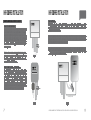
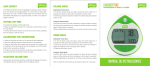
LINKING THE TRANSMITTER AND MONITOR
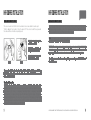
SETTING THE TIME AND DATE
Step 1 - Ensure three AA batteries are inserted in the transmitter
and three AAA batteries are inserted in the wireless energy monitor.
Observe polarity when installing batteries.
If the link is completed
you will clearly see the
transmission signal
Step 2 - Push the link button on the reverse of the monitor for two
seconds. The transmission signal symbol will flash for one minute.
Step 1
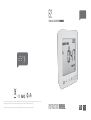
On the reverse of the display you will find the time set
button. Press and hold for two seconds. Time set up will
flash in the display.
Step 3 - While the transmission signal in the display flashes push
the link button on the front of the transmitter and wait until the
transmission signal symbol becomes solid.
Note - The default value for the transmission frequency is six
seconds. This means the transmitter is sending information every
six seconds. You can change the frequency from 6s (red flashing
light) to 12s (orange flashing light) and to 18s (green light) by
pushing and holding the transmitter button.
6 / 12 / 18s
ELECTRICITY MONITORING
TRANSMITTER
Monitor link button
11
The e2 monitor needs to know the time and date in order
to provide you with the correct information.
Set the time and date as follows:
Transmission Signal
If the link is not completed
you will see dashes on the
display
Step 2
Set the hour to the correct time by using backward and
forward buttons. Press unit set button once to save the
hours. Repeat for minutes, using the unit set button to
confirm.
Hold for 2 seconds
Step 3
Set the date by using the backward and forward
buttons. Press unit set button to confirm and move to
month set up. Repeat the process to set the year. Once
the correct time and date have been set, push unit set
button to save and exit.
press unit set button to exit
Transmitter link button
WE RECOMMEND THAT THE EFERGY MONITOR IS INSTALLED BY A LICENSED ELECTRICIAN
12