1
MONITOR SETUP
MONITOR SETUP
SETUP INSTRUCTIONS
IMPORTANT - Throughout the setup process, push the time period button at any time, your
settings will be saved & you will exit the function setting mode.
The efergy monitor needs to know the unit cost per kWh charged by your electricity supplier,
along with voltage and alarm settings. The following steps will move through each of these
settings for a single tariff period (alternatively see page 15 for Dual / Multiple Tariff Mode).
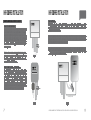
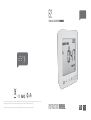
Press and hold down the unit set button for two seconds, this will enable you to enter the
setting mode.
Note - Twenty seconds of inactivity in setting mode will return
the unit to normal display mode without saving changes.
hold for 2 seconds
13
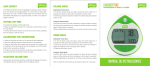
Step 4 - Electricity Cost
Default cost is set at 0.130 $/kWh. This is the average price per kWh
electricity that suppliers charge. Use the backward and forward
buttons to set the cost per kWh. Press unit set button to save your
setting and to move onto carbon emission ratio setting.
Step 5 - Carbon Emissions Ratio
Now set your carbon emissions ratio. This value can be increased or
decreased using backward and forward. Press the unit set button
to store the value. The Australian average is 1.0 kg. CO2/kWh, this
is the default value. Press unit set button to save your setting and
move on to alarm setting.
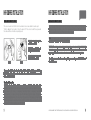
Step 1 - Voltage
Press and hold unit set button for two seconds. Default
voltage is set at 240V. Use backward and forward buttons
to change the voltage. Press unit set button to save your
setting and move into currency selection setting.
Step 2 - Currency Selection
Select the currency using backward and forward buttons.
Default currency will be $. Push unit set button to confirm
and to move onto tariff selection set up.
Step 3 - Single Tariff Set Up
On release you will see the symbol tariff period 1 will be highlighted.
If you are charged one single tariff push unit set button to confirm. If
you have dual tariff rate, please see the following page.
Step 6 - Alarm
The default alarm is set at 5.00kW. If the alarm function is switched
on, and you are using more than 5.00kW, the alarm will sound. This
value can be increased or decreased using forward and backward
buttons. Press unit set button to store the value and exit the
function mode. To activate and deactivate the alarm at any time
press the alarm on/off button on the back of the unit.
WE RECOMMEND THAT THE EFERGY MONITOR IS INSTALLED BY A LICENSED ELECTRICIAN
14