1
Display Options & Channel Setup (continued)
Channel Setup
Each region has different broadcast channels. Your portable TV will scan for all
the channels in the area and remember each location. You can then go through
and add or delete channels individually as you prefer. When completed,
pressing the up / down channel buttons will take you through all of your
selected channels in sequence.
Note: If you scan for broadcast channels (Air) and then switch to Cable TV, you
will need to re-scan. Your TV tuner can
receive both analog and digital signals.
.
Press the ◄ ► buttons to select
Press the ▼ button to enter to enter.
Press the▲▼ buttons to select the desired
sub-menu.
Antenna
Press the ▲▼ buttons to select antenna
mode.
Press the ◄ ► buttons to select CATV or Air.
In the Air position, you can use the telescoping antenna or another external
antenna to pick up broadcast signals. CATV settings please reference
Cable System submenu.
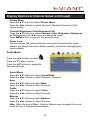
Auto Scan
In channel menu,
Press ▲▼ buttons to select Auto Scan.
Press ► button to enter.
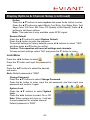
Cable System
For cable stations, first set Antenna to
CATV as above and then proceed as
follows:
Press the ▲▼ buttons to select Cable
System and press the ◄ ► buttons to select AUTO, STD, IRC or HRC.
Note: this item is only enabled when Antenna is set to CATV.
- 10 -