1
Unpacking
1. Remove the accessory pack
from the large box.
2. Remove the printer from
the box and set it on a flat,
stable surface.
3. Remove the plastic bags
protecting the printer and
the paper cassette. Save the
packing material in case you
need to transport the
printer.
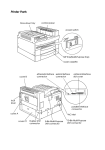
4. Locate the protective plate.
Use the wrench to unscrew
the two screws as shown
below; open the printer and
remove the protective plate.
P o w e r c o r d
- W r e n c h
Accessory pack
Printer
Assembling
Installing the imaging cartridge
To install the imaging cartridge and the cleaning pad, follow the
instructions in the imaging cartridge box.
CAUTIONS:
l
Do not turn the cartridge upside down.
l
Never transport the printer with the imaging cartridge
installed.
- 2 -