1
®
9-pin Dot Matrix Printer
No part of this publication may be reproduced, stored in a retrieval system, or transmitted
in any form or by any means, electronic, mechanical, photocopying, recording, or otherwise,
without the prior written permission of Seiko Epson Corporation. The information contained
herein is designed only for use with this Epson printer. Epson is not responsible for any use
of this information as applied to other printers.
Neither Seiko Epson Corporation nor its affiliates shall be liable to the purchaser of this
product or third parties for damages, losses, costs, or expenses incurred by the purchaser or
third parties as a result of: accident, misuse, or abuse of this product or unauthorized
modifications, repairs, or alterations to this product, or (excluding the U.S.) failure to strictly
comply with Seiko Epson Corporation’s operating and maintenance instructions.
Seiko Epson Corporation shall not be liable for any damages or problems arising from the
use of any options or any consumable products other than those designated as Original Epson
Products or Epson Approved Products by Seiko Epson Corporation.
EPSON and EPSON ESC/P are registered trademarks of Seiko Epson Corporation.
Microsoft®, Windows®, and Windows NT® are registered trademarks of Microsoft
Corporation.
IBM is a registered trademark of International Business Machines Corporation.
General Notice: Other product names used herein are for identification purposes only and may be
trademarks of their respective owners. Epson disclaims any and all rights in those marks.
Copyright © 2004 Seiko Epson Corporation. All rights reserved.
Reference Guide
Contents
Chapter 1 Safety Instructions
Warnings, Cautions, and Notes . . . . . . . . . . . . . . . . . . . . . . . . . . . . . . 6
Hot Parts Caution Symbol . . . . . . . . . . . . . . . . . . . . . . . . . . . . . . . . . . 6
Important Safety Instructions . . . . . . . . . . . . . . . . . . . . . . . . . . . . . . . . 6
Chapter 2 Paper Handling
Using the Two-Tractor System . . . . . . . . . . . . . . . . . . . . . . . . . . . . . .
Positioning the paper supply. . . . . . . . . . . . . . . . . . . . . . . . . . .
What paper types you can use . . . . . . . . . . . . . . . . . . . . . . . . .
Loading Paper onto the Front Tractor. . . . . . . . . . . . . . . . . . . . . . . .
Loading Paper onto the Rear Tractor . . . . . . . . . . . . . . . . . . . . . . . .
Adjusting the Paper Position . . . . . . . . . . . . . . . . . . . . . . . . . . . . . . .
Adjusting the top-of-form position. . . . . . . . . . . . . . . . . . . . . .
Adjusting the printing position. . . . . . . . . . . . . . . . . . . . . . . . .
Adjusting the label position. . . . . . . . . . . . . . . . . . . . . . . . . . . .
Tearing Off the Printed Pages. . . . . . . . . . . . . . . . . . . . . . . . . . . . . . .
Using the Tear Off button . . . . . . . . . . . . . . . . . . . . . . . . . . . . .
Adjusting the tear-off position . . . . . . . . . . . . . . . . . . . . . . . . .
Switching Between Front and Rear Tractors . . . . . . . . . . . . . . . . . .
Changing the Paper . . . . . . . . . . . . . . . . . . . . . . . . . . . . . . . . . . . . . . .
Printing on Multi-Part Forms and Labels . . . . . . . . . . . . . . . . . . . . .
Using multi-part forms. . . . . . . . . . . . . . . . . . . . . . . . . . . . . . . .
Using labels . . . . . . . . . . . . . . . . . . . . . . . . . . . . . . . . . . . . . . . . .
11
12
13
13
20
26
27
29
30
31
32
32
35
37
39
40
42
Chapter 3 Printer Software
About Your Printer Software . . . . . . . . . . . . . . . . . . . . . . . . . . . . . . .
Using the Printer Driver with Windows Me, 98, and 95 . . . . . . . .
Accessing the printer driver from Windows applications . .
Accessing the printer driver from the Start menu . . . . . . . . .
2
43
44
44
46
Changing the printer driver settings . . . . . . . . . . . . . . . . . . . . .47
Using the Printer Driver with Windows XP, 2000, and
Windows NT 4.0 . . . . . . . . . . . . . . . . . . . . . . . . . . . . . . . . . . . . . . . .48
Accessing the printer driver from Windows applications . . .49
Accessing the printer driver from the Start menu. . . . . . . . . .51
Changing the printer driver settings . . . . . . . . . . . . . . . . . . . . .53
Printer Driver Settings Overview . . . . . . . . . . . . . . . . . . . . . . . . . . . .54
Using EPSON Status Monitor 3. . . . . . . . . . . . . . . . . . . . . . . . . . . . . .58
Setting up EPSON Status Monitor 3 . . . . . . . . . . . . . . . . . . . . .59
Accessing EPSON Status Monitor 3. . . . . . . . . . . . . . . . . . . . . .60
Installing EPSON Status Monitor 3 . . . . . . . . . . . . . . . . . . . . . .61
Setting Up Your Printer on a Network. . . . . . . . . . . . . . . . . . . . . . . .62
Sharing the printer . . . . . . . . . . . . . . . . . . . . . . . . . . . . . . . . . . . .62
Setting up your printer as a shared printer . . . . . . . . . . . . . . .63
Setting for the clients . . . . . . . . . . . . . . . . . . . . . . . . . . . . . . . . . .67
Installing the printer driver from the CD-ROM . . . . . . . . . . .75
Canceling Printing. . . . . . . . . . . . . . . . . . . . . . . . . . . . . . . . . . . . . . . . .76
Uninstalling the Printer Software . . . . . . . . . . . . . . . . . . . . . . . . . . . .77
Uninstalling the printer driver and
EPSON Status Monitor 3. . . . . . . . . . . . . . . . . . . . . . . . . . . . .77
Chapter 4 Control Panel
Buttons and Lights . . . . . . . . . . . . . . . . . . . . . . . . . . . . . . . . . . . . . . . .82
Selecting a Font and Pitch . . . . . . . . . . . . . . . . . . . . . . . . . . . . . . . . . .86
About Your Printer’s Settings . . . . . . . . . . . . . . . . . . . . . . . . . . . . . . .87
Understanding the printer’s settings. . . . . . . . . . . . . . . . . . . . .87
Changing the printer’s settings . . . . . . . . . . . . . . . . . . . . . . . . .98
Lock-Out Mode . . . . . . . . . . . . . . . . . . . . . . . . . . . . . . . . . . . . . . . . . .103
Turning on or off the lock-out mode . . . . . . . . . . . . . . . . . . . .103
Chapter 5 Problem Solver
Diagnosing the Problem . . . . . . . . . . . . . . . . . . . . . . . . . . . . . . . . . . .104
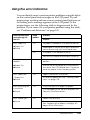
Using the error indicators . . . . . . . . . . . . . . . . . . . . . . . . . . . . .105
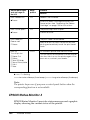
EPSON Status Monitor 3 . . . . . . . . . . . . . . . . . . . . . . . . . . . . . .106
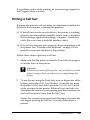
Printing a Self Test . . . . . . . . . . . . . . . . . . . . . . . . . . . . . . . . . . .107
3
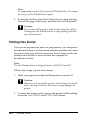
Printing Hex Dump. . . . . . . . . . . . . . . . . . . . . . . . . . . . . . . . . .
Problems and Solutions . . . . . . . . . . . . . . . . . . . . . . . . . . . . . . . . . . .
Power supply problems . . . . . . . . . . . . . . . . . . . . . . . . . . . . . .
Paper loading or feeding problems . . . . . . . . . . . . . . . . . . . .
Printing position problems . . . . . . . . . . . . . . . . . . . . . . . . . . .
Printing or printout quality problems . . . . . . . . . . . . . . . . . .
Option using problems. . . . . . . . . . . . . . . . . . . . . . . . . . . . . . .
Network problems . . . . . . . . . . . . . . . . . . . . . . . . . . . . . . . . . .
Correcting USB Problems . . . . . . . . . . . . . . . . . . . . . . . . . . . . . . . . .
Clearing Paper Jams. . . . . . . . . . . . . . . . . . . . . . . . . . . . . . . . . . . . . .
Aligning Vertical Lines in Your Printout . . . . . . . . . . . . . . . . . . . .
Canceling Printing . . . . . . . . . . . . . . . . . . . . . . . . . . . . . . . . . . . . . . .
Contacting Customer Support . . . . . . . . . . . . . . . . . . . . . . . . . . . . .
Technical Support Web Site . . . . . . . . . . . . . . . . . . . . . . . . . . . . . . .
108
109
110
111
113
115
120
121
121
125
126
127
128
129
Chapter 6 Options and Consumables
Ribbon Cartridge . . . . . . . . . . . . . . . . . . . . . . . . . . . . . . . . . . . . . . . .
Genuine Epson ribbon cartridge . . . . . . . . . . . . . . . . . . . . . . .
Replacing the Ribbon Cartridge . . . . . . . . . . . . . . . . . . . . . . . . . . . .
Using the Pull Tractor . . . . . . . . . . . . . . . . . . . . . . . . . . . . . . . . . . . .
Installing the pull tractor . . . . . . . . . . . . . . . . . . . . . . . . . . . . .
Using the pull tractor with the front tractor . . . . . . . . . . . . .
Using the pull tractor with the rear tractor . . . . . . . . . . . . . .
Removing the pull tractor . . . . . . . . . . . . . . . . . . . . . . . . . . . .
Using the Perforation Cutter. . . . . . . . . . . . . . . . . . . . . . . . . . . . . . .
Installing the perforation cutter . . . . . . . . . . . . . . . . . . . . . . .
Attaching the perforated paper output attachment and
output tray . . . . . . . . . . . . . . . . . . . . . . . . . . . . . . . . . . . . . . .
Paper handling. . . . . . . . . . . . . . . . . . . . . . . . . . . . . . . . . . . . . .
Removing the perforation cutter. . . . . . . . . . . . . . . . . . . . . . .
Interface Cards . . . . . . . . . . . . . . . . . . . . . . . . . . . . . . . . . . . . . . . . . .
Installing an interface card. . . . . . . . . . . . . . . . . . . . . . . . . . . .
Using a serial interface card. . . . . . . . . . . . . . . . . . . . . . . . . . .
Print Server . . . . . . . . . . . . . . . . . . . . . . . . . . . . . . . . . . . . . . . . . . . . .
Setting the IP address from the control panel . . . . . . . . . . . .
4
130
130
130
135
135
138
142
144
145
146
149
152
154
157
158
160
161
161
Appendix A Product Information
Printer Parts . . . . . . . . . . . . . . . . . . . . . . . . . . . . . . . . . . . . . . . . . . . . .163
Printer Specifications . . . . . . . . . . . . . . . . . . . . . . . . . . . . . . . . . . . . .166
Mechanical. . . . . . . . . . . . . . . . . . . . . . . . . . . . . . . . . . . . . . . . . .166
Electronic . . . . . . . . . . . . . . . . . . . . . . . . . . . . . . . . . . . . . . . . . . .168
Electrical. . . . . . . . . . . . . . . . . . . . . . . . . . . . . . . . . . . . . . . . . . . .170
Environmental . . . . . . . . . . . . . . . . . . . . . . . . . . . . . . . . . . . . . .171
Paper. . . . . . . . . . . . . . . . . . . . . . . . . . . . . . . . . . . . . . . . . . . . . . .171
Printable area . . . . . . . . . . . . . . . . . . . . . . . . . . . . . . . . . . . . . . .181
Command Lists . . . . . . . . . . . . . . . . . . . . . . . . . . . . . . . . . . . . . . . . . .183
EPSON ESC/P control codes . . . . . . . . . . . . . . . . . . . . . . . . . .183
IBM PPDS emulation control codes. . . . . . . . . . . . . . . . . . . . .185
Standards and Approvals. . . . . . . . . . . . . . . . . . . . . . . . . . . . . . . . . .186
Cleaning the Printer . . . . . . . . . . . . . . . . . . . . . . . . . . . . . . . . . . . . . .186
Transporting the Printer . . . . . . . . . . . . . . . . . . . . . . . . . . . . . . . . . . .187
Glossary
Index
5
Chapter 1
Safety Instructions
Warnings, Cautions, and Notes
w
c
Warnings
must be followed carefully to avoid bodily injury.
Cautions
must be observed to avoid damage to your equipment.
Notes
contain important information and useful tips on the operation of your
printer.
Hot Parts Caution Symbol
K
This symbol is placed on the print head to indicate that
it may be hot. Never touch this part just after the
printer has been used. Let it cool for a few minutes
before touching it.
Important Safety Instructions
Read all of these safety instructions before using the printer. In
addition, follow all warnings and instructions marked on the
printer itself.
6
Safety Instructions
When setting up the printer
❏ Because the printer weights approximately 34 kg, you should
not lift or carry it alone. Two people should carry it by the
bottom.
❏ Do not place the printer on an unstable surface or near a
radiator or heat source.
❏ Place the printer on a flat surface. The printer will not operate
properly if it is tilted or placed at an angle.
❏ Do not place this product on a soft, unstable surface like a bed
or a sofa, or a small, enclosed area, as this restricts ventilation.
❏ Do not block or cover the slots and openings in the printer’s
cabinet, and do not insert objects through the slots.
❏ Use only the type of power source indicated on the printer’s
label. If you are not sure of the power supply specifications in
your area, contact your local power company or consult your
dealer.
❏ Connect all equipment to properly grounded electrical
outlets. Avoid using outlets on the same circuit as
photocopiers or air control systems that regularly switch on
and off.
1
1
1
1
1
1
1
1
❏ Do not use a damaged or frayed power cord.
1
❏ The power cord should be placed to avoid abrasions, cuts,
fraying, crimping, kinking, and other damage.
1
❏ If you use an extension cord with the printer, make sure the
total ampere rating of all devices plugged into the extension
cord does not exceed the cord’s ampere rating. Also, make
sure the total ampere of all devices plugged into the electrical
outlet does not exceed the electrical outlet’s ampere rating.
1
Safety Instructions
7
1
❏ Use only the power cord that comes with this product. Use of
another cord may result in fire or electric shock.
❏ This product’s power cord is for use with this product only.
Use with other equipment may result in fire or electric shock.
When maintaining the printer
❏ Unplug the printer before cleaning it, and always clean it with
a piece of damp cloth only.
❏ Do not spill liquid onto the printer.
❏ Except as specifically explained in this guide, do not attempt
to service the printer yourself.
❏ Unplug the printer and refer servicing to qualified service
personnel under the following conditions:
i.
If the power cord or plug is damaged.
ii.
If liquid has entered the printer.
iii. If the printer has been dropped or the cabinet damaged.
iv. If the printer does not operate normally or exhibits a
distinct change in performance.
❏ Adjust only those controls that are covered by the operating
instructions.
❏ If you plan to use the printer in Germany, observe the
following:
To provide adequate short-circuit protection and
over-current protection for this printer, the building
installation must be protected by a 16-amp circuit breaker.
8
Safety Instructions
Bei Anschluss des Druckers an die Stromversorgung muss
sichergestellt werden, dass die Gebaudeinstallation mit einer
16 A-Sicherung abgesichert ist.
When Handling the paper
❏ Never feed labels backward using the Micro Feedd button.
When fed backward, labels can easily peel off the backing
sheet and cause a paper jam.
❏ Because labels are sensitive to temperature and humidity, use
them only under normal operating conditions described
below:
Temperature
15 to 25°C (59 to 77°F)
Humidity
30 to 60% RH
1
1
1
1
1
1
❏ Do not leave labels loaded in the printer between jobs; they
may curl around the platen and jam when you resume
printing.
1
❏ Do not load paper that is curled or has been folded.
1
When operating the printer
❏ Adjust only those controls that are covered in the user
documentation. Improper adjustment of other controls may
result in damage requiring extensive repair by a qualified
technician.
❏ Whenever you turn off the printer, wait at least five seconds
before turning it back on; otherwise, you may damage the
printer.
❏ Do not turn off the printer while it is printing the self test.
Always press the Pause button to stop printing and then turn
off the printer.
Safety Instructions
9
1
1
1
1
❏ Do not turn off the printer while it is printing the hex dump.
Always press the Pause button to stop printing and then turn
off the printer.
❏ Do not reconnect the power cord to an electrical outlet that
has the wrong voltage for your printer.
❏ Never replace the print head yourself; you may damage the
printer. Also, other parts of the printer must be checked when
the print head is replaced.
❏ You need to move the print head by hand to replace the ribbon
cartridge. If you have just used the printer, the print head may
be hot; let it cool for a few minutes before touching it.
ENERGY STAR® Compliance
As an ENERGY STAR® Partner, Epson
has determined that this product meets
the ENERGY STAR® guidelines for
energy efficiency.
The International ENERGY STAR® Office Equipment Program is
a voluntary partnership with the computer and office equipment
industry to promote the introduction of energy-efficient personal
computers, monitors, printers, fax machines, copiers, scanners,
and multifunction devices in an effort to reduce air pollution
caused by power generation. Their standards and logos are
uniform among participating nations.
10
Safety Instructions
Chapter 2
2
Paper Handling
2
Using the Two-Tractor System
Your printer’s paper handling system consists of a front push
tractor and a rear push tractor. Both tractors are easy to load and
operate, and both accommodate a wide variety of paper types,
including labels and multi-part forms.
The printer automatically adjusts to the thickness of the paper
loaded when the Platen gap setting is set to Auto in the SelecType
mode. See “SelecType mode” on page 88 for details.
You can print on continuous paper from 3 inches (76.2 mm) to
16.5 inches (419.1 mm) wide. Your printer senses the paper width
automatically.
When using more than two types of paper, load the paper you use
most often onto the front tractor. The front tractor, which is easier
to reach, will be available for the paper you change more
frequently.
Note:
❏ Before using your paper, check that it matches the specifications
described in this manual. See “Paper” on page 171 for details. Also
make sure your paper has a straight edge.
❏ If continuous paper is fed past the sprocket (on the last page, for
example), the paper may not feed properly.
❏ When the optional perforation cutter (#C81507X) is installed, the
printable width is from 4 inches (101.6 mm) to 16 inches (406.4
mm).
Paper Handling
11
2
2
2
2
2
2
2
2
2
2
Positioning the paper supply
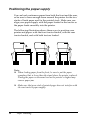
You can load continuous paper from both the front and the rear,
so be sure to leave enough room around the printer for the two
stacks of fresh paper and for the printed stack. Make sure you
align your paper supply with the paper loaded in the tractor so
the paper feeds smoothly into the printer.
The following illustration shows three ways to position your
printer and paper: with the front tractor loaded, with the rear
tractor loaded, and with both tractors loaded.
Note:
❏ When loading paper from the front, be sure to put the paper
someplace that is lower than the stand where the printer is placed.
Placing the paper on the same level as the printer or higher may
cause a paper jam.
❏ Make sure that your stack of printed pages does not interfere with
the rear tractor’s paper supply.
12
Paper Handling
What paper types you can use
2
You can use the continuous paper types listed below.
Continuous Paper Types
Front Tractor
Rear Tractor
Single-sheet
available
available
Multi-part
available
available
Labels
available
available
Continuous forms with labels
available
available
Overlapping multi-part forms
available
available
2
2
2
2
Loading Paper onto the Front Tractor
2
Follow these steps to load paper onto the front tractor:
2
1. Turn off the printer.
2
2
2
2
2
Paper Handling
13
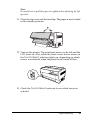
2. Open the printer’s front cover by lifting up the middle of its
bottom edge until it locks in place, as shown below.
front cover
3. Release the sprocket lock levers on both the right and left
sprockets by pulling each lever down.
sprocket lock lever
c
14
Caution:
Do not try to pull on or remove the elastic cord from the
tractor.
Paper Handling
4. Position the left sprocket so that the sprocket pins are to the
left of the arrow mark on the scale. Lock it into place by
pushing up the sprocket lock lever.
2
2
arrow mark on the scale
2
2
2
2
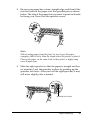
5. Now slide the right sprocket to approximately match the
width of your paper. (Do not lock it in place yet.)
2
2
2
2
2
2
Paper Handling
15
6. Slide the two paper supports so that they are spaced evenly
between the two sprockets.
paper supports
Note:
To use the paper that is less than four inches wide, remove the paper
supports.
7. Open both sprocket covers.
sprocket cover
16
Paper Handling
8. Be sure your paper has a clean, straight edge, and then fit the
first few holes in the paper over the sprocket pins as shown
below. The side of the paper that you want to print on should
be facing you. Now close the sprocket covers.
2
2
2
2
2
Note:
When loading paper from the front, be sure to put the paper
someplace that is lower than the stand where the printer is placed.
Placing the paper on the same level as the printer or higher may
cause a paper jam.
2
9. Slide the right sprocket so that the paper is straight and has
no wrinkles. Lock the sprocket in place by pushing up the
sprocket lock lever. After you lock the right sprocket, it may
still move slightly; this is normal.
2
2
2
2
2
sprocket lock lever
2
Paper Handling
17
Note:
Be careful not to pull the paper too tightly when adjusting the right
sprocket.
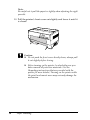
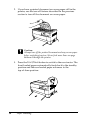
10. Pull the printer’s front cover out slightly and lower it until it
is closed.
c
Caution:
❏ Do not push the front cover directly down; always pull
it out slightly before closing.
❏ Before turning on the printer, be absolutely sure you
have removed all protective materials. (See the
Unpacking instructions that are provided with the
printer for more details.) Turning on the printer while
the print head cannot move may seriously damage the
mechanism.
18
Paper Handling
11. Turn on the printer. The print head moves to the left and the
LCD turns on. Also, either the front or rear tractor arrow on
the Tractor Select indicator lights up, depending on which
tractor was selected when the printer was turned off last.
2
2
2
2
2
12. Check the Tractor Select indicator to see which tractor is
selected:
2
If the front tractor arrow light is red, press the LF/FF Load
button to load the paper.
2
2
2
2
2
If the rear tractor arrow light is red, press the Front/Rear
button to switch to the front tractor. When the printer
switches tractors, it also loads the paper automatically.
Paper Handling
2
19
The Tractor Select indicator changes to green. The paper is now
loaded to the top-of-form position. If it looks like the printing will
start too high or low on the page, adjust the paper position. See
“Adjusting the Paper Position” on page 26 for instructions.
Loading Paper onto the Rear Tractor
Follow the steps below to load paper onto the rear tractor. (You
do not need to remove the paper from the front tractor first.)
1. Turn off the printer.
2. Open the printer’s top cover as shown below.
20
Paper Handling
3. Open the rear flap at the back of the top cover.
2
2
rear flap
2
4. Release the sprocket lock levers on the rear tractor’s right and
left sprockets by pulling each lever forward.
2
2
sprocket lock lever
2
2
2
c
2
Caution:
Do not try to pull on or remove the elastic cord from the
tractor.
2
2
2
Paper Handling
21
5. Position the right sprocket so that the sprocket pins are to the
right of the arrow mark on the scale. Lock it in place by
pushing the sprocket lock lever back.
arrow mark on the scale
6. Now slide the left sprocket to approximately match the width
of your paper. (Do not lock it in place yet.)
22
Paper Handling
7. Open both sprocket covers.
2
sprocket cover
2
2
2
8. Make sure your paper has a clean, straight edge. With the side
of the paper you want to print on facing down, insert your
paper through the opening at the rear of the printer.
Note:
You may find it easier to load the paper by standing to the side. That
way you can feed the paper with one hand and pull it through with
the other.
2
2
2
2
2
2
2
2
Paper Handling
23
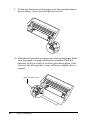
9. Fit the first few holes in the paper over the sprocket pins as
shown below. Now close the sprocket covers.
10. Slide the left sprocket to remove any slack in the paper. Make
sure the paper is straight and has no wrinkles. Push the
sprocket lock lever back to lock the sprocket in place. After
you lock the left sprocket, it may still move slightly; this is
normal.
sprocket lock lever
24
Paper Handling
Note:
Be careful not to pull the paper too tightly when adjusting the left
sprocket.
2
11. Close the top cover and the rear flap. The paper is now loaded
in the standby position.
2
2
2
2
12. Turn on the printer. The print head moves to the left and the
LCD turns on. Also, either the front or rear tractor arrow on
the Tractor Select indicator lights up, depending on which
tractor was selected when the printer was turned off last.
2
2
2
2
2
13. Check the Tractor Select indicator to see which tractor is
selected:
2
2
Paper Handling
25
If the rear tractor arrow light is red, press the LF/FF Load
button to load the paper.
If the front tractor arrow light is red, press the Front/Rear
button to switch to the rear tractor. When the printer switches
tractors, it also loads the paper automatically.
The Tractor Select indicator changes to green. The paper is now
loaded to the top-of-form position. If it looks like the printing will
start too high or low on the page, adjust the paper position. See
“Adjusting the Paper Position” on page 26 for instructions.
Adjusting the Paper Position
You can adjust the top-of-form position as well as the printing
position at any point on the page by using the Micro Feed, and
Top of Form buttons. The printer then remembers the new
top-of-form position. When you use the optional pull tractor, you
can adjust the paper position as described below.
26
Paper Handling
Note:
The printing position (based on the top-of-form position) is controlled
by your software. To change the print position, adjust your software’s
print settings. Use the following procedure only if your software does
not allow print position adjustment.
Adjusting the top-of-form position
2
2
The top-of-form position is the position to which the printer feeds
the paper when it loads it or performs a form feed. This position
is important because it determines where the printing begins on
each page. If the printing is too high or low on the page, you can
adjust the top-of-form position either permanently or temporarily
depending on how you use the Top of Form button.
❏ When you want to permanently change the top-of-form
position, you enter the top-of-form mode using the Top of
Form control panel button. The printer remembers the new
top-of-form position even after the printer is turned off, reset,
or initialized. (The printer remembers separate top-of-form
positions for the front and rear tractors.)
❏ When you want to temporarily change the top-of-form
position, you adjust the position using the Micro Feed
buttons during pause status without entering top-of-form
mode. The printer remembers the temporary top-of-form
position until the next time you load paper, switch tractors,
or turn off the printer.
You can set the top-of-form position from 4.2 mm (0.17 inch) to
33.9 mm (1.33 inch) below the top edge of the paper. The factory
setting is 8.5 mm (0.33 inch).
Follow the steps below to reset (permanently change) the
top-of-form position.
Paper Handling
2
2
2
2
2
2
2
2
2
2
27
c
Caution:
To adjust the top-of-form position when you are printing on
labels, continuous forms with labels, or overlapping multi-part
forms, use the Micro Feedu button only; do not enter the
top-of-form mode. Never feed labels backward through the printer.
1. Make sure the printer is turned on and the desired tractor is
selected (the corresponding tractor arrow should be lit).
2. Open the upper cover.
3. Press the Top of Form button to enter top-of-form mode. The
printer beeps once, and the Top of Form light turns on.
28
Paper Handling
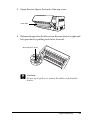
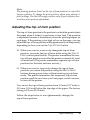
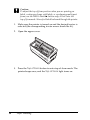
4. Use the Micro Feed buttons to feed the paper to the desired
top-of-form position. The letter “A” on the ribbon protector
shows you where the bottom edge of your first line of text will
print. This position is based on the first printable line of text.
If your software inserts a top margin of five lines, your text
will actually print five lines below the top-of-form position.
2
2
2
2
2
5. Press the Top of Form button again to exit and save your new
top-of-form position. Then close the top cover.
Note:
If you enter top-of-form mode right after loading paper, you can set the
loading and top-of-form positions at the same time. (When you use the
optional pull tractor, you cannot adjust the loading position.)
2
2
2
2
Adjusting the printing position
You may need to adjust the printing position in the middle of a
page, or to adjust the top-of-form position when using labels.
2
2
2
Paper Handling
29
When you move the printing position, you temporarily change
the top-of-form position by the same amount. For example, if you
adjust the printing in the middle of the page so that it falls a
half-inch lower, the next page will begin printing a half-inch lower
as well. The printer remembers this temporary top-of-form
position until the next time you load paper, switch tractors, or
turn off the printer. To adjust the printing position or top-of-form
position, follow these steps:
1. Start printing your document. When you reach the text that
you want to align at a particular spot on the page, press the
Pause button to stop printing.
2. Use the Micro Feed buttons to adjust the position where you
want your next line of text to fall. Press the button once to feed
the paper forward or backward in 1/216-inch increments, or
hold it down to move the paper continuously.
c
Caution:
To adjust the printing position when you are printing on
labels, continuous forms with labels, or overlapping
multi-part forms, use the Micro Feedu button only. Never
feed labels backward through the printer. When fed backward,
labels may easily peel off the backing sheet and cause a paper
jam.
3. When you are finished, press the Pause button to resume
printing your document.
Adjusting the label position
Follow the steps below to adjust the label position:
Note:
See “Changing the settings in the SelecType mode” on page 98 to find
how to make settings in the SelecType mode and see “Changing the
settings in the default-setting mode” on page 101 to find how to make
settings in the default-setting mode.
30
Paper Handling
1. Make sure that the printer is turned on.
2
2. Set the position for the settings listed below in the
default-setting mode.
2
Label base pos.
Label top pos.
2
Label length
Label left pos.
2
Label width
2
Base sheet PG (Base sheet PG position number)
Label paper PG (Label paper PG position number)
2
3. Make the settings in the SelecType mode as shown below.
2
Forms w/labels:
On
Pge length front:
paper length when using the front
tractor
Pge length rear:
paper length when using the rear
tractor
2
2
2
Tearing Off the Printed Pages
After you finish printing, you can use the tear-off feature to
advance continuous paper on the push tractor to the tear-off edge
of the printer. You can then easily tear off printed sheets. When
you resume printing, the printer automatically feeds paper back
to the loading position.
Paper Handling
31
2
2
This feature lets you save paper that would normally be lost
between documents.
If the perforation between pages is not aligned with the tear-off
edge, you can adjust the tear-off position using the micro-feed
feature. The printer remembers this new tear-off position.
c
Caution:
Never use the tear-off feature to reverse feed labels, overlapping
multi-part forms, or continuous forms with labels.
Using the Tear Off button
Whether or not the printer is in tear-off mode, you can use the
Tear Off button to advance continuous paper to the tear-off
position by following the steps below.
1. Make sure printing has finished. Then press the Tear Off
button. The printer advances the paper to the tear-off edge
and the Tear Off light comes on.
2. Tear off all printed pages. If the perforation is not aligned with
the tear-off edge, adjust the tear-off position. See “Adjusting
the tear-off position” on page 32 for instructions.
3. When you resume printing, the printer feeds the paper back
to the loading position and begins printing. (You can also
manually feed the paper back to the loading position by
pressing the Tear Off button again.)
Adjusting the tear-off position
If the paper’s perforation is not aligned with the tear-off edge,
follow these steps:
1. Turn on the printer and select the desired tractor.
32
Paper Handling
2. Open the paper separator cover (the flap on the top part of the
printer’s top cover). This exposes the printer’s tear-off edge.
3. Press the Tear Off button to enter the tear-off mode. The Tear
Off light comes on and the printer feeds the paper’s
perforation to the printer’s tear-off edge.
2
2
2
2
2
4. If the paper is not aligned with the tear-off edge, press the
Micro Feed buttons to feed the paper forward or backward
in 1/216-inch increments. (You can also hold down either
Micro Feed button to feed the paper continuously.)
tear-off-edge
2
2
2
2
2
2
2
Paper Handling
33
Note:
You can reset the tear-off position only when you are in tear-off mode
(after you press the Tear Off button once and the Tear Off light is
on). The printer remembers the new tear-off position even after the
printer is turned off, reset, or initialized.
5. Tear off the page using the tear-off edge on the printer’s top
cover.
6. Press the Tear Off button to feed the paper back to the
top-of-form position. You are now ready to print your next
document.
c
34
Caution:
Always tear off the printed document before you feed the
paper back to the top-of-form position. Never feed paper
backward more than one page.
Paper Handling
Switching Between Front and Rear Tractors
2
You can easily switch between paper loaded on the front tractor
and paper loaded on the rear tractor. The instructions below
explain how to switch from the front tractor to the rear tractor,
but you can follow the same steps to switch from the rear tractor
to the front tractor.
2
Caution:
Never switch between tractors if labels are already loaded in the
printer. First remove the labels by tearing off the fresh supply
below the tractor and pressing LF/FF Load to eject the remaining
labels.
2
c
Before you start, make sure the printer is turned on and that the
front tractor is selected (the front tractor arrow on the Tractor
Select indicator should be lit). If you are in the middle of printing
a document, wait for the printer to finish printing before you
switch tractors. Then follow these steps:
2
2
2
2
1. If no paper is loaded in the rear tractor, load paper to the
standby position (the first five pins of the sprockets). See
“Loading Paper onto the Rear Tractor” on page 20 for
instructions.
2
2
2
2
2
Paper Handling
35
2. If you have a printed document or excess paper still in the
printer, use the tear-off feature described in the previous
section to tear off the document or excess paper.
c
Caution:
Always tear off the printed document and any excess paper
before switching tractors. Never feed more than one page
backward through the printer.
3. Press the Front/Rear button to switch to the rear tractor. The
front-loaded paper automatically feeds back to the standby
position and the rear-loaded paper advances to the
top-of-form position.
36
Paper Handling
Changing the Paper
2
This section describes how to change paper on the front tractor,
but you can follow the same steps when you change the paper on
the rear tractor.
Before you start, make sure the printer is turned on and the front
tractor is selected. (If you are changing the paper on the rear
tractor, the rear tractor should be selected instead.)
c
Caution:
Never change paper using this procedure if labels, continuous
forms with labels, or overlapping multi-part forms are already
loaded in the printer. Remove the labels by tearing off the fresh
supply below the tractor and pressing LF/FF Load to eject the
remaining labels. Then load the new paper. See “Loading Paper
onto the Front Tractor” on page 13 (or “Loading Paper onto the
Rear Tractor” on page 20) for instructions.
1. If you have a printed document still in the printer, use the
tear-off feature to tear off the document or excess paper.
c
2
2
2
2
2
2
Caution:
Always tear off printed documents before changing the paper.
Never feed more than one page backward through the printer.
2
2
2
2
2
Paper Handling
37
2. Press the Front/Rear button to switch to the rear tractor. The
front-loaded paper automatically feeds back to the standby
position.
3. Open the printer’s front cover. (To change the rear-loaded
paper, open the printer’s top cover and the rear flap.)
38
Paper Handling
4. Open the sprocket covers and remove the paper from the
tractor.
2
2
sprocket cover
2
2
5. Load the new paper. See “Loading Paper onto the Rear
Tractor” on page 20 (or “Loading Paper onto the Front
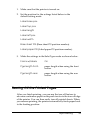
Tractor” on page 13) for instructions.
2
2
Printing on Multi-Part Forms and Labels
2
Your printer can print on both single-sheet and continuous
multi-part forms, as well as on labels.
You can print on various types of paper, including multi-part
forms and labels. Your printer can also handle a variety of paper
thicknesses, from thin paper to ten sheets (or seven sheets on the
rear tractor) including the original. The printer automatically
adjusts to the thickness of your paper when the Platen gap setting
is set to Auto in the SelecType mode. See “SelecType mode” on
page 88 for details.
When you print on multi-part forms and labels, the positioning
of your text on the page can be critical. See “Adjusting the Paper
Position” on page 26 for more information on aligning your text.
You should also check both your printer and your software page
length settings before you load labels or forms.
Paper Handling
39
2
2
2
2
2
If you are using multi-part forms or labels, you may want to use
the optional pull tractor. See “Using the Pull Tractor” on page 135
for details.
c
Caution:
When printing on labels, be absolutely sure that your printing
stays within the printable area of the label to prevent damage to
the print head. See “Paper” on page 171 for more information on
the printable area.
Using multi-part forms
You can use multi-part (carbonless or carbon-backed) forms with
up to seven sheets, including the original, on the rear tractor. On
the front tractor, you can use forms with up to ten sheets.
You load continuous multi-part forms the same way you load any
other type of continuous paper. Before loading multi-part forms,
however, make sure the paper has a clean straight edge and does
not separate or tear apart. See “Loading Paper onto the Front
Tractor” on page 13 or “Loading Paper onto the Rear Tractor” on
page 20 for instructions.
40
Paper Handling
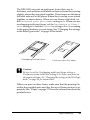
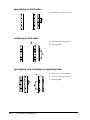
The DFX-9000 can print on multi-part forms that vary in
thickness, such as forms with labels on them or forms that overlap
slightly where they are glued together. These forms are thicker in
the label area and in the places where they overlap or are joined
together, as shown below. When you use forms with labels, set
the Continuous forms with labels setting to On. When you use
overlapping multi-part forms, set the Overlapping multipart
forms setting to On and the Platen gap setting to 0 to 14 according
to the paper thickness you are using. See “Changing the settings
in the SelecType mode” on page 98 for details.
2
2
2
2
2
2
Overlapping multi-part forms
c
2
Continuous forms with labels
Caution:
Be sure to set the Overlapping multi-part forms setting or
Continuous forms with Label setting to On before you print on
the respective forms. See “Changing the settings in the SelecType
mode” on page 98 for instructions.
When you print on these forms, make sure that the printing fits
within the printable area and that the top-of-form position is set
properly. See “Paper” on page 171 for more information about the
printable area.
2
2
2
2
2
Paper Handling
41
Using labels
When selecting labels for printing, always choose the type
mounted on continuous paper with sprocket holes for use with a
tractor. See “Loading Paper onto the Front Tractor” on page 13
for instructions for loading continuous paper.
c
Caution:
Never use the Tear Off, Front/Rear, or Micro Feedd button
when labels are loaded in the printer. Never feed labels backward
through the printer because they can easily come off the backing
and jam the printer.
Although you must never feed labels backward, you can still use
the automatic paper handling features if you follow these
precautions:
❏ Instead of using the Tear Off button to remove printed labels,
press the LF/FF Load button until the last printed label is at
the point where you can tear it off easily.
❏ Before using the Front/Rear button to switch tractors or
change paper, remove the entire supply of labels. Remove
labels by tearing off the fresh supply at a perforation below
the tractor. Then press the LF/FF Load button to eject the
remaining labels.
❏ When adjusting the top-of-form or printing position, use only
the Micro Feedu button.
c
42
Caution:
Because labels are especially sensitive to extreme temperatures
and humidity, use them only under normal operating conditions.
Paper Handling
Chapter 3
3
Printer Software
3
About Your Printer Software
3
The Epson software includes the printer driver software and
EPSON Status Monitor 3.
The printer driver is software that allows your computer to
control the printer. You need to install the printer driver so your
Windows software applications can take full advantage of the
printer’s capabilities.
EPSON Status Monitor 3 program allows you to monitor the
status of your printer, alerts you when errors occur, and provides
you with troubleshooting tips. EPSON Status Monitor 3 is
automatically installed when you install the printer driver. If you
want to install EPSON Status Monitor 3 later, see “Installing
EPSON Status Monitor 3” on page 61 for instructions.
Note:
❏ The network printers can not be monitored with EPSON Status
Monitor 3 in Windows 95.
❏ Before proceeding, make sure you have installed the printer driver
on your computer described in the Start Here.
❏ Make sure the software setting is set to ESC/P. The printer driver
software and EPSON Status Monitor 3 can only function in ESC/P
mode.
3
3
3
3
3
3
3
3
3
Printer Software
43
Using the Printer Driver with Windows Me, 98,
and 95
You can access the printer driver from your Windows
applications or from the Start menu.
❏ When you access the printer driver from a Windows
application, any settings you make apply only to the
application you are using. See “Accessing the printer driver
from Windows applications” on page 44 for more
information.
❏ When you access the printer driver from the Start menu, the
printer driver settings you make apply to all your
applications. See “Accessing the printer driver from the Start
menu” on page 46 for more information.
See “Changing the printer driver settings” on page 47 to check
and change printer driver settings.
Note:
While many Windows applications override the settings made with the
printer driver, some do not, so you must verify that the printer driver
settings match your requirements.
Accessing the printer driver from Windows
applications
Follow these steps to access the printer driver from a Windows
application:
44
Printer Software
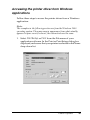
1. Select Print Setup or Print from the File menu of your
application software. In the Print or Print Setup dialog box
displayed, make sure that your printer is selected in the Name
drop-down list.
3
3
3
3
3
3
3
3
3
3
3
3
Printer Software
45
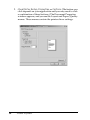
2. Click Printer, Setup, Properties, or Options. (The button you
click depends on your application and you may need to click
a combination of these buttons.) The Properties window
appears, and you see the Paper, Graphics, and Device Options
menus. These menus contain the printer driver settings.
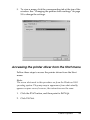
3. To view a menu, click the corresponding tab at the top of the
window. See “Changing the printer driver settings” on page
47 for information on how to change the settings.
Accessing the printer driver from the Start menu
Follow these steps to access the printer driver from the Start
menu:
1. Click the Start button, and then point to Settings.
2. Click Printers.
46
Printer Software
3. Right-click your printer icon, and click Properties. The screen
displays the Properties window, which contains the Paper,
Graphics, Device Options, and Utility menus. These menus
display the printer driver settings.
4. To view a menu, click the corresponding tab at the top of the
window. See “Changing the printer driver settings” on page
47 for information on how to change the settings.
Changing the printer driver settings
3
3
3
3
Your printer driver has seven menus: Paper, Graphics, Device
Options, General, Details, Utility, and Sharing. For an overview
of the available settings, see “Printer Driver Settings Overview”
on page 54. You can also view online help by right-clicking items
in the driver and selecting What’s this?
3
3
3
3
3
3
3
3
Printer Software
47
When you finish making printer driver settings, click OK to apply
the settings, or click Restore Defaults to return the settings to
their default values.
Once you have checked your printer driver settings and made any
necessary changes, you are ready to print.
Using the Printer Driver with Windows XP, 2000,
and Windows NT 4.0
You can access the printer driver from your Windows
applications or from the Start menu.
❏ When you access the printer driver from a Windows
application, any settings you make apply only to the
application you are using. See “Accessing the printer driver
from Windows applications” on page 49 for more
information.
❏ When you access the printer driver from the Start menu, the
printer driver settings you make apply to all your
applications. See “Accessing the printer driver from the Start
menu” on page 51 for more information.
To check and change printer driver settings, see “Changing the
printer driver settings” on page 53.
Note:
While many Windows applications override the settings made with the
printer driver, some do not, so you must verify that the printer driver
settings match your requirements.
48
Printer Software
Accessing the printer driver from Windows
applications
3
Follow these steps to access the printer driver from a Windows
application:
Note:
The examples in the following section are from the Windows 2000
operating system. They may vary in appearance from what actually
appears on your screen; however, the instructions are the same.
3
3
1. Select Print Setup or Print from the File menu of your
application software. In the Print or Print Setup dialog box
displayed, make sure that your printer is selected in the Name
drop-down list.
3
3
3
3
3
3
3
3
3
Printer Software
49
2. Click Printer, Setup, Properties, or Options. (The button you
click depends on your application and you may need to click
a combination of these buttons.) The Document Properties
window appears, and you see the Layout and Paper/Quality
menus. These menus contain the printer driver settings.
50
Printer Software
3. To view a menu, click the corresponding tab at the top of the
window. See “Changing the printer driver settings” on page
53 to change the settings.
3
3
3
3
3
3
3
Accessing the printer driver from the Start menu
Follow these steps to access the printer driver from the Start
menu:
3
3
Note:
The screen shots used in this procedure are from the Windows 2000
operating system. They may vary in appearance from what actually
appears on your screen; however, the instructions are the same.
3
1. Click the Start button, and then point to Settings.
3
2. Click Printers.
3
Printer Software
51
3. Right-click your printer icon, and click Printing Preferences
(in Windows XP or 2000) or Document Defaults (in
Windows NT 4.0). The screen displays the Default Document
Properties window, which contains the Layout and
Paper/Quality menus. These menus display the printer
driver settings.
52
Printer Software
When you click Properties in the menu displayed by
right-clicking the printer icon, the Properties window
appears, which includes menus used to make the printer
driver settings.
3
3
3
3
3
3
3
4. To view a menu, click the corresponding tab at the top of the
window. See “Printer Driver Settings Overview” on page 54
for information on how to change the settings.
3
3
Changing the printer driver settings
Your printer driver has two menus from which you can change
the printer driver settings; Layout and Paper/Quality. You can
also change settings on the Utility menu in the printer software.
For an overview of the available settings, see “Printer Driver
Settings Overview” on page 54. You can also view online help by
right-clicking items in the driver and selecting What’s this?
Printer Software
3
53
3
3
When you finish making your printer driver settings, click OK to
apply the settings, or click Cancel to cancel your changes.
Once you have checked your printer driver settings and changed
them if necessary, you are ready to print.
Printer Driver Settings Overview
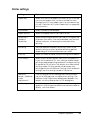
The following tables show the Windows printer driver settings.
Note that not every setting is available in all versions of Windows.
54
Printer Software
Printer settings
3
Settings
Explanations
Paper Size
Select the size of the paper you want to use. If you do
not see your paper size, use the scroll bar to scroll
through the list. If your paper size is not included in the
list, see “Definition of Custom Paper Size” on page 56
for instructions.
Orientation
Select Portrait or Landscape.
Paper Source
Select the paper source you want to use.
Resolution/
Graphics
Resolution
Select the printing resolution you want. The higher the
resolution you select, the more detailed your printout
will be; however, increasing the resolution slows
printing.
Dithering
You can leave this option set to Fine, which is the
default setting, or select another dithering pattern
depending on the kind of printout you want.
Intensity
Move the slider to make your printout lighter or darker.
Print Quality
Select a print quality option from the Print quality list.
If you set Hi-speed to On, you will enter bidirectional
printing mode and printing speed will increase. Setting
Hi-speed to Off will return the printer to unidirectional
printing mode. Printing speed will decrease, but
printing precision will improve. Printing with the default
settings uses the settings stored in the printer.
Halftone
Setup.../Halftone
Color
Adjustment...
Click this button to set the brightness and contrast,
input the RGB gamma, or make other settings. The
Halftone Color Adjustment dialog box appears. For
details, click the Help button in this dialog box.
Halftoning
Select the type of halftoning to use when printing
graphics. To let the printer determine the best halftone
quality, use Auto Select.
3
3
3
3
3
3
3
3
3
3
3
Printer Software
55
Settings
Explanations
Printer Fonts
Support
Select a character table group to use. You can select
one of three character table groups, Standard,
Expanded, and None (Bit Image printing).
When Standard or Expanded is selected, the printer
uses the device fonts. Expanded includes more fonts
than Standard.
When None is selected, the printer uses bit map
images instead of the device fonts.
For details on the fonts which are included in each
table, see “Electronic” on page 168.
Print Text as
Graphics*
Select Off when the printer uses the device fonts and
select On when the printer does not use the device
fonts.
Metafile
Spooling*
Select whether to use EMF spooling.
Paper Order*
Select whether to print from front to back or back to
front.
Pages Per Sheet*
Select the number of pages that you want to print
onto a single page.
Copy Count*
When you select more than one in the Number of
copies box, this check box appears and you can
select whether to collate the pages of the copies.
Advanced
Printing Features*
Select Enable or Disable for the metafile Spooling.
Print
Optimizations*
Select Disable when the printer uses the device fonts
and select Enable when the printer uses the device
fonts.
* For details, see Windows help.
Definition of Custom Paper Size
If your paper is not included in the Paper Size drop-down list, you
can add the size to the list.
56
Printer Software
For Windows Me, 98, and 95:
Click Custom or User Defined Size and enter the paper size in
the dialog box that appears.
For Windows XP, 2000, and Windows NT 4.0:
1. For Windows 2000 or Windows NT 4.0, click Start, point to
Settings, and click to Printers.
For Windows XP Professional, click Start, and click Printers
and Faxes.
For Windows XP Home Edition, click Start, and click Control
Panel, then click Printers and Faxes.
2. Click the EPSON DFX-9000 ESC/P icon.
3. Select Server Properties from the file menu.
3
3
3
3
3
3
4. Check the Create a New Form.
3
5. Enter the paper size in the Measurement fields.
6. Click Save From and then click OK.
3
3
3
3
3
Printer Software
57
Monitoring settings
Settings
Explanations
EPSON Status
Monitor 3
You can access EPSON Status Monitor 3 when you
click this button. To monitor the printer, make sure the
Monitor the printing status check box is selected.
Monitoring
Preferences
Click this button to open the Monitoring Preferences
dialog box where you can make settings for EPSON
Status Monitor 3. See “Setting up EPSON Status Monitor
3” on page 59 for more information.
Using EPSON Status Monitor 3
EPSON Status Monitor 3 is available for Windows XP, Me, 98, 95,
2000, and Windows NT 4.0. It allows you to monitor your printer’s
status, alerts you when printer errors occur, and provides
troubleshooting instructions when needed.
EPSON Status Monitor 3 is available only when:
❏ The printer is connected directly to the host computer via the
parallel port [LPT1] or the USB port.
❏ Your system is configured to support bidirectional
communication.
EPSON Status Monitor 3 is installed when you install the printer
driver as described in the Start Here.
Note:
If you install the driver using the “Point and Print” method, EPSON
Status Monitor 3 may not function properly. If you want to use EPSON
Status Monitor 3, reinstall the driver as described in the Start Here.
58
Printer Software
Before using EPSON Status Monitor 3, be sure to read the
README file on the User CD-ROM. This file contains the latest
information on the utility.
3
3
Setting up EPSON Status Monitor 3
3
Follow these steps to set up EPSON Status Monitor 3:
1. Open the Utility menu as described in “Using the Printer
Driver with Windows Me, 98, and 95” on page 44 or “Using
the Printer Driver with Windows XP, 2000, and Windows NT
4.0” on page 48.
2. Click the Monitoring Preferences button. The Monitoring
Preferences dialog box appears.
3
3
3
3
3
3
3
3
3
Printer Software
59
3. The following settings are available:
Select Notification
Displays the error item check box On/Off status.
Turn on this check box to display the selected
error notification.
Select Shortcut
Icon
The selected icon is displayed on the taskbar.
The setting’s example is shown on the right
window. By clicking the shortcut icon, you can
access the Monitoring Preferences dialog box
easily.
Receive error
notification for
shared printers
Error notification for a shared printer can be
received when this check box is selected.
Allow monitoring
of shared printer
When this check box is selected, a shared
printer can be monitored by other PCs.
Note:
Click the Default button to revert all items to the default settings.
Accessing EPSON Status Monitor 3
Do one of the following to access EPSON Status Monitor 3;
❏ Double-click the printer-shaped shortcut icon on the taskbar.
To add a shortcut icon to the taskbar, go to the Utility menu
and follow the instructions.
❏ Open the Utility menu, then click the EPSON Status Monitor
3 icon. To find out how to open the Utility menu, See “Using
the Printer Driver with Windows Me, 98, and 95” on page 44
or “Using the Printer Driver with Windows XP, 2000, and
Windows NT 4.0” on page 48.
60
Printer Software
When you access EPSON Status Monitor 3 as described above, the
following printer status window appears.
3
3
3
3
You can view printer status information in this window.
3
Installing EPSON Status Monitor 3
Follow the steps below to install EPSON Status Monitor 3.
3
1. Make sure that the printer is off and that Windows is running
on your computer.
3
2. Insert the printer software CD-ROM in the CD-ROM drive.
3
Note:
❏ If the language selection window appears, select your country.
❏ If the EPSON Installation Program screen does not appear
automatically, double-click the My Computer icon,
right-click the CD-ROM icon, click OPEN in the menu that
appears, then double-click Epsetup.exe.
3
3
3. Click Continue. When the software license agreement screen
appears, read the statement, then click Agree.
3
4. Click Custom.
3
Printer Software
61
5. Select the EPSON Status Monitor 3 check box, then click
Install.
6. In the dialog box that appears, make sure that your printer
icon is selected, and click OK. Then follow the on-screen
instructions.
7. When the installation is complete, click OK.
Setting Up Your Printer on a Network
Sharing the printer
This section describes how to share the printer on a standard
Windows network.
The computers on a network can share a printer that is directly
connected to one of them. The computer that is directly connected
to the printer is the printer server, and the other computers are
the clients which need permission to share the printer with the
printer server. The clients share the printer via the printer server.
According to the versions of Windows OS and your access rights
on the network, perform the appropriate settings of the printer
server and clients.
Setting the printer server
❏ For Windows Me, 98, or 95, see “With Windows Me, 98, or
95” on page 63.
❏ For Windows XP, 2000, or Windows NT 4.0, see “With
Windows XP, 2000, or Windows NT 4.0” on page 65.
62
Printer Software
Setting the clients
❏ For Windows Me, 98, or 95, see “With Windows Me, 98, or
95” on page 68.
3
❏ For Windows XP or 2000, see “With Windows XP or 2000” on
page 70.
3
❏ For Windows NT 4.0, see “With Windows NT 4.0” on page 73.
3
Note:
❏ When sharing the printer, be sure to set EPSON Status Monitor 3
so that the shared printer can be monitored on the printer server.
See “Setting up EPSON Status Monitor 3” on page 59.
❏ When you are Windows shared printer user in a Windows Me or
98 environment, on the server, double-click the Network icon in
Control panel and make sure that the “File and printer sharing for
Microsoft Networks” component is installed. Then, on the server
and clients, make sure that the “IPX/SPX-compatible Protocol” or
the “TCP/IP Protocol” is installed.
❏ The printer server and clients should be set on the same network
system, and they should be under the same network management
beforehand.
❏ The on-screen displays on the following pages may differ depending
on the version of Windows OS.
Setting up your printer as a shared printer
3
3
3
3
3
3
3
With Windows Me, 98, or 95
When the printer server’s OS is Windows Me, 98, or 95, follow
these steps to set the printer server.
3
1. Click Start, point to Settings, and click Control Panel.
2. Double-click the Network icon.
Printer Software
3
63
3. Click File and Print Sharing on the Configuration menu.
4. Select the I want to be able to allow others to print to my
printer(s). check box, then click OK.
5. Click OK to accept the settings.
Note:
❏ When “Insert the Disk” appears, insert the Windows Me, 98,
or 95 CD-ROM in the computer. Click OK and then follow the
on-screen instructions.
❏ When the prompt to restart the computer appears, restart the
computer and continue with the settings.
6. Double-click the Printers icon on the control panel.
7. Right-click your printer icon, and click Sharing in the menu
that appears.
8. Select Shared As, type the name in the Share Name box, and
click OK. Type a Comment and Password if needed.
Note:
❏ Do not use spaces or hyphens for the share name, or an error
may occur.
64
Printer Software
❏ When sharing the printer, be sure to set EPSON Status
Monitor 3 so that the shared printer can be monitored on the
printer server. See “Setting up EPSON Status Monitor 3” on
page 59.
3
3
You need to set the client computers so that they can use the
printer on a network. See the following pages for details.
3
❏ “With Windows Me, 98, or 95” on page 68
❏ “With Windows XP or 2000” on page 70
3
❏ “With Windows NT 4.0” on page 73
3
With Windows XP, 2000, or Windows NT 4.0
When the printer server’s OS is Windows XP, 2000, or Windows
NT 4.0, follow these steps to set the printer server.
Note:
You must access Windows XP, 2000, or Windows NT 4.0 as the
Administrators of the local machine.
3
3
1. For a Windows 2000 or Windows NT 4.0 printer server, click
Start, point to Settings, and click Printers.
For a Windows XP Professional printer server, click Start, and
click Printers and Faxes.
For Windows XP Home Edition printer server, click Start,
click Control panel, then click Printers and Faxes.
2. Right-click your printer icon, and click Sharing in the menu
that appears.
3
3
3
3
3
Printer Software
65
For Windows XP, if the following menu appears, click either
Network Setup Wizard or If you understand the security
risks but want to share printers without running the wizard,
click here.
In either case, follow the on-screen instructions.
3. For a Windows 2000 or Windows NT 4.0 printer server, select
Shared as (for Windows 2000) or Shared (for Windows NT
4.0), then type the name in the Share name box and click OK.
66
Printer Software
For a Windows XP printer server, select Share this printer,
then type the name in the Share name box and click OK.
3
3
3
Note:
Do not use spaces or hyphens for the share name, or an error may
occur.
You need to set the client computers so that they can use the
printer on a network. See the following pages for details:
3
3
3
❏ “With Windows Me, 98, or 95” on page 68
3
❏ “With Windows XP or 2000” on page 70
❏ “With Windows NT 4.0” on page 73
3
Setting for the clients
3
This section describes how to install the printer driver by
accessing the shared printer on a network.
3
Note:
❏ To share the printer on a Windows network, you need to set the
printer server. For details, see “Setting up your printer as a shared
printer” on page 63 (Windows Me, 98, or 95) or “With Windows
XP, 2000, or Windows NT 4.0” on page 65 (Windows XP, 2000,
or Windows NT 4.0).
Printer Software
67
3
3
❏ This section describes how to access the shared printer on a standard
network system using the server (Microsoft workgroup). If you
cannot access the shared printer due to the network system, ask the
administrator of the network for assistance.
❏ This section describes how to install the printer driver by accessing
the shared printer from the Printers folder. You can also access the
shared printer from Network Neighborhood or My Network on the
Windows desktop.
❏ When you want to use the EPSON Status Monitor 3 at clients, you
have to install both of the printer driver and the EPSON Status
Monitor 3 in each client from the CD-ROM.
With Windows Me, 98, or 95
Follow these steps to set Windows Me, 98, or 95 clients.
1. Click Start, point to Settings, and click Printers.
2. Double-click the Add Printer icon, then click Next.
3. Select Network printer, then click Next.
4. Click Browse, and the Browse for Printer dialog box appears.
Note:
You can also type “\\(the name of the computer that is locally
connected to the shared printer)\(the shared printer’s name)” in the
Network path or queue name.
68
Printer Software
5. Click the computer or server that is connected to the shared
printer, and the name of the shared printer. Then click OK.
3
3
3
3
3
Note:
The name of the shared printer may be changed by the computer or
server that is connected to the shared printer. To make sure of the
name of the shared printer, ask the administrator of the network.
3
3
6. Click Next.
Note:
❏ If the printer driver is installed in the client beforehand, you
need to select the new printer driver or the current printer
driver. When the prompt to select the printer driver appears,
select the printer driver according to the message.
❏ If the printer server’s OS is Windows Me, 98, or 95, go to the
next step.
❏ If the printer server’s OS is not Windows Me, 98, or 95, go to
“Installing the printer driver from the CD-ROM” on page 75.
7. Make sure of the name of the shared printer, and select
whether to use the printer as the default printer or not. Click
OK, and then follow the on-screen instructions.
Printer Software
69
3
3
3
3
3
Note:
You can change the shared printer’s name so that it appears only on
the client computer.
With Windows XP or 2000
Follow these steps to set Windows XP or 2000 clients.
You can install the printer driver of the shared printer, if you have
Power Users or more powerful access rights even if you are not
the Administrator.
1. For Windows 2000 clients, click Start, point to Settings, and
click Printers.
For Windows XP Professional clients, click Start, and click
Printers and Faxes.
For Windows XP Home Edition clients, click Start, click
Control panel, then click Printers and Faxes.
2. For Windows 2000, double-click the Add Printer icon, then
click Next.
For Windows XP, click the Add a printer in the Printer Tasks
menu.
70
Printer Software
3. Select Network printer (for Windows 2000) or A network
printer, or a printer attached to another computer (for
Windows XP), then click Next.
3
4. For Windows 2000, select Type the printer name, or click
Next to browse for a printer, then click Next.
3
3
3
3
3
Note:
You can also type the shared printer’s name or network path in the
Name box, such as “\\(the name of the computer that is
locally connected to the shared printer)\(the shared
printer’s name).”
3
3
For Windows XP, select Browse for a printer, then click Next.
3
3
3
3
Printer Software
71
5. Click the icon of the computer or server that is connected to
the shared printer, and the name of the shared printer. Then
click Next.
Note:
❏ The name of the shared printer may be changed by the computer
or server that is connected to the shared printer. To make sure
of the name of the shared printer, ask the administrator of the
network.
❏ If the printer driver is installed in the client beforehand, you
need to select either the new printer driver or the current printer
driver. When the prompt to select the printer driver appears,
select the printer driver according to the message.
❏ If the printer server’s OS is Windows XP or 2000, go to the next
step.
❏ If the printer server’s OS is not Windows XP or 2000, go to
“Installing the printer driver from the CD-ROM” on page 75.
6. For Windows 2000, select whether to use the printer as the
default printer or not, then click OK.
For Windows XP, if another driver is already installed, select
whether to use the printer as the default printer or not, then
click OK.
72
Printer Software
7. Make sure of the settings, then click Finish.
3
.
3
3
3
3
With Windows NT 4.0
Follow these steps to set Windows NT 4.0 clients.
You can install the printer driver of the shared printer, if you have
Power Users or more powerful access rights even if you are not
the Administrator.
1. Click Start, point to Settings, and click Printers.
3
3
3
2. Double-click the Add Printer icon.
3. Select Network printer server, then click Next.
3
3
3
3
Printer Software
73
4. Click the icon of the computer or server that is connected to
the shared printer and the name of the shared printer. Then
click OK.
Note:
❏ You can also type “\\(the name of the computer that is locally
connected to the shared printer)\(the shared printer’s name)”
in Network path or queue name.
❏ The name of the shared printer may be changed by the computer
or server that is connected to the shared printer. To make sure
of the name of the shared printer, ask the administrator of the
network.
❏ If the printer driver is installed in the client beforehand, you
need to select the new printer driver or the current printer
driver. When the prompt to select the printer driver appears,
select the printer driver according to the message.
❏ If the printer server’s OS is Windows NT 4.0, go to the next
step.
❏ If the printer server’s OS is not Windows NT 4.0, go to
“Installing the printer driver from the CD-ROM” on page 75.
74
Printer Software
5. Select whether to use the printer as the default printer or not,
then click OK.
3
6. Click Finish.
3
Installing the printer driver from the CD-ROM
This section describes how to install the printer driver in the
clients when the computers of the server and clients use different
OS.
The on-screen displays on the following pages may differ
depending on the version of Windows OS.
Note:
❏ When installing in Windows XP, 2000, or Windows NT 4.0 clients,
you must access Windows XP, 2000, or Windows NT 4.0 with the
Administrator.
3
3
3
3
❏ If the computers of the server and clients use the same OS, you do
not have to install the printer drivers from the CD-ROM.
3
1. Access the shared printer and a prompt may appear. Click
OK, and then follow the on-screen instructions to install the
printer driver from the CD-ROM.
3
2. Insert the CD-ROM, then the EPSON Installation Program
dialog box appears. Cancel the dialog box by clicking
Cancel, then type the appropriate drive and folder names in
which the printer driver for clients is located, then click OK.
3
3
3
3
Printer Software
75
When installing drivers in Windows XP or 2000, “Digital
Signature is not found.” may appear. Click Yes (for Windows
2000) or Continue Anyway (for Windows XP) and continue
installing.
The folder name differs depending on the OS being used.
Client’s OS
Folder Name
Windows 95
\<Language>\WIN95
Windows 98
\<Language>\WIN98
Windows Me
\<Language>\WINME
Windows XP, 2000
\<Language>\WIN2000
Windows NT 4.0
\<Language>\WINNT40
3. Select the name of the printer, then click OK. Then follow the
on-screen instructions.
Note:
If you also want to install EPSON Status Monitor 3, see “Installing
EPSON Status Monitor 3” on page 61 for instructions.
Canceling Printing
If the printouts are not what you expected and display incorrect
or garbled characters or images, you may need to cancel printing.
When the printer icon is displayed on the taskbar, follow the
instructions below to cancel printing.
1. Double-click the printer icon on the task bar, then click Purge
Print Documents on the Printer menu.
76
Printer Software
2. When canceling all printing documents, select Purge Print
Documents (For Windows Me or 98) or Cancel All
Documents (For Windows XP, 2000, or Windows NT 4.0) on
the Printer menu.
When canceling a specified document, select a document you
want to cancel and select Cancel Printing (For Windows Me
or 98) or Cancel (For Windows XP, 2000, or Windows NT
4.0) on the Document menu.
3
3
3
3
3
3
The printing job is canceled.
3
Uninstalling the Printer Software
3
When you wish to reinstall or upgrade the printer driver,
uninstall the printer driver that has been installed already.
Uninstalling the printer driver and EPSON Status
Monitor 3
3
3
1. Quit all applications.
3
2. Click Start, point to Settings, and click Control Panel.
3
Printer Software
77
3. Double-click the Add/Remove Programs icon.
4. Select EPSON Printer Software, and click the Add/Remove.
1
2
Note:
When using the Windows XP or Windows 2000 computer, click
Change or Remove Programs, select the EPSON Printer
Software, then click Change/Remove.
78
Printer Software
5. Click the Printer Model tab, select the EPSON DFX-9000
ESC/P icon, then click OK.
3
3
3
3
3
6. If you uninstall Monitored Printers, click Yes in the displayed
dialog box.
Note:
You can uninstall only the Monitored Printers utility of EPSON
Status Monitor 3. When the utility is uninstalled, you cannot
change the setting of Monitored Printers from EPSON Status
Monitor 3.
3
3
3
7. If you uninstall EPSON Status Monitor 3, click Yes in the
displayed dialog box.
3
8. Follow the on-screen instructions.
3
Uninstalling the USB device driver
When you connect the printer to your computer with a USB
interface cable, the USB device driver is also installed. When you
uninstalled the printer driver, you also need to uninstall the USB
device driver.
Printer Software
79
3
3
Follow these steps to uninstall the USB device driver.
Note:
❏ Uninstall the printer driver before uninstalling the USB device
driver.
❏ Once you uninstalled the USB device driver, you cannot access any
other Epson printers connected with a USB interface cable.
1. Follow steps 1 through 3 of “Uninstalling the Printer
Software” on page 77.
2. Select EPSON USB Printer Devices, and click Add/Remove.
1
2
Note:
❏ EPSON USB Printer Devices appears only when the printer is
connected to Windows Me or 98 with a USB interface cable.
80
Printer Software
❏ If the USB device driver is not installed correctly, EPSON USB
Printer Devices may not appear. Follow these steps to run the
“Epusbun.exe” file in the CD-ROM.
1. Insert the CD-ROM in your computer’s CD-ROM drive.
2. Access the CD-ROM drive.
3. Double-click the \<Language>\WIN98 or
\<Language>\WINME folder.
4. Double-click the Epusbun.exe icon.
3. Follow the on-screen instructions.
3
3
3
3
See the Start Here to reinstall a printer driver.
3
3
3
3
3
3
3
3
Printer Software
81
Chapter 4
Control Panel
Buttons and Lights
m
a
b
c
a
d
e
f
g
h
i
j
k
l
Tractor Select Front indicator
On when the front tractor is selected. The light is green
when paper is loaded, and red when the tractor is out of
paper.
b
Tractor Select Rear indicator
On when the rear tractor is selected. The light is green
when paper is loaded, and red when the tractor is out of
paper.
82
Control Panel
c
Front/Rear button
Selects the front or rear tractor. If you have been using
paper loaded on one tractor, first remove the printed
output before pressing this button to switch the tractor.
d
e
Font (ItemU) button
4
❏ Selects one of the fonts. To select a font, see “Selecting
a Font and Pitch” on page 86.
4
❏ When the printer enters the SelecType mode and
default-setting mode, the button works as an ItemU
button. You can press the ItemU button to select the
previous menu. See “Changing the printer’s settings”
on page 98 for details.
4
Reset
4
When you press both the Font and Pitch buttons
simultaneously, the printer clears buffer and returns to its
default settings.
f
4
Pitch (ItemD) button
❏ Selects one of the pitch settings. To select a pitch, see
“Selecting a Font and Pitch” on page 86.
❏ When the printer enters the SelecType mode and
default-setting mode, the button works as an ItemD
button. You can press the ItemD button to select the
next menu. See “Changing the printer’s settings” on
page 98 for details.
4
4
4
4
4
4
4
Control Panel
83
g
Tear Off (SetU) button
❏ Feeds continuous paper forward to the tear-off
position.
❏ When the printer enters the SelecType mode and
default setting mode, the button works as the SetU
button. You can press the SetU button to select the
previous value of a setting item. See “Changing the
printer’s settings” on page 98 for details.
Tear Off light
On when the paper is in the tear-off position.
h
Menu
When you press the Tear Off and Top of Form buttons at
the same time, the printer enters or exits the SelecType
mode and you can set the various printer settings. See
“Changing the settings in the SelecType mode” on page
98 for details.
84
Control Panel
i
Top of Form (SetD) button
❏ Enters the top-of-form position mode and sets the
new top-of-form position after it has been adjusted
with the Micro Feed buttons.
❏ When the printer enters the SelecType mode and
default setting mode, the button works as the SetD
button. You can press the SetD button to select the
next value of a setting item. See “Changing the
printer’s settings” on page 98 for details.
Top of Form light
j
4
4
4
On when the printer is in the top-of-form and tear-off
modes.
4
LF/FF Load button
4
❏ Loads continuous paper when the printer is out of
paper.
❏ Feeds paper line by line when pressed briefly.
❏ Advances continuous paper to the next top-of-form
position when held down for a few seconds.
k
4
4
4
4
Micro Feed buttons
Adjust the paper position, such as the top-of-form
position and tear-off position.
4
4
4
Control Panel
85
l
Pause button
Stops printing temporarily, and resumes printing when
pressed again.
Pause light
❏ On when the printer is paused.
❏ Flashes when the print head overheats.
m
Paper Out light
❏ On when the printer is out of paper.
❏ Flashes when paper jams or the printer fails to eject
paper.
Selecting a Font and Pitch
You can select one each of the printer’s fonts and pitches by using
the buttons on the printer’s control panel, as described below.
Note:
❏ Settings you make in application programs usually override settings
you make from the printer’s control panel. For best results, use your
application to select a font and make other settings.
❏ The available pitch depends on the font you select. See the table below
for more information.
86
Font
Pitch
HSD
10, 12, 15, 17, 20
Draft
10, 12, 15, 17, 20, PS
Control Panel
Font
Pitch
Roman
10, 12, 15, 17, 20, PS
Sans Serif
10, 12, 15, 17, 20, PS
4
4
1. Make sure that the printer is not printing.
2. Press the Font button. The first available font is displayed on
the LCD. Press the Font button until the font that you want
to use is displayed. The LCD goes back to the original state in
a few seconds and the font you selected is set.
3. Press the Pitch button. The first available font is displayed on
the LCD. Press the Pitch button until the pitch that you want
to use is displayed. The LCD goes back to the original state in
a few seconds and the pitch you selected is set.
4
4
4
4
About Your Printer’s Settings
You can make many settings that control printer functions with
the printer’s control panel. While you can often set these functions
through your software or printer driver, you may sometimes need
to change a setting from the control panel by using the SelecType
mode and default-setting mode.
For a detailed description of the settings you can change in the
SelecType mode and default-setting mode, see “Understanding
the printer’s settings” on page 87. For instructions on changing
the settings, see “Changing the printer’s settings” on page 98.
4
4
4
4
Understanding the printer’s settings
4
This section describes the settings and options available in the
SelecType mode and default-setting mode.
Control Panel
4
87
SelecType mode
The settings that are available in the SelecType mode are shown
in the following table and explained in detail after the table.
88
Menu
Values (default in bold)
Language
English, French, German, Italian, Spanish,
Portuguese
Print settings*1
Execute
Page length for rear tractor
3 inches, 3.5 inches, 4 inches, 5.5 inches,
6 inches, 7 inches, 8 inches, 8.5 inches,
11 inches, 70/6 inches, 12 inches,
14 inches, 17 inches
Page length for front tractor
3 inches, 3.5 inches, 4 inches, 5.5 inches,
6 inches, 7 inches, 8 inches, 8.5 inches,
11 inches, 70/6 inches, 12 inches,
14 inches, 17 inches
Skip over perforation
Off, On
Line spacing
1/6 inches, 1/8 inches
Left margin
0 columns to 80 columns
Right margin
1 columns to 136 columns
Platen gap
Auto, 0 to 14
Auto tear off
Off, On
Auto line feed
Off, On
Print direction
Bi-D, Uni-D
Software
ESC/P, IBM PPDS
0 slash
Off, On
I/F (Interface) mode
Auto, Parallel, Serial, USB, Optional
Auto I/F (Interface) wait time
10 seconds, 30 seconds
Parallel I/F bi-directional
mode
Off, On
Packet mode
Auto, Off
Control Panel
Menu
Values (default in bold)
Serial baud rate
19200 BPS, 9600 BPS, 4800 BPS, 2400 BPS,
1200 BPS, 600 BPS, 300 BPS
Serial parity
None, Odd, Even, Ignore
Serial data length
8-bit, 7-bit
Character table
Standard version: PC437, PC850, PC860,
PC863, PC865, PC861, BRASCII,
Abicomp, Roman8, ISO Latin 1, PC858,
ISO 8859-15, Italic U.S.A., Italic France,
Italic Germany, Italic U.K., Italic Denmark
1, Italic Sweden, Italic Italy, Italic Spain 1
4
NLSP version: PC437, PC850, PC860,
PC863, PC865, PC861, BRASCII,
Abicomp, Roman8, ISO Latin 1, PC858,
ISO 8859-15, PC437 Greek, PC853, PC855,
PC852, PC857, PC866, PC869, MAZOWIA,
Code MJK, ISO 8859-7, ISO Latin 1T,
Bulgaria, PC774, Estonia, ISO 8859-2,
PC866 LAT., PC866 UKR, PC APTEC,
PC708, PC720, PCAR864, PC771, PC437
Slovenia, PC MC, PC1250, PC1251, Italic
U.S.A., Italic France, Italic Germany, Italic
U.K., Italic Denmark 1, Italic Sweden, Italic
Italy, Italic Spain 1
Auto CR (IBM PPDS)*2
Off, On
IBM character table (IBM
PPDS)*2
Table 2, Table 1
Buzzer
Off, On
Low-noise mode
Off, On
Auto cut mode*3
Auto cut/back mode
Off, On
Continuous forms with labels
Off, On
Skip over binding
Off, On
Get IP address
4
4
4
4
4
4
Off, On
Overlapping multipart forms
*4
4
4
Off, On
*3
4
4
4
Panel, Auto, PING
Control Panel
89
Menu
Values (default in bold)
IP address*5
Subnet
mask*4
Default gateway*4
Save
settings?*6
000.000.000.000 to 255.255.255.255
000.000.000.000 to 255.255.255.255
000.000.000.000 to 255.255.255.255
Yes, No
*1
After this is displayed, press the SetD (Top of Form) button to print all current
settings.
*2
This setting is available only in IBM PPDS emulation mode.
*3
This setting is available only when the optional perforation cutter (#C81570X)
is installed.
*4
These settings are available only when the optional Print Server is installed.
*5
This setting is available only when the optional Print Server is installed and the
Get IP address setting is set to Panel or PING.
*6
This menu appears by pressing the Menu (Tear Off and Top of Form) buttons
in the SelecType mode.
Page length for rear tractor
This setting allows you to set the page length (in inches) for the
continuous paper loaded on the rear push tractor.
Page length for front tractor
This setting allows you to set the page length (in inches) for the
continuous paper loaded on the front push tractor.
Skip over perforation
When you turn on this feature, the printer provides a one-inch
(25.4 mm) margin between the last line printed on one page and
the first line printed on the next page. Because most application
program margin settings override margin settings from the
control panel, you should use this setting only if you cannot set
your top and bottom margins using your application.
90
Control Panel
Line spacing
4
You can select 1/6 inches or 1/8 inches for line spacing.
Left margin
This setting allows you to set the margin (in columns) from the
left edge. The margin is set in columns of 10 cpi, regardless of the
pitch that is set.
Right margin
This setting allows you to set the margin (in columns) from the
right edge. The margin is set in columns of 10 cpi, regardless of
the pitch that is set.
4
4
4
4
Platen gap
This setting allows you to set the paper thickness. When you select
Auto, the printer automatically adjusts to the thickness of the
paper loaded. If you want to set it manually, select 0 to 14. When
using overlapping multi-part forms, select 0 to 14 according to the
paper thickness you use.
Auto tear off
When auto tear off is on and you are using continuous paper with
the front or rear push tractor, the printer automatically advances
the paper perforation to the tear-off position, where you can easily
tear off the printed page(s). When the printer receives data again,
it automatically moves the paper back to the top-of-form position
and starts printing, so you can use all of the next page.
When auto tear off is off and you are using continuous paper with
the front or rear push tractor, you need to move the perforation
to the tear-off position manually by pressing the Tear Off and
Micro Feed buttons. See “Tearing Off the Printed Pages” on page
31 for more information.
Control Panel
91
4
4
4
4
4
4
4
Auto line feed
When auto line feed is on, the printer accompanies each carriage
return (CR) code received with a line feed (LF) code.
Print direction
You can select bidirectional printing (Bi-D) or unidirectional
printing (Uni-D). Printing is normally bidirectional; however,
unidirectional printing allows for precise vertical printing
alignment.
Software
When you select ESC/P, the printer operates in the EPSON ESC/P
mode. When you select IBM PPDS, the printer emulates an IBM
printer.
0 slash
The zero character has a slash ( ) when this feature is on; it has
no slash (0) when this feature is off. The slash allows you to easily
distinguish between the uppercase letter “O” and a zero.
I/F (Interface) mode
The printer provides a slot for an optional interface in addition to
its built-in parallel interface, serial interface, and USB interface.
You can choose Auto (automatic), Parallel, Serial, USB, or
Optional for the interface mode. When you select Auto, the
printer automatically selects the interface that is receiving data,
and uses that interface until the end of the print job. The Auto
setting allows you to share the printer among multiple computers
without changing the interface mode.
If only one computer is connected to the printer, you can select
Parallel, Serial, USB, or Optional, depending on which
interface your computer uses.
92
Control Panel
Auto I/F (Interface) wait time
When the printer is in the auto interface mode and it receives no
data from the currently selected interface for the amount of time
specified with this setting, it determines which interface is
receiving data and switches to that interface. You can specify
either 10 seconds or 30 seconds for the auto interface wait time.
4
4
4
Parallel I/F bi-directional mode
The Parallel Interface bidirectional transfer mode is used when
this feature is on. If bidirectional transfer mode is unnecessary,
turn this off.
Packet mode
Make sure to select Auto when you print from Windows
applications using the printer driver included in the Printer
Software CD-ROM that comes with the printer. Turn this feature
off if you have connection troubles while printing from
applications based on other operating systems such as DOS.
Serial baud rate
This setting is available only when data is transferred via a serial
interface. Use this option to set the data transfer rate (baud) for
the serial interface. The baud rate is measured in bits per second
(bps). See your computer manual and software documentation
for the proper setting.
Serial parity
This setting is available only when data is transferred via a serial
interface. The parity bit is added to data and detects errors on the
data. When this option is set to None, the parity bit is not added
to data. When this option is set to Ignore, the parity is added to
data, but the printer receives the data even if an error is detected.
Control Panel
93
4
4
4
4
4
4
4
4
4
Serial data length
This setting is available only when data is transferred via a serial
interface. Set the data length of the serial interface to 8-bit or
7-bit. See your computer manual and software documentation
for the proper setting.
Character table
You can select among various character tables including several
international character sets for the italic character table. This
setting is used when you print without using the printer driver.
When using the printer driver, change the settings on the printer
driver. For details, see “Printer Driver Settings Overview” on
page 54.
Auto CR (IBM PPDS)
This setting is available only in IBM PPDS emulation mode. When
auto carriage return is on, each line feed (LF) code or ESC J code
is accompanied by a carriage return (CR) code so the printer
moves the next printing position to the left margin. When this
setting is off, you must send a CR code after the line feed code to
move the printing position to the left margin.
IBM character table (IBM PPDS)
This setting is available only in IBM PPDS emulation mode. You
can select Table 2 or Table 1 for the IBM character table.
Buzzer
The printer beeps when an error occurs. See “Using the error
indicators” on page 105 for more information on printer errors. If
you do not want the printer to beep when an error occurs, turn
off this setting.
94
Control Panel
Low-noise mode
When this mode is set to On, the noise is reduced, but the printing
speed is slower.
4
4
Auto cut mode
This function is available only when the optional perforation
cutter (#C81570X) is installed in the printer. When this setting is
set to On, the perforation cutter cuts each page at the perforation
automatically. Note the following when you turn on this
functions:
❏ Make sure the paper is at least 4 inches long.
❏ Do not change the top of form position using the Top of Form
button.
4
4
4
4
❏ Do not feed the paper using the Micro Feed buttons.
❏ Never cut labels, continuous paper with labels, and
overlapping multi-part forms.
4
❏ If you set the cutting method through the printer driver’s
paper source setting, it overrides Auto cut mode.
4
Auto cut/back mode
This function is available only when the optional perforation
cutter (#C81570X) is installed in the printer. When you turn on
this feature, the printer automatically cuts each page at the
perforation and feeds the paper to the top-of-form position while
it is printing.
4
4
4
Overlapping multipart forms
When this setting is set to On, you can print on overlapping
multi-part forms that vary in thickness.
Control Panel
4
95
Continuous forms with labels
When this setting is set to On, you can print on continuous forms
with labels. You can set the label position in the default-settings
mode. See “Adjusting the label position” on page 30 for details.
Skip over binding
When this setting is set to On, the print head avoids the binding
area along the right and left edges of multi-part forms during
paper feeding. This makes paper feeding easier and prevents
paper jams.
Get IP address
This setting is available only when the optional Print Server is
installed. You can select the method of getting the IP address.
Select Panel to get the IP address from the control panel. See
“Setting the IP address from the control panel” on page 161 for
details. For information on the settings when this feature is set to
Auto or Ping, see a manual for the Print Server that you use.
IP address
This setting is available only when the optional Print Server is
installed and the Get IP address setting is set to Panel or Ping.
You can set the printer’s IP address with this setting.
Subnet mask
This setting is available only when the optional Print Server is
installed. You can set the printer’s subnet mask with this setting.
Default gateway
This setting is available only when the optional Print Server is
installed. You can set the printer’s default gateway with this
setting.
96
Control Panel
Save settings?
This menu appears by pressing the Menu (Tear Off and Top of
Form) buttons in the SelecType mode. When you select Yes, the
current settings in the SelecType mode are saved.
default-setting mode
You can make settings for continuous forms with labels and the
panel lock out mode in the default setting mode. These settings
are shown in the following tables.
Continuous forms with labels
The following settings are available only when the Continuous
forms with label setting is set to On in the SelecType mode.
Menu
Values (default in bold)
Label base position
Paper left edge, First dot
Label top position
0 to 4752/216 (by 1/216 inches)
Label length
0 to 4752/216 (by 1/216 inches)
Label left position
0 to 1440/120 (by 1/120 inch)
Label width
0 to 1440/120 (by 1/120 inch)
Base sheet PG position
number
0 to 14
Label paper PG position
number
0 to 14
4
4
4
4
4
4
4
4
4
4
4
4
Control Panel
97
Panel lock out
Menu
Values (default in bold)
Pause function
Unlock, Lock
Micro Feed function
Unlock, Lock
Load function
Unlock, Lock
LF function
Unlock, Lock
FF function
Unlock, Lock
Top of Form function
Unlock, Lock
Tear Off function
Unlock, Lock
Font function
Unlock, Lock
Pitch function
Unlock, Lock
Front/Rear function
Unlock, Lock
Menu function
Unlock, Lock
Reset function
Unlock, Lock
If a setting is set to Unlock, you can use the button, regardless of the panel
lock out mode. If a setting is set to Lock, you cannot use the button when
the printer is in the panel lock out mode.
Changing the printer’s settings
Changing the settings in the SelecType mode
The following table shows the basic function of each button in the
SelecType mode.
98
Button
Basic function
Menu (Tear Off and Top
of Form) buttons
Enters or exits the SelecType mode.
ItemU (Font) button
Selects the previous menu parameter.
Control Panel
Button
Basic function
ItemD (Pitch) button
Selects the next menu parameter.
SetU (Tear Off) button
Select the previous value in the selected menu.
SetD (Top of Form)
button
Select the next value in the selected menu.
4
4
Follow these steps to enter the SelecType mode and change the
settings:
4
Note:
If you turn off the printer prior to exiting the SelecType mode, any
changes you may have made are canceled and not saved.
4
1. Make sure paper is loaded.
4
2. Press the Menu (Tear Off and Top of Form) buttons to enter
the SelecType mode.The LCD displays the selected language
for this mode.
4
3. If the language you want is not selected, press the SetU (Tear
Off) or SetD (Top of Form) button until the LCD displays the
language you want.
4. Press the ItemD (Pitch) button to set the desired language.
Note:
The language you select is also used for other settings, modes, and
test print outs, such as default-settings mode and printing a Hex
Dump.
5. If you select Print Settings, press the SetD (Top of Form)
button to print the current settings.
6. Press the ItemU (Font) or ItemD (Pitch) button to select the
menu parameters which you wish to change.
Control Panel
99
4
4
4
4
4
4
Note:
You can scroll the menu by holding the ItemU (Font) or ItemD
(Pitch) button for a few seconds.
7. Press the SetU (Tear Off) or SetD (Top of Form) button to
select the values within the selected parameter until you find
the desired setting.
Note:
You can scroll the value by holding the SetU (Tear Off) or SetD
(Top of Form) button for a few seconds.
8. After setting the selected parameter to the desired setting, you
may either continue to make changes to other parameters by
pressing the ItemD or ItemU button, or exit the SelecType
mode.
Note:
The menu selection returns to the first menu after the selection of
the last menu parameter is done.
9. When you finish making settings, press the Menu (Tear Off
and Top of Form) buttons.
10. The LCD displays Save Setting. If you want to save the
settings, select Yes by pressing the SetU (Tear Off) button. If
you do not want to save the settings, select No by pressing the
SetD (Top of Form) button.
The printer exits the SelecType mode.
Note:
If you turn off the printer prior to exiting the SelecType mode, any
changes you may have made are canceled and not saved.
100
Control Panel
Changing the settings in the default-setting mode
The following table shows the basic function of each button in the
default-setting mode.
4
4
Button
Basic function
ItemU (Font) button
Selects the previous menu parameter.
ItemD (Pitch) button
Selects the next menu parameter.
SetU (Tear Off) button
Select the previous value in the selected menu.
SetD (Top of Form)
button
Select the next value in the selected menu.
4
4
Follow these steps to enter the default-setting mode and change
the settings:
4
Note:
If you turn off the printer prior to exiting the default-setting mode,
settings that you have set up until you turn off the printer are saved.
4
1. Make sure paper is loaded and turn off the printer.
4
c
Caution:
Whenever you turn off the printer, wait at least five seconds
before turning it back on; otherwise, you may damage the
printer.
2. Turn on the printer while holding down the Font button to
enter the default-setting mode. The message Setting mode
appears on the LCD panel.
Note:
The instructions and current settings are printed out in the
language that you set in the SelecType mode. If you want to change
the language, change the language setting in the SelecType mode.
See “Changing the settings in the SelecType mode” on page 98 for
details.
Control Panel
101
4
4
4
4
4
3. Select one of the three main menus by pressing the SetU (Tear
Off) or SetD (Top of Form) button.
Note:
You can scroll value by holding the SetU (Tear Off) or SetD (Top
of Form) button for a few seconds.
4. If you select Print Settings, press the ItemD (Pitch) button
to print the current settings.
If you select Form w/labels or Panal lock out, press the
ItemU (Font) or ItemD (Pitch) button to select the setting
items which you wish to change and go to the next step.
Note:
You can scroll the menu by holding the ItemU (Font) or ItemD
(Pitch) button for a few seconds.
5. Press the SetU (Tear Off) or SetD (Top of Form) button to
select the values within the selected parameter until you find
the desired setting.
Note:
You can scroll value by holding the SetU (Tear Off) or SetD (Top
of Form) button for a few seconds.
6. After setting the selected parameter to the desired setting, you
may either continue to make changes to other parameters by
pressing the ItemD button or the ItemU button, or exit the
default-setting mode.
Note:
The menu selection returns to the first menu after the selection of
the last menu parameter is done.
7. When you finish making settings, turn off the printer.
The printer exits the default-setting mode and the settings are
saved.
102
Control Panel
Lock-Out Mode
4
You can restrict the use of buttons on the control panel by using
the lock-out mode. In the basic setting, you can only use the
Pause, Load and Tear Off buttons, when the lock-out mode is on.
You can select which buttons are locked when the printer is in the
lock out mode. See “Changing the settings in the default-setting
mode” on page 101 for instructions on how to change the lock out
mode setting.
Turning on or off the lock-out mode
You can turn on or off the lock-out mode easily by using buttons
on the control panel.
Follow these steps to turn on the lock-out mode:
4
4
4
4
4
1. Make sure the printer is turned off.
c
4
Caution:
Whenever you turn off the printer, wait at least five seconds
before turning it back on; otherwise, you may damage the
printer.
2. Turn on the printer while holding down both the Font and
Pitch buttons. The printer beeps twice, indicating that the
lock-out mode has been turned on.
To turn off the lock-out mode, repeat steps 1 and 2. The printer
beeps once, indicating that the lock-out mode has been turned off.
See “Changing the settings in the default-setting mode” on page
101 for instructions on how to change the functions to be locked.
Control Panel
103
4
4
4
4
4
Chapter 5
Problem Solver
Diagnosing the Problem
For problems that may be related to USB connections, see
“Correcting USB Problems” on page 121 for details.
If your problem is not USB related, troubleshooting printer
problems is best handled in two easy steps; first diagnose the
problem, then apply likely solutions until the problem is fixed.
The information that you need to diagnose and solve most
common problems is provided by the printer’s control panel,
EPSON Status Monitor 3, or by printing a self test or Hex Dump.
Refer to the appropriate section below.
If you have a specific problem relating to print quality, a printout
problem not related to print quality, or a paper feeding problem,
or if the printer does not print at all, refer to the appropriate
section in this chapter.
To solve a problem, you may need to cancel printing. For details,
see “Canceling Printing” on page 76.
104
Problem Solver
Using the error indicators
You can identify many common printer problems using the lights
on the control panel and messages on the LCD panel. If your
printer stops working and one or more control panel lights are on
or flashing and a message appears on the LCD panel, or the
printer beeps, use the following table to diagnose and fix the
problem. If you cannot fix your printer problem using this table,
see “Problems and Solutions” on page 109.
State of panel lights
and message on
the LCD
Beep
pattern
Error: Paper out
• ••
No paper is loaded on the selected tractor.
Load paper in the printer or select a different
tractor by pressing the Front/Rear button.
• ••
5
5
5
Problem
Solution
O Paper Out
O Pause
5
5
5
The paper is not loaded correctly.
Remove your paper and reload it correctly.
Error: No paper
loaded
• ••
O Paper Out
O Pause
Error: Paper jam
Tear off the printed page at the perforation;
then press the LF/FF Load button. The printer
feeds the paper to the standby position.
•••
F Paper Out
O Pause
Error: Switching not
completed
O Pause
Paper is jammed in the printer.
To clear the paper jam, see “Clearing Paper
Jams” on page 125.
•••
• ••
Ribbon has jammed.
Remove and re-install the ribbon cartridge.
See “Replacing the Ribbon Cartridge” on
page 130 for instructions.
Problem Solver
5
5
5
5
The printer fails to change the paper.
Cut the paper at the top of it and press the
Pause or Front/Rear button.
O Pause
Error: Ribbon jam
Continuous paper is not fed to the standby
position.
105
5
5
State of panel lights
and message on
the LCD
Beep
pattern
Error: Ribbon out
•• •
Solution
O Pause
Error: Cover open
•• •
The printer top cover is open.
Close the cover.
—
The print head is overheated.
Wait for a few minutes; the printer resumes
printing automatically once the print head
cools.
F Pause
Error: xx
Turn off printer
Ribbon is not installed.
Install the ribbon cartridge and press the
Pause button. See “Replacing the Ribbon
Cartridge” on page 130 for instructions.
O Pause
Print head hot
Please wait
Problem
•• •• •
F Paper Out
F Pause
F Tear Off/SetU
F Top of Form/SetD
F Front
F Rear
An unknown printer error has occurred.
Turn off the printer and leave it off for several
minutes; then turn on the printer again. If the
error recurs, contact your dealer.
O = on, F = flashing
• •• = short series of beeps (three beeps), • •• •• = long series of beeps (five beeps)
Note:
The printer beeps once if you press a control panel button when the
corresponding function is not available.
EPSON Status Monitor 3
EPSON Status Monitor 3 provides status messages and a graphic
display showing the current status of the printer.
106
Problem Solver
If a problem occurs while printing, an error message appears in
the Progress Meter window.
Printing a Self Test
5
Running the printer’s self test helps you determine whether the
printer or the computer is causing the problem:
❏ If the self test results are satisfactory, the printer is working
properly and the problem probably results from your printer
driver settings, application settings, computer, or interface
cable. (Be sure to use a shielded interface cable.)
❏ If the self test does not print properly, there is a problem with
the printer. See “Problems and Solutions” on page 109 for
possible causes and solutions to the problem.
Follow these steps to perform a self test:
1. Make sure that the printer is turned off and that the paper is
set on the front or rear tractor.
c
5
Caution:
Whenever you turn off the printer, wait at least five seconds
before turning it back on; otherwise you may damage the
printer.
2. To run the test using the Draft font, turn on the printer while
holding down the LF/FF Load button. To run the test using
the printer’s NLQ font, hold down the Top of Form button
while you turn on the printer. Either self test can help you
determine the source of your printing problem; however, the
draft self test prints faster than the NLQ test.
After a few seconds, the printer loads the paper automatically
and begins printing the self test. A series of characters is
printed.
Problem Solver
107
5
5
5
5
5
5
5
5
5
5
Note:
To temporarily stop the self test, press the Pause button. To resume
the test, press the Pause button again.
3. To end the self test, press the Pause button to stop printing.
Tear off the page if necessary, and then turn off the printer.
c
Caution:
Do not turn off the printer while it is printing the self test.
Always press the Pause button to stop printing and then
turn off the printer.
Printing Hex Dump
If you are an experienced user or a programmer, you can print a
hexadecimal dump to isolate communication problems between
the printer and your software program. In hex dump mode, the
printer prints all data it receives from the computer as
hexadecimal values.
Note:
The Hex Dump feature is designed for use with DOS-based PC.
Follow these steps to print a hex dump:
1. Make sure paper is loaded and the printer is turned off.
c
Caution:
Whenever you turn off the printer, wait at least five seconds
before turning it back on; otherwise you may damage the
printer.
2. To enter hex dump mode, turn on the printer while holding
down the Top of Form and LF/FF Load buttons.
108
Problem Solver
3. Open a software program and send a print job to the printer.
Your printer prints all the codes it receives in hexadecimal
format.
5
5
By comparing the characters printed in the right column with
the printout of the hexadecimal codes, you can check the
codes the printer is receiving. If characters are printable, they
appear in the right column as ASCII characters. Nonprintable
codes, such as control codes, are represented by dots.
4. To turn off hex dump mode, press the Pause button, and then
turn off the printer.
c
Caution:
Do not turn off the printer while it is printing the hex dump.
Always press the Pause button to stop printing and then turn
off the printer.
5
5
5
5
5
5
Problems and Solutions
Most problems you may encounter while operating your printer
have simple solutions. Use the information in this section to find
the source of and solution to printer problems that occur.
“Power supply problems” on page 110
5
5
“Paper loading or feeding problems” on page 111
“Printing position problems” on page 113
5
“Printing or printout quality problems” on page 115
Problem Solver
5
109
“Network problems” on page 121
You can also use the self test to determine whether the printer or
the computer is causing the problem. See “Printing a Self Test” on
page 107 for instructions on printing a self test. To pinpoint
communication problems, experienced users may want to use the
printer’s hex dump mode described in “Printing Hex Dump” on
page 108.
To clear a paper jam, see “Clearing Paper Jams” on page 125.
Power supply problems
The control panel lights come on briefly, but then go off and stay
off.
Cause
What to do
The printer’s voltage rating
does not match the voltage of
your electrical outlet.
Check the printer and the outlet voltage
ratings. If the voltages do not match,
unplug the printer immediately and
contact your dealer.
w
Warning:
Do not reconnect the power cord to an electrical outlet that has the wrong
voltage for your printer.
The printer does not work and the control panel lights are off
even when you turn on the printer.
Cause
What to do
The power cord is not properly Turn off the printer, and make sure the
plugged into the electrical
power cord is firmly plugged into the
outlet or your printer.
electrical outlet and the printer, if
necessary. Then turn on the printer.
110
Problem Solver
The electrical outlet does not
work.
Use a different outlet.
5
5
Paper loading or feeding problems
5
The printer does not load continuous paper or does not feed it
properly.
5
Cause
What to do
Continuous paper is not
loaded properly.
See “Loading Paper onto the Front
Tractor” on page 13 or “Loading Paper
onto the Rear Tractor” on page 20 for
instructions on loading continuous
paper with the tractor you want to use.
5
The wrong tractor may be
selected.
Check if the correct tractor arrow is lit on
the Tractor Select indicator.
If the wrong tractor is selected, be sure
paper is loaded to the standby position
on the tractor you want to use. Then
press the Front/Rear button to switch to
that tractor.
The printer may be out of
paper.
Load paper onto the tractor. The tractor
arrow on the Tractor Select indicator
should be green.
5
5
5
5
5
The printer does not feed continuous paper to the standby
position.
Cause
5
5
What to do
Problem Solver
111
You have not torn off the
Tear off the printed pages at the
printed pages before pressing perforation. Then press the LF/FF Load
the LF/FF Load button.
button to feed the paper backward to the
standby position.
When you switch between front and rear tractors, the paper jams
or the printer does not feed the paper back to the standby
position.
Cause
What to do
The printer may have reverse
fed too many pages.
Use the tear off feature to tear off the
printed document or any excess paper
so that the printer needs to reverse feed
only one page. Then press the
Front/Rear button to switch tractors.
You may be trying to switch
tractors when labels are
loaded in the printer.
Labels jam when they are fed backward,
so always remove any labels loaded in
the printer before you switch tractors. To
remove labels loaded in the printer, tear
off the fresh supply below the tractor
and press the LF/FF Load button to eject
the remaining labels.
When you switch between front and rear tractors, the printer
does not load paper onto the selected tractor.
Cause
What to do
The printer may be out of
paper.
Load paper onto the tractor. The tractor
arrow on the Tractor Select indicator
should be green.
112
Problem Solver
Printing position problems
5
Wrong top-of-form position
5
Your printing appears too high or low on the page.
Cause
5
What to do
The paper size setting in your Check the paper size setting in your
application software or printer application or printer driver.
driver does not match the size
of the paper you are using.
The printer’s page length
settings for the front or rear
tractor do not match the size of
the continuous paper you are
using.
5
Check the page length settings for the
front or rear tractor using the printer’s
SelecType mode. See “Changing the
settings in the SelecType mode” on page
98 for details.
The top margin or top-of-form Check and adjust the margin or
position setting is incorrect.
top-of-form position settings in your
application software. See the printable
area specifications in “Printable area” on
page 181.
You can also adjust the top-of-form
position using the buttons on the control
panel. However, settings made in
Windows applications override settings
made with the control panel. See
“Adjusting the top-of-form position” on
page 27 for details.
The printer driver settings you Choose the correct printer driver setting
want to use are not selected in from the Windows desktop or in your
application before printing.
your software.
Problem Solver
113
5
5
5
5
5
5
5
5
Wrong tear-off position
The printer prints on (or too far away from) the perforation of
your continuous paper.
Cause
What to do
The tear-off position setting is Adjust the tear-off position using the
incorrect.
buttons on the control panel. See
“Adjusting the top-of-form position” on
page 27 for details.
The printer you want to use is Choose the correct printer from the
not selected in your software. Windows desktop or in your application
before printing.
The paper size setting in your Check the paper size setting in your
application or printer driver.
application or printer driver
does not match the size of the
paper you are using.
Check the page length settings for the
The printer’s page length
front or rear tractor using the printer’s
settings for the front or rear
tractor do not match the size of SelecType mode. See “Changing the
settings in the SelecType mode” on page
the paper you are using.
98 for details.
114
Problem Solver
Printing or printout quality problems
5
5
The printer is on but it doesn’t print.
Cause
What to do
The interface cable is broken or Check that the interface cable is not
twisted.
broken or twisted. If you have another
interface cable, replace the cable and
check whether the printer works
correctly.
The printer is not connected
directly to your computer.
The printer driver is not
installed correctly.
When you use a printer changer, printer
buffer, or a extension cable, the printer
does not print correctly due to the
combination of these devices. Make sure
that the printer works correctly when it
is connected to your computer without
these devices.
Check that the printer driver is installed
properly. If necessary, reinstall the
printer driver.
Paper is jammed or the ribbon Turn the printer off, open the printer
or guard mechanism is stuck. cover and remove the jammed paper or
things that are stuck.
The USB setting is incorrect.
The printer is hung-up
(stopping in abnormal
situations).
5
5
5
5
5
5
5
Confirm the USB setting is correct. See
“Correcting USB Problems” on page 121
for details.
5
Turn the printer off and wait for a while.
Then, turn the printer on again, and start
printing.
5
5
Problem Solver
115
The printer does not print when the computer sends data.
Cause
What to do
The printer is paused.
Press the Pause button to turn off the
Pause light.
The interface cable is not
plugged in securely.
Check that both ends of the cable
between the printer and the computer
are plugged in securely. If the cable is
connected correctly, run a self test as
described in “Printing a Self Test” on
page 107.
Your interface cable does not
meet the printer and/or
computer specifications.
Use an interface cable that meets the
requirements of both the printer and
computer. See “Electronic” on page 168
and your computer documentation.
Your software is not properly Select your printer from the Windows
set up for your printer.
desktop or in your application. If
necessary, install or reinstall the printer
driver software as illustrated in the Start
Here.
The printer makes noise, but nothing prints or printing stops
abruptly.
Cause
What to do
The ribbon has too much slack,
the ribbon has come loose, or
the ribbon cartridge is not
installed properly.
Remove any slack in the ribbon by
turning the ribbon-tightening knob, or
reinstall the ribbon cartridge as
described in the section under
“Replacing the Ribbon Cartridge” on
page 130.
116
Problem Solver
The printout is pale.
5
Cause
What to do
The ribbon is worn out.
Replace the ribbon cartridge as
described in “Replacing the Ribbon
Cartridge” on page 130.
5
5
The printout is faint.
Cause
What to do
The ribbon is worn out.
Replace the ribbon cartridge as
described in “Replacing the Ribbon
Cartridge” on page 130.
5
5
Part of the printout is missing, or dots are missing in random
positions.
Cause
What to do
The ribbon has too much slack,
the ribbon has come loose, or
the ribbon cartridge is not
installed properly.
Remove any slack in the ribbon by
turning the ribbon-tightening knob, or
reinstall the ribbon cartridge as
described in “Replacing the Ribbon
Cartridge” on page 130.
The ribbon is worn out.
Replace the ribbon cartridge as
described in “Replacing the Ribbon
Cartridge” on page 130.
5
5
5
5
5
Lines of dots are missing in the printout.
5
Cause
What to do
The print head is damaged.
Stop printing and contact your dealer to
have the print head replaced.
Problem Solver
117
5
c
Caution:
Never replace the print head yourself; you may damage the printer. Also,
other parts of the printer must be checked when the print head is replaced.
All the text is printed on the same line.
Cause
What to do
No line feed command is sent Turn on the auto line feed setting using
at the end of each line of text. the printer’s default-setting mode so
that the printer automatically adds a line
feed code to each carriage return. See
“Changing the settings in the SelecType
mode” on page 98 for details.
The printout has extra blank lines between lines of text.
Cause
What to do
Two line feed commands are
being sent at the end of each
line of text, because the
printer’s auto line feed setting
is on.
Turn off the auto line feed setting using
the printer’s SelecType mode. See
“Changing the settings in the SelecType
mode” on page 98 for details.
The line space setting in your
application software is
incorrect.
Adjust the line space setting in your
application software.
The printer prints strange symbols, incorrect fonts, or other
inappropriate characters.
Cause
What to do
Your printer and computer are Make sure that you use the correct
not communicating correctly. interface cable and that the
communications protocol is correct. See
“Electronic” on page 168 and your
computer documentation.
118
Problem Solver
The wrong character table is
selected in your software.
Select the correct character table using
your software or the SelecType mode.
The character table setting in your
software overrides settings made in the
SelecType mode.
5
5
The printer you want to use is Choose the correct printer from the
not selected in your software Windows desktop or in your application
before printing.
5
Your application software is
not configured correctly for
your printer.
5
Software settings override
settings you make using the
default-setting mode or the
control panel buttons.
Make sure that your application
software is configured correctly for your
printer. See your application
documentation. If necessary, install or
reinstall the printer driver software as
illustrated in the Start Here.
Use your application software to select
the font.
5
5
5
Vertical printed lines are not aligned.
Cause
What to do
5
Bidirectional printing, which
is the printer’s standard
printing mode, is out of
alignment.
Use the printer’s bidirectional
adjustment mode to correct this
problem. See “Aligning Vertical Lines in
Your Printout” on page 126.
5
5
5
5
Problem Solver
119
Option using problems
The perforation cutter is installed and the printer does not feed
continuous paper properly.
Cause
What to do
The perforation cutter’s
connector is not plugged
securely into the printer.
Turn off the printer then check the
perforation cutter connector.
The perforation cutter is installed and the paper is not cut
properly.
Cause
What to do
The printer driver setting is
not set correctly.
Select the paper source you want to use
in the printer driver.
You didn’t set the Auto cut
mode.
Set the Auto cut mode to On. However,
any setting made in the driver overrides
the auto cut mode setting.
You don’t set the page length
to match your paper.
Set the Page length for Rear tractor or
Page length for Front tractor to match
your paper.
Paper jams, does not feed smoothly.
Cause
What to do
The perforation cutter is not
correctly installed.
Remove the perforation cutter and then
reinstall it, making sure the mounting
notches and pins fit together properly.
See “Installing the pull tractor” on page
135 for instructions.
120
Problem Solver
Network problems
5
Cannot configure the network interface or cannot print from the
network.
5
5
Cause
What to do
The printer settings or
network settings may be
wrong.
First, check to see if you can print a status
sheet, as described in the manual for the
Print Server that you are using. If you
can print a status sheet, check the
network settings; otherwise, set the
interface mode of the printer’s control
panel to Auto.
5
5
Check whether or not print jobs from
other computers are being printed
through the network.
5
When the print job is executed, the
printer or your computer may have a
problem. Check the connection between
the printer and your computer, settings
on the printer driver, and settings of
your computer.
5
When the print job is not executed,
network settings may be incorrect. Ask
your network administrator for help.
5
5
5
Correcting USB Problems
5
If you are having difficulty using your printer with a USB
connection, read the information in this section.
Problem Solver
5
121
Make sure that your computer is a Windows XP, Me, 98, or 2000
pre-installed model
Your computer must be a Windows XP, Me, 98, or 2000
pre-installed model. You may not be able to install or run the USB
printer driver on a computer which is not equipped with a USB
port or which has been upgraded from Windows 95 to Windows
XP, Me, 98, or 2000.
For details about your computer, contact your dealer.
Make sure that EPSON USB Printer Devices appears on the
Device Manager menu (for Windows Me and 98 only)
If you canceled the plug-and-play driver installation before the
procedure was complete, either the USB printer device driver or
the printer driver may be incorrectly installed.
Follow these steps to check the installation and reinstall the
drivers:
1. Turn the printer on, and plug the USB cable into the printer
and the computer.
2. Right-click the My Computer icon on your desktop, then
click Properties.
3. Click the Device Manager tab.
122
Problem Solver
If your drivers are correctly installed, EPSON USB Printer
Devices should appear on the Device Manager menu.
5
5
5
5
5
5
5
If EPSON USB Printer Devices does not appear on the Device
Manager menu, click the plus (+) sign beside Other devices
to view the installed devices.
5
5
If USB Printer appears under Other devices, the USB printer
device driver is not installed correctly. If EPSON DFX-9000
appears, the printer driver is not installed correctly.
If USB Printer, or EPSON DFX-9000 does not appear under
Other devices, click Refresh or unplug the USB cable from
the printer, then plug it into the printer again.
Problem Solver
123
5
5
5
4. Under Other devices, select USB Printer or EPSON DFX-9000
and click Remove. Then, click OK.
5. When the following dialog box appears, click OK. Then click
OK again to close the System Properties dialog box.
6. Turn off the printer and restart your computer. Then, reinstall
the drivers from the beginning, following the instructions in
the Start Here.
124
Problem Solver
Printer does not work correctly with the USB cable
If your printer does not work correctly with the USB cable, try one
or more of these solutions:
5
❏ Make sure that the cable you are using is a standard, shielded
USB cable.
5
❏ If you are using a USB hub, connect the printer to the first tier
of the hub, or connect the printer directly to the computer’s
USB port.
5
❏ For Windows Me or 98, try reinstalling the USB printer device
driver and the printer software. First, uninstall EPSON Printer
Software using the Add/Remove Programs utility in the
Control Panel, then uninstall EPSON USB Printer Devices.
Next, reinstall the software as illustrated in the Start Here. If
EPSON USB Printer Devices is not registered in the
Add/Remove Programs list, access the CD-ROM and
double-click epusbun.exe in \<Language>\WINME or
\<Language>\WIN98 folder. Then follow the on-screen
instructions.
5
5
5
5
5
Clearing Paper Jams
5
Follow these steps to clear a paper jam:
1. Turn off the printer. The printer is off when the power switch
is pressed down to the N side.
2. Open the front cover or top cover depending on the tractor
you are using.
5
5
3. Tear off the fresh supply at the perforation.
5
4. Gently pull the paper out of the printer. Remove any
remaining pieces of paper.
Problem Solver
125
5. Close the printer cover and turn on the printer. Make sure the
Paper Out light is not flashing and the Pause light is off.
Aligning Vertical Lines in Your Printout
If you notice that the vertical lines in your printout are not
properly aligned, you can use the printer’s bidirectional
adjustment mode to correct this problem.
During bidirectional adjustment, the printer prints three sheets of
alignment patterns, labeled High Speed Draft, Draft, and NLQ
(near letter quality). As described below, you select the best
alignment pattern from each sheet.
Note:
The setting instructions are printed in the language that you set in the
SelecType mode. If you want to change the language of the setting
instructions, change the language setting in the SelecType mode. See
“Changing the settings in the SelecType mode” on page 98 for
instructions.
Follow these steps to perform the bidirectional adjustment:
1. Make sure paper is loaded, then turn off the printer.
c
Caution:
Whenever you turn off the printer, wait at least five seconds
before turning it back on; otherwise you may damage the
printer.
2. While holding down the Pause button, turn on the printer.
The printer enters the bidirectional adjustment mode and
then prints instructions and the first set of alignment patterns.
126
Problem Solver
3. As described in the instructions, compare the alignment
patterns and select the aligned pattern number with the best
alignment by pressing the Font (ItemU) or Pitch (ItemD)
button. The LCD shows the pattern number that is selected at
the time. Press the SetD (Top of Form) button to fix the
selected pattern number, and the next set of alignment
patterns is printed.
5
5
5
4. Select the pattern with the best alignment for each of the
remaining sets of alignment patterns.
5. After you select the best pattern in the final set of alignment
patterns and save your selection by pressing the SetD (Top of
Form) button, turn off the printer and exit the bidirectional
adjustment mode.
5
5
5
Canceling Printing
If you encounter problems while printing, you may need to cancel
printing.
5
You can cancel printing from your computer by using the printer
driver, or from the printer’s control panel.
5
5
Using the printer driver
To cancel a print job before it is sent from your computer, see
“Canceling Printing” on page 76.
Using the printer’s control panel
Pressing the Font (ItemU) and Pitch (ItemD) buttons at the same
time stops printing, clears the print job being received from the
active interface, and clears errors that may have occurred at the
interface.
Problem Solver
127
5
5
5
Note:
This operation also returns the printer’s settings to defaults. When you
do not want to change settings to defaults, cancel printing by using the
printer driver.
Contacting Customer Support
If your Epson product is not operating properly and you cannot
solve the problem using the troubleshooting information in your
product documentation, contact customer support services for
assistance. Check your Pan-European Warranty Document for
information on how to contact EPSON Customer support. They
will be able to help you much more quickly if you give them the
following information:
❏ Product serial number
(The serial number label is usually on the back of the product.)
❏ Product model
❏ Product software version
(Click About, Version Info, or similar button in the product
software.)
❏ Brand and model of your computer
❏ Your computer operating system name and version
❏ Names and versions of the software applications you
normally use with your product
128
Problem Solver
Technical Support Web Site
5
Go to http://www.epson.com and select the Support section of
your local EPSON web site for the latest drivers, FAQs, manuals
and other downloadables.
Epson's Technical Support Web Site provides help with problems
that cannot be solved using the troubleshooting information in
your printer documentation.
5
5
5
5
5
5
5
5
5
5
5
Problem Solver
129
Chapter 6
Options and Consumables
Ribbon Cartridge
Genuine Epson ribbon cartridge
When printing becomes faint, you need to replace the ribbon
cartridge. Genuine Epson ribbon cartridges are designed and
manufactured to work properly with your Epson printer. They
ensure proper operation and long life of the print head and other
printer parts.
Your printer uses the following ribbon cartridge:
Epson black ribbon cartridge: S015384
Replacing the Ribbon Cartridge
When printing becomes too faint, you need to replace the ribbon.
Use the S015384 Epson replacement cartridge only.
w
Warning:
If the printer has been used recently, the print head may be hot.
Let it cool before attempting to replace the ribbon.
To replace the ribbon cartridge, follow these steps:
1. Press the Pause button. Then turn off the printer.
130
Options and Consumables
2. Open the upper cover and slide the print head to the
mark.
6
6
6
6
6
3. Lift the ribbon guide off the print head as shown below.
6
6
6
6
6
6
6
Options and Consumables
131
4. Pull up on the side of the ribbon cartridge as shown below to
release it from the printer’s mounting pins. Remove the
cartridge by lifting it up and away from you.
c
Caution:
Make sure you don’t pull on the flat white cable beneath the
ribbon cartridge.
5. Remove the separator from the middle of the ribbon cartridge
and discard it.
separator
132
Options and Consumables
6. Hold the ribbon cartridge with both hands and lower it into
the printer as shown below. Pulling the cartridge toward you,
slide the notches nearest you over the two corresponding pins
in the printer.
6
6
6
6
6
7. Push the cartridge down into position until the other two slots
snap into place over the mounting pins in the printer.
6
6
6
6
6
8. Press lightly on both sides of the cartridge to make sure it is
locked in place.
Options and Consumables
133
6
6
9. Insert the ribbon guide over the metal pins on each side of the
print head as shown below. The smaller end of the guide
should be on top, with its angled edge facing back toward the
platen. Turn the ribbon-tightening knob again to remove any
slack in the ribbon.
ribbon guide
10. Slide the print head from side to side to see that it moves
smoothly and that the ribbon is not twisted or creased.
print head
134
Options and Consumables
11. Close the top cover.
6
6
6
6
6
Using the Pull Tractor
The optional pull tractor (C800382) provides optimum
continuous paper handling. The pull tractor is especially useful
with continuous multi-part forms and labels. For best results, use
the pull tractor with either the printer’s front or rear built-in
tractor, as described in this section.
Note:
When the pull tractor is installed, the tear-off feature is not available.
6
6
6
6
Installing the pull tractor
To install the pull tractor, you need a cross-head screwdriver.
Note:
If you are going to be using the pull tractor with the built-in rear tractor,
you should load paper onto the rear tractor before installing the pull
tractor. See “Loading Paper onto the Rear Tractor” on page 20 for
instructions.
Options and Consumables
135
6
6
6
1. Turn off the printer and open the paper separator cover.
2. Use a cross-head screwdriver to remove the two screws
securing the paper separator to the printer. Then lift the paper
separator off the printer.
136
Options and Consumables
3. Close the paper separator cover and open the printer’s top
cover.
6
6
6
6
4. Holding the pull tractor with its gears to the left, fit the
tractor’s front notches over the mounting shaft of the printer.
6
6
6
6
6
6
6
6
Options and Consumables
137
5. Then tilt the pull tractor back until its rear latches click into
place over the printer’s rear mounting pins.
6. Close the printer’s top cover.
Using the pull tractor with the front tractor
If you are using labels or multi-part forms with more than seven
parts (including the original), you should use the pull tractor with
the printer’s built-in front tractor.
You can switch between the front and rear tractors at any time
when you are using the pull tractor. Just press the Front/Rear
button and then use the LF/FF Load button to feed the paper the
additional distance to the pull tractor. (Labels require special
handling. See “Using labels” on page 42 for details.)
To tear off documents, press the LF/FF Load button to advance
the paper to a point where it can be torn off.
To use the pull tractor with the front tractor, follow these steps:
1. Turn on the printer and open the top cover.
138
Options and Consumables
2. Make sure paper is loaded on the front tractor to the
top-of-form position. If paper is already loaded on the tractor
but it is in the standby position, press the Front/Rear or LF/FF
Load button (depending on which tractor is selected) to load
the paper to the top-of-form position. (If no paper is loaded
on the front tractor, load paper. See “Loading Paper onto the
Front Tractor” on page 13 for instructions.)
3. Once you have paper loaded on the printer’s front tractor, use
the LF/FF Load button to advance the paper to the pull tractor.
4. Release both sprocket lock levers on the pull tractor by pulling
them toward you. Then open both sprocket covers.
6
6
6
6
6
6
6
6
5. Adjust the sprockets to match the width of your paper.
6
6
6
6
Options and Consumables
139
6. Slide the two paper supports so they are spaced evenly
between the two sprockets.
Note:
When you use the paper with less than four inches wide, remove the
paper supports.
7. Fit the sprocket holes of the paper over the sprocket pins. If
there is slack in the paper or if the holes in the paper do not
align properly with the sprocket pins, pull the paper slightly
and use the pull tractor knob to adjust the position of the
paper as shown below. Slide the knob to the right first, and
then turn it as necessary.
c
140
Caution:
Be sure the sprockets on the built-in front tractor and the
optional pull tractor are aligned.
Options and Consumables
8. Close the sprocket covers.
6
6
6
6
9. Adjust the two sprockets until the paper is straight and
smooth, and then lock the sprockets into place.
6
6
6
6
c
Caution:
Be sure the sprockets are not too far apart. Your paper could
jam if they pull the paper too tightly or tear the edges of the
paper holes. To remove any excess tension in your paper,
release the right sprocket and lock it again.
10. Adjust the top-of-form position, if necessary. See “Adjusting
the top-of-form position” on page 27 for instructions.
11. Close the top cover. Press the LF/FF Load button to feed the
paper out the back of the printer. Make sure the edge of the
first sheet emerges below the paper separator.
Options and Consumables
141
6
6
6
6
Using the pull tractor with the rear tractor
If you are using labels or multi-part forms with more than seven
sheets (including the original), do not use the rear tractor; use the
front tractor. See “Using the pull tractor with the front tractor” on
page 138 for details.
You can switch between the front and rear tractors at any time
when you are using the pull tractor. Just press the Front/Rear
button and then use the LF/FF Load button to feed the paper the
additional distance to the pull tractor.
To tear off printed pages, press the LF/FF Load button to advance
the paper to a point where it can be torn off.
The following steps explain how to load paper using the optional
pull tractor (already installed) with the printer’s built-in rear
tractor. If you have not yet installed the pull tractor, load paper
onto the rear tractor and then install the pull tractor. See
“Installing the pull tractor” on page 135 for instructions.
1. Turn off the printer, then open the top cover.
Note:
If paper is loaded on the rear tractor, in either the top-of-form or
standby position, skip to Step 6.
2. Pull the levers on the pull tractor toward you to release the
pull tractor.
142
Options and Consumables
3. Tilt the tractor forward so that its pins rest on the metal frame
of the printer.
6
6
6
6
6
4. Load paper onto the rear tractor by following step3 through
10 of “Loading Paper onto the Rear Tractor” on page 20.
6
5. Then tilt the pull tractor back until the rear latches click into
place over the printer’s rear mounting pins.
6
6
6
6
6. Turn on the printer, and use the LF/FF Load button to advance
the paper to the pull tractor.
Now follow steps 4 through 11 of “Using the pull tractor with the
front tractor” on page 138.
Options and Consumables
143
6
6
Removing the pull tractor
To remove the pull tractor you’ll need a cross-head screwdriver
and the paper separator that was originally installed on the
printer.
1. Remove any paper installed on the tractor and turn off the
printer.
2. Open the top cover and locate the levers that lock the pull
tractor in place on the printer. Pull these levers forward to
release the pull tractor. Then lift the tractor up and out of the
printer.
3. Close the printer’s top cover and open the paper separator
cover.
144
Options and Consumables
4. Use a cross-head screwdriver to remove the two screws
securing the paper separator to the printer. Then remove the
paper separator that came with the pull tractor.
6
5. Using the two screws, reinstall the original paper separator
and close the paper separator cover.
6
6
Using the Perforation Cutter
The optional perforation cutter (#C81507X) makes using
continuous paper easier by cutting off the perforation of your
printed documents for you. When you use the perforation cutter,
be sure to set the page length to match your paper.
The perforation cutter comes with the perforated paper output
attachment and the perforated paper output tray. See “Attaching
the perforated paper output attachment and output tray” on page
149 to attach the perforated paper output attachment and the
output tray.
c
Caution:
❏ When the perforation cutter is installed, never cut labels,
overlapping multi-part forms, or continuous forms with
labels.
❏ Make sure that the paper thickness and perforation between
pages are within the specified ranges. See the paper
specifications in Appendix A.
❏ Make sure the paper is at least 4 inches long and 16 inches
wide at the most.
❏ When using multi-part forms with the perforation cutter,
make sure that you use multi-part forms with seven parts
(one original and six copies) or less.
Options and Consumables
145
6
6
6
6
6
6
6
6
6
If you plan to load continuous paper from the rear tractor, be sure
to leave enough room around the printer for the attached
perforated paper output attachment and the output tray, and for
the stack of fresh paper. Make sure you align your paper supply
with the paper loaded in the tractor so the paper feeds smoothly
into the printer.
The following illustration shows a way to position your paper
with the rear tractor loaded.
Installing the perforation cutter
The steps below show you how to install the perforation cutter.
You will need a cross-head screwdriver.
Note:
If you plan to use the perforation cutter with the built-in rear tractor,
you need to load paper onto the rear tractor before you install the
perforation cutter. See “Loading Paper onto the Rear Tractor” on page
20 for instructions.
146
Options and Consumables
1. Turn off the printer and open the paper separator cover.
6
6
6
2. Use a cross-head screwdriver to remove the two screws
securing the paper separator to the printer. Then lift off the
paper separator. Store the paper separator and screws for later
use.
6
6
6
6
6
6
6
6
6
Options and Consumables
147
3. Close the paper separator cover. Then open the rear flap and
lock it in place.
rear flap
4. Open the top cover.
5. Hold the perforation cutter by its handle with the connector
facing to the right. Then lower the perforation cutter into the
space at the back of the printer, fitting the pins on the sides of
the perforation cutter into the notches in the printer.
6. After the perforation cutter is in place, push back the
perforation cutter handle flat.
148
Options and Consumables
7. Plug the perforation cutter’s connector securely into the
connector inside the printer. Then close the top cover.
6
6
6
6
6
8. Close the rear flap.
6
6
6
6
Attaching the perforated paper output
attachment and output tray
6
The perforation cutter comes with the perforated paper output
attachment and the perforated paper output tray for stacking
printed sheets. You can stack up to 200 sheets of paper or 100
multi-part forms on the output tray.
Note:
❏ Stacked pages may be turned over on the output tray.
Options and Consumables
149
6
6
❏ Do not allow the printer to stack more than 200 sheets of paper or
100 multi-part forms on the output tray.
❏ Remove the output tray when you will be printing hundreds of pages
and will not need to cut the printed pages.
To attach the perforated paper output attachment and the output
tray, follow these steps:
1. Open the paper separator cover and attach the output
attachment as shown below.
output attachment
150
Options and Consumables
2. Close the paper separator cover and position the output tray
on the output attachment to accommodate the page length of
paper you use:
6
6
second step: 9 inches or less
third step: 10 to 11 inches
fourth step: 12 inches or more
6
6
6
6
6
6
output tray
You are now ready to use the perforation cutter as described in
the next section.
c
Caution:
❏ You cannot open the top cover while the perforated paper
output attachment and the output tray is attached. If you
want to open the top cover, you need to remove them first.
❏ When you are ready to reload the paper onto the rear tractor,
first remove the perforation cutter. See “Removing the
perforation cutter” on page 154 for instructions.
Options and Consumables
151
6
6
6
6
Paper handling
This section describes how to use the perforation cutter with
continuous paper. Before printing with the perforation cutter
installed, set the page length to match your paper using your
software or the SelecType mode. See “Changing the settings in
the SelecType mode” on page 98 for details.
Note:
❏ EPSON recommends that the perforation between pages is folded
when using the perforation cutter.
❏ The last page may not be ejected completely. If this happens, gently
pull it out of the printer.
❏ The perforation cutter can not cut the last 11 inches of continuous
paper, but you can print on it.
Cutting off a printed document
You can cut off a printed document using one of the following
methods:
❏ If you set the cutting method through the printer driver, the
printer driver setting overrides the SelecType settings.
You can select the following from the printer driver’s paper
source settings:
Tractor Front: Do not cut
Tractor Front: Cut last page only
Tractor Front: Cut each page
Tractor Rear: Do not cut
Tractor Rear: Cut last page only
Tractor Rear: Cut each page
❏ Set the Auto cut mode setting to On in the SelecType mode.
See “Changing the settings in the SelecType mode” on page
98 for instructions.
152
Options and Consumables
❏ Select the printer’s tear-off mode as follows:
1. Make sure printing has finished. Open the paper separator
cover. You see the perforation cutter’s tear-off edge.
2. Press the Tear Off button to enter tear-off mode. The printer
feeds the paper’s perforation to the perforation cutter’s
tear-off edge.
3. If the paper is not aligned with the tear-off edge, adjust the
tear-off position by pressing the Micro Feed buttons.
4. Press the Tear Off button again. The printer cuts off your
printed document and feeds the fresh paper back to the
top-of-form position.
Switching tractors
To switch tractors when the perforation cutter is installed, follow
these steps:
1. Make sure the printer is turned on. If you are in the middle of
printing a document, wait for the printer to finish printing
before you switch tractors.
2. If no paper is loaded in the tractor you want to use, load paper.
See “Loading Paper onto the Front Tractor” on page 13 or
“Loading Paper onto the Rear Tractor” on page 20 for
instructions.
3. Press the Front/Rear button to switch to the other tractor. The
printer cuts off the printed document, feeds the paper on the
tractor backward to the standby position, and then advances
the paper on the other tractor to the loading position.
6
6
6
6
6
6
6
6
6
6
6
6
Options and Consumables
153
Removing the perforation cutter
To remove the perforation cutter, follow the steps below. After
you remove the perforation cutter, store it in its original box and
packing materials.
1. Cut off any printed document in the printer as described in
the previous section.
2. Turn off the printer and open the paper separator cover.
3. Remove the perforated paper output attachment and the
output tray from the printer.
154
Options and Consumables
4. Open the top cover. Then unplug the paper cutter’s connector
from the printer.
6
6
6
6
6
5. Grasp the handle on the perforation cutter and lift the
perforation cutter up and out of the printer.
6
6
6
6
6
6
6
Options and Consumables
155
6. Close the top cover and open the paper separator cover.
7. Reattach the paper separator using the two screws that you
removed before.
8. Close the paper separator cover.
156
Options and Consumables
Interface Cards
6
You can use optional interface cards to supplement your printer’s
built-in serial and parallel interfaces. The EPSON interface cards
below are compatible with your printer. (Not all of these
interfaces are available worldwide.)
6
6
Number
Name
C82305✽/C82306✽
Serial interface
C82307✽/C82308✽
32KB intelligent serial interface
C82312✽
LocalTalk interface
C82313✽
32KB IEEE-488 interface
C82314✽
Coax interface
C82315✽
Twinax interface
C82345✽
IEEE-1284 parallel interface
C82435✽
EpsonNet 10/100 Base Tx Int. Print Server 3
6
6
6
6
6
The asterisk (✽) is a substitute for the last digit, which varies by country.
If you are not sure whether you need an optional interface or
would like to know more about interfaces, contact your EPSON
dealer.
Note:
Your printer has an auto interface mode function that allows you to
connect to more than one interface at a time. See “Changing the settings
in the SelecType mode” on page 98 for details.
Coax and twinax interfaces enable the printer to communicate
with an IBM minicomputer or mainframe via coax or twinax
protocol. This allows EPSON printers to function as local IBM
printers without the addition of any other circuitry or
components.
Options and Consumables
157
6
6
6
6
Installing an interface card
Follow the steps below to install an optional interface card.
Note:
If you install an optional interface card, make sure you set the interface
you use in the SelecType mode. See “Changing the settings in the
SelecType mode” on page 98 for details.
1. Turn off both your printer and your computer. Then remove
all power and interface cables from the printer.
2. Turn the printer so that the rear cover faces you.
3. Open the rear cover.
rear cover
4. Be sure to set any switches and jumpers on the card, as
necessary. See the interface card’s manual for details. Make
sure that you set jumper JG to on, or the card will not work
properly. (To set the jumper to on, cover both wires of the
terminal with the rectangular jumper plug.)
158
Options and Consumables
5. Use a screwdriver to remove the screws securing the interface
shield plate; remove the shield plate.
6
6
6
6. Slide the interface card into the grooves in the interface slot.
Push it in firmly to make sure it connects to the printer’s
internal socket.
6
6
6
6
7. Secure the interface with the screws provided with the card.
8. Plug the connector cable into the interface card as shown.
6
6
6
6
6
Options and Consumables
159
9. Plug the other end of the cable into your computer.
10. Close the interface cover.
11. Plug the power cord into your printer and an electrical outlet.
Using a serial interface card
To use a serial interface card (C82305✽ or C82306✽), see the
sections below to set the correct baud rate, handshake timing, and
error handling. For all other data transfer conventions, such as
word structure and communications protocol, see your interface
card manual.
Selecting a baud rate
You can select from the following baud rates: 300, 600, 1200, 2400,
4800, 9600, and 19200 bps (bits per second). To set the baud rate,
see the bit-rate selection table in your interface card manual.
Handshake timing
When the unused area for data in the input buffer drops to 256
bytes, the printer outputs an X-OFF code or sets the DTR flag to
1 (MARK) to indicate that it cannot receive data. When the unused
area increases to 512 bytes, the printer outputs an X-ON code or
sets the DTR flag to 0 (SPACE) to indicate that it is ready to receive
data.
Error handling
When the printer detects a parity error, it prints an asterisk (✽).
The printer ignores all other errors, including framing and
overrun errors.
160
Options and Consumables
Print Server
6
You can use this printer as a network printer by installing a print
server in the printer’s parallel interface port. See the
Administrator’s Manual packaged with this option for
instructions on installation and use.
6
The following Printer Servers can be used:
6
❏ EpsonNet 10/100 Base Tx Int. Print Server 3 (C82435✼)
6
Setting the IP address from the control panel
Follow the steps below to get the IP address using the control
panel.
1. Turn on the printer.
6
6
2. Press the Menu (Tear Off and Top of Form) buttons to enter
the SelecType mode.
6
3. Press the ItemU (Font) or ItemD (Pitch) button to select the
Get IP address setting and set the setting to Panel using the
SetU (Tear Off) or SetD (Top of Form) button.
6
4. Press the ItemD (Pitch) button to select the IP byte 1.
6
5. Change the number for the IP byte 1 using the SetU (Tear
Off) or SetD (Top of Form) button.
6
6. Press the ItemD (Pitch) button to select the next byte and
change the number using the SetU (Tear Off) or SetD (Top
of Form) button.
6
7. Repeat step 6 until the number for the IP byte 4 is set.
6
Options and Consumables
161
8. Set the numbers for SM byte 1 to 4 and GW byte 1 to 4 in the
same way as the IP byte 1 to 4.
9. Confirm the numbers that you selected for the IP byte 1 to
4, SM byte 1 to 4, and GW byte 1 to 4 are correctly set.
10. When you finish making settings, press the Menu (Tear Off
and Top of Form) buttons.
11. The LCD displays Save Setting. If you want to save the
settings, select Yes by pressing the SetU (Tear Off) button. If
you do not want to save the settings, select No by pressing the
SetD (Top of Form) button.
12. Turn off the printer.
162
Options and Consumables
Appendix A
A
Product Information
A
Printer Parts
A
front cover
sprocket*
control panel
A
A
A
power switch
A
paper supports*
A
* front tractor unit parts
A
A
A
A
Product Information
163
sprockets*
top cover
164
Product Information
* rear tractor unit parts
A
upper cover
A
ribbon cartridge
A
print head
A
A
A
paper separator
paper
separator cover
A
USB interface
A
rear flap
parallel interface
serial interface
A
rear cover
A
A
A
Product Information
165
Printer Specifications
Mechanical
Printing method: 9-pin impact dot matrix
Printing speed:
High speed draft
1550 cps at 10 cpi
Draft
1320 cps at 10 cpi
NLQ
330 cps at 10 cpi
Printing direction: Bidirectional logic seeking for text and
graphics printing. Unidirectional text or
graphics printing can be selected using
software commands.
Line spacing:
1/6-inch or programmable in 1/432-inch
increments
Printable columns: 136 columns (at 10 cpi)
Resolution:
Maximum 240 × 144 dpi (NLQ)
Paper feed
methods:
Push tractor (front, rear)
Push and pull tractor (additional tractor is
required) (front, rear)
Paper feed speed: Continuous
Intermittent
166
Product Information
381 mm/second
15 inches/second
25 msec/line at 1/6 inch
line spacing
Reliability:
Total print volume 133 million lines
(except print head)
A
MTBF 20,000 POH
(25% duty)
Print head life
Dimensions and
weight:
Ribbon:
Acoustic noise:
200 million strokes/wire
approx. 400 million
characters (Draft, 10 cpi,
14 dots/character)
Height
363 mm (14.3 inches)
Width
700 mm (27.6 inches)
Depth
378 mm (14.9 inches)
Weight
approx. 34 kg (75 lb)
Black ribbon
cartridge
S015384
Ribbon life
approx. 15 million
characters (Draft, 10 cpi,
14 dots/character)
A
A
A
A
Approx. 58 dB (A) (ISO 7779 pattern)
A
A
A
A
A
A
A
Product Information
167
Electronic
Interfaces:
One standard bidirectional, 8-bit, parallel interface
with IEEE 1284 nibble mode support, one USB (ver
1.1) interface and one optional Type B interface slot
Buffer:
128KB
Fonts:
Bitmap fonts
Bar code fonts
EAN-13, EAN-8, Interleaved 2 of 5, UPC-A,
UPC-E, Code 39, Code 128, POSTNET
168
Product Information
Character
tables:
Standard
One italic and 12 graphics character tables:
Italic table,
PC 437 (US, Standard Europe),
PC 850 (Multilingual),
PC 860 (Portuguese),
PC 861 (Icelandic), PC 865 (Nordic),
PC 863 (Canadian-French), BRASCII, Abicomp,
ISO Latin 1, Roman 8, PC 858, ISO 8859-15
Expanded
A
A
A
One italic and 38 graphics character tables:
Italic table,
PC 437 (US, Standard Europe),
PC 850 (Multilingual),
PC 860 (Portuguese),
PC 861 (Icelandic), PC 865 (Nordic),
PC 863 (Canadian-French), BRASCII, Abicomp,
ISO Latin 1, Roman 8, PC 858, ISO 8859-15, PC
437 Greek,
PC 852 (Eastern Europe),
PC 853 (Turkish), PC 855 (Cyrillic),
PC 857 (Turkish), PC 866 (Russian),
PC 869 (Greek), MAZOWIA (Poland),
Code MJK (CSFR),
ISO 8859-7 (Latin/Greek),
ISO Latin 1T (Turkish),
Bulgaria (Bulgarian),
PC 774 (LST 1283: 1993),
Estonia (Estonian), PC 771 (Lithuanian),
ISO 8859-2, PC 866 LAT. (Latvian),
PC 866 UKR (Ukranian),
PC437 Slovenia, PC MC, PC1250,
PC1251, PC APTEC (Arabic),
PC 708 (Arabic), PC 720 (Arabic),
PC AR 864 (Arabic)
Product Information
A
169
A
A
A
A
A
A
A
A
Character sets: 13 international character sets and one legal
character set:
USA, France, Germany, UK, Denmark I,
Sweden, Italy, Spain I, Japan, Norway,
Denmark II, Spain II, Latin America, Legal
Electrical
Rated voltage range: 100 to 240 V
Input voltage range: 90 to 264 V
Rated frequency
range:
50 to 60 Hz
Input frequency
range:
49.5 to 60.5 Hz
Rated current:
5.4 A (maximum 11 A)
Power consumption: Approx. 185 W (ISO/IEC 10561 letter
pattern)
Approx. 7.5 W in sleep mode
170
Product Information
Environmental
A
Temperature
Humidity
(without
condensation)
Operation (plain paper)
5 to 35°C (41 to 95°F)
10 to 80% RH
Operation (recycled
paper, envelope, label,
or roll paper)
15 to 25°C (59 to 77°F)
30 to 60% RH
A
Storage
-30 to 60°C (-22 to
140°F)
0 to 85% RH
A
A
A
Paper
Note:
❏ Use recycled paper, labels, continuous forms with labels, and
overlapping multi-part forms only under normal temperature and
humidity conditions described below.
A
A
A
Temperature: 15 to 25°C (59 to 77°F)
Humidity:
30 to 60% RH
❏ Do not load paper that is curled, folded, or crumpled.
A
Continuous paper (Single sheets and multi-part forms)
❏ Use only continuous paper with less than 5 mm diameter
punch holes.
❏ The ratio of the cut/uncut length at the perforation should be
between 2:1 and 5:1.
A
A
A
Product Information
171
❏ If the horizontal and vertical perforation cuts cross, do not
print in the area illustrated below.
A 3 mm
B 28 mm
❏ The thickness of the perforation part when extended should
be 2 mm or less.
A 2 mm or less
❏ The perforation between pages should not extend all the way
to the edges of the paper. Uncut length on the edges should
be 1 mm or more.
A paper edge
B uncut part
C cut part
D 1 mm or more
❏ When using pre-printed paper, the reflectance of the
pre-printed color should be 60% or less.
172
Product Information
❏ When using pre-printed paper, do not use paper pre-printed
in the area illustrated below.
A 12 mm
B first dot
C Colored area should not be
pre-printed.
A
A
A
D 5 mm
A
A
A
A
A
A
A
A
A
Product Information
173
Continuous paper (Single sheets):
Rear entry / Front entry
Width
Length
Thickness
Weight
Minimum
Maximum
(mm)
76.2
419.1
(inch)
3
16.5
(mm)
76.2
558.8
(inch)
3
22
(mm)
0.065
0.10
(inch)
0.0025
0.0039
(g/m²)
52
82
(lb)
14
22
Quality
Plain paper and recycled paper with point gluing or
paper stapling on both sides
Continuous paper (Multi-part forms):
Rear entry
Width
Length
Minimum
Maximum
Minimum
Maximum
(mm)
76.2
419.1
76.2
419.1
(inch)
3
16.5
3
16.5
(mm)
76.2
558.8
76.2
558.8
(inch)
3
22
3
22
Copies
Thickness
Weight
Quality
174
Front entry
1 original + 6 copies
1 original + 9 copies
(mm)
0.12
0.53
0.12
0.79
(inch)
0.0047
0.021
0.0047
0.031
(g/m²)
41
56
41
56
(lb)
11
15
11
15
Carbonless or carbon-backed multi-part forms with point
gluing or paper stapling on both sides
Product Information
❏ Do not load thick paper, such as multipart forms with more
than seven parts, with the rear tractor.
❏ Form sheets of continuos multi-part forms should be securely
joined together along the left and right edges by crimping or
spot-gluing. See the illustration below for details.
A
A
A
A
A
A
A
A
A
A
A
A
Product Information
175
spot-gluing on both sides
A 25.4 mm (1 inch) or less
crimping on both sides
A 76.2 mm (3 inch) or less
B printing side
spot-gluing and crimping on opposing sides
A 25.4 mm (1 inch) or less
B 76.2 mm (3 inch) or less
C printing side
176
Product Information
❏ Do not use continuous multi-part forms that are joined with
metal staples, one side crimping, tape-staples, or bar-gluing.
A bar-gluing
A
A
B metal stapling
A
A
Labels
A
Rear entry / Front entry
Minimum
Maximum
(mm)
76.2
419.1
(inch)
3
16.5
Length of backing
sheet
(mm)
76.2
558.8
(inch)
3
22
Thickness of backing
sheet
(mm)
0.07
0.09
(inch)
0.0028
0.0035
Total thickness
(mm)
0.16
0.19
(inch)
0.0063
0.0075
(g/m²)
64
(lb)
17
Width of backing sheet
Label weight
Quality
A
A
A
A
Plain paper or the same quality labels
❏ Use only labels on continuous backing sheets.
A
❏ Epson recommends using labels whose backing sheet is
entirely covered with label material.
Product Information
A
A
177
Labels whose backing sheet is entirely covered with label
material:
A backing sheet
B label sheet
C label
D There should be several
uncut areas on each
side
E Corners should not be
cut
Labels whose backing sheet is not covered with label material:
A backing sheet
B label
C 63.5 mm (2.5 inches) or
more
D 23.8 mm (15/16 inch) or
more
E R2.5 mm (0.1 inch) or
more
Continuous forms with labels
Rear entry
Width of
backing
sheet
178
Front entry
Minimum
Maximum
Minimum
Maximum
(mm)
76.2
419.1
76.2
419.1
(inch)
3
16.5
3
16.5
Product Information
Rear entry
Front entry
Minimum
Maximum
Minimum
Maximum
Length of
backing
sheet
(mm)
76.2
558.8
76.2
558.8
(inch)
3
22
3
22
Total
thickness
(mm)
0.065
0.53
0.065
0.79
(inch)
0.0025
0.021
0.0025
0.031
A
A
A
A
A label
B backing sheet
C total thickness:
0.53 mm (0.021 inch) or
less (Rear Entry)
0.79 mm (0.031 inch) or
less (Front Entry)
A
A
A
A
A
A continuous paper
B labels paper
A
A
A
Product Information
179
Overlapping multi-part forms
Rear entry
Front entry
Minimum
Maximum
Minimum
Maximum
Width of
backing
sheet
(mm)
76.2
419.1
76.2
419.1
(inch)
3
16.5
3
16.5
Length of
backing
sheet
(mm)
76.2
558.8
76.2
558.8
(inch)
3
22
3
22
Total
thickness
(mm)
0.13
0.53
0.13
0.79
(inch)
0.0051
0.021
0.0051
0.031
A 13 mm (0.51 inch) or more
B From the perforation to the
bottom of the previous
overlapping form:
13.3 mm (0.52 inch) or less
C From the perforation to the top
of the next overlapping form:
3.3 mm (0.13 inch) or more
D From the perforation to the
bottom edge of the glue point
area:
17 mm (0.67 inch) or less
E Total thickness including glue
point dilation:
0.53 mm (0.021 inch) or less
(Rear Entry)
0.79 mm (0.031 inch) or less
(Front Entry)
180
Product Information
Printable area
Note:
❏ When you use paper that is less than 4 inches (101.6 mm) wide, the
left margin is fixed at 13 mm (0.51 inch) regardless of paper type.
Setting the left margin to larger than that may cause a defect when
beginning on a new line or cause a skew.
❏ When you use continuous paper with labels that is more than 16
inches (406.4 mm) wide while the optional pull tractor is installed,
the left margin may be set to 18 mm (0.71 inch) or more.
❏ When loading paper with the front tractor, set the Page length for
front tractor setting to 6 inches or more.
Continuous paper
A The minimum top and bottom margins
(above and below the perforation) are
4.2 mm (0.17 inch).
B The minimum left and right margins are
13 mm (0.51 inch).
A
A
A
A
A
A
A
A
A
A
A
A
Product Information
181
Labels
A The minimum top margin is 2.2 mm (0.09
inch).
B The minimum left and right margins are
13 mm (0.51 inch).
C The minimum top and bottom margins
on label are 2 mm (0.08 inch).
D The minimum left and right margins on
labels are 3 mm (0.12 inch).
Continuous forms with labels
A The minimum top and bottom margins
are 4.2 mm (0.17 inch).
B The minimum left and right margins are
13 mm (0.51 inch).
C The minimum top margin from labels is
20.2 mm (0.8 inch)
D The minimum bottom margin from labels
is 16.6 mm (0.65 inch)
E The minimum left and right margins from
labels are 30.9 mm (1.22 inches)
F The minimum top and button margins
on labels are 2 mm (0.08 inch)
G The minimum left and right margins on
labels are 3 mm (0.12 inch)
182
Product Information
A
Overlapping multi-part forms
A The minimum top margin is 26.3 mm
(1.04 inch)
B The minimum bottom margin is 16.6 mm
(0.65 inch).
C The minimum left and right margins are
16 mm (0.63 inch).
A
A
A
A
A
Command Lists
Your printer supports the following EPSON ESC/P control codes
and IBM PPDS emulation control codes.
For more information about the commands, contact Epson
Customer Services. See “Contacting Customer Support” on page
128 for details.
A
A
A
A
EPSON ESC/P control codes
Selecting an EPSON ESC/P printer in your software allows you
to use advanced fonts and graphics.
A
A
Product Information
183
General operation:
ESC @, ESC U, ESC EM F/B/C/A/V
Paper feeding:
FF, LF, ESC 0, ESC 1, ESC 2, ESC 3, ESC A, CR
Page format:
ESC (C, ESC C, ESC C 0, ESC Q, ESC l, ESC (c, ESC N, ESC O,
ESC (U
Print position motion:
ESC $, ESC \, ESC D, HT, ESC B, VT, ESC J
Font selection:
ESC k, ESC x, ESC y, ESC P, ESC M, ESC g, ESC p, ESC 4, ESC
5, ESC E, ESC F, ESC !
Font enhancement:
ESC W, DC4, SO, DC2, SI, ESC w, ESC G, ESC H, ESC T, ESC
S, ESC Spacing:
ESC Space
Character handling:
ESC t, ESC (t, ESC R, ESC %, ESC &, ESC :, ESC I, ESC 6, ESC 7
Bit image:
ESC K, ESC L, ESC Y, ESC Z, ESC *, ESC ^
Bar code:
ESC (B
Production
ESC |
184
Product Information
IBM PPDS emulation control codes
This printer emulates the IBM Proprinter using the commands
below.
General operation:
NUL, DC3, ESC j, BEL, CAN, DC1, ESC Q, ESC [K, ESC U, ESC
[F
Paper feeding:
A
A
A
A
FF, LF, ESC 5, ESC A, ESC 0, ESC 1, ESC 2, ESC 3, CR, ESC ]
A
Page format:
ESC C, ESC C0, ESC X, ESC N, ESC O, ESC 4
A
Print position motion:
ESC d, ESC R, ESC D, HT, ESC B, VT, ESC J
Font selection:
A
DC2, ESC P, ESC :, ESC E, ESC F, ESC I, ESC [d, ESC [I
Font enhancement:
DC4, SO, ESC SO, ESC W, ESC [@, SI, ESC SI, ESC G, ESC H,
ESC T, ESC S, ESC -, ESC _
A
A
Spacing:
BS, SP
Character handling:
A
ESC 6, ESC 7, ESC [T, ESC ^, ESC \
Bit image:
A
ESC K, ESC L, ESC Y, ESC Z
Bar code:
A
ESC [f, ESC [p
Product Information
185
Download:
ESC = (draft mode only)
Standards and Approvals
Universal (UPS) model:
Safety
UL60950
CSA C22.2 No. 60950
EN 60950
EMC
FCC part 15 subpart B class B
CAN/CSA-CEI/IEC CISPR22 Class B
EN 55022 Class B
EN 55024
EN 61000-3-2
EN 61000-3-3
Australian model:
EMC
AS/NZS CISPR22 Class B
Cleaning the Printer
To keep your printer operating at its best, you should clean it
thoroughly several times a year.
Follow these steps to clean the printer:
186
Product Information
1. Remove any paper loaded in the printer, and turn off the
printer. Make sure that all of its covers are closed.
A
2. Remove the ribbon cartridge. If an optional pull tractor or
perforation cutter is installed, remove it.
3. Use a soft brush to carefully brush away all dust and dirt from
the outer.
4. If the outer case is still dirty or dusty, clean it with a soft, clean
cloth dampened with mild detergent dissolved in water. Keep
the printer cover and front cover closed to prevent water from
getting inside the printer.
c
Caution:
❏ Never use alcohol or thinners to clean the printer; these
chemicals can damage the printer components as well as the
case.
❏ Be careful not to get water on the printer mechanism or
electronic components.
A
A
A
A
A
A
❏ Do not use a hard or abrasive brush.
Do not spray the inside of the printer with lubricants; unsuitable
oils can damage the printer mechanism. Contact your Epson
dealer if you think lubrication is needed.
A
A
A
Transporting the Printer
If you need to transport your printer some distance, carefully
repack it using the original box and packing materials.
Follow these steps to repack the printer in its original packing
materials:
Product Information
187
A
A
w
Warning:
You need to move the print head by hand to remove the ribbon
cartridge. If you have just used the printer, the print head may be
hot; let it cool for a few minutes before touching it.
1. Remove any paper loaded in the printer. Make sure the
printer is turned off.
2. Unplug the power cord from the electrical outlet; then
disconnect the interface cable from the printer.
3. Remove the ribbon cartridge. If any options are installed,
remove them and pack them in their original boxes.
4. Make sure the print head is not hot. Then remove the ribbon
cartridge.
5. Make sure that all covers of the printer are closed.
6. Repack the printer, ribbon cartridge, and power cord (if
necessary) in their original packing materials and place them
in the printer’s original box.
188
Product Information
Glossary
auto line feed
When this option is turned on in the SelecType mode, each carriage return (CR)
code is automatically followed by a line feed (LF) code.
bidirectional printing
Printing in which the print head prints in both directions (bidirectionally) from
left to right and then right to left. This increases the print speed but may reduce
precise vertical alignment. See also unidirectional printing.
character table
A collection of letters, numbers, and symbols that provides you with the set of
characters used in a particular language.
characters per inch (cpi)
The number of characters that can fit in one inch of a text line, determined by the
size of the characters. See also pitch.
continuous paper
Paper that has sprocket-feed holes on both long edges, is perforated between
pages, and is supplied in a folded stack. Also called fanfold paper.
control codes
Special codes used to control printer functions, such as a carriage return or line
feed, instead of printing characters.
cpi
See characters per inch (cpi).
default
Value settings that take effect when a device (such as a printer) is turned on, reset,
or initialized.
dithering
A halftoning method in which dots are printed in a predetermined pattern to
simulate a shade or tone. Dithering works best for images with solid colors, such
as charts and graphs. See also halftoning.
dot matrix
A method of printing in which each letter or symbol is formed by a pattern
(matrix) of individual dots.
Glossary
189
draft
The print mode used by your printer when you select Draft as the font. The Draft
font uses fewer dots per character for faster printing. See also near letter quality
(NLQ).
driver
See printer driver.
ESC/P
Abbreviation for EPSON Standard Code for Printers, the system of commands
your computer uses to control your printer. It is standard for all Epson printers
and supported by most application software for personal computers.
fanfold paper
See continuous paper.
font
A style of type designated by a name such as Roman or Sans Serif.
form feed (FF)
A control panel button and control code that advances the paper to the next
top-of-form position.
halftoning
A method of using dot patterns to represent an image. Halftoning makes it
possible to produce varying shades of gray using only black dots, or a nearly
infinite array of colors using only a few colors of dots. See also dithering.
hex dump
A troubleshooting method that helps identify the cause of communication
problems between the printer and the computer. When the printer is in hex dump
mode, it prints each code that it receives in hexadecimal notation as well as in
ASCII codes that stand for characters. Also called data dump.
interface
The connection between the computer and the printer through which print data
is transmitted to the printer.
landscape
Printing that is oriented sideways on the page. This orientation gives you a page
that is wider than it is high and is useful for printing spreadsheets. See also
portrait.
line feed (LF)
A control panel button and control code that advances the paper one line space.
190
Glossary
Micro Adjust function
A printer function that allows you to precisely adjust the tear-off, top-of-form,
and loading positions.
near letter quality (NLQ)
The print mode used by your printer to produce near letter-quality fonts for better
readability and appearance. Print speed is slower. See also draft.
pitch
The horizontal size of the font, which is measured by the number of characters
per inch (cpi). The standard is 10 cpi. See also characters per inch (cpi).
portrait
Printing that is oriented upright on the page (as opposed to landscape, in which
printing is sideways on the page). This is the standard orientation for printing
letters or documents. See also landscape.
printer driver
A software program that sends commands for using the functions of a particular
printer.
resolution
A measure of the amount of detail that can be represented. Resolution of printed
images is measured by using the number of dots per inch (dpi).
self test
A method for checking the operation of the printer. When you run the self test,
an internally stored self-pattern is printed.
standby position
The position of your continuous paper when it is attached to the push tractor but
not loaded in the printer.
tear-off position
The position of your continuous paper where you can tear off your printed pages
at the printer’s tear-off edge. Using the Micro Adjust function, you can adjust the
tear-off position so that the paper’s perforation is aligned with the tear-off edge.
top-of-form position
The position on the paper that the printer recognizes as the first printable line.
This is the default top margin position. Using the Micro Adjust function, you can
adjust the top-of-form position.
Glossary
191
unidirectional printing
Printing in which the print head prints in one direction only. Unidirectional
printing is useful for printing graphics because it provides precise vertical
alignment. You can select unidirectional printing using the printer’s SelecType
mode. See also bidirectional printing.
192
Glossary
Index
Numerics
0 slash, 92
A
A.G.M. (IBM PPDS), 94
Aligning vertical lines, 126
Auto CR (IBM PPDS), 94
Auto I/F (interface) wait time, 93
Auto line feed, 92
Auto tear-off, 91
B
Bidirectional adjustment mode, 126
Bidirectional printing (Bi-D), 92
Built-in font, 86
selecting, 86
Button
Font, 82
LF/FF, 82
Load/Eject, 82
Pause, 82
Pitch, 82
Tear-Off/Bin, 82
Buzzer
beep pattern, 105
Buzzer (beeper) setting, 94
C
Canceling printing, 76, 127
Clients
with Windows Me or 98, 68
with Windows NT 4.0, 73
with Windows XP or 2000, 70
Contacting EPSON, 128
Continuous paper
problems, 111
Control panel
Index
193
buttons and lights, 82
Customer support, 128
D
Default settings
changing, 101
default settings mode, 97
Diagnosing the problem, 104
Driver (printer driver), 43
E
Electrical, 170
ENERGY STAR compliance, 10
EPSON Status Monitor 3, 43, 58, 106
accessing, 60
installing, 61
setting up, 59
Error indication, 105
ESC/P, 92
F
Font selection mode, 86
H
Hex dump, 108
High Speed Draft (HSD), 86
I
I/F (interface) mode, 92
IBM PPDS emulation, 92
IP address
setting, 161
L
Lock-out mode, 103
P
Packet mode, 93
194
Index
Page length for tractor, 90
Paper jam
clearing, 125
Paper specifications, 171
Parallel I/F (interface) bidirectional mode, 93
Parallel interface, 92
Printable area, 181
Print direction, 92
Printer
sharing, 62
Printer driver
accessing
from Windows 2000 or Windows NT 4.0, 49
from Windows Me or 98, 44
settings, 54
uninstalling, 77
R
Ribbon cartridge
replacing, 130
S
SelecType
changing, 98
SelecType mode, 90
Self test, 107
Single sheets
problems, 111
Skip over perforation, 90
Specifications
built-in fonts, 170
command lists
ESC/P, 183
IBM PPDS emulation, 183
environmental, 171
standards and approvals, 186
Status Monitor 3, 58, 106
T
Tear-Off/Bin button, 82
Technical support, 128
Troubleshooting
Index
195
network problems, 121
option problems, 120
paper loading or feeding problems, 111
power supply problems, 110
printing or printout quality problems, 115
printing position problems, 113
USB problems, 121
U
Unidirectional (Uni-d) printing, 92
Uninstalling
printer software, 77
USB device driver, 79
USB interface, 92
problems, 121
196
Index