1
Introduction
Thank you for purchasing this 1:11 USB Copy Cruiser SA. Please read this
User Guide thoroughly before using this product.
• Page 2 shows the 1:11 USB Copy Cruiser SA Display Panel.
Product Features
•
•
•
•
•
Stand Alone, no computer required.
Copy to, Compare, or Erase up to 11 drives simultaneously.
Backlighted LCD display shows function selected and job progress.
Compatible with popular drive capacities and formats.
Fast Synchronous and Asynchronous copying.
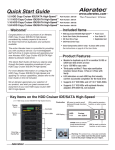
Key Items – 1:11 USB Copy Cruiser SA
Controller and
Display Panel
Power Switch
Source USB Port
Target USB Ports
(11)
Note: Choose a Good Location
1. Do not place near heat sources such as radiators or air ducts, or in a
place subject to direct sunlight, excessive dust, mechanical vibration or
shock.
2. Good care will help assure maximum product life. Improper operating
environment and misuse may void the warranty.
www.aleratec.com
1