1
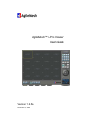
i-Pro Viewer
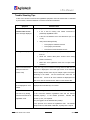
Trouble Shooting Tips
If video from cameras connected into AgileMesh equipment cannot be viewed and or controlled
by I-Pro Viewer, check the follow list of common issues and resolutions.
Symptom
“Cannot find the
network video server”
Possible cause
Can you ping 192.168.225.150?
•
error message displayed
If not, is the PC running I-Pro Viewer connected to
powered up AgileMesh node?
•
Is the PC LAN address set to 192.168.224.XX (10 <= X
<= 20)
•
“No Signal” displayed
•
Verify server Manager Setup
o
Is the proper IP address entered?
o
Is the proper port entered?
o
Is the User ID and Password correct?
Battery voltage is too low, recharge the battery or power
from AC.
•
Check the camera cable (does camera move during
power-on-self-test?)
•
Make sure each AgileMesh nodes set to unique Node
numbers?
Users connected shows
If only one copy of i-Pro Viewer is running and more than one (of
3/20 (more than the
20) users is displayed in the lower right corner of an individual
normal 1/20)
camera display window, there may be multiple copies of the video
streaming to the viewer.
cameras view.
On the General Tab, select the 16
If some or all of the cameras are displayed more
than once, click the “All Disconnect” button on the General Tab.
Video from an IP camera
Only analog cameras connected to AgileMesh nodes can be
is not displayed on I-Pro
displayed and controlled by I-Pro Viewer.
Viewer
Pan/Tilt/Zoom Controls do
Does the analog camera have Pan/Tilt/Zoom functionality?
not work on my analog
Is the connection between AgileMesh node and the camera
camera connected to an
installed properly?
AgileMesh node.
controls (+ and -) are required.
Is the camera powered?
RS-485 PTZ
Are you logged in as the Administrator (admin)?
Is the protocol set to match the AgileMesh node.
The default
setup is Pelco-D, 2400 baud, 8 data bits, no parity and 1 stop bit.
i-PRO Viewer User’s Guide
21/23