1
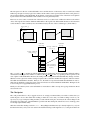
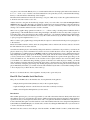
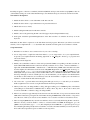
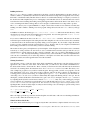
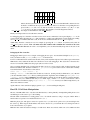
easy place to start. The main difficulty is for you to understand both how mode X maps pixels and how the abstractions
in modex.c work, so try to read the code and documentation to the point that you feel you understand these things,
then try to write the function with the help of the examples.
Find the VGA documentation for the status bar. Doing so was part of PS2, and you can work together and discuss how
it should be done, but not trade code to do it.
Add the status bar to the game. It should be big enough to allow you to write a line of text with an extra pixel above
and below. How big is that? Read the code. Defined constants have been cleverly included to reduce the amount of
work for you (see IMAGE versus SCROLL dimensions in the code), but you will have to shift a couple of bits of the
existing code around here and there because of VGA constraints.
Write a text to graphics image generation routine in text.c. Given a string, it should produce a buffer that holds a
graphical image of the ASCII characters in the string. The height of the buffer is fixed. You may either (a) figure out
how much text fits on the status bar and produce a buffer of fixed-size, or (b) return the resulting image width. In either
case, the text must be centered on the bar, in case (a) by this routine, and in case (b) by the next routine. Don’t forget
to put a prototype and explanation into text.h.
Write a routine to put a graphic image, and in particular, the output of routine described in the previous paragraph, on
to the status bar.
Put the level number, number of fruits, and clock (using minutes and seconds since the level was started, as shown in
the demonstration version) on the status bar.
You will notice that the player is surrounded by black pixels and leaves a trail in the code provided to you, whereas the
player is drawn on top of the normal maze floor and does not leave a trail in the demo version of the game. This effect
is accomplished by a technique known as masking, in which a separate mask image is used to differentiate between
fully transparent and fully opaque pixels in the image of the player. The blocks for the mask have been provided to
you, but you must write a routine to use the mask to determine which pixels are copied from the player image to the
screen, and which are not. You should store the old values for those pixels written to the screen in a buffer, which
you can think of as a third block image holding a picture of the maze floor under the player. Finally, you should
write an undraw routine that takes the mask and the pixel values copied from the floor and puts them back into the
screen, effectively erasing the player image. By drawing the player just before showing the screen and erasing the
player immediately afterwards, you can then create the effect illustrated by the demo version while retaining freedom
to move the player as you like in the rest of the event loop.
Be sure to look ahead at the rest of the assignment. You may want to get an early start.
Final CP: Tux Controller Serial Port Device
This portion of the MP is due on the final due date. Your requirements in the game are:
• Display the elapsed level time (minutes.seconds) on the 7-segment displays.
• Up/down/left/right on the tux controller have the same affect as the keyboard’s keys.
• Make some VGA palette manipulations (see next section)
Introduction:
This machine problem gives you several opportunities to work with software that interacts directly with devices and
must adhere to the protocols specified by those devices. Similar problems arise when one must meet software interface
specifications, but you need experience with both in order to recognize the similarities and differences. The Tux Controller is that funny little game controller attached to each of the machines in the lab. It was designed and implemented
by Kevin Bassett and Mark Murphy, two students who took this class during the 2004-2005 school year, and went on
to work as lab assistants for the class.
The Tux Controller connects to the USB port of the lab machine. An FTDI “Virtual Com Port” (VCP) driver makes