1
Preparing the DataRAM for Field Operation
Charging the Battery
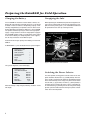
Uncapping the Inlet
If the DataRAM has not been used for about 3 months, the
battery will need to be fully recharged. Plug it into a 120-volt line
for about 12 hours to restore it to full operating capacity. A new
and fully charged battery can provide at least 20 hours of continuous operation at temperatures above 60 °F. The DataRAM
can operate continuously using its universal charger/power
supply—simply attach the universal charger/power supply to
the DataRAM and plug it into a 120-volt power source. Never
let the internal battery run completely down. If this happens,
the unit may need to be sent to MIE for repair.
Before operating the DataRAM, the protective Swagelok stem
cap must be removed from the air inlet and stored on the gray
pod on the back panel (figure 3). The DataRAM should never
be operated with the stem cap covering the inlet.
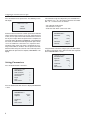
To determine the charge capacity of the battery, turn the DataRAM on.
Inlet with protective Swagelok cap
Universal
charger/
power
supply
Span Check
calibrator knob
Power selector
switch
At ‘MAIN MENU 1’, press the button next to ‘System Diagnos’.
14:02:19 01 Oct
MAIN MENU 1
RUN (zeroed?)
System Diagnos
Parameters
Purge
Zero
Next Screen
>
>
>
>
>
>
RS-232 cable
to laptop
Store Swagelok
on this keeper
RS-232 serial output cable
(gray nine-pin communication cable)
Figure 3—Back-panel view of the DataRAM.
The system diagnostic screen will display.
14:02:19 01 Oct
SYSTEM DIAGNOST
Filter
Normal
Battery
Normal
Backgrnd
Normal
Flow
Normal
BatChrg
12345
Flowrate2.0
Lpm
When the battery is fully charged, ‘BatChrg’ numbers ‘12345’
will display.
4
Switching the Power Selector
The three-position, locking power-selector switch on the rear
panel should be switched ‘OFF (0)’ (middle position) when the
unit is stored or transported. To enable the DataRAM to operate
with its internal battery or the charger, the power selector switch
must be ‘ON (1)’ (up position). The ‘EXT (1)’ (down position) is
used only when an external dc source (such as solar power or
an external battery) is powering the unit. To change the locking
position, pull the handle out while moving the power selector
switch to the desired position.