1
GORAMO – Janusz Górecki
MultiLink Router and MikroRouter
page 22 from 41
For modems understand the hardware that is supported by applications pppd. Modems are visible in
the interface as a device ppp0, ppp1, etc.
Traditional modems can be supported by built-in RS-232 ports, with speeds from 1,200 to 921,600
bits/s
By default, the router is installed modems 232 Server - which allows you to receive connections via
RS232 and RS232 Client - that lets you connect over the RS232 connection to your router on which is
running the modem 232server.
The connection using the GUI can be compiled only on port ttyS1 - because port ttyS0 are used for
logging by the RS-232 console.
4.10 Configuring access gateways: Gateways, Complex Gateway
(load balancing)
Computers that provides the Internet are called "gateways." The graphical interface allows you to
operate at Internet gateways as defined in the tab Gateways and the gateway "Gateway Complex" as
defined in the Complex Gateway tab. Gateways defined in the tab Gateways called simple gates, the
gate defined in the Complex Gateway gate complex. Gateways easily define Internet access points, the
complex gateways allows access to internet by several gateways simultaneously.
4.10.1
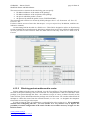
Defining simple gateways.
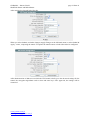
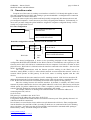
Each Internet gateway must have its own unique name in the system. You can not define the two
gates of the same name, because an interface could not choose, which gateway to use. Each gateway,
we can assign an IP address. We can assign the same IP gateways with different names, if we consider
that this will help us setup. For each gateway, we can also specify a network interface, in which they
work. If there is no need for attachment to a particular gateway network interface and gateway IP
address uniquely identify a network interface gateway - we can choose an automatic search of
interface, setting the field of Gateway Interface to Autodetect
www.goramo.com.pl
[email protected]