1
WDT 3200 Product Reference Guide
Table of Contents
Chapter 1. WDT3200 Introduction ..................................... 3
Overview........................................................................................................................ 3
Support........................................................................................................................... 3
Warranty ........................................................................................................................ 4
Regulatory ..................................................................................................................... 4
WDT3200 Model Specification................................................................................... 5
WDT3200 Accessories ................................................................................................ 6
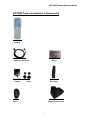
WDT3200 Product Introduction & Accessory Kit..................................................... 7
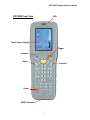
WDT3200 Front View .................................................................................................. 8
WDT3200 Back View................................................................................................... 9
Before You Begin Using Your WDT3200 ................................................................ 10
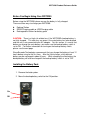
Installing the Battery Pack ........................................................................................ 10
Supplying Power to the WDT3200 ...........................................................................11
Using the WDT3200 for the First Time ....................................................................11
Chapter 2.
Using the Keypad and Scanner .................. 14
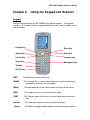
Keypad ......................................................................................................................... 14
WDT3200 HotKeys .................................................................................................... 15
Software Keyboard (Windows CE Keyboard)........................................................ 16
Other Character Support from WinCE Keyboard:................................................. 16
The Bar Code Scanner.............................................................................................. 17
Charging the Lithium-Ion Battery Pack................................................................... 17
Charging the Main and Backup Battery for the First Time................................... 17
Environmental Consideration for Charging ............................................................ 17
Power Status Indication............................................................................................. 18
How to Save Battery Power...................................................................................... 18
Storage and Safety Precautions .............................................................................. 19
Backlight Setting......................................................................................................... 19
Warm Boot / Cold Boot.............................................................................................. 20
Chapter 4. Data Communication...................................... 22
Introduction.................................................................................................................. 22
Connecting the Serial or USB Cable....................................................................... 22
Docking Station........................................................................................................... 23
RF Communication .................................................................................................... 23
Using ActiveSync........................................................................................................ 24
Using the Mobile Devices Window .......................................................................... 25
Changing Communications Settings ....................................................................... 26
Chapter 5. Useful Utilities................................................. 27
Introduction.................................................................................................................. 27
Scanner Setting .......................................................................................................... 27
Scan2Key .................................................................................................................... 27
Registry Backup/Restore .......................................................................................... 28
2