1
WDT 3200 Product Reference Guide
Chapter 4. Data Communication
Introduction
The WDT3200 allows you to link to a host computer via RS-232 / USB, Bluetooth,
or Wireless connection for data communication.
This chapter provides an overview of the communication of the WDT3200.
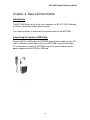
Connecting the Serial or USB Cable
Plug the RS232 or USB end of the WDT3200 communication cable into your PC's
Com or USB port, and the other end into the WDT3200's communication port.
To simultaneously charge the WDT3200, plug the AC power adaptor into the
power receptacle on the RS232 or USB plug.
22