1
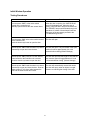
Issue
When the beam is
broken, the door does
not open. The red
“POWER” and “BEAM
BREAK” lights and the
green “MOTOR RUN”
light on the
CONTROLLER unit are
“ON”.
Probable Cause
Resolution
•
Defective motor assembly
Ø To test for a defective motor,
open and close the door with
the power “OFF”.
If the motor is faulty, the
red/green “MOTOR RUN”
lamp will not illuminate
•
Replace the motor assembly
•
Solenoid latch in the door is stuck
or defective
Ø To test for a defective
solenoid, manually open the
door halfway and break the
beam. The solenoid should
retract the hook and the door
should open, pause and close.
Break the beam again to verify
that the door are not opening
•
Replace the solenoid
Ø Check the wiring to the
solenoid
Beam Break Lamp is
“ON” and the door open,
but they do not close.
The door closes fully but
open back up as soon as
the door comes in
contact with the frame.
•
Defective components on the
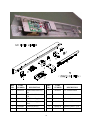
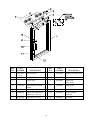
cable drive assembly. (“S” hook,
cable, spring, chain, bearing
•
Replace the defective component
•
Loose or broken wires
•
Secure or Replace the cable assembly
•
Defective electric eye assembly
Ø Disconnect the cable for the
electric eye and press the
“BEAM TEST” button. If the
door operate properly the eye
is defective
•
Replace the eye assembly
•
Defective PCB assembly
Ø Disconnect the cable for the
electric eye and press the
“BEAM TEST” button. If the
door do not operate properly
the PCB is defective
•
Replace the PCB assembly
•
Loose or broken wires to the limit
switches or the PCB assembly
•
Secure or replace the cable assembly
•
Limit switch striker is loose or out
of alignment
•
Tighten and/or align the striker plate
•
Defective controller unit
•
Replace the controller unit
•
Loose Cable and Chain
•
Tighten the cable pulley
30