1
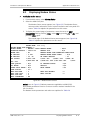
Installation and Operation Manual Chapter 5 Troubleshooting and Diagnostics The following are the BERT test patterns that can be selected: • 2E15-1 • Mark • Space • Alternate BERT has a possible Single Error injection only. The BERT performance counters are as follows: • BERT Error bits – the total number of bit errors detected • BERT run time – the total time the test is running in seconds • Bert error seconds – the total number of seconds in which errors have been detected – in seconds • BERT Sync Loss – the number of times Sync Loss was detected since BERT started to run • BERT result – the number of error bits divided with the total number of data bits. This item holds 1 byte for the exponent and 2 bytes for the mantissa holding 1 byte before the period and 1 byte after the period • BERT Sync Loss state – the Sync Status while BERT runs. The BERT Sync Loss state has the following values: • SyncLoss = OFF Sync = ON BERT sync run time – the total number of seconds in which sync have been detected – in seconds. 5.6 Frequently Asked Questions Question: Why can’t I access some fields in the CM-2 Terminal Management screens? Answer: In the menus of CM-2, there are some parameters you CAN change in each menu, and there are some parameters that you can NOT change in each menu. This is because the CM-2 manages many different modems, and at RAD we designed one single interface for all the modem cards inside the LRS-24, no matter which modem is being managed. That is why you will see that some parameters are inaccessible for you (because they are accessible for other modems, not ASMi-52CD, for example). Please remember to navigate the menus via the TAB key, and to change values by pressing the "f" (forward) key, and the "b" (backward) key. Press ‘Enter’ to select the desired value. Question: How does LRS-24 manage ASMi-52 cards? ASMi-52CQ Ver. 2.12 Frequently Asked Questions 5-13