1
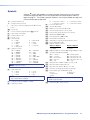
Command and Response Table for SIS Commands (continued)
Command Function
SIS Command
Response
(Host to Unit)
(Unit to Host)
Additional description
Set audio gain and attenuation
NOTE: The set gain (G) and set attenuation command (g) are case sensitive. The increment, decrement and view commands are not
case sensitive.
Set gain
Example:
Set attenuation
Increment level
Decrement level
View audio level
Example:
X!*X2#G
Set gain for input X! to X2# dB.
Set gain for input 4 to 3 dB.
4G
X!AudX2@]
4Aud+•3]
X!AudX2@]
X!AudX2@]
X!AudX2@]
X2@]
–•3]
X@*1Z
X@*0Z
X@Z
X@AmtX#]
X@AmtX#]
X#]
Mute the X@ audio output.
Unmute the X@ audio output.
Audio mute is X# for X@ output.
Adjustments and selections can
be made from the front panel.
Lock front panel adjustments;
adjust image via RS-232 only.
Show executive mode status.
Executive mode is off.
4*3G
X!*X2$g
X!+G
X!–G
X!g
Set attenuation for input X! to –X2@ dB.
Increase input X! audio level by +1 dB.
Decrease input X! audio level by –1 dB.
View gain for input X!.
The ISM reports that the input 4 audio
level is at –3 dB of attenuation.
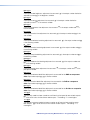
Audio mute
Audio mute on
Audio mute off
View audio mute status
Front panel security lockout (Executive mode)
Disable
0X
Exe0]
Enable (lock image adjustments)
1X
Exe1]
View the executive mode status
Example:
X
X
X#]
0]
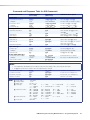
Verbose mode
NOTE: The default for verbose mode is on for the RS-232 connection and off for Ethernet connections.
Disable (block reports)
E0CV}
Vrb0]
Turn off verbose mode. The ISM does
not send the reports listed in Switcherinitiated messages earlier in this
chapter.
NOTE: Disabling verbose mode blocks reports for front panel operations only, to this connection (RS-232 or Ethernet) only. The ISM
continues to send responses to SIS commands to all ports. The ISM continues to send reports for front panel operations to other
connections.
Enable (allow reports)
E1CV}
Vrb1]
View the verbose mode status
Example:
ECV}
ECV}
X#]
1]
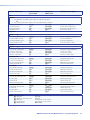
NOTE: X! = Input number
X@ = Output number
X# = Freeze and front panel lock status
X2# = Gain/attenuation
X2$ = Gain value
X2% = Attenuation value
Turn on verbose mode. The ISM sends
all reports.
Show verbose mode status.
Verbose mode is on (the ISM ISMues
reports).
1 through 8
1 or 2
0 = off, 1 = on
-24dB to +•9dB, each step = 1 dB
Numeric dB value, 0 to +9
Numeric dB value, –1 to –24
ISM 482 Integrated Scaling Matrix Switcher • Programming Guide
42