1
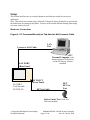
Table of Contents Table of Contents .......................................................................................................................... 2 About This Tutorial ...................................................................................................................... 4 Introduction ................................................................................................................................... 4 Equipment Required for this Tutorial ........................................................................................ 5 Test Set.....................................................................................................................................................5 Wireless Device .......................................................................................................................................5 Personal Computer (PC) ........................................................................................................................5 WAP Gateway software (for data connection evaluations).................................................................5 Cables.......................................................................................................................................................5 Setup ............................................................................................................................................... 7 Hardware Connections...........................................................................................................................7 Figure 1. PC Connected Directly to Test Set via LAN Crossover Cable ........................................................... 7 Test Set Setup ..........................................................................................................................................8 Set the Date and Time (Optional)..........................................................................................................9 Set the RF In/Out Amplitude.................................................................................................................9 Set the Cell Parameters ..........................................................................................................................9 PC Setup ................................................................................................................................................10 Windows 98....................................................................................................................................................... 10 Windows 2000................................................................................................................................................... 12 Verify PC Settings.................................................................................................................................13 Verify that Your Device Will Perform an Attach.............................................................................................. 14 Set Up Your Wireless Device............................................................................................................................ 14 Set WAPlite Gateway Address in Your Device ................................................................................................ 15 E6701A Features Using a Direct Connection Between the PC and Test Set ......................... 17 Product Feature: Screen Image Capture............................................................................................17 Product Feature: Protocol Logging.....................................................................................................17 View the log data on the PC .............................................................................................................................. 18 Save the Log to the PC ...................................................................................................................................... 18 View the saved log ............................................................................................................................................ 19 Log Data Using the Test Set’s Front Panel........................................................................................................ 19 Product Feature: Ping ..........................................................................................................................20 Product Feature: Data Channel ..........................................................................................................22 To run the Infinite WAPlite Proxy Gateway software on your PC: .................................................................. 22 To browse the WAPLite gateway with the phone: ............................................................................................ 22 To log the IP datagrams while you browse the WAPLite gateway with the phone:.......................................... 23 Product Feature: Additional Connection Parameters.......................................................................23 Copyright 2002 Agilent Technologies. All Rights Reserved. 10001809-E6701A Tutorial Direct Connection Page 2 of 30 Rev. 1.0; Feb. 19, 2002