1
Preferences
64
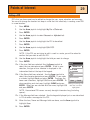
Selecting Languages
The eXplorist can be set to display information from any one of ten different langauges. You
can select from English, Français (French), Deutsch (German), Nederlands (Dutch), Suomi
(Finnish), Español (Spanish), Italiano (Italian), Português (Portuguese), Svenska (Swedish)
and Norsk (Norwegian).
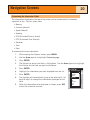
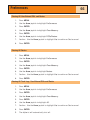
Selecting the Language for Your eXplorist
1.
Press MENU.
2.
Use the Arrow joystick to highlight Preferences.
3.
Press ENTER.
4.
Use the Arrow joystick to highlight Language.
5.
Press ENTER.
6.
Use the Arrow joystick to selecte the language desired.
7.
Press ENTER.
Language
English
Français
Deutsch
Nederlands
Suomi
Español
Italiano
Português
Svenska
Norsk