1
EPL-7000 LASER PRINTER
.****.**
Note: If you have used SelecType before, and if the printer is
set up to use both channels, the following option appears on the
display:
Press m or I,( to choose your channel, then go on to step
3.
3.
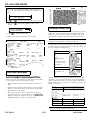
Hold down m until STATUS SHEET appears on the
display.
+SjnTl-iS SHEET
0000
0001
0002
0003
0004
0005
0006
0007
0008
0009
OOOA
OOOB
000C
000D
H E X D U M P L I S T ********
1s 52 10 18 43 45 18 6B 00 LB 70 00 18 63 OC IE
74 01 18 32 54 72 6F 15 62 6C 65 20 73 68 SF 6F
74 69 6E 67 20 20 20 20 20 00 DA 54 66 69 73 20
63 68 61
73 20 70
61 79 20
20 74 66
6C 75 74
6, 6E 20
20 79 6F
65 20 6F
20 00 OA
79 20 6F
20 10 61
70 ,1 65 72 20 64 69
72 6F 62 6C 65 60 73
65 6E 63 SF 75 6E 74
65 69 72 20 6C 69 68
69
65
75
66
69
6E
6E
6F
72
72
20
73
20
65
6E
72
20
69
20
74
SC
73
6F
62
SE
74
66
2E
2E
72
65
66
66
65
20
20
20
73
6F
65
20
00
73 63 75 73 73 65
20 79 6F 75 20 60
65 72 20 61 6E 64
65 6C 79 20 73 6F
00 OA 00 OA 49 66 20
6F 63 63 75 72 73 2C
74
72
20
63
OA
20
60
6,
6F
73
61
69
6E
6F
74
73
74
75
69
70
72
72 63
6F 6E
6C 61
6F 6C
Choosing a Paper Size
b
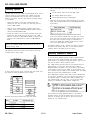
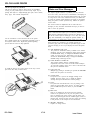
The printer can feed several sizes of paper automatically. To select
a paper size, simply change the paper size (P-SIZE) setting with
SelecType. You may also need to adjust the paper guides on the
paper cassette to match the size of the paper you want to use.
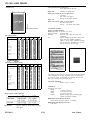
4. Press 1,1 to print the status sheet.
A portion of the status sheet printout is shown below
Note: If you are using the optional lower paper cassette, see
Appendix A for instructions on selecting a paper size.
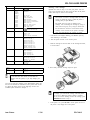
The table below lists all of the paper sizes on the SelecType menu.
Not all the sizes in this table are marked on the paper cassette, just
the more commonly used paper sizes.
Using Data Dump Mode
Data dump mode is a special feature that makes it easy for
experienced users to find the cause of communication problems
between the printer and computer. The data dump mode produces
an exact printout of the codes reaching the printer.
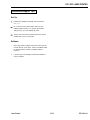
1. Make sure that the printer is turned off and is loaded with
paper.
2.
Hold down the SelecType button while you turn on the printer
Make sure you hold the button down until the message HEX
DUMP appears on the display.
3.
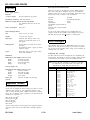
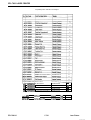
Run any program that causes the printer to print (either an
application program or a program written in any programmmg
language). Your printer prints out all of the codes sent to it in
hexadecimal format as shown in the sample below.
Paper
Dmemons
A4
A5
B5
LETTER
HALF LT (Half letter)
LEGAL
GLT (Government Letter)
GLG (Government legal)
EXE (Executive)
F4
210 y 297 mm
'48 . 210 mm
182 T 257 mm
8 112 n 11 mches
5 112 ‘- 8 1.:2 rxnes
8 112 q 14 Inches
8 A 10 1’2 IfICheS
85 i 13mches
7 114 x 10 l/2 Inches
210 y 330 mm
Envelopes
Dimensions
MONARCH
C10 (Commercial - 10)
DL
C5
3
710 .
7 112 lnmes
4 118 A 3 142 'PC-es
110 x 220 mm
162 * 229 mm
You will probably use one paper size most of the time. For your
convenience, you can use the SelecType Level 1 SAVE MACRO
option so that the paper size you use most often is automatically
selected whenever you turn on, reset, or initialize your printer. See
Chapter 3 for details.
Envelopes
Transparencies
labels
Manual or auto
Face-up or face-awn
Manual
Face-up or face-down
Manual
Face-up
Note: To print on letterhead paper, load the paper face-up with 1
the top of the page entering the printer first.
EPL-7000-12
1/7/91
Laser Printers