1
User Guide
Prodipe 49 C / 25 C
Copyright © 2008 IPE Music
Precaution
Thank you for purchasing this digital appliance. To ensure perfect operation and security,
please read the manual carefully and retain it for future reference.
Safety Precautions
The lightning flash with the arrowhead symbol in an equilateral triangle is intended to
alert the user to the presence of non-insulated “dangerous voltage” inside the appliance
that may be of sufficient magnitude to constitute a risk of electric shock.
The exclamation point within an equilateral triangle is intended to alert the user to the
presence of important operating and maintenance (servicing) instructions in the
literature accompanying the product.
Important Safety Instructions
1)
2)
3)
4)
5)
6)
7)
8)
9)
10)
11)
12)
13)
14)
Read these instructions.
Retain these instructions.
Heed all warnings.
Follow all instructions.
Do not use this appliance near water.
Clean only with a dry cloth.
Do not block any of the ventilation openings that were installed in accordance with the manufacturer’s
instructions.
Do not install near any heat sources such as radiators, heat registers, stoves, or other appliances
(including amplifiers) that produce heat.
Do not defeat the safety purpose of the polarized or grounding-type plug. A polarized plug has two
blades with one wider than the other. A grounding type plug has two blades and a third grounding prong.
The wide blade or the third prong is provided for your safety. If the plug provided does not fit into your
outlet, consult an electrician to ensure replacement of the obsolete outlet.
Protect the power cord from being walked on or pinched, particularly at plugs, convenience receptacles,
and the point where it exits from the appliance.
Only use attachments/accessories specified by the manufacturer.
Use only with the cart, stand, tripod, bracket, or table specified by the manufacturer, or sold with the
appliance. If using a cart, be careful when moving the cart/appliance combination to avoid injury from
tip-over (Figure 1).
Unplug this appliance during lightning storms or when unused for long periods of time.
Refer all servicing to qualified service personnel. Servicing is required when the appliance has been
damaged in any way, for example, the power-supply cord or plug is damaged, liquid has been spilled or
objects have fallen inside the appliance, the appliance has been exposed to rain or moisture, does not
operate normally, or has been dropped.
WARNING: To reduce the risk of fire or electric shock, do not expose this appliance to rain or moisture.
CAUTION: The appliance should not be exposed to drips or splashes of water. Objects filled with liquids, such
as vases, should not be placed on the appliance.
Copyright © 2008 IPE Music
Contents :
•
Introduction
Features ............................................................................ 1
•
Operation
Front panel ......................................................................... 2
Rear panel.......................................................................... 3
Connection / Power / Control
Assign controllers
Pedal resistance curve (49 C only) ............................................... 4
Tempo (49 C only)
Program change
Midi channel ....................................................................... 5
Transpose
Octave
Dual
Split (49 C only) ..................................................................... 6
Split point (49 C only)
MTC (Midi Time Code)
Active sensing (49 C only)
Lock
Mute
Snap shot
Upload / download................................................................ 7
Pedal polarity (49 C only)
Switch dial function groups
All notes off ........................................................................ 9
All sound off (49 C only)
Reset all controllers
GM/GS/XG On (25 C only)
GM On, GM2 On, GM2 On, GS On ,XG On ( 49 C only)
Preset (49 C only)
Clean ( 49 C only)
Reset
•
Appendix
Assignable controller list........................................................ 11
Assignable controller parameter list
LED status list..................................................................... 13
Technical specifications......................................................... 14
Package's content :
•
•
•
•
Prodipe 49 C/ 25 C keyboard
USB cable
Accompanying CD
This user guide
Non-contractual picture
Copyright © 2008 IPE Music
Thanks for having purchased this product.
For an optimal use of your product, please read the manual carefully and retain it for
future reference.
Introduction
49 C is a 49 key (25 C is a 25 key) USB-MIDI Controller, which supplies with professional
keyboard of initial touch and profuse assignable controllers. It satisfies the needs of
portability, play, control, etc…
Features
•
•
•
•
•
•
•
•
•
•
•
•
•
•
•
•
49 or 25 keys with initial touch.
(49 C): 2 x Assignable pedal interfaces (Pedal A, Pedal B), compatible with switch
pedal and continuous pedal. It can be assigned as 152 controllers.
(25 C): 1 x Assignable pedal interface (Pedal B), compatible with switch pedal and
continuous pedal. It can be assigned as 152 controllers.
1 x Assignable slider (SLIDER), which can be assigned as 148 controllers.
Pitch Bend Wheel and Modulation Wheel (WHEEL P and WHEEL M), which can be
assigned as 148 controllers.
2 x Assignable data buttons (DATA +/-), which can be assigned as 160 controllers.
1 x Edit button (EDIT), switch play and edit status.
1 x Dial function group switching button (SWITCH).
4 x Assignable dials, which can accomplish two groups of functions (R1~R4 and
R5~R8) with each dial distributed to an independent channel. These dials can be
assigned as 160 controllers.
5 x Keyboard velocity curve
PC upload and download, useful for user setting save and transfer.
Multi-functional keyboard, which can provide functions such as voice adjustment,
dual, touch sensitivity adjustment, split, tempo, mute, snap shot, etc.
1 x MIDI OUT.
USB interface, adaptable to USB 1.1. Power supply by USB and DC 9V (optional).
Compatible with Win XP/Vista and Mac OSX, drive free and hot plug supporting.
Compatible with major audio and sequencer software, such as Cubase and
Cakewalk.
Copyright © 2008 IPE Music
1
Operations
Front panel
5
10
6
1
11
13
4
12
3
7
8
9
2
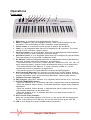
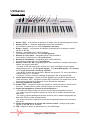
1. Edit button: It is to open/close keyboard multi-function.
2. DATA +/- buttons: They are assignable buttons, which could be assigned as 160
controllers. The initial setting is 154th controller: octave adjustment.
3. Switch button: It is to switch function groups of dials R1~R4 and R5~R8.
4. Slider: It is an assignable fader that can be assigned as 148 controllers. The initial
setting is 147th controller: master volume.
5. Pitch bend wheel: It is an assignable wheel that can be assigned as 148 controllers.
The initial setting is 146th controller: pitch bend wheel.
6. Modulation wheel: It is an assignable wheel that can be assigned as 148 controllers.
The initial setting is 1st controller: modulation wheel.
7. R1~R8 Dials: These are assignable dials with an independent channel distributed to
each dial, and each dial can be assigned as 160 controllers.
* The initial channel of R1~R4 is 0, initial controller numbers are 152, 153, 156, 157,
which controls program, channel, tempo and keyboard velocity curve respectively.
* The initial channels of R5~R8 are 0~3, initial controller number is 7, which
controls the volume of channels 0~3 respectively.
* The function group of R1~R4 and R5~R8 is switched by SWITCH button.
8. Multi-functional Keyboard: This function is turned on/off by EDIT button. When it
is on, the keyboard provides functions shown printed above the keyboard, including
program adjustment, dual, touch sensitivity adjustment, numeric pads, and etc.
9. Constant Controller Parameter
10. EDIT Indicator: When EDIT indicator is on, keyboard multi-function is on, vice versa.
11. OCTAVE/TRANSPOSE Indicator:
* When the indicator is on, it indicates that there’s upper/lower octave adjustment.
* When the indicator flickers slowly, it indicates that there’s upper/lower transpose
adjustment.
* When the indicator flickers quickly, it indicates that there’s upper/lower octave
and transpose adjustment at the same time.
* When the indicator is off, it indicates that there’s no upper/lower octave nor
transpose adjustment.
12. Dial Function Group Indicator:
When the corresponding indicator of R1~R4 is on, the current dial function group is
R1~R4; if the indicator of R5~R8 is on, the current dial function group is R5~R8.
13. LED: It is to display the current number/status information.
Copyright © 2008 IPE Music
2
Rear panel
1
2
3
4
5
6
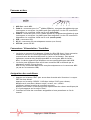
1. MIDI Out: MIDI output interface.
2. Pedal A: PEDAL A input interface, which can connect to pedals of both switching
type and continuous type. It can be assigned as 152 controllers; the initial setting is
soft pedal.
3. Pedal B: PEDAL B input interface, which can connect to pedals of both switching
type and continuous type. It can be assigned as 152 controllers; the initial setting is
sustain pedal.
4. USB : USB interface
5. DC 9V : 9V power input interface (optional)
6. OFF/ON : Power Off/On
Connection / Power / Control
9 The keyboard gets connected to PC via the USB cable. This connection powers the
keyboard and is used to transfer the MIDI data to PC. In addition, you can connect
to other devices such as a sound module to send out MIDI data via MIDI output port.
The USB interface of 49 C displays in PC as USB Audio Device.
9 The keyboard can also be used when connected to an optional 9V DC power supply.
In this case the MIDI data will only be sent out via the MIDI output port.
Assign controllers
9 Press EDIT button to enter keyboard multi-function mode, the indicator of EDIT is
on.
Press ASSIGN button to enter controller assignment mode, LED shows CHO,
reminding the user to choose the controller that needs to be assigned. Operate the
very controller to select it (For example, if you want to assign SLIDER, slide the
SLIDER to select), the LED shows the controller number of the selected controller,
input the desired assignable parameter value with numeric pad, and press ENTER to
confirm (for example, if Slider is selected, input 147 and the Slider is assigned as
Master Volume Controller).
9 Assignable controllers reference: Appendix 1- Assignable controller List
9 Assignable controller parameters reference: Appendix 2-Assignable Controller
Parameter List.
Copyright © 2008 IPE Music
3
Pedal resistance curve (49 C only)
9 You can adjust the pedal resistance curve to better work with pedals of different
specifications and resistance values.
9 Estimate resistance curve value: Value of PA CURVE or PB CURVE= (128*pedal
resistance value) / (10K+pedal resistance value). For instance, if the pedal
resistance value is 10K, the value of PA CURVE or PB CURVE is: 128*10K/ (10K+10K)
=64.
9 For pedal resistance value, please refer to the technical specifications provided by
pedal manufacturer.
9 The resistance curve estimation does not need to be very accurate, or you could
simply adjust it without calculation, as long as the travel and succession of the
pedal satisfy your needs.
9 The initial value of resistance curve is 64, adaptable to most pedals in the market.
9 When you use switching type pedal, the recommended resistance curve value is 64.
9 When DATA +/- is assigned as PA CURVE or PB CURVE, DATA +/- can be used to
adjust resistance curve values. Press two buttons of DATA +/- at the same time to
set the resistance curve value to initial 64.
9 When the dials (R1~R4 or R5~R8)are assigned as PA CURVE or PB CURVE, they can
be used to adjust pedal resistance value.
9 Press EDIT button to enter keyboard multi-function mode, press PA CURVE or PB
CURVE multi-functional keys to enter pedal resistance curve adjustment mode,
input the pedal resistance value with numeric pad, then press ENTER to confirm.
Tempo (49 C only)
9 Which adjust the tempo of MIDI Time Code (MTC).
9 When DATA +/- is assigned as TEMPO, it can be used to adjust tempo. Press DATA
+/- at the same time to set the tempo to initial 100.
9 When the dials (R1~R4 or R5~R8) are assigned as TEMPO, they (R1~R4 or R5~R8) can
be used to adjust tempo.
9 Press EDIT button to enter keyboard multi-function mode, press TEMPO to enter
tempo adjustment mode, then input the tempo value with numeric pad, and press
ENTER to confirm.
Program change
9 Voice adjusting function, adjusting the voice of current channel.
9 When DATA +/- is assigned as PROGRAM, DATA +/- can be used to adjust program.
Press DATA +/- at the same time to set the program number to initial 0.
9 When the dials (R1~R4 or R5~R8) are assigned as PROGRAM, they (R1~R4 or R5~R8)
can be used to adjust program.
9 Press EDIT button to enter keyboard multi-function mode, press PROGRAM button to
enter program adjustment mode, then input the program number with numeric pad
and press ENTER to confirm.
Copyright © 2008 IPE Music
4
Midi channel
9 When DATA +/- is assigned as CHANNEL, use DATA +/- to adjust general MIDI
channel. Press DATA +/- buttons at the same time to set general MIDI channel to
initial 0.
9 When dial R1~R4 or R5~R8 are assigned as CHANNEL, use dial R1~R4 or R5~R8 to
adjust general MIDI channel.
9 Global MIDI channel: press EDIT button to enter keyboard multi-function mode, and
then press CHANNEL to enter channel adjustment mode, and then use numeric pad
to enter general MIDI channel number and press ENTER to confirm.
49 C: please read section "Split" to assign different MIDI channels to each section of
the keyboard.
9 R1~R4 or R5~R8 individual MIDI channels : press EDIT button to enter keyboard
multi-function mode, and then press CHANNEL to enter channel adjustment mode.
Operate the desired dial from R1~R4 or R5~R8 to select that dial, and then use
numeric pad to enter the channel number of that dial in current group, and press
ENTER to confirm.
Transpose
9 This function allows the keyboard to change the pitch up/down by semi-tone.
9 When DATA +/- is assigned as TRANSPOSE, use DATA +/- to adjust transpose.
Adjustment range is +/- 12 semitones. Press DATA +/- buttons at the same time to
set transpose to initial 0.
9 Hold EDIT and use DATA +/- to adjust transpose. Adjustment range is +/- 12
semitones. Hold EDIT and DATA +/- at the same time to set transpose to initial 0.
9 When dial R1~R4 or R5~R8 are assigned as TRANSPOSE, use dial R1~R4 or R5~R8 to
adjust transpose. Adjustment range is +/- 12 semitones.
Octave
9 This function allows the keyboard to change the pitch up/down by octave.
9 When DATA +/- is assigned as OCTAVE, use DATA +/- to adjust octave. Adjustment
range is +/- 3 octaves. Press DATA +/- buttons at the same time to set octave to
initial 0.
9 When dial R1~R4 or R5~R8 are assigned as OCTAVE, use dial R1~R4 or R5~R8 to
adjust octave. Adjustment range is +/- 3 octaves.
Dual
9 When Dual is ON, Keyboard/Wheel/Pedal/Slider sends MIDI info of two channels,
with the voice/channel of both channels adjustable.
9 Press EDIT button to enter keyboard multi-function mode, and then press DUAL to
open/close dual function.
9 Dual and keyboard split functions cannot be used simultaneously. Open dual will
turn off keyboard split function.
Copyright © 2008 IPE Music
5
Split (49 C only)
9 When Split is ON, Wheel/Pedal/ Slider sends MIDI info of two channels, the
keyboard is split to right section and left section by the split point, with each
section use a own channel. The voice/channel of both channels is adjustable.
9 Press EDIT button to enter keyboard multi-function mode, and then press SPLIT to
open /close keyboard split function.
9 To choose the MIDI channels for each section, follow these steps :
1) Turn the Split mode OFF and choose the MIDI channel as previously explained.
This channel will be the one used for the LEFT section of the "splitted" keyboard.
2) Turn the Split mode ON, and choose the MIDI channel as previously explained.
This channel will be the one used for the RIGHTsection of the "splitted" keyboard.
9 Dual and keyboard split functions cannot be used simultaneously. Open keyboard
split will turn off dual function.
Split point (49 C only)
9 Default Split Point is the central C (MIDI No. 60). User can choose the Split Point.
9 Press EDIT button to enter keyboard multi-function mode, and then press SPLIT
POINT to select split point. LED displays CHO to remind users to select the split
point, and then press the desired split point note and then that note will be the
new split point.
MTC (Midi Time Code)
9 Press EDIT button to enter keyboard multi-function mode, and then press MTC to
open/close sending MTC message (0xF8).
Active sensing (49 C only)
9 Press EDIT button to enter keyboard multi-function mode, and then press ACTIVE
SENSING to open/close active sensing message (0xFE).
Lock (49 C only)
9 Press EDIT button to enter keyboard multi-function mode, and then press LOCK to
open/close lock function. No other controllers except keyboard can be operated
under Lock mode.).
Mute
9 Press EDIT button to enter keyboard multi-function mode, and then press MUTE to
open/close mute function. No message will be transmitted under Mute mode.
Copyright © 2008 IPE Music
6
Snap shot
9 Press EDIT button to enter keyboard multi-function mode, and then press SNAP
SHOT, DATA +/-, SLIDER, WHEEL, PEDAL, R1~R4 and R5~R8 and etc all together to
transmit those data at one time.
Upload / Download
9 Use USB port to connect with computer can upload or download user parameters:
to upload 49 C / 25 C panel parameters to computer, or, to download the
parameters from computer to the 49 C / 25 C.
9 The transmit messages are system exclusive messages in form of F0……F7.
According to different sequencer software, there are different ways to
receive/send system message: mainly record/playback style and system message
window style.
Details are as follows :
Record Style E.g. Cubase :
From 49 C / 25 C to computer (UPLOAD):
1)
2)
3)
4)
5)
6)
7)
8)
9)
Use USB cable to connect computer and 49 C / 25 C.
Set 49 C / 25 C parameters;
Open a new MIDI project in Cubase.
Select 49 C / 25 C as MIDI input and neglect output.
Uncheck the box – SYSEX in RECORD to validate system message. (FILE->
PREFERENCES-> MIDI-> MIDI FILTER).
Cubase starts to record.
Press EDIT button to enter keyboard multi-function mode, and then press UPLOAD,
49 C / 25 C enters into system message upload mode. LED displays SEu. After
upload completes, LED displays don.
Cubase stops recording.
In Cubase, select MIDI->OPEN LIST EDITOR to find received system message; press
COMMENT to open system message window and use EXPORT to save the message in
*.SYS format.
Record Style E.g. Cubase :
From computer to 49 C / 25 C to computer (DOWNLOAD) :
1)
2)
3)
4)
5)
Use USB cable to connect computer and 49 C/ 25 C.
Open a new MIDI project in Cubase.
Select 49 C / 25 C as MIDI output.
Export saved system message file (*.SYS) into Cubase.
Press EDIT button to enter keyboard multi-function mode, and then press
DOWNLOAD, 49 C / 25 C enters into system message download mode. LED displays
SEd.
6) Cubase starts to playback and transmit system message to 49 C / 25 C.
7) LED displays don after 49 C / 25 C finishes receiving correct system message.
8) System starts SNAP SHOT function to transmit download setting message to sequent
device.
Copyright © 2008 IPE Music
7
System Message Window style E.g. Cakewalk :
From 49 C / 25 C to computer (UPLOAD) :
(Operate 49 C / 25 C in the same way as under Record Style, only different operation in
sequencer software.)
1)
2)
3)
4)
5)
Use USB cable to connect computer and 49 C / 25 C.
Set 49 C / 25 C parameters.
Open a new MIDI project in Cakewalk.
Select 49 C / 25 C as MIDI input and neglect output.
Open system message window: VIEW->SYSX; select a BANK and press the down
arrow; select YOU START DUMP ON INSTRUMENT and then Cakewalk enters into
system message receive mode.
6) Press EDIT button to enter keyboard multi-function mode, and then press UPLOAD,
49 C / 25 C enters into system message upload mode. LED displays SEu. After
upload completes, LED displays don.
7) Use SAVE in Cakewalk to save received message in *.SYS format.
System Message Window style E.g. Cakewalk:
From computer to 49 C / 25 C (DOWNLOAD):
1)
2)
3)
4)
5)
6)
7)
8)
Use USB cable to connect computer and 49 C/ 25 C.
Open a new MIDI project in Cakewalk.
Select 49 C / 25 C as MIDI output
Open system message window: VIEW->SYSX; select a BANK and import saved system
message file.
Press EDIT button to enter keyboard multi-function mode, and then press
DOWNLOAD, 49 C / 25 C enters into system message download mode. LED displays
SEd.
Use Cakewalk system message send function to send system message to 49 C/ 25 C.
LED displays don after 49 C / 25 C finishes receiving correct system message.
System starts SNAP SHOT function to transmit download setting message to sequent
device.
Pedal polarity (49 C only)
9 System can recognize or change pedal polarity. If you want pedal to transmit PEDAL
ON message while pressing the pedal and PEDAL OFF message while releasing the
pedal, you do not need to do any adjustment. Otherwise, you can press down the
pedal while switching on this unit and release the pedal after the unit is turned on.
9 Press EDIT button to enter keyboard multi-function mode, and press PEDAL A
POLARITY or PEDAL B POLARITY to adjust pedal polarity.
Switch dial function groups
9 Press SWITCH to shift dial function group between R1~R4 or R5~R8.
Copyright © 2008 IPE Music
8
All notes off
9 Press EDIT button to enter keyboard multi-function mode, and then press ALL NOTE
OFF to transmit all notes off message (Controller #123), in case of abnormal
constant sound from system or external sound module.
All sound off (49 C only)
9 Press EDIT button to enter keyboard multi-function mode, and then press ALL
SOUND OFF to transmit all sound off MIDI message (Controller #120), in case of
abnormal constant sound from system or external sound module.
Reset all controllers
9 Press EDIT button to enter keyboard multi-function mode, and then press RESET ALL
CONTROLLER to transmit all reset all controllers message (Controller #121).
GM / GS / XG On (25 C only)
9 Press EDIT button to enter keyboard multi-function mode, and then press
GM/GS/XG ON to transmit GM initialization message (F0 7E 7F 09 01 F7), GS
initialization message (F0 41 10 42 12 40 00 7F 00 41 F7), and XG initialization
message (F0 43 10 4C 00 00 7E 00 F7).
GM On (49 C only)
9 Press EDIT button to enter keyboard multi-function mode, and then press GM ON to
transmit GM initialization message (F0 7E 7F 09 01 F7).
GM2 On (49 C only)
9 Press EDIT button to enter keyboard multi-function mode, and then press GM2 ON
to transmit GM2 initialization message (F0 7E 7F 09 03 F7).
GS On (49 C only)
9 Press EDIT button to enter keyboard multi-function mode, and then press GS ON to
transmit GS initialization message (F0 41 10 42 12 40 00 7F 00 41 F7).
XG On (49 C only)
9 Press EDIT button to enter keyboard multi-function mode, and then press XG ON to
transmit XG initialization message (F0 43 10 4C 00 00 7E 00 F7).
Copyright © 2008 IPE Music
9
Preset (49 C only)
9 Press EDIT button to enter keyboard multi-function mode, and then press PRESET to
return to factory preset.
9 System starts SNAP SHOT function to transmit preset to sequent device.
Clean (49 C only)
9 While using numeric pad to enter numbers, press CLEAN button to set the number
to 0.
Reset
9 If not especially mentioned, press DATA +/- buttons at the same time to set
controlled parameter to 0.
Copyright © 2008 IPE Music
10
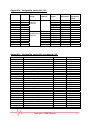
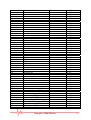
Appendix : Assignable controller list
No.
Item
Channel
range
Initial
channel
Parameter
range
Initial
parameter
1
2
3
4
5
6
7
8
9
10
11
12
13
14
Data +/Slider
Wheel P
Wheel M
Pedal A
Pedal B
R1
R2
R3
R4
R5
R6
R7
R8
0~15
current
channel
0
0~159
0~147
0~147
0~147
0~151
0~151
0~159
0~159
0~159
0~159
0~159
0~159
0~159
0~159
154
147
146
1
64
67
152
153
156
157
7
7
7
7
0
0~15
Independent 0
channel
0
0
0
1
2
3
Initial
parameter
value
0
0
64
0
0
0
0
0
100
0
100
100
100
100
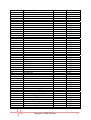
Appendix : Assignable controller parameter list
Controller No
0
1
2
3
4
5
6
7
8
9
10
11
12
13
14-31
32
33
34
35
36
37
38
39
40
41
42
Definition
Bank select MSB
Modulation MSB
Breath MSB
Controller
Foot controller MSB
Portamento time MSB
Data entry MSB
Channel volume MSB
Balance MSB
Controller
Pan MSB
Expression MSB
Effect control 1 MSB
Effect control 2 MSB
Controller
Bank select LSB
Modulation LSB
Breath LSB
Controller
Foot controller LSB
Portamento time LSB
Data entry LSB
Channel volume LSB
Balance LSB
Controller
Pan LSB
Initial Value
0
0
127
0
127
0
2
100
64
0
64
127
0
0
0
0
0
127
0
127
0
0
127
64
0
64
Copyright © 2008 IPE Music
Value range
0-127
0-127
0-127
0-127
0-127
0-127
0-127
0-127
0-127
0-127
0-127
0-127
0-127
0-127
0-127
0-127
0-127
0-127
0-127
0-127
0-127
0-127
0-127
0-127
0-127
0-127
11
43
44-63
64
65
66
67
68
69
70
71
72
73
74
75
76
77
78
79
80-83
84
85-90
91
92
93
94
95
96
97
98
99
100
101
102-119
120
121
122
123
124
125
126
127
128
129
130
131
132
133
134
135
136
137
138
Expression LSB
Controller
Sustain
Portamento
Sostenuto
Soft pedal
Legato footswitch
Hold 2
Sound controller
Resonance
Release time
Attack time
Cutoff
Decay time
Vibrato depth
Vibrato depth
Vibrato depth
Sound controller
Controller
Portamento control
Controller
Reverb
Effects
Chorus
Effects
Effects
RPN Increment
RPN Decrement
NRPN LSB
NRPN MSB
RPN LSB
RPN MSB
Controller
All sound off
Reset all controllers
Local control
All notes off
Omni off
Omni on
Mono
Poly
Pitch bend sensitivity (RPN)
Channel fine tuning (RPN)
Channel coarse tuning (RPN)
Modulation depth range (RPN)
Vibrato rate (RPN)
Vibrato depth (NRPN)
Vibrato delay (NRPN)
Filter cutoff frequency (NRPN)
Filter resonance (NRPN)
EQ low gain (NRPN)
EQ high gain (NRPN)
127
0
0
0
0
0
0
0
64
64
64
64
64
64
64
64
64
64
0
0
0
64
0
0
0
0
0
0
0
0
0
0
0
0
0
0
0
0
0
0
0
2
64
64
64
64
64
64
64
64
64
64
Copyright © 2008 IPE Music
0-127
0-127
0-127
0-127
0-127
0-127
0-127
0-127
0-127
0-127
0-127
0-127
0-127
0-127
0-127
0-127
0-127
0-127
0-127
0-127
0-127
0-127
0-127
0-127
0-127
0-127
0-127
0-127
0-127
0-127
0-127
0-127
0-127
0-127
0-127
0-127
0-127
0-127
0-127
0-127
0-127
0-127
0-127
0-127
0-127
0-127
0-127
0-127
0-127
0-127
0-127
0-127
12
139
140
141
142
143
144
145
146
147
148
149
150
151
152
153
154
155
156
157
158
159
EQ low frequency (NRPN)
EQ high frequency (NRPN)
EG attack time (NRPN)
EG decay time (NRPN)
EG release time (NRPN)
Polyphonic key pressure
After touch
Pitch bend
Master volume
Start (MTC)
Continue (MTC)
Stop (MTC)
Reset (MTC)
Program
Global channel
Octave
Transpose
Tempo
Keyboard curve
Pedal A curve
Pedal B curve
64
64
64
64
64
100
100
64
100
0-127
0-127
0-127
0-127
0-127
0-127
0-127
0-127
0-127
-
0
0
0
0
100
0
64
64
0-127
0-15
-3 ~ +3
-12 ~ +12
20-250
0-4
1-127
1-127
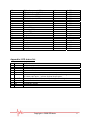
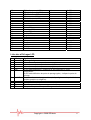
Appendix: LED status list
No
1
2
3
4
5
6
Status
Xxx
Xx
-xx
X
-x
CHO
7
8
9
10
11
ON/OFF
Don
Err
SEu
SEd
Definition
3 digit display
Upper transpose value
Lower transpose value
Upper octave value
Lower octave value
(1) Under assign mode : indicate the controller to be assign.
(2) Under split point : indicate keyboard split point.
Certain function On/Off, or pedal polarity positive/negative
Certain function done
Operation error
Parameters upload
Parameters download
Copyright © 2008 IPE Music
13
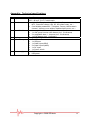
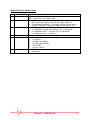
Appendix : Technical specifications
No Item
1
Keyboard
2
Function
3
Panel & indicator
4
5
Display
Input & Output
6
Power supply
Specifications
25 C : 25 keys, C2-C4, Initial touch
49 C: 49 keys, C1-C5, Initial touch
• Midi data : Program select, Bank select, Sequencer control,
MTC, Controller change, GM, GS, XG system reset, etc …
• Controllable parameters : Transpose, Octave, MIDI transmit
channel, Velocity curve adjust, Keyboard split point, etc …
• 4 x assignable dials
• 1 x dial group function shift button (incl. 2 indicators)
• 2 x assignable data +/- buttons (incl. 2 indicators)
• 1 x Edit button (incl. 1 indicator)
8 segments, 3 digits LED.
• 1 x MIDI out
• 1 x USB port
• 1 x Pedal input (25 C)
• 2 x Pedal inputs (49 C)
• 1 x DC input
• 1 x Power switch
• 9V DC
• USB power
Copyright © 2008 IPE Music
14
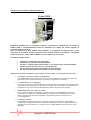
Discover our complementary products:
Finale 2008
The world's best-selling music notation software.
Finale® is the worldwide standard in music publishing. Now the new, easier-to-use
Finale 2008 gives you increased productivity, a richer playback experience, and the
ability to record or import audio files.
From inspiration to applause, Finale 2008 helps you make more music faster.
More information on : www.finalemusic.com
Copyright © 2008 IPE Music
15
Prodipe VE
A professional expander that restores the sound of any instrument extremely accurately.
•
•
more than 300 sounds
no latency
If you only have the sound card that was supplied with your computer, Prodipe VE replaces this
card and transforms your computer into a genuine musical instrument capable of faithfully restoring
the sound of every possible instrument.
For all home-studio buffs, Prodipe VE will add the finishing touch to your equipment without
replacing it. Its complete absence of latency means that you can capture your notes, your demo
recordings and your Midi files in real time on your keyboard and easily obtain the type of color and
style that you want for your music.
Prodipe VE can also be used as a professional expander for live and session work…
Two user modes:
1-“MIDI” Mode
PRODIPE VE is compatible with all appropriate MIDI software: Sequencers (Cubase, Sonar, etc.) - Score
Editors (Finale, Sibelius, PrintMusic!, etc.) - Accompaniment Software (Band in a Box, etc). Its sound
qualities, along with its unlimited polyphony, mean that you can use PRODIPE VE for any kind of musical
project. At last your music can benefit from the exceptional sounds that are available within a truly
professional module installed at the heart of your computer.
2- “Performance” Mode
When you connect a MIDI instrument (such as a master keyboard, a controller keyboard, a digital piano, a
guitar or a MIDI wind controller) to your computer, PRODIPE VE becomes the equivalent of a genuine
electronic musical instrument, capable of restoring the integrality of all the instruments from an orchestra
in real time and without latency. The software functions let you customize or create your own
‘Performances’ (registration) that you can save or call up later.
PRODIPE VE is both supple and easy to use because of its carefully designed and clear graphic interface so
you can use it on its own or across the entirety of your MIDI software.
PRODIPE VE is available in French, English, German and Spanish.
For more information about our products, please visit our website www.ipemusic.com
Copyright © 2008 IPE Music
16
Copyright © 2008 IPE Music
Manuel utilisateur
Prodipe 49 C / 25 C
Copyright © 2008 IPE Music
Mise en garde
Merci d’avoir acheté ce matériel. Pour un fonctionnement parfait et une sécurité maximale, lisez attentivement
ce manuel et conservez-le afin de pouvoir vous y référer en cas de besoin.
ATTENTION
Risque d’électrocution
Ne pas ouvrir
Mesures de sécurité
Le symbole de l’éclair finissant par un flèche à l’intérieur d’un triangle équilatéral est destiné à
sensibiliser l’utilisateur au fait que des « tensions électriques dangereuses » non isolées sont présentes
à l’intérieur de l’appareil et qu’elles peuvent être suffisamment importantes pour constituer un risque
d’électrocution.
Le point d’exclamation à l’intérieur d’un triangle équilatéral signale à l’utilisateur que le manuel
accompagnant le produit contient d’importantes consignes d’utilisation et d’entretien.
Consignes de sécurité importantes
1)
2)
3)
4)
5)
6)
7)
8)
9)
10)
11)
12)
13)
14)
Lisez ces instructions.
Conservez ces instructions.
Tenez compte de tous les avertissements.
Suivez toutes les instructions.
N’utilisez pas cet appareil près de l’eau.
Nettoyez uniquement avec un chiffon sec.
Ne bouchez pas les orifices de ventilations, installés selon les instructions du fabricant.
N’installez pas cet appareil près d’une source de chaleur : radiateur, registre de chaleur, cuisinière, poêle, ou
autres appareils (y compris d’autres amplificateurs) qui produisent de la chaleur.
N’abîmez pas le système de sécurité des fiches polarisées ou des prises avec mise à la terre. Une fiche polarisée a
deux broches, l’une plus large que l’autre. Une prise avec mise à la terre a deux broches et une broche de terre.
La broche la plus large ou la troisième broche est là pour votre sécurité, si la prise fournie n’est pas adaptée à
votre prise de courant, contactez un électricien pour qu’il la change.
Protégez le cordon d’alimentation afin d’éviter de marcher dessus ou de le coincer, particulièrement au niveau
des prises de courant, des prolongateurs et à l’endroit où le cordon sort de l’appareil.
Utilisez uniquement les accessoires spécifiés par le producteur.
Utilisez uniquement avec le chariot, le pied, le support, le trépied ou la table spécifié(e) par le fabricant ou
vendu (e) avec l’appareil. Lorsque vous utilisez le chariot, faîtes attention lorsque vous déplacez l’ensemble
(chariot + appareil) à ce qu’il ne se renverse pas (figure 1), vous pourriez vous blesser.
Débranchez l’appareil pendant les orages ou lorsqu’il reste longtemps inutilisé.
Pour tout entretien, contactez le personnel qualifié. L’entretien est nécessaire lorsque l’appareil a été
endommagé – par exemple lorsque le cordon d’alimentation ou la prise a été abîmé (e), du liquide a été renversé
sur l’appareil, des objets sont tombés dans l’appareil – lorsque l’appareil a été exposé à la pluie ou à l’humidité,
lorsqu’il ne fonctionne pas normalement ou qu’il est tombé.
MISE EN GARDE : pour réduire les risques d’incendie et d’électrocution, n’exposez pas l’appareil à la pluie ou à
l’humidité.
ATTENTION : l’appareil ne doit pas être exposé à des gouttes d’eau ou à des éclaboussures. Les objets remplis de
liquides (vases, par exemple) ne doivent pas être placés sur l’appareil.
Ce logo indique que ce produit est recyclable. Une fois usagé, ne le jetez pas à la poubelle mais rapportez-le à votre
revendeur ou déposez-le dans une borne de collecte spécifique.
Copyright © 2008 IPE Music
Sommaire :
•
Introduction
Caractéristiques principales ..................................................... 1
•
Utilisation
Panneau avant ..................................................................... 2
Panneau arrière ................................................................... 3
Connexions / Alimentation / Contrôles
Assignation des contrôleurs
Courbe de réponse des pédales (49 C seulement) .............................. 4
Tempo (49 C seulement)
Messages Program Change (changement de sonorité MIDI)
Canal MIDI (global ou par bouton R1 à R8) .......................................... 5
Transposition par demi-tons
Transposition par d'octave
Mode Dual
Mode partage (Split) (49 C seulement) ............................................ 6
Point de partage (Split) (49 C seulement)
Messages MIDI 'MTC" (Midi Time Code)
Messages MIDI "Active sensing" (49 C seulement)
Verrouillage (Lock)
Fonction "Mute" (clavier muet)
Fonction "Snap shot" (envoi de tous les contrôleurs sur une seule touche)
Transfert des données............................................................ 7
Polarité des pédales (49 C seulement)
Changement de groupe des boutons rotatifs
Message MIDI "All notes off" ..................................................... 9
Message MIDI "All sound off" (49 C seulement)
Message MIDI "Reset all controllers"
Messages MIDI GM/GS/XG On (25 C seulement)
Messages MIDI GM On, GM2 On, GM2 On, GS On ,XG On (49 C seulement)
Réinitialisation aux réglages d'usine (49 C seulement)
Fonction "Clean" (mise à zéro d'un paramètre) (49 C seulement)
Réinitialisation d'une valeur de contrôleur
•
Appendices
Liste des contrôleurs assignables .............................................. 11
Liste des paramètres de contrôleurs assignables
Liste des affichages LED ........................................................ 13
Spécifications techniques ....................................................... 14
Contenu de la boîte :
•
•
•
•
Clavier Prodipe 49 C ou 25 C
Câble USB
CD-ROM
Manuel d’utilisation
Photos non contractuelles
Copyright © 2008 IPE Music
Merci d’avoir acheté ce matériel. Pour un fonctionnement parfait et une sécurité
maximale, lisez attentivement ce manuel et conservez-le afin de pouvoir vous y référer en
cas de besoin.
Introduction
Le clavier/contrôleur MIDI 49 C est un clavier 49 touches (25 touches pour le 25 C)
disposant d'une connexion USB, d'un toucher agréable et confortable, ainsi que des
possibilités de paramétrage très étendues. Il est de plus très maniable et portable, et vous
offrira une qualité de jeu et de contrôle parfaite.
Caractéristiques principales
•
•
•
•
•
•
•
•
•
•
•
•
•
•
•
•
49 ou 25 touches.
(49 C) : 2 x connecteurs de pédales assignables (Pedal A-Pedal B), compatibles avec
des pédales de type interrupteur ou continues. Chaque pédale peut être affectée à
l'un des 152 contrôleurs disponibles.
(25 C) : 1 x connecteur de pédale assignable (Pedal B), compatible avec des
pédales de type interrupteur ou continues. La pédale peut être affectée à l'un des
152 contrôleurs disponibles.
1 x curseur assignable parmi 148 contrôleurs.
Molettes de "Pitch Bend" et de "Modulation" (WHEEL P and WHEEL M), assignables
parmi 148 contrôleurs.
2 x boutons de données (DATA +/-), assignables parmi 160 contrôleurs.
1 x bouton EDIT (passage du mode édition au mode jeu et vice-versa).
1 x bouton SWITCH de changement de groupe des boutons rotatifs.
4 x boutons rotatifs assignables, à canaux MIDI indépendants, et répartis sur 2
groupes (R1~R4 et R5~R8). Ces boutons sont assignables parmi 160 contrôleurs.
5 types de courbes de vélocité MIDI.
Transferts des données de configuration du clavier depuis et vers un ordinateur
connecté (très utile pour sauvegarder ou rappeler une configuration particulière par
exemple).
Clavier multi fonctions : mode "Dual" (les notes jouées sont émises simultanément
sur 2 canaux MIDI au choix), mode "Split" (le clavier est séparé en deux parties
utilisant des canaux MIDI différents), ajustage du toucher (types de courbes de
vélocité MIDI), tempo, mode Muet, envoi de tous les contrôleurs sur une seule
touche, etc …
1 x connecteur MIDI OUT.
Interface USB, compatible avec USB 1.1. Alimentation électrique fournie par le
câble USB ou un adaptateur secteur 9V (non fourni).
Compatible avec Windows XP/Vista et Mac OS X. Ne nécessite pas de pilote.
Compatible avec tout logiciel MIDI.
Copyright © 2008 IPE Music
1
Utilisation
Panneau avant
5
6
10
1
11
13
4
12
3
7
8
9
2
1. Bouton "Edit" : vous permet de basculer du mode "Jeu" au paramétrage du clavier.
2. Boutons DATA +/- : boutons assignables parmi 160 contrôleurs.
Le contrôleur initial est le nr 154 (changement d'octave).
3. Bouton "Switch" : vous permet de changer de groupe pour les boutons rotatifs
(R1~R4 ou R5~R8).
4. Curseur : assignable parmi 148 contrôleurs.
Le contrôleur initial est le nr 147 (volume général).
5. Molette de "Pitch bend" : assignable parmi 148 contrôleurs.
Le contrôleur initial est le nr 146 (pitch bend).
6. Molette de "Modulation" : assignable parmi 148 contrôleurs.
Le contrôleur initial est le nr 1 (modulation).
7. Boutons rotatifs R1~R8 : assignables parmi 160 contrôleurs, chaque bouton peut
utiliser son propre canal MIDI.
* Le canal initial des boutons R1 à R4 est le 0, leurs contrôleurs initiaux étant
respectivement les nr 152 (Program change), 153 (canal MIDI global), 156 (Tempo)
et 157 (type de toucher/ courbe de vélocité).
* Les canaux initiaux des boutons R5 à R8 sont les canaux 0 à 3, leurs contrôleurs
initiaux étant le nr 7 (volume).
* Le bouton "Switch" permet le passage du groupe R1~R4 au groupe R5~R8.
8. Clavier Multi fonctions : chaque fonction indiquée est activée ou désactivée à
l'aide du bouton "EDIT". Lorsque le voyant EDIT est allumé, les touches du clavier
servent alors de touches de fonction et non de touches musicales.
9. Liste des paramètres constants.
10. Voyant "EDIT" : lorsque ce voyant est allumé, le clavier devient un clavier multi
fonctions. Il redevient un clavier musical lorsque ce voyant est éteint.
11. Voyant de changement d'octave ou de transposition :
* Le voyant est allumé lorsque le clavier est en mode transposition d'octave.
* Le voyant clignote lentement lorsque le clavier est en mode transposition par
demi-tons.
* Le voyant clignote rapidement lorsque le clavier est en mode transposition par
demi-tons ET par octave simultanément.
* Le voyant est éteint lorsqu'aucun mode de transposition (demi-tons ou octave)
n'est actif.
12. Voyant de changement de groupe des boutons rotatifs : indique quel groupe
(R1~R4 ou R5~R8) est en fonction.
13. LED : indique la valeur du paramètre en cours d'affichage.
Copyright © 2008 IPE Music
2
Panneau arrière
1
2
3
4
5
6
1. MIDI Out : sortie MIDI.
2. Pedal A : connecteur pour la 1ère pédale (PEDAL A), acceptant des pédales de type
interrupteur ou continues. La pédale peut être assignée à l'un des 152 contrôleurs
disponibles. Le contrôleur initial est le nr 67 (soft pedal).
3. Pedal B : connecteur pour la 2ème pédale (PEDAL B), acceptant des pédales de type
interrupteur ou continues. La pédale peut être assignée à l'un des 152 contrôleurs
disponibles. Le contrôleur initial est le nr 64 (sustain pedal).
4. USB : connecteur USB.
5. DC 9V : connecteur 9V pour adaptateur secteur (non fourni).
6. OFF/ON : power Off/On.
Connexions / Alimentation / Contrôles
9 Le clavier se connecte à l'ordinateur à l'aide du câble USB fourni. Cette connexion
alimente le clavier en courant électrique mais est surtout utilisée pour la
communication des données MIDI entre le clavier et l'ordinateur. Vous pouvez
également connecter des périphériques MIDI au connecteur MIDI du clavier.
Note : le clavier apparaît sous Windows© en tant que Périphérique Audio USB.
9 Le clavier peut également être utilisé sans connexion USB et alimenté par un
adaptateur secteur 9V (non fourni).
Dans ce cas, les données MIDI seront envoyées uniquement sur le connecteur MIDI
(et pas sur le connecteur USB).
Assignation des contrôleurs
9 Appuyez sur le bouton "EDIT" pour entrer dans le mode multi fonctions. Le voyant
EDIT est alors allumé.
Appuyez sur la touche "ASSIGN". L'afficheur indique "CHO" (pour choose).
Manœuvrez le contrôleur (bouton rotatif, curseur, etc…) désiré.
L'afficheur indique la valeur du contrôleur en cours.
Modifiez cette valeur à l'aide des touches représentant des valeurs numériques (de
0 à 9) puis appuyez sur la touche "Enter".
9 Consultez les listes des contrôleurs assignables et leurs paramètres en fin de
manuel.
Copyright © 2008 IPE Music
3
Courbe de réponse des pédales (49 C seulement)
9 Vous pouvez ajuster la courbe de réponse des pédales en fonction de leurs
spécifications et résistances.
9 Estimation de la valeur des paramètres "PA CURVE" ou "PB CURVE" = (128*résistance
de la pédale) / (10K+ résistance de la pédale).
Par exemple, si la résistance de la pédale vaut 20K, la valeur du paramètre (PA
CURVE ou PB CURVE) vaudra : 128*20K / (10K+20K) = 85.
9 Consultez la documentation de votre pédale pour connaître la valeur de sa
résistance.
9 La valeur du paramètre ne nécessite pas une très grande précision, et vous pouvez
entrer une valeur par essais successifs, jusqu'à ce que la réponse de la pédale
convienne au jeu souhaité.
9 La valeur initiale de la courbe de réponse des pédales est de 64, valeur convenant à
la majorité des pédales du marché.
9 Vous devez utiliser une valeur de 64 pour les pédales de type interrupteur.
9 Lorsque les boutons "DATA +/-" sont assignés aux paramètres "PA CURVE" ou "PB
CURVE", ils peuvent être utilisés pour ajuster la courbe de réponse des pédales.
Appuyez simultanément sur les deux boutons DATA +/- pour réinitialiser le
paramètre à sa valeur initiale de 64.
9 Lorsque les boutons rotatifs (R1~R4 ou R5~R8 sont assignés aux paramètres "PA
CURVE" ou "PB CURVE", ils peuvent être utilisés pour ajuster la courbe de réponse
des pédales.
9 Appuyez sur le bouton "EDIT" pour entrer en mode multi fonctions, puis sur l'une des
touches "PA CURVE" ou "PB CURVE" pour pouvoir en modifier la valeur. Entrez alors
la valeur désirée à l'aide des touches numériques puis terminez par la touche
"ENTER".
Tempo (49 C seulement)
9 Votre clavier vous permet d'utiliser le tempo MTC (MIDI Time Code).
9 Lorsque les boutons "DATA +/-" sont assignés au tempo, ils peuvent être utilisés
pour en ajuster la valeur. Appuyez simultanément sur les deux boutons DATA +/pour réinitialiser le tempo à sa valeur initiale de 100.
9 Lorsque les boutons rotatifs (R1~R4 ou R5~R8) sont assignés au tempo, ils peuvent
être utilisés pour ajuster sa valeur.
9 Appuyez sur le bouton "EDIT" pour entrer en mode multi fonctions, puis sur la
touche "TEMPO" pour pouvoir en modifier la valeur. Entrez alors la valeur désirée à
l'aide des touches numériques puis terminez par la touche "ENTER".
Messages Program Change (changement de sonorité MIDI)
9 Votre clavier vous permet de choisir la sonorité MIDI pour le canal MIDI en cours
d'utilisation.
9 Lorsque les boutons "DATA +/-" sont assignés au message "Program Change", ils
peuvent être utilisés pour en ajuster la valeur. Appuyez simultanément sur les deux
boutons DATA +/- pour réinitialiser la sonorité MIDI à sa valeur initiale de 0.
9 Lorsque les boutons rotatifs (R1~R4 ou R5~R8) sont assignés au message "Program
Change", ils peuvent être utilisés pour en ajuster la valeur.
9 Appuyez sur le bouton "EDIT" pour entrer en mode multi fonctions, puis sur la
touche "PROGRAM" pour pouvoir en modifier la valeur.
Entrez alors la valeur désirée à l'aide des touches numériques puis terminez par la
touche "ENTER".
Copyright © 2008 IPE Music
4
Canal MIDI
9 Lorsque les boutons "DATA +/-" sont assignés au choix du canal MIDI, ils peuvent
être utilisés pour en ajuster la valeur. Appuyez simultanément sur les deux boutons
DATA +/- pour réinitialiser le canal MIDI à sa valeur initiale de 0.
9 Lorsque les boutons rotatifs (R1~R4 ou R5~R8) sont assignés au choix du canal MIDI,
ils peuvent être utilisés pour ajuster sa valeur.
9 Canal MIDI global : appuyez sur le bouton "EDIT" pour entrer en mode multi
fonctions, puis sur la touche "CHANNEL" pour pouvoir en modifier la valeur. Entrez
alors la valeur désirée à l'aide des touches numériques puis terminez par la touche
"ENTER".
49 C : consultez la section "Mode partage (Split)" pour le changement de canal MIDI
de chaque section du clavier.
9 Canaux MIDI individuels des boutons R1~R4 ou R5~R8 : appuyez sur le bouton
"EDIT" pour entrer en mode multi fonctions, puis sur la touche "CHANNEL" pour
pouvoir en modifier la valeur. Manœuvrez l'un des boutons rotatifs R1~R4 ou R5~R8
dont vous voulez modifier le canal MIDI et entrez alors la valeur désirée à l'aide des
touches numériques puis terminez par la touche "ENTER".
Transposition par demi-tons
9 Cette fonctionnalité vous permet de transposer votre clavier par demi-tons.
9 Lorsque les boutons "DATA +/-" sont assignés à la fonction de transposition par
demi-tons, ils peuvent être utilisés pour en ajuster la valeur.
La plage de transposition est de +/- 12 demi-tons. Appuyez simultanément sur les
deux boutons DATA +/- pour réinitialiser la transposition à sa valeur initiale de 0.
9 Maintenez le bouton "EDIT" appuyé et utilisez les boutons DATA +/- pour ajuster la
valeur de transposition (de -12 à +12 demi-tons). Appuyez simultanément sur les
boutons "EDIT" et "DATA +/-" pour réinitialiser la transposition à sa valeur initiale 0.
9 Lorsque les boutons rotatifs (R1~R4 ou R5~R8) sont assignés à la transposition, ils
peuvent être utilisés pour ajuster sa valeur.
Transposition par octave
9 Cette fonctionnalité vous permet de transposer votre clavier par octaves.
9 Lorsque les boutons "DATA +/-" sont assignés à la fonction de transposition par
octave, ils peuvent être utilisés pour en ajuster la valeur. La plage de transposition
est de +/- 3 octaves. Appuyez simultanément sur les deux boutons DATA +/- pour
réinitialiser la transposition à sa valeur initiale de 0.
9 Lorsque les boutons rotatifs (R1~R4 ou R5~R8) sont assignés à la transposition, ils
peuvent être utilisés pour ajuster sa valeur.
Mode "Dual"
9 Lorsque le mode "Dual" est en fonction, le clavier, les molettes, les pédales et le
curseur envoient des données MIDI simultanément sur deux canaux de votre choix.
9 Appuyez sur le bouton "EDIT" pour entrer en mode multi fonctions, puis sur la
touche "DUAL" pour activer ou désactiver le mode "DUAL".
9 Les modes "DUAL" et "SPLIT" ne peuvent pas être utilisés en même temps.
L'activation de l'une de ces deux fonctions désactivera automatiquement l'autre.
Copyright © 2008 IPE Music
5
Mode partage (Split) (49 C seulement)
9 Lorsque le mode "Split" est en fonction, les molettes, les pédales et le curseur
envoient des données MIDI sur deux canaux de votre choix, et le clavier est partagé
en deux sections (gauche et droite), chaque section utilisant son propre canal MIDI.
9 Appuyez sur le bouton "EDIT" pour entrer en mode multi fonctions, puis sur la
touche "SPLIT" pour activer ou désactiver le mode "SPLIT".
9 Pour sélectionner le canal MIDI de chaque section du clavier partagé :
1) Désactivez le mode "Split" et choisissez un canal MIDI comme expliqué dans la
section précédente "Canal MIDI global". Ce canal sera celui de la partie GAUCHE du
clavier partagé.
2) Activez le mode "Split" et choisissez un canal MIDI comme expliqué dans la
section précédente "Canal MIDI global". Ce canal sera celui de la partie DROITE du
clavier partagé.
9 Les modes "SPLIT" et "DUAL" ne peuvent pas être utilisés en même temps.
L'activation de l'une de ces deux fonctions désactivera automatiquement l'autre.
Point de partage (Split) (49 C seulement)
9 Le point de partage par défaut est le Do central (note MIDI Nr. 60). Vous pouvez
bien sûr redéfinir la note déterminant le point de partage du clavier :
9 Appuyez sur le bouton "EDIT" pour entrer en mode multi fonctions, puis sur la
touche "SPLIT POINT" pour pouvoir sélectionner la note de point de partage.
L'afficheur indique "CHO" (pour choose); appuyez alors simplement sur la note que
vous voulez utiliser comme point de partage.
Messages MIDI "MTC" (Midi Time Code)
9 Appuyez sur le bouton "EDIT" pour entrer en mode multi fonctions, puis sur la
touche "MTC" pour que votre clavier envoie (ou cesse d'envoyer selon l'état actuel
de la fonction MTC) les messages MIDI MTC (0xF8).
Messages MIDI "Active sensing" (49 C seulement)
9 Appuyez sur le bouton "EDIT" pour entrer en mode multi fonctions, puis sur la
touche "ACTIVE" pour que votre clavier envoie (ou cesse d'envoyer selon l'état
actuel de la fonction ACTIVE) les messages MIDI "Active sensing" (0xFE).
Verrouillage (Lock) (49 C seulement)
9 Appuyez sur le bouton "EDIT" pour entrer en mode multi fonctions, puis sur la
touche "LOCK" pour verrouiller (ou déverrouiller selon l'état actuel de la fonction)
votre clavier. En mode verrouillé, seules les notes du clavier sont actives et tous les
contrôleurs, boutons, molettes, etc. sont désactivés.
Copyright © 2008 IPE Music
6
Fonction "Mute" (clavier muet)
9 Appuyez sur le bouton "EDIT" pour entrer en mode multi fonctions, puis sur la
touche "MUTE" pour activer (ou désactiver selon l'état actuel de la fonction) le
mode muet du clavier. Aucun message MIDI ne sera transmis par votre clavier si la
fonction "MUTE" est active (mettre le clavier en mode muet peut par exemple être
utile pour effectuer certains réglages sur votre clavier sans affecter le matériel
MIDI environnant).
Fonction "Snap shot"
(envoi de tous les contrôleurs sur une seule touche)
9 Appuyez sur le bouton "EDIT" pour entrer en mode multi fonctions, puis sur la
touche "SNAP SHOT". Toutes les valeurs des contrôleurs MIDI affectés aux boutons
DATA +/-, R1~R4 et R5~R8, au curseur, aux molettes et aux pédales, etc. seront
transmises simultanément en un seul bloc de données MIDI.
Transfert des données (par câble USB)
9 La connexion USB entre votre clavier et un ordinateur vous permet de sauvegarder
tous les réglages en cours d'utilisation de votre clavier vers un ordinateur, ou
inversement de télécharger dans votre clavier des réglages enregistrés dans un
ordinateur.
9 Les données sont transmises sous la forme d'un bloc de données MIDI exclusives
(System Exclusive ou SysEx) : 0xF0……0xF7.
Il existe principalement deux façons d'envoyer ou de recevoir des données MIDI
exclusives selon le logiciel MIDI utilisé : le mode "enregistrement MIDI" et le mode
"fenêtre de messages exclusifs".
Nous vous indiquons ci-dessous quelques exemples de transferts.
Mode enregistrement MIDI dans Cubase :
Du clavier 49 C / 25 C vers l'ordinateur (UPLOAD) :
1)
2)
3)
4)
5)
6)
7)
8)
9)
Reliez le clavier 49 C / 25 C à l'ordinateur à l'aide du câble USB.
Configurez votre clavier 49 C / 25 C selon vos besoins.
Ouvrez un nouveau projet MIDI dans Cubase.
Sélectionnez l'entrée MIDI correspondant au 49 C / 25 C (le choix de la sortie MIDI
est indifférent).
Désactivez l'option de filtre des messages exclusifs (FILE-> PREFERENCES-> MIDI->
MIDI FILTER -> SYSEX).
Lancez l'enregistrement dans Cubase.
Appuyez sur le bouton "EDIT" pour entrer en mode multi fonctions, puis sur la
touche "UPLOAD". Le clavier 49 C / 25 C envoie alors les données SysEx via le câble
USB et l'afficheur indique "SEu". Dès l'envoi terminé, l'afficheur indique "don".
Arrêtez l'enregistrement dans Cubase.
Enregistrez ces données exclusives dans un fichier (*.SYS généralement).
Copyright © 2008 IPE Music
7
Mode enregistrement MIDI dans Cubase :
De l'ordinateur vers le clavier 49 C / 25 C (DOWNLOAD) :
1)
2)
3)
4)
5)
Reliez le clavier 49 C / 25 C à l'ordinateur à l'aide du câble USB.
Ouvrez un nouveau projet MIDI dans Cubase.
Sélectionnez la sortie MIDI correspondant au 49 C / 25 C.
Ouvrez le fichier précédemment enregistré (*.SYS) dans Cubase.
Appuyez sur le bouton "EDIT" pour entrer en mode multi fonctions, puis sur la
touche "DOWNLOAD". L'afficheur indique "SEd".
6) Lancez la lecture du fichier dans Cubase pour commencer la transmission des
messages exclusifs vers le 49 C / 25 C.
7) Dès la réception terminée, l'afficheur indique "don".
8) Immédiatement après la réception, le clavier effectue l'opération "Snap shot" (envoi
de tous les contrôleurs).
Mode "fenêtre de messages exclusifs" dans Cakewalk :
Du clavier 49 C / 25 C vers l'ordinateur (UPLOAD) :
(Le fonctionnement du côté clavier 49 C / 25 C est identique au mode "enregistrement
MIDI", seul le mode d'utilisation du logiciel est différent).
1)
2)
3)
4)
Reliez le clavier 49 C / 25 C à l'ordinateur à l'aide du câble USB.
Configurez votre clavier 49 C / 25 C selon vos besoins.
Ouvrez un nouveau projet MIDI dans Cakewalk.
Sélectionnez l'entrée MIDI correspondant au 49 C / 25 C (le choix de la sortie MIDI
est indifférent).
5) Ouvrez la fenêtre "system message" : VIEW->SYSX; sélectionnez une banque,
sélectionnez la fonction "you start dump on instrument" et Cakewalk passe en mode
d'attente de réception de messages exclusifs.
6) Appuyez sur le bouton "EDIT" pour entrer en mode multi fonctions, puis sur la
touche "UPLOAD". Le clavier 49 C / 25 C envoie alors les données SysEx via le câble
USB et l'afficheur indique "SEu". Dès l'envoi terminé, l'afficheur indique "don".
7) Enregistrez les données exclusives reçues dans un fichier (*.SYS généralement).
Mode "fenêtre de messages exclusifs" dans Cakewalk :
De l'ordinateur vers le clavier 49 C / 25 C (DOWNLOAD) :
1)
2)
3)
4)
5)
6)
7)
8)
Reliez le clavier 49 C / 25 C à l'ordinateur à l'aide du câble USB.
Ouvrez un nouveau projet MIDI dans Cakewalk.
Sélectionnez la sortie MIDI correspondant au 49 C / 25 C.
Ouvrez la fenêtre "system message" : VIEW->SYSX; sélectionnez une banque et
importez le fichier précédemment enregistré.
Appuyez sur le bouton "EDIT" pour entrer en mode multi fonctions, puis sur la
touche "DOWNLOAD". L'afficheur indique "SEd".
Utilisez la fonction "send" de Cakewalk pour envoyer les données exclusives au 49 C
/ 25 C.
Dès la réception terminée, l'afficheur indique "don".
Immédiatement après la réception, le clavier effectue l'opération "Snap shot" (envoi
de tous les contrôleurs).
Copyright © 2008 IPE Music
8
Polarité des pédales (49 C seulement)
9 Le clavier reconnaît automatiquement la polarité des pédales utilisées. Mais vous
pouvez aussi inverser cette polarité selon votre besoin. Si vous voulez qu'un appui
sur la pédale envoie un message de "PEDAL ON", et qu'un relâchement de la pédale
envoie un message de "PEDAL OFF", vous n'avez rien à modifier. Sinon, vous devez
appuyer sur la pédale AVANT d'allumer le clavier, puis allumer le clavier et relâcher
la pédale après que le clavier soit fonctionnel.
9 Appuyez sur le bouton "EDIT" pour entrer en mode multi fonctions, puis sur la
touche "PEDAL A POLARITY" ou "PEDAL B POLARITY" pour ajuster la polarité de la
pédale A ou B.
Changement de groupe des boutons rotatifs
9 Appuyez sur le bouton "SWITCH" pour basculer du groupe R1~R4 à R5~R8.
Message MIDI "All notes off"
9 Appuyez sur le bouton "EDIT" pour entrer en mode multi fonctions, puis sur la
touche "ALL NOTE OFF" pour envoyer le message MIDI "all notes off" (Contrôleur nr
123). Utilisez cette fonction dans le cas de notes bloquées dans votre logiciel MIDI
ou dans le module sonore externe connecté au clavier.
Message MIDI "All sound off" (49 C seulement)
9 Appuyez sur le bouton "EDIT" pour entrer en mode multi fonctions, puis sur la
touche "ALL SOUND OFF" pour envoyer le message MIDI "all sound off" (Contrôleur nr
120). Utilisez cette fonction dans le cas de la présence de sons anormaux dans le
module sonore externe connecté au clavier.
Reset all controllers
9 Appuyez sur le bouton "EDIT" pour entrer en mode multi fonctions, puis sur la
touche "RESET ALL CONTROLLER" pour envoyer le message MIDI "reset all
controllers" (Contrôleur nr 121).
Messages MIDI GM / GS / XG On (25 C seulement)
9 Appuyez sur le bouton "EDIT" pour entrer en mode multi fonctions, puis sur la
touche "GM/GS/XG ON" pour envoyer les messages d'initialisation GM (F0 7E 7F 09
01 F7), GS (F0 41 10 42 12 40 00 7F 00 41 F7), et XG (F0 43 10 4C 00 00 7E 00 F7).
Copyright © 2008 IPE Music
9
Message MIDI "GM On" (49 C seulement)
9 Appuyez sur le bouton "EDIT" puis sur la touche "GM On" pour envoyer le message
d'initialisation GM (F0 7E 7F 09 01 F7).
Message MIDI "GM2 On" (49 C seulement)
9 Appuyez sur le bouton "EDIT" puis sur la touche "GM2 On" pour envoyer le message
d'initialisation GM2 (F0 7E 7F 09 03 F7).
Message MIDI "GS On" (49 C seulement)
9 Appuyez sur le bouton "EDIT" puis sur la touche "GS On" pour envoyer le message
d'initialisation GS (F0 41 10 42 12 40 00 7F 00 41 F7).
Message MIDI "XG On" (49 C seulement)
9 Appuyez sur le bouton "EDIT" puis sur la touche "XG On" pour envoyer le message
d'initialisation XG (F0 43 10 4C 00 00 7E 00 F7).
Réinitialisation aux réglages d'usine (Preset) (49 C seulement)
9 Appuyez sur le bouton "EDIT" puis sur la touche "PRESET" pour revenir aux réglages
d'usine.
9 Après sa réinitialisation, le clavier effectue l'opération "Snap shot" (envoi de tous
les contrôleurs au périphérique MIDI connecté).
Fonction "Clean" (mise à zéro d'un paramètre) (49 C seulement)
9 Lorsque vous utilisez les touches numériques pour saisir une valeur, l'appui sur la
touche "CLEAN" réinitialise la valeur en cours de saisie à 0.
Réinitialisation d'une valeur de contrôleur (Reset)
9 L'appui simultané sur les boutons DATA + et DATA – réinitialise la valeur d'un
contrôleur à 0.
Copyright © 2008 IPE Music
10
Liste des contrôleurs assignables
No.
Item
Plage de
canal
Canal
initial
1
2
3
4
5
6
7
8
9
10
11
12
13
14
Data +/Slider
Wheel P
Wheel M
Pedal A
Pedal B
R1
R2
R3
R4
R5
R6
R7
R8
0~15
canal en
cours
0
0
0~15
canal
0
indépendant 0
0
0
1
2
3
Plage de
Contrôleur Valeur
contrôleurs initial
initiale du
contrôleur
0~159
154
0
0~147
147
0
0~147
146
64
0~147
1
0
0~151
64
0
0~151
67
0
0~159
152
0
0~159
153
0
0~159
156
100
0~159
157
0
0~159
7
100
0~159
7
100
0~159
7
100
0~159
7
100
Liste des paramètres de contrôleurs assignables
Contrôleur No
Nom du contrôleur
Valeur initiale
0
1
2
3
4
5
6
7
8
9
10
11
12
13
14-31
32
33
34
35
36
37
38
39
40
41
42
Bank select MSB
Modulation MSB
Breath MSB
Controller
Foot controller MSB
Portamento time MSB
Data entry MSB
Channel volume MSB
Balance MSB
Controller
Pan MSB
Expression MSB
Effect control 1 MSB
Effect control 2 MSB
Controller
Bank select LSB
Modulation LSB
Breath LSB
Controller
Foot controller LSB
Portamento time LSB
Data entry LSB
Channel volume LSB
Balance LSB
Controller
Pan LSB
0
0
127
0
127
0
2
100
64
0
64
127
0
0
0
0
0
127
0
127
0
0
127
64
0
64
Copyright © 2008 IPE Music
Plage de
valeurs
0-127
0-127
0-127
0-127
0-127
0-127
0-127
0-127
0-127
0-127
0-127
0-127
0-127
0-127
0-127
0-127
0-127
0-127
0-127
0-127
0-127
0-127
0-127
0-127
0-127
0-127
11
43
44-63
64
65
66
67
68
69
70
71
72
73
74
75
76
77
78
79
80-83
84
85-90
91
92
93
94
95
96
97
98
99
100
101
102-119
120
121
122
123
124
125
126
127
128
129
130
131
132
133
134
135
136
137
138
Expression LSB
Controller
Sustain
Portamento
Sostenuto
Soft pedal
Legato footswitch
Hold 2
Sound controller
Resonance
Release time
Attack time
Cutoff
Decay time
Vibrato depth
Vibrato depth
Vibrato depth
Sound controller
Controller
Portamento control
Controller
Reverb
Effects
Chorus
Effects
Effects
RPN Increment
RPN Decrement
NRPN LSB
NRPN MSB
RPN LSB
RPN MSB
Controller
All sound off
Reset all controllers
Local control
All notes off
Omni off
Omni on
Mono
Poly
Pitch bend sensitivity (RPN)
Channel fine tuning (RPN)
Channel coarse tuning (RPN)
Modulation depth range (RPN)
Vibrato rate (RPN)
Vibrato depth (NRPN)
Vibrato delay (NRPN)
Filter cutoff frequency (NRPN)
Filter resonance (NRPN)
EQ low gain (NRPN)
EQ high gain (NRPN)
127
0
0
0
0
0
0
0
64
64
64
64
64
64
64
64
64
64
0
0
0
64
0
0
0
0
0
0
0
0
0
0
0
0
0
0
0
0
0
0
0
2
64
64
64
64
64
64
64
64
64
64
Copyright © 2008 IPE Music
0-127
0-127
0-127
0-127
0-127
0-127
0-127
0-127
0-127
0-127
0-127
0-127
0-127
0-127
0-127
0-127
0-127
0-127
0-127
0-127
0-127
0-127
0-127
0-127
0-127
0-127
0-127
0-127
0-127
0-127
0-127
0-127
0-127
0-127
0-127
0-127
0-127
0-127
0-127
0-127
0-127
0-127
0-127
0-127
0-127
0-127
0-127
0-127
0-127
0-127
0-127
0-127
12
139
140
141
142
143
144
145
146
147
148
149
150
151
152
153
154
155
156
157
158
159
EQ low frequency (NRPN)
EQ high frequency (NRPN)
EG attack time (NRPN)
EG decay time (NRPN)
EG release time (NRPN)
Polyphonic key pressure
After touch
Pitch bend
Master volume
Start (MTC)
Continue (MTC)
Stop (MTC)
Reset (MTC)
Program
Global channel
Octave
Transpose
Tempo
Keyboard curve
Pedal A curve
Pedal B curve
64
64
64
64
64
100
100
64
100
0-127
0-127
0-127
0-127
0-127
0-127
0-127
0-127
0-127
-
0
0
0
0
100
0
64
64
0-127
0-15
-3 ~ +3
-12 ~ +12
20-250
0-4
1-127
1-127
Liste des affichages LED
No
1
2
3
4
5
6
Affichage
Xxx
Xx
-xx
X
-x
CHO
7
ON/OFF
8
9
10
11
Don
Err
SEu
SEd
Signification
Affichage 3 digits
Valeur de transposition par demi-tons (supérieur)
Valeur de transposition par demi-tons (inférieur)
Valeur de transposition par octave (supérieur)
Valeur de transposition par octave (inférieur)
(1) En mode assignation : indique le nr du contrôleur en cours
d'assignation.
(2) En mode définition de point de partage (split) : indique le point de
partage.
Toutes les fonctions de type oui/non; indique également la polarité des
pédales (positive ou négative).
Opération effectuée
Erreur pendant une opération
Envoi des paramètres par messages exclusifs
Réception des paramètres par messages exclusifs
Copyright © 2008 IPE Music
13
Spécifications techniques
No Item
1
Keyboard
2
Function
3
Panel & indicator
4
5
Display
Input & Output
6
Power supply
Spécifications
25 C : 25 keys, C2-C4, Initial touch
49 C : 49 keys, C1-C5, Initial touch
• Midi data : Program select, Bank select, Sequencer control,
MTC, Controller change, GM, GS, XG system reset, etc …
• Controllable parameters : Transpose, Octave, MIDI transmit
channel, Velocity curve adjust, Keyboard split point, etc …
• 4 x assignable dials
• 1 x dial group function shift button (incl. 2 indicators)
• 2 x assignable data +/- buttons (incl. 2 indicators)
• 1 x Edit button (incl. 1 indicator)
8 segments, 3 digits LED.
• 1 x MIDI out
• 1 x USB port
• 1 x Pedal input (25 C)
• 2 x Pedal inputs (49 C)
• 1 x DC input
• 1 x Power switch
• 9V DC
• USB power
Copyright © 2008 IPE Music
14
Découvrez les produits complémentaires :
Finale 2008 :
Référence mondiale pour la conception, l’édition, l’impression et l’audition de vos partitions,
FINALE 2008 a considérablement évolué en devenant une station de travail originale et
particulièrement innovante.
Avec une puissance et une rapidité jamais égalées, ce programme d’exception met à votre
disposition un ensemble d’outils perfectionnés au nombre illimité de possibilités. Totalement
traduit en français, Finale 2008 est dédié à tous les métiers de la musique.
Nouveautés FINALE 2008 :
•
•
•
•
•
•
Enregistrez ou importez une piste audio
Fusionnez vos partitions automatiquement
Fonction « Couper/Copier/Coller/Insérer » plus efficace pour plus de flexibilité
Banque de sons Garritan enrichie : plus de 250 sons
Fonctionnement simultané des banques de sons intégrées
De nouveaux outils pour personnaliser vos mises en page.
FINALE est le logiciel de composition le plus complet, le plus puissant, le plus intuitif et le plus souple.
•
La création, l’écriture et l’édition professionnelle
Avec FINALE 2008, l’édition de partition prend une nouvelle dimension et n’a de limite que votre
imagination. Encore plus d’interactivité, de richesse, d’ergonomie et d’intuition…
•
L’orchestration et les arrangements
Créez plus, éditez moins ! Finale 2008 vous offre une multitude de fonctionnalités et d’astuces pour
vous conduire plus rapidement de l’inspiration au résultat. Grâce à ses atouts, vous éprouverez la
satisfaction de voir votre musique admirablement présentée et prête à être partagée.
•
FINALE 2008 tourné vers l’audio et la vidéo
Pour les cours de musique, les auditions, le travail quotidien … FINALE 2008 permet de créer
facilement des centaines d’accompagnements que l’on peut graver instantanément au format
audio. Après avoir tant travaillé une partition, quel plaisir de pouvoir l’interpréter avec
l’accompagnement !
•
L’éducation musicale
FINALE 2008 encourage les vocations en offrant de nouvelles fonctionnalités indispensables à
l’évolution de l’enseignement musical. Professeurs de Musique en écoles et Conservatoires, ainsi
que dans les classes de primaire, en collège, en lycée, FINALE 2008 est l’outil essentiel de votre
pédagogie.
Copyright © 2008 IPE Music
Prodipe VE :
Votre ordinateur devient un véritable instrument de musique capable de reproduire
tous les instruments avec un réalisme impressionnant.
Zéro latence pour faire de la musique en temps réel !
A utiliser au travers de vos logiciels et/ou directement en connectant un instrument
MIDI à votre ordinateur. Et là pour vous, tout change !!
•
•
•
300 sonorités General MIDI et VST : 300 sons hyper réalistes, comme si 300
musiciens avaient pris place dans votre ordinateur. Votre PC va enfin sonner
comme un véritable orchestre.
Aucune latence : des sons de grande qualité en temps réel, c’est un nouveau
pas dans la recherche audio et un véritable exploit technologique !
Une polyphonie illimitée.
Deux modes d’utilisation :
1/ Mode “MIDI”
PRODIPE VE est compatible avec tous les logiciels MIDI appropriés : Séquenceurs (Cubase, Sonar,
Music Studio...) - Editeurs de partitions (Finale, Sibelius, Notation...) - Arrangeurs (Band in a Box...).
Ses qualités sonores et sa polyphonie illimitée permettent d'associer PRODIPE VE à tout projet
musical. Vous pourrez exploiter tout aussi facilement les ressources instrumentales d'une simple
formation comme celles d'un orchestre symphonique au grand complet. Votre musique pourra alors
enfin bénéficier des sonorités exceptionnelles d’un véritable module professionnel installé au cœur
de votre ordinateur.
2/ Mode “Performance”.
En connectant à votre ordinateur un instrument équipé d'une prise MIDI (tel qu'un clavier maître,
arrangeur, piano numérique, guitare ou contrôleurs MIDI divers...) PRODIPE VE, sans rajouter de
logiciel, devient un véritable instrument de musique, capable de restituer l'intégralité des éléments
d’un orchestre en temps réel et sans latence. Les fonctions autonomes de PRODIPE VE vous
permettent de personnaliser et de créer vos propres ‘Performances’ (registrations) que vous pourrez
rappeler à tout moment.
PRODIPE VE est parfaitement autonome : c’est un expandeur professionnel pour le live et les
séquences...
PRODIPE VE est disponible en Français, Anglais, Allemand et Espagnol.
Pour plus d’information sur nos produits, visitez notre site www.ipemusic.com
Copyright © 2008 IPE Music
Copyright © 2008 IPE Music