1
5330/5340 IP Phones – User Guide
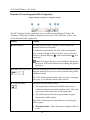
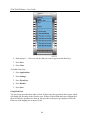
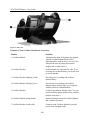
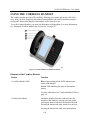
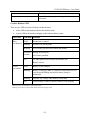
Figure 2. Rear view
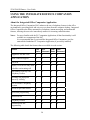
Elements of Your Cordless Module and Accessories
Feature
Function
1) Cordless Module
Attached to the back of the phone, the module
contains a Light Emitting Diode (LED)
indicating that a cordless device is in use; also
indicates the state of pairing between the
module and a cordless device.
2) Cordless Headset
Cordless hands free operation for calls. If you
are using the cordless headset, you do not need
to use the handset.
3) Cordless Headset Charging Cradle
Provides power to recharge the cordless
headset battery.
4) Cordless Handset Charging Cover
Provides power to recharge the cordless
handset battery. Replaces the cover supplied
with the phone for corded handsets.
5) Cordless Handset
Cordless operation for handset calls. (You can
transfer from the phone handset to the cordless
headset at any time.)
6) Cordless Module pairing button
Initiates pairing between the Cordless Module
and a cordless accessory.
7) Cordless Headset Cradle cable
Connects to the Cordless Module to provide
power to the charging cradle.
106