1
EPSON Progression 4
If the computer has an Epson 120MB or 240MB hard disk
drive, select the appropriate type number from the table
below.
Epson Hard Disk Drive Types
Type number
39
34
Epson hard disk drive
120MB
240MB
Installation/Support Tips
Power
The computer has an input voltage selection switch on the
back panel to select between 115V, for USA and Canadian
use, and 230V, for use in other countries.
Mouse and Keyboard
When connecting the mouse and keyboard to the computer,
be careful to plug them into the proper ports. Although the
ports are physically identical, they are not interchangeable,
and you can damage the main system board if you plug the
connectors into the wrong ports.
D If you are using a copy-protected program that does not
require a key disk but requires a special procedure to
install it on a hard disk, set the speed to low while you
install the program. Then set the speed to high while you
load and run the program. If this does not work, try
installing and loading the program at low speed and then
change to high speed to run it.
cl You can change the processor speed using the SETUP
program, the ESPEED program, or keyboard commands.
See the User’s Guide and Setup Guide for more information.
Password
Make sure that you do not forget the password you set. If you
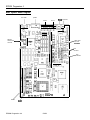
do, you must disable it by setting jumper J13 on the main
system board to position A.
Information Reference List
Engineering Change Notices
None.
Technical Information Bulletins
Installing Diskette Drives
None.
Make sure that the drive type has been correctly selected in
the SETUP program.
Product Support Bulletins
Installing Hard Disk Drives
It is recommended that a 16-bit, AT-type hard disk
controller be used if you are installing a drive that cannot
use the embedded IDE interface. If you install a non-IDE
hard disk drive and controller card, you need to use the
SETUP program to disable the built-in IDE hard disk drive
interface.
See the hard disk drive type tables on page 7 and use the
SETUP program to enter the correct type number(s) for
the hard disk drive(s) installed in the computer. (Also be
sure to use the SETUP program to set the hard disk drive
configuration if you install or remove a hard disk drive.)
You can select a type number that matches the parameters
for the drive or a type number with parameters having
lesser values, as long as they do not exceed the maximum
capacity (in MB) of the drive. If there is no match for the
drive, you can press Enter and then F2 at the Hard disk 1
or 2 option and enter the drive’s exact parameters.
None.
Related Documentation
TM-PROGRSS4 EPSON Progression 4 Service Manual
PL-PROGRSS4
EPSON Progression 4 Parts Price List
SPKPROGRSS4
EPSON Progression 4 Self Paced Kit
400192900
EPSON Progression 4 Setup Guide
400193000
EPSON Progression 4 User’s Guide
400193100
EPSON VGA Utilities Guide for Wingine
based products
Software Problems
Q If you are using a copy-protected program that can run
only on a diskette or that requires a key disk, try to load
the program at high speed. If you can’t load the program
at high speed, set the processor speed to automatic.
EPSON Progression 4-8
5/3/93