1
Chapter 2: Controls and Indicators
2.3
LCD DISPLAY
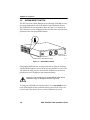
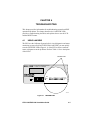
The ESX is equipped with an LCD display located on the front panel. The
LCD provides status information about the present as well as past
conditions of the ESX. You can view power up diagnostics, firmware
revisions, MAC addresses, IP addresses, and alarm messages. The LCD
displays the most current event, but can store up to 25 past events in
memory. Chapter 4 provides details about the LCD Display.
2.4
NETWORK MANAGEMENT CAPABILITIES
You can control and manage the ESX using any of the following SNMP
network management systems:
•
Cabletron Systems Local Management
•
Cabletron Systems SPECTRUM
•
Cabletron Systems SPECTRUM Element Manager for Windows
•
Cabletron Systems Remote SPECTRUM Portable Management
Applications
•
Third Party SNMP compliant Network Management Packages
Network management capabilities provide the necessary management
tools for the ESX to operate at full capacity. Your ability to set up
parameters with network management ensures optimal performance of
the ESX.
Refer to the applicable network management package user’s manual for
more information.
2.5
SIMPLEX OR FULL DUPLEX MODE OPERATION
With FDSE, each switched port can be configured to operate in simplex or
full duplex mode. The default is simplex mode.
In simplex mode, a port can send and receive, but not both
simultaneously. Collision detection is turned on. In the full duplex mode,
the transmit and receive paths operate independently, collision detection
is turned off (eliminating the collision domain), and a separate CRC
generator and receive CRC checker are used on the port transmit and
receive lines for error detection.
2-2
ESX-1320/ESX-1380 Installation Guide