1
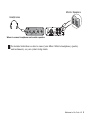
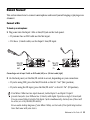
Welcome to Pro Tools LE Read this guide if you are new to Pro Tools® or are just starting out making your own music. Inside, you’ll find quick examples of how to record, compose, mix, and produce your own music in Pro Tools. One quick question: Have you installed Pro Tools yet? If not, follow the Quick Setup instructions or your detailed Setup Guide to install Pro Tools software and your Mbox® 2 Mini hardware. Do not connect your Mbox 2 Mini to your computer until you’ve installed Pro Tools from your installer DVD as described in the Quick Setup instructions. Connect Headphones or Speakers You have to be able to hear your music, so plug in some headphones or speakers. Plug your headphones into the jack on the front panel. If your headphones have an 1/8inch plug, use the 1/8-inch to 1/4-inch adapter (included). If you want to use speakers, connect them to the 1/4-inch Monitor outputs (Mon Out L and R) on the back panel (L to left, R to right). 2 Getting Started with Pro Tools LE & Mbox 2 Mini