1
.
ESPANO L
... ap an tz®
.
FRAN<;::AIS
.
ENGLISH
Integrated Amplifier
PM6004
Owner' s Manual
ESPANOL
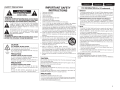
0 SAFETY PRECAUTIONS
ARISK
A
CAUTION:
TO REDUCE THE RISK OF ELECTRIC SHOCK, DO NOT REMOVE
COVER (OR BACK). NO USER-SERVICEABLE PARTS INSIDE.
REFER SERVICING TO QUALIFIED SERVICE PERSONNEL.
A
A
The lightning flash with arrowhead symbol, w ithin an equilateral
triangle, is intended to alert the user to the presence of
uninsulated " dangerous voltage " w ithin the product's enclosure
that may be of sufficient magnitude to constitute a risk of
electric shock to persons.
The exclamation point w it hin an equilateral triangle is intended
to alert the user to the presence of important operat ing
and maintenance (servicing) instructions in the literature
accompanying the appliance.
IMPORT ANT SAFETY
INSTRUCTIONS
1.
2.
3.
4.
5.
6.
7.
8.
9.
10.
WARNING:
TO REDUCE THE RISK OF FIRE OR ELECTRIC SHOCK, DO NOT
EXPOSE THIS APPLIANCE TO RAIN OR MOISTURE.
11.
12.
13.
CAUTION:
HOT SURFACE. DO NOT TOUCH.
Hot
surface
mark
The top surface over the internal heat sink may become hot
when operating this product continuously.
Do not touch hot areas, especially around the " Hot surface
mark" and the top panel.
PRECAUTION:
Read these instructions.
Keep these instructions.
Heed all warnings.
Follow all instructions.
Do not use this apparatus near water.
Clean only with dry cloth.
Do not block any ventilation openings.
Install in accordance with the manufacturer's instructions.
Do not install near any heat sources such as radiators, heat registers,
stoves, or other apparatus (including amplifiers) that produce heat .
Do not defeat the saf ety purpose of the polarized or grounding-type plug. A
polarized plug has two blades with one w ider than the other. A grounding
type plug has two blades and a third grounding prong. The wide blade or the
third prong are provided for your safety. If the provided plug does not fit into
your outlet, consult an electrician for replacement of the obsolete outlet.
Protect the power cord from being walked on or pinched particularly at
plugs, convenience receptacles, and the point where they exit from the
apparatus.
Only use attachments/accessories specified by the manufacturer.
Use only w ith the cart, stand, tripod, bracket, or tab l e ®
specified by the manufacturer, or sold w ith the apparatus.
When a cart is used, use caution w hen moving the cart/
• ~
apparatus combination to avoid injury from tip-over.
'<1111
Unplug this apparatus during lightning storms or w hen
l~
unused for long periods of time.
~-
tm
14. Refer all servicing to qualified service personnel.
Servicing is required when the apparatus has been damaged in any way,
such as pow er-supply cord or plug is damaged, liquid has been spilled or
objects have fallen into the apparatus, the apparatus has been exposed to
rain or moisture, does not operate normally, or has been dropped.
15. Batteries shall not be exposed to excessive heat such as sunshine, fire or
the like.
SURFACE CHAUDE. NE PAS TOUCHER.
La surface superieure du dissipateur de chaleur peut devenir
chaude si vous utilisez ce produit en continu.
Ne touchez pas les zones chaudes, tout particulierement vers
!'inscription " Hot surface mark" et le panneau superieur.
PRECAUC16N:
SUPERFICIE CALIENTE. NO TOCAR.
La superficie superior sabre el disipador de calor interne
podrfa llegar a calentarse al operar este producto de forma
continua.
No toque las areas calientes, especialmente las situadas
alrededor de Ia " Hot surface mark" y del panel superior.
CAUTION:
FRAN<;:AIS
ENGLI SH
FCC INFORMATIO N (For US customers)
1.PRODUCT
This product complies w ith Part 15 of the FCC Rules. Operation is subject
to the following two conditions: (1) t his product may not cause harmful
interference, and (2) this product must accept any interference received,
including interference that may cause undesired operat ion.
2 . IMPORTANT NOTICE: DO NOT MODIFY THIS PRODUCT
This product, when installed as indicated in t he instructions contained
in this manual, meet s FCC requirements. Modification not expressly
approved by marantz may void your authority, granted by the FCC, to use
the product.
3.NOTE
This product has been tested and found to comply w ith the limits for
a Class B digital device, pursuant to Part 15 of the FCC Rules. These
limits are designed to provide reasonable protection against harmful
interference in a residential installation.
This product generates, uses and can radiate radio frequency energy and,
if not installed and used in accordance w ith the instructions, may cause
harmful interference to radio communications. However, there is no
guarant ee that interference w ill not occur in a particular installation. If this
product does cause harmful interference to radio or television reception,
which can be determined by turning the product OFF and ON, the user
is encouraged to try to correct the interference by one or more of the
following measures:
• Reorient or relocate the receiving antenna.
• Increase the separation between the equipment and receiver.
• Connect the product into an outlet on a circuit diff erent f rom that to
which the receiver is connected .
• Consult the local retailer authorized to distribute this type of product or
an experienced radio/TV technician for help.
For Canadian customers:
This Class B digital apparatus complies w it h Canadian ICES-003.
Cet appareil numerique de Ia classe B est conforme a Ia norme NMB-003 du
Canada.
To completely disconnect this product from the mains, disconnect the plug
from the w all socket outlet.
The mains plug is used to completely interrupt the power supply to the unit
and must be within easy access by the user.
PRECAUTION:
Pour deconnecter completement ce produit du courant sect eur, debranchez
Ia prise de Ia prise murale.
La prise secteur est utilises pour couper completement !'alimentation de
l'appareil et J'utilisateur doit pouvoir y acceder facilement.
PRECAUCI6N:
Para desconectar completamente este producto de Ia alimentaci6n electrica,
desconecte el enchufe del enchufe de Ia pared.
El enchufe de Ia alimentaci6n electrica se utiliza para interrumpir por completo
el suministro de alimentaci6n electrica a Ia unidad y debe de encontrarse en
un Iugar al que el usuario tenga facil acceso.
I
ENGLISH
FRAN<;:AIS
ESPANOL
0 NOTES ON USE I OBSERVATIONS RELATIVES A L'UTILISATION I NOTAS SOBRE EL USO
WARNING S
AVERTISS EMENTS
ADVERTENCIAS
• Avoid high temperatures.
Allow for sufficient heat di spersion when
installed in a rack.
• Handle the power cord carefully.
Hold the plug when unplugging the cord .
• Keep the unit free from moisture, w ater, and
• Eviter des temperatures elevees.
Tenir compte d'une dispersion de chaleur
suffisante lors de !'installation sur une etagere.
• Manipuler le cordon d'alimentation avec
precaution.
Tenir Ia prise lors du debranchement du cordon .
• Proteger l'appareil contre l'humidite, l'eau et Ia
• Evite altas temperaturas.
Permite Ia suficiente dispersion del calor cuando
esta instalado en Ia consola .
• Maneje el cord6n de energia con cuidado .
Sostenga el enchufe cuando desconecte el
cordon de energia .
• Mantenga el equipo libre de humedad, agua y
polvo.
• Desconecte el cordon de energia cuando no
utilice el equipo por mucho tiempo.
• No obstruya los orificios de ventilacion.
• No deje objetos extranos dentro del equipo.
• No permita el contacto de insecticidas, gasolina
y diluyentes con el equipo.
• Nunca desarme o modifique el equipo de
ninguna manera .
• La ventilacion no debe quedar obstruida por
haberse cubierto las aperturas con objetos como
peri6dicos, manteles o cortinas.
• No deberan colocarse sobre el aparato fuentes
inflamables sin proteccion, como velas
encendidas.
• A Ia hora de deshacerse de las pilas, respete Ia
normativa para el cuidado del medio ambiente.
• No exponer el aparato al goteo o salpicaduras
cuando se uti lice.
• No colocar sobre el aparato objetos !Ienos de
liquido, como jarros.
• No maneje el cable de alimentacion con las
manos mojadas.
• Cuando el interruptor esta en Ia posicion OFF
(STANDBY), el equipo no esta completamente
desconectado de Ia alimentacion MAINS.
• El equipo se instalara cerca de Ia fuente de
alimentacion de manera que resulte tacil acceder
dust.
• Unplug the power cord when not using the unit
for long periods of time.
• Do not obstruct the ventilation holes.
• Do not let foreign objects into the unit.
• Do not let insecticides, benzene, and thinner
come in contact with the unit.
• Never disassemble or modify the unit in any way.
• Ventilation should not be impeded by covering
the ventilation openings with items, such as
newspapers, tablecloths or curtains.
• Naked flame sources such as lighted candles
should not be placed on the unit.
• Observe and follow local regulations regarding
battery disposal.
• Do not expose the unit to dripping or splashing
fluids.
• Do not place objects filled w ith liquids, such as
vases, on the unit.
• Do not handle the mains cord with wet hands.
• When the switch is in the OFF (STANDBY)
position, the equipment is not completely
switched off from MAINS.
• The equipment shall be installed near the
pow er supply so that the power supply is easily
accessible.
II
poussiere.
• Debrancher le cordon d'alimentation lorsque
l'appareil n'est pas utilise pendant de longues
periodes.
• Ne pas obstruer les trous d'aeration .
• Ne pas la isser des objets etrangers dans
l'appareil.
• Ne pas mettre en contact des insecticides, du
benzene et un diluant avec l'appareil.
• Ne jamais demonter ou modifier l'appareil d'une
maniere ou d'une autre.
• Ne pas recouvrir les orifices de ventilation avec
des objets tels que des journaux, nappes ou
rideau x. Cela entraverait Ia ventilation.
• Ne jamais placer de !Iamme nue sur l'appareil,
notamment des bougies allumees.
respecter les lois en vigueur lorsque
• Veillez
vous jetez les piles usagees.
• L'appareil ne doit pas etre expose l'eau ou
l'humidite.
• Ne pas poser d'objet contenant du liquide, par
exemple un vase, sur l'appareil.
• Ne pas manipuler le cordon d'alimentation avec
les mains mouillees.
• Lorsque l'interrupteur est sur Ia position OFF
(STANDBY), l'appareil n'est pas completement
deconnecte du SECTEUR (MAINS).
• L'appareil sera installe pres de Ia source
d'alimentation, de sorte que cette derniere soit
facilement accessible .
a
a
a
a ella.
0 CAUTIONS ON INSTALLATION
PRECAUTIONS D'INSTALLATION
EMPLAZAM IENTO DE LA INSTALACION
/.
*
* For proper heat dispersal, do not install this unit in a confined
space, such as a bookcase or similar enclosure.
• More than 12 in. (0.3 m) is recommended .
• Do not place any other equipment on this unit.
* Pour permettre Ia dissipation de chaleur requise, n'installez
pas cette unite dans un espace confine tel qu'une bibliotheque
ou un endroit similaire.
• Une distance de plus de 12 po (0,3 m) est recommandee.
• Ne placez aucun materiel sur cet appareil.
este
* Para Ia dispersion del calor adecuadamente, no instale
o unidad
equipo en un Iugar confinado tal como una libreria
similar.
• Se recomienda dejar mas de 12 pulg. (0,3 m) alrededor.
• No coloque ningun otro equipo sobre Ia unidad.
ENG LISH
I
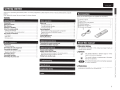
Gettin started
Thank you for purchasing this marantz product. To ensure properoperat ion, please read this owner's manual carefully before using the
product.
After reading the manual, be sure to keep it for future reference.
Accessories
Check that the fol lowing parts are supplied w ith the product.
Getting started
'
············· ······· ... ............ .................... ... . 1
Accessories ·
... ... .. ... ............. .. ........ 1
About this manual
Main features ··
.. ·2
Cautions on handling · · ··· ··· ··· ·· ···· ·· ····
. ... ·· ·· ··3
About the remote control · ··· ··· ········· ···
.. ·3
Inserting the batteries·· ···· ··
. 3
Operating range of the remote control
···· 3
Part names and functions .. ················· ..
4
Front panel·
····· ············· ····4
..... ..... .... ... ······4
Rear panel·········
..... .... ........ . ···· ·5
Remote control··· · ···· ··· ···· ·· ········ ··· ··· ···· ····· ···
Basic operation
Before use ·······- ······ ········· ····· ········································ ················8
Turning the power on··· ······ ·
········ ······ ······· ······· ··· ····-- ··· ··· ··· ·8
Turning the power standby···
....... ...... .. ........... .... .
···· ··· 8
Turning the power off····
················· ····· ··
···· ··· 8
Starting playback
-·· ···· ·· ···· ···· ··
--- --- -9
Direct playback using a source audio component······ ·············-- ·· 9
Playback using the LOUDNESS function ················ ······ ····· ···-·· ··· ··9
Muting sound-·---· ····· ····· ········
······ ·············· ······ ···· ·····-- ··· ········ 9
Using headphone set -- ----···· ·· ····· ·· ·· ·· ···· ·········· ······· ·· ···· ···· ···· ····· ··· ··9
Starting Recording ·· ··· -·--······· ············· ································ ······· 9
Advanced connections
Basic connections
Preparations
········ ·················· ··· ········
Connecting cables .... ............................... ............ ...... .
Connecting the audio equipment ..... .. ... .
Connecting the speakers ········
Connecting the speakers cableS···
Speaker connections · ··
Connecting players ·· ··············· ············
Connecting recorders ·
.. ·· ..··.. ·· .··· ·
Connecting the power cord·.
······· ············
6
.. - ·6
.
B
Connecting the remote control jacks ---Connecting the flasher input jack··· ··· ····
1
o
-·10
····· · 10
6
-6
... 6
·6
..... 7
.. .. 7
..... 7
- 8
Advanced operations
11
Remote control settings··
····· ····· ··· ········
····· ··· ····· ·11
Setting remote control codes
··· ·········11
Setting remote control codes for the remote control
·11
Setting remote control codes for this unit ···· ·· ··· ·········
······ 11
Setting Auto standby mode········ ··· ··· ····· ··
-·- 12
Troubleshooting
13
Specifications
14
Explanation terms
14
Index
1!J
CD Owner's manual.. ... ........ ..... ....
CV Power cord ...... ..................... ..............
... 1
_1
®Remote control (RC003PM) .. ..... .. ....... ...... ......
..... 1
@) R03/AAA batteries ........ .
......... ...... ..... ... .
...... 2
®Warranty card (U.S.A)
.. ......... .... ..... .......... .. ... 1
®Warranty card (Canada) ... ... .......... ... .......... ........ .. ... .... ... ..... . .. 1
About this manual
0 Operation buttons
The operations described in t his manual are based mainly on
remote control operation.
OSymbols
@'
This symbol indicates a reference page on w hich
related information is described.
This symbol indicates a supplementary information
and tips for operations.
jNeii.
This symbol indicates points to remember operations
--· - - - or f unction limitations.
0 Illustrations
Note that the illustrations in these instructions are for explanation
purposes and may differ from the actual unit.
1
ENGLISH
Main features
All-discrete current feedback amplifier
Tone control function
This unit uses a high-speed current feedback amplifier circuit for
its preamplifier and power amplifier so that signals from the Super
Audio CD player can be amplified with high fidelity. The high-speed
current feedback amplifier reproduces a natural sound space.
This unit has a tone control function for adjustment of bass (low
frequency) and treble (high frequency) sound to produce your
preferred tone (Gi'page 9).
High-power output
This unit is provided with a LOUDNESS function that makes it
easier to hear music played back at a low volume level (~page 9).
LOUDNESS function
This unit features a slimline body, but comes with a large power
supply unit for dynamic music reproduction with high power.
Wireless remote control
High quality audio design
This unit has a high quality audio design such as minimized signal
path, use of high sound quality parts, and large power circuit, which
is possible only in discrete audio components.
PHONO input terminal for connecting a turntable
This unit is provided with a phono amplifier so that you can directly
connect a turntable and play records. (Only the MM cartridge can
be used (Gi'page 7) .)
Two-sets of speaker output terminals
Besides getting separate sound output from two sets of speakers,
you can easily connect this unit to speakers that support bi-wiring
connection (separately connects the low and mid/high jacks of the
speaker to the amplifier). The unit adopts screw terminals that can
connect thick audio cables.
2
The wireless remote control of this unit can also operate marantz
audio components such as a CD player (~page 5).
This remote is provided with three sets of remote control codes.
You can set a different remote control code for up to three
amplifiers and control them independently from one location.
ENGLISH
Cautions on handling
• Before turning the power switch on
Check once again that all connections are correct and that there are
no problems with the connection cables.
• Power is supplied to some of the circuitry even when the unit is set
to the standby mode. W hen leaving home for long periods of time,
be sure to unplug the power cord from the pow er outlet.
• About condensation
If there is a major difference in temperature between the inside
of the unit and the surroundings, condensation may form on parts
inside the unit causing the unit to fail to operate properly.
If this happens, let the unit sit for an hour or two with the power off
and wait until there is little difference in temperature before using
the unit.
• Cautions on using mobile phones
Using a mobile phone near this unit may result in noise. If that
occurs, move the mobile phone away from the unit when it is in
use.
• Moving the unit
Turn off the power and unplug the power cord from the pow er
outlet.
Next, disconnect the cables connected to other system units
before moving the unit.
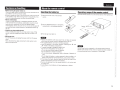
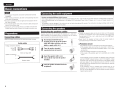
About the remote control
Inserting the batteries
Operating range of the remote control
CD Remove the rear cover of the remote
Point t he remote control unit at the remote sensor when operating it.
I
! "'
e:
;;·
control .
(")
I
'
Q
;
""'
~·
"'e:
® Set two R03/AAA batteries in the battery
compartment in the indicated direction.
;;·
l i5
"'01
e.
i g
G) Put the rear cover back on.
4N•Ua
• Replace the batteries w ith new ones if the unit does not operate
even when the remote control is operated close to the unit.
• The supplied batteries are only for verifying operation.
• Insert the batteries in the proper direction, following the "EEl " and
"8" marks in the battery compartment.
• To prevent damage or leakage of battery fluid:
• Do not use a new battery with an old one.
• Do not use two different types of batteries.
• Do not attempt to charge dry batteries.
• Do not short-circu it disassemble, heat or dispose of batteries in
a fire.
• Do not keep the battery in a place exposed to direct sunlight or in
places w ith extremely high temperatures, such as near a heater.
• If the battery fluid leaks, carefully wipe the fl uid off the inside of t he
battery compartment and insert new batteries.
• Remove the batteries from the remote control if it w ill not be used
for a long time
• Used batteries in accordance w ith local regulat ions on battery
disposal.
•N•Ua
The unit may function improperly or the remote control may not
operate if the remote control sensor is exposed t o direct sunlight, or
strong artificial light from a fluorescent or infrared light.
3
ENGLISH
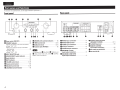
Part names and functions
For buttons not explained here, see the page indicated in pare ntheses ( ).
Rear panel
Front panel
.............. SYSTEU'"'B••••••·····
~
! ~lii~i !
~~~~~ ~
:
•
0 Power switch (ON/OFF)
f.J STANDBY indicator ··· ··
······(8)
... ... ... .... ... ····(8)
Indicates the status of th e unit's as follows:
• Power "ON" :Off
• When the protection circuit is activated :
Red (blinking) .. .. ... .... ...... ......................... .. (6)
• Standby : Red
• Power " OFF " :Off
OINPUT SELECTOR knob ···
·· (9)
Q SOURCE DIRECT switch/indicator
··· (9)
01nput indicators ·········
······ ·· ············· ·· (8)
0 MUTE indicator··· ····· ···· ·············· ·· ····· ···· ······ (9)
······ (8, 9)
8 VOLUME control knob· ·
fit Remote control sensor ··
0 BALANCE control knob ··
41) LOUDNESS switch/indicator
4
··· ·· ··· ··· (1 0)
·· (8, 9)
·········· (9)
$-A-B
:
&- L --<:;9
:
SVSTF.U A
fit Speaker system terminals
f/TREBLE control knob ··· ··· ··· ··· ···
······ (8, 9)
0 PHONO input connectors ················
f.J PHONO GND terminal· ·····
41 BASS control knob···
······ (8, 9)
C) TUNER input connectors
····· (7)
0
·········· (9)
Q CD input connectors ···
..... (7)
41) REMOTE CONTROL
4D SPEAKERS A/B switches/indicators
·······
41Headphone jack (PHONES) ·······
· ·· ······ (9)
0 AUX/DVD input connectors
4¢l•U*
0
fl
TREBLE, and
BALANCE,
You can adjust the
BASS control knobs only when Q SOURCE
DIRECT switch is turned off.
41
0RECORDER 1 (CD-R)
input/output connectors ·
(7)
(SPEAKER SYSTEMS) ··
.. ... (7)
. (7)
..... (7)
8RECORDER 2 (MD/TAPE)
input/output connectors·· ········· ··········· ·· ·· · (7)
4D
FLASHER input jack · ··
....... (6, 7)
·(10)
input/output connectors ···· · ····· ··· ········ ···· (1 0)
·· (8)
AC outlets (AC OUTLETS)
f/AC inlet (AC IN) ········· ·· ·· ········
··· (8)
ENGLISH
Part names and functions
Remote control
You can use the supplied remote control to operate th is unit and
marantz aud io components such as CD players, tuners, DVD players,
and tape decks. See "Operating marantz audio components "(02iT'page
O---r~-;-;t-E';J_-:_-;.,- ,;;-,l-;;;,;.~;
8--------HioE
. ____:.o
o o1
______________
__.
5)
0POWER ON/STANDBY buttons · ·········· · ·· · ··················· ·· ·····
,---------------·-----~
~8
88 ·!
,
[:~-~:~j
(?~'\---------~·:
'C:J H+--0
; "-=._)
~:~;~---QQ~ II
: ~~~tR~e~e~::~~:;::so~
· ••. .•••
Q :
o----Hj:f!\::f,i\
\:} p.?'... Q
r+----0 C) INPUT i./' buttons ·········· ····
l_0)j t8J
0 Component operating buttons
0 ":" 0 i
~
.. ........ .. (9)
•MUTE Button
• VO LU ME +I- Button
0 Operating marantz audio components
0 ""'- 0 i
Operation
8 0 0
0 0 i
0 0 0
;
j
8 0 8 i
[
_QQ_Q_Q_;
1 Press the correspondin g 0 Input selector button of the audio
component for selecting the input source to be used in playback
and recording.
• The remote control operation is switched to operation mode of the
selected input source.
• This unit's f unction w ill be switched accordingly.
2 Operate the audio component.
.• See the table on the right for the buttons you can use.
.j>-1
..,.
'
Cue
•
Stop
Playback
Pause
Track selection
Sound mode selection
~
II
0-9
T.MODE
~-
.The remote control 8 Input selector buttons are used to select the
input source for t his unit and sw1tch the remote control operation
mode at the same time .
• You can operate the remote control of this unit rega rdless of the
remote control mode setting.
• To use the remote control correctly, also refer to the operating
instructions of other components .
MENU
ENTER
0- 9
DISPLAY
.... ...... (5)
-~..~.~~
G)
~~
. .. (9)
0VOLUME adjustment buttons ······ ···· ···· · ························· ·· (8, 9)
i
ii---9
i
- ~~~~~.ri[..t; ) :;;;;J~~:0!'- :•: ·
• POWER ON button
• POW ER OFF button
• SOURCE POWER button
You can press this button to switch the mode of marantz audio
components (provided with a power standby function) between
power-on and standby.
II~8 08 1
.:.:..,,ru.~-----··--··.,;;·
(8)
0 CD operation
',~il)P,·eridioft -~' ~ ""'' ·~ ;;>;-:P· :t>;~·
0 Tuner operation
(TUNER)
.
•. ..
i
""
., ·;,Oper~~io,n· ·~ '".i' · :,:'F"'·''
m\'ctfim"'~-. ·~,,,.
,.. 11 :buttons :c, ~· rn : ~~ · ::t• :~·.. :::.~
'
P.SCAN/A.TUNE
i./TUNE+
'/TUNE-
Qreset scan
Tuning up
Tuning down
Preset channel
.../PRESETselection
Preset channel
~/PRESET+
selection
BAND
FM/ AM switchinq
0- 9
Enter number
Clear memory
CLEAR
or inout data
Save preset
MEMO
station number
Direct frequency
F.DIRECT
tuninq
Auto stereo/
T.MODE
monaural switchinq
• The remote control buttons may
not f unction properly for some
m arantz tuners .
Menu
Cursor o eration
Enter settin
Enter number
Display disc
information
0 Cassette deck operation
(TAPE)
:,i:QpfrStioO >J~·~i-
>t
·~, ;;~
:?, ;;
!r '!Ji~tti\p( ;~: ~G '~ ~IM'cP.!'~; ·· ~~. ·
~
~
•
~
II
CLEAR
Fast-rewind
Fast-forward
Stop
Playback
Pause
Counter reset
4N•U•
Some input terminals of this unit and correspondin g input selector
buttons on t he remote control have different names, as shown below
Remote control buttons The unit input terminals
AUX,DVD
CD-R
TAPE, MD
AUX/DVD
RECORDER 1
RECORDER2
5
I
ENGLISH
Basic connections
•~!·u•
• Do not plug in the power cord until all connections have been
completed.
• When making connections, also refer to the operating instructions
of the other components.
• Be sure to connect the left and right channels prope rly (left with
left, right w ith right).
• Do not bundle power cords with connection cables. Doing so can
result in humming or noise.
• Do not turn up the volume without a turntable connected to the
PHONO input terminals. Doing so wil l cause humming or noise.
Connecting the audio equipment
Cautions on playing SA(Super Audio) sources:
When regular speakers not compatible with SA sources (DVD Audio discs, Super Audio COs and other sources, including treble components
above the audible range). set the properties of the player (DVD Audio player, Super Audio CD player, etc.) for use with regular speakers (or
amplifiers).
The speakers may be damaged if the volume is set too high when playing SA sources. For instructions on player settings, refer to the
operating inst ructions included with the player.
Connecting the speakers
Connecting the speakers cables
Preparations
Carefu lly check the left (L) and right (R) channels and + (red) and (black) polarities on the speakers being connected to the unit and be
sure to connect the channels and polarities correct ly.
Connecting cables
Select the cables according to the equipment being connected.
off about 0.03 ft/1 0 mm of
1 Peel
sheathing from the tip of the speaker
Audio cables
cable, then either twist the core wire
tightly or apply solder to it.
Analog connections (stereo)
(White) ~
(Red)~
2
Turn the speaker terminal
counterclockwise to loosen it.
3
Insert the speaker cable's core
wire to all the way into the speaker
terminal.
4
Turn the speaker terminal clockwise
to tighten it.
Stereo pin-plug cable
Speaker connections
+
+
Speaker cables
•n·n•
• Connect the speake r cables so they do not stick out of the speaker
terminals. The protection circuit may be activated if the wi res touch
the rear panel or if the + and - sides touch each other (&page 6
"Protection circuit").
• Never touch the speaker terminals wh1le t he powe r supply is
connected. Doing so could result in electric shock.
0 Protection circuit
The protection circuit is be activated in the following situations:
• If the speaker cable wire touches the rear panel or screws or if
the speaker cable wire touches the speaker cable's +and- sides
are touching
• If the surrounding temperature 1s extremely high
• If the inside of the amplifier gets hot to extended use at a high
output
If the protection circUit is activated, the speaker output is blocked
and the STANDBY indicator flashes in red. If this happens, unplug
the power cord, then check the connections of the speaker cab les
and input cab les. If the unit becomes very hot, wait for it to cool
off and improve the ventilation around it. After doing this, plug the
power cord back in.
If the protection circuit is activated even though there are no
problems with the ventilation around the unit or in connections,
the unit may be damaged. Turn off the power and then contact a
marantz service center.
6
ENGLISH
Connecting the speakers
Speaker connections
• The same signal is output from the SPEAKERS A and B terminals.
• When only one set of speakers is to be connected, use either the SYSTEM A or B terminals.
Connecting players
A turntable w ith an MM type cartridge can be connected to this unit . To use an M C cartridge, please
install a step-up t ransformer.
• If humming or other noise is generated w hen the ground w ire is connected, disconnect it.
I
Turntable
<il@'@'i
CD player
DVD player
-
-
· AUDIQ -
-
Le
AUOIOOUT
@[email protected]@[email protected]
e- ~~.~, ...?-L-$
"e
AUOIQ AUOIO OUT
el
' GR
0 Speaker impedance
Use speakers w ith impedances within the ranges shown below to suit how they are used .
Speakers used
Impedance
A
4 - 16 0
B
4 - 16 0
A and B
8 - 16 0
' Connecting recorders
Recorder-1
-
AUDIO--
Recorder-2
AUDIO IN
L
R
R
~
~
~
~
~
AUDIO IN
~
~
AUDIO OUT
L
..
- AUDIO -
; ""
L
R
~
,,
AUDIO OUT
R
0
0
R
"
"'
"
~
~
¥
~
7
ENGLISH
Connecting the power cord
Wait until all connections have been completed before connecting the
power cord.
Basic o eration
Before use
To household power outlet
(AC 120 V, 60 Hz)
Power cord
(supplied)
the remote control
Button only on the main unit - -Button only on the remote control
<ON/OFF> <INPUT SELECTOR>
STANDBY
indicator
-
BUTTON
- - J » <BUTTON>
[BUTTON]
<LOUDNESS>
Input
indicators
SOURCE DIRECT
VOLUME
1 Turn the VOLUME all the way down.
<BASS>, <TREBLE> and <BALANCE> to the
2 Set
center positions.
Turning the power on
Press <ON/OFF>.
Power cords of other AV
equipment
•n·n•
• Insert the plugs securely. Loose connections wi ll result in the
generation of noise.
• Do not use any cord other than th e provided power cord.
0 Connection to the AC outlet
You can use the AC outlets of this unit to supply power to other
AV equipment
This unit is equipped w ith "SWITCHED " and " UNSWITCHED " AC
outlets.
SWITCHED (Interlocked operation)
The "SWITCHED " AC outlet turns on/off the power supply in sync
w ith power on/standby of this unit
You can connect AV equipment that has total power consumption of
up to 120 W (1A)
···· ·······:····;~::::;~r ····:··· · ··· · · ·
P-?--l~~
PHONES
Jack
<BASS>
WARNING:
Do not connect AV equipment exceeding the absolute allowable
power. If you do, it could result in fire or elect ri c shock.
•n·n•
Only use the AC outlet to plug in audio equipment Do not use it as a
power supply for hairdryers or anything other than audio equipment
8
<TREBLE> <BALANCE>
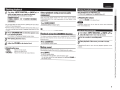
Turning the power standby
Press [POWER OFF].
• The pow er is set to the standby mode.
• The STANDBY indicator lights in red.
<SPEAKERS AlB>
~~
[POWER OFF]
SOURCE DIRECT
=i:..6
)
[POWER ON]
• Press [POWER ON] to tu rn on power from standby mode.
• You can also turn on pow er by using eit her <INPUT SELECTOR>
from standby mode.
•n.,••
Pow er continues t o be supplied to some of the circu itry even when th e
pow er is in the standby mode. When leaving home for long periods of
t ime or when going on vacation, either press <ON/OFF> t o turn off the
power, or unplug the power cord from t he power outlet
UNSWITCHED (Non-interlocked operation)
The "UNSWITCHED" AC outlet supplies power regard less of power
on/standby of this unit.
You can connect AV equipment that has maximum power consumpt ion
of up to 120 W (1 A).
• Power is turned on .
• Input indicator for the selected source lights.
• The unit will be ready to start playback after several seconds.
:(;):·;' :'G)':
[INPUT!••]
t 0J tBJ
VOLUME
'------+- [MUTE]
Turning the power off
Press <ON/OFF>.
• Pow er is turned off.
• All indicators w ill turn off.
ENG LISH
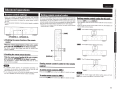
Starting playback
1 Use either <INPUT SELECTOR> or [INPUT !,T] to
select an input sonrce you want for playback.
The input indicator for the selected source lights.
[Selectable sources)
IPHONO II TUNER l'lr--C-D-,II AUX/DVD II RECORDER-11
IRECORDER-21
Usin head hone set
Direct playback using a source audio
component
Plug headphones into PHONES jack.
Since the audio signals bypass the tone control circuits (BASS/
TREBLE/BALANCE ), t he m usic reproduction is more faithf ul to the
original sound.
0 Adjusting the volume
Press SOURCE DIRECT.
• You can also select an input source by pressing the Input selector
buttons of the remote control.
• The input source you select is stored in memory even after you turn
off power, and the same source is selected when power is turned
on again.
To adjust the tone, tu rn off SOURCE DIRECT.
<SPEAKERS AlB> to select the speaker system
2 toPress
be used for playback.
Playback using the LOUDNESS function
The indicator for the selected speaker system lights.
3
4
Start playing back the source.
Adjust the VOLUME to the desired level.
OAdjusting the tone
• <BASS>
• <TREBLE>
• <BALANCE>
Adjusts the bass sound.
Adjusts the treble sound.
Adjusts the left and right output balance.
The SOURCE DIRECT indicator lights.
This featu re performs playback after compensating for insufficient
bass and treble response at low volume levels to reproduce a more
balanced sound.
Press <LOUDNESS>.
• To listen with headphones, turn speaker output OFF.
Adjust the VOLUME to the desired level.
•N•Ii•
To prevent hearing loss, do not raise the volume level excessively
w hen using headphones.
Startin Recordin
either <INPUT SELECTOR> or [INPUT ! ,T] to
1 Use
select the input source you want to record.
2 Set the recorder to recording mode.
3 Start playback of the source you want to record.
The LOUDNESS indicator lights.
Muting sound
• Recording will start in sync with the playback operat ion of the
source.
This function mutes the sound by stopping audio output.
Press [MUTE].
The MUTE indicator lights.
• To cancel the mute operation, press the button again.
You can also cancel the mute operation by operating VO~UME of
the remote control.
.."...
:;
9
ENGLISH
Advanced connections
Connecting the flasher input jack
Connectin the remote control ·acks
When you use this unit connected to marantz audio components, it sends control signals to operate each component.
0 Connection
Use the remote connection cable (supplied with a marantz audio component you want to connect) to connect the REMOTE CONTROL OUT
terminal of this unit to the REMOTE CONTROL IN terminal of the component to be connected.
OSetting
Set the remote control switch located on the rear panel of the connected audio component to "EXTERNAL" or "EXT." to use this feature.
• This setting will disable remote sensor reception of the connected audio component.
• To operate the connected audio component, point the remote control at the remote sensor of this unit.
CD player
10
Option unit
(such as remote control receiver unit)
• This is used to control this unit using a keypad from another room.
• If a flasher input connector is to be used, do not use the remote
control input connector.
ENGLI:H
Advanced o erations
Remote control settings
• When you connect a remote control receiver unit (purchased
separately) to the REMOTE CONTROL IN terminal of this unit. use
the following procedure to disable the remote sensor function of
this unit.
• The remote sensor function of remote control signals is enabled by
default.
;;+·:·2·~~-~~
Settin remote control codes
This unit and its supplied remote control are equipped with three sets
of remote control codes. When two or three amplifiers are used in the
same location, you can set a different remote control code to pair each
unit and remote control so that you can operate the selected amplifier
from the remote control without interference from other signals.
• When the unit is shipped from the factory, the main unit and remote
control are set to "AMP1 ".
Setting remote control codes for this unit
Hold down [AMP] and press [DISPLAY].
• This operation sends the remote control code set for the remote to
this unit
• After you set the remote control code for this unit, the indicators on
the unit blink as shown below.
(r.df'".Utll'
~~1~~· :;c~~--~-;'1~-:---~~~
_ : The PHONO indicator flashes three times.
<SPEAKERS A> <SPEAKERS B>
0 Disabling the sensor function of the remote
control
:The TUNER indicator flashes three times.
While the remote .~nsor function of this unit is enabled,
press and hold <SPEAKERS B> for about 5 seconds.
The MUTE indicator blinks three times and the remote sensor
function is disabled.
0 Enabling the remote sensor function
While the remote sensor funCtion of this unit is disabled,
press. and hold <SPEAKER~, ~-/.Pt ~~t 5 seconds~
[DISPLAY]
~ : The CD indicator flashes three times.
The RECORDER 2 1nd1cator blinks three t1mes and the remote
sensorfunction is enabled.
'~'·II•
• If a remote control
receiver unit (purchased separately) is not
connected. do not perform this setting. If you do, you will not be
able to operate this unit using the remote controL
• If you unplug the power cord while the remote sensor function of
this unit is disabled, the remote sensor function is enabled.
Setting remote control codes for the remote
control
~~r~-~~!NPlWiAMU,
Press and hold [AMP] and number button [2] for 5 seconds or longer.
rJ9AIUka~iiAIIlf~~
•N·U·
To restore the remote control code default setting, press and hold
[AMP] and number button [1) for 5 seconds or longer.
Press and hold [AMP] and number button [3) for 5 seconds or longer.
11
.."'
..
.."a.."
..
iii
r;·
0
ENGLISH
Setting Auto standby mode
With the Auto standby mode ON, this unit will automatically enter the
Auto standby mode after about 30 continuous minutes of no output
from the speakers or headphones.
SOURCE DIRECT
0
~~.-.~
s (',)
® ®
0
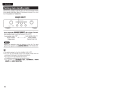
Press and hold <SOURCE DIRECT> for at least 5 seconds.
Auto standby mode is switched between On and Off.
Auto standby mode "Off"
Power indicator
Flashes once
Auto standby mode "On"
Power indicator
Flashes three times
•N•U•
Perform the operation using the buttons on the unit. You cannot
perform the operation using [SOURCE DIRECn on the remote control .
• The default setting for the Auto standby mode is OFF.
• This unit will automatically enter Auto standby mode after about
continuous 30 minutes in the following conditions .
• No output from the selected input source .
• No operation performed on the remote control.
• No operation of <SPEAKERS AlB>, <LOUDNESS>, <SOURCE
DIRECT> or <INPUT SELECTOR>.
12
ENGLISH
Troubleshootin
"'"?.
~
If a problem occurs, first check the following:
1. Are the connections correct?
2. Is the unit being operated as described in the owner's manual?
3. Are the other components operating properly?
If this unit does not operate properly, check the items listed in the table below. If the problem persist there may
be a malfunction.
In that case, disconnect the power immediately and contact your retail outlet.
:c.•· .., ,J" ·.
.,
sviriP'foffi~·:
:~
··· ~·
'l~;.%. ' .
·~cau.- .
;~;:\[! ,;;; J.;;~ ~ '"'~T ·~ '{'' El ~' '• • ,s•
jc'··· ••. :~~· \-t !..f:- { ~l!i•p~.,, . ,,
,.,..
•,:c. C.o.unt~i:fn·ii.U~e ·',1• , ,,. " " • • "
Power is not turned on.
• The power cord's plug is not plugged in firmly.
• Make sure t hat the power cord is plugged in properly.
8
• The unit is in standby mode.
• Either turn the INPUT SELECTOR knob of th is unit or press POWER ON of t he remote
8
control.
• The protection circuit is activated.
•If the STANDBY indicator is blinking, turn off power, wait 1 minute or longer, and turn on
6
power again.
When power is turned on but there is • The speaker cables are not properly connected.
• Make sure the speakers are connected properly.
7
no sound.
• The input cable is not properly connected.
• Make sure the input cables are connected properly.
7
• The INPUT SELECTOR knob setting position is incorrect.
• Set the INPUT SELECTOR knob at the correct setting position.
9
• The VOLUME control knob is set to minimum.
• Use the VOLUM E control knob t o turn volume up to an appropriate level.
9
• The SPEAKERS AJB switches are turned off.
• Turn on t he SPEAKERS AJB switch corresponding to the speaker system terminals (SYSTEM
9
A or SYSTEM B) to which the speakers are connected.
• The incorrect SPEAKERS AJB switch is turned on .
• Turn on the SPEAKERS AJB switch corresponding to the speaker system terminals (SYSTEM
9
A or SYSTEM B) to which the speakers are connected.
• The mute function activated.
• If the MUTE indicator is lit. press MUTE on the remote control to cancel muting.
9
The volume drops automatically.
• The protection circuit is activated.
• Turn off pow er, wait 1 minute or longer, and turn on power again.
6
Sound is produced f rom either one • The speaker cables are not properly connected.
• Make sure that the speakers are connected properly.
7
speaker only.
• The BALANCE control knob setting position is inappropriate. • Set the BALANCE control knob at t he appropriate
position .
9
The left and right channels are
• Either the left/right speaker or left/right input cable
• Make sure that the speakers are connected correctly.
7
reversed.
connections are reversed .
Noise is produced during a record • The ground wire from the turntable is disconnected.
• Make sure that the PHONO GND terminal is connected properly.
7
playback.
• The PHONO input terminals are not properly connected.
• Make sure that th e PHONO input term inal is connected properly.
7
• A TV set near the turntable is causing the noise.
• Relocate t he TV set or turntable in another place.
An audio feedback occurs when you • The turntable and speakers are too close to each other.
• Install t he speakers as far away from the t urntable as possible.
turn up the volume during a record • The turntable is placed on a rack or floor that vibrates easily. • If the tu rntable is not supplied with an insulating
pad, use insulating pad available in the
playback.
market.
The unit does not function when a • Batteries are low.
• Replace w ith new batteries.
3
remote control button is pressed.
• You are operating the remote control outside of the specified • Operate within the specified range.
3
range.
• There is an obstacle between the main unit and remote • Remote the obstacle.
3
control.
• You have pressed the wrong button.
• Press the correct button.
5
• Batteries are not inserted in the proper direction as indicated • Insert the batteries in the proper direction in accordance
with the polarity markers in the
3
by polarity markers (Ef) and 8 ) in the battery compartment.
battery compartment.
• The remote sensor function of this unit is disabled.
• Make sure the remote control sensor function is enabled.
11
• The remote control code set for this unit does not match the • Set the same remote control code for this unit and remote
control.
11
code of its remote control.
'.'.' ·· "''
,
•' · ; ;
..:
..
13
"';:>
"'
---"' -Q..
ENGLISH
Ex lanation terms
S ecifications
• RMS Power output
(20Hz-20kHz simultaneous drive of both channels):
• Total harmonic distortion
(20 Hz- 20 kHz simultaneous drive of both channels, 8 0 load):
• Output band width
(8 0 load, 0.06%):
• Frequency response
(CD, 1 W, 8 0 load):
• Dumping factor
(8 0 load, 40 Hz- 20 kHz):
• Input sensitivity/Input impedance
PHONO (MM):
CD, TUNER, AUX/DVD, RECORDER
• Maximum allowable PHONO input level (1 kHz)
MM:
• RIAA deviation
(20 Hz- 20 kHz):
• S/N (IHF-A, 8 0 load)
PHONO (MM)
CD, TUNER, AUX/DVD, RECORDER
• Tone control
Bass (50 Hz) :
Treble (15kHz):
• Power requirement:
• Power consumption
(UL60065)
• Power consumption during standby:
• Weight:
45 W x 2 (8 0 load)
60 W x 2 (4 0 load)
0.08%
10Hz- 50 kHz
10 Hz- 70 kHz +0 dB, -1 dB
100
2 2 mV/47 kO
200 mV/20 kO
100 mV
±1.0 dB
Index
rat' A
Protection Circuit
This is a function to prevent damage to components
wit hin the power supply when an abnormality such
as an overload or excess vo ltage occurs for any
reason.
In this unit, the power indicator blinks and the unit
enters standby mode when an abnormality occurs.
s
Speaker impedance
This is certain-rated resistance of the speaker set
to an alternating current and expressed in ohms.
The smaller the impedance, the greater the output.
However, load on the amplifier is increased. Use
speakers whose impedance is supported by this
unit.
aar"B
.. .. ..... ... 4, 8
·4, 8
Connection
Connecting
Connecting
Connecting
Connecting
...... 3
...... 6
.. ..... 7
.. ... ........ 7
..... s, 7
cables ·
players ..
recorders ·
the speakers ...
~I
INPUT SELECTOR
±10 dB
±10 dB
AC 120 V 60Hz
Mute ....
* For the purpose of improvem ent, the specifications and design are subject to change without notice.
.... 12
BALANCE ·
BASS
Batteries
83 dB (5 mV input, 1 W output)
102 dB (2 V input, Rated output)
150W
0.2W
7.4 kg (16 lbs 5 oz)
.... g
...... g
Adjusting the tone
Adjusting the volume
Auto standby mode
·4, 8
........ . 4, 8
.. .......... 8
Power cord ..
Protection circuit
.... s,
14
~R
Remote control ·
.
3, 5, 10, 11
~s
SOURCE DIRECT
Speaker cables ..
Speaker impedance ..
Stereo pin-plug cable·
..... 4, 8
....... ·6, 7
........ .. ..... .. . .... 7, 14
....... 6
Gf'T
TREBLE
.. 4, 8
aar"V
VO LUME
14
.... 4, 8
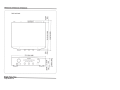
Dimensions I Dimensions I Dimensions
Unit: inch (mm)
0
r-M
(!)
,....
-0'1
~
00~
.._<0
LO~
17-21 /64 440
@!
0
@!
0
@!
@!
0
'<!"
<0
LO
-- ,....
~
~"'-m
M-
M
~'<!"
LO.-
("<')-
7.4 kg (16 lbs 5 oz)
'<!"
--
(!)
O'l
~
"<~"~
Weight I Po ids I Peso
0
www.marantz.com
You can find your nearest authorized distributor or dealer on our website .
... a ..an I
z
®
is a registered trademark.
D&M Holdings Inc.
Printed in Ch ina 54 11 10002 02AM
For CANADA
1narantz®
MARANTZ CANADA LIMITED WARRANTY
Marantz Canada ("Marantz") warrants the following Marantz
products for the periods indicated:
Who May Enforce the Warranty
3·year warranty for both Parts & Labour, from the original
purchase date :
What We Will Pay For
Amplifiers; Pre Amplifiers; Pre Amplifier-Processor-Tuners;
Integrated Amplifiers; Tuners; Receivers; Blu-ray DVD Super
Audio CD/CD Players/Changers; Learning Remote Control
Devices; iPod Docks & DLP front Projectors.
90 day warranty for parts and labour from the original purchase
date:
DLPlamps
What is Covered and What Is Not Covered
Except as specified below, this warranty covers parts and
labor to correct all defects in materials and workmanship. The
following are not covered by the warranty:
1. Damage, deterioration, malfunction or failure to meet
performance specifications resulting from:
a} Accident; acts of nature; misuse; abuse; neglect;
unauthorized product modification.
b) Improper installation, removal or maintenance, or
failure to follow instructions supplied with the
product.
c) Repair or attempted repair by anyone not authorized
by Marantz to repair the product.
d) Any shipment of the product (claims must be
presented to the carrier)
e) Any cause other than a product defect
2. Cleaning, initial set-up, check-ups with no defects found,
or charges incurred for installation, removal or
reinstallation of the product.
3. Any product on which the serial number has been
defaced, modified or removed.
4. Accessories, including but not limited to, batteries, cables,
mounting hardware and brackets, cleaning accessories,
antenna and detachable power cords.
5. Warranty is void if purchase was made from anyone
other than an authorized Marantz dealer.
Only the original purchaser may enforce this warranty.
We will pay for all labor and material expenses for items
covered by the warranty. Payment of shipping charges is
discussed in the next section of this warranty.
How You Can Get Service
1. If your unit needs service, please first contact your dealer
to see what support services they do offer. You can also
contact one of our Authorized Marantz Service Centers as
per our website http: I I ca.marantz.com / 162.asp or
contact us directly as below. Please do not return your
unit to the factory without prior authorization.
2. You must pay any shipping charges if it is necessary to
ship the product for service. However, if the necessary
repairs are covered under warranty, we will pay the
return shipping charges to any destination within
Canada.
3. Whenever warranty service is required, you must present
the original dated sales receipt or other proof of date of
purchase.
Limitation of Implied warranties
All implied warranties, including warranties of
m erchantability and fitness for a particular purchase, are
limited in duration to the length of this warranty.
Exclusion of damages
Marantz liability for any defective product is limited to repair
or replacement of the product at Marantz's option. Marantz
shall not be liable for damage to other products caused by
any defects in Marantz products, damages based upon
inconvenience or loss of use of the product, or any other
damages, whether incidental, consequential, or otherwise.
Some provinces do not allow limitations on how long an
implied warranty lasts and / or does not allow the exclusion of
incidental or consequential damages, so the above limitations
and exclusions may not apply to you.
This warranty gives you specific legal rights, but you may
also have other rights, which vary from province to province.
MARANTZ Canada
Division of D&M Canada Inc.
5-505 Apple Creek Blvd.,
Markham, Ontario
L3R 581
1-888-258-9361
www.marantz.com
PRINTED IN JAPAN
11/09
OOM183J854018
Pour CANADA
1narantz®
GARANTIE LIMITEE DE MARANTZ CANADA
Marantz Canada ("Marantz") garantie les produits suivants
pour les periodes indiquees :
3 ans de garantie pour les pieces et Ia main d'muvre prenant
effet apartir de Ia date d'achat du produit :
Amplificateurs, Preamplificateurs, Pre-ampli-processeurssyntoniseurs; amplificateurs integres, syntoniseurs, recepteurs,
Blu-ray DVD Super Audio CD I Lecteur CD I Changeur,
telecommandes programmables, Docks iPod et projecteurs
avant DLP.
90 jours de garantie pour les pieces et Ia main d'muvre prenant
effet apartir de Ia date d'achat du produit :
Lampes DLP
Ce qui est couvert et pas couvert par Ia garantie :
A !'exception de ce qui est mentionne ci-dessous, cette
garantie couvre les pieces et Ia main d'ceuvre afin de reparer
tous les defauts de materiel ou de fabrication du produit. Ce
qui suit n' est pas couvert par Ia garantie :
1. Les dommages, deterioration, defauts de fonctionnement,
ou le fait de ne pas respecter les specifications d'executions
resultant d'un (e):
a) accident, acte de Ia nature, abus, negligence, utilisation
impropre ou d'une modification de produit non
autorisee;
b) installation incorrecte, deplacement, maintenance ou
d'un emploi contraire aux instructions fournies avec
le produit;
c) reparations ou tentatives de reparations par une
personne non reconnue par Marantz ;
d) envoi de produit (les reclamations doivent etre
presentees au transporteur)
e) cause autre qu'un defaut de produit.
2. L'entretien, !'installation initiale, toute verification de produit
ou aucun defaut n' a ete trouve, ou tous frais encourus pour
!'installation, le deplacement ou Ia reinstallation du produit.
3. Tout produit dont le numero de serie a ete efface, modifie
ou enleve.
4. Les accessoires incluant mais non limites aux, piles,
dibles, materiaux de support, accessoires de nettoyage,
antennes et cordons de secteur detachables.
5. La garantie n'est pas valable si l'achat a ete fait au Canada
chez un revendeur non recorinu par Marantz.
Qui peut faire appliquer Ia garantie
Seule Ia personne qui a achete le produit a I' origine peut faire
appliquer Ia garantie.
Notre paiement
Nous paierons tous les frais de pieces et de main d' ceuvre
pour tous les produits couverts par Ia garantie. Le paiement
des frais de livraison est aborde dans Ia section suivante de
cette garantie.
Comment obtenir du service
1. Si votre produit Marantz requiert du service,
communiquez premierement avec votre revendeur
autorise afin de connaitre s'il peut proceder au service de
votre appareil. Vous pouvez aussi consulter Ia liste des
centres de service ailtorises sur notre site web au
http: I I ca.marantz.com I 162.asp ou contactez nous
directement aux coordonnees ci-dessous. Veuillez ne pas
retourner votre appareil chez le manufacturier sans
autorisation obtenue prealablement.
2. Vous devez payer les frais de livraison dans le cas oil votre
appareil a besoin d' etre envoye au service des reparations.
Toutefois, si les reparations necessaires sont couvertes par
Ia garantie, nous payerons les frais de retour d'expedition
et ce quelle que soit Ia destination au Canada.
3. Lorsque vous envoyez votre appareil pour un service
sous garantie, vous devez joindre une copie de la facture
d'achat (ticket ou autre preuve d'achat)
Limites des garanties implicites
Toutes les garanties implicites, y compris les garanties de
valeur marchande et specifique pour un achat particulier,
sont limitees dans la duree a Ia longueur de cette garantie.
Exclusion des dommages
La responsabilite de Marantz est limitee pour n'importe que!
produit defectueux en ce qui concerne Ia reparation ou le
remplacement du produit en question. Si des dommages
interviennent a des produits autres que ceux de Marantz,
Marantz ne sera pas tenu responsable des dits dommages,
bases sur le derangement ou la perte d'utilisation du produit
ou tout autre dommage qu'il soit fortuit, indirect ou autre.
Certaines provinces ne permettent pas de limites quant a Ia
duree d'une garantie sous-entendue etl ou ne permettent pas
!'exclusion de dommages fortuits ; ainsi les limitations et les
exclusions mentionnees ci-dessus peuvent ne pas s'appliquer
a votre cas.
Cette garantie vous donne des droits legaux specifiques, mais
vous pouvez aussi a voir d' autres droits qui peuvent varier
d'une province a !'autre.
Cette garantie n' est seulement valable qu' au Canada.
MARANTZ Canada
Division of D&M Canada Inc.
5-505 Apple Creek Blvd.,
Markham, Ontario
L3R 581
1-888-258-9361
www.marantz.com
PRINTED IN JAPAN
11/09
OOM183J854018
For U.S.A.
1narantz®
Limited Warranty
Marantz America, Inc. ("Marantz") warrants the following Marantz
Products for the periods indicated:
Who may enforce the warranty
This warranty may be enforced only by the original purchaser.
1. The following Marantz Audio/Video components, have a 3
year warranty for both Parts & Labor, from the original
purchase date:
Amplifiers, Pre Amplifiers, Pre Amplifier-ProcessorTuners, Integrated Amplifiers, Tuners, Receivers, Blu-ray
DVD SA-CD/CD Players/Changers, Learning Remote
Control Devices, iPod Docks & DLP front Projectors.
2. DLP lamps have a 90 day warranty for parts and labor from
the original purchase date.
What is covered and what is not covered
Except as specified below, this warranty covers parts and labor
to correct all defects in materials and workmanship. The
following are not covered by the warranty:
1. Damage, deterioration, malfunction or failure to meet
performance specifications resulting from:
a) Accident, acts of nature, misuse, abuse, neglect or
unauthorized product modification.
b) Improper installation, removal or maintenance, or
failure to follow instructions supplied with the product.
c) Repair or attempted repair by anyone not authorized by
Marantz to repair the product.
d) Any shipment of the product (claims must be presented
to the carrier).
e) Any cause other than a product defect.
2. Cleaning, initial set-up, check-ups with no defects found, or
charges incurred for installation, removal or reinstallation of
the product.
3. Any product on which the serial number has been defaced,
modified or removed.
4. Batteries.
5. Accessories, including but not limited to, batteries, cables,
mounting hardware and brackets, cleaning accessories,
antenna and detachable power cords.
6. Warranty is void if purchase was made from anyone other
than an authorized Mar;;tntz dealer.
What we will pay for
We will pay for all labor and material expenses for items covered
by the warranty. Payment of shipping charges is discussed in the
next section of this warranty.
How you can get service
1. If your unit needs service, contact Marantz customer service
by calling 201-762-6666. We will advise you of the name
and location of one or more authorized Marantz service
stations from which service can be obtained. Please do not
return your unit to the factory without prior authorization.
2. You must pay any shipping charges if it is necessary to ship
the product for service. However, if the necessary repairs are
covered under warranty, we will pay the return shipping
charges to any destination within the United States, its
possessions or territories.
3. Whenever warranty service is required, you must present the
original dated sales receipt or other proof of date of purchase.
Limitation of implied warranties
All implied warranties, including warranties of merchantability
and fitness for a particular purchase, are limited in duration to
the length of this warranty.
Exclusion of damages
Marantz liability for any defective product is limited to repair or
replacement of the product at Marantz's option. Marantz shall
not be liable for damage to other products caused by any defects
in Marantz products, damages based upon inconvenience or
loss of use of the product, or any other damages, whether
incidental, consequential, or otherwise.
How state law relates to the warranty
Some states do not allow limitations on how long an implied
warranty lasts and/ or do not allow the exclusion or limitation
of incidental or consequential damages, so the above limitations
or exclusions may not apply to you.
This warranty gives you specific legal rights, and you may also
have other rights which vary from state to state.
Marantz America, Inc.
1DO Corporate Drive,
Mahwah, NJ, 07430-2041
Phone. 201-762-6666
PRINTED IN JAPAN
6/09
5431101 05026M