1
Remote Support sends diagnostic information, such as system health statistics, configuration data,
performance data, and system events, to HP 3PAR Central. These diagnostics are required for HP
to perform fault detection and analysis on your HP 3PAR StoreServ Storage system that help
maximize your storage availability.
All remote communications are encrypted and transferred securely to HP 3PAR Central, and no
customer application data is ever transferred. No other business information is collected, and the
data is managed according to the HP Data Privacy policy. For more information, visit http://
www8.hp.com/us/en/privacy/privacy.html.
Requirements for Setting Firewalls and Ports
Meeting firewall and port requirements are necessary when configuring inbound and outbound
connections on HP 3PAR arrays. An inbound connection enables remote access to SP and StoreServ
for authorized HP 3PAR support personnel. An outbound connection enables diagnostic data
transfer such as alerts, StoreServ, SP log files, and configuration files for remote diagnosis.
Secure Network Mode is a mode used for communication between the SP and HP 3PAR Connection
portal for diagnostic data transfer (Outbound) and Remote Access (Inbound).
NOTE:
Connectivity to only one of the Global Access Servers is required for remote support.
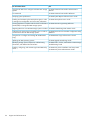
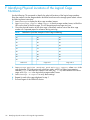
Table 14 Firewall and Port Requirements
Network Requirement
Secure Network Mode
3PAR support portal IP address
Your DNS server should allow remote3par.houston.hp.com
to be resolved to 15.201.225.95
Outbound connectivity (Secure Service Collector Server)
Port 443 (https) to be opened (outbound) between service
processor IP and the following IP address:
• remote3par.houston.hp.com 15.201.225.95 (primary
IP address)
• remote3par.houston.hp.com 15.240.56.190
(secondary IP address)
Inbound connectivity (Global Access Server)
Port 443 (https) to be opened (outbound) between Service
Processor IP and the following IP addresses:
• 15.201.200.205 g4t2481g.houston.hp.com
• 15.201.200.206 g4t2482g.houston.hp.com
• 15.240.0.73 g9t1615g.houston.hp.com
• 15.240.0.74 g9t1616g.houston.hp.com
NOTE: If the StoreServ Storage system or the SP are placed on different IP networks and an IP
firewall exists between them, the following ports must be opened for communication between the
StoreServ Storage system and the SP:
•
Port 22 (SSH)–Used for depositing and executing programmatically driven service scripts and
for collecting an archive of diagnostic data (known as an InSplore).
•
Port 5781 (Event Monitor)–Used for monitoring system events on the StoreServ Storage system.
•
Port 5782 (CLI)–Used for gathering system health information, configuration data, and
performance data.
To enable a proxy server for remote support:
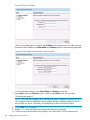
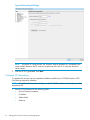
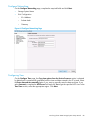
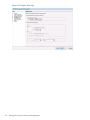
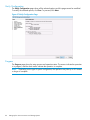
1. Enter proxy server settings, if applicable.
2. If applicable, check the Enable authentication box to enable the setting. Enter the required
credentials.
78
Setting Up the Service Processor and Storage System