1
Rack mounting
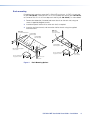
For optional rack mounting, mount the P/2 DA2xi MT on a19-inch, 1U RSF 123 rack shelf
kit (part #60-190-20), a universal RSU 126 1U 6-inch deep rack shelf kit (part #60-190-10),
or a universal RSU 129 1U 9.5-inch deep rack shelf kit (part #60-190-01), as shown below.
1. Remove the rubber feet (if installed) and mount the unit on the rack shelf, using two
screws in opposite (diagonal) corners.
2. Install blank panels or other units to the rack shelf, as required.
3. Insert the shelf into the rack, and secure the shelf to the rack using the supplied
machine screws.
RSU 123
Rack Shelf for
3.5" Deep Products
RSU 129
1U Universal Rack Shelf
1/2 Rack Width
False Faceplate
1/4 Rack Width
False Faceplate
1/4 Rack Width
False Faceplate
Both front false faceplates
use 2 screws.
Use 2 mounting holes
on opposite corners.
Use 2 mounting holes
on opposite corners.
(2) 4-40 x
3/16" Screws
(2) 4-40 x 3/16"
Screws
Figure 4.
Rack Mounting Options
P/2 DA2xi MT User Guide User Guide • Installation
6