1
Linksys AC1200 Max Wi-Fi Range Extender

Introduction
Overview
This User Guide can help you connect the extender to your network and solve
common setup issues. You can find more help from our award-winning, 24/7
customer support at Linksys.com/support.
Front
Contents
Overview . . . . . . . . . . . . . . . . . . . . . . . . . . . . . . . . . . . . . . . . 1
How to install the range extender . . . . . . . . . . . . . . . . . 2
How to access the browser-based utility . . . . . . . . . . . 3
Using Wi-Fi Protected Setup . . . . . . . . . . . . . . . . . . . . . . 4
How to use Site Survey . . . . . . . . . . . . . . . . . . . . . . . . . . . 6
Power Light
Cross-Band . . . . . . . . . . . . . . . . . . . . . . . . . . . . . . . . . . . . . . . 7
Wireless Music Playback. . . . . . . . . . . . . . . . . . . . . . . . . . . 7
Troubleshooting . . . . . . . . . . . . . . . . . . . . . . . . . . . . . . . . . . 7
Specifications . . . . . . . . . . . . . . . . . . . . . . . . . . . . . . . . . . . . 9
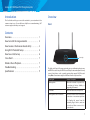
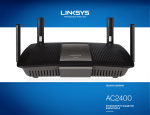
The light on the front of the range extender gives you information about power
and Wi-Fi Protected Setup. Use Wi-Fi Protected Setup to automatically and securely
connect client devices such as wireless printers that support Wi-Fi Protected
Setup. Note: Your antennas might look different from those pictured here.
Power Light
Status/ description
Blinking white
When the extender is powered on,
is resetting to factory defaults, or
upgrading its firmware
Solid white
When the extender is ready to use
Blinking amber for two minutes
When the extender cannot establish a
connection or encounters a problem
Fix: Unplug the power from the
extender, plug it back in, wait two
seconds, and then reconnect it to
your network
1