1
Linksys AC1200 Max Wi-Fi Range Extender
NOTE
If you have a dual-band router and wish to connect to both bands, you will
have to perform the WPS setup twice. The first connection will be on the 2.4
GHz band.
Connecting with the range extender’s PIN
The Wi-Fi Protected Setup PIN (Personal Identification Number) can be found
on the product label on the bottom of the extender. You can use this method
only if your router’s administration utility has a Wi-Fi Protected Setup menu.
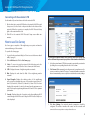
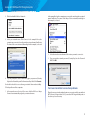
1. Enter the extender’s PIN into the appropriate field on the router’s Wi- Fi
Protected Setup screen. Click Register. When the connection is complete,
the Wi-Fi Protected Setup light on the extender will be solid.
2. Click OK.
Connecting devices to your network through the
extender
Choose from the methods below to connect devices that support Wi-Fi
Protected Setup to your network.

NOTE
Repeat the instructions for each client device that supports Wi-Fi Protected
Setup.
Connecting with the Wi-Fi Protected Setup Button
Use this method if your client device has a Wi-Fi Protected Setup button.
1. Press the Wi-Fi Protected Setup button on the client device.
2. Click the Wi-Fi Protected Setup button on the extender’s Wi-Fi Protected
Setup screen, OR press and hold the Wi-Fi Protected Setup button on
the top panel of the extender for one second. When the connection is
complete, the Wi-Fi Protected Setup light on the extender will be solid.
3. If using the extender’s Wi-Fi Protected Setup screen, be sure to click OK
within two minutes or you will have to start over.
Connecting with the client device’s PIN
Use this method if your client device has a Wi-Fi Protected Setup PIN (Personal
Identification Number).
1. Enter the PIN from the client device in the field on the extender’s Wi-Fi
Protected Setup screen.
2. Click Register on the extender’s Wi-Fi Protected Setup screen. When the
connection is complete, the Wi-Fi Protected Setup light on the extender
will be solid.
3. Click OK on the extender’s Wi-Fi Protected Setup screen within two minutes
or you will have to start over.
5