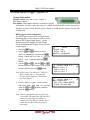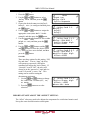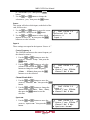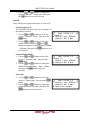
1
ATLAS
Modular Receiver Decoder
MRD 3187B
User Manual
Form 7632B
Revision 4.0
July 2009
MRD 3187B User Manual
FCC Class A Information
The Atlas MRD 3187B has been tested and found to comply with the limits for a Class A digital
device, pursuant to Part 15 of the FCC Rules. These limits are designed to provide reasonable
protection against harmful interference when the equipment is operated in a commercial
environment. This equipment generates, uses, and can radiate radio frequency energy and, if not
installed and used in accordance with the instructions, may cause harmful interference to radio
communications. Operation of this equipment in a residential area is likely to cause harmful
interference in which case the user will be required to correct the interference at his or her own
expense.
Shielded cables must be used with this unit to ensure compliance with the Class A FCC limits.
Warning: Changes or modifications to this unit not expressly approved by the party
responsible for compliance could void the user’s authority to operate the equipment.
Dolby Digital Information
This product has been manufactured under license from Dolby Laboratories.
“Dolby Digital”, “DolbyE” and “AC-3” are licensed trademarks of Dolby Laboratories.
Page 1
MRD 3187B User Manual
WARNING
PLEASE OBSERVE THESE SAFETY PRECAUTIONS
There is always a danger present when using electronic equipment.
Unexpected high voltages can be present at unusual locations in defective equipment and signal
distribution systems. Become familiar with the equipment that you are working with and observe the
following safety precautions.
Every precaution has been taken in the design of your MRD 3187B to ensure that it is as
safe as possible. However, safe operation depends on you the operator.
Always be sure your equipment is in good working order. Ensure that all points of
connection are secure to the chassis and that protective covers are in place and secured
with fasteners.
Never work alone when working in hazardous conditions. Always have another person
close by in case of an accident.
Always refer to the manual for safe operation. If you have a question about the
application or operation call SENCORE for assistance.
Never allow your equipment to be exposed to water or high moisture environments. If
exposed to a liquid, remove power safely (at the breaker) and send your equipment to be
serviced by a qualified technician.
When installing the MRD 3187B utilizing the DC power supply, the power supply
MUST be used in conjunction with an over-current protective device rated at 50V, 5A,
type: Slow-blo, as part of battery-supply circuit.
Page 2
MRD 3187B User Manual
Package Contents
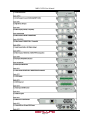
The following is a list of the items that are included along with the MRD 3187B:
1.
2.
3.
4.
5.
6.
7.
User Manual
Declaration of Conformity
Warranty Registration Card
AC Power Cable
Four (4) Rack Mount Clips
Four (4) Rack Mount Screws
Third Wire Ground Warning
Note: If any option cables were ordered with the MRD 3187B, they will be included in the box as
well.
If any of these items were omitted from the packaging of the MRD 3187B please call 1-800SENCORE to obtain a replacement.
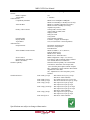
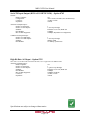
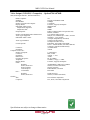
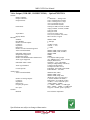
3.) Warranty
Registration Card
2.) Declaration of
Conformity
4.) AC Power Cable
5.) Rack Mount Clips
6.) Rack Mount Screws
Page 3
7.) Third Wire
Ground Warning
MRD 3187B User Manual
How to Use This Manual
Since the MRD 3187B is a modular device, this manual is arranged according to the specific
option cards available. During configuration steps, all button presses are indicated by a picture
of the actual button.
The beginning of each section includes a short description of the section, along with a section
specific table of contents.
When using this manual, many extra pieces of useful information are inserted where pertinent
and are designated in the following forms:
Note
Designator: Note: “ ”
Description: These items are little extra pieces of information to ease unit configuration
Caution
Designator: CAUTION: “ ”
Description: These items should be seriously considered before configuring a setting.
Warning
Designator:
Warning: “ ”
or
WARNING
Description: These items indicate actions that could have severe consequences.
Factory Configurations
The MRD 3187B is an extremely versatile piece of equipment and in order to further expand its
capabilities its internal setup can be factory configured in a number of different ways.
Configuration 1 “Config 1” (No Decoder)
This configuration slaves the internal backplanes to one another but provides no decoded video
output. The placement of input cards can be in both RDS1 and RDS2 (Slots 1-2, 1-3, 1-4, 2-2, 23, 2-4). No video output cards may be installed. This configuration is usually used as a satellite
receiver or in combination with an MPEG/IP card to encapsulate the TS from the active input
and transmit it via IP.
Configuration 1 “Config 1” (Single Decoder)
This configuration slaves the internal backplanes to one another and provides one video output.
The placement of input cards can be in both RDS1 and RDS2 (Slots 1-2, 1-3, 1-4, 2-2, 2-3, 2-4).
Video outputs cards may only be placed in slot 1-1. This configuration allows for the tuning of
two independent audio services. Only one input may be active and only one program decoded at
any time.
Page 4
MRD 3187B User Manual
Configuration 1 “Config 1” (Dual Decoder)
This configuration slaves the internal backplanes to one another and provides two mirrored video
outputs. The placement of input cards can be in both RDS1 and RDS2 (Slots 1-2, 1-3, 1-4, 2-2,
2-3, 2-4). Video outputs cards may be placed in slots 1-1 and 2-1. This configuration allows for
the tuning of four independent audio services. This configuration is commonly used to provide
an HD and SD video output from the same input signal. Only one input may be active and only
one program decoded at any time.
Configuration 2 “Config 2” (No Decoder)
This configuration utilizes the internal backplanes independent from one another allowing one
MRD to input two independent inputs simultaneously. With this configuration, the MRD
essentially acts like two configuration 1 no decoder units in the in the rack space of one MRD.
One input per RDS can be active.
Configuration 2 “Config 2” (Single Decoder)
This configuration utilizes the internal backplanes independent from one another. This
configuration operates identical to a configuration 1 unit except for input cards placed in RDS2
(Slots 2-2, 2-3, 2-4) cannot be decoded. A popular use of this configuration is to place an RF
card and an ASI card (i.e. 8701A and 8702) in RDS2 to provide RF input and ASI output to act
as an 8-VSB or satellite receiver. The bottom RDS may then be used independently to decode a
different independent input.
Configuration 2 “Config 2” (Dual Decoder)
This configuration utilizes the internal backplanes independent from one another allowing one
MRD to input and decode two independent inputs simultaneously. With this configuration, the
MRD essentially acts like two configuration 1 single decoder units in the in the rack space of one
decoder. One input per RDS can be active and decode unique video simultaneously.
Page 5
MRD 3187B User Manual
Contents
PACKAGE CONTENTS ............................................................................................................................................3
HOW TO USE THIS MANUAL ................................................................................................................................4
FACTORY CONFIGURATIONS..............................................................................................................................4
CONFIGURATION 1 “CONFIG 1” (NO DECODER) ........................................................................................................ 4
CONFIGURATION 1 “CONFIG 1” (SINGLE DECODER) .................................................................................................. 4
CONFIGURATION 1 “CONFIG 1” (DUAL DECODER) .................................................................................................... 5
CONFIGURATION 2 “CONFIG 2” (NO DECODER) ........................................................................................................ 5
CONFIGURATION 2 “CONFIG 2” (SINGLE DECODER) .................................................................................................. 5
CONFIGURATION 2 “CONFIG 2” (DUAL DECODER) .................................................................................................... 5
CONTENTS .................................................................................................................................................................6
SECTION 1 – GETTING STARTED ........................................................................................................................9
1.1 INSTALLATION ................................................................................................................................................... 10
1.2 QUICK START GUIDE ......................................................................................................................................... 11
1.3 MAINTENANCE .................................................................................................................................................. 11
SECTION 2 – CONTROLS AND CONFIGURATION ......................................................................................... 13
2.1 FRONT OF UNIT .................................................................................................................................................. 14
2.2 REAR OF UNIT .................................................................................................................................................... 14
2.3 FRONT PANEL DISPLAY LAYOUT ....................................................................................................................... 14
2.4 FRONT PANEL INDICATORS ................................................................................................................................ 14
2.5 INPUT ERROR LOGIC .......................................................................................................................................... 15
2.6 DECODER ERROR LOGIC .................................................................................................................................... 15
2.8 FAN ERROR LOGIC ............................................................................................................................................. 16
2.9 SNMP TRAPS .................................................................................................................................................... 16
2.10 INPUT/OUTPUT SLOT ORGANIZATION .............................................................................................................. 16
SECTION 3 – OPTION CARDS OVERVIEW ...................................................................................................... 17
3.1 LICENSE OPTIONS .............................................................................................................................................. 19
3.2 8VSB/QAM RECEIVER – OPTION 8701A .......................................................................................................... 19
3.3 SERIAL TRANSPORT STREAM I/O (DVB-ASI/SMPTE 310M) – OPTION 8702 ................................................... 19
3.4 HIGH BIT RATE ASI INPUT – OPTION 8703 ........................................................................................................ 19
3.5 VIDEO OUTPUT (2 SD-SDI, 1 COMPOSITE) – OPTION 8704A/8704B ................................................................. 19
3.6 VIDEO OUTPUT (2 HD-SDI, 1 RGBHV/YPBPR) – OPTION 8705/8705A ........................................................... 19
3.7 VIDEO OUTPUT (1 RGBHV/YPBPR, 1 COMPOSITE) – OPTION 8706A ............................................................... 19
3.8 AUDIO OUTPUT (DOLBY E, AES DIGITAL, ANALOG) – OPTION 8707A ............................................................. 20
3.9 VIDEO OUTPUT (2 HD/SH-SDI, 1 RGBHV/YPBPR/COMPOSITE) – OPTION 8708 ............................................. 20
3.10 DUAL INPUT DVB-S/DVB-S2 RECEIVER – OPTION 8710/8710A .................................................................... 20
3.11 DUAL INPUT ASM RECEIVER – OPTION 8711 .................................................................................................. 20
3.12 VIDEO OUTPUT (2 HD/SD-SDI, 1 RGBHV/YPBPR/COMP) – OPTION 8712 .................................................... 20
3.13 GPIO MODULE – OPTION 8713........................................................................................................................ 20
3.14 RELAY AND DPI TRIGGER – OPTION 8714 ....................................................................................................... 21
3.15 DUAL INPUT COFDM RECEIVER – OPTION 8715 ............................................................................................ 21
3.16 CAM DECRYPTION – OPTION 8721 ................................................................................................................. 21
3.17 MPEG OVER IP INPUT/OUTPUT – OPTION 8725............................................................................................... 21
3.18 DUAL MPEG OVER IP INPUT/ UDP OUTPUT – OPTION 8727 ........................................................................... 21
SECTION 4 – USING THE FRONT PANEL TO CONFIGURE THE MRD 3187B ......................................... 23
4.1 8VSB/QAM RECEIVER – OPTION 8701A .......................................................................................................... 24
4.2 SERIAL TRANSPORT STREAM INPUT/OUTPUT (DVB-ASI/SMPTE 310M) – OPTION 8702 ................................ 27
Page 6
MRD 3187B User Manual
4.3 HIGH BIT RATE ASI INPUT – OPTION 8703 ........................................................................................................ 29
4.4 VIDEO OUTPUT (2 SD-SDI, 1 COMPOSITE) – OPTION 8704A/8704B ................................................................. 31
4.5 VIDEO OUTPUT (2 HD-SDI, 1 RGBHV/YPBPR) – OPTION 8705/8705A ........................................................... 38
4.6 VIDEO OUTPUT (1 RGBHV/YPBPR, 1 COMPOSITE) - OPTION 8706A................................................................ 44
4.7 AUDIO OUTPUT (DOLBYE, AES DIGITAL, ANALOG) – OPTION 8707A .............................................................. 51
4.8 DUAL VIDEO OUTPUT (2 SDI, 1 RGBHV/YPBPR/COMPOSITE) – OPTION 8708 ................................................ 53
4.9 DUAL INPUT DVB-S/DVB-S2 RECEIVER – OPTION 8710/8710A ...................................................................... 60
4.10 DUAL INPUT ASM RECEIVER – OPTION 8711 .................................................................................................. 64
4.11 VIDEO OUTPUT (2 HD/SD-SDI, 1 RGBHV/YPBPR/COMP) – OPTION 8712 .................................................... 68
4.12 GPIO MODULE – 8713..................................................................................................................................... 73
4.13 RELAY AND DPI TRIGGER – OPTION 8714 ....................................................................................................... 75
4.14 DUAL INPUT COFDM RECEIVER – OPTION 8715 ............................................................................................ 78
4.15 CA DECRYPTION – OPTION 8721 ..................................................................................................................... 81
4.16 MPEG OVER IP INPUT/OUTPUT – OPTION 8725............................................................................................... 83
4.17 DUAL MPEG OVER IP INPUT/ UDP OUTPUT – OPTION 8727 ........................................................................... 96
4.18 MPEG-2/MPEG-4 DECODER (1 VIDEO, 2 AUDIO) – OPTION 8730A/8732 .................................................... 109
4.19 MPEG DECODER WITH GENLOCK (1 VIDEO, 4 AUDIO) – OPTION 8733 ......................................................... 118
4.20 MPEG-2/MPEG-4 DECODER WITH GENLOCK (1 VIDEO, 2 AUDIO) – OPTION 8731A/8734 .......................... 127
4.21 NETWORK SETUP ........................................................................................................................................... 136
4.22 SMPTE 333M CONFIGURATION .................................................................................................................... 138
4.23 ACTIVE ERRORS............................................................................................................................................. 138
4.24 PASSWORD ..................................................................................................................................................... 139
4.25 EVENT LOG .................................................................................................................................................... 140
4.26 SCTE35 TO SCTE104 SETUP ........................................................................................................................ 141
4.27 FEATURE LICENSING ...................................................................................................................................... 143
SECTION 5 – USING THE WEB CLIENT TO CONFIGURE THE MRD 3187B .......................................... 145
5.1 LOGIN .............................................................................................................................................................. 146
5.2 STATUS INDICATORS ........................................................................................................................................ 146
5.3 CONFIGURATION .............................................................................................................................................. 147
5.4 UNIT ................................................................................................................................................................ 154
5.5 PROFILES ......................................................................................................................................................... 156
5.6 WEB PASSWORDS ............................................................................................................................................ 159
5.7 RESET UNIT ..................................................................................................................................................... 159
5.8 SNMP MIB MODULES .................................................................................................................................... 160
5.9 SOFTWARE UPDATES ....................................................................................................................................... 160
5.10 DIAGNOSTICS ................................................................................................................................................. 160
5.11 ABOUT ........................................................................................................................................................... 161
SECTION 6 – USING SIMPLE NETWORK MANAGEMENT PROTOCOL (SNMP) TO CONFIGURE
THE MRD 3187B..................................................................................................................................................... 163
6.1 SNMP CONFIGURATION .................................................................................................................................. 164
APPENDICES.......................................................................................................................................................... 167
APPENDIX A – ACRONYMS AND GLOSSARY .......................................................................................................... 168
APPENDIX B – ERROR LIST .................................................................................................................................... 171
APPENDIX C – SPECIFICATIONS ............................................................................................................................. 173
APPENDIX D – PINOUT OF 8705/8705A, 8708 AND 8707A .................................................................................... 196
APPENDIX E – COORDINATED UNIVERSAL TIME ................................................................................................... 197
APPENDIX F – OPEN SOURCE SOFTWARE .............................................................................................................. 198
APPENDIX G – WARRANTY .................................................................................................................................... 199
APPENDIX H – SUPPORT AND CONTACT INFORMATION ......................................................................................... 200
Page 7
MRD 3187B User Manual
This Page Intentionally Left Blank
Page 8
MRD 3187B User Manual
Section 1 – Getting Started
Introduction
This section includes the following topics:
1.1 INSTALLATION ................................................................................................................................................... 10
1.2 QUICK START GUIDE ......................................................................................................................................... 11
1.3 MAINTENANCE .................................................................................................................................................. 11
Page 9
MRD 3187B User Manual
1.1 Installation
Cooling
The MRD 3187B is cooled via forced induction through the front of the unit and exhausted
through the vents on either side. The MRD 3187B is equipped with a temperature controlled
status indicator. If the temperature in the inside of the unit exceeds 70° C the red “Error”
LED will illuminate and a description of the error will appear in the “Error List.”
Rack Information
The MRD 3187B is intended to be mounted in a standard 19” rack. It occupies 1U of rack
space and the connections are all on the rear of the unit.
Rack Installation
To install the MRD 3187B into a rack use the
following steps:
1. Determine the desired position in the rack for the
MRD 3187B making sure that the air intake on
the front of the unit and the exhausts on the sides
of the unit will not be obstructed.
2. Insert the rack mount clips into place over the
mounting holes in the rack.
3. Slide the MRD 3187B into position in the rack.
4. Secure the MRD 3187B to the rack by installing
the four supplied screws through the front
mounting holes and tightening.
Power Connection
Using the proper power connections is vital to the safe operation of the MRD 3187B. Only
use the supplied 3-prong power connector or one with equal specifications. NEVER tamper
with or remove the 3rd – prong grounding pin. This could cause damage to the MRD 3187B,
personnel, or property.
Page 10
MRD 3187B User Manual
AC Power Connection
The MRD 3187B is intended for use on either 120V or 240V systems. The power supply
will automatically detect the system it is connected to. To hook up the power use the
following steps:
1. Locate the AC power cord that was included with the MRD 3187B.
2. Plug the female end of the power cord (end with no prongs) into the back of the unit.
3. Locate a protected outlet (usually inside of the rack) to plug the male end of the power
cable into.
DC Power Connection (if equipped)
Using the proper power connections is vital to the safe operation of the MRD 3187B. The
MRD 3187B is intended for use in 40-65Vdc systems. The power supply will automatically
detect the system it is connected to. When installing the MRD 3187B, the power supply
MUST be used in conjunction with an over-current protective device rated at 50V, 5A,
type: Slow-blo, as part of battery-supply circuit. Failure to include an over-current
protective device could cause damage to the MRD 3187B, personnel, or property.
1.2 Quick Start Guide
Quick Start
To get the MRD 3187B up and running there is a few things that need to be done.
1. Select the desired input as active.
2. Setup the decoder with the proper PIDs.
3. Setup the desired output(s).
The easiest way to set these options up is to refer to Section 4. At the beginning of Section 4
is a table that shows the specific cards included in that section. Find the desired card in the
table, then navigate to the corresponding page number and follow the step-by-step
instructions.
1.3 Maintenance
The MRD 3187B is virtually a maintenance-free piece of equipment. There are no user
serviceable parts on the inside of the unit however it is recommended that the user cleans the
intake filter on the front right side of the unit on a regular basis to ensure the unit has an
unobstructed cool air intake. This filter is removed easily, for cleaning, by opening the door
on the front right side of the unit and removing the filter.
Page 11
MRD 3187B User Manual
This Page Intentionally Left Blank
Page 12
MRD 3187B User Manual
Section 2 – Controls and Configuration
Introduction
This section includes an overview of the MRD 3187B.
2.1 FRONT OF UNIT .................................................................................................................................................. 14
2.2 REAR OF UNIT .................................................................................................................................................... 14
2.3 FRONT PANEL DISPLAY LAYOUT ....................................................................................................................... 14
2.4 FRONT PANEL INDICATORS ................................................................................................................................ 14
2.5 INPUT ERROR LOGIC .......................................................................................................................................... 15
2.6 DECODER ERROR LOGIC .................................................................................................................................... 15
2.8 FAN ERROR LOGIC ............................................................................................................................................. 16
2.9 SNMP TRAPS .................................................................................................................................................... 16
2.10 INPUT/OUTPUT SLOT ORGANIZATION .............................................................................................................. 16
Page 13
MRD 3187B User Manual
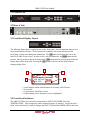
2.1 Front of Unit
2.2 Rear of Unit
2.3 Front Panel Display Layout
The following figure shows a typical screen on the front panel. Several important features have
been circled and noted below. These features are common to all screens and assist when
navigating, viewing and editing unit information. The
button will return the user to the
home level while in any screen. In order to edit a selected parameter, the
button must be
pressed. Once a parameter has been changed, the
button must be pressed again before the
change takes effect on the unit. Pressing the
button will leave an edit mode without
changes taking effect.
2
1
3
1.
2.
3.
4.
RDS1 Serv Setup
Tune Mode:PID Lock
PID Select:Manual
►PCR PID
:0x0031
1
4
Icons indicate which control buttons are currently valid for entry.
Screen title.
Cursor shows which line is active.
When editing, active character or item is highlighted.
2.4 Front Panel Indicators
The MRD 3187B has four internal error parameters: INPUT, DECODER, FAN and
TEMPERATURE. These parameters can be monitored locally or remotely. Locally the unit’s
status can be checked by visually looking at the INPUT LED and the ERROR LED on the front
Page 14
MRD 3187B User Manual
panel, then use the “Error List” under the
button to pinpoint the error. Remotely, the unit’s
status can be checked by using the web client and looking at the status icons on the top of the
main window. To see a detailed list of errors, click on the
tab from the web client.
The INPUT LED indicates the presence of a stream at the user-selected
input. “Stream present” is represented by a green INPUT LED while
“stream NOT present” is represented by a dark INPUT LED.
The ERROR LED represents the combined status of the unit’s error
indicators. If INPUT, DECODER, TEMP, or FAN status is in the error
state, the LED will be red. If all error indicators are good, the LED will be
dark.
2.5 Input Error Logic
The input status is based on the selected input card’s status and the transport error indicator bit
in the transport stream being decoded. For example if the current input is VSB, the input status
is based on: VSB receiver lock, RF channel level, and the MER level. The RF channel and
MER thresholds can be set by the user. If the unit detects the presence of the transport error bit
in a transport packet header, the input status will be an error for 0.5 seconds each time the TS
error bit is set. The system must detect a constant cadence of sync bytes (0x47h) every 188
bytes and detect a valid PAT at least every 500 ms in order for the INPUT LED to illuminate.
2.6 Decoder Error Logic
The decoder error indicator is based on the decoder’s ability to decode what the user has
requested. The input status will be alarmed differently depending on the current decoding mode:
In “Auto Mode,” the decoder status will be good unless the Video or Audio decoders cannot
decode a stream. For example: a stream defines program 4 to have video on PID 52. If PID
52 is not actually present in the stream, or is un-decodable, the decoder status will be in the
error state. This is true for all modes.
In “PID Lock Mode,” the decoder status will be good if all of the PIDs entered by the user,
for video and audio, are being decoded by the unit. If the user wants nothing to be decoded,
they can set a PID to 0. If the user enters a PID which is not present or cannot be decoded
the decoder status will be in the error state.
In “Program Priority Mode,” the decoder status will be good if any priority is currently active
and the Audio and Video represented by that priority are being decoded. If the PMT for a
selected program lists a video or audio PID, but the decoder cannot decode that PID, the
indicator will be in the error state. If the user enters an index for a priority that does not exist
in the PMT, the indicator will still be good because the decoder will be set to decode nothing
on that audio output.2.7 Temperature Error Logic
The temperature error indicator is based on the correct operation of the unit. If the unit’s
temperature exceeds 70 degrees C, the temperature status will be in the error state.
Page 15
MRD 3187B User Manual
2.8 Fan Error Logic
If the fan in the unit fails, the fan status will be in the error state. The fan status will be good as
long as the fan is spinning at the proper RPM.
2.9 SNMP Traps
The unit contains separate SNMP Traps for Fan Status, Temperature Status, Decoder Status,
Input Status, and IP Receive Group. Whenever any item changes state, a trap is sent to the
configured host.
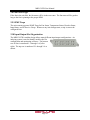
2.10 Input/Output Slot Organization
The MRD 3187B’s modular design allows many different input/output configurations. An
indexing system is used to identify module slots for
configuration and monitoring reference. The bottom
row of slots is numbered 1-1 through 1-4 (left to
right). The top row is numbered 2-1 through 2-4 as
shown.
Page 16
MRD 3187B User Manual
Section 3 – Option Cards Overview
Introduction
This section includes a brief overview of the different option cards that are available for
the MRD 3187B. There are descriptions of each card as well as pictures of the various
inputs and outputs for each card.
3.1 LICENSE OPTIONS .............................................................................................................................................. 19
3.2 8VSB/QAM RECEIVER – OPTION 8701A .......................................................................................................... 19
3.3 SERIAL TRANSPORT STREAM I/O (DVB-ASI/SMPTE 310M) – OPTION 8702 ................................................... 19
3.4 HIGH BIT RATE ASI INPUT – OPTION 8703 ........................................................................................................ 19
3.5 VIDEO OUTPUT (2 SD-SDI, 1 COMPOSITE) – OPTION 8704A/8704B ................................................................. 19
3.6 VIDEO OUTPUT (2 HD-SDI, 1 RGBHV/YPBPR) – OPTION 8705/8705A ........................................................... 19
3.7 VIDEO OUTPUT (1 RGBHV/YPBPR, 1 COMPOSITE) – OPTION 8706A ............................................................... 19
3.8 AUDIO OUTPUT (DOLBY E, AES DIGITAL, ANALOG) – OPTION 8707A ............................................................. 20
3.9 VIDEO OUTPUT (2 HD/SH-SDI, 1 RGBHV/YPBPR/COMPOSITE) – OPTION 8708 ............................................. 20
3.10 DUAL INPUT DVB-S/DVB-S2 RECEIVER – OPTION 8710/8710A .................................................................... 20
3.11 DUAL INPUT ASM RECEIVER – OPTION 8711 .................................................................................................. 20
3.12 VIDEO OUTPUT (2 HD/SD-SDI, 1 RGBHV/YPBPR/COMP) – OPTION 8712 .................................................... 20
3.13 GPIO MODULE – OPTION 8713........................................................................................................................ 20
3.14 RELAY AND DPI TRIGGER – OPTION 8714 ....................................................................................................... 21
3.15 DUAL INPUT COFDM RECEIVER – OPTION 8715 ............................................................................................ 21
3.16 CAM DECRYPTION – OPTION 8721 ................................................................................................................. 21
3.17 MPEG OVER IP INPUT/OUTPUT – OPTION 8725............................................................................................... 21
3.18 DUAL MPEG OVER IP INPUT/ UDP OUTPUT – OPTION 8727 ........................................................................... 21
Page 17
MRD 3187B User Manual
Page 18
MRD 3187B User Manual
3.1 License Options
The MRD 3187B has two license options available. A separate license must be purchased to (1)
decode MPEG4 or H.264 and/or (2) convert SCTE35 to SCTE104.
3.2 8VSB/QAM Receiver – Option 8701A
This card will receive a TS that is demodulated from an 8VSB signal or it will demodulate a
QAM64B or QAM256B RF input. With an 8VSB input, the card will tune to channels 2 – 69.
With a QAM input, the card will tune to channels 2 – 134 in three cable frequency bands (FCC,
IRC, and HRC). The MRD 3187B will show a valid input if the following conditions are met:
the receiver equalizer and the FEC are locked. If the RF level is lower than the “Low Warning
Setting” or the MER is lower than the “Low MER Warning Setting,” the red “Error” LED will
illuminate on the front panel and there will be an error recorded in the Error List.
3.3 Serial Transport Stream I/O (DVB-ASI/SMPTE 310M) – Option 8702
This card will receive a TS from either a DVB-ASI input or a SMPTE 310M input. Only one
format may be selected at a time. For an ASI input, the bitrate of the TS must be between
1.5Mb/s and 160Mb/s. For a SMPTE 310M input, the bitrate of the TS must be 19.392658Mb/s.
The selected input format will also be the output format. The 8702 card can also be used as a TS
output for any of the other input cards.
3.4 High Bit Rate ASI Input – Option 8703
This card will receive, up to a 160Mb/s MPTS on ASI. This card is equipped with a passive
loop-through to allow the TS to be passed through the card without altering the stream. The
loop-through on this card cannot be used to output a TS from a different input card. When the
loop-through output is not in use it should be terminated with a 75 Ohm terminator.
3.5 Video Output (2 SD-SDI, 1 Composite) – Option 8704A/8704B
A standard definition video output card. It provides two mirrored serial digital (SMPTE 259M)
outputs and one composite NTSC & PAL output. Four pairs of audio can be embedded into the
serial output on group 1 and 2. Closed captioning found within the transport (608/708B) can be
embedded into the serial video output. NTSC closed caption, detected in the transport stream,
can be inserted on line 21.
3.6 Video Output (2 HD-SDI, 1 RGBHV/YPbPr) – Option 8705/8705A
A high definition video output card. It provides two mirrored serial digital (SMPTE 292M)
outputs and one analog component video output (RGBHV or YPbPr). Four pairs of audio can be
embedded into the serial output on group 1 and 2. Closed captioning found within the transport
(608/708B) can be embedded into the serial video output.
3.7 Video Output (1 RGBHV/YPbPr, 1 Composite) – Option 8706A
An analog only video output card that can output either high definition or standard definition
formats. Two outputs are on the card: one BNC for composite (NTSC & PAL) and one 15-pin
D-sub for component (RGBHV or YPbPr). The card outputs an SD or HD signal, one at a time.
Closed caption (NTSC), detected in the transport stream, can be inserted on line 21 of the
composite (NTSC video) output.
Page 19
MRD 3187B User Manual
3.8 Audio Output (Dolby E, AES Digital, Analog) – Option 8707A
This card allows the output of both Digital-AES and analog audio. Each digital audio output can
be set to either Raw or PCM. In Raw, the compressed audio for the selected PID is passed
through to the digital output. Typically this setting is used to pass-through the Dolby AC-3
compressed digital signal. When the digital audio output is set to PCM, two-channel linear coded
PCM AES/EBU audio is output to the digital output. The analog output provides two-channel (L,
R) decoded analog audio from the selected audio processor. The two audio processors on the
decoder board, feeding the two digital outputs, can process or decode Dolby AC-3, MPEG Layer
1, or MPEG Layer 2 formats. The audio processor will self-sense which type of audio is in the
TS. The 8707A also has a Dolby E parsing feature.
3.9 Video Output (2 HD/SH-SDI, 1 RGBHV/YPbPr/Composite) – Option 8708
A versatile video output card. It provides two user selectable serial digital (SMPTE 259M, or
SMPTE 292M) outputs and one component RGBHV or YPbPr/Composite NTSC & PAL output.
Four pairs of audio can be embedded into the serial output on group 1, and 2. Closed captioning
found within the transport (608/708B) can be embedded into the serial video output. NTSC
closed caption, detected in the transport stream, can be inserted on line 21.
3.10 Dual Input DVB-S/DVB-S2 Receiver – Option 8710/8710A
This card will input a satellite L-band (950MHz – 2150MHz) signal for demodulation of KUband or C-band DVB-S QPSK signals or DVB-S2 QPSK/8PSK signals. The symbol rate ranges
from 1MSym/s to 45MSym/s for DVB-S and 1-30MSym/s for DVB-S2. This card does not
provide any power to the dish LNB. The “Input” LED will only illuminate if the card detects
frequency, symbol rate, FEC lock (Carrier Lock), and TS sync (Sync Lock). The card provides
A and B inputs, which may be independently configured, but only one may be active at a time.
3.11 Dual Input ASM Receiver – Option 8711
This card will input a satellite L-band (950MHz – 2150MHz) signal for demodulation of KUband, C-band, or X-band DVB-QPSK, 8PSK, or Adv-QPSK signals. All these modes are
available using Turbo Coded forward error correction. The DVB-QPSK mode also supports
legacy DVB FEC. The symbol rate ranges from 0.256MSym/s to 30MSym/s for all modulation
types. This card does not provide any power to the dish LNB. The “Input” LED will only
illuminate if the card detects frequency, symbol rate, FEC lock (Carrier Lock), and TS sync
(Sync Lock). The card provides A and B inputs, which may be independently configured, but
only one may be active at a time.
3.12 Video Output (2 HD/SD-SDI, 1 RGBHV/YPbPr/Comp) – Option 8712
A versatile video output card. It provides two user selectable serial digital (SMPTE 259M, or
SMPTE 292M) outputs and one component RGBHV or YPbPr/Composite NTSC & PAL output.
Eight pairs of audio can be embedded into the serial output on group 1, 2, 3 and 4. Closed
captioning found within the transport (608/708B) can be embedded into the serial video output.
NTSC closed caption, detected in the transport stream, can be inserted on line 21.
Note: This card requires the 8733 decoder board.
3.13 GPIO Module – Option 8713
Page 20
MRD 3187B User Manual
This module is considered a global unit option. In other words, the inputs and outputs of a single
installed module can be accessed by functions associated with general system features, or RDS
specific features in any unit configuration. Only one GPIO module can be installed in a unit.
3.14 Relay and DPI Trigger – Option 8714
This card is a single-slot module and should be considered a global unit option. In other words,
the relays of a single installed module can be accessed by functions associated with general
system alarms, or RDS specific features in any unit configuration.
3.15 Dual Input COFDM Receiver – Option 8715
This card will input a (49 – 861 MHz) COFDM signal for use in electronic news gathering (U.S.)
or any COFDM Terrestrial Broadcast (DVB-T, European) applications. The card provides A
and B inputs, which may be independently configured, but only one may be active at a time.
3.16 CAM Decryption – Option 8721
This is a factory installed slot that will allow for up to two CAM cards to be installed at a time,
giving the MRD 3187B the ability to decrypt Conditional Access transport streams. This card
also includes all the functionality of the 8722 option card as well.
3.17 MPEG over IP Input/Output – Option 8725
This card is a dual purpose card in that it can receive and/or transmit from the internal TS bus,
MPEG over IP. Up to two multicasts can be subscribed to, allowing for a backup multicast to be
chosen and three mirrored multicasts can be transmitted to allow for redundancy.
3.18 Dual MPEG over IP Input/ UDP Output – Option 8727
This card is a dual purpose card in that it can receive and/or transmit from the internal TS bus,
MPEG over IP. It has two physical connectors that can be configured independently. Up to two
multicasts can be subscribed to, allowing for a backup multicast to be chosen and two UDP
mirrored unicasts can be transmitted to allow for redundancy
Example Configurations:
IP Address Selection
“Leave” IGMP V2 & V3 Multicast/Unicast
Filter Mode: Include
IP list: empty
Unicast:
X.X.X.X – 223.255.255.255
Multicast:
224.X.X.X – 239.255.255.255
Suggested Multicast Range: 239.192.X.X
“Join” IGMP V2 & V3 Multicast/Unicast
Filter Mode: Exclude
IP list: empty
Suggested Port Selection
- Choose a port number of 5000 or more
- Choose even numbered ports
- If using FEC the following example applies
- Destination port = 5000
- Column FEC = 5002
- Row REC = 5004
- Next available multicast port = 5006
“Join Filtered” IGMP V3 Multicast/Unicast
Filter Mode: Include
IP: X.X.X.X
Or
Filter Mode: Exclude
IP: X.X.X.X
Page 21
MRD 3187B User Manual
This Page Intentionally Left Blank
Page 22
MRD 3187B User Manual
Section 4 – Using the Front Panel to
Configure the MRD 3187B
Introduction
This section describes how to navigate through the configuration menus on the front
panel of the MRD 3187B.
Note: All instructions in this manual are based on the unit software versions 7.2.X. Newer
versions of software, when released, may operate slightly different in regards to menus
and configuration.
4.1 8VSB/QAM RECEIVER – OPTION 8701A .......................................................................................................... 24
4.2 SERIAL TRANSPORT STREAM INPUT/OUTPUT (DVB-ASI/SMPTE 310M) – OPTION 8702 ................................ 27
4.3 HIGH BIT RATE ASI INPUT – OPTION 8703 ........................................................................................................ 29
4.4 VIDEO OUTPUT (2 SD-SDI, 1 COMPOSITE) – OPTION 8704A/8704B ................................................................. 31
4.5 VIDEO OUTPUT (2 HD-SDI, 1 RGBHV/YPBPR) – OPTION 8705/8705A ........................................................... 38
4.6 VIDEO OUTPUT (1 RGBHV/YPBPR, 1 COMPOSITE) - OPTION 8706A................................................................ 44
4.7 AUDIO OUTPUT (DOLBYE, AES DIGITAL, ANALOG) – OPTION 8707A .............................................................. 51
4.8 DUAL VIDEO OUTPUT (2 SDI, 1 RGBHV/YPBPR/COMPOSITE) – OPTION 8708 ................................................ 53
4.9 DUAL INPUT DVB-S/DVB-S2 RECEIVER – OPTION 8710/8710A ...................................................................... 60
4.10 DUAL INPUT ASM RECEIVER – OPTION 8711 .................................................................................................. 64
4.11 VIDEO OUTPUT (2 HD/SD-SDI, 1 RGBHV/YPBPR/COMP) – OPTION 8712 .................................................... 68
4.12 GPIO MODULE – 8713..................................................................................................................................... 73
4.13 RELAY AND DPI TRIGGER – OPTION 8714 ....................................................................................................... 75
4.14 DUAL INPUT COFDM RECEIVER – OPTION 8715 ............................................................................................ 78
4.15 CA DECRYPTION – OPTION 8721 ..................................................................................................................... 81
4.16 MPEG OVER IP INPUT/OUTPUT – OPTION 8725............................................................................................... 83
4.17 DUAL MPEG OVER IP INPUT/ UDP OUTPUT – OPTION 8727 ........................................................................... 96
4.18 MPEG-2/MPEG-4 DECODER (1 VIDEO, 2 AUDIO) – OPTION 8730A/8732 .................................................... 109
4.19 MPEG DECODER WITH GENLOCK (1 VIDEO, 4 AUDIO) – OPTION 8733 ......................................................... 118
4.20 MPEG-2/MPEG-4 DECODER WITH GENLOCK (1 VIDEO, 2 AUDIO) – OPTION 8731A/8734 .......................... 127
4.21 NETWORK SETUP ........................................................................................................................................... 136
4.22 SMPTE 333M CONFIGURATION .................................................................................................................... 138
4.23 ACTIVE ERRORS............................................................................................................................................. 138
4.24 PASSWORD ..................................................................................................................................................... 139
4.25 EVENT LOG .................................................................................................................................................... 140
4.26 SCTE35 TO SCTE104 SETUP ........................................................................................................................ 141
4.27 FEATURE LICENSING ...................................................................................................................................... 143
Page 23
MRD 3187B User Manual
4.1 8VSB/QAM Receiver – Option 8701A
General Information
Install Location: Any slot except 1-1 and 2-1.
I/O: (1) 75 Female F Connector
Supported Formats: 8VSB, QAM64B, QAM256B
Description: This card provides demodulation of 8VSB or QAM. For 8VSB the card is able
to tune to channels 2-69 on UHF/VHF and channels 2-134 on the cable channel bands of
FCC cable, IRC, and HRC. For QAM, the card is able to receive both QAM64B and
QAM256B and is able to tune to channels 2-134 in the cable bands of FCC cable, IRC,
and HRC.
Input Control
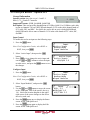
To enable this card as an input use the following steps.
1. Press the
button.
Note: For Configuration 2 units, select RDS1 or
RDS2, then press
.
2. Select “Active Input”, then press the
button.
3. Press
twice to change the active input and
use the
and
buttons to select the input
to make active, and press the
button to save
the changes.
Input
►Active Input
Backup Mode
Input Modules
Active Input
Active Input:
►
VSB/QAM 1-4
Configure Input
1. Press the
button.
Note: For Configuration 2 units, select RDS1 or
RDS2, then press
.
2. Select “Input Modules”, and press the
button.
3. Use the
and
buttons to move the cursor
to the “VSB/QAM” card of the specific slot (e.g.
1-4). Notice the location diagram in the upper
right corner of the screen changes as the cursor
moves by each card.
4. Press the
button once to display the Status
screen for the VSB/QAM card.
5. Press the
button again to display the Edit
screen for the VSB/QAM card.
Page 24
Input
Active Input
Backup Mode
►Input Modules
Input
ASI+ 1-3
►VSB/QAM 1-4
ASI/310M 2-3
MRD 3187B User Manual
6. Use the
and
buttons to move the cursor
to “Selected I/O:” then press the
button.
7. Use the
and
buttons to change the
selection to, “yes,” then press the
button.
VSB/QAM 1-4
►Selected I/O:no
Chan:__
Modulation:8VSB
Channel
1. Use the
and
buttons to move the cursor
to, “Chan:” then press the
button.
2. Use the
and
buttons to tune to the
specific RF channel of interest (2-134), then
press the
button to save the selection.
Modulation
1. Use the
and
buttons to move the cursor
to, “Modulation:” then press the
button.
2. Use the
and
buttons to choose the
appropriate modulation type (8VSB, QAM64B,
QAM256B), then press the
button to save the
selection.
VSB/QAM 1-4
Selected I/O:yes
►Chan:32
Modulation:8VSB
VSB/QAM 1-4
Selected I/O:yes
Chan:32
►Modulation:8VSB
Channel Bands
1. Use the
and
buttons to move the cursor
to, “Air/CATV:” then press the
button.
2. Use the
and
buttons to choose the
appropriate channel band (OffAir, CableFCC, Cable-HRC, Cable-IRC), then press
the
button to save the selection.
VSB/QAM 1-4
Modulation:8VSB
►Air/CATV:OffAir
Low:+00dBmV
Set Low Signal and MER Error Levels
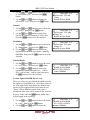
These two values are user defined threshold levels for
the signal level and MER level. Once these values are
set, if the input levels drops below the defined value,
an error will be triggered which will cause the red
“Error” LED to illuminate on the front panel, a
description of the error will be shown in the “Active
Errors” menu under the
button, and an entry
will be logged in the event log.
1. Use the
and
buttons to move the cursor
to, “Low:” then press the
button.
2. Use the
and
buttons to select the
Page 25
VSB/QAM 1-4
Modulation:8VSB
Air/CATV:OffAir
►Low:+00dBmV
MRD 3187B User Manual
column to edit and use the
and
buttons to
set the value of the low signal alarm threshold (30dBmV - +40dBmV), then press the
button
to save the selection.
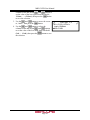
3. Use the
and
buttons to move the cursor
VSB/QAM 1-4
to, “MER:” then press the
button.
Air/CATV:OffAir
4. Use the
and
buttons to select the
Low:+00dBmV
column to edit and use the
and
buttons
►MER:10dB
to set the value of the low MER alarm threshold
(0dB – 40dB), then press the
button to save
the selection.
Page 26
MRD 3187B User Manual
4.2 Serial Transport Stream Input/Output (DVB-ASI/SMPTE 310M) –
Option 8702
General Information
Install Location: Any slot except 1-1 and 2-1.
I/O: (1) 75 Female BNC Input, (1) 75 Female BNC
Output
Supported Formats: DVB-ASI, 310M
Description: This card provides either DVB-ASI or 310M input and output. The card will
provide 310M output only if the input TS is 19.39Mb/sec. When the card is in ASI
mode, the TS bitrate for both the input and output is from 1.5Mb/sec – 160Mb/sec.
When the card is in SMPTE 310M mode, the bitrate for both input and output must be
19.39Mb/sec. The output jack on this card is an active loop-through (i.e. a re-serialized
TS). The output will be the same type that the input is set for (e.g. 310M or ASI). The
card can be used to provide an ASI TS output from another type of input on the unit
(e.g. 8VSB).
Input Control
To enable this card as an input use the following steps.
1. Press the
button.
Note: For Configuration 2 units, select RDS1 or
RDS2, then press
.
2. Select “Active Input”, then press the
button.
3. Press
twice to change the active input and
use the
and
buttons to select the input
to make active, and press the
button to save
the changes.
Input
►Active Input
Backup Mode
Input Modules
Active Input
Active Input:
►
ASI/310M 2-3
Configure Input
1. Press the
button.
Note: For Configuration 2 units, select RDS1 or
RDS2, then press
.
2. Select “Input Modules”, and press the
button.
3. Use the
and
buttons to move the cursor
to the “ASI/310M” card of the specific slot (e.g.
2-3). Notice the location diagram in the upper
right corner of the screen changes as the cursor
Page 27
Input
Active Input
Backup Mode
►Input Modules
Input
ASI+ 1-3
VSB/QAM 1-4
►ASI/310M 2-3
MRD 3187B User Manual
4.
5.
6.
7.
moves by each card.
Press the
button once to display the Status
screen for the ASI/310M card.
ASI/310M 2-3
►Selected
I/O:no
Press the
button again to display the Edit
Type:ASI
screen for the ASI/310M card.
Use the
and
buttons to move the cursor
to, “Selected I/O:” then press the
button.
Use the
and
buttons to change the selection to, “yes,” then press the
button.
Input Type
1. Use the
and
buttons to move the cursor
to, “Type:” then press the
button.
2. Use the
and
buttons to select the
appropriate input (ASI, 310M), then press the
button to save the selection.
Page 28
ASI/310M 2-3
Selected I/O:yes
►Type:ASI
MRD 3187B User Manual
4.3 High Bit Rate ASI Input – Option 8703
General Information
Install Location: Any slot except 1-1 and 2-1.
I/O: (1) 75 Female BNC Input, (1) 75 Female BNC
Loop Out
Supported Formats: ASI
Description: This card provides DVB-ASI input for MPTS up to 160Mb/sec. The maximum
TS bitrate for the card is 160Mb/sec. The output on the card is a passive loop-through
and should be terminated with a 75Ohm terminator when not in use. The card cannot be
used to provide a TS output from another TS input on the unit.
Input Control
To enable this card as an input use the following steps.
1. Press the
button.
Note: For Configuration 2 units, select RDS1 or
RDS2, then press
.
2. Select “Active Input”, then press the
button.
3. Press
twice to change the active input and
use the
and
buttons to select the input
to make active, and press the
button to save
the changes.
Input
►Active Input
Backup Mode
Input Modules
Active Input
Active Input:
►
ASI+ 2-2
Configure Input
1. Press the
button.
Note: For Configuration 2 units, select RDS1 or
RDS2, then press
.
2. Select “Input Modules”, and press the
button.
3. Use the
and
buttons to move the cursor
to the “ASI+” card of the specific slot (e.g. 2-2).
Notice the location diagram in the upper right
corner of the screen changes as the cursor moves
by each card.
4. Press the
button once to display Status
screen for the ASI+ card.
5. Press the
button again to display the Edit
screen for the ASI+ card.
Page 29
Input
Active Input
Backup Mode
►Input Modules
Input
►ASI+ 2-2
VSB/QAM 1-4
ASI/310M 2-3
ASI+ 2-2
►Selected I/O:no
MRD 3187B User Manual
6. Press the
button one more time.
7. Use the
and
buttons to change the
selection to, “yes,” then press the
button.
Page 30
MRD 3187B User Manual
4.4 Video Output (2 SD-SDI, 1 Composite) – Option 8704A/8704B
General Information
Install Location: 1-1 or (2-1, only on Configuration 2
units or Configuration 1 with dual decoders)
I/O: (2) 75 Female BNC SD-SDI outputs, (1) 75
Female BNC NTSC/PAL Composite output
Supported Formats: SD-SDI, NTSC/PAL Composite
Description: This card provides three mirrored outputs from any of the available input
option cards. Two of the outputs are SD-SDI and one is NTSC Composite. The 8704A
card provides Composite Color Phase Reference when used with Genlock and the 8731,
Genlock decoder.
Output Control
1. Press the
button.
Note: For Configuration 2 units, select RDS1 or
RDS2, then press
.
2. Use the
and
buttons to move the cursor
to the “SD Video” card of the specific slot (e.g.
1-1). Notice the location diagram in the upper
right corner of the screen changes as the cursor
moves by each card.
Output
Audio 1-2
►SD Video 1-1
Video Settings
1. Use the
and
buttons to move the cursor
to, “Video,” then press the
button to
display the Video Status screen for the video
output card.
2. Press the
button again to display the Edit
screen for the video output card.
SD Video 1-1
►Video
SDI VANC Assignment
CMPST VBI Assignment
NTSC Pedestal
When the NTSC Ped is enabled it applies a 7.5IRE
pedestal to the black level of the Composite video
output.
1. Use the
and
buttons to move the
cursor to, “NTSC Ped:” then press the
SD Video 1-1
►NTSC Ped:Disabled
button.
SDI Clk:Pass on Fail
2. Use the
and
buttons to enable or
Format: 720x480i
disable the pedestal, then press the
button to save the selection.
Page 31
MRD 3187B User Manual
SDI Clock
This option sets how the SDI clock behaves upon
input failure. Pass on Fail will continue to send
the SDI clock and show the selected raster color
on the SDI outputs. Squelch will stop the SDI
clock and any equipment down the line will lose
SDI input.
1. Use the
and
buttons to move the
cursor to, “SDI Clk:” then press the
button.
2. Use the
and
buttons to set the
desired SDI clock mode (Pass on Fail,
Squelch), then press the
button to
save the selection.
SD Video 1-1
NTSC Ped:Disabled
►SDI Clk:Pass on Fail
Format: 720x480i
Video Format
1. Use the
and
buttons to move the
cursor to, “Format:” then press the
button.
2. Use the
and
buttons to select the
appropriate format, then press the
button to save the selection.
720x480i
720x480i
720x576i
720x576i
4x3
16x9
16x9
4x3
SD Video 1-1
SDI Clk:Pass on Fail
►Format: 720x480i
4x3 29.97
29.97
29.97
25.00
25.00
Display Mode
1. Use the
and
buttons to move the
cursor to, “Disp Mode:” then press the
button.
2. Use the
and
buttons to select the
appropriate display mode (Letterbox,
Cropped, Anamorph), then press the
button to save the selection.
SD Video 1-1
Format: 720x480i
4x3 29.97
►Disp Mode: Letterbox
Auto AFD
SD Video 1-1
1. Use the
and
buttons to move the
4x3 29.97
cursor to, “Auto AFD:” then press the
Disp Mode: Letterbox
button.
►Auto AFD: Disabled
2. Use the
and
buttons to select the
appropriate mode (Enabled or Disabled),
then press the
button to save the
selection.
Page 32
MRD 3187B User Manual
Raster Color
This setting determines the color of the raster that
is output by the decoder when input is lost.
1. Use the
and
buttons to move the
cursor to, “Raster Color:” then press the
button.
2. Use the
and
buttons to select the
desired raster color (Black, White,
SD Video 1-1
Disp Mode: Letterbox
Auto AFD: Disabled
►Raster Color: Black
Yellow, Cyan, Green, Magenta, Red,
Blue), then press the
button to save the
selection.
VANC Embedding
1. Use the
and
buttons to move the cursor
to, “SDI VANC Assignment,” then press the
button to view the Status screen.
2. Press the
button once more to display the
edit menu.
3. Use the
and
buttons to move the cursor
to the desired ancillary data type, then press the
button.
4. Use the
and
buttons to choose
(Enabled or Disabled), then press the
button to save the selection.
5. Use the
and
buttons to select “Line:”
and press the
button.
6. Use the
and
buttons to change the line
number in which the ancillary data will be
located.
SD Video 1-1
Video
►SDI VANC Assignment
CMPST VBI Assignment
SDI VANC 1-1
ADP
► EIA-608CC:Disabled
Line: 9
SDI VANC 1-1
ADP
EIA-608CC:Disabled
►
Line: 9
Note: Use the above steps 3-6 to embed other
components on other lines.
Composite VBI Assignment
To setup Line 21 Closed Captions, Teletext, etc…
on the Composite output of this card use the
following steps:
1. Use the
and
buttons to move the
cursor to, “Cmpst VBI Assignment,” then
press the
button.
2. To Enable or Disable any of the options (Line
21 CC, TTX, VPS, or WSS) press the
button
on the selected option.
Page 33
HD Video 2-1
►CMPST VBI Assignment
Overlay
Genlock Offset
Cmpst VBI
NTSC
► Line21 CC: Enabled
PAL
MRD 3187B User Manual
3. Then use the
and
buttons to toggle
between Enabled and Disabled.
4. Press the
button to save changes.
Overlay Settings
Overlays provide an easy to use OSD to help
troubleshoot problems, monitor stream characteristics,
or decode closed captioning.
CAUTION: All overlays will appear on the
downstream video.
1. Use the
and
buttons to move the cursor
to, “Overlay,” then press the
button.
Type of Overlay
1. Use the
and
buttons to move the
cursor to, “Type:” then press the
button.
2. Use the
and
buttons to select which
overlay to display (Table, Closed
Caption, Service, Off), then press the
button to save the selection.
SD Video 1-1
CMPST VBI Assignment
►Overlay
Genlock Offset
Overlay 1
►Type:Closed Caption
Overlay:NTSC
NTSC Srvc:1
Overlay (Closed Caption)
Note: This menu changes depending upon which
overlay is set in “Type of Overlay” above.
1. Use the
and
buttons to move the
cursor to, “Overlay:” then press the
button.
2. Use the
and
buttons to select the
appropriate type of overlay (NTSC, DTVCC),
then press the
button to save the
selection.
NTSC Service
Note: This menu is only available when the
“Overlay” setting is set to NTSC.
Page 34
Overlay 1
Type:Closed Caption
►Overlay:NTSC
NTSC Srvc:1
MRD 3187B User Manual
1. Use the
and
buttons to move the
cursor to, “NTSC Srvc:” then press the
button.
2. Use the
and
buttons to select
which NTSC CC Srvc to display on the
overlay (1-4), then press the
save the selection.
Overlay 1
Type:Closed Caption
Overlay:NTSC
►NTSC Srvc:1
button to
DTVCC Service
Note: This menu is only available when the
“Overlay” setting is set to DTVCC.
1. Use the
and
buttons to move the
cursor to, “DTVCC Srvc:” then press the
Overlay 1
Type:Closed Caption
Overlay:DTVCC
►DTVCC Srvc:1
button.
2. Use the
and
buttons to select which
DTVCC Srvc to display on the overlay (1-7),
then press the
selection.
button to save the
Overlay (Table)
Note: This menu changes depending on which
overlay is set in “Type of Overlay” above.
1. Use the
and
buttons to move the
cursor to, “Overlay:” then press the
button.
2. Use the
and
buttons to select the
appropriate type of overlay (PSI PAT, PSI
Overlay 1
Type:Table
►Overlay:PSI PMT
Screen Interaction
PMT, PSIP MGT, PSIP STT, PSIP
TVCT, PSIP EIT, PSIP EPG), then press
the
button to save the selection.
Screen Interaction
This mode allows the user to page through the OSD
PSI/PSIP tables.
Note: This option will only be available if the type
of overlay is set to, “Table.”
1. Use the
and
buttons to move the
cursor to, “Screen Interaction,” then
press the
button.
2. While this mode is enabled, the
,
,
, and
buttons will control the on-
Page 35
Overlay 1
Type:Table
Overlay:PSI PMT
►Screen Interaction
MRD 3187B User Manual
screen PSI/PSIP tables. To exit the, “Screen
Interaction” mode press the
button.
Coordinated Universal Time Offset
1. Use the
and
buttons to move the
cursor to, “Utc Offset:” then press the
button.
2. Use the
and
buttons to change to
the appropriate offset, then press the
button to save the selection.
See Appendix E for UTC values
Overlay 1
Screen Interaction
►Utc Offset: -06:00
Central
Overlay (Service)
Note: This option only displays the Service Info.
Overlay 1
Type: Service
►Overlay: Service Info
Small Format Display
To setup the MRD 3187B to output a “Small Format
Display,” use the following steps:
1. Use the
and
buttons to move the cursor
to “Small Format Disp,” then press the
button.
2. Press the
button again to change the
settings.
Format
1. While the cursor is on “Output Format:”
press the
button to change the display
format.
2. Use the
and
buttons to change
from any of the following settings:
720x480i
720x480i
720x576i
720x576i
3. Press the
4x3 29.97
16x9 29.97
16x9 25.00
4x3 25.00
button to save the settings.
Page 36
Output
SDI VANC Assignment
Overlay
►Small Format Disp
SFD 1-1
►Output Format:4x3
720x480i 29.97fps
Location: Top-Lt
MRD 3187B User Manual
SFD Location
1. Use the
and
button to move the
cursor to “Location:” and then press the
button.
2. Use the
and
buttons to select one
of the following options:
Top-Lt
Top-Rt
Top-Ctr
3. Press the
Mid-Lt
Mid-Rt
Mid-Ctr
Btm-Lt
Btm-Rt
Btm-Ctr
button to save the settings.
Page 37
SFD 1-1
Output Format:4x3
720x480i 29.97fps
►Location: Top-Lt
MRD 3187B User Manual
4.5 Video Output (2 HD-SDI, 1 RGBHV/YPbPr) – Option 8705/8705A
General Information
Install Location: 1-1 or (2-1, only on Configuration 2
units or Configuration 1 with dual decoders)
I/O: (2) 75 HD-SDI Female BNC outputs, (1) 15-pin
D-sub Female analog output
Supported Formats: HD-SDI, YPbPr, RGBHV
Description: This card provides three mirrored outputs from any of the available input
option cards. Two of the outputs are HD-SDI and one is analog YPbPr/RGBHV.
Output Control
1. Press the
button.
Note: For Configuration 2 units, select RDS1 or
RDS2, then press
.
2. Use the
and
buttons to move the cursor
to the “HD Video” card of the specific slot (e.g.
2-1). Notice the location diagram in the upper
right corner of the screen changes as the cursor
moves by each card.
Output
►HD Video 2-1
Audio 2-2
Video Settings
1. Use the
and
buttons to move the cursor
to, “Video,” then press the
button to
display the Video Status screen for the video
output card.
2. Press the
button again to display the Edit
screen for the video output card.
HD Video 2-1
►Video
SDI VANC Assignment
Overlay
Select Format Setting
When in “Auto” mode, the unit will automatically pick the
format which is closest to the native format of the decoded
video in the elementary stream. When in “Manual” mode,
the format may be selected from the list of available output
formats listed under “Video Format” below.
1. Use the
and
buttons to move the
cursor to, “Select Format:” then press
HD Video 2-1
►Select Format: manual
the
button.
Format: 1920x1080i
2. Use the
and
buttons to select either
16x9 29.97
auto or manual mode, then press the
button to save the selection.
Page 38
MRD 3187B User Manual
Video Format
Note: This menu is only available if the “Select
Format” option is set to “manual.”
1. Use the
and
button to move the
cursor to, “Format:” then press the
button.
2. Use the
and
buttons to select the
desired output format, then press the
button to save the selection.
720x480i 16x9 29.97
720x480i 4x3 29.97
720x576i 16x9 25.00
720x576i 4x3 25.00
1280x720p 16x9 50.00
1280x720p 16x9 59.94
1280x720p 16x9 60.00
HD Video 2-1
Select Format: manual
►Format: 1920x1080i
16x9 29.97
1920x1080i
1920x1080i
1920x1080i
1920×1080p
1920×1080p
1920×1080p
1920×1080p
1920×1080p
16x9
16x9
16x9
16×9
16×9
16×9
16×9
16×9
25.00
29.97
30.00
23.98*
24.00*
25.00*
29.97*
30.00*
* indicates that this setting is only available for the 8730A/8732
Note: “If either 480i or 576i video format is used the HD-SDI outputs are turned off and
only the analog output is enabled.
Analog Output Format
Note: If this setting is set incorrectly when using
an RGB monitor, the image will appear
green. If this setting is set incorrectly when
using a Component monitor, there will be no
video on the monitor.
1. Use the
and
buttons to move the
cursor to, “Anlg Out:” then press the
button.
2. Use the
and
buttons to select the
desired output format (RGBHV, YPbPr),
then press the
button to save the
selection.
HD Video 2-1
Format: 1920x1080i
16x9 29.97
►Anlg Out: RGBHV
Display Mode
1. Use the
and
buttons to move the
cursor to, “Disp Mode:” then press the
button.
Page 39
HD Video 2-1
16x9 29.97
Anlg Out: RGB
►Disp Mode: Letterbox
MRD 3187B User Manual
2. Use the
and
buttons to select the
desired output size (Letterbox, Cropped),
then press the
button to save the
selection.
Raster Color
This setting determines the color of the raster that
is output by the decoder when input is lost.
1. Use the
and
buttons to move the
cursor to, “Raster Color:” then press the
button.
2. Use the
and
buttons to select the
desired raster color (Black, White,
Yellow, Cyan, Green, Magenta,
Red, Blue), then press the
button to
save the selection.
HD Video 2-1
Anlg Out:RGBHV
Display Mode:Letterbox
►Raster Color:Black
VANC Embedding
1. Use the
and
buttons to move the cursor
to, “SDI VANC Assignment,” then press the
button to view the Status screen.
2. Press the
button once more to display the
edit menu.
3. Use the
and
buttons to move the cursor
to the desired ancillary data type, then press the
button.
4. Use the
and
buttons to choose
(Enabled or Disabled), then press the
button to save the selection.
5. Use the
and
buttons to select “Line:”
and press the
button.
6. Use the
and
buttons to change the line
number in which the ancillary data will be
located.
Note: Use the above steps 3-6 to embed other
components on other lines.
Overlay Settings
Overlays provide an easy to use OSD to help
troubleshoot problems, monitor stream
characteristics, or decode closed captioning.
Page 40
HD Video 1-1
Video
►SDI VANC Assignment
Overlay
SDI VANC 1-1
ADP
► EIA-608CC:Disabled
Line: 9
SDI VANC 1-1
ADP
EIA-608CC:Disabled
►
Line: 9
MRD 3187B User Manual
CAUTION: All overlays will appear on the
downstream video.
1. Use the
and
buttons to move the cursor
to, “Overlay,” then press the
button.
HD Video 2-1
SDI VANC Assignment
►Overlay
Genlock Offset
Type of Overlay
1. Use the
and
buttons to move the
cursor to, “Type:” then press the
button.
2. Use the
and
buttons to select which
Overlay 2
overlay to display (Closed Caption,
►Type: Closed Caption
Service, Table) then press the
Overlay: NTSC
button to save the selection.
NTSC Srvc: 1
Overlay (Closed Caption)
Note: This menu changes depending on which
overlay is set in “Type of Overlay” above.
1. Use the
and
buttons to move the
cursor to, “Overlay:” then press the
button.
2. Use the
and
buttons to select the
appropriate type of overlay (NTSC, DTVCC,
OFF), then press the
button to save the
selection.
Overlay 2
Type: Closed Caption
►Overlay: NTSC
NTSC Srvc: 1
Closed Caption Number
NTSC
Note: This option will only be available if the TYPE
of overlay is set to, “Closed Caption” and
the OVERLAY is set to “NTSC.”
1. Use the
and
buttons to move the
cursor to, “NTSC Srvc:” then press the
button.
2. Use the
and
buttons to select the
desired number of closed caption to view (14), then press the
selection.
Overlay 2
Type: Closed Caption
Overlay: NTSC
►NTSC Srvc: 1
button to save the
DTVCC
Note: This option will only be available if the
TYPE of overlay is set to, “Closed
Caption” and the OVERLAY is set to
“DTVCC.”
Page 41
Overlay 2
Type: Closed Caption
Overlay: DTVCC
►DTVCC Srvc: 1
MRD 3187B User Manual
1. Use the
and
buttons to move the
cursor to, “DTVCC Srvc:” then press the
button.
2. Use the
and
buttons to select the
desired number of closed caption to view (17), then press the
selection.
button to save the
Overlay (Table)
Note: This menu changes depending on which
overlay is set in “Overlay”.
1. Use the
and
buttons to move the
cursor to, “Overlay:” then press the
button.
2. Use the
and
buttons to select the
appropriate type of overlay (PSI PAT, PSI
Overlay 2
Type: Table
►Overlay: PSI PAT
Screen Interaction
PMT, PSIP MGT, PSIP STT, PSIP
TVCT, PSIP EIT, PSIP EPG), then press
the
button to save the selection.
Screen Interaction
This mode allows the user to page through the
on-screen PSI/PSIP tables.
Note: This option will only be available if the
type of overlay is set to, “Table.”
1. Use the
and
buttons to move the
cursor to, “Screen Interaction,” then
press the
button.
2. While this mode is enabled, the
,
,
, and
buttons will control
the on-screen PSI/PSIP tables. To exit
the, “Screen Interaction” mode
press the
button.
Overlay 2
Type: Table
Overlay: PSI PMT
►Screen Interaction
Coordinated Universal Time Offset
1. Use the
and
buttons to move
the cursor to, “Utc Offset:” then
press the
button.
2. Use the
and
buttons to change
Page 42
Overlay 2
Screen Interaction
►Utc Offset: -06:00
Central
MRD 3187B User Manual
to the appropriate offset, then press the
button to save the selection.
Overlay (Service)
Note: This option only displays the Service Info.
Small Format Display
To setup the MRD 3187B to output a “Small Format
Display,” use the following steps:
1. Use the
and
buttons to move the cursor
to “Small Format Disp,” then press the
button.
2. Press the
button again to change the
settings.
Format
1. While the cursor is on “Format:” press the
button to change the display format.
2. Use the
and
buttons to change
from any of the following settings:
720x480i
720x480i
720x576i
720x576i
1280x720p
1280x720p
1280x720p
3. Press the
16x9
4x3
16x9
4x3
16x9
16x9
16x9
29.97
29.97
25.00
25.00
50.00
59.94
60.00
Overlay 1
Type: Service
►Overlay: Service Info
Output
SDI VANC Assignment
Overlay
►Small Format Disp
SFD 1-1
►Format:1920x1080i
16x9
29.97
SFD Location:Top-Lt
1920x1080i
1920x1080i
1920x1080i
1920x1080p
1920x1080p
1920x1080p
1920x1080p
1920x1080p
16x9
16x9
16x9
16x9
16x9
16x9
16x9
16x9
25.00
29.97
30.00
23.98
24.00
25.00
29.97
30.00
button to save the settings.
SFD Location
1. Use the
and
button to move the
cursor to “SFD Location:” and then press
the
button.
2. Use the
and
buttons to select one
of the following options:
Top-Lt
Top-Rt
Top-Ctr
3. Press the
Mid-Lt
Mid-Rt
Mid-Ctr
Btm-Lt
Btm-Rt
Btm-Ctr
button to save the settings.
Page 43
SFD 1-1
Format:1920x1080i
16x9
29.97
►SFD Location:Top-Lt
MRD 3187B User Manual
4.6 Video Output (1 RGBHV/YPbPr, 1 Composite) - Option 8706A
General Information
Install Location: 1-1 or (2-1 only on Configuration 2
units or Configuration 1 units with dual decoders)
I/O: (1) 75 Female BNC NTSC/PAL Composite
output, (1) 15-pin D-sub Female analog output
Supported Formats: NTSC/PAL Composite, YPbPr, RGBHV
Description: Analog only, video output card that can output either high definition or
standard definition formats. There are two outputs on the card. One BNC for composite and
one 15-pin D-sub for composite
Output Control
1. Press the
button.
Note: For Configuration 2 units, select RDS1 or RDS2, then press
2. Use the
and
buttons to move the cursor
to the “Anlg Video” card of the specific slot
(e.g. 1-1), then press the
button. Notice the
location diagram in the upper right corner of the
screen changes as the cursor moves by each
card.
.
Output
►Anlg Video 1-1
Audio 1-2
Video Settings
1. Use the
and
buttons to move the cursor
to, “Video,” then press the
button to
display the Video status screen for the video
output card.
2. Press the
button again to display the Edit
screen for the video output card.
Anlg Video 1-1
►Video
Cmpst VBI Assignment
Overlay
Select Format Setting
When in “Auto” mode, the unit will automatically pick the format which is closest to the
native format of the decoded video in the elementary stream. When in “Manual” mode,
the format may be selected from the list of available output formats listed under “Video
Format” below.
1. Use the
and
buttons to move the
cursor to, “Select Format:” then press
Anlg Video 1-1
►Select
Format: manual
the
button.
Format:
1920x1080i
2. Use the
and
buttons to select either
16x9 29.97
auto or manual mode, then press the
button to save the selection.
Page 44
MRD 3187B User Manual
Video Format
Note: This menu is only available if the “Select
Format” option is set to “manual.”
1. Use the
and
buttons to move the
cursor to, “Format:” then press the
button.
2. Use the
and
buttons to select the
appropriate output format, then press the
button to save the selection.
720x480i
720x480i
720x576i
720x576i
1280x720p
16x9
4x3
16x9
4x3
16x9
29.97
29.97
25.00
25.00
50.00
Anlg Video 1-1
Select Format: manual
►Format: 1920x1080i
16x9 29.97
1280x720p
1280x720p
1920x1080i
1920x1080i
1920x1080i
16x9
16x9
16x9
16x9
16x9
59.94
60.00
25.00
29.97
30.00
Analog Output Format
Note: If this setting is set incorrectly when using an RGB monitor, the image will appear
green. If this setting is set incorrectly when using a Component monitor, there will
be no video on the monitor.
1. Use the
and
buttons to move the
cursor to, “Anlg Out:” then press the
Anlg Video 1-1
button.
Format: 1920x1080i
2. Use the
and
buttons to select the
16x9 29.97
►Anlg
Out:
RGBHV
desired output format (RGBHV, YPbPr),
then press the
button to save the
selection.
NTSC Ped
When the NTSC Ped is enabled it applies a 7.5IRE
offset to the black level of the Composite video
output.
1. Use the
and
buttons to move the
Anlg Video 1-1
►NTSC offset: Enabled
cursor to, “Format:” then press the
Disp Mode: Letterbox
button.
Raster Color: Black
2. Use the
and
buttons to enable or
disable the NTSC offset, then press the
button to save the selection.
Display Mode
1. Use the
and
buttons to move the
cursor to, “Disp Mode:” then press the
button.
Page 45
Anlg Video 1-1
NTSC offset: Enabled
►Disp Mode: Letterbox
Raster Color: Black
MRD 3187B User Manual
2. Use the
and
buttons to select either
(Letterbox, Cropped), then press the
button to save the selection.
Auto AFD
AFD or Active Format Description, is a standard
set of codes that if sent in the MPEG transport
stream is interpreted by the MRD 3187A into a
certain aspect ratio and active picture
characteristics.
1. Use
the
and buttons to move the
cursor to, “Auto AFD:” then press the
button.
2. Use
the
and buttons to select the
appropriate mode (Enabled or Disabled),
then press the
button to save the
selection.
Anlg Video 1-1
Disp Mode: Letterbox
►Auto AFD:Disabled
Raster Color: Black
Raster Color
1. Use the
and
buttons to move the
cursor to, “Raster Color:” then press the
button.
2. Use the
and
buttons to select the
desired raster color (Black, White,
Yellow, Cyan, Green, Magenta,
Red, Blue), then press the
button to
Anlg Video 1-1
NTSC offset: Enabled
Disp Mode: Letterbox
►Raster Color: Black
save the selection.
Composite VBI Assignment
To setup Line 21 Closed Captions, Teletext, etc…
on the Composite output of this card use the
following steps:
1. Use the
and
buttons to move the
cursor to, “Cmpst VBI Assignment,” then
press the
button.
2. To Enable or Disable any of the options (Line
21 CC, TTX, VPS, or WSS) press the
button on the selected option.
3. Then use the
and
buttons to toggle
between Enabled and Disabled.
4. Press the
button to save changes.
Page 46
HD Video 2-1
►CMPST VBI Assignment
Overlay
Genlock Offset
Cmpst VBI 2-1
NTSC
► Line21 CC:Disabled
PAL
MRD 3187B User Manual
Overlay Settings
CAUTION: If Info (PSI/PSIP) data is turned on, the
overlay will appear on downstream video.
The same is true if Closed Caption overlay
is turned on.
1. Use the
and
buttons to move the cursor
to, “Overlay,” then press the
button.
HD Video 2-1
CMPST VBI Assignment
►Overlay
Genlock Offset
Type of Overlay
1. Use the
and
buttons to move the
cursor to, “Type:” then press the
button.
2. Use the
and
buttons to select which
overlay to display (Table, Closed
Caption, Service, OFF), then press the
button to save the selection.
Overlay 2
►Type: Closed Caption
Overlay: NTSC
NTSC Srvc: 1
Overlay (Closed Caption)
Note: This menu changes depending on which
overlay is set in “Type of Overlay” above.
1. Use the
and
buttons to move the
cursor to, “Overlay:” then press the
button.
2. Use the
and
buttons to select the
appropriate type of overlay (NTSC, DTVCC),
then press the
button to save the
selection.
Overlay 2
Type: Closed Caption
►Overlay: NTSC
NTSC Srvc: 1
Closed Caption Number
NTSC
Note: This option will only be available if the
TYPE of overlay is set to, “Closed
Caption” and the OVERLAY is set to
“NTSC.”
1. Use the
and
buttons to move
the cursor to, “NTSC Srvc:” then press
the
button.
2. Use the
and
buttons to select
the desired number of closed caption to
Page 47
Overlay 2
Type: Closed Caption
Overlay: NTSC
►NTSC Srvc: 1
MRD 3187B User Manual
view (1-4), then press the
save the selection.
button to
DTVCC
Note: This option will only be available if the
TYPE of overlay is set to, “Closed
Caption” and the OVERLAY is set to
“DTVCC.”
1. Use the
and
buttons to move
the cursor to, “DTVCC Srvc:” then
press the
button.
2. Use the
and
buttons to select the
desired number of closed caption to view
(1-7), then press the
button to save
the selection.
Overlay 2
Type: Closed Caption
Overlay: DTVCC
►DTVCC Srvc: 1
Overlay (Table)
Note: This menu changes depending on which
overlay is set in “Overlay”.
1. Use the
and
buttons to move the
cursor to, “Overlay:” then press the
button.
2. Use the
and
buttons to select the
appropriate type of overlay (PSI PAT, PSI
PMT, PSIP MGT, PSIP STT, PSIP
TVCT, PSIP EIT, PSIP EPG), then press
the
Overlay 2
Type: Table
►Overlay: PSI PAT
Screen Interaction
button to save the selection.
Screen Interaction
This mode allows the user to page through the
on-screen PSI/PSIP tables.
Note: This option will only be available if the
type of overlay is set to, “Table”
1. Use the
and
buttons to move
Overlay 2
the cursor to, “Screen Interaction,”
Type: Table
then press the
button.
Overlay: PSI PMT
►Screen Interaction
2. While this mode is enabled, the
,
,
, and
buttons will control
the on-screen PSI/PSIP tables. To exit the,
“Screen Interaction” mode press the
button.
Page 48
MRD 3187B User Manual
Coordinated Universal Time Offset
1. Use the
and
buttons to move
the cursor to, “Utc Offset:” then
press the
button.
2. Use the
and
buttons to change
to the appropriate offset, then press the
button to save the selection.
Overlay 1
Screen Interaction
►Utc Offset: -06:00
Central
Overlay (Service)
Note: This option only displays the Service Info.
Overlay 1
Type: Service
►Overlay: Service Info
Small Format Display
To setup the MRD 3187B to output a “Small Format
Display,” use the following steps:
1. Use the
and
buttons to move the cursor
to “Small Format Disp,” then press the
button.
2. Press the
button again to change the
settings.
Format
1. While the cursor is on “Format:” press the
button to change the display format.
2. Use the
and
buttons to change
from any of the following settings:
720x480i 16x9 29.97
720x480i 4x3 29.97
720x576i 16x9 25.00
720x576i 4x3 25.00
1280x720p 16x9 50.00
1280x720p 16x9 59.94
1280x720p 16x9 60.00
Output
SDI VANC Assignment
Overlay
►Small Format Disp
SFD 1-1
►Format:1920x1080i
16x9
29.97
SFD Location:Top-Lt
1920x1080i
1920x1080i
1920x1080i
1920×1080p
1920×1080p
1920×1080p
1920×1080p
1920×1080p
16x9
16x9
16x9
16×9
16×9
16×9
16×9
16×9
* indicates that this setting is only available for the 8730A/8732
Page 49
25.00
29.97
30.00
23.98*
24.00*
25.00*
29.97*
30.00*
MRD 3187B User Manual
Note: “If either 480i or 576i video format is used the HD-SDI outputs are turned off and
only the analog output is enabled.
3. Press the
button to save the settings.
SFD Location
1. Use the
and
button to move the
cursor to “SFD Location:” and then press
the
button.
2. Use the
and
buttons to select one
of the following options:
Top-Lt
Top-Rt
Top-Ctr
3. Press the
Mid-Lt
Mid-Rt
Mid-Ctr
Btm-Lt
Btm-Rt
Btm-Ctr
button to save the settings.
Page 50
SFD 1-1
Format:1920x1080i
16x9
29.97
►SFD Location:Top-Lt
MRD 3187B User Manual
4.7 Audio Output (DolbyE, AES Digital, Analog) – Option 8707A
General Information
Install Location: Any slot except 1-1 and 2-1.
I/O: (2) 75 Female BNC digital outputs, (1) 15-pin Dsub Male analog output
Supported Formats: Raw, PCM, Dolby E
Description: This card provides parsed DolbyE compressed audio, two digital audio outputs,
and two analog audio pair outputs. It provides the audio from two audio decoder
processors. Two 8707A cards can be installed to provide Raw and PCM digital audio
outputs from four audio decoder processors (Only in Configuration 2 units for separate
inputs or Configuration 1 Dual Decoder units for the same input).
Output Control
1. Press the
button.
Note: For Configuration 2 units, select RDS1 or
RDS2, then press
.
2. Use the
and
buttons to move the cursor
to the “Audio” card of the specific slot (e.g. 2Output
Anlg
Video 1-1
2), then press the
button. Notice the
►Audio
2-2
location diagram in the upper right corner of the
screen changes as the cursor moves by each
card.
3. Press the
button one more time to move from
the Status screen to the Edit screen.
Digital Audio Settings
1. Use the
and
buttons to move the
cursor to, “Digital Audio: Out1:” then
press the
button.
2. Use the
and
buttons to select the
audio decoder and output format desired
(Audio X, Raw, PCM), then press the
button to save the selection.
Audio 2-2
Digital Audio:
► Out1: Audio 1 – PCM
Out2: Audio 2 – PCM
Note: The above steps apply to “Digital Audio:
Out2:” as well.
Note: The “X” of “Audio X,” in the step above, will be (1, 2, Off) for a Configuration 1
Single Decoder unit or any Configuration 2 unit, and it will be (1, 2, 3, 4, Off) for a
Configuration 1 Dual Decoder unit.
Page 51
MRD 3187B User Manual
Analog Audio Settings
1. Use the
and
buttons to move the
cursor to, “Analog Audio: Ch1:” then
press the
button.
2. Use the
and
buttons to select the
desired audio to output (Audio X), then
press the
button to save the selection.
Note: The “X” of “Audio X,” in the step above,
will be (1, 2, Off) for a Configuration 1
Single Decoder unit or any Configuration
2 unit, and it will be (1, 2, 3, 4, Off) for a
Configuration 1 Dual Decoder unit.
Audio 2-2
Analog Audio:
► Ch1: Audio 1
Ch2: Audio 2
Note: The above steps apply to “Analog Audio:
Ch2:” as well.
Output Level
1. Use the
and
buttons to move the
cursor to, “Level:” then press the
button.
2. Use the
and
buttons to select the
desired level (1-9), then press
to save
the selection.
Note: The level 7 is approx. 0 Db and each
number increment is approx. 2.5 Db.
Page 52
Audio 2-2
Ch1: Audio 1
Ch2: Audio 2
► Level: 1
MRD 3187B User Manual
4.8 Dual Video Output (2 SDI, 1 RGBHV/YPbPr/Composite) – Option 8708
General Information
Install Location: 1-1 or (2-1 only on Configuration 2
units or Configuration 1 units with dual decoders)
I/O: (2) 75 HD-SDI Female BNC outputs, (1) 15-pin
D-sub Female analog output
Supported Formats: HD-SDI, SD-SDI, YPbPr, RGBHV, and Composite
Description: This card provides three mirrored outputs from any of the available input
option cards. Two of the outputs are any combination of HD-SDI or SD-SDI and one is
analog YPbPr/RGBHV/Composite.
Output Control
1. Press the
button.
2. Use the
and
buttons to move the cursor
to the “HD/SD SDI Anlg Video” card of the
specific slot (e.g. 2-1). Notice the location
diagram in the upper right corner of the screen
changes as the cursor moves by each card.
Output
►HD/SD SDI Anlg Video
Audio 2-2
Video Settings
1. Use the
and
buttons to move the cursor
to, “Video,” then press the
button to
display the Video Status screen for the video
output card.
2. Press the
button again to display the Edit
screen for the video output card.
SDI Anlg Video 2-1
►Video
HD Settings
SD Settings
Select Format Setting
When in “Auto” mode, the unit will automatically pick the
format which is closest to the native format of the decoded
video in the elementary stream. When in “Manual” mode,
the format may be selected from the list of available output
formats listed under “Video Format” below.
1. Use the
and
buttons to move the
cursor to, “Select Format:” then press
SDI Anlg Video 2-1
►Select
Format: manual
the
button.
Format:
1920x1080i
2. Use the
and
buttons to select either
16x9 29.97
auto or manual mode, then press the
button to save the selection.
Video Format
Note: This menu is only available if the “Select
Format” option is set to “manual.”
Page 53
MRD 3187B User Manual
1. Use the
and
button to move the
cursor to, “Format:” then press the
button.
2. Use the
and
buttons to select the
desired output format, then press the
button to save the selection.
720x 480i
720x 480i
720x 576i
720x 576i
1280x720p
1280x720p
1280x720p
1920x1080i
1920x1080i
16x9
4x3
4x3
16x9
16x9
16x9
16x9
16x9
16x9
29.97
29.97
25.00
25.00
60.00
59.94
50.00
25.00
29.97
SDI Anlg Video 2-1
Select Format: manual
►Format: 1920x1080i
16x9 29.97
1920x1080i
1920x1080psF
1920x1080psF
1920x1080p
1920x1080p
1920x1080p
1920x1080p
1920x1080p
16x9
16x9
16x9
16x9
16x9
16x9
16x9
16x9
30.00
23.98
24.00
23.98
24.00
25.00
29.97
30.00
SDI Output Setup
Follow the steps in this section to set the outputs to
SD-SDI and HD-SDI.
1. Use the
and
button to move the
SDI Anlg Video 2-1
cursor to, “Output A:” then press the
SDI
button.
► Output A:SD
2. Use the
and
buttons to select the
Output B:HD
desired output format (SD or HD), then
press the
button to save the selection.
Note: Repeat the steps above to change to the
desired output setting for “Output B:”
Analog Output Format
Note: If this setting is set incorrectly when using
an RGB monitor, the image will appear
green. If this setting is set incorrectly when
using a Component monitor, there will be no
video on the monitor.
1. Use the
and
buttons to move the
cursor to, “Anlg Out:” then press the
button.
2. Use the
and
buttons to select the
desired output format (RGBHV, YPbPr,
Composite), then press the
button to
save the selection.
Page 54
SDI Anlg Video 2-1
Analog
► Anlg Out:RGBHV
NTSC Ped:Disabled
MRD 3187B User Manual
3. Use the
and
buttons to move the
cursor to, “NTSC Ped:” then press the
button.
4. Use the
and
buttons to change the
“NTSC Ped:” to either “Black 0” or “Black
7.5”, then press the
button to save the
selection.
Raster Color
This setting determines the color of the raster that
is output by the decoder when input is lost.
1. Use the
and
buttons to move the
cursor to, “Raster Color:” then press the
button.
2. Use the
and
buttons to select the
desired raster color (Black, White,
Yellow, Cyan, Green, Magenta,
Red, Blue), then press the
button to
save the selection.
SDI Anlg Video 2-1
Analog
Anlg Out:RGBHV
► NTSC Ped:Black 0
SDI Anlg Video 2-1
Anlg Out:RGBHV
NTSC Ped:Disabled
►Raster Color:Black
HD Settings
1. Use the
and
buttons to move the cursor
to, “HD Settings,” then press the
button
to display the Status screen for the HD video
output settings.
2. Press the
button again to display the Edit
screen for the HD video output settings.
SDI Video 2-1
Video
►HD Settings
SD Settings
Display Mode
1. Use the
and
buttons to move the
cursor to, “Disp Mode:” then press the
button.
2. Use the
and
buttons to select the
desired output size (Pillarbars,
Cropped), then press the
button to save
the selection.
SDI Video 2-1
►Disp Mode: Pillarbars
Video Loss Mode:
Display Raster
Video Loss Mode
1. Use the
and
buttons to move the
cursor to, “Video Loss Mode:” then press
the
button.
2. Use the
and
buttons to choose
between (Display Raster, Disable
Page 55
SDI Video 2-1
Disp Mode: Pillarbars
►Video Loss Mode:
Display Raster
MRD 3187B User Manual
Output), then press the
button to save
the selection.
Auto AFD
1. Use the
and
buttons to move the
cursor to, “Auto AFD:” then press the
button.
2. Use the
and
buttons to enable or
disable AFD, then press the
button to
save the selection.
SDI VANC Assignment
To edit the SDI VANC Assignment, use the
following steps.
1. Use the
and
buttons to move the
cursor to, “SDI VANC Assign” then press
the
button to display the status screen
for the VANC.
2. Press the
button once more to enter the
Edit screen.
SDI Video 2-1
Video Loss Mode:
Display Raster
►Auto AFD:Disabled
SDI Video 2-1
Display Raster
Auto AFD:Disabled
►SDI VANC Assign
ADP
To enable items in the VANC and assign a
line for each item, use the following steps.
1. Use the
and
buttons to move the
cursor to the desired type of closed
captioning (EIA-608CC, EIA-708CC,
TTX S2031M, Source ID, or 127
S2031M), then press the
button.
2. Use the
and
buttons to choose
“Enabled or Disabled” then select
the “Line” on which to embed. Press the
button to save the selection.
SDI VANC 2-1
ADP
► EIA-608CC:Disabled
Line:9
Note: Repeat steps 1-4 above to change EIA708CC, TTX S2031M, Source ID, and 127
S2031M.
SD Settings
1. Use the
and
buttons to move the cursor
to, “SD Settings,” then press the
button
to display the Status screen for the SD video
output settings.
2. Press the
button again to display the Edit
Page 56
SD SDI Video 2-1
Video
HD Settings
►SD Settings
MRD 3187B User Manual
screen for the SD video output settings.
Display Mode
1. Use the
and
buttons to move the
cursor to, “Disp Mode:” then press the
button.
2. Use the
and
buttons to select the
desired output size (Letterbox,
Anamorph, or Cropped), then press the
button to save the selection.
SD SDI Video 2-1
►SD Mode: Cropped
Video Loss Mode:
Display Raster
Video Loss Mode
1. Use the
and
buttons to move the
cursor to, “Video Loss Mode:” then press
the
button.
2. Use the
and
buttons to choose
between (Display Raster, Disable
Output), then press the
button to save
the selection.
SD SDI Video 2-1
Disp Mode: Pillarbars
►Video Loss Mode:
Display Raster
Auto AFD
1. Use the
and
buttons to move the
cursor to, “Auto AFD:” then press the
button.
2. Use the
and
buttons to enable or
disable AFD, then press the
button to
save the selection.
SDI VANC Assignment
To edit the SDI VANC Assignment, use the
following steps.
1. Use the
and
buttons to move the
cursor to, “SDI VANC Assign” then press
the
button to display the status screen
for the VANC.
2. Press the
button once more to enter the
Edit screen.
SD SDI Video 2-1
Video Loss Mode:
Display Raster
►Auto AFD:Disabled
SD SDI Video 2-1
Auto AFD:Disabled
►SDI VANC Assign
Cmpst VBI Assignment
ADP
To enable items in the VANC and assign a
line for each item, use the following steps.
1. Use the
and
buttons to move
the cursor to the desired type of closed
Page 57
SD SDI VANC 2-1
ADP
► EIA-608CC:Disabled
Line:9
MRD 3187B User Manual
captioning (EIA-608CC, EIA-708CC,
TTX S2031M, Source ID, or 127
S2031M), then press the
button.
2. Use the
and
buttons to choose
“Enabled or Disabled” then select
the “Line” on which to embed. Press the
button to save the selection.
SD SDI VANC 2-1
ADP
EIA-608CC:Disabled
►
Line:9
Note: Repeat steps 1-4 above to change EIA708CC, TTX S2031M, Source ID, and 127
S2031M.
NTSC Waveforms
To enable NTSC items, use the following
steps.
1. Use the
and
buttons to move
the cursor to, “Line21CC:” then press
the
button.
2. Use the
and
buttons to enable
or disable “Line21CC”, then press the
button to save the selection.
SD SDI Video 2-1
NTSC Waveforms
► Line21CC:Enabled
AMOL:Disabled
Note: Repeat steps 1-2 above to change AMOL,
and TVG2x.
PAL Waveforms
To enable PAL items, use the following steps.
1. Use the
and
buttons to move
the cursor to, “TTX:” then press the
button.
2. Use the
and
buttons to enable
or disable “TTX”, then press the
button to save the selection.
SD SDI Video 2-1
PAL Waveforms
► TTX:Enabled
VPS:Disabled
Note: Repeat steps 1-2 above to change VPS,
and WSS.
Composite VBI Assignment
To edit the Composite VBI Assignment, use the
following steps.
1. Use the
and
buttons to move the
cursor to, “Cmpst VBI Assignment” then
press the
button to display the status
screen for the VBI.
Page 58
SD SDI Video 2-1
Auto AFD:Disabled
SDI VANC Assign
►Cmpst VBI Assignment
MRD 3187B User Manual
2. Press the
Edit screen.
button once more to enter the
NTSC Waveforms
To enable NTSC items, use the following
steps.
1. Use the
and
buttons to move
the cursor to, “Line21CC:” then press
the
button.
2. Use the
and
buttons to enable
or disable “Line21CC”, then press the
button to save the selection.
SD SDI Video 2-1
NTSC Waveforms
► Line21CC:Enabled
AMOL:Disabled
Note: Repeat steps 1-2 above to change AMOL,
and TVG2x.
PAL Waveforms
To enable PAL items, use the following steps.
1. Use the
and
buttons to move
the cursor to, “TTX:” then press the
button.
2. Use the
and
buttons to enable
or disable “TTX”, then press the
button to save the selection.
Note: Repeat steps 1-2 above to change VPS,
and WSS.
Page 59
SD SDI Video 2-1
PAL Waveforms
► TTX:Enabled
VPS:Disabled
MRD 3187B User Manual
4.9 Dual Input DVB-S/DVB-S2 Receiver – Option 8710/8710A
General Information
Install Location: Any slot except 1-1 or 2-1.
I/O: (2) 75 Female F Connectors
Supported Formats: DVB-S/DVB-S2
Description: This card will input a satellite L-band (950MHz – 2150MHz) signal for
demodulation of KU-band or C-band DVB-S QPSK signals or DVB-S2 QPSK/8PSK
signals. The symbol rate ranges from 1MSym/s to 45MSym/s for DVB-S and 130MSym/s for DVB-S2. This card does not provide any power to the dish LNB. The
“Input” LED will only illuminate if the card detects frequency, symbol rate, FEC lock
(Carrier Lock), and TS sync (Sync Lock). The card provides A and B inputs, which may
be independently configured, but only one may be used at a time.
Note: This card does not provide power to the dish LNB
Input Control
To enable this card as an input use the following steps.
1. Press the
button.
Note: For Configuration 2 units, select RDS1 or
RDS2, then press
.
2. Select “Active Input”, then press the
button.
3. Press
twice to change the active input and
use the
and
buttons to select the input
to make active, and press the
button to save
the changes.
Input
►Active Input
Backup Mode
Input Modules
Active Input
Active Input:
►
DVB-S/S2 2-2
Configure Input
1. Press the
button.
Note: For Configuration 2 units, select RDS1 or
RDS2, then press
.
Input
Active Input
Backup Mode
►Input Modules
2. Select “Input Modules”, and press the
button.
3. Use the
and
buttons to move the cursor
to the “DVB-S/S2” card of the specific slot (e.g.
2-2). Notice the location diagram in the upper
right corner of the screen changes as the cursor
moves by each card.
Input
MPEG/IP 1-3
►DVB-S/S2 2-2
Page 60
MRD 3187B User Manual
4. Press the
button once to display the Status
screen for the DVB-S/S2 card.
5. Press the
button again to display the Edit
screen for the DVB-S/S2 card.
6. Use the
and
buttons to move the cursor
to, “Selected I/O:” then press the
button.
7. Use the
and
buttons to change the
selection to, “yes,” then press the
button.
Source
This option will select which input, on the back of
the card, will be active.
1. Use the
and
buttons to move the cursor
to, “Source:” then press the
button.
2. Use the
and
buttons to select which
input to be active (A, B), then press the
button to save the selection.
DVB-S/S2 2-2
►Selected I/O: no
Source: A
Input A
DVB-S/S2 2-2
Selected I/O: yes
►Source: A
Input A
Input A
These settings correspond to the input on “Source A.”
DVB Mode
The DVB-S/S2 card can receive either DVB-S or
DVB-S2 transmission.
1. Use the
and
buttons to move the
cursor to, “DVB Mode:” then press the
button.
2. Use the
and
buttons to select either
(DVB-S, DVB-S2), then press the
button to save the selection.
DVB-S/S2 2-2
Input A
► DVB Mode: DVB-S2
Freq: 1250.0 MHz
Frequency A
The DVB-S/S2 card tunes by the L-band frequency rather than the transponder frequency
or local oscillator value. The L-band frequency is the difference between the downlink
transponder frequency and the LNB local oscillator frequency.
1. Use the
and
buttons to move the
cursor to, “Freq:” then press the
button.
2. Use the
and
buttons to select the
DVB-S/S2 2-2
column to edit and use the
and
DVB Mode: DVB-S2
buttons to change the frequency (950MHz –
► Freq: 1250.0 MHz
Sym Rt: 27.0000 MSps
2150MHz), then press the
button to
save the selection.
Page 61
MRD 3187B User Manual
Symbol Rate A
1. Use the
and
buttons to move the
cursor to, “Sym Rt:” then press the
button.
2. Use the
and
buttons to select the
column to edit and use the
and
buttons to change the symbol rate.
Note: 1 – 45MSymbols/s for DVB-S,
and 1 – 30MSymbols/s for DVB-S2.
3. Then press the
selection.
DVB-S/S2 2-2
DVB Mode: DVB-S2
Freq: 1250.0 MHz
► Sym Rt: 27.0000 MSps
button to save the
Input B
These settings correspond to the input on “Source B.”
DVB Mode
The DVB-S/S2 card can receive either DVB-S or
DVB-S2 transmission.
1. Use the
and
buttons to move the
cursor to, “DVB Mode:” then press the
button.
2. Use the
and
buttons to select either
(DVB-S, DVB-S2), then press the
button to save the selection.
DVB-S/S2 2-2
Input B
► DVB Mode: DVB-S
Freq: 1390.0 MHz
Frequency B
The DVB-S/S2 card tunes by the L-band
frequency rather than the transponder frequency or
local oscillator value. The L-band frequency is the
difference between the downlink transponder
frequency and the LNB local oscillator frequency.
1. Use the
and
buttons to move the
cursor to, “Freq:” then press the
button.
DVB-S/S2 2-2
2. Use the
and
buttons to select the
DVB Mode: DVB-S
► Freq: 1390.0 MHz
column to edit and use the
and
Sym Rt: 30.0000 MSps
buttons to change the frequency (950MHz –
2150MHz), then press the
button to
save the selection.
Page 62
MRD 3187B User Manual
Symbol Rate B
1. Use the
and
buttons to move the
cursor to, “Sym Rate:” then press the
button.
2. Use the
and
buttons to select the
column to edit and use the
and
buttons to change the symbol rate.
Note: 1 – 45MSymbols/s for DVB-S,
and 1 – 30MSymbols/s for DVB-S2.
3. Then press the
selection.
button to save the
Page 63
DVB-S/S2 2-2
DVB Mode: DVB-S
Freq: 1390.0 MHz
► Sym Rt: 30.0000 MSps
MRD 3187B User Manual
4.10 Dual Input ASM Receiver – Option 8711
General Information
Install Location: Any slot except 1-1 or 2-1.
I/O: (2) 75 Female F Connectors
Supported Formats: DVB-S/DVB-S2
Description: This card will input a satellite L-band (950MHz – 2150MHz) signal for
demodulation of KU-band, C-band, or X-band DVB-QPSK, 8PSK, or Adv-QPSK
signals. All these modes are available using Turbo Coded forward error correction. The
DVB-QPSK mode also supports legacy DVB FEC. The symbol rate ranges from
0.256MSym/s to 30MSym/s for all modulation types. This card does not provide any
power to the dish LNB. The “Input” LED will only illuminate if the card detects
frequency, symbol rate, FEC lock (Carrier Lock), and TS sync (Sync Lock). The card
provides A and B inputs, which may be independently configured, but only one may be
active at a time.
Note: This card does not provide power to the dish LNB
Input Control
To enable this card as an input use the following steps.
1. Press the
button.
Note: For Configuration 2 units, select RDS1 or
RDS2, then press
.
2. Select “Active Input”, then press the
button.
3. Press
twice to change the active input and
use the
and
buttons to select the input
to make active, and press the
button to save
the changes.
Input
►Active Input
Backup Mode
Input Modules
Active Input
Active Input:
►
AdvPSK 2-2
Configure Input
1. Press the
button.
Note: For Configuration 2 units, select RDS1 or
RDS2, then press
.
2. Select “Input Modules”, and press the
button.
3. Use the
and
buttons to move the cursor
to the “AdvPSK” card of the specific slot (e.g. 2-
Page 64
Input
Active Input
Backup Mode
►Input Modules
Input
MPEG/IP 1-3
►AdvPSK 2-2
MRD 3187B User Manual
4.
5.
6.
7.
2). Notice the location diagram in the upper right
corner of the screen changes as the cursor moves
by each card.
Press the
button once to display the Status
screen for the Adv-PSK card.
Press the
button again to display the Edit
screen for the Adv-PSK card.
Use the
and
buttons to move the cursor
to, “Selected I/O:” then press the
button.
Use the
and
buttons to change the
selection to, “yes,” then press the
button.
Source
This option will select which input, on the back of the
card, will be active.
1. Use the
and
buttons to move the cursor
to, “Source:” then press the
button.
2. Use the
and
buttons to select which
input to be active (A, B), then press the
button to save the selection.
AdvPSK 2-2
►Selected I/O: no
Source: A
Input A
AdvPSK 2-2
Selected I/O: yes
►Source: A
Input A
Input A
These settings correspond to the input on “Source A.”
Modulation Type
The ASM card can receive DVB-QPSK (1/2, 2/3,
3
/4, 5/6, 7/8), Adv QPSK (1/2, 2/3, 3/4, 5/6, 7/8), and 8PSK (2/3, 3/4 (2.05), 3/4 (2.10), 3/4 (2.20), 5/6, 8/9)
transmission.
1. Use the
and
buttons to move the
cursor to, “Mod:” then press the
button.
2. Use the
and
buttons to select
(DVB-QPSK, Adv QPSK, or 8-PSK),
then press the
button to save the
selection.
AdvPSK 2-2
Input A
► Mod:Adv QPSK 2/3
Freq:01250.0 MHz
Frequency A
The ASM card tunes by the L-band frequency rather than the transponder frequency or
local oscillator value. The L-band frequency is the difference between the downlink
transponder frequency and the LNB local oscillator frequency.
Page 65
MRD 3187B User Manual
1. Use the
and
buttons to move the
cursor to, “Freq:” then press the
button.
2. Use the
and
buttons to select the
column to edit and use the
and
buttons to change the frequency (950MHz –
2150MHz), then press the
button to save
the selection.
►
AdvPSK 2-2
Mod:Adv QPSK 2/3
Freq:01250.0 MHz
LO Off:00000.0 MHz
Local Oscillator Offset
The ASM card offers an offset for the Local Oscillator frequency. This means that the
MRD will calculate the actual frequency in which the card tunes; saving the user time
and possible miscalculation errors. Follow the steps below to change the offset or set to
zero for manual calculation.
1. Use the
and
buttons to move the
AdvPSK 2-2
cursor to, “LO Off:” then press the
Freq:01250.0 MHz
button.
► LO Off:00000.0 MHz
2. Use the
and
buttons to select the
SymRt:00.000000MSps
column to edit and use the
and
buttons to change the Local Oscillator Offset,
then press the
button to save the
selection.
Symbol Rate A
1. Use the
and
buttons to move the
cursor to, “SymRt:” then press the
button.
2. Use the
and
buttons to select the
column to edit and use the
and
buttons to change the symbol rate.
3. Then press the
button to save the
selection.
Input B
These settings correspond to the input on “Source B.”
Modulation Type
The ASM card can receive DVB-QPSK (1/2, 2/3,
3
/4, 5/6, 7/8), Adv QPSK (1/2, 2/3, 3/4, 5/6, 7/8), and 8PSK (2/3, 3/4 (2.05), 3/4 (2.10), 3/4 (2.20), 5/6, 8/9)
transmission.
Page 66
►
AdvPSK 2-2
Freq:01250.0 MHz
LO Off:00000.0 MHz
SymRt:00.000000MSps
MRD 3187B User Manual
1. Use the
and
buttons to move the
cursor to, “Mod:” then press the
button.
2. Use the
and
buttons to select
(DVB-QPSK, Adv QPSK, or 8-PSK),
then press the
button to save the
selection.
AdvPSK 2-2
Input B
► Mod:Adv QPSK 2/3
Freq:01250.0 MHz
Frequency B
The ASM card tunes by the L-band frequency rather than the transponder frequency or
local oscillator value. The L-band frequency is the difference between the downlink
transponder frequency and the LNB local oscillator frequency.
1. Use the
and
buttons to move the
cursor to, “Freq:” then press the
button.
AdvPSK 2-2
2. Use the
and
buttons to select the
DVB Mode: DVB-S
► Freq: 1390.0 MHz
column to edit and use the
and
Sym Rt: 30.0000 MSps
buttons to change the frequency (950MHz –
2150MHz), then press the
button to
save the selection.
Local Oscillator Offset
The ASM card offers an offset for the Local Oscillator frequency. This means that the
MRD will calculate the actual frequency in which the card tunes; saving the user time
and possible miscalculation errors. Follow the steps below to change the offset or set to
zero for manual calculation.
1. Use the
and
buttons to move the
AdvPSK 2-2
cursor to, “LO Off:” then press the
Freq:01250.0
MHz
button.
► LO Off:00000.0 MHz
2. Use the
and
buttons to select the
SymRt:00.000000MSps
column to edit and use the
and
buttons to change the Local Oscillator Offset,
then press the
button to save the
selection.
Symbol Rate B
1. Use the
and
buttons to move the
cursor to, “SymRt:” then press the
button.
2. Use the
and
buttons to select the
column to edit and use the
and
buttons to change the symbol rate.
3. Then press the
button to save the
selection.
Page 67
►
AdvPSK 2-2
Freq:01250.0 MHz
LO Off:00000.0 MHz
SymRt:00.000000MSps
MRD 3187B User Manual
4.11 Video Output (2 HD/SD-SDI, 1 RGBHV/YPbPr/Comp) – Option 8712
General Information
Install Location: This card can only be installed in
location 2-1.
I/O: (2) 75 HD-SDI Female BNC outputs, (1) 15-pin
D-sub Female analog output
Supported Formats: HD-SDI, SD-SDI, YPbPr, RGBHV, and Composite
Description: This card provides three mirrored outputs from any of the available input
option cards. Two of the outputs are any combination of HD-SDI or SD-SDI and one is
analog YPbPr/RGBHV/Composite.
Output Control
1. Press the
button.
2. Use the
and
buttons to move the cursor
to the “HD Video” card of the specific slot (e.g.
2-1). Notice the location diagram in the upper
right corner of the screen changes as the cursor
moves by each card.
Output
►SDI Anlg Video 2-1
Audio 2-2
Video Settings
1. Use the
and
buttons to move the cursor
to, “Video,” then press the
button to
display the Video Status screen for the video
output card.
2. Press the
button again to display the Edit
screen for the video output card.
SDI Anlg Video 2-1
►Video
HD SDI VANC Assign
SD SDI VANC Assign
Select Format Setting
When in “Auto” mode, the unit will automatically pick the
format which is closest to the native format of the decoded
video in the elementary stream. When in “Manual” mode,
the format may be selected from the list of available output
formats listed under “Video Format” below.
1. Use the
and
buttons to move the
cursor to, “Select Format:” then press
SDI Anlg Video 2-1
►Select
Format: manual
the
button.
Format:
1920x1080i
2. Use the
and
buttons to select either
16x9 29.97
auto or manual mode, then press the
button to save the selection.
Video Format
Note: This menu is only available if the “Select
Format” option is set to “manual.”
Page 68
MRD 3187B User Manual
1. Use the
and
button to move the
cursor to, “Format:” then press the
button.
2. Use the
and
buttons to select the
desired output format, then press the
button to save the selection.
1280x720p
1280x720p
1280x720p
16x9 50.00
16x9 59.94
16x9 60.00
SDI Anlg Video 2-1
Select Format: manual
►Format: 1920x1080i
16x9 29.97
1920x1080i 16x9 30.00
1920x1080i 16x9 29.97
1920x1080i 16x9 25.00
SDI Output Setup
Follow the steps in this section to set the outputs to
SD-SDI and HD-SDI.
1. Use the
and
button to move the
SDI Anlg Video 2-1
cursor to, “Output 1:” then press the
SDI
button.
► Output 1:SD
2. Use the
and
buttons to select the
Output 2:HD
desired output format (SD or HD), then
press the
button to save the selection.
Note: Repeat the steps above to change to the
desired output setting for “Output 2:”
3. Use the
and
button to move the
cursor to, “SDI Clk:” then press the
button.
4. Use the
and
buttons to select the
desired SDI Clk (Pass or Squelch), then
press the
button to save the selection.
►
SDI Anlg Video 2-1
Output 1:SD
Output 2:HD
SDI Clk:Pass
Analog Output Format
Note: If this setting is set incorrectly when using
an RGB monitor, the image will appear
green. If this setting is set incorrectly when
using a Component monitor, there will be no
video on the monitor.
1. Use the
and
buttons to move the
cursor to, “Anlg Out:” then press the
button.
2. Use the
and
buttons to select the
desired output format (RGBHV, YPbPr,
Page 69
SDI Anlg Video 2-1
Analog
► Anlg Out:RGBHV
NTSC Ped:Disabled
MRD 3187B User Manual
Composite), then press the
button to
save the selection.
3. Use the
and
buttons to move the
cursor to, “NTSC Ped:” then press the
button.
4. Use the
and
buttons to Enable,
or Disable the “NTSC Ped:” then press
the
button to save the selection.
SDI Anlg Video 2-1
Analog
Anlg Out:RGBHV
► NTSC Ped:Disabled
Display Mode
1. Use the
and
buttons to move the
cursor to, “Disp Mode:” then press the
button.
2. Use the
and
buttons to select the
desired output size (Letterbox,
Cropped), then press the
button to save
the selection.
SDI Anlg Video 2-1
Format: 1920x1080i
16x9 29.97
►Disp Mode: Letterbox
SD Mode
1. Use the
and
buttons to move the
cursor to, “SD Mode:” then press the
button.
2. Use the
and
buttons to select the
desired output size (Letterbox,
Cropped, Anamorph), then press the
button to save the selection.
Raster Color
This setting determines the color of the raster that
is output by the decoder when input is lost.
1. Use the
and
buttons to move the
cursor to, “Raster Color:” then press the
button.
2. Use the
and
buttons to select the
desired raster color (Black, White,
Yellow, Cyan, Green, Magenta,
Red, Blue), then press the
button to
save the selection.
Page 70
SDI Anlg Video 2-1
►Disp Mode: Letterbox
SD Mode: Anamorph
SDI
SDI Anlg Video 2-1
Anlg Out:RGBHV
NTSC Ped:Disabled
►Raster Color:Black
MRD 3187B User Manual
HD SDI VANC Embedding
1. Use the
and
buttons to move the cursor
to, “HD SDI VANC Assign,” then press the
button to view the Status screen.
2. Press the
button once more to display the
Edit menu.
3. Use the
and
buttons to move the cursor
to the desired type of closed captioning (EIA608CC: or EIA-708CC:), then press the
button.
4. Use the
and
buttons to choose
“Enabled or Disabled” then select the
“Line” on which to embed the captioning. Press
the
button to save the selection.
SDI Anlg Video 2-1
Video
►HD SDI VANC Assign
SD SDI VANC Assign
SDI VANC 1-1
ADP
► EIA-608CC:Disabled
Line:9
SD SDI VANC Embedding
1. Use the
and
buttons to move the cursor
to, “SD SDI VANC Assign,” then press the
button to view the Status screen.
2. Press the
button once more to display the
Edit menu.
3. Use the
and
buttons to move the cursor
to the desired type of closed captioning (EIA608CC: or EIA-708CC:), then press the
button.
4. Use the
and
buttons to choose
“Enabled or Disabled” then select the
“Line” on which to embed the captioning. Press
the
button to save the selection.
Composite VBI Assignment
To setup Line 21 Closed Captions on the Composite
output of this card use the following steps:
1. Use the
and
buttons to move
the cursor to, “Cmpst VBI
Assignment,” then press the
button.
1. To Enable or Disable “Line 21 CC” press
the
button on the selected option.
2. Then use the
and
buttons to toggle
between Enabled and Disabled.
3. Press the
button to save changes.
Page 71
SDI Anlg Video 2-1
Video
HD SDI VANC Assign
►SD SDI VANC Assign
SDI VANC 1-1
ADP
► EIA-608CC:Disabled
Line:9
SDI Anlg Video 2-1
►CMPST VBI Assignment
HD Genlock Offset
SD Genlock Offset
Cmpst VBI 2-1
NTSC
► Line21 CC: Enabled
MRD 3187B User Manual
HD/SD Genlock Offset
The 8712 card can be Genlocked to a standard “black
and burst” or Tri-level sync signal applied to the
Genlock input on the back panel. The frame rate of
the “black and burst” signal must be the same as the
frame rate of the video output. The “Genlock
Reference,” under the
button, must be set to the
type of Genlock signal being used as well. If the
Genlock input source is lost, the red Error LED will
illuminate, a Decoder Error will show, and the Error
list will show the error. The video will restore but will
not be Genlocked until the Genlock signal is restored.
Note: This mode is only available if the unit is
equipped with an 8733 decoder as well as the
8712 video output card.
1. Use the
and
buttons to move the
cursor to, “HD Genlock Offset,” then press
the
button.
SDI Anlg Video 2-1
CMPST VBI Assignment
►HD Genlock Offset
SD Genlock Offset
Note: To setup the “SD Genlock Offset”, select the
“SD Genlock Offset” instead.
Vertical
1. Use the
and
buttons to move the
cursor to, “Vert:” then press the
button.
2. Use the
and
buttons to select the
column to edit and use the
and
buttons to change the number of lines (-131 +131), then press the
button to save the
selection.
Genlock1 Offset
►Vert:-125 lines
Horiz:-0177 pixels
Horizontal
1. Use the
and
buttons to move the
cursor to, “Horiz:” then press the
button.
2. Use the
and
buttons to select the
column to edit and use the
and
buttons to change the number of pixels, then
press the
button to save the selection.
Note: The maximum amount of offset is
determined by the format of the video set.
Page 72
Genlock1 Offset
Vert:-125 lines
►Horiz:-0177 pixels
MRD 3187B User Manual
4.12 GPIO Module – 8713
General Information
Install Location: Any slot except 1-1 and 2-1.
I/O: Logic Input, Open-Collector, and Relay Contact
Description: This module is considered a global unit
option. In other words, the inputs and outputs of a single installed module can be
accessed by functions associated with general system features, or RDS specific features
in any unit configuration. Only one GPIO module can be installed in a unit.
DTMF Tones
To setup the MRD 3187B to interpret a contact closure from a receiver (getting DTMF
analog cue tones) and output an embedded SCTE104 message in the SDI output, use the
following steps:
1. Press the
button.
2. Use the
and
buttons to move the
cursor to, “GPIO Module”, then press the
button.
3. Use the
and
buttons to move the
cursor to, “Input 1”, then press the
button.
4. Use the
and
buttons to move the
cursor to, “Input 1”, then press the
button.
5. Use the
and
buttons to select the
SCTE104 message that is to be inserted, then
press the
button to save the selection.
Menu
Event Log
►GPIO Module
Splice Req. Setup
GPIO Module 2-4
►Input 1:None
Input 2:None
Input 3:None
GPIO Module 2-4 1
►Input 1:SCTE104 RDS1 1
Active State:High
Ex: SCTE104 RDS1 1 refers to splice
request 1 that will be output on RDS1. All
other options follow the same convention.
6. Use the
and
buttons to move the
cursor to, “Active State”, then press
button.
7. Use the
and
buttons to select the
state in which the input will be considered
active, then press the
button to save the
selection.
GPIO Module 2-4 1
Input 1:SCTE104 RDS1 1
►Active State:High
Note: The aforementioned steps apply to the configuration of
“Inputs 1-4, Outputs 1-3, and Relays 1-3” as well.
Page 73
MRD 3187B User Manual
Splice Request Setup
Once the Input is setup the outgoing SCTE104 messages need to be configured. Use the
following steps to configure the outgoing SCTE104 messages:
1. Press the
button.
2. Use the
and
buttons to move the
Menu
cursor to, “Splice Requests”, and then
Event Log
GPIO Module
press the
button.
►Splice Requests
3. Use the
and
buttons to move the
cursor to, “Splice Req 1”, and then press
Splice Req Setup 1
the
button.
►Splice Req 1
4. Use the
and
buttons to move the
Splice Req 2
cursor to the desired field to edit, and then
Splice Req 3
press the
button to edit.
5. Use the
and
buttons to choose the
desired values, and then press the
button to
save the selection.
Note: Use steps 4-5 to edit all “Splice Req”
variables
Note: The aforementioned steps apply to the
configuration of “Splice Req 2-4” as well.
Pinout
1
2
3
4
5
6
7
8
9
10
11
12
13
14
15
16
17
18
GND
Logic Input #1
Logic Input #2
Logic Input #3
Logic Input #4
+Vcc
GND
Open-Collector Output #1
GND
Open-Collector Output #2
GND
Open-Collector Output #3
Relay Contact #1
Relay Contact #1
Relay Contact #2
Relay Contact #2
Relay Contact #3
Relay Contact #3
Page 74
MRD 3187B User Manual
4.13 Relay and DPI Trigger – Option 8714
General Information
Install Location: Any slot except 1-1 and 2-1.
I/O: Relay Contacts
Description: This module should be considered a global
unit option. In other words, the relays of a single installed module can be accessed by
functions associated with general system alarms, or RDS specific features in any unit
configuration.
DPI Trigger Event Configuration
The DPI Trigger event must be configured and
then mapped to a relay contact in order to utilize
the new DPI Trigger output feature. Use the
following steps to configure the DPI Trigger
Event, and map the DPI Trigger Event to a relay
contact output.
1. Press the
button.
2. Use the
and
buttons to select
“Splice Requests” and press the
button. Choose (Splice Rec 1, Splice
Req 2, etc…), and then press the
button.
3. Use the
and
, and the
and
buttons to set the “AS Index” to the desired
amount, and then press the
button.
Note: Refer to step 3 to adjust the “DPI PID
Index:, Event Source:, Program ID:,
Preroll:, Break Duration:, Avail Num:,
and Avail Expect:”.
4. For the “Splice Type:” choose (OON,
OON Imm, RTN, RTN Imm, or Cancel)
using the
press the
and
buttons, and then
button.
Note: The user should take care to ensure the
correct DPI PID and Video PID and PCR
values (as indicated by the PMT) are
configured on the MRD so that the splice
points and decoded video are properly
associated.
Page 75
Menu
Event Log
Relay Card
►Splice Requests
Relay Card 1-4
►Splice Rec 1
Splice Rec 2
Splice Rec 3
Relay Card 1-4
►AS Index:000
DPI PID Index:00000
Event Source:0x0
MRD 3187B User Manual
Relay Contact Configuration
1. Press the
button.
2. Use the
and
buttons to select
“Relay Card” and then press the
button.
3. Choose the desired contact set (Relay1,
Relay2, etc…) to configure and then press
the
button.
4. Use the
and
buttons to assign the
appropriate event (OON RDS1 1 in this
example) and then press the
button.
5. Use the
and
buttons to select either
(High or Low), and then press the
button.
6. Use the
and
buttons and the
and
buttons to select the desired offset
(+/-2000) or leave set to default, and then
press the
button.
Override
There are three options for this setting: “Off,
On, and Auto”. If set to “Auto” the relay
will operate as expected (a DPI splice
command will trigger the Active State). If
“Override” is set to “Off”, the relay will
always be in the “non-active” state and vice
versa if “Override” is set to “On”. This
setting can be used for testing the
downstream equipment.
1. Use the
and
buttons to change
the “Override” to either (Off, On,
or Auto).
2. Press the
button to save the
selection.
Menu
Event Log
►Relay Card
Splice Requests
Relay Card 1-4
►Relay1
Relay2
Relay3
Relay Card 1-4 1
►Relay: OON RDS1 1
Active State: High
Offset:+0000
Relay Card 1-4 1
Relay: OON RDS1 1
►Active State: High
Offset:+0000
Relay Card 1-4 1
Active State: High
Offset: +0000
►Override: Auto
IMPORTANT NOTE ABOUT THE “OFFSET” SETTING:
The “offset” value may need to be adjusted to compensate for switch time latencies and
line up the exact desired insertion switch point.
Page 76
MRD 3187B User Manual
The MRD will delay the relay pulse according to the parameters received in the DPI
splice command. If the received DPI command is a splice_immediate type, the MRD
will fire the relay immediately following any delay (positive value) indicated by the
configured “Offset” value. In the case of the splice_immediate event, negative offsets
have no meaning, and the event will be fired as soon as possible.
In the case of a splice_insert event with a delayed splice_time indicated, the MRD will
wait until the indicated splice time before firing the relay pulse. The splice_insert
command is typically transmitted 4 to 5 seconds before the actual DPI insertion point. In
this case the “Offset” value can be used to cause the relay to be fired earlier (negative
offset) or later (positive offset) than indicated by the splice_insert message.
A NOTE ABOUT MULTIPLE SPLICE COMMANDS:
SCTE35 allows the DPI inserter to send more than one splice command indicating the
same DPI event. This is accomplished by using the splice_event_ID. The MRD will keep
track of the splice_event_ID so that duplicate splice commands do not cause more than
one DPI trigger output, and so that unique splice events are properly queued and fired - as
would be expected.
Page 77
MRD 3187B User Manual
4.14 Dual Input COFDM Receiver – Option 8715
General Information
Install Location: Any slot except 1-1 or 2-1.
I/O: (2) 75 Female F Connectors
Supported Formats: COFDM
Description: This card will allow the MRD 3187B to receive a COFDM signal for use in
electronic news gathering (U.S.) or any COFDM Terrestrial Broadcast (DVB-T,
European) applications. Only one input may be selected at a time.
Input Control
To enable this card as an input use the following steps.
1. Press the
button.
Note: For Configuration 2 units, select RDS1 or
RDS2, then press
.
2. Select “Active Input”, then press the
button.
3. Press
twice to change the active input and
use the
and
buttons to select the input
to make active, and press the
button to save
the changes.
Input
►Active Input
Backup Mode
Input Modules
Active Input
Active Input:
►
Dual COFDM 1-4
Configure Input
1. Press the
button.
Note: For Configuration 2 units, select RDS1 or
RDS2, then press
.
2. Select “Input Modules”, and press the
button.
3. Use the
and
buttons to move the cursor
to “Dual COFDM” card of the specific slot (e.g.
1-4). Notice the location diagram in the upper
right corner of the screen changes as the cursor
moves by each card.
4. Press the
button once to display the Status
screen for the COFDM card.
5. Press the
button again to display the Edit
screen for the COFDM card.
6. Use the
and
buttons to move the cursor
Page 78
Input
Active Input
Backup Mode
►Input Modules
Input
Dual QPSK 1-3
►Dual COFDM 1-4
Dual COFDM 1-4
►Selected I/O: no
Source: A
Input A
MRD 3187B User Manual
to, “Selected I/O:” then press the
button.
7. Use the
and
buttons to change the
selection to, “yes,” then press the
button.
Source
This option will select which input, on the back of the
card, will be active.
1. Use the
and
buttons to move the cursor
to, “Source:” then press the
button.
2. Use the
and
buttons to select which
input to be active (A, B), then press the
button to save the selection.
Dual COFDM 1-4
Selected I/O: no
►Source: A
Input A
Input A
These settings correspond to the input on “Source A.”
Center Frequency A
The COFDM card tunes to the center frequency of
the channel to tune to.
1. Use the
and
buttons to move the
cursor to, “Center Freq:” then press the
button.
2. Use the
and
buttons to select the
Dual COFDM 1-4
column to edit and use the
and
Input A
buttons to change the center frequency
► Center Freq: 050MHz
Channel BW: 8 MHz
(49MHz – 861MHz), then press the
button to save the selection.
Channel Bandwidth A
1. Use the
and
buttons to move the
cursor to, “Channel BW:” then press the
button.
2. Use the
and
buttons to change the
channel bandwidth (6MHz, 7MHz, 8MHz),
then press the
button to save the
selection.
Dual COFDM 1-4
Input A
Center Freq: 050MHz
► Channel BW: 8 MHz
Spectrum
1. Use the
and
buttons to move the
cursor to, “Spectrum:” then press the
button.
Page 79
Dual COFDM 1-4
Center Freq: 050MHz
Channel BW: 8 MHz
► Spectrum: Normal
MRD 3187B User Manual
2. Use the
and
buttons to change the
spectrum (Normal, Inverted), then press
the
button to save the selection.
Input B
These settings correspond to the input on “Source B.”
Center Frequency B
The COFDM card tunes to the center frequency of
the channel to tune to.
Dual COFDM 1-4
1. Use the
and
buttons to move the
Input B
cursor to, “Center Freq:” then press the
► Center Freq: 050MHz
Channel BW: 8 MHz
button.
2. Use the
and
buttons to select the
column to edit and use the
and
buttons to change the center frequency (49MHz
– 861MHz), then press the
button to save
the selection.
Channel Bandwidth B
1. Use the
and
buttons to move the
cursor to, “Channel BW:” then press the
button.
2. Use the
and
buttons to change the
channel bandwidth (6MHz, 7MHz, 8MHz),
then press the
button to save the
selection.
Dual COFDM 1-4
Input B
Center Freq: 050MHz
► Channel BW: 8 MHz
Spectrum
1. Use the
and
buttons to move the
cursor to, “Spectrum:” then press the
button.
2. Use the
and
buttons to change the
spectrum (Normal, Inverted), then press the
button to save the selection.
Page 80
Dual COFDM 1-4
Center Freq: 050MHz
Channel BW: 8 MHz
► Spectrum: Normal
MRD 3187B User Manual
4.15 CA Decryption – Option 8721
General Information
Install Location: Factory Installed Option (Not Field Upgradeable)
I/O: Two external slots in the front of the unit. The transport stream is input and output
through the various other option cards
Description: The MRD 3187B can be configured with this option to be able to decrypt a
Conditional Access transport stream. In Config 1 the dual CAM functionality can be
used to decrypt multiple services to send out ASI, essentially looping the stream through
the MRD 3187B for decryption.
Note: the dual CAM functionality is only available in a Config 1 when the CAS mode
is set to manual.
In Config 2 each slot links to its respective RDS.
CAM Setup
To setup the MRD 3187B to decrypt Conditional
Access Streams use the following steps.
1. Press the
button to bring the display back
to the RDS status screen.
2. Press the
button to access the RDS 1
Decoder Menu.
RDS 1
Source ID
►CA Systems
Note: For Configuration 2 units, all of the following
instructions apply exactly the same except, use the
button to access the RDS 2 Decoder Menu.
3. Use the
and
buttons to move the cursor
to, “CA Systems,” then press the
button.
4. Use the
and
buttons to move the cursor
to, “CA Mode,” then press the
button.
5. Use the
and
buttons to change the
mode (Automatic or Manual), then press the
button to save the selection.
Note: Depending on the mode selection, the menus
below the mode options will have changed. .
Automatic
Once CA Mode has been set to Automatic, the
CAM will decrypt only one program no matter
how many programs the CAM is capable of
decrypting (i.e. Even if the CAM can decrypt 4
Page 81
CA Systems RDS 1
►CA Mode:Automatic
MRD 3187B User Manual
programs, only 1 program will be decrypted by
the CAM).
Manual
Once CA Mode has been set to Manual, use the
following steps to configure your MRD 3187B to
decrypt selected programs.
Note: It is only possible to decrypt more than one
program at a time, if the CAM module
supports multiple program decrypting.
1. Use the
and
buttons to move the
cursor to, “Program,” then press the
button.
2. Use the
and
buttons to select the
CAM, then press the
button to save the
selection.
3. To change the program to decrypt, select
“Program1:” then press the
button.
4. Use the
and
buttons to select the
column to edit and use the
and
buttons to enter the Program number, then
press the
button to save the selection.
Note: The status of the stream will be listed below
the program number.
Page 82
CA System RDS 1
CA Mode:Manual
►Program:Nagravision
CAM2:Nagravision
CA System RDS 1
CAM2:Nagravision
► Program1:00012
Decrypting
MRD 3187B User Manual
4.16 MPEG over IP Input/Output – Option 8725
General Information
Install Location: Installs
in 1-3,4 or 2-3,4 Only
(Uses two slots) Up
to two 8725 can be installed per MRD 3187B chassis with purchase of an additional fan.
I/O: (1) 10/100/1000 Auto-negotiating Base-T RJ-45 Ethernet Port, (1) SFP Port
Supported Formats: UDP or RTP Multicasts and Unicasts
Description: This card encapsulates the TS from the bus and will transmit IP streams. It can
also take in IP streams and place them on the bus for an ASI/310M card and/or a decoder.
Up to two multicasts can be subscribed to, allowing for a backup multicast to be chosen
and three mirrored multicasts can be transmitted to allow for redundancy.
Menu Control
This menu is used to setup the IP address, Subnet Mask, and Gateway for the MPEG/IP card.
These settings need to be set to proper values for the network that the MRD 3187B is being
used on. These values can usually be obtained from the local network administrator.
1. Press the
button.
2. Use the
and
buttons to move the cursor
Menu
to, “MPEG/IP NetCfg,” then press the
►MPEG/IP NetCfg
button.
SMPTE 333M
System
IP Address/Subnet Mask/Gateway
1. Use the
and
buttons to move the
cursor to, “IP Address,” then press the
button.
2. Use the
and
buttons to select the
column to edit and use the
and
buttons to change the IP, then press the
button to save the selection.
3. The cursor will now be on, “Subnet Mask”.
4. Use the
and
buttons to select the
column to edit and use the
and
buttons to change the Subnet Mask, then
press the
button to save the selection.
5. The cursor will now be on, “Gateway.”
6. Use the
and
buttons to select the
column to edit and use the
and
buttons to change the Gateway, then press
the
button to save the selection.
Page 83
MPEG/IP 1-3 Net
IP Address
► 000.000.000.000
Subnet Mask
MPEG/IP 1-3 Net
000.000.000.000
Subnet Mask
► 255.255.255.000
MPEG/IP 1-3 Net
255.255.255.000
Gateway
► 000.000.000.000
MRD 3187B User Manual
MAC Address
This option will show the physical MAC
Address of the MPEG/IP card.
1. Use the
and
buttons to move the
cursor to, “MAC Address” to view the
MPEG/IP card’s physical MAC Address.
Input Control
To enable this card as an input use the following steps.
1. Press the
button.
Note: For Configuration 2 units, select RDS1 or
RDS2, then press
.
2. Select “Active Input”, then press the
button.
3. Press
twice to change the active input and
use the
and
buttons to select the input
to make active, and press the
button to save
the changes.
MPEG/IP 1-3 Net
0.0.0.0
MAC Address
► 000000000000
Input
►Active Input
Backup Mode
Input Modules
Active Input
Active Input:
►
MPEG/IP 1-3
Configure Input
1. Press the
button.
Note: For Configuration 2 units, select RDS1 or
RDS2, then press
.
2. Select “Input Modules”, and press the
button.
3. Use the
and
buttons to move the cursor
to the “MPEG/IP” card of the specific slot (e.g.
1-3 or 2-3). Notice the location diagram in the
upper right corner of the screen changes as the
cursor moves by each card.
4. Press the
button once to display the Status
screen for the MPEG/IP card.
5. Press the
button again to display the Edit
screen for the MPEG/IP card.
6. Use the
and
buttons to move the cursor
to, “Selected I/O:” then press the
button.
7. Use the
and
buttons to change the
selection to, “yes,” then press the
button to
save the selection.
Page 84
Input
Active Input
Backup Mode
►Input Modules
Input
►MPEG/IP 1-3
QPSK 2-2
MPEG/IP 1-3
►Selected I/O:no
Receive:Enable
Grp To Recv:1
MRD 3187B User Manual
Receive
This option enables or disables the receive function of
the MPEG/IP card.
1. Use the
and
buttons to move the cursor
to, “Receive:” then press the
button.
MPEG/IP 1-3
Selected I/O: yes
2. Use the
and
buttons to Enable or
►Receive: Enable
Disable “Receive,” then press the
button to
Grp To Recv: 1
save the selection.
Group to Receive
The MRD 3187B allows the user to subscribe to two multicasts simultaneously in order to
provide a backup in the case of a primary failure. There are three options for “Group To
Recv:” (1, 2, Auto). Auto will attempt to join the first multicast, if it cannot join that one it
will then attempt to join the second one. If the unit is currently joined to the first multicast
and that stream disappears, the unit will automatically switch over to the second receive
group. The only time the unit will go back to the first receive group is if it is forced back or
if the second receive group disappears. If the “Group To Recv” is set to either 1 or 2, the unit
will always stay on that receive group regardless of if it is present or not.
1. Use the
and
buttons to move the cursor
to, “Grp To Recv:” then press the
button.
MPEG/IP 1-3
2. Use the
and
buttons to select the
Selected I/O: no
desired group to receive (1, 2, Auto), then press
Receive: Enable
►Grp
To Recv: 1
the
button to save the selection.
Receive 1
1. Use the
and
buttons to move the cursor
to, “Receive 1,” then press the
button to
access the Edit screen.
IP
1. Use the
and
buttons to move the
cursor to, “IP:” then press the
button.
2. Use the
and
buttons to select the
column to edit and use the
and
buttons to change the IP, then press the
button to save the selection.
Note: A Unicast or Multicast IP address may be
chosen.
Unicast: X.X.X.X – 223.255.255.255
Multicast: 224.0.0.0 – 239.255.255.255
Suggested Multicast Range: 239.192.X.X
Page 85
MPEG/IP 1-3 1
►Ip: 239.192.1.50
Dest Port: 01050
Send IGMP Report
MRD 3187B User Manual
Destination Port
1. Use the
and
buttons to move the
cursor to, “Dest Port:” then press the
button.
2. Use the
and
buttons to select the
column to edit and use the
and
buttons to change the port (1025 – 65536),
then press the
button to save the
selection.
Send IGMP Report
This option will send an unsolicited IGMP report
to force a join operation.
1. Use the
and
buttons to move the
cursor to, “Send IGMP Report,” then press
the
button.
2. Press the
button one more time to send
the report.
MPEG/IP 1-3 1
Ip: 239.192.1.50
►Dest Port: 01050
Send IGMP Report
MPEG/IP 1-3 1
Ip: 239.192.1.50
Dest Port: 01050
►Send IGMP Report
IGMP V3 Source Filter
1. Use the
and
buttons to move the
cursor to, “IGMP V3 Src Filter,” then press
the
button to access the Edit screen.
Filter Mode
1. Use the
and
MPEG/IP 1-3 1
Dest Port: 01050
Send IGMP Report
►IGMP V3 Src Filter
buttons to move the
cursor to, “Filter Mode:” then press the
button.
2. Use the
and
buttons to select
either Include or Exclude, then press the
MPEG/IP 1-3 1
►Filter Mode: Include
Add IP
Clear All
button to save the selection.
Add IP
1. Use the
and
buttons to move the
cursor to, “Add IP,” then press the
button.
2. Press the
button again to add an IP
address to the list.
3. Use the
and
buttons to select the
column to edit and use the
and
buttons to change the IP address, then press
the
button to save the selection.
Page 86
MPEG/IP 1-3 1
Filter Mode: Include
►Add IP
Clear All
MPEG/IP 1-3 1
Filter Mode: Include
000.000.000.000
Clear All
MRD 3187B User Manual
Note: A maximum of 64 IP addresses may be added
to the list.
Edit/Remove an IP
1. Use the
and
buttons to move the
cursor to the desired IP address to edit, then
press the
2. Use the
button.
and
buttons to select
MPEG/IP 1-3 1
Filter Mode: Include
Edit
Remove
Add IP
either Edit or Remove, then press the
button.
Clear All
This option will clear all IP addresses in the filter
list.
1. Use the
and
buttons to move the
cursor to, “Clear All,” then press the
button.
2. Press the
button one more time to clear
all the IP addresses in the list.
MPEG/IP 1-3 1
239.192.20.3
Add IP
►Clear All
Receive 2
1. Use the
and
buttons to move the cursor
to, “Receive 2,” then press the
button to
access the Edit screen.
IP
1. Use the
and
buttons to move the
cursor to, “IP:” then press the
button.
2. Use the
and
buttons to select the
column to edit and use the
and
buttons to change the IP, then press the
button to save the selection.
Note: A Unicast or Multicast IP address may be
chosen.
Unicast: X.X.X.X – 223.255.255.255
Multicast: 224.0.0.0 – 239.255.255.255
Suggested Multicast Range: 239.192.X.X
Page 87
MPEG/IP 1-3 2
►Ip: 239.192.1.50
Dest Port: 01050
Send IGMP Report
MRD 3187B User Manual
Destination Port
1. Use the
and
buttons to move the
cursor to, “Dest Port:” then press the
button.
2. Use the
and
buttons to select the
column to edit and use the
and
buttons to change the port (1025 – 65536),
then press the
button to save the
selection.
Send IGMP Report
This option will send an unsolicited IGMP
report to force a join operation.
1. Use the
and
buttons to move the
cursor to, “Send IGMP Report,” then press
the
button.
2. Press the
button one more time to send
the report.
MPEG/IP 1-3 2
Ip: 239.192.1.50
►Dest Port: 01050
Send IGMP Report
MPEG/IP 1-3 2
Ip: 239.192.1.50
Dest Port: 01050
►Send IGMP Report
IGMP V3 Source Filter
1. Use the
and
buttons to move the
cursor to, “IGMP V3 Src Filter,” then press
the
button to access the Edit screen.
MPEG/IP 1-3 2
Dest Port: 01050
Send IGMP Report
►IGMP V3 Src Filter
Filter Mode
1. Use the
and
buttons to move the
cursor to, “Filter Mode:” then press the
button.
2. Use the
and
buttons to select
MPEG/IP 1-3 2
►Filter Mode: Include
Add IP
Clear All
either Include or Exclude, then press the
button to save the selection.
Add IP
1. Use the
and
buttons to move the
cursor to, “Add IP,” then press the
button.
2. Press the
button again to add an IP
address to the list
3. Use the
and
buttons to select the
column to edit and use the
and
buttons to change the IP address, then press
the
button to save the selection.
Page 88
MPEG/IP 1-3 2
Filter Mode: Include
►Add IP
Clear All
MPEG/IP 1-3 2
Filter Mode: Include
000.000.000.000
Clear All
MRD 3187B User Manual
Note: A maximum of 64 IP addresses may be added
to the list.
Edit/Remove an IP
1. Use the
and
buttons to move the
cursor to the desired IP address to edit, then
press the
2. Use the
button.
and
buttons to select
MPEG/IP 1-3 2
Filter Mode: Include
Edit
Remove
Add IP
either Edit or Remove, then press the
button.
Clear All
This option will clear all IP addresses in the list.
1. Use the
and
buttons to move the
cursor to, “Clear All,” then press the
button.
MPEG/IP 1-3 2
0.0.0.0
Add IP
►Clear All
2. Press the
button one more time to clear
all the IP addresses in the list.
Forward Error Correction
This setting lets the decoder know if it should be
expecting FEC data with the active receive group. If
no FEC data is expected, this setting can be disabled
to allow multicasts closer together on the same IP.
1. Use the
and
buttons to move the cursor
to, “FEC:” then press the
button.
2. Use the
and
buttons to either Enable or
Disable the setting, then press the
button to
save the selection.
Jitter Tolerance
This setting is used to set the number of IP packets
that the unit needs to receive before starting to decode
video. Most closed networks should use a setting of
Low or Medium unless the network is especially
prone to severe jitter.
1. Use the
and
buttons to move the cursor
to, “Jitter Tol:” then press the
button.
2. Use the
and
buttons to set the desired
jitter tolerance mode (Low, Med, High), then
press the
button to save the selection.
Page 89
MPEG/IP 1-3
Receive 2
►FEC:Disable
Jitter Tol:Low
MPEG/IP 1-3
Receive 2
FEC:Disable
►Jitter Tol:Low
MRD 3187B User Manual
Null Stripped
This setting is used to allow the MRD 3187B to
receive a null stripped IP stream.
1. Use the
and
buttons to move the cursor
to, “Null Strip:” then press the
button.
2. Use the
and
buttons to enable or
disable null stripping, then press the
button
to save the selection.
Reset Counters
This option will reset the counters on the status screen
for the MPEG/IP card.
1. Use the
and
buttons to move the cursor
to, “Reset Counters,” then press the
button.
2. Press the
button again to reset the counters.
Output Control
To configure this card as an output use the following
steps:
1. Press the
button.
MPEG/IP 1-3
Jitter Tol:Low
►Null Strip:Disable
Reset Counters
MPEG/IP 1-3
Jitter Tol:Low
Null Strip:Disable
►Reset Counters
Note: For Configuration 2 units, select RDS1 or
RDS2, then press
.
2. Use the
and
buttons to move the cursor
to the “MPEG/IP” card of the specific slot (e.g.
1-3 or 2-3). Notice the location diagram in the
upper right corner of the screen changes as the
cursor moves by each card.
3. Press the
button once to display the Status
screen for the MPEG/IP card.
4. Press the
button again to display the Edit
screen for the MPEG/IP card.
Transmit 1
To enable “Transmit 1” as an output use the
following steps:
1. Use the
and
buttons to move the cursor
to, “Transmit 1,” then press the
button.
2. Press the
button one more time to get to the
Edit screen.
3. Use the
and
buttons to move the cursor
to, “Transmit:” then press the
button.
Page 90
Output
HD Video 2-1
►MPEG/IP 1-3
MPEG/IP 1-3
►Transmit 1
Transmit 2
Transmit 3
MRD 3187B User Manual
4. Use the
and
buttons to change the
selection to, “Enabled,” then press the
button to save the selection.
IP
1. Use the
and
buttons to move the
cursor to, “IP:” then press the
button.
2. Use the
and
buttons to select the
column to edit and use the
and
buttons to change the IP, then press the
button to save the selection.
MPEG/IP 1-3
►Transmit:Enabled
IP:000.000.000.000
Dest Port:00000
MPEG/IP 1-3
Transmit:Enabled
►IP:000.000.000.000
Dest Port:00000
Destination Port
1. Use the
and
buttons to move the
cursor to, “Dest Port:” then press the
button.
2. Use the
and
buttons to select the
column to edit and use the
and
buttons to change the destination port (1025 –
65536), then press the
button to save the
selection.
MPEG/IP 1-3
Transmit:Enabled
IP:000.000.000.000
►Dest Port:00000
RTP
1. Use the
and
buttons to move the
cursor to, “RTP:” then press the
button.
2. Use the
and
buttons to enable or
disable RTP, then press the
button to
save the selection.
MPEG/IP 1-3
IP:000.000.000.000
Dest Port:00000
►RTP:Enabled
Transmit 2
To enable “Transmit 2” as an output use the following
steps:
1. Use the
and
buttons to move the cursor
MPEG/IP 1-3
to, “Transmit 2,” then press the
button.
Transmit 1
►Transmit 2
2. Press the
button one more time to get to the
Transmit 3
Edit screen.
3. Use the
and
buttons to move the cursor
to, “Transmit:” then press the
button.
MPEG/IP 1-3
4. Use the
and
buttons to change the
►Transmit:Enabled
selection to, “Enabled,” then press the
IP:000.000.000.000
button to save the selection.
Dest Port:00000
Page 91
MRD 3187B User Manual
IP
1. Use the
and
buttons to move the
cursor to, “IP:” then press the
button.
2. Use the
and
buttons to select the
column to edit and use the
and
buttons to change the IP, then press the
button to save the selection.
MPEG/IP 1-3
Transmit:Enabled
►IP:000.000.000.000
Dest Port:00000
Destination Port
1. Use the
and
buttons to move the
cursor to, “Dest Port:” then press the
button.
2. Use the
and
buttons to select the
column to edit and use the
and
buttons to change the destination port (1025 –
65536), then press the
button to save the
selection.
MPEG/IP 1-3
Transmit:Enabled
IP:000.000.000.000
►Dest Port:00000
RTP
1. Use the
and
buttons to move the
cursor to, “RTP:” then press the
button.
2. Use the
and
buttons to enable or
disable RTP, then press the
button to
save the selection.
MPEG/IP 1-3
IP:000.000.000.000
Dest Port:00000
►RTP:Enabled
Transmit 3
To enable “Transmit 3” as an output use the following
steps:
1. Use the
and
buttons to move the cursor
MPEG/IP 1-3
to, “Transmit 3,” then press the
button.
Transmit 1
Transmit 2
2. Press the
button one more time to get to the
►Transmit
3
Edit screen.
3. Use the
and
buttons to move the cursor
to, “Transmit:” then press the
button.
MPEG/IP 1-3
4. Use the
and
buttons to change the
►Transmit:Enabled
IP:000.000.000.000
selection to, “Enabled,” then press the
Dest Port:00000
button to save the selection.
Page 92
MRD 3187B User Manual
IP
1. Use the
and
buttons to move the
cursor to, “IP:” then press the
button.
2. Use the
and
buttons to select the
column to edit and use the
and
buttons to change the IP, then press the
button to save the selection.
MPEG/IP 1-3
Transmit:Enabled
►IP:000.000.000.000
Dest Port:00000
Destination Port
1. Use the
and
buttons to move the
cursor to, “Dest Port:” then press the
button.
2. Use the
and
buttons to select the
column to edit and use the
and
buttons to change the destination port (1025 –
65536), then press the
button to save the
selection.
MPEG/IP 1-3
Transmit:Enabled
IP:000.000.000.000
►Dest Port:00000
RTP
1. Use the
and
buttons to move the
cursor to, “RTP:” then press the
button.
2. Use the
and
buttons to enable or
disable RTP, then press the
button to
save the selection.
MPEG/IP 1-3
IP:000.000.000.000
Dest Port:00000
►RTP:Enabled
Global Transmit Settings
1. Use the
and
buttons to move the cursor
to, “Global Settings,” then press the
button.
Forward Error Correction
MPEG/IP 1-3
Transmit 2
Transmit 3
►Global Settings
1. Use the
and
buttons to move the
cursor to, “FEC:” then press the
button.
2. Use the
and
buttons to select the
desired FEC type (Off, Col & Row, Col
only), then press the
button to save the
selection.
MPEG/IP 1-3
►FEC:Off
RTP
SSRC Setup:Auto
Rows(D) and Columns(L)
Note: These settings will only be available if FEC
is enable, either Col & Row or Col only, in
the above steps.
Page 93
MRD 3187B User Manual
1. Use the
and
buttons to move the
cursor to, “Rows(D):” then press the
button.
2. Use the
and
buttons to select the
column to edit and use the
and
buttons to change the rows value, then press
the
button to save the selection.
3. Use the
and
buttons to move the
MPEG/IP 1-3
FEC:Col & Row
► Rows(D):004
Columns(L):001
cursor to, “Columns(L):” then press the
button.
4. Use the
and
buttons to select the
column to edit and use the
and
buttons to change the columns value, then
press the
button to save the selection.
Synchronization Source Setup Type
1. Use the
and
buttons to move the
cursor to, “SSRC Setup:” then press the
button.
2. Use the
and
buttons select the
desired type of SSRC Setup (Auto, User),
then press the
button to save the
selection.
MPEG/IP 1-3
FEC:Off
RTP
► SSRC Setup:User
Synchronization Source Setup
Note: This option will only be available if the SSRC
SETUP is set to, “User.”
1. Use the
and
buttons to move the
cursor to, “SSRC:” then press the
button.
2. Use the
and
buttons to select the
column to edit and use the
and
buttons to change the SSRC, then press the
MPEG/IP 1-3
RTP
SSRC Setup:User
► SSRC:0x00000000
button to save the selection.
Differentiated Services
1. Use the
and
buttons to move the
cursor to, “DiffServ:” then press the
button.
2. Use the
and
buttons to select the
desired differentiated services (Default,
Page 94
MPEG/IP 1-3
SSRC Setup:User
SSRC:0x00000000
►DiffServ:Default
MRD 3187B User Manual
AF11, AF12, AF13, AF21, AF22, AF23,
AF31, AF32, AF33, AF41, AF42, AF43, EF),
then press the
button to save the
selection.
Source Port
1. Use the
and
buttons to move the
cursor to, “Src Port:” then press the
button.
2. Use the
and
buttons to select the
column to edit and use the
and
buttons to change the port (1025 – 65536),
then press the
button to save the
selection.
IP Packets / MPEG Frame
This setting defines how many IP packets will be
transmitted per MPEG frame.
1. Use the
and
buttons to move the
cursor to, “Packets/Frame:” then press the
button.
2. Use the
and
buttons to specify the
number of IP packets to be transmitted per
MPEG frame (1-7), then press the
button to save the selection.
Page 95
MPEG/IP 1-3
SSRC:0x00000000
DiffServ:Default
►Src Port:00000
MPEG/IP 1-3
DiffServ:Default
Src Port:00000
►Packets/Frame:7
MRD 3187B User Manual
4.17 Dual MPEG over IP Input/ UDP Output – Option 8727
General Information
Install Location: Installs in 1-2 through 1-4 and/or 2-2
through 2-4.
I/O: (2) 10/100/1000 Auto-negotiating Base-T RJ-45 Ethernet Port
Supported Formats: Receive: UDP or RTP Multicasts and Unicasts. Transmit: UDP only
Description: This card encapsulates the TS from the bus and will transmit IP streams. It can
also take in IP streams and place them on the bus for an ASI/310M card and/or a decoder.
Up to two multicasts can be subscribed to, allowing for a backup multicast to be chosen
and two mirrored unicasts can be transmitted to allow for redundancy. The two physical
connectors can be configured independently.
Menu Control
This menu is used to setup the IP address, Subnet Mask, and Gateway for the MPEG/IP card.
These settings need to be set to proper values for the network that the MRD 3187B is being
used on. These values can usually be obtained from the local network administrator.
1. Press the
button.
2. Use the
and
buttons to move the
cursor to, “MPEG/IP NetCfg,” then press the
Menu
button.
►MPEG/IP NetCfg
3. Select “Port 1” or “Port 2” and then press the
SMPTE 333M
System
button.
IP Address/Subnet Mask/Gateway
1. Use the
and
buttons to move the
cursor to, “IP Address,” then press the
button.
2. Use the
and
buttons to select the
column to edit and use the
and
buttons to change the IP, then press the
button to save the selection.
3. The cursor will now be on, “Subnet Mask”.
4. Use the
and
buttons to select the
column to edit and use the
and
buttons to change the Subnet Mask, then
press the
button to save the selection.
5. The cursor will now be on, “Gateway.”
6. Use the
and
buttons to select the
column to edit and use the
and
buttons to change the Gateway, then press
the
button to save the selection.
Page 96
MPEG/IP 1-4 Net
IP Address
► 10.0.0.51
Subnet Mask
MPEG/IP 1-3 Net
000.000.000.000
Subnet Mask
► 255.255.255.000
MPEG/IP 1-3 Net
255.255.255.000
Gateway
► 000.000.000.000
MRD 3187B User Manual
MAC Address
This option will show the physical MAC
Address of the MPEG/IP card.
1. Use the
and
buttons to move the
cursor to, “MAC Address” to view the
MPEG/IP card’s physical MAC Address.
Input Control
To enable this card as an input use the following steps.
1. Press the
button.
Note: For Configuration 2 units, select RDS1 or
RDS2, then press
.
2. Select “Active Input”, then press the
button.
3. Press
twice to change the active input and
use the
and
buttons to select the input
to make active, and press the
button to save
the changes.
MPEG/IP 1-3 Net
0.0.0.0
MAC Address
► 000000000000
Input
►Active Input
Backup Mode
Input Modules
Active Input
Active Input:
►
MPEG/IP 1-4
Configure Input
1. Press the
button.
Note: For Configuration 2 units, select RDS1 or
RDS2, then press
.
2. Select “Input Modules”, and press the
button.
3. Use the
and
buttons to move the cursor
to the “MPEG/IP” card of the specific slot (e.g.
1-4). Notice the location diagram in the upper
right corner of the screen changes as the cursor
moves by each card.
4. Press the
button once to display the Status
screen for the MPEG/IP card.
5. Press the
button again to display the Edit
screen for the MPEG/IP card.
6. Use the
and
buttons to move the cursor
to, “Active Group:” then press the
button.
7. Use the
and
buttons to change the
selection to, “Auto, 1 or 2,” (this relates to the
Page 97
Input
Active Input
Backup Mode
►Input Modules
Input
►MPEG/IP 1-4
QPSK 2-2
MPEG/IP 1-3
►Active Group:1
Receive 1
Receive 2
MRD 3187B User Manual
physical connector on the card), then press the
button to save the selection.
Receive 1
This section allows the user to setup the receive
function of the first receive group.
1. Use the
and
buttons to move the
cursor to, “Receive 1” then press the
button.
2. Use the
and
buttons to move the
cursor to, “Receive:” then press the
button.
3. Use the
and
buttons to Enable or
Disable “Receive,” then press the
button to save the selection.
4. Choose the physical connector, “Port1” or
“Port 2” then press the
button.
MPEG/IP 1-4
Active Group:1
►Receive 1
Receive 2
MPEG/IP 1-4 1
►Receive: Enable
Phys Conn: Port 1
Ip: 239.192.0.1
IP
1. Use the
and
buttons to move the
cursor to, “IP:” then press the
button.
2. Use the
and
buttons to select
the column to edit and use the
and
buttons to change the IP, then press
the
button to save the selection.
MPEG/IP 1-4 1
►Ip: 239.192.1.50
Dest Port: 01050
FEC: Disable
Note: A Unicast or Multicast IP address may be
chosen.
Unicast: X.X.X.X – 223.255.255.255
Multicast: 224.0.0.0 – 239.255.255.255
Suggested Multicast Range: 239.192.X.X
Destination Port
1. Use the
and
buttons to move the
cursor to, “Dest Port:” then press the
button.
2. Use the
and
buttons to select
the column to edit and use the
and
buttons to change the port (1025 –
65536), then press the
button to save
the selection.
Page 98
MPEG/IP 1-4 1
Ip: 239.192.1.50
►Dest Port: 01050
FEC: Disable
MRD 3187B User Manual
Forward Error Correction
This setting lets the decoder know if it should
be expecting FEC data with the active receive
group. If no FEC data is expected, this setting
can be disabled to allow multicasts closer
together on the same IP.
1. Use the
and
buttons to move
the cursor to, “FEC:” then press the
button.
2. Use the
and
buttons to select
“enable” or “disable”, then press the
button to save the selection.
MPEG/IP 1-4 1
Ip: 239.192.1.50
Dest Port: 01050
►FEC: Disable
Null Stripped
This setting is used to allow the MRD 3187B
to receive a null stripped IP stream.
1. Use the
and
buttons to move
the cursor to, “Null Strip:” then press the
button.
2. Use the
and
buttons to select
“enable” or “disable”, then press the
button to save the selection.
MPEG/IP 1-4 1
Dest Port: 01050
FEC: Disable
►Null Strip:Disable
Synchronized Source Setup
1. Use the
and
buttons to move
the cursor to, “SSRC:” then press the
button.
2. Use the
and
buttons to select
“enable” or “disable”, then press the
button to save the selection.
MPEG/IP 1-4 1
Null Strip:Disable
►SSRC:Disable
SSRC Filt:0x00000000
Synchronized Source Setup Filter
1. Use the
and
buttons to move
the cursor to, “SSRC Filt:” then press the
button.
2. Use the
and
buttons to select the
column to edit and use the
and
buttons to change the SSRC Filter, then press
the
button to save the selection.
Page 99
MPEG/IP 1-4 1
Null Strip:Disable
SSRC:Disable
►SSRC Filt:0x00000000
MRD 3187B User Manual
Buffer
1. Use the
and
buttons to move
the cursor to, “Buffer:” then press the
button.
2. Use the
and
buttons to select the
column to edit and use the
and
buttons to change the Buffer, then press the
MPEG/IP 1-4 1
SSRC Filt:0x00000000
►Buffer:0100kb
IGMP V3 Src Filter
button to save the selection.
IGMP V3 Source Filter
1. Use the
and
buttons to move
the cursor to, “IGMP V3 Src Filter,” then
press the
button to access the Edit
screen.
MPEG/IP 1-4 1
SSRC Filt:0x00000000
Buffer:0100kb
►IGMP V3 Src Filter
Filter Mode
1. Use the
and
buttons to move
the cursor to, “Filter Mode:” then press
the
button.
2. Use the
and
buttons to select
either Include or Exclude, then press the
MPEG/IP 1-4 1
►Filter Mode: Include
Add IP
Clear All
button to save the selection.
Add IP
1. Use the
and
buttons to move
the cursor to, “Add IP,” then press the
button.
2. Press the
button again to add an IP
address to the list.
3. Use the
and
buttons to select
the column to edit and use the
and
buttons to change the IP address,
then press the
selection.
button to save the
MPEG/IP 1-4 1
Filter Mode: Include
►Add IP
Clear All
MPEG/IP 1-4 1
Filter Mode: Include
000.000.000.000
Clear All
Note: A maximum of 64 IP addresses may be
added to the list.
Edit/Remove an IP
1. Use the
and
buttons to move
the cursor to the desired IP address to
edit, then press the
2. Use the
and
button.
buttons to select
Page 100
MPEG/IP 1-4 1
Filter Mode: Include
Edit
Remove
Add IP
MRD 3187B User Manual
either Edit or Remove, then press the
button.
Clear All
This option will clear all IP addresses in the
filter list.
1. Use the
and
buttons to move
the cursor to, “Clear All,” then press the
button.
2. Press the
button one more time to
clear all the IP addresses in the list.
Receive 2
This section allows the user to setup the receive
function of the second receive group.
1. Use the
and
buttons to move the
cursor to, “Receive 2” then press the
button.
2. Use the
and
buttons to move the
cursor to, “Receive:” then press the
button.
3. Use the
and
buttons to Enable or
Disable “Receive,” then press the
button to save the selection.
4. Choose the physical connector, “Port1” or
“Port 2” then press the
button.
MPEG/IP 1-4 1
239.192.20.3
Add IP
►Clear All
MPEG/IP 1-4
Active Group:1
Receive 1
►Receive 2
MPEG/IP 1-4 2
►Receive: Enable
Phys Conn: Port 1
Ip: 239.192.0.1
IP
1. Use the
and
buttons to move the
cursor to, “IP:” then press the
button.
2. Use the
and
buttons to select
the column to edit and use the
and
buttons to change the IP, then press
the
button to save the selection.
Note: A Unicast or Multicast IP address may be
chosen.
Unicast: X.X.X.X – 223.255.255.255
Multicast: 224.0.0.0 – 239.255.255.255
Suggested Multicast Range: 239.192.X.X
Page 101
MPEG/IP 1-4 2
►Ip: 239.192.1.50
Dest Port: 01050
FEC: Disable
MRD 3187B User Manual
Destination Port
1. Use the
and
buttons to move
the cursor to, “Dest Port:” then press the
button.
2. Use the
and
buttons to select
the column to edit and use the
and
buttons to change the port (1025 –
65536), then press the
button to save
the selection.
MPEG/IP 1-4 2
Ip: 239.192.1.50
►Dest Port: 01050
FEC: Disable
Forward Error Correction
This setting lets the decoder know if it should
be expecting FEC data with the active receive
group. If no FEC data is expected, this setting
can be disabled to allow multicasts closer
together on the same IP.
1. Use the
and
buttons to move
the cursor to, “FEC:” then press the
button.
2. Use the
and
buttons to select
“enable” or “disable”, then press the
button to save the selection.
MPEG/IP 1-4 2
Ip: 239.192.1.50
Dest Port: 01050
►FEC: Disable
Null Stripped
This setting is used to allow the MRD 3187B
to receive a null stripped IP stream.
1. Use the
and
buttons to move
the cursor to, “Null Strip:” then press the
button.
2. Use the
and
buttons to select
“enable” or “disable”, then press the
btton to save the selection.
MPEG/IP 1-4 2
Dest Port: 01050
FEC: Disable
►Null Strip:Disable
Synchronized Source Setup
1. Use the
and
buttons to move
the cursor to, “SSRC:” then press the
button.
2. Use the
and
buttons to select
“enable” or “disable”, then press the
button to save the selection.
Page 102
MPEG/IP 1-4 2
Null Strip:Disable
►SSRC:Disable
SSRC Filt:0x00000000
MRD 3187B User Manual
Synchronized Source Setup Filter
1. Use the
and
buttons to move
the cursor to, “SSRC Filt:” then press the
button.
2. Use the
and
buttons to select the
column to edit and use the
and
buttons to change the SSRC Filter, then press
the
MPEG/IP 1-4 2
Null Strip:Disable
SSRC:Disable
►SSRC Filt:0x00000000
button to save the selection.
Buffer
MPEG/IP 1-4 2
1. Use the
and
buttons to move
SSRC Filt:0x00000000
the cursor to, “Buffer:” then press the
►Buffer:0100kb
IGMP V3 Src Filter
button.
2. Use the
and
buttons to select
the column to edit and use the
and
buttons to change the Buffer, then
press the
button to save the selection.
IGMP V3 Source Filter
1. Use the
and
buttons to move
the cursor to, “IGMP V3 Src Filter,” then
press the
button to access the Edit
screen.
MPEG/IP 1-4 2
SSRC Filt:0x00000000
Buffer:0100kb
►IGMP V3 Src Filter
Filter Mode
1. Use the
and
buttons to move
the cursor to, “Filter Mode:” then press
the
button.
2. Use the
and
buttons to select
either Include or Exclude, then press the
MPEG/IP 1-4 2
►Filter Mode: Include
Add IP
Clear All
button to save the selection.
Add IP
1. Use the
and
buttons to move
the cursor to, “Add IP,” then press the
button.
2. Press the
button again to add an IP
address to the list.
3. Use the
and
buttons to select
the column to edit and use the
and
buttons to change the IP address,
then press the
selection.
button to save the
Page 103
MPEG/IP 1-4 2
Filter Mode: Include
►Add IP
Clear All
MPEG/IP 1-4 2
Filter Mode: Include
000.000.000.000
Clear All
MRD 3187B User Manual
Note: A maximum of 64 IP addresses may be
added to the list.
Edit/Remove an IP
1. Use the
and
buttons to move
the cursor to the desired IP address to
edit, then press the
button.
2. Use the
and
buttons to select
either Edit or Remove, then press the
MPEG/IP 1-4 2
Filter Mode: Include
Edit
Remove
Add IP
button.
Clear All
This option will clear all IP addresses in the
filter list.
1. Use the
and
buttons to move
the cursor to, “Clear All,” then press the
button.
2. Press the
button one more time to
clear all the IP addresses in the list.
Reset Counters
This option will reset the counters on the status
screen for the MPEG/IP card.
1. Use the
and
buttons to move the
cursor to, “Reset Counters,” then press the
button.
2. Press the
button again to reset the
counters.
MPEG/IP 1-4 2
239.192.20.3
Add IP
►Clear All
MPEG/IP 1-3
Receive 1
Receive 2
►Reset Counters
Output Control
To configure this card as an output use the following
steps:
1. Press the
button.
Note: For Configuration 2 units, select RDS1 or
RDS2, then press
.
2. Use the
and
buttons to move the cursor
to the “MPEG/IP” card of the specific slot (e.g.
1-4). Notice the location diagram in the upper
right corner of the screen changes as the cursor
moves by each card.
3. Press the
button once to display the
Page 104
Output
HD Video 2-1
►MPEG/IP 1-4
MRD 3187B User Manual
selection screen for “Transmit 1” and “Transmit 2”
of the MPEG/IP card.
Transmit 1
To enable “Transmit 1” as an output use the
following steps:
1. Use the
and
buttons to move the
cursor to, “Transmit 1,” then press the
button.
2. Press the
button one more time to get
to the Edit screen.
3. Use the
and
buttons to move the
cursor to, “Transmit:” then press the
button.
4. Use the
and
buttons to change the
selection to, “Enabled,” then press the
button to save the selection.
5. Choose the physical connector, “Port1” or
“Port 2” then press the
button.
MPEG/IP 1-4
►Transmit 1
Transmit 2
MPEG/IP 1-4
►Transmit:Enabled
Phys Conn:Port 1
IP:239.192.0.1
IP
1. Use the
and
buttons to move the
cursor to, “IP:” then press the
button.
2. Use the
and
buttons to select
the column to edit and use the
and
buttons to change the IP, then press
the
button to save the selection.
MPEG/IP 1-4
►IP:239.192.0.1
Dest Port:01030
Source Port:01030
Destination Port
1. Use the
and
buttons to move
the cursor to, “Dest Port:” then press the
MPEG/IP 1-4
IP:239.192.0.1
button.
►Dest Port:01030
2. Use the
and
buttons to select
Source Port:01030
the column to edit and use the
and
buttons to change the destination port
(1025 – 65536), then press the
button
to save the selection.
Page 105
MRD 3187B User Manual
Source Port
1. Use the
and
buttons to move
the cursor to, “Source Port:” then press
MPEG/IP 1-4
IP:239.192.0.1
the
button.
Dest Port:01030
2. Use the
and
buttons to select
►Source Port:01030
the column to edit and use the
and
buttons to change the destination port
(1025 – 65536), then press the
button
to save the selection.
Packets Per Frame
1. Use the
and
buttons to move
the cursor to, “Packets/Ip:” then press the
button.
2. Use the
and
buttons to select
the column to edit and use the
and
buttons to change the number of
packets per frame (1 –7), then press the
button to save the selection.
MPEG/IP 1-4
Source Port:01030
►Packets/Ip:7
DiffServ:Default
Differentiated Services
1. Use the
and
buttons to move
the cursor to, “DiffServ:” then press the
button.
2. Use the
and
buttons to select
the column to edit and use the
and
buttons to change between (Default,
AF11, AF12, AF13, AF21, AF22, AF23,
AF31, AF32, AF33, AF41, AF42, AF43,
EF), then press the
button to save the
selection.
Transmit 2
To enable “Transmit 2” as an output use the
following steps:
1. Use the
and
buttons to move the
cursor to, “Transmit 2,” then press the
button.
2. Press the
button one more time to get
to the Edit screen.
Page 106
MPEG/IP 1-4
Source Port:01030
Packets/Ip:7
►DiffServ:Default
MPEG/IP 1-4
Transmit 1
►Transmit 2
MRD 3187B User Manual
3. Use the
and
buttons to move the
cursor to, “Transmit:” then press the
button.
4. Use the
and
buttons to change the
selection to, “Enabled,” then press the
button to save the selection.
5. Choose the physical connector, “Port1” or
“Port 2” then press the
button.
MPEG/IP 1-4
►Transmit:Enabled
Phys Conn:Port 1
IP:239.192.0.1
IP
1. Use the
and
buttons to move the
cursor to, “IP:” then press the
button.
2. Use the
and
buttons to select
the column to edit and use the
and
buttons to change the IP, then press
the
button to save the selection.
MPEG/IP 1-4
►IP:239.192.0.1
Dest Port:01030
Source Port:01030
Destination Port
1. Use the
and
buttons to move
the cursor to, “Dest Port:” then press the
MPEG/IP 1-4
IP:239.192.0.1
button.
►Dest Port:01030
2. Use the
and
buttons to select
Source Port:01030
the column to edit and use the
and
buttons to change the destination port
(1025 – 65536), then press the
button
to save the selection.
Source Port
1. Use the
and
buttons to move
the cursor to, “Source Port:” then press
MPEG/IP 1-4
IP:239.192.0.1
the
button.
Dest Port:01030
2. Use the
and
buttons to select
►Source Port:01030
the column to edit and use the
and
buttons to change the destination port
(1025 – 65536), then press the
button
to save the selection.
Packets Per Frame
1. Use the
and
buttons to move
the cursor to, “Packets/Ip:” then press the
button.
Page 107
MPEG/IP 1-4
Source Port:01030
►Packets/Ip:7
DiffServ:Default
MRD 3187B User Manual
2. Use the
and
buttons to select the
column to edit and use the
and
buttons to change the number of packets
per frame (1 –7), then press the
button to save the selection.
Differentiated Services
MPEG/IP 1-4
1. Use the
and
buttons to move
Source
Port:01030
the cursor to, “DiffServ:” then press the
Packets/Ip:7
button.
►DiffServ:Default
2. Use the
and
buttons to select
the desired differentiated services (Default,
AF11, AF12, AF13, AF21, AF22, AF23,
AF31, AF32, AF33, AF41, AF42, AF43,
EF), then press the
button to save the
selection.
Page 108
MRD 3187B User Manual
4.18 MPEG-2/MPEG-4 Decoder (1 Video, 2 Audio) – Option 8730A/8732
General Information
Install Location: Not Field Upgradeable
I/O: The input and output is done through the various other I/O cards. (e.g. 8701)
Supported Formats: 8730A: MPEG2 and all formats supported by the option cards.
8732: MPEG2, MPEG4, and all formats supported by the option cards.
Description: The MRD 3187B can be configured as a Single RDS or as a Dual RDS. As a
Single RDS, the MRD 3187B has only one MPEG Decoder. As a Dual RDS the MRD
3187B has two MPEG Decoders. The MRD 3187B can be configured, when ordering, to
act as two separate RDSs or as one RDS with two decoders to enable four audio
processors.
Decoder Setup
To setup the MRD 3187B to be able to decode the incoming audio and video use the
following steps.
1. Press the
button to bring the display back to the RDS status screen.
2. Press the
button to access the RDS 1 Decoder Menu.
Note: For Configuration 2 units, all of the following
instructions apply exactly the same except, use the
button to access the RDS 2 Decoder Menu.
3. Use the
and
buttons to move the cursor
to, “Service Setup,” then press the
button.
4. Press the
button again to display the Edit
screen for the RDS 1 Decoder.
RDS 1
►Service Setup
Sdi Aud Embed
Video Status
Tune Mode
1. Use the
and
buttons to move the
cursor to, “Tune Mode:” then press the
button.
2. Use the
and
buttons to select the
desired mode (Auto, No PSI, PID Lock,
Priority), then press the
button to save
the selection.
PID Lock Mode
This mode is the most desirable and will produce
the most consistent output. If possible this mode
should always be used.
Page 109
RDS1 Serv Setup
►Tune Mode :Pid Lock
PID Select :Manual
PCR PID
:0x0000
MRD 3187B User Manual
PID Select
PID Select determines how the PID will be
entered during the following steps. “Manual”
mode allows any PID to be entered. In “List”
mode, the MRD 3187B will only allow the
PIDs to be entered that are in the PMT. In the
following steps, only the
and
buttons
are needed to change the PID if this option is
set to “List.”
1. Use the
and
buttons to move
the cursor to, “PID Select:” then press
RDS1 Serv Setup
Tune
Mode :PID Lock
the
button.
►PID Select :Manual
2. Use the
and
buttons to select
PCR PID
:0x0000
either “Manual” or “List,” then press the
button to save the selection.
PCR
1. Use the
and
buttons to move the
cursor to, “PCR PID:” then press the
button.
2. Use the
and
buttons to select
the column to edit and use the
and
buttons to set the PID, then press
the
button to save the selection.
RDS1 Serv Setup
Tune Mode :PID Lock
PID Select :Manual
►PCR PID
:0x0000
Video
1. Use the
and
buttons to move
the cursor to, “Video PID:” then press
the
button.
2. Use the
and
buttons to select
the column to edit and use the
and
buttons to set the PID, then press
the
button to save the selection.
RDS1 Serv Setup
PID Select :Manual
PCR PID
:0x0031
►Video PID :0x0000
Audio 1 PID
1. Use the
and
buttons to move the
cursor to, “Audio1 PID:” then press the
button.
2. Use the
and
buttons to select
the column to edit and use the
and
buttons to set the PID, then press
the
button to save the selection.
Page 110
RDS1 Serv Setup
PCR PID
:0x0031
Video PID :0x0031
►Audio1 PID :0x0000
MRD 3187B User Manual
Audio 2 PID
1. Use the
and
buttons to move
the cursor to, “Audio2 PID:” then press
the
button.
2. Use the
and
buttons to select
the column to edit and use the
and
buttons to set the PID, then press
the
button to save the selection.
RDS1 Serv Setup
Video PID :0x0031
Audio1 PID :0x0034
►Audio2 PID :0x0000
Audio 3 PID
Note: This menu is only available if the unit is
equipped with a second decoder in
Configuration 1.
1. Use the
and
buttons to move
the cursor to, “Audio3 PID:” then press
the
button.
2. Use the
and
buttons to select
the column to edit and use the
and
buttons to set the PID, then press the
button to save the selection.
RDS1 Serv Setup
Audio1 PID :0x0034
Audio2 PID :0x0035
►Audio3 PID :0x0000
Audio 4 PID
Note: This menu is only available if the unit is
equipped with a second decoder in
Configuration 1.
1. Use the
and
buttons to move
the cursor to, “Audio4 PID:” then press
the
button.
2. Use the
and
buttons to select
the column to edit and use the
and
buttons to set the PID, then press the
button to save the selection.
RDS1 Serv Setup
Audio2 PID :0x0035
Audio3 PID :0x0036
►Audio4 PID :0x0000
DolbyE 1
Note: This option is only available if there is
an 8707A audio output card installed.
1. Use the
and
buttons to move
the cursor to, “DlbyE1 PID:” then press
the
button.
2. Use the
and
buttons to select
Page 111
RDS1 Serv Setup
Audio3 PID :0x0036
Audio4 PID :0x0037
►DlbyE1 PID :0x0000
MRD 3187B User Manual
the column to edit and use the
and
buttons to set the PID, then press the
button to save the selection.
Priority Mode
This mode is generally used with two identical
streams for redundancy.
1st Priority
1. Use the
and
buttons to move
st
the cursor to, “1 Priority:” then press
the
button.
2. Use the
and
buttons to select
either “manual” or “list,” then press the
button to save the selection.
RDS1 Serv Setup
Mode: priority
►1st Priority: manual
Program:00001
Program
1. Use the
and
buttons to move
the cursor to, “Program:” then press the
RDS1 Serv Setup
Mode:
priority
button.
st
1
Priority:
manual
2. Use the
and
buttons to select
►Program:00001
the column to edit and use the
and
buttons to select the program, then
press the
button to save the selection.
Audio 1 Index
1. Use the
and
buttons to move
the cursor to, “Audio 1 Index:” then
press the
button.
2. Use the
and
buttons to select
the desired audio, then press the
button to save the selection.
RDS1 Serv Setup
1 Priority: manual
Program:00001
►Audio 1 Index: 1
st
Audio 2 Index
1. Use the
and
buttons to move
the cursor to, “Audio 2 Index:” then
press the
button.
2. Use the
and
buttons to select
the desired audio, then press the
button to save the selection.
Note: Use the previous steps to setup the 2nd
Priority as well.
Page 112
RDS1 Serv Setup
Program:00001
Audio 1 Index: 1
►Audio 2 Index: 2
MRD 3187B User Manual
No PSI Mode
This mode should only be used if both the PID
information and audio/video formats are known
about the stream.
PCR PID
Note: This menu is only available if the “Tune
Mode” is set to “No PSI”.
1. Use the
and
buttons to move
the cursor to, “No PSI” then press the
button.
2. Use the
and
buttons to select
the column to edit, then use the
and
buttons to select the desired PCR
PID in the stream, then press the
button to save the PID.
RDS1 Serv Setup
Tune Mode: No PSI
►PCR PID
:0x0000
Video PID :0x0000
Video PID
1. Use the
and
buttons to move
the cursor to, “Video PID” then press the
button.
2. Use the
and
buttons to select
the column to edit, then use the
and
buttons to select the desired Video
PID in the stream, then press the
button to save the PID.
RDS1 Serv Setup
PCR PID
:0x0010
►Video PID :0x0000
Video Type :------
Video Type
1. Use the
and
buttons to move
the cursor to, “Video Type” then press
the
button.
2. Use the
and
buttons to select
the video type on the PID chosen above,
then press the
button.
RDS1 Serv Setup
Video PID :0x0000
►Video Type :-----Audio1 PID :0x0000
Audio 1 PID
1. Use the
and
buttons to move
the cursor to, “Audio1 PID” then press
the
button.
2. Use the
and
buttons to select
the column to edit, then use the
and
buttons to select the desired Audio
Page 113
RDS1 Serv Setup
Video Type :MPEG 2
►Audio1 PID :0x0000
Audio1 Typ :---------
MRD 3187B User Manual
PID in the stream, then press the
button to save the PID.
Audio 1 Type
1. Use the
and
buttons to move
the cursor to, “Audio1 Typ” then press
the
button.
2. Use the
and
buttons to select
the audio type on the PID chosen above,
then press the
button.
RDS1 Serv Setup
Audio1 PID :0x0022
►Audio1 Typ :--------Audio2 PID :0x0000
Audio 2 PID
1. Use the
and
buttons to move
the cursor to, “Audio2 PID” then press
the
button.
2. Use the
and
buttons to select
the column to edit, then use the
and
buttons to select the desired Audio
PID in the stream, then press the
button to save the PID.
RDS1 Serv Setup
Audio1 Typ :Dolby AC3
►Audio2 PID :0x0000
Audio2 Typ :---------
Audio 2 Type
1. Use the
and
buttons to move
the cursor to, “Audio2 Typ” then press
the
button.
2. Use the
and
buttons to select
the audio type on the PID chosen above,
then press the
button.
RDS1 Serv Setup
Audio2 PID :0x0024
►Audio2 Typ :--------DlbyE1 PID :0x0000
DolbyE 1
Note: This option is only available if there is
an 8707A audio output card installed.
1. Use the
and
buttons to move
the cursor to, “DlbyE1 PID:” then press
the
button.
2. Use the
and
buttons to select
the column to edit and use the
and
buttons to set the DlbyE1, then press
the
button to save the selection.
Page 114
RDS1 Serv Setup
Audio2 PID :0x0024
Audio2 Typ :AAC ADTS
►DlbyE1 PID :0x0000
MRD 3187B User Manual
Auto Mode
This mode should only be used if no PID
information is known about the stream.
Auto Program
Note: This menu is only available if the “Tune
Mode” is set to “Auto”.
1. Use the
and
buttons to move
the cursor to, “Auto” then press the
button.
2. Use the
and
buttons to select
the desired program number in the
stream, then press the
button to
save the selection.
RDS1 Serv Setup
Tune Mode: Auto
►Number: -
Audio 1 Setup
The following menus are used to setup the audio
downmix settings.
Note: Use the following instructions to setup
Audio 1-4 (if equipped).
1. Use the
and
buttons to move the
cursor to, “Audio 1 Setup” then press the
button.
2. The current screen shows the status of the
audio downmix settings, press the
button again to display the Edit screen.
RDS 1
Sdi Aud Embed
Video Status
►Audio 1 Setup
Type
1. Use the
and
buttons to move
the cursor to, “Type:” then press the
button.
2. Use the
and
buttons to select
the desired downmix type (User, Monitor,
Transmission) then press the
button
to save the selection.
Page 115
RDS1 Aud1 Setup
►Type: User
Compress: RF Mode
Downmix: 2/0 LR
MRD 3187B User Manual
Compression
1. Use the
and
buttons to move
the cursor to, “Compress:” then press the
button.
2. Use the
and
buttons to select
the desired compression (RF Mode, Line
Mode, Custom 0, Custom 1) then press
the
button to save the selection.
RDS1 Aud1 Setup
Type: User
►Compress: RF Mode
Downmix: 2/0 LR
Downmix
Note: This menu is only user configurable if
the Type is set to “User.”
1. Use the
and
buttons to move
the cursor to, “Downmix:” then press the
button.
2. Use the
and
buttons to select
the desired downmix (2/0 LR, 2/0 LtRt,
Mono Chan1, Mono Chan2) then press the
button to save the selection.
RDS1 Aud1 Setup
Type: User
Compress: RF Mode
►Downmix: 2/0 LR
Dynamic Range
1. Use the
and
buttons to move
the cursor to, “Dyn Range:” then press
the
button.
2. Use the
and
buttons to Enable
or Disable Dynamic Range then press the
button to save the selection.
RDS1 Aud1 Setup
Compress: RF Mode
Downmix: 2/0 LR
►Dyn Range: Enabled
MRD 3187B Audio Explanation
Audio Setup
There are three primary modes of audio down mix operation for the 8730A/8732 decoder.
These settings only affect the signal if the digital output is set to “PCM.” It will also affect
those embedded audio channels that are set to a PCM Downmix as well as analog audio.
Note: There are no gain changes if the digital or embedded outputs are set to Raw.
The modes are “Monitor” (the default setting), “Transmission”, and “User.”
The first mode is “Transmission.” It allows no changes by the customer. It is intended to
provide a limited dynamic range signal to drive a set top box or a transmitter. The
“Transmission” mode does respond to dialog normalization data. It provides a gain boost of
11 dB and has compression to prevent the signal from overdriving a modulator. The 11dB
gain boost is applied to the analog outputs, AES digital outputs set to PCM, and any
embedded outputs set to PCM.
Note: It will not affect the gain of digital outputs or embedded outputs set to Raw.
Page 116
MRD 3187B User Manual
It is intended to provide a similar audio level as a broadcast TV station signal through an RF
modulator. The down mix includes the “center” and “surround” channels if they are present,
and is represented as Lt/Rt. (left total/right total)
The second mode is “Monitor.” It has moderate processing, no gain boost and its down mix
involves left and right channels only (L/R). The compression setting is “Line” mode as the
default, but may be changed to “RF”, “Custom 0” or “Custom 1.” In “Line” mode, the Dolby
dialog normalization data is followed. No other parameters may set by the customer. It is
intended for monitoring of sources with only some peak limiting protection. Selecting “RF”
as the compression setting will add 11 dB of gain and the same processing as the
“Transmission” mode to the analog outputs, AES digital outputs set to PCM, and any
embedded outputs set to PCM. The down mix is L/R (left only/right only)
The third mode available is “User.” It allows all parameters to be set by the operator. The
compression choices are “RF”, “Line Mode”, “Custom 0”, and “Custom 1.” RF and “Line
Mode” essentially duplicate the first two modes of audio down mix described above. The
“Custom 0” and “Custom 1” modes have no audio processing or gain boost. “Custom 1”
does enable gain changes called for by the dialog normalization data. It allows the operator
to enable or disable the dynamic range (peak limiting) and select the channels to down mix
“Lt/Rt”, “L/R”, “Mono L”, and “Mono R”. Mono left or Mono right applies that signal to
both left and right channels of the digital service, left and right channels of the analog
outputs, and left and right channels of any embedded stream set to PCM. “Custom 0”
disregards the Dolby dialog normalization data and runs at a fixed gain. Choosing “RF” as
the compression mode will increase the gain by 11dB for the analog outputs, AES digital
outputs set to PCM, and any embedded outputs set to PCM.
If you want to run with no processing, then set “User / Custom 1 / L/R / Disabled.” This will
still allow gain changes called for in the Dolby metadata.
Audio Output Settings
The digital audio services may be set to “PCM” (AES) or “Raw” as an output. This applies
to all available sources. The “PCM” setting will pass an AES stream, or automatically down
mix an AC-3 Dolby stream to two channels. “Raw” simply passes thru the Dolby AC-3 data
stream to be decoded by an external decoder such as the Dolby 569. The analog channels
can be assigned to any of the digital services. The analog gain may be adjusted for the
desired level. The gain setting does not affect the level of either the embedded audio or the
digital services. A setting of 7 provides an output of approximately 0dBu for a digital signal
level of -20 dBFS. To check the audio output level, set “User / Custom1 / L/R / Disabled.”
This will remove any signal processing in the down mix. Set the digital service to be
measured to “PCM.” A test stream of -20dBFS will output from the digital services as 20dBFS. If the analog channels are set to a gain setting of 7, the output should be -0.7 dBu
plus or minus 0.5 dBu. Each gain number increments or decrements approximately 2.5 dBu
per step. When you are setting the output levels it is suggested that an AC-3 stereo tone (2.0)
be used as the source. Do not use a Dolby AC-3 5.1 tone source as your test signal. The five
channels of equal tones will down mix such that one channel will be more than twenty dB
greater than the other.
Page 117
MRD 3187B User Manual
4.19 MPEG Decoder with Genlock (1 Video, 4 Audio) – Option 8733
General Information
Install Location: Not Field Upgradeable
I/O: The input and output is done through the various other I/O cards. (e.g. 8701)
Supported Formats: Option 8733 can decode MPEG-2 4.2.2, and all formats supported by
the option cards, with the exception of MPEG-4.
Description: With the 8733 decoder board the MRD 3187B can only be configured as a
Single RDS. Meaning only one MPEG Decoder. The MRD 3187B with the 8733
decoder board can be configured to process four audio streams.
Decoder Setup
To setup the MRD 3187B to be able to decode the incoming audio and video use the
following steps.
1. Press the
button to bring the display back to the RDS status screen.
2. Press the
or
button to access the Decoder Menu.
Note: With this Decoder card the MRD 3187B can only
have one decoder so either of the
or
buttons
will display the same decoder menu.
3. Use the
and
buttons to move the cursor
to, “Service Setup,” then press the
button.
4. Press the
button again to display the Edit
screen for the RDS 1 Decoder.
RDS 1
►Service Setup
Sdi Aud Embed
Video Status
Tune Mode
1. Use the
and
buttons to move the
cursor to, “Tune Mode:” then press the
button.
2. Use the
and
buttons to select the
desired mode (Auto, No PSI, PID Lock,
Priority), then press the
button to save
the selection.
PID Lock Mode
This mode is the most desirable and will produce
the most consistent output. If possible this mode
should always be used.
Page 118
Serv Setup
►Tune Mode :Pid Lock
PID Select :Manual
PCR PID
:0x0000
MRD 3187B User Manual
PID Select
PID Select determines how the PID will be
entered during the following steps. “Manual”
mode allows any PID to be entered. In “List”
mode, the MRD 3187B will only allow the
PIDs to be entered that are in the PMT. In the
following steps, only the
and
buttons
are needed to change the PID if this option is
set to “List.”
1. Use the
and
buttons to move
the cursor to, “PID Select:” then press
Serv
Tune
Mode
the
button.
►PID Select
2. Use the
and
buttons to select
PCR PID
either “Manual” or “List,” then press the
button to save the selection.
Setup
:PID Lock
:Manual
:0x0000
PCR
1. Use the
and
buttons to move the
cursor to, “PCR PID:” then press the
button.
2. Use the
and
buttons to select
the column to edit and use the
and
buttons to set the PID, then press
the
button to save the selection.
Serv
Tune Mode
PID Select
►PCR PID
Setup
:PID Lock
:Manual
:0x0000
Serv
PID Select
PCR PID
►Video PID
Setup
:Manual
:0x0031
:0x0000
Serv
PCR PID
Video PID
►Audio1 PID
Setup
:0x0031
:0x0031
:0x0000
Video
1. Use the
and
buttons to move
the cursor to, “Video PID:” then press
the
button.
2. Use the
and
buttons to select
the column to edit and use the
and
buttons to set the PID, then press
the
button to save the selection.
Audio 1 PID
1. Use the
and
buttons to move the
cursor to, “Audio1 PID:” then press the
button.
2. Use the
and
buttons to select
the column to edit and use the
and
buttons to set the PID, then press
the
button to save the selection.
Page 119
MRD 3187B User Manual
Audio 2 PID
1. Use the
and
buttons to move
the cursor to, “Audio2 PID:” then press
the
button.
2. Use the
and
buttons to select
the column to edit and use the
and
buttons to set the PID, then press
the
button to save the selection.
Serv
Video PID
Audio1 PID
►Audio2 PID
Setup
:0x0031
:0x0034
:0x0000
Serv
Audio1 PID
Audio2 PID
►Audio3 PID
Setup
:0x0034
:0x0035
:0x0000
Serv
Audio2 PID
Audio3 PID
►Audio4 PID
Setup
:0x0035
:0x0036
:0x0000
Audio 3 PID
1. Use the
and
buttons to move
the cursor to, “Audio3 PID:” then press
the
button.
2. Use the
and
buttons to select
the column to edit and use the
and
buttons to set the PID, then press the
button to save the selection.
Audio 4 PID
1. Use the
and
buttons to move
the cursor to, “Audio4 PID:” then press
the
button.
2. Use the
and
buttons to select
the column to edit and use the
and
buttons to set the PID, then press the
button to save the selection.
Priority Mode
This mode is generally used with two identical
streams for redundancy.
Priority 1
1. Use the
and
buttons to move
the cursor to, “Priority 1:” then press the
button.
2. Use the
and
buttons to select
either “manual” or “list,” then press the
button to save the selection.
Page 120
Serv Setup
Mode: priority
►Priority 1: manual
Number:00001
MRD 3187B User Manual
Number
1. Use the
and
buttons to move
the cursor to, “Number:” then press the
Serv Setup
Mode:
priority
button.
Priority
1: manual
2. Use the
and
buttons to select
►Number:00001
the column to edit and use the
and
buttons to select the program, then
press the
button to save the selection.
Audio 1 Index
1. Use the
and
buttons to move
the cursor to, “Audio 1 Index:” then
press the
button.
2. Use the
and
buttons to select
the desired audio, then press the
button to save the selection.
Serv Setup
Priority 1: manual
Number:00001
►Audio 1 Index: 1
Audio 2 Index
1. Use the
and
buttons to move
the cursor to, “Audio 2 Index:” then
press the
button.
2. Use the
and
buttons to select
the desired audio, then press the
button to save the selection.
Serv Setup
Number:00001
Audio 1 Index: 1
►Audio 2 Index: 2
Note: Repeat the steps above to setup “Audio
3 Index:” and “Audio 4 Index:.”
Note: Then use the steps above to setup
Priority 2.
No PSI Mode
This mode should only be used if both the PID
information and audio/video formats are known
about the stream.
PCR PID
Note: This menu is only available if the “Tune
Mode” is set to “No PSI”.
1. Use the
and
buttons to move
the cursor to, “No PSI” then press the
button.
Page 121
Serv Setup
Tune Mode: No PSI
►PCR PID
:0x0000
Video PID :0x0000
MRD 3187B User Manual
2. Use the
and
buttons to select the
column to edit, then use the
and
buttons to select the desired PCR PID in
the stream, then press the
button to
save the PID.
Video PID
1. Use the
and
buttons to move
the cursor to, “Video PID” then press the
button.
2. Use the
and
buttons to select
the column to edit, then use the
and
buttons to select the desired Video
PID in the stream, then press the
button to save the PID.
Serv
PCR PID
►Video PID
Video Type
Setup
:0x0010
:0x0000
:------
Serv
Video PID
►Video Type
Audio1 PID
Setup
:0x0000
:-----:0x0000
Serv
Video Type
►Audio1 PID
Audio1 Typ
Setup
:MPEG 2
:0x0000
:---------
Serv
Audio1 PID
►Audio1 Typ
Audio2 PID
Setup
:0x0022
:--------:0x0000
Video Type
1. Use the
and
buttons to move
the cursor to, “Video Type” then press
the
button.
2. Use the
and
buttons to select
the video type on the PID chosen above,
then press the
button.
Audio 1 PID
1. Use the
and
buttons to move
the cursor to, “Audio1 PID” then press
the
button.
2. Use the
and
buttons to select
the column to edit, then use the
and
buttons to select the desired Audio
PID in the stream, then press the
button to save the PID.
Audio 1 Type
1. Use the
and
buttons to move
the cursor to, “Audio1 Typ” then press
the
button.
2. Use the
and
buttons to select
the audio type on the PID chosen above,
then press the
button.
Audio 2 PID
Page 122
MRD 3187B User Manual
1. Use the
and
buttons to move
the cursor to, “Audio2 PID” then press
the
button.
2. Use the
and
buttons to select
the column to edit, then use the
and
buttons to select the desired Audio
PID in the stream, then press the
button to save the PID.
RDS1 Serv Setup
Audio1 Typ :Dolby AC3
►Audio2 PID :0x0000
Audio2 Typ :---------
Audio 2 Type
1. Use the
and
buttons to move
the cursor to, “Audio2 Typ” then press
the
button.
2. Use the
and
buttons to select
the audio type on the PID chosen above,
then press the
button.
RDS1 Serv Setup
Audio2 PID :0x0024
►Audio2 Typ :--------DlbyE1 PID :0x0000
Note: Repeat the steps above to setup “Audio
3 PID” and “Typ” as well as “Audio 4
PID” and “Typ.”
Auto Mode
This mode should only be used if no PID
information is known about the stream.
Auto Program
Note: This menu is only available if the “Tune
Mode” is set to “Auto”.
1. Use the
and
buttons to move
the cursor to, “Auto” then press the
button.
2. Use the
and
buttons to select
the desired program number in the
stream, then press the
button to
save the selection.
Audio 1 Setup
The following menus are used to setup the audio
downmix settings.
Note: Use the following instructions to setup
Audio 1-4.
Page 123
Serv Setup
Tune Mode: Auto
►Number: -
MRD 3187B User Manual
1. Use the
and
buttons to move the
cursor to, “Audio 1 Setup” then press the
button.
2. The current screen shows the status of the
audio downmix settings, press the
button again to display the Edit screen.
RDS 1
Sdi Aud Embed
Video Status
►Audio 1 Setup
Type
1. Use the
and
buttons to move
the cursor to, “Type:” then press the
button.
2. Use the
and
buttons to select
the desired downmix type (Monitor,
Transmission, and User) then press the
button to save the selection.
Aud1 Setup
►Type: User
Compress: RF Mode
Downmix: 2/0 LR
Compression
1. Use the
and
buttons to move
the cursor to, “Compress:” then press the
button.
2. Use the
and
buttons to select
the desired compression (RF Mode, Line
Mode, Custom 0, Custom 1) then press
the
button to save the selection.
Aud1 Setup
Type: User
►Compress: RF Mode
Downmix: 2/0 LR
Downmix
Note: This menu is only user configurable if
the Type is set to “User.”
1. Use the
and
buttons to move
the cursor to, “Downmix:” then press the
button.
2. Use the
and
buttons to select
the desired downmix (2/0 LR, 2/0 LtRt,
Mono Chan1, Mono Chan2) then press the
button to save the selection.
Aud1 Setup
Type: User
Compress: RF Mode
►Downmix: 2/0 LR
Dynamic Range
1. Use the
and
buttons to move
the cursor to, “Dyn Range:” then press
the
button.
2. Use the
and
buttons to Enable
or Disable Dynamic Range then press the
Page 124
Aud1 Setup
Compress: RF Mode
Downmix: 2/0 LR
►Dyn Range: Enabled
MRD 3187B User Manual
button to save the selection.
MRD 3187B Audio Explanation
Audio Setup
There are three primary modes of audio down mix operation for the 8733 decoder. These
settings only affect the signal if the digital output is set to “PCM.” It will also affect those
embedded audio channels that are set to a PCM Downmix as well as analog audio.
Note: There are no gain changes if the digital or embedded outputs are set to Raw.
The modes are “Monitor” (the default setting), “Transmission”, and “User.”
The first mode is “Transmission.” It allows no changes by the customer. It is intended to
provide a limited dynamic range signal to drive a set top box or a transmitter. The
“Transmission” mode does respond to dialog normalization data. It provides a gain boost of
11 dB and has compression to prevent the signal from overdriving a modulator. The 11dB
gain boost is applied to the analog outputs, AES digital outputs set to PCM, and any
embedded outputs set to PCM.
Note: It will not affect the gain of digital outputs or embedded outputs set to Raw.
It is intended to provide a similar audio level as a broadcast TV station signal through an RF
modulator. The down mix includes the “center” and “surround” channels if they are present,
and is represented as Lt/Rt. (left total/right total)
The second mode is “Monitor.” It has moderate processing, no gain boost and its down mix
involves left and right channels only (L/R). The compression setting is “Line” mode as the
default, but may be changed to “RF”, “Custom 0” or “Custom 1.” In “Line” mode, the Dolby
dialog normalization data is followed. No other parameters may set by the customer. It is
intended for monitoring of sources with only some peak limiting protection. Selecting “RF”
as the compression setting will add 11 dB of gain and the same processing as the
“Transmission” mode to the analog outputs, AES digital outputs set to PCM, and any
embedded outputs set to PCM. The down mix is L/R (left only/right only)
The third mode available is “User.” It allows all parameters to be set by the operator. The
compression choices are “RF”, “Line Mode”, “Custom 0”, and “Custom 1.” RF and “Line
Mode” essentially duplicate the first two modes of audio down mix described above. The
“Custom 0” and “Custom 1” modes have no audio processing or gain boost. “Custom 1”
does enable gain changes called for by the dialog normalization data. It allows the operator
to enable or disable the dynamic range (peak limiting) and select the channels to down mix
“Lt/Rt”, “L/R”, “Mono L”, and “Mono R”. Mono left or Mono right applies that signal to
both left and right channels of the digital service, left and right channels of the analog
outputs, and left and right channels of any embedded stream set to PCM. “Custom 0”
disregards the Dolby dialog normalization data and runs at a fixed gain. Choosing “RF” as
the compression mode will increase the gain by 11dB for the analog outputs, AES digital
outputs set to PCM, and any embedded outputs set to PCM.
If you want to run with no processing, then set “User / Custom 1 / L/R / Disabled.” This will
still allow gain changes called for in the Dolby metadata.
Audio Output Settings
The digital audio services may be set to “PCM” (AES) or “Raw” as an output. This applies
to all available sources. The “PCM” setting will pass an AES stream, or automatically down
Page 125
MRD 3187B User Manual
mix an AC-3 Dolby stream to two channels. “Raw” simply passes thru the Dolby AC-3 data
stream to be decoded by an external decoder such as the Dolby 569. The analog channels
can be assigned to any of the digital services. The analog gain may be adjusted for the
desired level. The gain setting does not affect the level of either the embedded audio or the
digital services. A setting of 7 provides an output of approximately 0dBu for a digital signal
level of -20 dBFS. To check the audio output level, set “User / Custom1 / L/R / Disabled.”
This will remove any signal processing in the down mix. Set the digital service to be
measured to “PCM.” A test stream of -20dBFS will output from the digital services as 20dBFS. If the analog channels are set to a gain setting of 7, the output should be -0.7 dBu
plus or minus 0.5 dBu. Each gain number increments or decrements approximately 2.5 dBu
per step. When you are setting the output levels it is suggested that an AC-3 stereo tone (2.0)
be used as the source. Do not use a Dolby AC-3 5.1 tone source as your test signal. The five
channels of equal tones will down mix such that one channel will be more than twenty dB
greater than the other.
Page 126
MRD 3187B User Manual
4.20 MPEG-2/MPEG-4 Decoder with Genlock (1 Video, 2 Audio) – Option
8731A/8734
General Information
Install Location: Not Field Upgradeable
I/O: The input and output is done through the various other I/O cards. (e.g. 8701)
Supported Formats: 8731A: MPEG2 and all formats supported by the option cards.
8734: MPEG2, MPEG4, and all formats supported by the option cards. Both cards support
genlock between compatible option cards.
Description: The MRD 3187B can be configured as a Single RDS or as a Dual RDS. As a
Single RDS, the MRD 3187B has only one MPEG Decoder. As a Dual RDS the MRD
3187B has two MPEG Decoders. The MRD 3187B can be configured, when ordering, to
act as two separate RDSs or as one RDS with two decoders to enable four audio
processors.
Decoder Setup
To setup the MRD 3187B to be able to decode the incoming audio and video use the
following steps.
1. Press the
button to bring the display back to the RDS status screen.
2. Press the
button to access the RDS 1 Decoder Menu.
Note: For Configuration 2 units, all of the following
instructions apply exactly the same except, use the
button to access the RDS 2 Decoder Menu.
3. Use the
and
buttons to move the cursor
to, “Service Setup,” then press the
button.
4. Press the
button again to display the Edit
screen for the RDS 1 Decoder.
RDS 1
►Service Setup
Sdi Aud Embed
Video Status
Tune Mode
1. Use the
and
buttons to move the
cursor to, “Tune Mode:” then press the
button.
2. Use the
and
buttons to select the
desired mode (Auto, No PSI, PID Lock,
Priority), then press the
button to save
the selection.
PID Lock Mode
This mode is the most desirable and will produce
the most consistent output. If possible this mode
should always be used.
Page 127
RDS1 Serv Setup
►Tune Mode :Pid Lock
PID Select :Manual
PCR PID
:0x0000
MRD 3187B User Manual
PID Select
PID Select determines how the PID will be
entered during the following steps. “Manual”
mode allows any PID to be entered. In “List”
mode, the MRD 3187B will only allow the
PIDs to be entered that are in the PMT. In the
following steps, only the
and
buttons
are needed to change the PID if this option is
set to “List.”
1. Use the
and
buttons to move
the cursor to, “PID Select:” then press
RDS1 Serv Setup
Tune
Mode :PID Lock
the
button.
►PID Select :Manual
2. Use the
and
buttons to select
PCR PID
:0x0000
either “Manual” or “List,” then press the
button to save the selection.
PCR
1. Use the
and
buttons to move the
cursor to, “PCR PID:” then press the
button.
2. Use the
and
buttons to select
the column to edit and use the
and
buttons to set the PID, then press
the
button to save the selection.
RDS1 Serv Setup
Tune Mode :PID Lock
PID Select :Manual
►PCR PID
:0x0000
Video
1. Use the
and
buttons to move
the cursor to, “Video PID:” then press
the
button.
2. Use the
and
buttons to select
the column to edit and use the
and
buttons to set the PID, then press
the
button to save the selection.
RDS1 Serv Setup
PID Select :Manual
PCR PID
:0x0031
►Video PID :0x0000
Audio 1 PID
1. Use the
and
buttons to move the
cursor to, “Audio1 PID:” then press the
button.
2. Use the
and
buttons to select
the column to edit and use the
and
buttons to set the PID, then press
the
button to save the selection.
Page 128
RDS1 Serv Setup
PCR PID
:0x0031
Video PID :0x0031
►Audio1 PID :0x0000
MRD 3187B User Manual
Audio 2 PID
1. Use the
and
buttons to move
the cursor to, “Audio2 PID:” then press
the
button.
2. Use the
and
buttons to select
the column to edit and use the
and
buttons to set the PID, then press
the
button to save the selection.
RDS1 Serv Setup
Video PID :0x0031
Audio1 PID :0x0034
►Audio2 PID :0x0000
Audio 3 PID
Note: This menu is only available if the unit is
equipped with a second decoder in
Configuration 1.
1. Use the
and
buttons to move
the cursor to, “Audio3 PID:” then press
the
button.
2. Use the
and
buttons to select
the column to edit and use the
and
buttons to set the PID, then press the
button to save the selection.
RDS1 Serv Setup
Audio1 PID :0x0034
Audio2 PID :0x0035
►Audio3 PID :0x0000
Audio 4 PID
Note: This menu is only available if the unit is
equipped with a second decoder in
Configuration 1.
1. Use the
and
buttons to move
the cursor to, “Audio4 PID:” then press
the
button.
2. Use the
and
buttons to select
the column to edit and use the
and
buttons to set the PID, then press the
button to save the selection.
RDS1 Serv Setup
Audio2 PID :0x0035
Audio3 PID :0x0036
►Audio4 PID :0x0000
DolbyE 1
Note: This option is only available if there is
an 8707A audio output card installed.
1. Use the
and
buttons to move
the cursor to, “DlbyE1 PID:” then press
the
button.
2. Use the
and
buttons to select
Page 129
RDS1 Serv Setup
Audio3 PID :0x0036
Audio4 PID :0x0037
►DlbyE1 PID :0x0000
MRD 3187B User Manual
the column to edit and use the
and
buttons to set the PID, then press the
button to save the selection.
Priority Mode
This mode is generally used with two identical
streams for redundancy.
1st Priority
1. Use the
and
buttons to move
st
the cursor to, “1 Priority:” then press
the
button.
2. Use the
and
buttons to select
either “manual” or “list,” then press the
button to save the selection.
RDS1 Serv Setup
Mode: priority
►1st Priority: manual
Program:00001
Program
1. Use the
and
buttons to move
the cursor to, “Program:” then press the
RDS1 Serv Setup
Mode:
priority
button.
st
1
Priority:
manual
2. Use the
and
buttons to select
►Program:00001
the column to edit and use the
and
buttons to select the program, then
press the
button to save the selection.
Audio 1 Index
1. Use the
and
buttons to move
the cursor to, “Audio 1 Index:” then
press the
button.
2. Use the
and
buttons to select
the desired audio, then press the
button to save the selection.
RDS1 Serv Setup
1 Priority: manual
Program:00001
►Audio 1 Index: 1
st
Audio 2 Index
1. Use the
and
buttons to move
the cursor to, “Audio 2 Index:” then
press the
button.
2. Use the
and
buttons to select
the desired audio, then press the
button to save the selection.
Note: Use the previous steps to setup the 2nd
Priority as well.
Page 130
RDS1 Serv Setup
Program:00001
Audio 1 Index: 1
►Audio 2 Index: 2
MRD 3187B User Manual
No PSI Mode
This mode should only be used if both the PID
information and audio/video formats are known
about the stream.
PCR PID
Note: This menu is only available if the “Tune
Mode” is set to “No PSI”.
1. Use the
and
buttons to move
the cursor to, “No PSI” then press the
button.
2. Use the
and
buttons to select
the column to edit, then use the
and
buttons to select the desired PCR
PID in the stream, then press the
button to save the PID.
RDS1 Serv Setup
Tune Mode: No PSI
►PCR PID
:0x0000
Video PID :0x0000
Video PID
1. Use the
and
buttons to move
the cursor to, “Video PID” then press the
button.
2. Use the
and
buttons to select
the column to edit, then use the
and
buttons to select the desired Video
PID in the stream, then press the
button to save the PID.
RDS1 Serv Setup
PCR PID
:0x0010
►Video PID :0x0000
Video Type :------
Video Type
1. Use the
and
buttons to move
the cursor to, “Video Type” then press
the
button.
2. Use the
and
buttons to select
the video type on the PID chosen above,
then press the
button.
RDS1 Serv Setup
Video PID :0x0000
►Video Type :-----Audio1 PID :0x0000
Audio 1 PID
1. Use the
and
buttons to move
the cursor to, “Audio1 PID” then press
the
button.
2. Use the
and
buttons to select
the column to edit, then use the
and
buttons to select the desired Audio
Page 131
RDS1 Serv Setup
Video Type :MPEG 2
►Audio1 PID :0x0000
Audio1 Typ :---------
MRD 3187B User Manual
PID in the stream, then press the
button to save the PID.
Audio 1 Type
1. Use the
and
buttons to move
the cursor to, “Audio1 Typ” then press
the
button.
2. Use the
and
buttons to select
the audio type on the PID chosen above,
then press the
button.
RDS1 Serv Setup
Audio1 PID :0x0022
►Audio1 Typ :--------Audio2 PID :0x0000
Audio 2 PID
1. Use the
and
buttons to move
the cursor to, “Audio2 PID” then press
the
button.
2. Use the
and
buttons to select
the column to edit, then use the
and
buttons to select the desired Audio
PID in the stream, then press the
button to save the PID.
RDS1 Serv Setup
Audio1 Typ :Dolby AC3
►Audio2 PID :0x0000
Audio2 Typ :---------
Audio 2 Type
1. Use the
and
buttons to move
the cursor to, “Audio2 Typ” then press
the
button.
2. Use the
and
buttons to select
the audio type on the PID chosen above,
then press the
button.
RDS1 Serv Setup
Audio2 PID :0x0024
►Audio2 Typ :--------DlbyE1 PID :0x0000
DolbyE 1
Note: This option is only available if there is
an 8707A audio output card installed.
1. Use the
and
buttons to move
the cursor to, “DlbyE1 PID:” then press
the
button.
2. Use the
and
buttons to select
the column to edit and use the
and
buttons to set the DlbyE1, then press
the
button to save the selection.
Page 132
RDS1 Serv Setup
Audio2 PID :0x0024
Audio2 Typ :AAC ADTS
►DlbyE1 PID :0x0000
MRD 3187B User Manual
Auto Mode
This mode should only be used if no PID
information is known about the stream.
Auto Program
Note: This menu is only available if the “Tune
Mode” is set to “Auto”.
1. Use the
and
buttons to move
the cursor to, “Auto” then press the
button.
2. Use the
and
buttons to select
the desired program number in the
stream, then press the
button to
save the selection.
RDS1 Serv Setup
Tune Mode: Auto
►Number: -
Audio 1 Setup
The following menus are used to setup the audio
downmix settings.
Note: Use the following instructions to setup
Audio 1-4 (if equipped).
1. Use the
and
buttons to move the
cursor to, “Audio 1 Setup” then press the
button.
2. The current screen shows the status of the
audio downmix settings, press the
button again to display the Edit screen.
RDS 1
Sdi Aud Embed
Video Status
►Audio 1 Setup
Type
1. Use the
and
buttons to move
the cursor to, “Type:” then press the
button.
2. Use the
and
buttons to select
the desired downmix type (User, Monitor,
Transmission) then press the
button
to save the selection.
Page 133
RDS1 Aud1 Setup
►Type: User
Compress: RF Mode
Downmix: 2/0 LR
MRD 3187B User Manual
Compression
1. Use the
and
buttons to move
the cursor to, “Compress:” then press the
button.
2. Use the
and
buttons to select
the desired compression (RF Mode, Line
Mode, Custom 0, Custom 1) then press
the
button to save the selection.
RDS1 Aud1 Setup
Type: User
►Compress: RF Mode
Downmix: 2/0 LR
Downmix
Note: This menu is only user configurable if
the Type is set to “User.”
1. Use the
and
buttons to move
the cursor to, “Downmix:” then press the
button.
2. Use the
and
buttons to select
the desired downmix (2/0 LR, 2/0 LtRt,
Mono Chan1, Mono Chan2) then press the
button to save the selection.
RDS1 Aud1 Setup
Type: User
Compress: RF Mode
►Downmix: 2/0 LR
Dynamic Range
1. Use the
and
buttons to move
the cursor to, “Dyn Range:” then press
the
button.
2. Use the
and
buttons to Enable
or Disable Dynamic Range then press the
button to save the selection.
RDS1 Aud1 Setup
Compress: RF Mode
Downmix: 2/0 LR
►Dyn Range: Enabled
MRD 3187B Audio Explanation
Audio Setup
There are three primary modes of audio down mix operation for the 8731A/8734 decoder.
These settings only affect the signal if the digital output is set to “PCM.” It will also affect
those embedded audio channels that are set to a PCM Downmix as well as analog audio.
Note: There are no gain changes if the digital or embedded outputs are set to Raw.
The modes are “Monitor” (the default setting), “Transmission”, and “User.”
The first mode is “Transmission.” It allows no changes by the customer. It is intended to
provide a limited dynamic range signal to drive a set top box or a transmitter. The
“Transmission” mode does respond to dialog normalization data. It provides a gain boost of
11 dB and has compression to prevent the signal from overdriving a modulator. The 11dB
gain boost is applied to the analog outputs, AES digital outputs set to PCM, and any
embedded outputs set to PCM.
Note: It will not affect the gain of digital outputs or embedded outputs set to Raw.
Page 134
MRD 3187B User Manual
It is intended to provide a similar audio level as a broadcast TV station signal through an RF
modulator. The down mix includes the “center” and “surround” channels if they are present,
and is represented as Lt/Rt. (left total/right total)
The second mode is “Monitor.” It has moderate processing, no gain boost and its down mix
involves left and right channels only (L/R). The compression setting is “Line” mode as the
default, but may be changed to “RF”, “Custom 0” or “Custom 1.” In “Line” mode, the Dolby
dialog normalization data is followed. No other parameters may set by the customer. It is
intended for monitoring of sources with only some peak limiting protection. Selecting “RF”
as the compression setting will add 11 dB of gain and the same processing as the
“Transmission” mode to the analog outputs, AES digital outputs set to PCM, and any
embedded outputs set to PCM. The down mix is L/R (left only/right only)
The third mode available is “User.” It allows all parameters to be set by the operator. The
compression choices are “RF”, “Line Mode”, “Custom 0”, and “Custom 1.” RF and “Line
Mode” essentially duplicate the first two modes of audio down mix described above. The
“Custom 0” and “Custom 1” modes have no audio processing or gain boost. “Custom 1”
does enable gain changes called for by the dialog normalization data. It allows the operator
to enable or disable the dynamic range (peak limiting) and select the channels to down mix
“Lt/Rt”, “L/R”, “Mono L”, and “Mono R”. Mono left or Mono right applies that signal to
both left and right channels of the digital service, left and right channels of the analog
outputs, and left and right channels of any embedded stream set to PCM. “Custom 0”
disregards the Dolby dialog normalization data and runs at a fixed gain. Choosing “RF” as
the compression mode will increase the gain by 11dB for the analog outputs, AES digital
outputs set to PCM, and any embedded outputs set to PCM.
If you want to run with no processing, then set “User / Custom 1 / L/R / Disabled.” This will
still allow gain changes called for in the Dolby metadata.
Audio Output Settings
The digital audio services may be set to “PCM” (AES) or “Raw” as an output. This applies
to all available sources. The “PCM” setting will pass an AES stream, or automatically down
mix an AC-3 Dolby stream to two channels. “Raw” simply passes thru the Dolby AC-3 data
stream to be decoded by an external decoder such as the Dolby 569. The analog channels
can be assigned to any of the digital services. The analog gain may be adjusted for the
desired level. The gain setting does not affect the level of either the embedded audio or the
digital services. A setting of 7 provides an output of approximately 0dBu for a digital signal
level of -20 dBFS. To check the audio output level, set “User / Custom1 / L/R / Disabled.”
This will remove any signal processing in the down mix. Set the digital service to be
measured to “PCM.” A test stream of -20dBFS will output from the digital services as 20dBFS. If the analog channels are set to a gain setting of 7, the output should be -0.7 dBu
plus or minus 0.5 dBu. Each gain number increments or decrements approximately 2.5 dBu
per step. When you are setting the output levels it is suggested that an AC-3 stereo tone (2.0)
be used as the source. Do not use a Dolby AC-3 5.1 tone source as your test signal. The five
channels of equal tones will down mix such that one channel will be more than twenty dB
greater than the other.
Page 135
MRD 3187B User Manual
4.21 Network Setup
Description: The MRD 3187B can be setup on a network connection to allow remote
management and SNMP configuration. For these features to work, the network settings
for the MRD 3187B must first be configured properly for the network it is connected to.
Static IP Address
To setup the MRD 3187B with a static IP address, use
the following steps:
Menu
1. Press the
button.
Error List
2. Use the
and
buttons to move the cursor
►Network
Password
to “Network,” then press the
button.
3. Use the
and
buttons to move the cursor
to, “DHCP:” then press the
button.
Network
4. Use the
and
buttons to change the
►Dhcp: off
IP Address
selection to, “off,” then press the
button to
000.000.000.000
save the selection.
IP Address/Subnet Mask/Gateway
1. Use the
and
buttons to move the cursor
to, “IP Address,” then press the
button.
2. Use the
and
buttons to select the
column to edit and use the
and
buttons
to change the IP, then press the
button to
save the selection.
3. The cursor will now be on, “Subnet Mask.”
4. Use the
and
buttons to select the
column to edit and use the
and
buttons
to change the Subnet Mask, then press the
button to save the selection.
5. The cursor will now be on, “Gateway.”
6. Use the
and
buttons to select the
column to edit and use the
and
buttons
to change the Gateway, then press the
button to save the selection.
Network
Dhcp: off
IP Address
► 000.000.000.000
Network
000.000.000.000
Subnet Mask
► 255.255.255.000
Network
255.255.255.000
Gateway
► 000.000.000.000
DHCP
The MRD 3187B can be configured to use DHCP to
obtain an IP address/Subnet Mask/Gateway.
1. Use the
and
buttons to move the cursor
to, “Dhcp:” then press the
button.
2. Use the
and
buttons to change the
Page 136
Network
►Dhcp: on
IP Address
000.000.000.000
MRD 3187B User Manual
selection to, “on,” then press the
save the selection.
button to
Note: It may take up to a minute for the MRD 3187B
to obtain an IP address. During this time the
unit will display a “busy” message next to
DHCP.
Page 137
MRD 3187B User Manual
4.22 SMPTE 333M Configuration
Description: The MRD 3187B can be configured to output SMPTE 333M Closed Caption
signals from the SMPTE 333M port on the back of the unit.
Configuration
1. Press the
button.
2. Use the
and
button to move the cursor
to, “SMPTE 333M,” then press the
button.
3. Press the
button one more time to edit,
“333M:”
4. Use the
and
buttons to enable or
disable SMPTE 333M, then press the
button to save the selection.
Menu
SNMP
►SMPTE 333M
System
SMPTE 333M
►333M: Enabled
4.23 Active Errors
Description: Whenever an error occurs on any of the four internal status indicators in the
MRD 3187B, the Error LED will illuminate on the front panel and the details of the error
will be listed in the Active Errors. An extensive listing of errors and their definitions is
included in Appendix B.
Active Errors Display
To display the current errors on the unit use the
following steps:
1. Press the
button.
2. Use the
and
buttons to move the cursor
to, “Active Errors,” then press the
button.
3. Use the
and
buttons to scroll through
the list of errors. The number in front of the
error indicates which card the error is on (e.g.
“1-4 Low Level” = RDS1, Card 4 has
dropped below the user defined RF level
threshold).
Page 138
Menu
►Active Errors
Event Log
Network
0-0
1-0
1-4
Active Errors
Fan
No TS Present
Low Level
MRD 3187B User Manual
4.24 Password
Description: The MRD 3187B has the option to lock out the front panel with a user defined
password. Follow the steps below to set the password in the MRD 3187B.
Configuration
1. Press the
button.
2. Use the
and
buttons to move the cursor
to, “Password,” then press the
button.
Set Password
To set a password, use the following steps:
1. Press the
key, when the cursor is on “Set
Password”.
2. Use the
and
buttons to change the
character and then the
and
buttons to
move to the next character.
3. Press the
password.
button when finished, to save the
Menu
Event Log
Network
►Password
Password
►Enter Password
Set Password
Lock Front Panel
Password
Set Password:
---------
Enter Password
To enter the password, after it has been set, follow the
steps below.
1. Move the cursor to “Enter Password,” then
press the
button.
2. Use the
and
buttons to change the
character and then the
and
buttons to
move to the next character.
3. Press the
password.
Password
Enter Password:
---------
button when finished, to save the
Lock Front Panel
To lock the front panel, after a password has been
set, follow the steps below.
1. Press the
button, when the cursor is on
“Lock Front Panel.”
2. Press the
the
button again to confirm, or press
button to cancel.
Page 139
Password
to lock
<exit> cancel
MRD 3187B User Manual
4.25 Event Log
Description: The MRD 3187B has user selectable event logging that it stores to a list. The
list includes the date and time of each event, a short description of the event, and which
card was affected by the event. To configure the MRD 3187B to log specific events from
a predefined list, use the steps below.
Error List Display
To display the current events or view past events on
the unit use the following steps:
1. Press the
button.
2. Use the
and
buttons to move the cursor
to, “Event Log,” then press the
button.
3. Use the
and
buttons to select
“current, day 1 log, day 2 log,
etc…”
Menu
►Event Log
Network
Password
Event Log
►current
day 1
day 2
Display
1. Press the
button while the cursor is on
“Display” to view the events for the selected
time.
2. Use the
and
buttons to view the
entire event and the
and
buttons to
view the next event.
3. The log currently shown in the front panel is
specified by the top line “1/8” meaning
event 1 out of 8.
current
►display
clear
1/8
Apr 8 13:11:32 2008
Cleared Audio
2-0 Audio 2 Not Decode
Clear
1. While the cursor is on “clear,” press the
button to clear that log.
CAUTION: If “clear” is selected, all of the
events that have been logged under
the time selected will be erased from
memory, and cannot be recovered.
2. The log selected will be listed followed by “has
been cleared!”
Page 140
current
display
►clear
current
has been cleared!
MRD 3187B User Manual
4.26 SCTE35 to SCTE104 Setup
Use the following steps to setup SCTE35 to SCTE104 conversion.
SCTE35 PID
There are two modes that the SCTE35 PID(s) can be entered in, Auto or Manual. In Auto
mode the unit attempts to discover the SCTE35 PID(s) as they are signaled in the stream. In
Manual mode the user must enter the PID(s) manually using each PID’s HEX PID number.
To setup the SCTE35 PID(s) use the following steps.
1. Start out at the home screen (where it shows the
TS bit rate).
2. Press the
button.
3. Use the
and
buttons to move the cursor
to “SCTE35 Setup,” then press the
button.
4. Press the
button again to get to the edit
screen.
5. Use the
and
buttons to move the cursor
to “Mode,” then press the
button.
6. Use the
and
buttons to select the
desired mode of operation (Auto or Manual),
then press the
button to save the selection.
The following steps are only applicable to “Manual”
mode.
7. Use the
and
button to select “PID 1:”
then press the
button.
8. Use the
and
arrows to select the
column to edit and use the
and
arrows
to enter the PID, then press the
button to
save the selection.
Note: Use steps 1 and 2 above to enter the SCTE35
PIDs for fields “PID 2:” and PID 3:” if
applicable.
RDS 1
Audio 2 Setup
►SCTE35 Setup
Source ID
SCTE35
PID:0x0016 Hrtbt:10
0x0000
0x0000
SCTE35
►Mode:Auto
Heartbeat TO:10
SCTE35
►Mode:Manual
Heartbeat TO:10
PID 1:0x0016
SCTE35
Mode:Manual
Heartbeat TO:10
►PID 1:0x0016
SCTE104 VANC Embedding
To setup the MRD 3187B to embed the SCTE104 message into the SDI VANC use the
following steps:
Output
Audio
1-2
1. Press the
button.
MPEG/IP 1-3
►HD Video 1-1
Page 141
MRD 3187B User Manual
2. Use the
and
buttons to move the cursor
to, “HD Video”, then press the
button.
3. Use the
and
buttons to move the cursor
to, “SDI VANC Assignment”, then press the
button.
4. Press the
button again to display the edit
menu.
5. Use the
and
buttons to move the cursor
to the desired line, then press the
button.
6. Use the
and
buttons to change the
available option to “SCTE104 Msg”, then press
the
button to save the selection.
Page 142
HD Video 1-1
Video
►SDI VANC Assignment
Overlay
SDI VANC 1-1
Line 4:None
Line 5:None
►Line 6:SCTE104 Msg
MRD 3187B User Manual
4.27 Feature Licensing
The Web Client is the easiest way to upgrade the licensing on the MRD 3187B so it can
decode MPEG4/H.264 and/or convert SCTE35 to SCTE104.
Over the Web Client
Simply login to the MRD 3187B Remote Web Client
as an administrator, and then click the
tab. The
first section under this tab is “Feature Licensing”.
“h.264” is listed as well as “SCTE35/104” each
followed by either ENABLED or DISABLED. If they
are both listed as ENABLED then you do not need to
upgrade the licensing.
Follow these steps to upgrade
1. Click on the
button on the left under “Feature
Licensing”.
2. Enter your newly acquired license key in the space
provided, and then press the
button.
3. When the MRD 3187B is finished saving the settings
a reboot will be required.
On the Front Panel
1. Click the
2. Use the
button.
and
buttons to select
“System”, and then press the
button.
3. Use the
and
buttons to select
“License”, and then press the
button.
To View the Current Licensing
1. To view your current licenses select “Feature
List”, and then press the
System
Hardware
►License
Temperature
button.
Note: If both “h.264:” and “SCTE 35/104:” are
ENABLED, then it is not necessary to enter
a new license key.
Page 143
License Key Menu
Key Entry
►Feature List
License Features
h.264: Disabled
SCTE 35/104: Disabled
MRD 3187B User Manual
To Enter the License Key
1. To enter a new license key press the
button when “Key Entry” is selected.
2. Use the
and
buttons to edit the
character and use the
and
buttons
to move to then next character. Press the
button when finished.
Note: If you incorrectly enter the license key,
you can go back and try again.
License Key Menu
►Key Entry
Feature List
Key Entry
Enter Key for
Unit S/N: XXXXXXX
--------
Note: A reboot will be required when the MRD 3187B has finished saving the settings.
Page 144
MRD 3187B User Manual
Section 5 – Using the Web Client to
Configure the MRD 3187B
Introduction
This section describes how to navigate through the configuration menus on the web client
of the MRD 3187B.
Note: All instructions in this manual are based on unit software 7.2.X. Newer versions of
software, when released, may operate slightly different in regards to menus and
configuration.
5.1 LOGIN .............................................................................................................................................................. 146
5.2 STATUS INDICATORS ........................................................................................................................................ 146
5.3 CONFIGURATION .............................................................................................................................................. 147
5.4 UNIT ................................................................................................................................................................ 154
5.5 PROFILES ......................................................................................................................................................... 156
5.6 WEB PASSWORDS ............................................................................................................................................ 159
5.7 RESET UNIT ..................................................................................................................................................... 159
5.8 SNMP MIB MODULES .................................................................................................................................... 160
5.9 SOFTWARE UPDATES ....................................................................................................................................... 160
5.10 DIAGNOSTICS ................................................................................................................................................. 160
5.11 ABOUT ........................................................................................................................................................... 161
Page 145
MRD 3187B User Manual
5.1 Login
To login to the remote web client for the MRD
3187B, use the following steps:
1. Open an Internet Explorer browser window or a
Firefox browser window, then type the IP
address of the MRD 3187B into the address box
and press ENTER.
Note: The IP address of the MRD 3187B can be
found by using the following steps:
1. Press the
button.
Menu
2. Use the
and
buttons to move the
Error List
►Network
cursor to “Network,” then press the
Password
button.
3. This screen will show the IP address for the
MRD 3187B. It will also give the option to set
a static IP address or leave it as DHCP.
Refer to section 4.16 for more information.
Network
►Dhcp: off
IP Address
2. Pick the username from the drop-down menu.
000.000.000.000
3. Enter the password then click the
button.
Note: By default there is no password.
Note: If the password was changed it can
be recorded in the provided space
below.
Password:__________________________
5.2 Status Indicators
Once logged into the web client, there are many things to take note of. The first things are the
four status indicators along the top of the screen.
These indicators directly reflect the two status LEDs on the front panel. A green LED means the
status of that object is good and a red LED means that status of that object is in error. If any of
Page 146
MRD 3187B User Manual
the indicators are red, a more detailed explanation is provided by clicking on the
looking under the first section, “Error List.”
Refer to Appendix B for a more detailed explanation of the individual errors.
tab and
5.3 Configuration
When setting up the MRD 3187B using the web client, some of the same things apply as the
front panel. In a Configuration 2 unit, RDS1 and RDS2 are differentiated in the first two tabs.
To setup the Input, Services, and Output use the following steps:
5.3.1 Input Setup
To set the desired input as active use the following
steps:
1. Click on the
configured.
or
tab of the corresponding RDS that needs to be
Note: In a Configuration 1 MRD 3187B, there will only be a
2. Click the
button on the
same line as the input you wish to
make active.
Note: The input is already active if
the button looks like this:
3. A dialog box will appear
asking “Are you sure you want
to change the active input?”
Click
to approve the
action.
Once the desired input had been set to
active, the specific options of that input
card can be set by clicking on the
icon
next to the active input. When the
icon is clicked, an edit window will
appear with the specific options for that
card. Use the drop down menus and input
boxes to complete the edit form. Click the
button at the bottom of the form to
save the settings. The current settings for
Page 147
tab.
MRD 3187B User Manual
any of the input cards can be verified by
clicking on the button next to the desired
input.
5.3.2 Services Setup
After the desired input has been selected and
configured, now the session needs to be setup.
All of the following options can be found under the
“Services” heading.
5.3.2.1 Services
The “Services” edit menu defines which program is going to be decoded. These can be
setup in four different ways depending upon the application. The four different setup
options are: “Auto,” “PID-Locked,” “Priority,” and “No PSI.” Auto mode should only be
used if nothing is known about the PIDs in the TS. Priority mode is primarily used for
redundancy. PID-Locked mode should always be used unless one of the above
conditions is true. No PSI mode should only be used for streams that do not contain any
PSI information. To setup these decoder settings use the following steps:
1. Click on the
or
tab of the
corresponding RDS that needs to be
configured.
Note: In a Configuration 1 MRD
3187B, there will only be a
tab.
2. Under the “Services” heading, click
on the
button next to
“Services.”
3. A new window should pop up in the
middle of the screen. Use the drop
down menu at the top to choose the
appropriate setup type.
PID-Locked Mode
1. In the section on the right, there is a list of services detected in the stream and a
button to the left of each service.
2. Click the button to view the contents of each service.
3. You can then drag and drop the PID values by simply clicking and holding them as
you drag the PID value to the appropriate box in the section on the left.
4. Fill in the remaining input boxes then click the
button to save the
settings.
Note: In PID-Locked mode, all of the entries should be entered as PIDs.
Page 148
MRD 3187B User Manual
Note: In Auto mode, the program number should be entered as the number of the
program in the TS.
Note: In Priority mode, the service number is entered and the audio entries should be
entered as the number they are indexed by, in the TS.
Note: In No PSI mode, all of the entries should be entered as PIDs with their
corresponding data type.
5.3.2.2 Audio Status and Downmix Settings
The audio downmix settings have three different configuration settings. These three are:
transmission, monitor, and user. To configure the audio downmix setting, use the
following steps:
1. Click on the
configured.
or
tab of the corresponding RDS that needs to be
Note: In a Configuration 1 MRD 3187B, there will only be a
2. Under the “Services” heading,
click on the
button next to
the corresponding audio to
configure.
3. A new window should pop up in
the middle of the screen. Use
the drop down menu at the top
to choose the appropriate audio
downmix configuration.
4. Depending on the chosen
configuration, use the remaining drop down
menus to finish the setup.
5. Click the
button to save the
settings.
Note: Use the previous steps to setup the other
audio dowmixes as well.
5.3.2.3 Source ID
To setup the Source ID, use the following
steps:
1. Click on the
or
tab of the
corresponding RDS that needs to be
configured.
Page 149
tab.
MRD 3187B User Manual
2. Under the “Services” heading, click on
the
button next to the Source ID
option.
3. A new window will pop up in the
middle of the screen. Use the drop
down menu at the top to choose the
“Lookup Mode.”
4. Then use the next drop down box
to choose the desired “ID
Timeout” (in seconds).
5. Enter a “Manual Station Name:”
and then click the
button to save the changes.
Note: If no source is found in the allotted time
the “Manual Station Name:” is
displayed.
5.3.2.4 SCTE35
To select the PIDs for SCTE35 follow the steps
below.
1. Click on the
or
tab of the
corresponding RDS that needs to be
configured.
2. Under the “Services” heading, click on
the
button next to the “SCTE35”
option.
3. Set the “PID Detection Mode” to
either “Auto, or Manual.”
Note: If “Manual” PID Detection Mode
is selected the following boxes
become available to configure:
“PID 1, PID 2, and PID 3.”
Note: If “Auto” mode is selected the
MRD 3187B will pick the first
three DPI PIDs in the PMT’s
registration descriptor to monitor
for SCTE35 events.
4. Next, enter the “Heartbeat Timeout:” in
minutes.
5. If “Manual” is selected in the above drop
down box, “PID 1, PID 2, and PID 3”
Page 150
MRD 3187B User Manual
can be set as the PIDs that the MRD
3187B will monitor for SCTE35 events.
5.3.2.5 SCTE104 Splice Requests
To setup SCTE104 Splice Requests follow the steps below.
Note: Up to 4 SCTE104 Splice
Requests can be set up at one
time. Use the tabs at the top of
the editor to configure a different
Splice Request.
1. Click on the
or
tab of the corresponding RDS that
needs to be configured.
2. Under the “Services” heading,
click on the
button next to the
“SCTE104 Splice Requests”
option.
3. Next, enter the “AS Index” if one
is present, otherwise leave blank.
Note: The “AS Index” ranges from 0
to 255 and uniquely identifies the
source of the message.
4. Enter the “DPI PID Index” to specify the index to the
DPI PID that will carry the splice_info_sections.
Note: The “DPI PID Index” ranges from 0 to 65535 and is
important when there are multiple DPI PIDs
referenced by the PMT of one MPEG program.
5. Use the drop down menu to select either “Start Normal,
Start Immediate, End Normal, End Immediate, or
Cancel.”
6. Next is the “Splice Event Source.” This is a user
assigned value for the source of the cue message.
7. In the next box, enter the “Unique Program ID:”
Note: The “Unique Program ID” ranges from 0 to 65535
and is a unique identification for a viewing event in
the service.
Page 151
MRD 3187B User Manual
8. In the box to the right of “Pre-Roll Time” enter the
desired amount of time, in milliseconds, after being
processed that the action will occur.
9. Then insert the “Break Duration” in tenths of seconds.
Note: The “Break Duration” ranges from 0 65535. If the
default, 0, is chosen the Injector will not set a
duration. This value is ignored if “Splice Insert
Type” is anything other than “Start Normal” or
“Start Immediate.”
10. Next is the “Avail Num” which is a field that gives an
authentication for a specific avail in the current
“Unique Program ID.”
Note: The “Avail Num” ranges from 0 to 255. If left at
default, 0, non-usage will be assumed.
11. Finally the “Avails Expected” box is the last parameter
to configure. This box indicates the specific number of
individual Avails expected within the current viewing
event.
Note: The “Avails Expected” ranges from 0 to 255. If left
at its default, 0, “Avail Num” is assumed to have no
meaning.
5.3.3 Output Setup
All of the installed output option cards
are listed under the “Outputs”
heading. This section includes the
options for the installed output cards
(e.g. Video, Audio).
Each output card can be configured by clicking on the
button that is next to it. When the
button is clicked it will bring up another window, in the middle of the screen, with the
specific options for that card. Use the drop down menus and input boxes to complete the edit
form. Click the
button, at the bottom of the form, to save the settings. The
current settings for any of the output cards can be verified by clicking on the button next to
the desired output.
Page 152
MRD 3187B User Manual
5.3.4 PSIP Information
To view the PSIP information for the applied TS, click the
button which is
located right next to the “Inputs” heading towards the top of the page. This will open a new
window that displays all of the PSIP information for the applied TS. Click the tabs at the top
of the window to view the corresponding PSIP data ex. PMT, PAT, MGT, etc.
Page 153
MRD 3187B User Manual
5.4 Unit
This section will describe what information is included
under the
tab.
5.4.1 Active Errors
The first thing under this tab is the
“Active Errors.” If any of the status
indicators across the top of the web client
are indicating an error (i.e. red circle) this
section will give a more detailed
description of the specific error along with
the location of the item that is producing
the error.
5.4.2 Event Logging
Just below the “Active Errors” is the “Event Logging”
section. This section shows all the possible events that
the MRD 3187B will log. Follow the steps below to
either enable or disable an event.
1. Click the
button under the “Event Logging”
heading. This will bring up a new edit form in the
middle of the screen.
2. Choose either the “General, Video, Audio, DPI, or
System” tab to enable or disable events under those
headings.
3. Then click the
button, at the bottom of the
form, to save the settings.
5.4.3 Unit Date/Time
The next section is the “Unit Date/Time” section. This
section gives an overview of how to configure the date
and time of the unit.
1. Click the
button under the “Unit Date/Time”
heading. This will bring up a new edit form in the
middle of the screen.
2. Use the drop down menu to select either “Auto, or
Manual.”
3. If “Auto” is selected, the option to use a time server is
available. Enter the IP address of the Time Server in
the space provided.
4. Then click the
button to save the changes.
Page 154
MRD 3187B User Manual
5. If “Manual” is selected, click the
button to choose the date.
6. Then enter the time manually in the space
provided.
7. Click the
button to save the
changes.
5.4.4 SNMP Settings
The next section is the SNMP settings. This section gives
an overview of all the SNMP settings as well as the
configuration of SNMP. To edit the SNMP settings use the
following steps:
1. Click the
button under the “SNMP Settings”
heading. This will bring up a new edit form in the
middle of the screen.
2. Use the drop down menus and input boxes to configure
SNMP to the desired settings.
3. At the top of the edit form there are five drop down
menus for enabling or disabling five separate SNMP
traps as well.
4. When all of the settings have been configured, click the
button, at the bottom of the form, to save
the settings.
5.4.5 SMPTE333M
To enable SMPTE333M, use the following steps:
1. Click the
button next to the SMPTE333M title. This
will bring up a new edit form in the middle of the
screen.
2. Use the drop down menu to enable or disable
SMPTE333M.
3. Click the
button, at the bottom of the
form, to save the settings.
Page 155
MRD 3187B User Manual
5.5 Profiles
Profiles are the means for saving and applying a group of settings on an MRD 3187B for a
particular use. By applying a particular profile, the user can recall the settings of the MRD
3187B for different demodulation and decoding needs.
Up to 24 different profiles can be stored on an MRD 3187B. New profiles can be added to the
unit by configuring the various settings of the MRD 3187B, then “saving” this profile and giving
it a name. New profiles can also be added to an MRD 3187B by transferring them from a PC via
the web client interface. Profiles can be deleted, by name, to make room for others. To
configure profiles, first click on the
tab to display the profiles section.
5.5.1 Saving a Profile
Once the MRD 3187B is configured as required for a
specific use and environment, the settings can be
saved to the MRD 3187B by a named profile. To
save a profile, use the following steps:
1. Click the
button.
2. Enter a name for the profile.
Note: The profile name should be no more than 15
characters long.
3. Click the
button to save the profile.
4. Click the
button after the profile has been
successfully saved.
Page 156
MRD 3187B User Manual
5.5.2 Deleting a Profile
If a given profile is no longer needed or more space is
needed on the MRD 3187B for more profiles, it may
be necessary to delete a profile. To delete a profile,
use the following steps:
1. Use the drop down menu to select the
profile to be deleted.
2. Click the
button.
3. A dialog box will appear and ask, “Are
you sure you want to delete this profile?”
Be sure to check the profile name in the
dropdown box because that is the profile that will
be deleted.
4. Click the
button in the dialog box to
confirm the delete.
5. After the profile has been deleted, click the
button to close the dialog box.
5.5.3 Renaming a Profile
If a particular profile’s name needs to be changed
for one reason or another, use the following steps
to change the name of the profile:
1. Use the drop down menu to select the profile
to be renamed.
2. Click the
button.
3. A dialog box will appear that has the current name
of the profile in it. Type a new name for the
profile in the input box.
4. Click the
button in the dialog box to
confirm the rename.
5. After the profile has been renamed, click the
button to close the dialog box.
5.5.4 Applying a Saved Profile
Once one or more profiles have been saved in the MRD 3187B it is possible to apply any of
the saved profiles. When the selected profile is applied, the settings that were saved in that
profile will now be applied. To apply a saved profile, use the following steps:
1. Choose the desired profile from the drop down
menu.
2. Click the
button.
Page 157
MRD 3187B User Manual
3. It may take up to a minute to apply the new
profile. When the profile has been
successfully loaded click the
button to
close the dialog box.
5.5.5 Viewing a Saved Profile
To view the settings contained in a saved profile choose the desired profile from the drop
down list then click the
settings contained in that profile.
button. A new window will appear with all of the
5.5.6 Downloading a Saved Profile
The MRD 3187B is capable of downloading a saved profile to a local computer. This option
can be extremely useful if more than 24 profiles are needed. Since only 24 profiles can be
stored on the MRD 3187B, new profiles can be created on the unit and then downloaded to
the local computer. To download a profile from the MRD 3187B, use the following steps:
1. Choose the desired profile from the drop down
menu.
2. Click the
button.
3. A new dialog box will appear and ask what to do
with the file. Click the
button and
then point to a location on the local computer.
4. Click the
button again.
5.5.7 Uploading a Saved Profile
When a saved profile on a local computer is needed, it is necessary to upload that profile
back to the MRD 3187B. To upload a profile, from a local computer, back to the MRD
3187B, use the following steps:
1. Click the
button.
2. A new window will appear with a
space to provide the path of the
profile to upload. Click the
button and navigate to the location of
the profile on the local computer.
Select the file and then click
.
3. The file path box should now be filled in with the
location of the profile. Click the
button.
Page 158
MRD 3187B User Manual
5.6 Web Passwords
The password on the web client for the admin account and user account should be changed to
something other than the default passwords. The process is the same for both the admin account
and the user account, just click on the
button next to the account of the password to change.
To change either the admin account password or the user account password, use the following
steps:
1. Click on the
button next to the account
to edit.
2. A new window will appear in the middle of
the screen. Type the new password in both
of the fields and then click the
button
to save the new password.
5.7 Reset Unit
If a problem should ever arise where the MRD 3187B has locked up, or malfunctioned in some
manner, it is possible to perform a soft reset from the web client. A soft reset will reboot the
MRD 3187B and hopefully take care of any previous problems the unit was exhibiting. A soft
reset will not change any setting. To perform a soft reset, use the following steps:
1. Click the “Reset Unit” hyperlink under the “Reset
Unit” heading.
2. A new page will appear. Click the
button.
3. A new dialog box will appear asking “Are you sure that you want to reset
the unit?” Click the
button to reset the unit.
Caution: Resetting the unit is a service affecting event and service will be interrupted while
the unit is rebooting.
4. A progress bar will appear on the screen as the unit is
resetting. It may take up to 5 minutes for the MRD
3187B to restart depending on the configuration.
5. Once the unit has restarted the web client will be
redirected back to the login page for the MRD 3187B.
Page 159
MRD 3187B User Manual
5.8 SNMP MIB Modules
In order to control the MRD 3187B using SNMP, the MIB modules need to be downloaded. The
Sencore specific MIB modules are displayed under the “SNMP MIB Modules” heading. The
generic MIB modules can be viewed and downloaded by clicking on the “View All MIB
Modules…” hyperlink. That will bring up a new window displaying all the generic MIB
modules. To download these, right-click on the desired MIB module under the “SNMP MIB
Modules” heading and select “Save Target As…”
5.9 Software Updates
Occasionally Sencore will release new software for the MRD 3187B to provide new features and
bug fixes. NEVER PERFORM A SOFTWARE UPDATE UNLESS INSTRUCTED TO DO
SO BY A SENCORE REPRESENTATIVE. If an update is warranted, the representative will
provide the software and instructions for the update.
5.10 Diagnostics
5.10.1 Processes
This section is primarily used by a Sencore representative to aid in troubleshooting a
problem. By clicking on the “View Processes Window…” hyperlink, under the
“Diagnostics” heading, it will bring up a new window that shows all the running processes of
the MRD 3187B’s operating system. There are no user-definable parameters under this
menu.
5.10.2 Network Interface Information
This section displays detailed information about the
network portion of the MRD 3187B. It also allows a
new IP address to be set in the unit. To set a new IP
address, use the following steps:
Page 160
MRD 3187B User Manual
Warning: Use caution when changing IP settings or the unit may be rendered
unreachable.
1. Click the “View Network
Interface Window…”
hyperlink, under the
“Diagnostics” heading.
2. A new window will appear in
the middle of the screen. This
new windows will give all of
the details for the network
interface of the MRD 3187B, as
well as contain three input
boxes to set a new IP address.
3. Fill in the three fields, “IP
Address,” “Subnet Mask,” and
“Gateway.”
4. Click the
button to save the network
settings.
5.11 About
Under the
tab, there are no user definable
parameters but there is information about how to contact
Sencore, as well as information about the software
versions on the unit, and which option cards are installed.
Page 161
MRD 3187B User Manual
This Page Intentionally Left Blank
Page 162
MRD 3187B User Manual
Section 6 – Using Simple Network
Management Protocol (SNMP) to
Configure the MRD 3187B
Introduction
This section describes how to configure, control, and manage the MRD 3187B through
the use of SNMP commands.
Note: All instructions in this manual are based on the unit software versions 7.2.X. Newer
versions of software, when released, may operate slightly different in regards to menus and
configuration.
Page 163
MRD 3187B User Manual
6.1 SNMP Configuration
Description: The MRD 3187B can be controlled, configured, and monitored by SNMP via
the RJ45 Ethernet port or the RS232 port on the back of the unit. Additionally, there are
five separate SNMP traps that can be set to trigger by various error conditions.
MRD 3187B MIB Modules
The MIBs needed for SNMP configuration are included on the MRD 3187B itself. To access
and download the MIB files use the following steps:
1. Open a web browser of choice on a local computer and type the IP address of the MRD
3187B into the address bar then press enter.
2. Log into the MRD 3187B remotely.
Note: By default there is no password.
3. Click on the
tab.
4. Scroll down until the “SNMP
MIB Modules” section is in view.
5. Right click on the desired MIB
module and click “Save Target
As…”
6. Now use the desired SNMP
manager to configure the MRD 3187B.
Configure SNMP Manager Addresses
Two SNMP communities exist on the MRD 3187B, a
“Read Only” Community and a “Read Write”
Community. Each one of these can be managed by
two different host addresses. To set these up use the
following steps:
1. Press the
button.
2. Use the
and
buttons to move the cursor
to, “SNMP,” then press the
button
3. Use the
and
buttons to move the cursor
to either, “RO Community” or “RW
Community,” then press the
button.
Note: The setup instructions for the “RO Community”
and the “RW Community” are the same from
this point on.
Page 164
Menu
Network
Password
►SNMP
SNMP
►RO Community
RW Community
MRD 3187B User Manual
IP Address 1
1. Use the
and
buttons to move the
cursor to, “IP1:” then press the
button.
2. Use the
and
buttons to select the
column to edit and use the
and
buttons to set the IP, then press the
button to save the selection.
RO Community
Name:public____
►Ip1: 0.0.0.0
Port1: 0000
Port 1
1. Use the
and
buttons to move the
cursor to, “Port1:” then press the
button.
2. Use the
and
buttons to select the
column to edit and use the
and
buttons to set the port, then press the
button to save the selection.
RO Community
Name:public____
Ip1: 0.0.0.0
►Port1: 0162
IP Address 2
1. Use the
and
buttons to move the
cursor to, “IP2:” then press the
button.
2. Use the
and
buttons to select the
column to edit and use the
and
buttons to set the IP, then press the
button to save the selection.
RO Community
Ip1: 0.0.0.0
Port1: 0162
►Ip2: 0.0.0.0
Port 2
1. Use the
and
buttons to move the
cursor to, “Port2:” then press the
button.
2. Use the
and
buttons to select the
column to edit and use the
and
buttons to set the port, then press the
button to save the selection.
Page 165
RO Community
Port1: 0162
Ip2: 0.0.0.0
►Port2: 0162
MRD 3187B User Manual
This Page Intentionally Left Blank
Page 166
MRD 3187B User Manual
Appendices
Introduction
This section includes the following appendices.
APPENDIX A – ACRONYMS AND GLOSSARY .......................................................................................................... 168
APPENDIX B – ERROR LIST .................................................................................................................................... 171
APPENDIX C – SPECIFICATIONS ............................................................................................................................. 173
APPENDIX D – PINOUT OF 8705/8705A, 8708 AND 8707A .................................................................................... 196
APPENDIX E – COORDINATED UNIVERSAL TIME ................................................................................................... 197
APPENDIX F – OPEN SOURCE SOFTWARE .............................................................................................................. 198
APPENDIX G – WARRANTY .................................................................................................................................... 199
APPENDIX H – SUPPORT AND CONTACT INFORMATION ......................................................................................... 200
Page 167
MRD 3187B User Manual
Appendix A – Acronyms and Glossary
8VSB: Vestigial sideband modulation with 8 discrete amplitude levels.
16VSB: Vestigial sideband modulation with 16 discrete amplitude levels.
AC-3: Also known as Dolby Digital
AAC: Advanced Audio Coding
AES: Audio Engineering Society
ASI: Asynchronous Serial Interface
ATSC: Advanced Television Systems Committee
AV: Audio Video
Bit Rate: The rate at which the compressed bit stream is delivered from the channel to the input
of a decoder.
BNC: British Naval Connector
BPS: Bits per second.
CAT: Conditional Access Table
CAT6: Category 6 – Cable standard for gigabit Ethernet
CC: Closed Caption
CoP: Code of Practice
CRC: Cyclic Redundancy Check
CVCT: Cable Virtual Channel Table
DHCP: Dynamic Host Configuration Protocol
DTVCC: Digital Television Closed Captioning
DVB: Digital Video Broadcasting
EBU: European Broadcasting Union
EIA: Electronic Industries Alliance
EIT: Event Information Table
EPG: Electronic Program Guide
ETM: Extended Text Message
ETT: Extended Text Table
Event: An event is defined as a collection of elementary streams with a common time base, an
associated start time, and an associated end time.
FCC: Federal Communications Commission
FEC: Forward Error Correction
Field: For an interlaced video signal, a “field” is the assembly of alternate lines of a frame.
Therefore, an interlaced frame is composed of two fields, a top field and a bottom field.
Frame: A frame contains lines of spatial information of a video signal. For progressive video,
these lines contain samples starting from one time instant and continuing through successive
Page 168
MRD 3187B User Manual
lines to the bottom of the frame. For interlaced video a frame consists of two fields, a top field
and a bottom field. One of these fields will commence one field later than the other.
HANC: Horizontal Ancillary
HD: High Definition
High level: A range of allowed picture parameters defined by the MPEG-2 video coding
specification which corresponds to high definition television.
I/O: Input/Output
IP: Internet Protocol
LED: Light Emitting Diode
LNB: Low-Noise Block
MAC: Medium Access Control
Main level: A range of allowed picture parameters defined by the MPEG-2 video coding
specification with maximum resolution equivalent to ITU-R Recommendation 601.
Main profile: A subset of the syntax of the MPEG-2 video coding specification that is expected
to be supported over a large range of applications.
Mbps: 1,000,000 bits per second.
MER: Modulation Error Ratio
MGT: Master Guide Table
MIB: Management Information Base
MP@HL: Main profile at high level.
MP@ML: Main profile at main level.
MPEG: Refers to standards developed by the ISO/IEC JTC1/SC29 WG11, Moving Picture
Experts Group. MPEG may also refer to the Group.
MPEG-2: Refers to ISO/IEC standards 13818-1 (Systems), 13818-2 (Video), 13818-3 (Audio),
13818-4
MPTS: Multiprogram Transport Stream
MRD: Modular Receiver Decoder
NTSC: National Television System Committee
OSD: On Screen Display
PAL: Phase-Alternating Line
PAT: Program Association Table
PCM: Pulse-Code Modulation
PCR: Program Clock Reference
PID: Packet Identifier. A unique integer value used to associate elementary streams of a
program in a single or multi-program transport stream.
PMT: Program Map Table
Profile: A defined subset of the syntax specified in the MPEG-2 video coding specification
Page 169
MRD 3187B User Manual
Program specific information (PSI): PSI consists of normative data which is necessary for the
demultiplexing of transport streams and the successful regeneration of programs.
Program: A program is a collection of program elements. Program elements may be elementary
streams. Program elements need not have any defined time base; those that do have a common
time base and are intended for synchronized presentation.
PTS: Presentation Time Stamp
QAM: Quadrature Amplitude Modulation
QPSK: Quadrature Phase-Shift Keying
RDS: Receiver Decoder System
RF: Radio Frequency
RGBHV: Red, Green, Blue, Horizontal, Vertical
RO: Read Only
RPM: Revolutions Per Minute
RRT: Rating Region Table
RS-232: Recommended Standard. A standard for serial binary data interconnection.
RU: Rack Unit
RW: Read/Write
SD: Standard Definition
SDI: Serial Digital Interface
SFP: Small Form-Factor Pluggable
SI: System Information
SMPTE: Society of Motion Pictures and Television Engineers
SNMP: Simple Network Management Protocol
SSRC: Synchronization Source
STD input buffer: A first-in, first-out buffer at the input of a system target decoder for storage
of compressed data from elementary streams before decoding.
STD: System Target Decoder. A hypothetical reference model of a decoding process used to
describe the semantics of the Digital Television Standard multiplexed bit stream.
STT: System Time Table
TS: Transport Stream
TVCT: Terrestrial Virtual Channel Table
UTC: Coordinated Universal Time
VANC: Vertical Ancillary
VCT: Virtual Channel Table. Used in reference to either TVCT or CVCT.
XLR: Cannon “X” series connector, with a Latch, and Rubber around the contacts.
YPbPr: Component Red, Green, Blue
Page 170
MRD 3187B User Manual
Appendix B – Error List
General
Bitrate Error - The TS bitrate is not within 100 bps of 19.392 Mbps while using the 310M card, or it is greater
than 160 Mbps while using ASI.
Tuner Lock Error – The FEC is not synchronized. Data on carrier is not synchronized.
Video Unsupported Profile/Level - The video is not of a supported profile/level.
Carrier Lock Error - Cannot detect the carrier signal.
TS Rate Invalid - A burst of packets caused the receive FIFO to overflow.
Not Receiving Packets - The card is not receiving IP packets within 1 FEC period (1 second).
No TS Present Error - There is no sync byte (0x47) found in a 1 second period.
Transport Packet Error - There was an error in the transport stream.
Lock Error - A carrier cannot be found.
Low MER - The MER is lower than the threshold set by the user.
Low Level - The signal level is lower than the threshold set by the user.
System Time Event – If the unit is powered on/off, the time is manually updated, or the time server is invalid,
this event will be triggered.
CA No Entitlement Error- The user has no entitlement for the program, or the user does not want to buy the
program.
CA Need Technical Dialog Error- The application has to enter into a technical dialogue with the user before
being able to descramble (e.g. ask the user to select fewer elementary streams because the
descrambling capabilities are limited).
CA Need Purchase Dialog Error- The application has to enter into a purchase dialogue with the user before
being able to descramble (e.g. pay per view programs).
CA Resource Unavailable Error- There is not a CAS card available to descramble the stream.
CA Technical Error- The application cannot descramble the elementary stream for technical reasons (e.g. all
descrambling capabilities are already in use).
Video
Video Not Decoding Error – The decoder didn’t receive a new video frame within 3 seconds.
Video Type Error- Selected video stream format is not supported by the decoder.
Video Unknown Error – Video Decoder does not recognize the video stream.
Video Conversion Error- The video stream cannot be converted.
Invalid Output Format Error - The output format selected is invalid for the combination of incoming stream
and output card.
Incompatible Genlock Error - The Genlock Reference selected by the user is incompatible with the incoming
stream format.
Genlock Reference Error - The Genlock reference is set but there is no reference signal detected.
Audio
DolbyE Not Decoding Error - The DolbyE PID has been set but is not being decoded.
Audio (N) Not Decoding Error - Audio Decoder (N) didn’t receive a new audio frame within 3 seconds.
Audio (N) Unknown Error - Audio Decoder (N) does not recognize the audio stream.
System
Fan Error - The fan is spinning at less than 500 RPM.
Temperature Error - The temperature has exceeded 70 Celsius.
DPI Stream Type Locked Error- User is not licensed to decode the selected stream.
DPI
SCTE104 GPI Event- I2C failed to write to the splice request data to the decoder.
SCTE104 LAN Event- I2C failed to write to the splice request data to the decoder.
SCTE35 Event- Parsed transport stream and event was fired.
SCTE35 GPO Event- Relay configured by user to have an SCTE35 trigger and an SCTE35 splice_insert
message was received.
Page 171
MRD 3187B User Manual
SCTE35 to SCTE104 Event- Although a number of things can trigger this event, one example is: The decoder
received an SCTE104 splice_request_data message but failed to embedded it in the VANC because
either an embedder was not available or the ADP packet was too large for the number of available
lines.
SCTE35 Heartbeat Event- Have not received an SCTE35 message for a user specified period of time (default
10min).
Page 172
MRD 3187B User Manual
Appendix C – Specifications
MRD 3187B – base unit
Includes:
Display, keypad, embedded controller,
Chassis/case, Power Supply/line cord
System –
Display Type:
Display Configuration:
Keypad:
Front Panel Lockout:
VFD (Vacuum Fluorescent Display)
4 lines x 20 characters
Membrane switches
Password control, up to 10 alpha-numeric
characters (no punctuations or spaces allowed)
Single RDS – 8-Slot (Configuration 1)
Dual RDS – 4-Slot (Configuration 2)
Eight available slots
Six I/O interface slots
Two video output slots
(Configuration dependant)
Configurations Allowed:
Rear panel:
Remote Operation/Update Interface –
Type:
Rear panel indicators:
Connector:
Serial Remote operation interface –
Type:
Protocol:
Connector:
Front Panel Indicators –
Input LED:
Ethernet, 10/100
Link (Green LED), Activity (Amber LED)
RJ45
RS232
115, 8, N, 1
9-pin D-sub, male
Green indicates valid input on selected input,
Off indicates no valid signal on the selected input
Constant Blinking Green for Configuration 2 units
indicates one valid input and one invalid input
Red indicates error is occurring
OFF indicates no errors detected
Error LED:
AC Power –
Operating Voltage:
Current Draw/Power:
Typical 1 Decoder with 4 option cards:
Typical 2 Decoders with 8 option cards:
Frequency:
Line Cord:
DC Power –
Operating Voltage:
Max Current Draw/Power:
Current Draw/Power:
Typical 1 Decoder with 4 option cards:
Typical 2 Decoders with 8 option cards:
Line Cord:
General –
RoHS Compliant:
Operating Temperature:
Operating Humidity:
Cooling:
Temperature monitor:
Size:
95-135 VAC or 180-265 VAC
0.40A / 50W
0.60A / 70W
47-63Hz
Detachable, 3-prong
40 - 60 VDC
4.17A / 200W (at 48VDC)
1.04A / 50W
1.46A / 70W
Detachable, 3-prong connector (+, -, Earth Ground)
Yes
0 to 45 degrees C
<95% Non-Condensing
Forced air, front intake, rear exhaust
Fan failure, internal temperature sensor
Height = 1RU (13/4”), Width = 19”, Depth = 19”
19 in. rack mountable, removable ears
Rack clips and screws included
9.5 lbs. (base unit)
12.75 lbs. (Fully Loaded)
2
II
On chassis
Weight:
Pollution Degree:
Installation Category:
Grounding Post:
Specifications are subject to change without notice.
Page 173
MRD 3187B User Manual
MPEG-2/MPEG-4 Decoder (1 Video, 2 Audio) – Option 8730A/8732
General –
RoHS Compliant:
TS Data Rate:
Video Decoder –
Compatibility Standard:
Yes
1-160 Mb/s
MPEG-2 4:2:0 MP@HL & MP@ML
MPEG-4 H.264 [email protected] & HP@4 (8732 only)
MPEG-2 1-80 Mbps (dependent on profile)
MPEG-4 H.264 1-50 Mbps (8732 only;
dependent on profile)
1080i@ 25Hz, 29.97Hz, 30Hz
720p@ 50Hz, 59.94Hz, 60Hz
480p@ 59.94Hz
480i@ 29.97Hz
576i@ 25Hz
Output Format Selectable
Letterbox, Cropped, & Anamorphic
16x9, 4x3 (Selectable - format dependent)
Video Bit Rate:
Primary Video Formats:
Format Scaling:
Display Modes:
Aspect Ratio:
Audio Decoder –
Output Formats:
IEC-60958 (uncompressed)
IEC-61937 (compressed)
PCM Downmix
MPEG-2
MPEG-1
AC-3
HE-AAC
DolbyE (With 8707A)
MPEG-2 AAC ADTS
MPEG-4 AAC ADTS & LOAS
MRD Configuration 1 Opt 1/3 (2 services)
L/R (Stereo), Lt/Rt (Surround), Mono1, Mono2
User defined, Monitor, Transmission
Allowed MPEG-2 PES Formats:
Service Source:
PCM Downmix (selectable):
Modes (selectable):
Specifications are subject to change without notice.
Page 174
MRD 3187B User Manual
MPEG-2 Decoder with Genlock (1 Video, 4 Audio) – Option 8733
General –
RoHS Compliant:
TS Data Rate:
Video Decoder –
Compatibility Standard:
Decoding Capability:
Yes
1-160 Mb/s
MPEG-2 4:2:2 MP@HL & MP@ML
Can decode HD-SDI and SD-SDI simultaneously
(Must use the 8712 option card)
MPEG-2 1-80 Mbps (dependent on profile)
1080i@ 25Hz, 29.97Hz, 30Hz
720p@ 50Hz, 59.94Hz, 60Hz
480p@ 59.94Hz
480i@ 29.97Hz
576i@ 25Hz
Output Format Selectable
Letterbox, Cropped, & Anamorphic
16x9, 4x3 (Selectable - format dependent)
Video Bit Rate:
Primary Video Formats:
Format Scaling:
Display Modes:
Aspect Ratio:
Audio Decoder –
Output Formats:
IEC-60958 (uncompressed)
IEC-61937 (compressed)
PCM Downmix
MPEG-2
MPEG-1
AC-3
HE-AAC
Up to 4 DolbyE PIDs (With 8707A)
MPEG-2 AAC ADTS
MRD Configuration 1 Opt 1/3 (2 services)
L/R (Stereo), Lt/Rt (Surround), Mono1, Mono2
User defined, Monitor, Transmission
Allowed MPEG-2 PES Formats:
Service Source:
PCM Downmix (selectable):
Modes (selectable):
Specifications are subject to change without notice.
Page 175
MRD 3187B User Manual
MPEG-2/MPEG-4 Decoder with Genlock (1 Video, 2 Audio) – Option 8731A/8734
General –
RoHS Compliant:
TS Data Rate:
Video Decoder –
Compatibility Standard:
Yes
1-160 Mb/s
MPEG-2 4:2:0 MP@HL & MP@ML
MPEG-4 H.264 [email protected] & HP@4 (8734 only)
MPEG-2 1-80 Mbps (dependent on profile)
MPEG-4 H.264 1-50 Mbps (8734 only;
dependent on profile)
1080i@ 25Hz, 29.97Hz, 30Hz
720p@ 50Hz, 59.94Hz, 60Hz
480p@ 59.94Hz
480i@ 29.97Hz
576i@ 25Hz
Output Format Selectable
Letterbox, Cropped, & Anamorphic
16x9, 4x3 (Selectable - format dependent)
Video Bit Rate:
Primary Video Formats:
Format Scaling:
Display Modes:
Aspect Ratio:
Audio Decoder –
Output Formats:
Allowed MPEG-2 PES Formats:
Service Source:
PCM Downmix (selectable):
Modes (selectable):
Genlock Capability -
Genlock Reference -
IEC-60958 (uncompressed)
IEC-61937 (compressed)
PCM Downmix
MPEG-2, MPEG-1, AC-3, HE-AAC,
DolbyE (With 8707A),
MPEG-2 AAC ADTS,
MPEG-4 AAC ADTS & LOAS
MRD Configuration 1 Opt 1/3 (2 services)
L/R (Stereo), Lt/Rt (Surround), Mono1, Mono2
User defined, Monitor, Transmission
Includes Genlock capability for 8704A/8704B,
8705/8705A, and 8706A video output cards.
(No Color burst phase adjust on NTSC outputs)
HD – Adjustment of pixels and lines. Max number
dependent on video mode
SD – Adjustment of Color burst phase, pixels,
and lines.
Video 1080i @ 25 fps
– Ref 1080i tri-level sync @ 25 fps
– Ref NTSC “black and burst”
Video 1080i @ 29.97
– Ref 1080i tri-level sync @ 29.97 fps
Video 1080i @ 30 fps
– Ref NTSC1080i tri-level sync @ 30 fps
Video 720p @ 50 fps
– Ref 720p tri-level sync @ 50 fps
– Ref 720p tri-level sync @ 25 fps
Video 720p @ 59.94 fps – Ref 720p tri-level sync @ 59.94 fps
– Ref 720p tri-level sync @ 29.97 fps
– Ref NTSC “black and burst”
Video 720p @ 60 fps
– Ref 720p tri-level sync @ 60 fps
– Ref 720p tri-level sync @ 30 fps
Video 480i @ 29.97
– Ref NTSC “black and burst”
Specifications are subject to change without notice.
Page 176
MRD 3187B User Manual
8VSB/QAM Receiver – Option 8701A
RF Input RoHS Compliant:
Frequency Range:
Yes
50M-850MHz
VHF/UHF (Ch2 – Ch69)
CATV (Ch2 – Ch134)
FCC, IRC, HRC
–15dBmV
>35dB
8VSB, QAM-B
F-81 Type, panel mount, female
75 ohms
Accuracy: +/- 1dB
Range: 0 – 35dB – 38dB (QAM 256)
Low limit flag: User defined
Range: –15dBmV to +20dBmV
Accuracy: +/-5dB
Low flag limit: User defined
CATV Offsets:
Sensitivity:
Dynamic Range:
Modulation:
Connector:
Impedance:
MER:
Input Level Flag:
QAM Standard:
QAM Mode:
De-interleaver:
Nyquist Roll Off (Alpha):
ITU-T, Annex B (SCTE DVS-031)
64 and 256
I=1-128, J=128/1
12%, 18%
Standard:
Decoding Levels:
Nyquist Roll Off (Alpha):
ATSC A/53E
8
11.5%
8VSB -
Specifications are subject to change without notice.
Page 177
MRD 3187B User Manual
Serial TS Input/Output (DVB-ASI /SMPTE 310M) – Option 8702
General –
RoHS Compliant:
Configuration:
Connector:
Impedance:
Yes
ASI or 310M, selectable (Not simultaneously)
(2) BNC, female
75ohms
ASI Serial TS Input/Output Number of ASI Inputs:
Number of ASI Outputs:
Standard:
Data Bit Rate:
Max TS Rate Supported:
1
1 (non loop-through)
EN50083-9 (V2:3/98) DVB ASI
270Mbps
160Mbps (Dependant on configuration)
310M Serial TS Input/Output Number of 310M Inputs:
Number of 310M Outputs:
Standard:
Data Bit Rate:
1
1 (non loop-through)
SMPTE 310M
19.39Mbps, synchronous
High Bit Rate ASI Input – Option 8703
This card is not needed with 8730A/8732 decoder, but is supported in the MRD 3187B.
ASI Serial TS Input/Output –
RoHS Compliant:
Yes
Number of ASI Inputs:
1
Number of ASI Outputs:
1 (passive loop-through)
Standard:
EN50083-9 (V2:3/98) DVB ASI
Data Bit Rate:
270Mbps
Max TS Rate Supported:
160Mbps for MPTS
Connector:
(2) BNC, female
Impedance:
75ohms
Specifications are subject to change without notice.
Page 178
MRD 3187B User Manual
Video Output (2 SD-SDI, 1 Composite) – Option 8704A/8704B
SDI (Serial Digital Interface, Standard definition) –
RoHS Compliant:
Standard:
Data Bit Rate:
Number of Serial Video Outputs:
Display Modes:
Embedded Audio Format:
Sample Rates Supported:
Sample Rate Out:
Output Squelch:
Number of Embedded Audio Channel Pairs:
Audio Types Supported:
Embedded Audio Control:
Audio Type Standard:
Closed Captions:
Connector:
Impedance:
Composite Video Out –
Number of Outputs:
Connector:
Impedance:
Return Loss:
Frequency Response:
Amplitude:
Display Modes:
NTSC Standard:
Format, Frame rate:
Setup (pedestal):
Closed Caption:
CC Standard:
PAL Standard:
Format, Frame rate:
Genlock –
SDI:
Composite:
Yes
ITU-BT.601/SMPTE 259M
270Mbps
2 (Isolated)
Letterbox, cropped, anamorphic
SMPTE272M
48KHz
48KHz
Enable, (Output muted if no input detected)
Disable, selectable
4 (2 complete audio groups)
DolbyE, AC3, MPEG2 layer 1 and 2, or PCM
Selectable – “type”/disable
(each pair independently controlled)
Compressed (IEC 60958)
Uncompressed (IEC 61937)
Embedded - EIA-708B or EIA-608B
Line21 – Enable/Disable (selectable) SDI and
Composite controlled simultaneously.
(2) Female BNC
75ohms
1 (NTSC/PAL)
BNC, female
75ohms, +/-10%
>25dB
DC to 6.0MHz
140 IRE (1.0Vpp), +/-2 IRE
Letterbox, cropped, anamorphic
ANSI/SMPTE 170M-1994; CCIR656
525lines, 29.97Hz (Interlaced)
On/Off, selectable
Enable/Disable, selectable
EIA-608B
ITU.R.BT.470-6
625lines, 25.00Hz (Interlaced)
Line and Pixel Adjustment
Line, Pixel, Color Phase Adjustment
Specifications are subject to change without notice.
Page 179
MRD 3187B User Manual
Video Output (2 HD-SDI, 1 RGBHV/YPbPr) – Option 8705/8705A
General RoHS Compliant:
Output Connectors:
Output Formats:
Yes
2 – HD-SDI, 1 – Analog Video
1920 x 1080 Interlaced (1080i)
1280 x 720 Progressive (720p)
720 x 576 Interlaced (576i)
720 x 480 Interlaced (480i)
1080i@ 25.00Hz, 29.97Hz, 30.00Hz
720p@ 50.00Hz, 59.94Hz, 60.00Hz
576i@ 25.00Hz
480i@ 29.97Hz
16x9 (fixed: 1080i, 720p)
16x9, 4x3 (selectable: 576i, 480i)
HD: Letterbox, Cropped
Frame Rates:
Aspect Ratio:
Display Modes:
HD-SDI –
Standard:
Data Bit Rate:
Number of Serial Outputs:
Connector:
Impedance:
Return loss:
Number of Video formats Supported:
Video Format Standards:
Embedded Audio Format:
Sample Rates Supported:
Sample Rate Output:
Number of Embedded Audio Channel Pairs:
Audio Types Supported:
Embedded Audio Control:
Audio Type Standard:
Closed Captions:
Analog Video –
Video Format Standards:
SMPTE 292M
1.485Gbps
2
(2) BNC, female
75ohms, +/-10%
>=15dB,
2
SMPTE 274M (1080I, 29.97Hz)
SMPTE 296M (720P, 59.94Hz)
SMPTE 299M
48KHz
48KHz
4 (2 complete audio groups)
AC3, MPEG2 layer 1 and 2, or PCM
DolbyE (With 8707A)
Selectable – “type” and disable
(Each pair independently controlled)
Compressed (IEC 60958)
Uncompressed (IEC 61937)
Embedded - EIA-708B or EIA-608B
Enable/Disable – selectable
SMPTE274M (1080i)
SMPTE 296M (720p)
SMPTE 253M (480p, 480i)
(Reference: EIA 770.2 and 770.3)
1 (shared: RGBHV and YPbPr)
High Density 15-pin D-sub, female
75 ohms, +/-10%, 1kohm for syncs
>20dB, 30KHz – 30MHz
Y = 30KHz - 30MHz, +/-0.2dB ripple
PbPr = 30KHz – 15MHz, +/-0.2dB ripple
4Vpp into 1 M ohm, positive polarity
Number of Analog Outputs:
Connector:
Impedance:
Return Loss:
Frequency Response:
H/V Sync:
Genlock HD-SDI:
Line and Pixel Adjustment
Specifications are subject to change without notice.
Page 180
MRD 3187B User Manual
Video Output (2 HD-SDI, 1 RGBHV/YPbPr) – Option 8705/8705A
(Continued)
Options available –
8705/8705A Opt 1:
Connectors:
Analog video breakout cable
(5) BNC, male;
R, G, B, Horizontal Sync, Vertical Sync or
Pr, Y, Pb, --, -(1) High density 15-pin D-sub, male
48 inches
Length:
Specifications are subject to change without notice.
Page 181
MRD 3187B User Manual
Video Output (1 RGBHV/YPbPr, 1 Composite) – Option 8706A
Analog Video General –
RoHS Compliant:
Video Standards:
Yes
SMPTE274M (1080i)
SMPTE296M (720p)
SMPTE253M (480p)
SMPTE170M (480i)
(Reference: EIA 770.2 and 770.3)
1920 x 1080 Interlaced (1080i)
1280 x 720 Progressive (720p)
720 x 576 Interlaced (576i)
720 x 480 Interlaced (480i)
1080i@ 25.00Hz, 29.97Hz, 30.00Hz
720p@ 50.00Hz, 59.94Hz, 60.00Hz
576i@ 25.00Hz
480i@ 29.97Hz
16x9 (fixed: 1080i, 720p)
16x9, 4x3 (selectable: 576i, 480i)
HD: Letterbox, Cropped
SD: Letterbox, Cropped
Output Formats:
Frame Rates:
Aspect Ratio:
Display Modes:
Composite General –
Standard:
ANSI/SMPTE 170M-1994
CCIR656
PAL Standard
Output Formats:
NTSC:
PAL:
480 Interlaced
576 Interlaced
Note: Simultaneous RGB/YPbPr and Composite operation in 480i29.97Hz format only.
Analog Video –
Number of Outputs:
Connector:
Impedance:
Return Loss:
Frequency Response:
1 (shared: RGBHV and YPbPr)
High Density 15-pin D-sub, female
75ohms, +/-10%; 1kohm for syncs
>20dB, 30KHz – 30MHz
Y = 30KHz - 30MHz, +/-0.2dB ripple
PbPr = 30KHz – 15MHz, +/-0.2dB ripple
4Vpp into 1Mohm, negative polarity
H/V Sync:
Specifications
are subject to change without notice.
Page 182
MRD 3187B User Manual
Video Output (1 RGBHV/YPbPr, 1 Composite) – Option 8706A (Continued)
Composite Video Out –
Number of Outputs:
Connector:
Impedance:
Return Loss:
Frequency Response:
Amplitude:
NTSC Standard:
Format, Frame rate
Setup (pedestal):
Closed Caption:
CC Standard:
PAL Standard:
Format, Frame rate:
Genlock Line and Pixel Adjustment
Color Phase Adjustment (8706A Only)
1 (NTSC/PAL)
BNC, female
75ohms, +/-10%
>25dB
DC to 6.0MHz
140 IRE (1.0Vpp), +/-2 IRE
ANSI/SMPTE 170M-1994; CCIR656
525lines, 29.97Hz (480i)
On/Off, selectable
Enable/Disable, selectable
EIA-608B
ITU-R.BT.470-6
625lines, 25.00Hz
Specifications are subject to change without notice.
Page 183
MRD 3187B User Manual
Audio Output (DolbyE, AES Digital, Analog) – Option 8707A
General –
RoHS Compliant:
Audio Source:
# Of Services:
Service Source:
Yes
Selected Audio Services 1-4
2 supported per 8707A option card
MRD Configuration 1 Opt 1/3 (2 services)
MRD Configuration 1 Opt 2/4 (4 services)
(Requires 2 – 8707A cards)
User defined, Monitor, Transmission
DolbyE extracted digital data output provides
extracted DolbyE for embedding
Modes:
DolbyE PID:
Digital Audio Out –
DolbyE:
Available with breakout cable on 15-pin D-sub
Connector
S/PDIF/AES3id (Unbalanced)
Raw (native – AC3, MPEG, etc.),
PCM (uncompressed Ch1 and 2),
IEC 60958-3 AC-3 (consumer),
MPEG-1/2, layers 1 and 2
AES3id (IEC 60958-4/61937), Ch1/2 (professional)
(2) BNC, female
75ohms
Digital Output format:
Type (selectable):
Standard:
Connector:
Impedance:
Analog Audio Out Output Type:
Source:
Conditions:
Balanced, 2 channel pairs (+/-, L/R)
Same as selected Digital PCM above
Load=600ohms,
–20dBFS encoded TS source when gain set to “7”
0dBu
Adjustable to +4dBu
27dBu
<0.01%
<-85dB
20Hz to 20KHz < +/-0.1dBu
High density 15-pin D-sub, male
600ohms nominal
50ohms min.
Amplitude:
Max Output:
THD+N:
Crosstalk:
Frequency Response:
Connector:
Impedance:
Options available –
8707A Opt 1:
Connectors:
Audio breakout cable with XLR and DolbyE BNC
(4) XLR, male; Chan 1 – L,R Chan 2 – L,R
(1) BNC, male; DolbyE
(1) High density 15-pin D-sub, female
14 inches
Audio breakout cable with unbalanced BNC and
DolbyE BNC
(5) BNC, male; Chan 1 – L,R Chan 2 – L, R DolbyE
(1) High density 15-pin D-sub, female
14 inches
DolbyE breakout cable
(1) BNC, male; DolbyE
(1) High density 15-pin D-sub, female
14 inches
Length:
8707A Opt 3:
Connectors:
Length:
8707A Opt 4:
Connectors:
Length:
Specifications are subject to change without notice.
Page 184
MRD 3187B User Manual
Dual Video Output (2 SDI, 1 RGBHV/YPbPr/Composite) – Option 8708
General –
RoHS Compliant:
Connector:
Impedance:
Output Connectors:
Yes
(2) Female BNC
75ohms +/- 10%
2 –SDI, 1 – RGBHV/YPbPr/Composite
(Composite/YPbPr output with breakout cable only)
Genlock SDI:
Composite:
SDI (Serial Digital Interface) Video Out –
HD-SDI Standard:
Line and Pixel Adjustment
Line, Pixel, Color Phase Adjustment
SD-SDI Standard:
Data Bit Rate:
Display Modes:
Embedded Audio Format:
Sample Rates Supported:
Sample Rate Out:
Output Squelch:
Number of Embedded Audio Channel Pairs:
Audio Types Supported:
Embedded Audio Control:
Audio Type Standard:
Closed Captions:
Analog Video –
Video Format Standards:
SMPTE 292M
SMPTE 274M (1080I, 29.97Hz)
SMPTE 296M (720P, 59.94Hz)
ITU-BT.601/SMPTE 259M
SD-SDI = 270Mbps
HD-SDI = 1.485Gbps
Letterbox, cropped, anamorphic
SD-SDI = SMPTE272M
HD-SDI = SMPTE 299M
48KHz
48KHz
Selectable – Enable or Disable (if Enabled, and no
input is detected, then the output is muted)
4 (2 complete audio groups)
AC-3, MPEG2 layer 1 and 2, or PCM
DolbyE (With 8707A)
Selectable – “type”/disable
(Each pair independently controlled)
Compressed (IEC 60958)
Uncompressed (IEC 61937)
Embedded - EIA-708B or EIA-608B
Line21 – Enable/Disable (selectable) SDI and
Composite controlled simultaneously.
SMPTE274M (1080i)
SMPTE 296M (720p)
SMPTE 253M (480p, 480i)
(Reference: EIA 770.2 and 770.3)
1 (shared: RGBHV or YPbPr/Composite via
breakout cable)
High Density 15-pin D-sub, female
75 ohms, +/-10%, 1kohm for syncs
>20dB, 30KHz – 30MHz
Y = 30KHz - 30MHz, +/-0.2dB ripple
PbPr = 30KHz – 15MHz, +/-0.2dB ripple
4Vpp into 1 M ohm, positive polarity
Number of Analog Outputs:
Connector:
Impedance:
Return Loss:
Frequency Response:
H/V Sync:
Options available –
8708 Opt 1:
Connectors:
Analog video breakout cable
(5) BNC, male;
R, G, B, Horizontal Sync, Vertical Sync or
Pr, Y, Pb, --, Composite
(1) High density 15-pin D-sub, male
48 inches
Length:
Specifications are subject to change without notice.
Page 185
MRD 3187B User Manual
Dual Input DVB-S2 Receiver – Option 8710/8710A
General –
RoHS Compliant:
Frequency Range:
Number of inputs:
Connector:
Impedance:
Return Loss:
Separation:
Legacy DVB-S Modulation:
DVB-S2 Modulation:
Packet size:
Modulation/Coding supported:
Transport Stream:
Nyquist root filter roll-off factors:
RF Input Level
Input RF Spectrum
DVB-S –
Standard :
FEC Code:
Viterbi soft decoder rate:
Code rates:
QPSK Symbol rate:
DVB-S2 –
Standard :
Decoding type:
FEC Framing Type
QPSK supported rates:
8PSK supported rates:
QPSK Symbol rate:
8PSK Symbol rate:
Carrier Loop capture range:
Pilot:
Yes
950MHz – 2150MHz
2 (A and B)
F-81 Type, Female (2)
75 Ohms
>9dB
>65dB
QPSK
QPSK, 8PSK
188 bytes
CCM (ACM & VCM not supported)
Up to 81Mbps
.20, .25, .35
-25 dBm to -65 dBm
Normal/Inverted Auto Detect
EN 300 421
Conv. + Reed-Solomon
1/2
1/2, 2/3, 3/4, 5/6, 7/8
1-45Msym/s
EN 302 307
LDPC and BCH
Normal Frames
1/2, 3/5, 2/3, 3/4, 4/5, 5/6, 8/9, 9/10
3/5, 2/3, 3/4, 5/6, 8/9, 9/10
1-30Msym/s
1-30Msym/s
+/-5MHz
On/Off Auto Detect
Specifications are subject to change without notice.
Page 186
MRD 3187B User Manual
Dual Input ASM Receiver – Option 8711
General –
RoHS Compliant:
Frequency Range:
Number of inputs:
Connector:
Impedance:
Return Loss:
Legacy DVB-S Modulation:
Packet size:
Transport Stream:
RF Input Level:
Input RF Spectrum:
DVB-QPSK –
Standard :
FEC Code:
Code rates:
QPSK Symbol rate:
Adv-PSK –
Standard:
FEC Code:
Code rates:
QPSK Symbol rate:
8-PSK –
Standard:
FEC Code:
Code rates:
QPSK Symbol rate:
Yes
950MHz – 2150MHz
2 (A and B)
F-81 Type, Female (2)
75 Ohms
>7dB
QPSK
188 bytes
Up to 72Mbit/s (depends on FEC and mode)
-25 dBm to -65 dBm
Normal/Inverted Auto Detect
EN 300 421
Viterbi + Reed-Solomon
1/2, 2/3, 3/4, 5/6, 7/8
0.256Msym/s – 30Msym/s
Advanced
Advanced + Reed-Solomon
1/2, 2/3, 3/4, 5/6, 7/8
0.256Msym/s – 30Msym/s
Advanced
Advanced + Reed-Solomon
2/3, 3/4 (2.05), 3/4 (2.10), 3/4 (2.20), 5/6, 8/9
0.256Msym/s – 30Msym/s
Specifications are subject to change without notice.
Page 187
MRD 3187B User Manual
Video Output (2 SDI, 1 RGBHV/YPbPr/Composite) – Option 8712
SDI outputs 1 and 2 can be set to either HD-SDI or SD-SDI independently.
General –
RoHS Compliant:
Yes
Connector:
(2) Female BNC
Impedance:
75ohms +/- 10%
Output Connectors:
2 –SDI, 1 – RGBHV/YPbPr/Composite
(Composite/YPbPr output with breakout cable only)
Genlock SDI:
Composite:
SDI (Serial Digital Interface) Video Out –
HD-SDI Standard:
Line and Pixel Adjustment
Line, Pixel, Color Phase Adjustment
SD-SDI Standard:
Data Bit Rate:
Display Modes:
Embedded Audio Format:
Sample Rates Supported:
Sample Rate Out:
Output Squelch:
Number of Embedded Audio Channel Pairs:
Audio Types Supported:
Embedded Audio Control:
Audio Type Standard:
Closed Captions:
Analog Video –
Video Format Standards:
SMPTE 292M
SMPTE 274M (1080I, 29.97Hz)
SMPTE 296M (720P, 59.94Hz)
ITU-BT.601/SMPTE 259M
SD-SDI = 270Mbps
HD-SDI = 1.485Gbps
Letterbox, cropped, anamorphic
SD-SDI = SMPTE272M
HD-SDI = SMPTE 299M
48KHz
48KHz
Enable, (Output muted if no input detected)
Disable, selectable
8 (4 complete audio groups)
AC3, MPEG2 layer 1 and 2, or PCM
DolbyE (With 8707A)
Selectable – “type”/disable
(Each pair independently controlled)
Compressed (IEC 60958)
Uncompressed (IEC 61937)
Embedded - EIA-708B or EIA-608B
Line21 – Enable/Disable (selectable) SDI and
Composite controlled simultaneously.
SMPTE274M (1080i)
SMPTE 296M (720p)
SMPTE 253M (480p, 480i)
(Reference: EIA 770.2 and 770.3)
1 (shared: RGBHV or YPbPr/Composite via
breakout cable)
High Density 15-pin D-sub, female
75 ohms, +/-10%, 1kohm for syncs
>20dB, 30KHz – 30MHz
Y = 30KHz - 30MHz, +/-0.2dB ripple
PbPr = 30KHz – 15MHz, +/-0.2dB ripple
4Vpp into 1 M ohm, positive polarity
Number of Analog Outputs:
Connector:
Impedance:
Return Loss:
Frequency Response:
H/V Sync:
Specifications are subject to change without notice.
Page 188
MRD 3187B User Manual
Video Output (2 SDI, 1 RGBHV/YPbPr/Composite) – Option 8712
(Continued)
Composite Video Out –
Number of Outputs:
Connector:
Frequency Response:
Amplitude:
Display Modes:
NTSC Standard:
Format, Frame rate:
Setup (pedestal):
Closed Caption:
CC Standard:
PAL Standard:
Format, Frame rate:
1(NTSC/PAL)
Breakout cable into BNC, female
DC to 6.0MHz
140 IRE (1.0Vpp), +/-2 IRE
Letterbox, cropped, anamorphic
ANSI/SMPTE 170M-1994; CCIR656
525lines, 29.97Hz (Interlaced)
On/Off, selectable
Enable/Disable, selectable
EIA-608B
ITU.R.BT.470-6
625lines, 25.00Hz (Interlaced)
Specifications are subject to change without notice.
Page 189
MRD 3187B User Manual
GPIO Module – Option 8713
General –
RoHS Compliant:
Remote Interfaces:
+Vcc Voltage Level:
Relay Type:
Contact Ratings:
Event Types:
I/O –
Suggested Connector Type:
Yes
Web GUI and SNMP
+5V @ 800mA
High-cycle, High-reliability
>30vdc @ 500mA
OON and RTN (Out-Of-Network and
Return-To-Network)
Phoenix 2.5mm Pluggable Terminal Block
Logic Input:
Logic Outputs:
Voltage Range:
Short circuit protection:
Relay Contact:
Provides four logic inputs
Provides three open-collector outputs
5 - 24Volts logic switching and current limiting
Yes
Provides three relay contact outputs
Specifications are subject to change without notice.
Page 190
MRD 3187B User Manual
Relay and DPI Trigger – Option 8714
General –
RoHS Compliant:
Remote Interfaces:
Connector Type:
Relay Type:
Contact Ratings:
Event Types:
Trigger Offset:
DPI Commands:
Yes
Web GUI and SNMP
3.5mm Molex ESE Eurostyle Pluggable Terminal
High-cycle, High-reliability
>30vdc @ 500mA
OON and RTN (Out-Of-Network and Return-To-Network)
+/-2000 mS
The MRD DPI Trigger function need only respond to the
splice_insert() command. The parameters following the
command are what the MRD is concerned with.
Specifications are subject to change without notice.
Page 191
MRD 3187B User Manual
Dual Input COFDM Receiver – Option 8715
General –
RoHS Compliant:
Compatibility Standard:
Spectrum:
Frequency range:
Channel bandwidth:
Guard interval:
FFT size:
Code rate:
Constellation:
Connector:
Impedance:
Return Loss:
Yes
EN 300 744
Normal or Inverted
49MHz – 861MHz
6MHz, 7MHz, 8MHz
1/4, 1/8, 1/16, 1/32
2K, 8K
1/2, 2/3, 3/4, 5/6, 7/8
QPSK, QAM16, QAM64
2-F-81 Type, panel mount, female
75 Ohms
>9dB
Specifications are subject to change without notice.
Page 192
MRD 3187B User Manual
Conditional Access – Option 8721
General –
RoHS Compliant:
Compatibility Standard:
Supported CAMs:
Yes
DVB-CI
NDS
NagraVision
NagraStar
Irdeto
Viaccess (SCM and Aston)
Crypto Works
Based on individual CAMs
Max number of Programs at once:
Specifications are subject to change without notice.
Page 193
MRD 3187B User Manual
MPEG over IP Input/Output – Option 8725
(This card physically requires two slots and is limited to one card per MRD chassis.)
General –
RoHS Compliant:
Connector:
Yes
1 – 10/100/1000 Auto-negotiating Base-T
RJ-45 Ethernet Port
1 – SFP Port (Optical or CAT6)
Pro MPEG CoP3
Range: L*D<100
1<L<20
4<D<20
Annex B
Filters based on IP address
(Avoids Problematic 30IP – 1 MAC)
FEC Transmit/Receive:
Multicast Filtering:
Receive –
Input Format:
UDP and RTP
Multicast and Unicast
1 – 160Mbps
1-7 MPEG Packets/IP Frame
Version 1, 2, and 3
120ms
Bitrate Range:
Packets/IP Frame:
IGMP Compatibility:
Network Jitter Buffer:
Transmit –
Output Format:
Bitrate Range:
Packets/IP Frame:
Number of Outputs:
UDP and RTP
1 – 160Mbps
1-7 MPEG Packets/IP Frame
3 Mirrored TS – Unicast and/or
Multicast
Specifications are subject to change without notice.
Page 194
MRD 3187B User Manual
Dual Input MPEG over IP Receiver/UDP Output – Option 8727
General –
RoHS Compliant:
Connector:
Yes
2 – 10/100/1000 Auto-negotiating Base-T
RJ-45 Ethernet Port
Licensed - Pro MPEG CoP3 SMPTE 2022
Range: L*D<100
1<L<20
4<D<20
Annex B
Filters based on IP address
(Avoids Problematic 30IP – 1 MAC)
FEC Receive:
Multicast Filtering:
Receive –
Input Format:
UDP, RTP, and RTP with extension headers
Multicast and Unicast
CBR, VBR, Null Stripped
2 simultaneous MPEG over IP transport streams
with automatic failover
5 user configurable settings
1 – 160Mbps
1-7 MPEG Packets/IP Frame
Version 1, 2, and 3
Receive Capability:
Buffer size:
Bitrate Range:
Packets/IP Frame:
IGMP Compatibility:
Transmit –
Output Format:
Bitrate Range:
Packets/IP Frame:
Number of Outputs:
UDP
1 – 160Mbps
1-7 MPEG Packets/IP Frame
2 Mirrored TS – Unicast
Specifications are subject to change without notice.
Page 195
MRD 3187B User Manual
Appendix D – Pinout of 8705/8705A, 8708 and 8707A
8705/8705A
DB-15 (RGB / YPbPr)
8708
DB-15 (RGB/YPbPr/Composite)
Pin RGB
YPbPr
Pin RGB
YPbPr
1
2
3
4
5
6
7
8
9
10
11
12
13
14
15
Red
Green
Blue
Pr
Y
Pb
Red
Green
Blue
Pr
Y
Pb
Ground
Ground
Ground
Ground
Ground
Ground
Ground
Ground
Ground
Ground
Ground
Ground
Ground
Ground
Ground
Ground
1
2
3
4
5
6
7
8
9
10
11
12
13
14
15
Ground
Ground
Horizontal Sync
Vertical Sync
8707A
DB-15 (Audio)
Pin Function
1
2
3
4
5
6
7
8
9
10
11
12
13
14
15
Chan 1 (Left) +
Chan 1 (Right) +
Chan 2 (Left) +
Chan 2 (Right) +
Dolby E data
(Digital Output 3)
Chan 1 (Left) –
Chan 1 (Right) –
Chan 2 (Left) –
Chan 2 (Right) –
NC
Ground
Ground
Ground
Ground
Dolby E Ground
Page 196
Horizontal Sync
Vertical Sync
Comp
Ground
Ground
Ground
Ground
Composite
Ground
MRD 3187B User Manual
Appendix E – Coordinated Universal Time
-12:00 Eniwetok
-11:00 Midway
-10:00 Hawaii
-09:00 Alaska
-08:00 Pacific
-07:00 Mountain
-06:00 Central
-05:00 Eastern
-04:00 Atlantic
-03:30 Newfoundland
-03:00 Greenland
-02:00 Mid-Atlantic
-01:00 Azores
00:00 Greenwich
01:00 Amsterdam
02:00 Athens
03:00 Baghdad
03:30 Tehran
04:00 Abu Dhabi
04:30 Kabul
05:00 Ekaterinburg
05:30 Calcutta
05:45 Kathmandu
06:00 Amaty
06:30 Rangoon
07:00 Bangkok
08:00 Beijing
09:00 Osaka
09:30 Adelaide
10:00 Brisbane
11:00 Magadan
12:00 Auckland
13:00 Nuku
Page 197
MRD 3187B User Manual
Appendix F – Open Source Software
The MRD 3187B includes:
binutils 2.15
Copyright (c) 2002, 2003 Free Software Foundation, Inc.
All rights reserved.
busybox 1.8.2
Portions of this code are respectively:
Copyright (c) 1989, 1991 Free Software Foundation, Inc.
Copyright (c) 1998-2006 Erik Anderson, Rob Landley, and others.
All rights reserved.
codeIgnighter 1.5.4
Copyright (c) 2006, EllisLab, Inc.
All rights reserved.
coreutils 5.9.7
Copyright (c) 1994 – 2005 Free Software Foundation, Inc.
All rights reserved.
curl 7.16.2
Copyright (c) 1996 – 2007, Daniel Stenberg, <[email protected]>.
All rights reserved.
famfamfam 1.3
Copyright (c) 2004 – 2008 Creative Commons Attribution 2.5 License.
All rights reserved.
fcgi 2.4.0
Copyright (c) 1996 Open Market, Inc.
All rights reserved.
gcc 4.1.0
Copyright (c) 2002, 2003 Free Software Foundation, Inc.
All rights reserved
glibc 2.3.6
Portions of this code are respectively :
Copyright (c) 1991 Regents of the University of California.
Copyright (c) 1993 by Digital Equipment Corporation.
Copyright (c) 1984, Sun Mircosystems, Inc.
Copyright (c) 1991, 1990, 1989 Carnegie Mellon University.
Copyright (c) 2000, Intel Corporation.
All rights reserved.
libxml2 2.6.28
Copyright (c) 1998 – 2003 Daniel Veillard.
All rights reserved.
libxslt 1.1.20
Portions of this code are respectively:
Copyright (c) 2001 – 2002 Daniel Veillard.
Copyright (c) 2001 – 2002 Thomas Broyer, Charlie Bozeman, and Daniel
Veillard.
All rights reserved.
lighttpd 1.4.15
Copyright (c) 2004 Jan Kneschke, incremental.
All rights reserved.
linux 2.6.15
Portions of this code are respectively :
Copyright (c) 1989, 1991 Free Software Foundation, Inc.
Copyright (c) 2004 – 2005 Intel Corporation.
All rights reserved.
linux 2.6.20.7
Copyright (c) 1989, 1991 Free Software Foundation, Inc.
All rights reserved.
log4cpp 0.3.5 rc3
Copyright (c) 2000 – 2002 LifeLine Networks bv.
Copyright (c) 2000 – 2002 Bastiaan Bakker.
All rights reserved.
MD5.c
Copyright (c) 1991 – 1992 RSA Data Security, Inc.
All rights reserved.
MD5.h
Copyright (c) 1991 – 1992 RSA Data Security, Inc.
All rights reserved.
module_init_tools 3.2
Copyright (c) 1989, 1991 Free Software Foundation, Inc.
Copyright (c) 2002 Rusty Russell IBM Corporation.
All rights reserved.
Mstring.cpp 1.7
Copyright (c) 2001 – 2004 Jesse L. Lovelace (jesse at aslogicsys dot com).
All rights reserved.
newlib 1.15.0
Portions of this code are respectively:
Copyright (c) 1994 – 2006 Red Hat, Inc.
Copyright (c) 1981 – 2000 The Regents of the University of California.
Copyright (c) 1991 by AT&T.
Copyright (c) 1998-2001 by Lucent Technologies.
Copyright (c) 1989, 1990 Advanced Micro Devices, Inc.
Copyright (c) 1993 C.W. Sandmann.
Copyright (c) 1992 Eric Backus.
Copyright (c) by Sun Microsystems, Inc.
Copyright (c) 1986 HEWLETT-PACKARD COMPANY.
Copyright (c) 2001 Hans-Peter Nilsson.
Copyright (c) 1999, 2000, 2001, 2002 Stephane Carrez.
Copyright (c) 2001 Christopher G. Demetriou.
Copyright (c) 2002 SuperH, Inc.
Copyright (c) 1999 Kungliga Tekniska Högskolan (Royal Institute of Technology,
Stockholm, Sweden).
Copyright (c) 2000, 2001 Alexey Zelkin.
Copyright (c) 1997 by Andrey A. Chernov, Moscow, Russia.
Copyright (c) 1997 – 2002 FreeBSD Project.
Copyright (c) 1984, 2000 S.L. Moshier.
Copyright (c) 1999 Citrus Project.
Copyright (c) 1998 Todd C. Miller <[email protected]>.
Copyright (c) 1991 DJ Delorie.
Copyright (c) 1990 – 1999, 2000, 2001 Free Software Foundation, Inc.
Copyright (c) 1996 Xavier Leroy ([email protected]).
Copyright (c) 1993 Intel Corporation.
Copyright (c) 1986 HEWLETT-PACKARD COMPANY.
Copyright (c) 1992, 1993, 1994 Henry Spencer.
Copyright (c) 2001 Mike Barcroft <[email protected]>.
Copyright (c) 1999, 2000 Konstantin Chuguev.
Copyright (c) 2003, Artem B. Bityuckiy, SoftMine Corporation.
Copyright (c) 2001, 2006, IBM, Sony, Toshiba.
All rights reserved.
ntpdate 4.0.99g
Copyright (c) 1996 – 2001 by Software in the Public Interest.
All rights reserved.
php 5.2.5
Copyright (c) 1999 – 2006 The PHP Group.
All rights reserved.
redboot 2.0
Portions of this code are respectively:
Copyright (c) 2002 Bart Veer.
Copyright (c) 2000, 2001, 2001 Red Hat, Inc.
All rights reserved.
ucd-snmp 4.2.3
Portions of this code are respectively:
Copyright 1989, 1991, 1992 by Carnegie Mellon University.
Copyright 1996, 1998 – 2000 The Regents of the University of California.
Copyright (c) 2001, Networks Associates Technology, Inc.
Copyright (c) 2001, Cambridge Broadband Ltd.
All rights reserved.
xerces –c –src 2.7.0
Portions of this code are respectively:
Copyright (c) 1999 – 2004, The Apache Software Foundation.
Copyright (c) 1999, IBM Corporation.
All rights reserved.
Page 198
MRD 3187B User Manual
Appendix G – Warranty
Sencore One-Year Warranty
Sencore warrants this instrument against defects from any cause, except acts of God and abusive
use, for a period of 1 (one) year from date of purchase. During this warranty period, Sencore
will correct any covered defects without charge for parts, labor, or recalibration. The warranty
registration card (packed with or attached to the unit) must be mailed to the factory within 10
(ten) days of receiving of the product to validate this warranty.
Page 199
MRD 3187B User Manual
Appendix H – Support and Contact Information
Returning Products for Service or Calibration
The MRD 3187B, part of the ATLAS Modulator Receiver Decoder System, is a delicate piece of
equipment and needs to be serviced and repaired by Sencore. Periodically it is necessary to
return a product for repair or calibration. In order to expedite this process please carefully read
the instructions below.
RMA Number
Before any product can be returned for service or calibration, an RMA number must be obtained.
In order to obtain a RMA number, use the following steps:
1. Contact the SENCORE service department by calling 1-800-SENCORE.
2. Let the customer service representative know the following things
a. Product name and model number
b. Reason for product return
c. Contact information
d. Serial number of the unit
3. Get the RMA number and shipping information from the customer service representative.
Shipping the Product
Once an RMA number has been issued, the unit needs to be packaged and shipped back to
Sencore. It’s best to use the original box and packaging for the product but if this not available,
check with the customer service representative for the proper packaging instructions.
Note: DO NOT return any power cables or accessories unless instructed to do so by the
customer service representative.
Page 200
MRD 3187B User Manual
Contact Information
Please address all correspondence to the following:
SENCORE Inc.
3200 Sencore Drive
Sioux Falls, S.D.
57107
USA
Tel: 1-800-SENCORE
(736-2673)
Tel: (605)-339-0100
Fax: (605)-339-0317
www.SENCORE.com
E-mail: [email protected]
Page 201
Copyright
2008, SENCORE Inc.