1
Listening to the memorized station
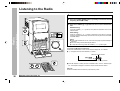
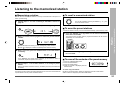
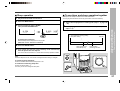
■ Memorizing a station
You can store 40 AM and FM stations in memory and recall them at the push of a
button. (Preset tuning)
2
Turn the jog dial to select the desired station.
Perform steps 1 - 3 in the “Listening to the Radio” section on
page 20.
This can be operated by pressing the PRESET (X or W) button on the remote control.
Press the ENTER button to enter the preset tuning saving mode.
■ To scan the preset stations
The stations saved in memory can be scanned automatically. (Preset memory scan)
3
Within 5 seconds, turn the jog dial to select the preset channel
number.
Press the PRESET (X
X or W) button on the remote control for
more than 0.5 seconds.
The preset number will flash and the programmed stations will be tuned in
sequentially, for 5 seconds each.
● Store the stations in memory, in order, starting with preset channel 1.
● When “ ” is displayed, a station has already been stored in memory.
4
5
Within 5 seconds, press the ENTER button to store that station
in memory.
2
X or W) button again when the desired staPress the PRESET (X
tion is located.
If the “MEMORY” and preset number indicators go out before the station is
memorized, repeat the operation from step 2.
■ To erase all the contents of the preset memory
Repeat steps 1 - 4 to set other stations, or to change a preset
station.
1.
2.
3.
4.
When a new station is stored in memory, the station previously memorized will
be erased.
Note:
The backup function protects the memorized stations for a few hours should there be
a power failure or the AC power cord disconnection.
Radio
1
– Listening to the memorized station –
1
■ To recall a memorized station
Press the TUNER (BAND) button.
Press the ENTER button.
Press the CLEAR button.
While “ALL CLEAR” is displayed, press the
ENTER button.
To erase only one station:
Recall the memorized station. While it is displayed, press the CLEAR button.
While “CLEAR” is displayed, press the ENTER button.
21