1
Machine Requirements
• Video or audio machines that are Sony 9-pin
or Videomedia® V-LAN™ compatible devices.
Certain V-LAN machines may not require a
time code reader card. Refer to your machine's
documentation for more information. For 9pin Remote mode, a controller compatible
with the Sony “P2” 9-Pin specification is required.
About This Guide
This guide assumes:
• You have installed Pro Tools and verified that
it works properly.
• You have a thorough understanding of your
video deck, external 9-pin decks, or mixer.
• You have an understanding of your synchronization equipment.
Synchronization Requirements
• A Digidesign Universal Slave Driver™ (USD) is
required to support serial time code and 9-pin
Remote mode features of Pro Tools. USD is
also the recommended synchronization peripheral for all applications.
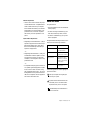
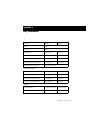
This guide uses the following conventions to indicate menu choices and key commands:
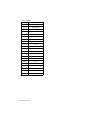
Convention
Action
File > Save Session
Choose Save Session
from the File menu
Control+N
Hold down the Control
key and press the N key
Option/Alt-click
Hold down the Option
(Macintosh) or Alt (Windows) key and click the
mouse button
Right-click (Windows)
Click with the right
mouse button
– or –
• A Digidesign Video Slave Driver™ (VSD), plus
a standard MIDI interface capable of converting Linear Time Code (LTC) to MIDI Time
Code (MTC). This configuration does not support Remote mode.
– or –
• A compatible third-party synchronization device, capable of generating SuperClock (256x
clock), and LTC-to-MTC conversion (along
with an available serial port for it - do not use
the DigiSerial Port for any device other than a
USD). This configuration does not support Remote mode or Serial Time Code.
The following symbols are used to highlight important information:
User Tips are helpful hints for getting the
most from your system.
Important Notices include information that
could affect your Pro Tools session data or
the performance of your Pro Tools system.
Cross References point to related sections in
the Pro Tools Guides.
Chapter 1: Introduction
3