1
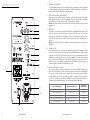
Amp Panel & Controls
1. Stand-by / On Indicator
The LED indicates whether the unit is in stand-by mode or operational. It will be illuminated
red when in stand-by, and green when operational. The Monitor Audio logo on the front of the cabinet will also illuminate depending on operational state.
Title: Bronze BXW-10 Amp Panel Artwork
Date: 5th January 2010
2. RCA Line Level Inputs (Left & Right)
1
2
3
4
5
6
7
8
When using a stereo amplifier system, connection can be provided by a pair of high-quality
signal cables from the pre-out section of an amplifier. Please refer to the crossover table below
for further advice on which frequency to use. Experimentation is advised.
Note: Cable lengths should not exceed 10 metres to avoid interference from other electrical
appliances.
3. LFE Input
This input is to be used when connecting the BXW-10 to an AV amplifier. When using the LFE
input, the crossover control function does not have an effect. This is due to the crossover
function being controlled by the AV amplifier to which it is connected. Please refer to the
crossover table below for further advice on which frequency to use. Experimentation is
advised.
Note: Cable lengths should not exceed 10 metres to avoid interference from other electrical
appliances.
4. Volume Control
This control allows the level or volume to be adjusted in order to achieve a balanced overall
sound. To use this facility you will need to play a selection of familiar music or film excerpts.
Start with the volume at a low level and increase the level control until a balanced sound is
established. If using an AV processor or AV receiver amplifier, the system can be adjusted
by the test tone function within the set-up features. (Refer to the set up section in the AV
processor or AV receiver amplifier user guide.) When the BXW-10 is correctly set-up, you
should not be able to identify its location easily in the room.
5. Crossover Frequency Control
12
9
10
10a
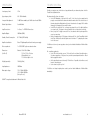
The crossover frequency control only operates when connecting to the BXW-10 using the Line
Inputs. This control feature is used to set the upper frequency limit (low pass) of the BXW-10.
The crossover control should be set in accordance with the size or bass output of the main/
satellite speakers. Refer to the chart below as a guide to setting the crossover frequency
control to the optimum position. Much will depend on the correct low frequency response of
the main speakers and their position in your room. Experimentation is advisable.
Type of Main Speaker
Monitor Audio Product
Crossover
Control Setting
Large floor-standing speaker
PL200/300; GS20/60; RX6/8; BX6
40-60 Hz
Small floor-standing speaker
BX5; R270
HD
50-70Hz
Large stand-mount/ bookshelf speaker
PL100; GS10; RX2
Small stand-mount/ bookshelf speaker
RX1; BX1/2; R225HD/250HD;R oneHD
60-90 Hz
Small satellite speaker
R45HD/90HD/180HD
80-120 Hz
50-80 Hz
11
Notes:
1. IMAGE FOR REFERENCE PURPOSES ONLY.
2. VERSION 2
4
Bronze BXW-10
monitoraudio.co.uk
5