1
Scanning Film
Scanning Film
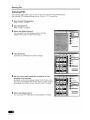
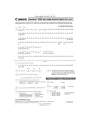
The following steps explain how to scan 35 mm film strips with ArcSoft PhotoStudio.
Use ScanGear CSls Advanced Mode to scan 120 or 4 x 5 format films.
11
1
11
Start ArcSoft PhotoStudio.
Refer to step 2 on page 7.
2
Start ScanGear CS.
Refer to step 4 on page 8.
3
Select the [Select Source].
You can select from theJollowing options for films.
Negative Film (Color) / Positive Film (Color)
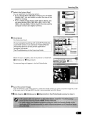
4
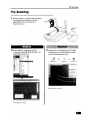
Click [Preview].
ScanGear CS will display the preview image(s).
5
Place a check mark beside the number(s) of the
frame(s) to be scanned.
By default, a -check mark appears beside the first frame only.
You can scan multiple frames in one step if you place a check
mark beside the number of each frame you wish to include.
6
Select the [Destination].
You can sele~t [Print (300 dpi)] or [Image display (150 dpi)].