1
1
Installing the Modem
Place the modem in front of you as
you go through this chapter. This
will help you identify the various
components of your modem.
This chapter guides you through the process of setting up your modem. It is organized as
follows:
❑ On Your Modem
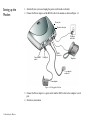
❑ Setting up the Modem
❑ Connecting Telephone Line and Phone Set
On Your Modem
This section describes the jacks and connectors of the modem.
Telephone Line jack
The Telephone Line jack allows you to connect a telephone line for data and fascimile
transmission.
Phone jack
The Phone jack allows you to connect a phone set to the modem.
This jack differs across countries.
Power jack
The Power jack allows you to connect an external power adapter to your modem.
RS232 Connector
The RS232 connector allows you to connect the modem to a computer serial port.
Installing the Modem 1-1