1
Logic Pro 7.1 – Apple Loops (2005-0905)
11 of 23
File Location
The file
•
•
•
location for indexed Apple Loops has been straightened out in Logic 7.1 and makes much more sense than in earlier version:
Apple Loops Library folders (or aliases) are stored in “Library/Audio/Apple Loops” folder
Apple Loops index files are stored in “Library/Audio/Apple Loops Index” folder
These two folders exist twice: one in the root Library directory and one in the use Library directory
All the indexed Apple Loops from an installation
disc or an application installation are stored in the
root Library folder
(root)/Library/Audio/
All the indexed Apple Loops (imported) by the user
are stored in the user Library folder
(user)/Library/Audio/
The “Apple Loops” folder has the following subfolders:
o “User Loops”: contains all the Apple Loop Libraries dragged in by the user
o “User Loops/SingleFiles”: subfolder, containing all the single Apple Loops added to the Loop Browser
o “Apple”: contains all the Apple Loop Libraries installed by an Apple product (Jam Pack or Application)
•
The “Apple Loops Index” folder contains all the index files. Each single Library folder in the
Apple Loops folder has its own index file
•
If the Apple Loops Index folder is empty (in root and user directory) then you get an error
message “No Apple Loops found”
Both folders “Apple Loops” and “Apple Loops Index” will automatically created when you
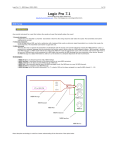
(accidentally) delete them. The default (empty) folder structure is
•
What’s inside an index file:
The Index files inside the “Apple Loops Index” folder are regular text files
containing an entry for each Apple Loop with its meta data and the search
path to the actual location of the Apple Loop audio file.
How do index file work:
The first step of course is the creation of the index file. As I mentioned above,
for each indexed Apple Loops Library there will be a corresponding index file.
The first line of the text file includes the path to the Apple Loops folder, which
data it has indexed.
When you launch Logic, the Loop Browser reads the first line and compiles the
popup menu for the Loop Browsers “Jam Pack Management”
When you make a search, Logic knows all the available index files and
searches for the information based on the search criteria.