1
usbLOGiC USB-AV-Player
USB-E65
for BMW E65 Professional navigation systems
with 8.8” monitor
Product features
• USB-port for media up to 2 TB (2000GB)
• supports FAT32 and NTFS formatted media
• multi partition capable
• compatible with MP3, AVI, VOB, MOV, RMVB, JPG and many more
• last position memory
• integrated into and controllable by vehicle infotainment
• AV-input with IR-control channel
• control of after-market devices by OEM buttons, e.g. DVD-player, USB/iPod devices, …
• after-market rear-view camera input
• automatic switching to rear-view camera input (only from usbLOGiC mode)
• rear-view camera power (+12V max 1A)
• rear-seat-entertainment AV-output
• optional remote control for full USB functions/rear-seat-entertainment
• power on remote out trigger signal (+12V max 1A) to switch on connected devices
• video-in-motion
Version 31.01.2013
USB-E65
Contents
1. Prior to Installation
1.1.
1.2.
1.3.
1.4.
1.4.1.
1.4.2.
Delivery contents
Check compatibility of vehicle and accessories
Setting the dip switches of the CAN-box TV-436
Setting the dip switches of the USB-box USBC-M536
Automatic switching to rear-view camera
Deactivating usbLOGiC AV input
2. Installation
2.1.
2.2.
2.3.
2.4.
2.4.1.
2.4.2.
2.4.3.
2.4.4.
2.4.5.
Installation of CAN-box TV-436
Installation of USB-box USBC-M536
Antennas and optional IR-remote control set
Connecting peripheral devices
AV-source
Installing AV-source’s IR-sensor additionally
After-market rear-view camera
After-market rear-seat-entertainment
Factory nightvision, factory DVD-changer, factory rear-view camera
3. Operation
3.1.
3.2.
3.3.
3.4.
3.5.
Activation of the video-in-motion function
Selecting the usbLOGiC as current AV-source
Assigning device control for connected AV-source
Switching to internal USB, AV-source or after-market rear-view camera
Button assignment table iDrive
4. Specifications
5. Connections (USB-box)
6. Technical support
Page
1
Appendix A – Device control table
Appendix B – USB function manual
Version 31.01.2013
USB-E65
Legal Information
By law, watching moving pictures while driving is prohibited, the driver must not be
distracted. We do not accept any liability for material damage or personal injury resulting,
directly or indirectly, from installation or operation of this product. This product should only
be used while standing or to display fixed menus or rear-view-camera video when the
vehicle is moving, for example the MP3 menu for DVD upgrades.
Changes/updates of the vehicle’s software can cause malfunctions of the interface. We
offer free software-updates for our interfaces for one year after purchase. To receive a free
update, the interface must be sent in at own cost. Labor cost for and other expenses
involved with the software-updates will not be refunded.
1. Prior to installation
Read the manual prior to installation. Technical knowledge is necessary for installation. The
place of installation must be free of moisture and away from heat sources.
1.1.
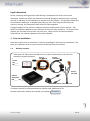
Delivery contents
Take down the SW-version and HW-version of the interface boxes, and store this
manual for support purposes.
Harness
Harness
CAN-box
TV-436
HW_____
SW _____
C2C-BMW02
TV-BMW65
Harness
C3C-AVIR
USB-box
USBC-M536
HW_____ SW_____
USB-installation socket USBC-EXT
If remote function for a peripheral device shall be used, additional an IR.
Page
2
Remote cable and Y-adapter are needed, see chapter AV-source
Version 31.01.2013
USB-E65
1.2.
Check compatibility of vehicle and accessories
Requirements
Vehicle
7series (E65/E66)
Navigation
Navigation system Professional E65 (older 1/2-button iDrive
or CIC (newer 8-button iDrive) with 8.8” monitor
Limitations
factory-TV-tuner
Must NOT be installed. If uninstalled, optical ring must be closed.
factory DVD-changer
or factory nightvision
After-market rear-view camera cannot be connected to
the usbLOGiC interface.
factory
rear-seat-entertainment
Additional interface VL-RGB02-R is necessary
After-market rear-view cam
Only works from usbLOGiC mode, not from OEM.
USB-port
Only for media which work with power supply by ONE single USB
connector
Factory PDC
If an after-market rear-view camera should be connected by the
usbLOGiC the visual PDC display must be deactivated
occasionally or permanently for camera picture.
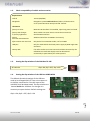
1.3.
Setting the dip switches of the CAN-box TV-436
All vehicles
1.4.
dip 1 ON, dip 2 OFF, dip 3 OFF
Setting the dip switches of the USB-box USBC-M536
The default dip switch settings of the USB-box
need to be changed ONLY if a rear-view camera is
or shall be connected or if the AV-input of the
usbLOGiC shall be deactivated. The dip switches are
located inside the USB-box. For changes it is
necessary to open the box. Default settings are:
Page
3
dip1 = ON, dip2 = OFF, dip3 = ON
Version 31.01.2013
USB-E65
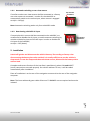
1.4.1. Automatic switching to rear-view camera
If an after-market rear-view camera shall be connected or a factory
rear-view camera is connected, in order for the usbLOGiC to
automatically switch to its camera input, when reverse is engaged
set dip2 = ON (up).
Dip switches
of USB-box
Note: Automatic switching works only from usbLOGiC mode.
1.4.2. Deactivating usbLOGiC AV input
If no peripheral AV-source shall be connected to the usbLOGiC, we
recommend to disable the AV-input, to avoid customers switching by
mistake to black/no picture of the AV-input. In order to disable the
AV-input of the usbLOGiC,
set dip1 = OFF (down).
dip switches
of USB-box
2. Installation
Switch off ignition and disconnect the vehicle’s battery! If according to factory rules
disconnecting the battery has to be avoided, it is usually sufficient to put the vehicle in
sleep-mode. In case the sleep-mode does not show success, disconnect the battery with a
resistor lead.
Complete and correct function of the interface is possible only when CAN and MOST®
(tuner) connections are made properly. On vehicles without TV-icon, it will be coded
automatically after installation.
Place of installation is at the rear of the navigation screen and at the rear of the navigation
computer.
Page
4
Note: The loose white and green cable of harness TV-BMW65 are not required and must be
isolated.
Version 31.01.2013
USB-E65
2.1.
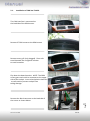
Installation of CAN-box TV-436
The CAN interface is connected to
the backside of the OEM screen.
Remove 3 TORX screws at the OEM screen.
Remove cover grill (only plugged). Place soft
towel beneath the navigation monitor
to avoid scratches
Flip down the board monitor. NOTE: The OEM
screen gets stuck with its connector at the upper
side of the cockpit. Insert a hard plastic sheet like
a credit card to prevent cockpit from
taking damage.
Page
5
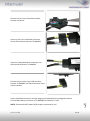
Remove the black connector at the backside of
the screen as shown below.
Version 31.01.2013
USB-E65
Remove 12-pin insert from black vehicle
harness connector.
Insert 12-pin insert into black connector
of the CAN interface harness TV-BMW65.
Insert the completed black connector into
CAN interface harness TV-BMW65.
Connect 12-pin insert from CAN interface
harness TV-BMW65 into black connector from
vehicle harness.
6
Insert completed connector into the plug on the backside of the navigation monitor.
Connect 8pin Molex connector of TV-BMW65 to CAN-box TV-436.
Version 31.01.2013
Page
NOTE: Pictures do NOT show the fibre optics connected in car!
USB-E65
2.2.
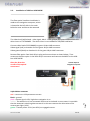
Installation of USB-box USBC-M536
The fibre optical interface installation is
made at the navigation computer, which
is located at the left side in the trunk
behind a cover and has to be removed.
The video lead (red/colored - video signal, black - video ground) has to be removed from the
white insert of C2C-BMW02. The white insert is not needed for E65/E66 installation.
Connect video lead of C2C-BMW02 to green 18-pin AMP connector
Video-signal (red) to chamber 3 of the green 18-pin AMP connector
Video-ground (black) to chamber 11 of the green 18-pin AMP connector
Remove fibre optics from black 20-pin plug and connect them as shown below. Then
reconnect the fibre optics in the black 20-pin connector and connect the MOST to the USBbox USBC-M536.
Obey the direction
arrows of the optical
connectors!
To black 20pin of
navigation computer
Version 31.01.2013
USB-E65
Page
red – connect to +12V permanent current
black – ground
pink – remote signal +12V, high when navigation is on
white – The white wire is not connected and has to be isolated. In some cases it is possible
that the automatic switching does not work. In this case connect the white wire to the
reverse gear light (+12V).
green – camera power +12V (max 0.5A) on engaged reverse.
7
14pin Molex connector
2.3.
USB and optional IR-remote control set
Connect USB-connector of USB-installation socket USBC-EXT to USB-socket of USBbox USBC-M536 and install the USBC-EXT socket in a well accessible location, e.g. the
glove-box. Make sure there is enough space to load USB-media.
Installation socket for the connection of USB-media.
The USB-IRSET consists of the external C3C-SENSOR IR-sensor and the USBC-RC IRremote control and can be used to control the usbLOGiC’s internal USB functions
additionally to the control through the navigations buttons. Connect the C3C-SENSOR
to the female black/red/blue 3pin AMP connector of harness C3C-AVIR and locate the
sensor in an accessible place.
2.4.
Connecting peripheral devices
It is possible to connect an after-market AV-source, after-market rear-view camera and rearseat-entertainment to the usbLOGiC. Also factory nightvision, factory DVD-changer or
factory rear-view camera must be connected to the usbLOGiC.
Page
8
Before final installation of the peripheral devices, we recommend to test-run the usbLOGiC
functions to detect incompatibility of vehicle, navigation, factory accessories or peripheral
devices as soon as possible.
Version 31.01.2013
USB-E65
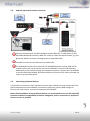
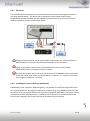
2.4.1. AV-source
The usbLOGiC has the possibility to connect and remotely control by navigation buttons a
pre-programmed device. The device list in the device control table shows the preprogrammed remote channels and the related IR-remote cables STA-xxx which must be
ordered separately for the control of the device.
Using the respective STA-xxx IR-control cable, interconnect the yellow female 3pin
AMP connector of harness C3C-AVIR and the IR-port of the AV-source.
Using an RCA-cable, interconnect the female RCA-port AV1 of the USB-box
USBC-M536 with the AV-output of the AV-source.
The pink ACC-output wire (+12V max 1A) of harness C2C-BMW02 can be connected
to the ACC-input wires of the connected device to switch it on. It carries +12V when
the navigation computer is running.
2.4.2. Installing AV-source’s IR-sensor additionally
Page
9
Additionally to the control via OEM navigation, it is possible to install the original IR-sensor
of a connected device. By using the respective Y-adapter (e.g. STA-Y35MM or STA-RJ12) for
the IR-Port of the connected device, the controls of navigation AND device’s IR-sensor can be
connected and used simultaneously. Installation of the IR-sensor is recommended as the
controls via navigation are limited, and not all functions may be covered.
Version 31.01.2013
USB-E65
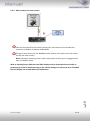
2.4.3. After-market rear-view camera
Connect the video RCA of the after-market rear-view camera to the female RCA
connector R-CAM IN of USB-box USBC-M536.
The green wire of harness C2C-BMW02 can be used as +12V power (max 1A) supply
for the rear-view camera.
Note: Automatic switching to the camera-input when reverse gear is engaged works
only in usbLOGiC mode.
Page
10
With an existing factory PDC the visual PDC display must be deactivated occasionally or
permanently by iDrive while operating in the vehicle settings for camera picture. If needed
the PDC display can be switched on by PDC button.
Version 31.01.2013
USB-E65
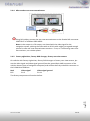
2.4.4. After-market rear-seat-entertainment
Using RCA-cables, connect the rear-seat-entertainment to the female RCA-connector
VIDEO OUT of USB-box USBC-M536.
Note: As the output is a full output, not shared with the video signal for the
navigation system, splitting the video with an RCA Y-cable might give a good enough
picture for two rear-seat-entertainment monitors. If not, or if connecting more than
two monitors, use a video splitter.
2.4.5. Factory nightvision, factory DVD-changer, factory rear-view camera
On vehicles with factory nightvision, factory DVD-changer or factory rear-view camera, pin
out the video-signal and video-signal ground from the green 18pin AMP connector of the
vehicles harness (rear of navigation computer) and connect them by male RCA-connector to
the R-CAM IN of USB-box.
Navi
E65
Video-signal
Pin 3
Video-signal ground
Pin 11
Page
11
The factory component will work as before.
Version 31.01.2013
USB-E65
3. Operation
3.1.
Activation of the video-in-motion function
Tthe video-in-motion function is permanently active without disturbing the navigation
performance.
3.2.
Selecting the usbLOGiC as current AV-source
In the vehicle’s main menu, select Infotainment and then TV by iDrive to choose the
usbLOGiC as current AV-source.
3.3.
Assigning device control for connected AV-source
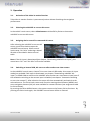
After selecting the usbLOGiC as current AV
source, push iDrive knob to open the
usbLOGiC control menu. Select control
levels setup “AV: RCxx” and assign related
IR-code as described in device control
table.
Note: If the AV-input is deactivated (see chapter “Deactivating usbLOGiC AV-input”), the
menu items “AV” and “AV: RCxx” will not be available.
3.4.
Switching to internal USB, AV-source or after-market rear-view camera
Page
12
In the usbLOGiC control menu, choose TV to enter internal USB mode, AV to enter AV-input
mode (not available if AV-input is deactivated, see chapter “Deactivating usbLOGiC AVinput”) or REAR CAM to switch to the usbLOGiC after-market rear-view camera-input (even if
the automatic switching to the camera input is disabled, see chapter “Automatic switching
to rear-view camera”). After selection the menu will close automatically and switch to the
selected source. The iDrive knob, some multi-function-steering wheel buttons (MFSW) and
some navigation buttons (HU) are now available for remote functions (see assignment table
for iDrive below).
By pressing the iDrive-MENU-button, the system returns to the factory iDrive functions. By
pressing the iDrive knob again, the usbLOGiC control menu will be re-entered.
Version 31.01.2013
USB-E65
3.5.
Button assignment table iDrive
The button assignment table shows which functions of usbLOGiC and additionally connected
devices can be executed by iDrive. Once USB or AV-input mode are activated the iDrive
action in the left column will execute the function described in the corresponding device
column. The function description equals the remote control buttons of the optional
usbLOGiC remote control or the additional device. On the additional device the writing may
vary (e.g. AV instead of Source).
iDrive Action
Internal USB
DVB-T Tuners
Device
DVD on AV-input
DVC on AV-input
MENU long
MENU short
SETUP
Return to factory
iDrive functions
MENU
Return to factory
iDrive functions
Setup
Return to factory
iDrive functions
Setup
Return to factory iDrive
functions
OPTIONS long
*2
OPTIONS
short *2
SOURCE
INFO
Audio
Audio
Signal strength
Subtitle
Subtitle
ENTER long
ENTER short
NORTH long
NORTH short
WEST long
WEST short
SOUTH long
SOUTH short
POWER
OK / PLAY
EXIT
UP
MEDIA
LEFT
DOWN
POWER
OK
EPG
UP
EXIT
LEFT
SOURCE
DOWN
Power
OK
Menu/PBC *1
Up
Play/Resume
Left
Source
Down
Power
OK
Menu/PBC *1
Up
Play/Resume
Left
Source
Down
Power
OK
Shuffle
Previous chapter
Play/resume
Left
Source
Next chapter
EAST long
POWER
AUTO
Zoom
EAST short
Left turn
Right turn
UP long on
MFSW *3
UP short on
MFSW *3
RIGHT
Previous Track
Next Track
RIGHT
Previous channel
Next channel
SOURCE
Right
Previous chapter
Next chapter
Next DVD
Previous Track
Previous channel
Previous chapter
Next DVD or DVD
selection menu
Right
Previous chapter
Next chapter
Next DVD or DVD
selection menu
Previous chapter
KCE: increase vol,
Vlink: ESC
Right
Up
Down
Next DVD or DVD
selection menu
Previous chapter
DOWN long
on MFSW *3
DOWN short
on MFSW *3
SOURCE
INFO
Next DVD
Next Track
Next channel
Next chapter
Next DVD or DVD
selection menu
Next chapter
Next DVD or DVD
selection menu
Next chapter
SOURCE
Next DVD
Previous channel
Previous chapter
Next DVD or DVD
selection menu
Previous chapter
Next DVD or DVD
selection menu
Previous chapter
RIGHT long
SOURCE
INFO
Next DVD
Next DVD or DVD
on HU *3
selection menu
RIGHT short
Next Track
Next channel
Next chapter
Next chapter
on HU *3
*1 DVD title menu *2 not available on all vehicles *3 multi function steering wheel and head-unit
Next DVD or DVD
selection menu
Next chapter
Previous Track
KCE: Light Bulb, Vlink:
Subtitle
KCE: lower vol, Vlink:
Display
Page
13
LEFT long on
HU *3
LEFT short on
HU *3
iPod interface on AVimput
Setup
Return to factory
iDrive functions
Version 31.01.2013
USB-E65
4. Specifications
Operation voltage
Stand-by power drain
Operation power drain
Power consumption
Power rating USB-port
Temperature range
Weight
Measurements (box only) B x H x T
10.5 – 14.8V DC
<1mA
min. 400mA/max. 900mA
min. 5.5W/max. 12.4W
0,5A permanent (0,8A max)
-30°C to +80°C
312g
135 x 30 x 105 mm
5. Connections (USB-box)
6. Technical Support
Caraudio-Systems Vertriebs GmbH
manufacturer/distribution
Rheinhorststr. 22
D-67071 Ludwigshafen am Rhein
NavLinkz GmbH
corporate sales/tech dealer-support
Eurotec-Ring 45
D-47445 Moers
phone +49 180 3 907050
email [email protected]
Page
14
Legal disclaimer: Mentioned company and trademarks, as well as product names/codes are registered
trademarks ® of their corresponding legal owners.
Version 31.01.2013
USB-E65