1
Setup
Introduction
This section shows how to connect the Remote Power-Off
Device. After setup, continue with the procedure in “Overview of Configuration and Setup” on page 6.
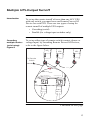
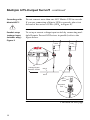
If you are setting up multiple Remote Power-Off Devices
for use with one remote switch, refer to this section for basic
information on wiring and see “Multiple UPS-Output Turnoff” on page 13.
Connecting the
Remote PowerOff Device:
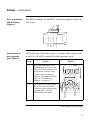
Figure 4
Follow the figure below to set up the Remote Power-Off
Device. Note that the RJ11 cable connects to the middle
port of the unit, which is labeled “RPO / Cascade In.”
Server
To
Remote
Switch
APC UPS
Cable Supplied with
Remote Power-Off
Device
Keystone
Jack
Remote
Power-Off
Unit
RJ11
Cable
Cable Supplied with
PowerChute Software
Figure 4:Connecting the Remote Power-Off Device
Continued on next page
9