1
V I S I O N
User's Guide
Information in this document is subject to change without notice and does not represent a commitment on the part
of Creative Technology Ltd. No part of this manual may be reproduced or transmitted in any form or by any means,
electronic or mechanical, including photocopying and recording, for any purpose without the written permission of
Creative Technology Ltd.
Copyright © 2005 Creative Technology Ltd. All rights reserved. The Creative logo, Zen and Creative MediaSource are
trademarks or registered trademarks of Creative Technology Ltd. in the United States and/or other countries.
Microsoft, Windows, Windows Media, Outlook and the Windows logo are registered trademarks of Microsoft
Corporation. Intel and Pentium are registered trademarks of Intel Corporation.
Version 1.2 August 2005
Zen Vision at a Glance ................................................ 5
Zen Vision - Front View ................................................. 5
Zen Vision - Side Views................................................. 8
Zen Vision - Top and Bottom Views ............................ 10
Turning Zen Vision On and Off .................................... 12
Selecting Options......................................................... 12
Navigating Menus ........................................................ 14
Inserting a Memory Card ............................................. 15
Connecting Your Player to a TV .................................. 18
Locking Zen Vision ...................................................... 21
Main Applications......................................................... 22
Transferring and Managing Content ........................
About Content Types ...................................................
Getting Content............................................................
Transferring Content....................................................
Synchronizing Content.................................................
Managing Videos .........................................................
Managing Photos.........................................................
Managing Audio...........................................................
Using FM Radio ...........................................................
Recording With Zen Vision ..........................................
25
25
25
26
30
31
33
35
41
43
Using Zen Vision’s Organizer Features...................
Synchronizing With Microsoft Outlook .........................
Viewing the Calendar...................................................
Viewing Today’s Tasks ................................................
Viewing Contacts .........................................................
46
46
47
47
47
Storing Data Files in Zen Vision............................... 48
Using Zen Vision as a Removable Disk....................... 48
Changing the Amount of Hard Disk Space in Removable
Disk Mode.................................................................... 51
Stopping Zen Vision Properly .................................. 52
Adjusting Your Player’s Settings .............................
Date and Time .............................................................
Information...................................................................
Audio Settings..............................................................
Photo and Video Settings ............................................
Setting Preferences .....................................................
Theme..........................................................................
Language.....................................................................
Resetting Zen Vision....................................................
53
53
53
54
56
57
59
59
59
Frequently Asked Questions .................................... 60
Safety Advice ............................................................. 66
General Specifications .............................................. 67
Zen Vision at a Glance
Zen Vision at a Glance
After completing the setup instructions in the Quick Start booklet, take
some time to read this User’s Guide to learn how to get the most out of your
player.
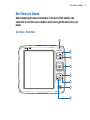
Zen Vision - Front View
1
2
3
4
5
6
7
8
5
Zen Vision at a Glance
1
2
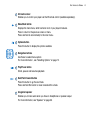
Infrared receiver
Enables you to control your player via the IR remote control (available separately).
Menu/Back button
Displays the main menu, which contains most of your player's features.
Press to return to the previous screen or menu.
Press and hold to return directly to the main menu.
3
Options button
Press this button to display the options available.
4
Navigation buttons
Use these to select menu options.
For more information , see "Selecting Options" on page 12.
5
Play/Pause button
Starts, pauses and resumes playback.
6
Next/Fast-Forward button
Press this button to go the next track.
Press and hold this button to move forward within a track.
7
Integrated speaker
Enables you to hear audio when you have no headphones or speaker output.
For more information, see "Speaker" on page 55.
6
Zen Vision at a Glance
8
Previous/Rewind button
Press this button to go the previous track.
Press and hold this button to move back within a track.
NOTE
In the process of Liquid Crystal Display (LCD) manufacturing, instances of one or more
pixels appearing in a dark or fixed color, or in an unchanging state, may occur. These
appear on the screen as spots and may be fixed on a particular colour, such as, white
or red.
In line with industry standards and based on Creative's screen manufacturer's
technical specifications, occurrences of fixed spots may appear and are considered
acceptable if they do not impair display quality.
If, however, you notice fixed spots on your Creative Zen Vision LCD interfering with
your use, contact Customer Support Services. You can find Customer Support
Services information in the Installation and Applications CD. Go to
d:\support\<region>\<language>\support.chm.
(replace d:\ with the drive letter of your CD-ROM/DVD-ROM drive, <region> with the
region that you are in, and <language> with the language that your document is in)
7
Zen Vision at a Glance
Zen Vision - Side Views
1
2
3
4
8
Zen Vision at a Glance
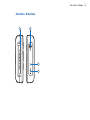
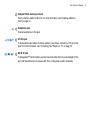
1
Compact Flash memory card slot
Insert a memory card into this slot. For more information, see "Inserting a Memory
Card" on page 15.
2
Headphone jack
Connect earphones to this jack.
3
A/V Out jack
To conveniently view videos or photos stored in your player, connect your TV set to this
jack. For more information, see "Connecting Your Player to a TV" on page 18.
4
DC IN 5V jack
To charge Zen™ Vision’s battery, connect one end of Zen Vision’s power adapter to this
port, and the other end to a power outlet. Turn on the power outlet if necessary.
9
Zen Vision at a Glance
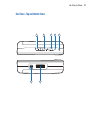
Zen Vision - Top and Bottom Views
1
7
2
6
3
4
5
10
Zen Vision at a Glance
1
Volume Decrease button
Decreases the volume.
Press and hold to decrease the volume quickly.
2
Volume Increase button
Increases the volume.
Press and hold to increase the volume quickly.
3
Power switch
Turns your player on and off.
Slide and hold the switch towards the Power
icon to turn your player on or off. For
more information, see "Turning Zen Vision On and Off" on page 12.
4
Lock icon
Slide the switch to the right to disable your player’s buttons.
5
Microphone
Make instant recordings with this built-in microphone.
6
Docking connector
Connects to a docking station (available separately).
7
USB 2.0 port
To transfer music and data files, connect one end of the supplied USB cable to this
port, and the other end of the USB cable to your computer’s USB port. For more
information, see "Transferring Content" on page 26.
11
Zen Vision at a Glance
Turning Zen Vision On and Off
1 To turn on your player, slide the Power switch towards the Power
icon and hold it
there until the LCD lights up.
2 To turn off your player, slide the Power switch towards the Power
icon and hold it
there until Shutting down... appears.
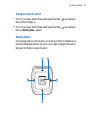
Selecting Options
In the following sections of this document, we use the term ‘Select’ to indicate that you
should use the Navigation buttons (Up, Down, Left or Right) to highlight menu options,
then press the OK button to select the option.
1
5
2
3
4
12
Zen Vision at a Glance
1
Up button
Press to go to the menu option or selection above the current selection.
2
OK button
Press to select the highlighted menu option or selection on the screen.
3
Right button
Press to go to the menu option or selection to the right of the current selection.
4
Down button
Press to go to the menu option or selection below the current selection.
5
Left button
Press to go to the menu option or selection to the left of the current selection.
13
Zen Vision at a Glance
Navigating Menus
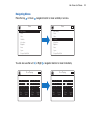
Press the Up
or Down
navigation button to move vertically in a menu.
Menu
Menu
Music Library
Music Library
Photos
Photos
Videos
Videos
FM Radio
FM Radio
Microphone
Microphone
Organizer
Organizer
Extras
Extras
System
System
Compact Flash Card
Compact Flash Card
You can also use the Left
or Right
Now Playing
navigation buttons to move horizontally.
Now Playing
1 of 4
1 of 4
1
2
3
4
5
6
7
8
9
0
1
2
3
4
5
6
7
8
9
0
q
w
e
r
t
y
u
i
o
p
q
w
e
r
t
y
u
i
o
p
a
s
d
f
g
h
j
k
l
a
s
d
f
g
h
j
k
l
z
x
c
v
b
n
m
,
z
x
c
v
b
n
m
,
.
?
.
?
Caps
Accents
Clear
Symbols
Caps
Accents
Clear
Symbols
Shift
Space
Bkspc
OK
Shift
Space
Bkspc
OK
14
Zen Vision at a Glance
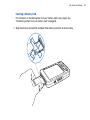
Inserting a Memory Card
For information on transferring files from your memory card to your player, see
"Transferring content from your memory card" on page 28.
1 Align the memory card with the Compact Flash memory card slot as shown below.
15
Zen Vision at a Glance
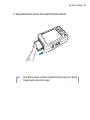
2 Gently push the memory card into the Compact Flash memory card slot.
NOTE
Do not force the memory card into the Compact Flash memory card slot. If it does not
fit properly, gently remove it and try again.
16
Zen Vision at a Glance
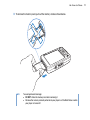
3 To remove the memory card, pull out the memory card as shown below.
NOTE
To avoid permanent damage:
■
DO NOT shake the memory card when removing it.
■
Remove the memory card only when when your player is at the Main Menu or when
your player is turned off .
17
Zen Vision at a Glance
Connecting Your Player to a TV
To view your player’s content on a larger screen, connect your player to a TV. To do this,
you must use the supplied video cable.
NOTE
Your player has been developed and tested to display photos and videos of high
quality. When you view these photos and videos from a TV monitor, the display may
vary in quality because of the TV model and/or display format (for example, PAL or
NTSC).
1 Slide the Power switch on your player towards the Power icon
and hold it there until
the LCD lights up.
2
3
4
5
Select System.
Select Photo/Video Settings .
Select Video Out.
Select (Auto) NTSC or (Auto) PAL.
Be sure to choose the display format that matches your TV so as that you can better enjoy
your videos. See the User’s Guide for your TV if you are not sure about your TV’s display
format.
18
Zen Vision at a Glance
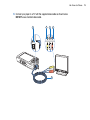
6 Connect your player to a TV with the supplied video cable as shown below.
DO NOT use a standard video cable.
1
2
3
COMP IN
4
L AUDIO R
5
19
Zen Vision at a Glance
1
2
3
4
5
A/V Out jack
Connect the supplied video cable to this jack on your player.
Video In jack
Connect the yellow connector on your video cable to this jack on your TV.
Audio In (Left) jack
Connect the white connector on your video cable to this jack on your TV.
Audio In (Right) jack
Connect the red connector on your video cable to this jack on your TV.
Video cable
Connects your player to a TV.
20
Zen Vision at a Glance
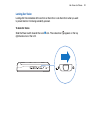
Locking Zen Vision
Locking Zen Vision disables all the controls on Zen Vision. Lock Zen Vision when you want
to prevent buttons from being accidently pressed.
To lock Zen Vision
Slide the Power switch towards the Lock
right-hand corner of the LCD.
icon. The Locked icon
appears on the top
21
Zen Vision at a Glance
Main Applications
Creative MediaSource Player/Organizer, Creative Media Explorer and Creative Media
Toolbox applications are included with your Zen Vision. These applications are installed
when you set up the Zen Vision software on your computer.
In this document, we will use Creative Media Explorer to outline usage instructions. For
usage information in Creative Media Explorer, refer to Creative Media Explorer’s online
Help.
Creative Media Explorer
Creative Media Explorer offers you the ease of managing music tracks and data files in
Zen Vision, in a Windows Explorer environment. Use Creative Media Explorer, if:
■
■
you already have an extensive MP3 or WMA collection and/or another preferred media player
you prefer to view or manage Zen Vision as a removable disk drive under My Computer
NOTE
After Creative Media Explorer is installed, the Creative Media Explorer
appears under My Computer.
NOTE
You can also use Windows Media® Player 10 (WMP 10) to import or transfer music.
For more information on using WMP 10, refer to WMP 10’s online Help.
icon
22
Zen Vision at a Glance
Creative MediaSource Player/Organizer
Creative MediaSource Player/Organizer is your digital music center for playing, creating,
organizing, synchronizing and transferring digital music. Use Creative MediaSource
Player/Organizer, if you:
■
■
■
TIP
are new to digital music and intend to build up your MP3 or WMA library via CD ripping
frequently need to play back or organize music in your computer
require other features such as recording, audio conversion, Smart Playlist, CD burning and
online music services (available only in certain regions)
By default, a window automatically appears at the lower right-hand corner, prompting
you to launch Creative MediaSource Player/Organizer, when you connect Zen Vision to
your computer. To disable this feature, in Creative MediaSource Player/Organizer, click
Tools → Settings, and then click the Detector tab. In the Device(s) to Detect
window, disable your player.
23
Zen Vision at a Glance
Creative Media Toolbox
Creative Media Toolbox provides a single point of access to software applications for
cleaning, organizing and converting your media files.
Creative Media Toolbox consists of the following Creative applications:
■
■
■
■
■
Auto Organizer
Organizes and renames your music using categories, for example, genre or artist
Auto Tag Cleaner
Updates your music’s ID3 tags using the MusicIDSM service from Gracenote®
Tag Format Converter
Converts non-English ID3 tags for proper display in your player
Video Converter
Converts unsupported video formats to a format supported by your player, for proper transfer
and playback. Depending on your original video, the converted file may be of a lower quality or
resolution than the original file.
Audio Converter
Converts your audio files from one format to another, for example, WAV to MP3. This
application is only available with Creative MediaSource.
24
Transferring and Managing Content
Transferring and Managing Content
About Content Types
Creative Zen Vision plays many different types of content, including videos, TV recordings,
audio tracks and still photos.
You can use Creative Video Converter to convert unsupported video formats to the WMV
format 320 x 240 pixel resolution, for proper transfer and playback. Depending on your
orginal video, the converted file may be of a lower quality or resolution than the previous
file. For more information, refer to its online Help.
Your player only displays photos that are in the JPEG (JPG) format.
Getting Content
You can acquire content from many legal sources. Here are some suggestions:
■
Videos — purchased from online movie stores or digitized home video footage.
Audio tracks — ripped from personal audio CDs, home studio recordings or purchased from
online music stores.
Photos — encoded from your personal digital camera or scanned from printed photos.
■
TV recordings — recorded using Microsoft® Windows® XP Media Center Edition.
■
■
25
Transferring and Managing Content
Transferring Content
Transferring content from your computer
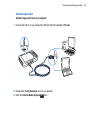
1 Connect Zen Vision to your computer’s USB port with the supplied USB cable.
2 Double-click the My Computer icon on your desktop.
3 Click the Creative Media Explorer
icon.
26
Transferring and Managing Content
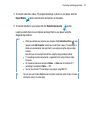
4 To transfer audio files, videos, TV program recordings or photos to your player, click the
Import Media
button and follow the instructions on the screen.
5 To transfer data files to your player, click the Transfer Documents
button.
Locate your data files on your computer and copy them to your player using the
drag-and-drop method.
NOTE
■
When you connect your player to your computer, the Creative Zen Vision
■
appears under My Computer. Locate your audio tracks, videos, TV recordings or
photos on your computer and copy them to your player using the drag-and-drop
method.
Note that you can also transfer data files using this drag-and-drop method.
TV recordings must be converted to a supported format using Creative Video
Converter.
All transferred videos are located in Videos → Video and all transferred TV
recordings are located in Videos → TV.
You can also transfer TV recordings to your player using WMP 10.
■
■
TIP
icon
You can also use Creative MediaSource to transfer media files to Zen Vision. For more
information, refer to its online Help.
27
Transferring and Managing Content
Transferring content from your memory card
All content in your memory card is transferred to your player. Transferred photos and
videos can be viewed on your player. Other files need to be viewed on your computer.
1 Insert your memory card into your player’s Compact Flash card slot. For more information,
see "Inserting a Memory Card" on page 15.
2
3
4
5
In the main menu, Select Compact Flash Card.
Select Copy from Compact Flash.
Select a copy option.
When a message appears, telling you that the transfer is complete, press any button on
your player to close the message.
6 To view transferred photos (JPEG) or videos (AVI) using your player, Select Photos/
Videos → Imported Files → <CF YYYY-MM-DD HHHMMMSSS>. For example, if you
transfer content on August 15, 2005 at 2:57 pm, the folder name is CF 2005-08-15
14H57M00S.
7 To locate all transferred content, connect your player to your computer using the supplied
USB cable, and then click the Creative Zen Vision
icon under My Computer. Click
Data → Imported Files → <CF YYYY-MM-DD HHHMMMSSS>.
28
Transferring and Managing Content
8 To transfer new content from a previously transferred folder in the same memory card,
Select Append from Compact Flash.
NOTE
■
■
■
■
You cannot transfer content from your player to your memory card.
Your player only supports memory cards formatted in FAT16 or FAT32 file systems.
You can also view transferred photos or videos by Selecting Compact Flash Card
→ Browse Imported Pictures or Browse Imported Video.
For accurate folder names, make sure that you set the correct date and time in your
player. To change the date or time, see "Date and Time" on page 53.
29
Transferring and Managing Content
Synchronizing Content
You can use Sync Manager to update and synchronize music, photos, videos, contacts,
calender and tasks in Zen Vision and your computer.
1 Connect Zen Vision to your computer.
2 Start Sync Manager.
You can start Sync Manager in either Creative Media Explorer or Creative MediaSource
Player/Organizer.
3 Select My Computer and Zen Vision as the devices you want to synchronize, and then
click the Next button.
4
5
6
7
Select the checkboxes that you want, and then click the Sync Now button.
To configure the synchronization settings, click the Next button.
Follow the instructions on the screen.
Click the Finish button.
30
Transferring and Managing Content
Managing Videos
To play videos, you must first transfer the videos to your player. For more information, see
"Transferring Content" on page 26. The transferred videos are categorized by name, with
duration, in your player’s Video Library.
Use the Play/Pause
button to pause or resume playback. Use the Next/Fast-Forward
or Previous/Rewind
buttons, or Left
or Right
forward or backward in a video. Use the Up
or Down
the playback speed.
NOTE
navigation buttons to go
navigation buttons to change
To display the last viewed video, Select Videos → Recently browsed videos.
Locating a video
The videos in your player are sorted alphabetically for quicker searches.
1 In the main menu, Select Videos.
A list of videos is displayed.
2 Use the navigation buttons to search for the video you want.
Playing a video
1 Locate a video as described above.
2 Select a video.
Video playback starts automatically.
3 To adjust the viewing window size, press the Options
window size that you want.
button and Select the viewing
31
Transferring and Managing Content
Deleting a video
1 In the main menu, Select Videos.
2
3
4
5
Use the navigation buttons to highlight the video that you want to delete.
Press the Options
Select Delete Video.
Select Yes.
button.
32
Transferring and Managing Content
Managing Photos
With Creative Zen Vision’s high-capacity storage, you can store thousands of photos in
your player, and even set up a slide show, so that you can share memories with friends
and family. Photos are categorized by name in Photo Library. Your player only displays
photos that are in the JPEG (JPG) format.
NOTE
■
■
To display the last viewed photos, Select Photos → Recently browsed photos.
When viewing transferred photos for the first time, the photos may take a while to
appear.
Locating a photo
Use your computer to sort photos by date or alphabetically for quicker searches.
1 In the main menu, Select Photos.
2 Select Pictures.
3 Use the navigation buttons to search for the photo you want.
Viewing a slide show
A slide show is automatically set up when you have photos in your player, and these are
sorted alphabetically.
1
2
3
4
5
In the main menu, Select Photos.
Select Pictures.
Use the navigation buttons to highlight the folder of photos that you want in your slideshow.
Press the Options
button.
Select Start Slideshow. The slide show starts.
33
Transferring and Managing Content
Viewing photo information
1 In the main menu, Select Photos.
2
3
4
5
Select Pictures.
Select a photo.
Press the Options
button.
Select View Details.
You can see information for that photo displayed on your player’s screen.
Deleting a photo
1 In the main menu, Select Photos.
2
3
4
5
6
Select Pictures.
Use the navigation buttons to highlight the photo that you want to delete.
Press the Options
Select Delete Photo.
Select Yes.
button.
34
Transferring and Managing Content
Managing Audio
When audio tracks are transferred to your player, they are organized into the following
Music Library categories:
■
■
■
■
■
■
■
■
■
Now Playing
Playlists
Albums
Artists
Genres
All Tracks
Recordings
Bookmarks
DJ
All transferred tracks can be found in the "All Tracks" category, but depending on your
player’s settings, tracks can also be found in other categories. For example, take a fictitious
track called "Toffee Apple Smile", performed by "The Nano Singers", from the soundtrack
to the "The Big Sneeze" movie. Besides All Tracks, the "Toffee Apple Smile" song would
also be found in the "Songs from The Big Sneeze" album, and the "The Nano Singers"
artist category.
Tracks not belonging to any album, artist or genre, can only be found in "All Tracks".You
can also use Music Library to:
■
■
■
Add audio selections to the portable playlist
Find tracks, playlists, albums, artists or genres in your player
View track information
Modifying or renaming albums, artists or genres, including renaming of audio tracks, can
be done in Creative Media Explorer or Creative MediaSource.
35
Transferring and Managing Content
Playing a track
1 In the main menu, Select Music Library.
2 Select a category (album, artist, playlist or genre).
A list of tracks from the category appear.
3 Select a track.
4 Select Play.
Track playback starts.
NOTE
To search for a track alphabetically, press the Right
alphabetical menu on the right. Use the Up
Select an alphabet.
navigation button to access the
or Down
navigation buttons to
Viewing track information
1 In the main menu, Select Music Library.
2 Select a category (album, artist, playlist or genre).
A list of tracks in the category appear.
3 Select a track.
4 Press the Options
button.
5 Select View Details.
You can see the information for that track displayed on your player’s screen.
Changing play modes
When playing audio tracks, you can choose to change the play mode. For more
information, see "Play Mode" on page 54.
36
Transferring and Managing Content
Adding a track to the Now Playing folder
1 In the main menu, Select Music Library.
2 Select a category (album, artist, playlist or genre).
A list of tracks in the category appear.
3 Select a track.
4 Press the Options
button.
5 Select Add to Selected.
Adding a group of tracks to the Now Playing folder
1 In the main menu, Select Music Library.
2
3
4
5
Select a category (album, artist, playlist or genre).
Highlight an album, artist or genre.
Press the Options
button.
Select Add to Selected.
37
Transferring and Managing Content
Creating a playlist
Add tracks, artists, albums or genres to a playlist to play back selected tracks in a specific
order. You can only create a playlist from tracks in the Now Playing folder.
1 In the main menu, Select Music Library.
2
3
4
5
6
Select Now Playing.
Press the Options
button.
Select Save As Playlist.
Use the navigation buttons to create a name for your playlist.
Press the OK button.
Playing a playlist
1 In the main menu, Select Music Library.
2 Select the playlist that you want.
1
2
3
4
5
6
Deleting tracks from a playlist
In the main menu, Select Music Library.
Select the playlist that you want.
Select the track that you want to delete.
Press the Options
Select Delete Track.
Select Yes.
button.
38
Transferring and Managing Content
Inserting a bookmark
You can insert bookmarks during playback. A bookmark helps you mark a point within a
track, so you can return to it at a later time.
For example, if you are listening to your recording of an interview, insert a bookmark if you
need to stop halfway through. When you want to continue listening from where you left off,
go to this bookmark.
You can use up to 10 bookmarks at any one time.
1 In the Now Playing screen, press the Options
2 Select Set Bookmark.
3 Select a bookmark number.
button.
Your bookmark is assigned to the selected bookmark number. If all 10 bookmark numbers
have been assigned, you can replace an existing bookmark with the new one.
Going to a bookmark
1 Press the Menu/Back
button.
The main menu appears.
2 Select Music Library.
3 Select Bookmarks.
4 Select the bookmark that you want.
39
Transferring and Managing Content
Clearing a bookmark
1 Press the Menu/Back
button.
The main menu appears.
2
3
4
5
Select Music Library.
Select Bookmarks.
In the Bookmarks screen, press the Options
button.
Select Clear Bookmark.
Using Zen Vision’s DJ
Instead of selecting tracks yourself, you can let Zen Vision’s DJ pick out tracks for you.
1
2
3
4
In the main menu, Select Music Library.
Select DJ.
Select Album of the Day to play an album of music tracks selected by Zen Vision’s DJ.
Select Random Play All to let Zen Vision’s DJ randomly play all tracks, including your
recorded tracks.
5 Select Most Popular to let Zen Vision’s DJ play the most played tracks.
6 Select Rarely Heard to let Zen Vision’s DJ play rarely played tracks.
40
Transferring and Managing Content
Using FM Radio
Listening to the radio
1 Make sure your earphones are connected to your player when scanning for radio stations.
The earphone cable acts as an antenna for radio reception.
2 In the main menu, Select FM Radio.
3 To automatically scan and save radio stations, press the Options
button and select
Autoscan.
The player scans for all radio stations with clear reception. At the end of the autoscan, Zen
Vision automatically saves all stations as preset channels and tunes in to the first preset.
4 Use the Up
TIP
or Down
navigation buttons to select a different preset.
If you are using the Zen Vision wired remote control, you can press the MODE button
to switch between the Now Playing and FM Radio screens.
Manually tuning or scanning for a radio station
1 Press the Left
or Right
navigation button to fine tune the radio frequency or
manually scan for a radio station.
2 Hold down the Left
or Right
navigation button for one second to scan for the next
available radio station.
3 To save a radio station as a preset, press the Options
button, select Save as Preset.
You can also press and hold the OK button until the Save as Preset screen appears.
4 Select a preset number.
41
Transferring and Managing Content
Renaming a radio preset
1 In the main menu, Select FM Radio.
2
3
4
5
6
Select a preset.
Press the Options
button.
Select Name preset.
Use the navigation buttons to type a name for your preset.
When complete, select OK.
Deleting radio presets
1 In the main menu, Select FM Radio.
2 Press the Left
or Right
navigation button to select the preset you want to delete.
3 Press the Options
button and select Delete preset.
4 Select Yes.
42
Transferring and Managing Content
Recording With Zen Vision
Recording radio broadcasts
1 While listening to a radio broadcast, press the Options
Radio to start recording.
2 While recording, you can press the Options
button and select Record
button and select one of the following
items:
■
■
■
■
Pause
Pauses the recording. You can also pause the recording by pressing the Play/Pause
button.
Resume
Resumes the paused recording.
Split
Starts a new recording.
Stop
Stops and saves the recording.
3 The recorded track is named FM followed by the date and time of the recording (FM
YYYY-MM-DD HH:MM:SS). For example, if you record a track on March 15, 2005 at 2:57
pm, the track is named FM 2005-03-15 14:57:00.
4 To view and play back recorded tracks, see "Playing recorded tracks" on page 45.
NOTE
■
■
You can also press and hold the Play/Pause
button to start recording.
Make sure your earphones are connected to your player when recording radio
broadcasts. The earphone cable acts as an antenna for radio reception.
43
Transferring and Managing Content
Recording with the built-in microphone
1 In the main menu, Select Microphone.
2 Press the Options
button and select Start Recording to start recording.
3 While recording, you can press the Options
button and select one of the following
items:
■
■
■
■
Pause
Pauses the recording. You can also pause the recording by pressing the Play/Pause
button.
Resume
Resumes the paused recording.
Split
Starts a new recording.
Stop
Stops and saves the recording.
4 The recorded track is named MIC followed by the date and time of the recording (MIC
YYYY-MM-DD HH:MM:SS). For example, if you record a track on March 15, 2005 at 2:57
pm, the track is named MIC 2005-03-15 14:57:00.
5 To preview your new recording, press the Options
button and select Preview. To delete
it, select Delete Recording.
6 To view and play back recorded tracks, see "Playing recorded tracks" on page 45.
44
Transferring and Managing Content
Playing recorded tracks
1 In the main menu, Select Music Library.
2 Select Recordings.
3 Select the recording you want to play.
NOTE
You can also press and hold the Play/Pause
TIP
For a clear recording, make sure you place Zen Vision as close as possible to what you
want to record.
button to start playing the recording.
45
Using Zen Vision’s Organizer Features
Using Zen Vision’s Organizer Features
Zen Vision can store contacts, calendar events and tasks from Microsoft
Outlook®. Read on to learn how to use these organizer features.
Synchronizing With Microsoft Outlook
1 Connect Zen Vision to your computer.
2 Start Sync Manager.
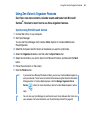
You can start Sync Manager from Creative Media Explorer or Creative MediaSource
Player/Organizer.
3 Select My Computer and Zen Vision as the devices you want to synchronize.
4 Select the Organizer checkbox, and then click the Sync Now button.
5 Select the information you want to import from Microsoft Outlook, and then click the Next
button.
6 Follow the instructions on the screen.
7 Click the Finish button.
NOTE
If you do not have Microsoft Outlook installed, you can use Creative Media Explorer to
edit your calender, "to do" tasks and contact information using the Personal Information
Manager editor. In Creative Media Explorer, click the Manage Organizer Data in
Device
button. For more information, refer to Creative Media Explorer’s online
Help.
TIP
You can also use Sync Manager to synchronize music tracks between Zen Vision and
your computer. For more information, see "Synchronizing Content" on page 30
46
Using Zen Vision’s Organizer Features
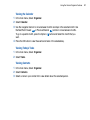
Viewing the Calendar
1 In the main menu, Select Organizer.
2 Select Calendar.
3 Use the navigation buttons to move between months and days in the selected month. Use
the Next/Fast-Forward
or Previous/Rewind
buttons to move between months.
To go to a specific month, press the Options
button and Select the month that you
want.
4 Press the OK button to view the events and tasks of the selected day.
Viewing Today’s Tasks
1 In the main menu, Select Organizer.
2 Select Tasks.
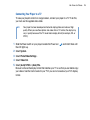
Viewing Contacts
1 In the main menu, Select Organizer.
2 Select Contacts.
3 Select a name in your contact list to view details about the selected person.
47
Storing Data Files in Zen Vision
Storing Data Files in Zen Vision
You can use Zen Vision to store backup copies of your computer’s data files,
or use it to transfer files from one computer to another. Use Zen Vision as a
Removable Disk if you want to use Zen Vision to transfer files between
different computers.
Using Zen Vision as a Removable Disk
1 In the main menu, Select Extras.
2 Select Removable Disk.
When you select this menu item for the first time, you must select the amount of hard disk
space you want to use for the Removable Disk mode. For more information, see
"Changing the Amount of Hard Disk Space in Removable Disk Mode" on page 51.
3 When you see Removable Disk on Zen Vision’s LCD, you are ready to transfer data files
to and from any computer.
48
Storing Data Files in Zen Vision
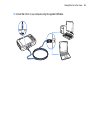
4 Connect Zen Vision to your computer using the supplied USB cable.
49
Storing Data Files in Zen Vision
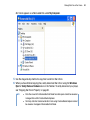
Zen Vision appears as a Removable Disk under My Computer.
5 Use the drag-and-drop method to copy files to and from Zen Vision.
6 When you have finished copying files, safely disconnect Zen Vision using the Windows
Eject or Safely Remove Hardware icon on the Taskbar. To safely disconnect your player,
see "Stopping Zen Vision Properly" on page 52.
NOTE
■
■
Data files saved in the Removable Disk Mode hard disk space cannot be viewed or
managed from within Creative Media Explorer.
Similarly, data files transferred to Zen Vision using Creative Media Explorer cannot
be viewed or managed in Removable Disk Mode.
50
Storing Data Files in Zen Vision
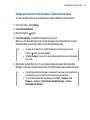
Changing the Amount of Hard Disk Space in Removable Disk Mode
You can change the amount of hard disk space in Removable Disk mode at anytime.
1
2
3
4
In the main menu, Select Extras.
Select Removable Disk.
Press the Options
button.
Select Set Capacity, and select the capacity that you want.
Before you can decrease the amount of hard disk space, the existing data files stored in
Removable Disk mode must be able to fit into the decreased space.
NOTE
■
■
To delete all the data files in the Removable Disk hard disk space, press the
Options
button and select Format.
Go to My Computer if you want to delete individual data files stored in Removable
Disk mode.
5 Alternatively, connect Zen Vision to your computer and use Creative Removable Disk
Manager to increase or decrease the amount of hard disk space in Removable Disk mode.
TIP
■
■
Creative Removable Disk Manager is included with your player and is automatically
installed when you set up the Zen Vision software on your computer.
To start Creative Removable Disk Manager, click Start → Programs or All
Programs → Creative →Creative Removable Disk Manager → Creative
Removable Disk Manager.
51
Storing Data Files in Zen Vision
Stopping Zen Vision Properly
To prevent data loss, ensure that:
■
■
CAUTION!
you have disconnected Zen Vision properly in Windows before unplugging it from the USB port
on your computer (refer to the steps for your respective operating system)
you do not unplug Zen Vision from the USB port on your computer when transferring files to or
from the device, or when files stored in Zen Vision are in use.
Only disconnect Zen Vision after the Do not Disconnect message disappears from
the LCD. If not, your player may not be able to function normally.
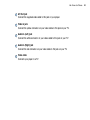
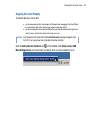
Click the Safely Remove Hardware icon
on the Taskbar, click Safely remove USB
Mass Storage Device, and disconnect your player when you are prompted to do so.
52
Adjusting Your Player’s Settings
Adjusting Your Player’s Settings
Your player offers you many settings. You can select equalization presets,
adjust display settings, enable visual and audio feedback, set the default
language or reset your player.
Date and Time
1
2
3
4
5
6
7
In the main menu, Select Extras.
Select Date & Time.
Press the Options
button.
To set the time or date, Select Set Time or Set Date.
To set the alarm, Select Set Alarm.
To change the date or time format, Select Time Format or Date Format.
To change the date separator, Select Date separator.
Information
Your player’s Information screen displays:
■
■
■
■
the player’s firmware and operating system version — so that you know if you have the latest
updates
the number of videos, programs, photos and audio tracks stored in your player
the total amount of space used in your player for storing media
the available space in your player for storing media
1 In the main menu, Select System.
2 Select Information.
53
Adjusting Your Player’s Settings
Audio Settings
You can change Zen Vision’s play mode, equalization preset or built-in speaker output
from the Audio Settings menu:
1 In the main menu, Select System.
2 Select Audio Settings.
Play Mode
When playing audio tracks, you can choose to change the play mode.
1
2
3
4
5
6
Select Play Mode.
Select Repeat Track to repeat playback of the current track.
Select Repeat All to repeat playback of all the tracks.
Select Shuffle to play the tracks in a random order.
Select Shuffle Repeat to repeat playback of all the tracks in a random order.
Select Track Once to play the current track once.
Equalization
You can choose from several equalization presets to make audio playback sound better.
For example, if you are listening to classical music, or watching a video with a classical
score, choose the Classical preset.
1 Select EQ.
2 Select a preset from the list of equalizer presets that appears.
54
Adjusting Your Player’s Settings
Speaker
You can enable or disable your player’s built-in speaker.
Select Off to disable your player’s speaker.
Select Auto to automatically detect earphones, If no earphones are connected to your
player, audio will play back from your player’s speaker.
1 Select Speaker.
2 Press the OK button to change the speaker settings.
55
Adjusting Your Player’s Settings
Photo and Video Settings
You can adjust Zen Vision’s slideshow interval and display settings from the Photo/Video
Settings menu.
1 In the main menu, Select System.
2 Select Photo/Video Settings.
Slideshow Interval
You can specify the number of seconds to display each photo.
1 Select Slideshow Interval.
2 Use the Up
or Down
navigation buttons to increase or decrease the number of
seconds.
Video Out
You can adjust your player’s display by selecting Backlight, Brightness and Video Out
settings.
For Video Out settings, you can choose to have content directed to your TV in NTSC or
PAL formats. Be sure to choose the display format that matches your TV so that you can
better enjoy your videos. See the User’s Guide for your TV if you are not sure about your
TV’s display format.
1 In the main menu, Select System.
2 Select Photo/Video Settings.
3 Select the Video Out setting that you want.
56
Adjusting Your Player’s Settings
Setting Preferences
To personalize your player:
1 In the main menu, Select System.
2 Select Player Settings.
User Name
1 Select Owner.
2 Use the Navigation buttons to create a user name.
Backlight Duration
1 Select Backlight Time.
2 Use the Up
or Down
navigation buttons to increase or decrease the backlight
duration. A lower number setting conserves battery power for longer playback time.
LCD Brightness
1 Select Brightness.
2 Use the Up
or Down
navigation buttons to increase or decrease the LCD brightness.
The lower the number, the dimmer the LCD.
Idle Shutdown
1 Select Idle Shutdown.
2 Use the Up
or Down
navigation buttons to increase or decrease the duration you
want your player to wait before automatically shutting down.
57
Adjusting Your Player’s Settings
Sleep Timer
1 Select Sleep Timer.
2 Use the Up
or Down
navigation buttons to increase or decrease the duration you
want your player to wait before automatically shutting down.
Infrared
1 Select IR Remote.
2 Press the OK button to enable or disable the infrared detection for your IR Remote Control
(available separately).
Menu Configuration
1 Select Configure Menu.
2 Select the options that you want included in your player’s main menu.
58
Adjusting Your Player’s Settings
Theme
You can change your player’s display design by selecting a different theme.
1 In the main menu, Select System.
2 Select Theme.
3 Select the theme that you want.
Language
You can change the default language for your player.
1 In the main menu, Select System.
2 Select Language.
3 Select the default language that you want.
Resetting Zen Vision
You can reset Zen Vision to its original settings.
1 In the main menu, Select System.
2 Select Reset Settings.
3 Select Yes.
59
Frequently Asked Questions
Frequently Asked Questions
This section covers questions you might have while using your player. It has
been divided into a few categories for your easy reference. For further
assistance, you may wish to consult our self-help tool "Knowledge Base".
Go to www.creative.com, select your region and then select Support.
For the latest firmware updates to improve Zen Vision’s functionality, go to
www.creative.com and select Downloads.
What are the minimum system requirements for setting up Zen Vision’s
software?
■
■
■
■
■
■
■
NOTE
Microsoft Windows XP (Service Pack 1 or higher)
Intel® Pentium® II 350 MHz, AMD®-K6-2® 450 MHz or better processor (Pentium III 450 MHz or
higher recommended for MP3 encoding)
CD-ROM/DVD-ROM drive with digital audio extraction support
USB 1.1 (USB 2.0 port recommended for faster transfers)
64 MB RAM (128 MB recommended)
170 MB free hard disk space (more for media content storage)
Internet connection for Internet content downloading and CDDB2™ support (any charges
incurred are the responsibility of the user)
The software applications on the Zen Vision CD may have higher requirements for
basic functionality. Refer to each application’s documentation for details.
Should I leave the power adapter plugged in to the wall outlet?
No, you should not. After charging the battery or using Zen Vision, disconnect your power
adapter from the wall outlet. Leaving it plugged in leads to heat buildup, which is not good
for your power adapter.
60
Frequently Asked Questions
Can I jog with my Zen Vision?
You should not subject Zen Vision to continuous shocks, such as those that are likely to
occur while you jog or run.
Can I transfer Digital Rights Management (DRM) protected WMA files to my
player?
Yes. To transfer DRM protected WMA files to Zen Vision, you can use Creative Media
Explorer, Creative MediaSource Player/Organizer or WMP 10.
Can I use the player for portable data storage?
Yes, you can. For more information, see "Storing Data Files in Zen Vision" on page 48.
Why does the player skip certain tracks?
The player will only play valid media formats. Other types of media formats are skipped.
Generally, your player plays MP3, WAV and WMA files. For more information, see
"Playback Formats" on page 67.
If I damage or lose my power adapter, can I buy a similar, off-the-shelf
adapter?
No. An off-the-shelf adapter may not be compatible with Zen Vision, and may even
damage it. You should get a replacement power adapter from Creative at
www.creative.com, or your local Creative office/distributor.
61
Frequently Asked Questions
I have to recharge Zen Vision’s battery quite often. Is there anything I can do
to make it last longer?
Generally, any operation requiring Zen Vision to access the hard disk uses battery power.
Consequently, filling your player to capacity is not recommended. However, some
operations consume more battery power:
■
■
■
■
■
■
NOTE
a long backlight timeout setting. A shorter timeout conserves battery power.
a high contrast setting. Position the player so that you can read the display without using a high
contrast setting.
fast-forwarding or rewinding
turning the player on and off too many times
prolonged use at high volumes
enabling equalization presets
For the latest firmware updates to improve Zen Vision’s functionality, go to
www.creative.com and select Downloads.
How do I reset Zen Vision?
1 Disconnect Zen Vision’s power adapter and turn off the power outlet.
2 Remove the battery.
3 Wait five seconds before reinserting the battery.
NOTE
Insert the battery within one minute to retain the current date and time settings in your
player.
62
Frequently Asked Questions
Do I need to defragment Zen Vision hard disk drive?
Zen Vision may occasionally operate at less than optimal performance for a number of
reasons, for example, if Music Library is rebuilt frequently when no changes are made to it.
Selecting CleanUp in Zen Vision’s Recovery Mode menu cleans, rebuilds and reorganizes
Music Library and restores it to optimal efficiency. Save a copy of Zen Vision’s content
before cleaning up your player.
To clean up Zen Vision’s hard disk drive
1 Turn off Zen Vision.
2 Remove the battery.
3 Slide the Power switch towards the Power
icon and hold it there while you reinsert the
battery.
4 The Recovery Mode screen appears when Zen Vision turns on.
Four menu items are available in the Recovery Mode screen: CleanUp, Format All,
Reload Firmware and Reboot.
5 To clean up your player’s hard disk drive, select Cleanup.
6 When the clean up is complete, select Reboot. Your player restarts and starts rebuilding
Music Library.
CAUTION!
■
■
Selecting Format All clears Zen Vision’s memory and erases all hard disk content.
Save a copy of your player’s content before formatting your player.
Selecting Reload Firmware erases your player’s firmware. DO NOT Select the
Reload Firmware unless you have downloaded a newer firmware version for Zen
Vision, or have been advised to do so by the Creative Customer Services center.
63
Frequently Asked Questions
My Zen Vision wired remote control is not working. What do I do?
■
■
Make sure the wired remote control’s Lock switch is not in the Lock
position.
Make sure the wired remote control is properly connected to Zen Vision, and the earphones are
properly connected to the wired remote control.
Zen Vision does not turn on or stops responding. What do I do?
■
■
■
Make sure the Power switch is not in the Lock
position.
If you are using the Zen Vision wired remote control, make sure the wired remote control’s Lock
switch is not is the Lock
position.
Your battery may need to be recharged. Connect your player to the Zen Vision power adapter,
and then connect the power adapter to a power outlet. If necessary, turn on the power outlet.
What is PC Music Library?
PC Music Library is your collection of digital audio tracks in Creative MediaSource Player/
Organizer. In Creative MediaSource Player/Organizer, you can have more than one PC
Music Library. When sharing the same computer, multiple users can each have their own
music library, each with its own settings. However, only one music library can be active at
one time.
Can PC Music Library be automatically updated?
Yes. You can use the Media Sniffer tool in Creative MediaSource Player/Organizer to
monitor or 'watch' folders in your computer. With Media Sniffer enabled, PC Music Library
is updated when tracks in monitored folders are added, deleted or moved. This helps to
prevent broken links in PC Music Library. For more information about using Creative
MediaSource Player/Organizer, refer to its online help.
64
Frequently Asked Questions
What does the PlaysForSure logo mean?
The PlaysForSure logo makes it easy to find digital music stores that are compatible with
your player. If you see the PlaysForSure logo, you can be sure that the music bought can
be played on your player.
Where can I get more information on Creative products?
Visit www.creative.com and select your region or country for updates and downloads
relating to all Creative products.
65
Safety Advice
Safety Advice
Refer to the following information to use your player safely, and to reduce
the chance of electric shock, short-circuiting, damage, fire, hearing
impairment or other hazards.
NOTE
Improper handling may void the warranty of your player. For more information, read the
Warranty available with your product.
■
■
■
■
■
■
■
■
■
■
■
Do not dismantle or attempt to repair your player, battery or power adapter.
Refer all servicing to Creative or authorized repair agents.
Do not expose your player or battery to temperatures outside the range of 0°C to 45°C (32°F to
113°F).
Do not pierce, crush or set fire to your player or battery.
Keep your player or battery away from strong magnetic objects.
Do not subject your player to excessive force or impact.
Do not expose your player or battery to water or moisture.
If your player is moisture-resistant (see product packaging for details), take care not to immerse
your player in water or expose it to rain.
Do not listen to audio at high volume for prolonged periods of time.
The battery must be recycled or disposed of properly. Contact local agencies for recycling and
disposal information.
Do not allow metal objects to touch the terminals of your battery.
If there is leakage, an offensive odor, discoloration or deformation during charging or use,
remove the battery and do not use it again. Clean your hands well before touching food or
sensitive areas, for example, your eyes.
66
General Specifications
General Specifications
Power Source
■
■
Battery: 1 x Rechargeable Lithium Ion battery
DC IN 5V when connected to a power outlet
Playback Formats
■
■
■
Audio playback formats: MP3: Up to 320 kbps, WMA: Up to 320 kbps, WMA with Digital Rights
Management (DRM) 9 or later, WAV
Video playback formats: MPEG-1, MPEG-2, MPEG-4-SP, Windows Media™ Video (WMV) 9,
MJPEG, AVI
Photo format: JPEG Baseline and JPEG Progressive: Up to 8 MegaPixels
Recording Formats
■
■
Voice (via built-in microphone): IMA ADPCM (16 kHz, Mono)
FM Radio: IMA ADPCM (22 kHz, Stereo)
FM Radio
■
■
■
Stereo and Mono
Up to 32 preset stations
FM region support
International: 87.5 MHz ~ 108.0 MHz, 100 kHz intervals
MP3 Playback Performance
■
■
■
■
Signal-to-Noise Ratio: Up to 97 dB
Channel Separation: Up to -70 dB (Line Out)
Frequency Response: 20 Hz ~ 20 kHz
Harmonic Distortion Output: <0.1%
67
General Specifications
Connectors
■
■
■
■
■
■
DC IN 5V jack
Headphone jack: 3.5 mm (1/8") stereo minijack, 25 mW per channel
AV OUT jack: PAL or NTSC
Compact Flash memory card slot
Docking connector
USB 2.0 port: Standard USB mini-B receptacle
USB 2.0 (High speed)
USB 1.1 (Full speed)
LCD
■
Large 93.98 mm or 3.7" 640 x 480 pixel resolution backlit display (262,144 colors)
Firmware Support
■
Upgradable via USB (firmware upgrades are available from www.creative.com)
Earphone Specifications
■
■
■
■
Frequency Range: 20 Hz ~ 20 KHz
Sensitivity: 113 dB ±5 dB (I/P Level:1 mW)
Impedance: 32 Ω ± 5 dB
Plug: 3.5 mm (1/8") stereo minijack
68