1
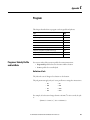
Program
Appendix C
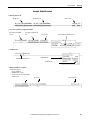
For Decel Jerk:
2
jd [% of Time] =
1+
jd [EU/s3] vmax [EU/s]
100
dmax [EU/s2]
Jerk Programming in Units/Sec3
If you want to specify the jerk in 'Units/sec3' instead of '% of time', adjust your
jerk value as follows so that you get the value that you programmed.
Programmed Decel Rate2
Temporary Speed =
Desired Decel Jerk value in Units/Sec3
Start Speed - Programmed Speed
k=
Max (Programmed Speed, Temporary Speed)
if (k < 1)
•Instruction faceplate Decel jerk in Units/Sec3 = Desired Decel Jerk in Units/Sec3
else
•Instruction faceplate Decel jerk in Units/Sec3 = Desired Decel Jerk in Units/Sec3 * k
Unique Program Considerations
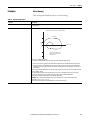
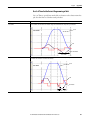
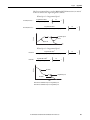
If you program a move by using the % of Time units, the programming software
computes an Accel Jerk = a2/v where a = the programmed Accel Rate and v =
programmed Speed.
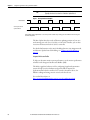
Therefore, the higher the programmed speed, the lower the computed Jerk. The
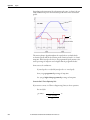
system has a Jerk priority planner. In other words, Jerk always takes priority over
acceleration and velocity.
Therefore, you always get the programmed Jerk. If a move is velocity-limited, the
move does not reach the programmed acceleration and/or velocity. Once you
reach the velocity limit for the length of the move, as the velocity is increased, the
move takes longer and longer to complete.
Decel Jerk is computed similarly to the Accel Jerk described above. The only
difference is that instead of a2/v, Decel Jerk = d2/v, where d = the programmed
Decel Rate.
Rockwell Automation Publication MOTION-UM003F-EN-P - March 2015
261