1
A
DisplayPort Source Automated Test with W2642A DPTC
Step2: Change Bit Rate and Number of Lanes
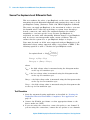
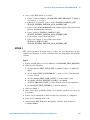
1 To change the bit rate and number of lanes, DPTC controller will
initiate the below sequence:
a Set 0x202 (LANE0_1_STATUS) = 0x77
b Set 0x203 (LANE2_3_STATUS) = 0x77
c Set 0x204 (LANE_ALIGN__STATUS_UPDATED) = 0x81
d Set bit 0x201.1 (AUTOMATED_TEST_REQUEST)
e Clear 0x218(TEST_REQUEST)
f
Set bit 0x218.0 (TEST_LINK_TRAINING)
g Set byte 0x219 (TEST_LINK_RATE) to 0x0A(2.7 Gbps) or 0x06(1.62
Gbps)
h Set byte 0x220 (TEST_LANE_COUNT) to desired lane count
i
Trigger an IRQ Event(Send 1ms HPD Pulse)
2 Once a 1ms HPD pulse is received:
a Source reads bit 0x201.1 (AUTOMATED_TEST_REQUEST). If 0x201.1
is asserted, go to 2
b If 0x218.0 is asserted, source clears LINK_BW_SET and
LANE_COUNT_SET
c Source reads 0x219 and 0x220 and outputs signals with desired lane
count and data rate
d Source writes new values to LINK_BW_SET, LANE_COUNT_SET.
e Source clears bit 218.0 if a DisplayPort source successfully outputs
signals with desired lane count and data rate
3 Aux Controller checks LINK_BW_SET, LANE_COUNT_SET if signal
change is successful.
Step3: Change Pre-Emphasis, Level and Test pattern
1 To change the pre- Emphasis, level and test pattern, DPTC initiates the
following sequences:
a Set 0x202 (LANE0_1_STATUS) = 0x77
b Set 0x203 (LANE2_3_STATUS) = 0x77
c Set 0x204 (LANE_ALIGN__STATUS_UPDATED) = 0x81
d Set bit 0x201.1 (AUTOMATED_TEST_REQUEST)
e Set 0x206 (ADJUST_REQUEST_LANE0_1) and 0x207
(ADJUST_REQUEST_LANE2_3) with the desired level and
pre- Emphasis
Agilent U7232A DisplayPort Electrical Performance Compliance Test Application
239