1
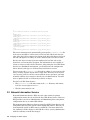
Advanced Printing Software
System Administration and Operation Guide
September 2002
Product Version:
Operating System and Version:
Advanced Printing Software Version 1.2
Tru64 UNIX Version 5.1B or higher
This manual describes how to configure and manage Advanced Printing
Software on systems running the Tru64 UNIX operating system.
Hewlett-Packard Company
Palo Alto, California
© 2002 Hewlett-Packard Company
UNIX® is a trademark of The Open Group. PrintXchange® is a trademark of Xerox Corporation. All other
product names mentioned herein may be the trademarks of their respective companies.
Advanced Printing Software is based on Xerox PrintXchange technology developed and marketed by
Xerox Corporation.
Confidential computer software. Valid license from Compaq Computer Corporation, a wholly owned
subsidiary of Hewlett-Packard Company, required for possession, use, or copying. Consistent with FAR
12.211 and 12.212, Commercial Computer Software, Computer Software Documentation, and Technical
Data for Commercial Items are licensed to the U.S. Government under vendor’s standard commercial
license.
None of Compaq, HP, or any of their subsidiaries shall be liable for technical or editorial errors or omissions
contained herein. The information is provided “as is” without warranty of any kind and is subject to
change without notice. The warranties for HP or Compaq products are set forth in the express limited
warranty statements accompanying such products. Nothing herein should be construed as constituting
an additional warranty.
Contents
About This Manual
1
Advanced Printing Software Overview
1.1
Terminology . . .. . . .. . .. . .. . .. . . .. . .. . .. . .. . .. . . .. . .. . .. . .. . . .. . .. . .. . .. .
1.1.1
Clients and Servers . .. . . .. . .. . .. . .. . .. . . .. . .. . .. . .. . . .. . .. . .. . .. .
1.1.1.1
Client Programs .. . . .. . .. . .. . .. . .. . . .. . .. . .. . .. . . .. . .. . .. . .. .
1.1.1.2
Server Programs .. . . .. . .. . .. . .. . .. . . .. . .. . .. . .. . . .. . .. . .. . .. .
1.1.2
Objects and Object Attributes . . .. . .. . . .. . .. . .. . .. . . .. . .. . .. . .. .
1.1.3
Operations . . .. . .. . .. . .. . . .. . .. . .. . .. . .. . . .. . .. . .. . .. . . .. . .. . .. . .. .
1.1.4
Logical Printers, Physical Printers, and Queues .. . .. . .. . .. .
1.1.5
Documents and Jobs . . . .. . .. . .. . .. . .. . . .. . .. . .. . .. . . .. . .. . .. . .. .
1.1.6
Initial-Value Objects .. . . .. . .. . .. . .. . .. . . .. . .. . .. . .. . . .. . .. . .. . .. .
1.1.7
Supported and Ready Attributes . .. . . .. . .. . .. . .. . . .. . .. . .. . .. .
1.1.8
Name Services . .. . .. . .. . . .. . .. . .. . .. . .. . . .. . .. . .. . .. . . .. . .. . .. . .. .
1.1.9
Server Databases . .. . .. . . .. . .. . .. . .. . .. . . .. . .. . .. . .. . . .. . .. . .. . .. .
1.1.10
User Classes and Access Control . .. . . .. . .. . .. . .. . . .. . .. . .. . .. .
1.1.11
Notification Profile and Events .. . .. . . .. . .. . .. . .. . . .. . .. . .. . .. .
1.2
Software Components .. . .. . . .. . .. . .. . .. . .. . . .. . .. . .. . .. . . .. . .. . .. . .. .
1.2.1
Client Interfaces . .. . .. . . .. . .. . .. . .. . .. . . .. . .. . .. . .. . . .. . .. . .. . .. .
1.2.1.1
End-User Interface . .. . .. . .. . .. . .. . . .. . .. . .. . .. . . .. . .. . .. . .. .
1.2.1.2
Administrative Interfaces . . .. . .. . . .. . .. . .. . .. . . .. . .. . .. . .. .
1.2.2
Server Programs . .. . .. . . .. . .. . .. . .. . .. . . .. . .. . .. . .. . . .. . .. . .. . .. .
1.2.2.1
Spooler . . .. . .. . .. . .. . . .. . .. . .. . .. . .. . . .. . .. . .. . .. . . .. . .. . .. . .. .
1.2.2.2
Supervisor . .. . .. . .. . . .. . .. . .. . .. . .. . . .. . .. . .. . .. . . .. . .. . .. . .. .
1.2.2.3
LPD Outbound Gateway Supervisor . . .. . .. . . .. . .. . .. . .. .
1.2.3
Server Daemons . . .. . .. . . .. . .. . .. . .. . .. . . .. . .. . .. . .. . . .. . .. . .. . .. .
1.2.4
Printer Attribute Files . .. . .. . .. . .. . .. . . .. . .. . .. . .. . . .. . .. . .. . .. .
1.2.5
Translation and Modification Filters . .. . .. . .. . .. . . .. . .. . .. . .. .
2
1–1
1–1
1–2
1–2
1–2
1–3
1–4
1–5
1–5
1–5
1–6
1–6
1–7
1–7
1–7
1–7
1–8
1–8
1–8
1–8
1–9
1–9
1–9
1–10
1–10
Planning an Installation
2.1
Setting Up Software Components . . .. . .. . . .. . .. . .. . .. . . .. . .. . .. . .. .
2.1.1
Printer Configurations . .. . .. . .. . .. . .. . . .. . .. . .. . .. . . .. . .. . .. . .. .
2.1.2
Multiple Server Hosts . . .. . .. . .. . .. . .. . . .. . .. . .. . .. . . .. . .. . .. . .. .
2.1.3
Server Restrictions . . .. . . .. . .. . .. . .. . .. . . .. . .. . .. . .. . . .. . .. . .. . .. .
2.1.3.1
Logical-to-Physical Printer Associations .. . . .. . .. . .. . .. .
2–1
2–1
2–1
2–2
2–2
Contents iii
2.1.3.2
2.1.3.3
2.1.4
2.1.5
2.2
2.3
2.4
2.5
3
Local File Name Service .. . . .. . .. . .. . .. . .. . . .. . .. . .. . .. . . .. . .. . .. . .. .
Network Information Service . .. . .. . .. . .. . . .. . .. . .. . .. . . .. . .. . .. . .. .
LDAP Name Service . . .. . .. . . .. . .. . .. . .. . .. . . .. . .. . .. . .. . . .. . .. . .. . .. .
Creating an LDAP Client Username and Password . . .. . .. .
Creating or Modifying the apx.conf File . . .. . .. . .. . .. . . .. . .. . .. . .. .
Protoserver Daemon .. . . .. . .. . .. . .. . .. . . .. . .. . .. . .. . . .. . .. . .. . .. .
3–1
3–2
3–5
3–5
3–5
3–7
Managing Security
4.1
4.2
4.2.1
4.2.2
4.2.3
4.3
4.3.1
5
2–2
2–2
2–3
2–3
2–3
2–4
2–4
2–4
Managing the Name Space
3.1
3.2
3.3
3.3.1
3.4
3.4.1
4
Close Association . . . .. . .. . .. . .. . .. . . .. . .. . .. . .. . . .. . .. . .. . .. .
Loose Association (Fan-in and Fan-Out Queues) . .. . .. .
Using Multiple Supervisors on a Single Host .. . . .. . .. . .. . .. .
Using Supervisors on Direct-Connected Printers . . .. . .. . .. .
Planning Name Services .. . . .. . .. . .. . .. . .. . . .. . .. . .. . .. . . .. . .. . .. . .. .
Event Notification . .. . .. . .. . . .. . .. . .. . .. . .. . . .. . .. . .. . .. . . .. . .. . .. . .. .
Security . .. . .. . .. . . .. . .. . .. . .. . . .. . .. . .. . .. . .. . . .. . .. . .. . .. . . .. . .. . .. . .. .
Configuration Tasks . . .. . .. . . .. . .. . .. . .. . .. . . .. . .. . .. . .. . . .. . .. . .. . .. .
System Security . .. . .. . .. . .. . . .. . .. . .. . .. . .. . . .. . .. . .. . .. . . .. . .. . .. . .. .
Authorization .. . . .. . .. . .. . .. . . .. . .. . .. . .. . .. . . .. . .. . .. . .. . . .. . .. . .. . .. .
End User Operations . . . .. . .. . .. . .. . .. . . .. . .. . .. . .. . . .. . .. . .. . .. .
Operator Operations .. . . .. . .. . .. . .. . .. . . .. . .. . .. . .. . . .. . .. . .. . .. .
Administrator Operations .. . .. . .. . .. . . .. . .. . .. . .. . . .. . .. . .. . .. .
Authentication by Access Control Lists . . .. . .. . .. . .. . . .. . .. . .. . .. .
Managing ACLs . . .. . .. . . .. . .. . .. . .. . .. . . .. . .. . .. . .. . . .. . .. . .. . .. .
4–1
4–2
4–2
4–2
4–3
4–3
4–5
Creating and Managing Servers
5.1
5.1.1
5.1.2
5.1.3
5.1.4
5.2
5.2.1
5.3
5.3.1
5.3.2
5.3.3
5.3.4
5.3.5
iv Contents
Creating Servers . . .. . .. . .. . . .. . .. . .. . .. . .. . . .. . .. . .. . .. . . .. . .. . .. . .. .
Creating an Object Database . . .. . .. . . .. . .. . .. . .. . . .. . .. . .. . .. .
Displaying Object Database Data .. . . .. . .. . .. . .. . . .. . .. . .. . .. .
Modifying an Existing Object Database . . .. . .. . . .. . .. . .. . .. .
Backing Up Object Databases . . .. . .. . . .. . .. . .. . .. . . .. . .. . .. . .. .
Configuring Server Object Attributes .. . . .. . .. . .. . .. . . .. . .. . .. . .. .
Examples of Setting Server Object Attributes . . .. . .. . .. . .. .
Configuring Servers in a TruCluster Server Environment . . .. .
apx-default.cap Resource Profile . . .. . . .. . .. . .. . .. . . .. . .. . .. . .. .
apx-default.scr Action Script .. . .. . .. . . .. . .. . .. . .. . . .. . .. . .. . .. .
Registering the apx-default Resource Profile .. . . .. . .. . .. . .. .
Starting and Stopping the Resource Profile . .. . . .. . .. . .. . .. .
Adding Servers to the apx-default Resource Profile . . .. . .. .
5–1
5–2
5–3
5–4
5–5
5–5
5–6
5–7
5–7
5–8
5–8
5–8
5–8
5.3.6
5.3.6.1
5.3.6.2
Customizing the Advanced Printing Cluster Environment
Relocating Resources . .. . .. . .. . .. . . .. . .. . .. . .. . . .. . .. . .. . .. .
Using the apx_caa_setup Script to Manage CAA
Resource Profiles . . . .. . .. . .. . .. . .. . . .. . .. . .. . .. . . .. . .. . .. . .. .
5.3.6.2.1
Displaying CAA Printing Resource Profiles . . .. . .. .
5.3.6.2.2
Creating a CAA Printing Resource Profile .. . .. . .. .
5.3.6.2.3
Modifying a CAA Printing Resource Profile . . .. . .. .
5.3.6.2.4
Deleting a CAA Printing Resource Profile . .. . .. . .. .
5.3.6.2.5
Initializing CAA Printing Resource Profiles . .. . .. .
5.3.7
Configuring a Printer to Run on One Member . . .. . .. . .. . .. .
5.3.8
LPD Inbound Gateway in a Cluster . . .. . .. . .. . .. . . .. . .. . .. . .. .
5.4
Managing Servers . .. . .. . .. . . .. . .. . .. . .. . .. . . .. . .. . .. . .. . . .. . .. . .. . .. .
5.4.1
Server States .. . .. . .. . .. . . .. . .. . .. . .. . .. . . .. . .. . .. . .. . . .. . .. . .. . .. .
5.4.2
Starting a Server . .. . .. . . .. . .. . .. . .. . .. . . .. . .. . .. . .. . . .. . .. . .. . .. .
5.4.3
Starting a Spooler .. . .. . . .. . .. . .. . .. . .. . . .. . .. . .. . .. . . .. . .. . .. . .. .
5.4.4
Starting a Supervisor . . . .. . .. . .. . .. . .. . . .. . .. . .. . .. . . .. . .. . .. . .. .
5.4.5
Starting an Outbound Gatway Supervisor .. . .. . . .. . .. . .. . .. .
5.4.6
Enabling a Server .. . .. . . .. . .. . .. . .. . .. . . .. . .. . .. . .. . . .. . .. . .. . .. .
5.4.7
Disabling a Server . . .. . . .. . .. . .. . .. . .. . . .. . .. . .. . .. . . .. . .. . .. . .. .
5.4.8
Removing Jobs from a Server . . .. . .. . . .. . .. . .. . .. . . .. . .. . .. . .. .
5.4.8.1
Removing Named Jobs from a Server . .. . .. . . .. . .. . .. . .. .
5.4.8.2
Removing All Jobs from a Spooler . . .. . .. . .. . . .. . .. . .. . .. .
5.4.9
Pausing Spoolers . .. . .. . . .. . .. . .. . .. . .. . . .. . .. . .. . .. . . .. . .. . .. . .. .
5.4.10
Resuming a Server . . .. . . .. . .. . .. . .. . .. . . .. . .. . .. . .. . . .. . .. . .. . .. .
5.4.11
Shutting Down a Server . . .. . .. . .. . .. . . .. . .. . .. . .. . . .. . .. . .. . .. .
5.4.12
Deleting a Server . .. . .. . . .. . .. . .. . .. . .. . . .. . .. . .. . .. . . .. . .. . .. . .. .
6
5–9
5–9
5–9
5–10
5–10
5–11
5–12
5–12
5–13
5–13
5–14
5–14
5–14
5–15
5–15
5–16
5–16
5–17
5–18
5–18
5–18
5–19
5–19
5–20
5–21
Creating and Managing Queues and Printers
6.1
Creating and Managing Queues . .. . .. . .. . . .. . .. . .. . .. . . .. . .. . .. . .. .
6.1.1
Enabling a Queue .. . .. . . .. . .. . .. . .. . .. . . .. . .. . .. . .. . . .. . .. . .. . .. .
6.1.2
Disabling a Queue . . .. . . .. . .. . .. . .. . .. . . .. . .. . .. . .. . . .. . .. . .. . .. .
6.1.3
Removing All Jobs from a Queue . .. . . .. . .. . .. . .. . . .. . .. . .. . .. .
6.1.4
Determining Queue States . . .. . .. . .. . . .. . .. . .. . .. . . .. . .. . .. . .. .
6.1.5
Setting Limits for Queue Backlog Events . .. . .. . . .. . .. . .. . .. .
6.1.6
Listing Queue Attributes . .. . .. . .. . .. . . .. . .. . .. . .. . . .. . .. . .. . .. .
6.2
Creating and Managing Physical Printers . . .. . .. . .. . . .. . .. . .. . .. .
6.2.1
Creating Physical Printers . . .. . .. . .. . . .. . .. . .. . .. . . .. . .. . .. . .. .
6.2.1.1
Setting the Printer Address . . .. . . .. . .. . .. . .. . . .. . .. . .. . .. .
6.2.1.2
Setting the Printer Connection Method . .. . . .. . .. . .. . .. .
6.2.1.3
Setting Printer Connection Level .. . .. . .. . .. . . .. . .. . .. . .. .
6.2.1.4
Setting Serial Port Parameter Attributes . . . .. . .. . .. . .. .
6–1
6–2
6–2
6–2
6–2
6–3
6–3
6–4
6–4
6–5
6–6
6–7
6–7
Contents v
6.2.1.5
Setting the TCP/IP Port Number .. . .. . .. . .. . . .. . .. . .. . .. .
6.2.1.6
Using Unsupported Printers . .. . . .. . .. . .. . .. . . .. . .. . .. . .. .
6.2.2
Examples for Creating Physical Printers . .. . .. . . .. . .. . .. . .. .
6.2.3
Setting Optional Attributes for Physical Printers . .. . .. . .. .
6.2.4
Enabling a Physical Printer . .. . .. . .. . . .. . .. . .. . .. . . .. . .. . .. . .. .
6.2.5
Disabling a Physical Printer .. . .. . .. . . .. . .. . .. . .. . . .. . .. . .. . .. .
6.2.6
Pausing a Physical Printer . . .. . .. . .. . . .. . .. . .. . .. . . .. . .. . .. . .. .
6.2.7
Resuming a Physical Printer .. . .. . .. . . .. . .. . .. . .. . . .. . .. . .. . .. .
6.2.8
Deleting a Physical Printer Object . . . .. . .. . .. . .. . . .. . .. . .. . .. .
6.3
Creating and Managing Logical Printers .. . .. . .. . .. . . .. . .. . .. . .. .
6.3.1
Example for Creating a Logical Printer .. . .. . .. . . .. . .. . .. . .. .
6.3.2
Setting Optional Logical Printer Attributes . .. . . .. . .. . .. . .. .
6.3.3
Performing Management Functions on Logical Printers . .
6.3.3.1
Enabling a Logical Printer . .. . .. . . .. . .. . .. . .. . . .. . .. . .. . .. .
6.3.3.2
Disabling a Logical Printer .. . .. . . .. . .. . .. . .. . . .. . .. . .. . .. .
6.3.3.3
Listing Printer Attributes . . .. . .. . . .. . .. . .. . .. . . .. . .. . .. . .. .
6.3.3.4
Displaying Jobs Submitted to Logical Printers .. . .. . .. .
6.3.3.5
Deleting a Logical Printer . .. . .. . . .. . .. . .. . .. . . .. . .. . .. . .. .
6.4
Specifying Job Defaults and Creating Default Objects .. . .. . .. .
6.4.1
Specifying Defaults for Jobs and Documents .. . . .. . .. . .. . .. .
6.4.2
Creating Default Objects . . .. . .. . .. . .. . . .. . .. . .. . .. . . .. . .. . .. . .. .
6.4.3
Creating Printer Setup Modules . . .. . . .. . .. . .. . .. . . .. . .. . .. . .. .
7
6–8
6–8
6–9
6–10
6–10
6–11
6–11
6–12
6–12
6–13
6–14
6–14
6–14
6–14
6–15
6–15
6–16
6–17
6–17
6–18
6–19
6–20
Managing Jobs and Documents
7.1
Performing Job and Document Operations . .. . .. . .. . . .. . .. . .. . .. .
7.1.1
Printing a Job . . .. . .. . .. . . .. . .. . .. . .. . .. . . .. . .. . .. . .. . . .. . .. . .. . .. .
7.1.2
Printing a Job After a Specified Time .. . .. . .. . .. . . .. . .. . .. . .. .
7.1.3
Listing Job and Document Attributes . . .. . .. . .. . . .. . .. . .. . .. .
7.1.4
Listing a Job Queue .. . . .. . .. . .. . .. . .. . . .. . .. . .. . .. . . .. . .. . .. . .. .
7.1.5
Modifying Job and Document Attributes . . .. . .. . . .. . .. . .. . .. .
7.1.6
Removing a Job .. . .. . .. . . .. . .. . .. . .. . .. . . .. . .. . .. . .. . . .. . .. . .. . .. .
7.1.7
Resubmitting a Job . .. . . .. . .. . .. . .. . .. . . .. . .. . .. . .. . . .. . .. . .. . .. .
7.1.8
Promoting a Job . . .. . .. . . .. . .. . .. . .. . .. . . .. . .. . .. . .. . . .. . .. . .. . .. .
7.1.9
Pausing a Job . . .. . .. . .. . . .. . .. . .. . .. . .. . . .. . .. . .. . .. . . .. . .. . .. . .. .
7.1.10
Resuming a Job .. . .. . .. . . .. . .. . .. . .. . .. . . .. . .. . .. . .. . . .. . .. . .. . .. .
7.1.11
Holding a Job . . .. . .. . .. . . .. . .. . .. . .. . .. . . .. . .. . .. . .. . . .. . .. . .. . .. .
7.1.12
Retaining a Job .. . .. . .. . . .. . .. . .. . .. . .. . . .. . .. . .. . .. . . .. . .. . .. . .. .
7.1.13
Discarding a Job . . .. . .. . . .. . .. . .. . .. . .. . . .. . .. . .. . .. . . .. . .. . .. . .. .
7.1.14
Including Messages . .. . . .. . .. . .. . .. . .. . . .. . .. . .. . .. . . .. . .. . .. . .. .
7.1.15
Including Event Notification .. . .. . .. . . .. . .. . .. . .. . . .. . .. . .. . .. .
vi Contents
7–1
7–2
7–2
7–3
7–4
7–5
7–6
7–7
7–8
7–8
7–9
7–9
7–10
7–10
7–11
7–11
8
Document Data Filtering
8.1
8.1.1
8.1.2
8.1.3
8.1.4
8.1.5
8.2
9
Types of Filters . . .. . .. . .. . .. . . .. . .. . .. . .. . .. . . .. . .. . .. . .. . . .. . .. . .. . .. .
Filter-Related Attributes . .. . .. . .. . .. . . .. . .. . .. . .. . . .. . .. . .. . .. .
Command Text Processing .. . .. . .. . .. . . .. . .. . .. . .. . . .. . .. . .. . .. .
Invoking a Filter . .. . .. . . .. . .. . .. . .. . .. . . .. . .. . .. . .. . . .. . .. . .. . .. .
Error Handling .. . .. . .. . . .. . .. . .. . .. . .. . . .. . .. . .. . .. . . .. . .. . .. . .. .
Creating a Filter Program .. . .. . .. . .. . . .. . .. . .. . .. . . .. . .. . .. . .. .
Using the Text-to-PostScript Translation Filter . .. . . .. . .. . .. . .. .
8–1
8–2
8–4
8–7
8–7
8–8
8–8
Setting Event Notification
9.1
9.2
9.3
9.3.1
9.3.2
9.3.3
9.3.4
Event Notification Server . . .. . .. . .. . .. . .. . . .. . .. . .. . .. . . .. . .. . .. . .. .
Notification Method . . .. . .. . . .. . .. . .. . .. . .. . . .. . .. . .. . .. . . .. . .. . .. . .. .
Notification Event Classes . .. . .. . .. . .. . .. . . .. . .. . .. . .. . . .. . .. . .. . .. .
Server Events . . .. . .. . .. . . .. . .. . .. . .. . .. . . .. . .. . .. . .. . . .. . .. . .. . .. .
Queue Notification Events .. . .. . .. . .. . . .. . .. . .. . .. . . .. . .. . .. . .. .
Printer Notification Events . . .. . .. . .. . . .. . .. . .. . .. . . .. . .. . .. . .. .
Job Notification Events .. . .. . .. . .. . .. . . .. . .. . .. . .. . . .. . .. . .. . .. .
9–1
9–1
9–2
9–2
9–3
9–3
9–3
10 LPD Inbound Gateway Client Daemon
10.1
Configuring an LPD Inbound Gateway Client Daemon . . .. . .. .
10.1.1
Changes to the printcap File .. . .. . .. . . .. . .. . .. . .. . . .. . .. . .. . .. .
10.2
Cancelling Advanced Printing Jobs .. . .. . . .. . .. . .. . .. . . .. . .. . .. . .. .
10.3
Mapping LPD Print Jobs to Advanced Printing Software .. . .. .
10–1
10–1
10–3
10–3
11 LPD Outbound Gateway Supervisor
11.1
11.2
11.3
11.4
Specifying Protocol Extensions . . .. . .. . .. . . .. . .. . .. . .. . . .. . .. . .. . .. .
Creating a Physical Printer .. . .. . .. . .. . .. . . .. . .. . .. . .. . . .. . .. . .. . .. .
The pdspvr Features Not Supported by the LPD Supervisor . .
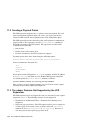
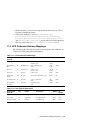
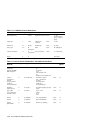
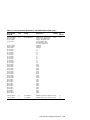
LPD Outbound Gateway Mappings .. . .. . . .. . .. . .. . .. . . .. . .. . .. . .. .
11–1
11–2
11–2
11–3
12 Troubleshooting
12.1
Solving Server Problems .. . . .. . .. . .. . .. . .. . . .. . .. . .. . .. . . .. . .. . .. . .. .
12.1.1
Determining Which Server Processes Are Running . . .. . .. .
12.1.2
Servers Running But Nothing Works .. . .. . .. . .. . . .. . .. . .. . .. .
12.1.3
Supervisor Will Not Shut Down . . .. . . .. . .. . .. . .. . . .. . .. . .. . .. .
12.1.4
Spooler Will Not Shut Down .. . .. . .. . . .. . .. . .. . .. . . .. . .. . .. . .. .
12.2
Solving Job and Print Problems . .. . .. . .. . . .. . .. . .. . .. . . .. . .. . .. . .. .
12–1
12–1
12–2
12–2
12–3
12–3
Contents vii
12.2.1
PostScript Documents Print PostScript Program Code . .. .
12.2.2
Physical Printer Is Hung in Connecting State . . .. . .. . .. . .. .
12.2.3
Jobs Remain in Pending State . .. . .. . . .. . .. . .. . .. . . .. . .. . .. . .. .
12.3
System Errors and Error Information .. . . .. . .. . .. . .. . . .. . .. . .. . .. .
12.3.1
Console Notification Does Not Work . .. . .. . .. . .. . . .. . .. . .. . .. .
12.3.2
Locating System Error Information . . .. . .. . .. . .. . . .. . .. . .. . .. .
A
Attribute Descriptions
A.1
A.1.1
A.1.2
A.2
A.2.1
A.2.2
A.3
A.4
A.5
B
Server ObjectAttributes . .. . . .. . .. . .. . .. . .. . . .. . .. . .. . .. . . .. . .. . .. . .. .
Spooler Object Attributes . .. . .. . .. . .. . . .. . .. . .. . .. . . .. . .. . .. . .. .
Supervisor Object Attributes .. . .. . .. . . .. . .. . .. . .. . . .. . .. . .. . .. .
Printer Object Attributes . . . .. . .. . .. . .. . .. . . .. . .. . .. . .. . . .. . .. . .. . .. .
Logical Printer Object Attributes . .. . . .. . .. . .. . .. . . .. . .. . .. . .. .
Physical Printer Object Attributes . . . .. . .. . .. . .. . . .. . .. . .. . .. .
Queue Object Attributes .. . . .. . .. . .. . .. . .. . . .. . .. . .. . .. . . .. . .. . .. . .. .
Job Object Attributes . .. . .. . . .. . .. . .. . .. . .. . . .. . .. . .. . .. . . .. . .. . .. . .. .
Document Object Attributes . . .. . .. . .. . .. . . .. . .. . .. . .. . . .. . .. . .. . .. .
A–1
A–3
A–3
A–4
A–8
A–8
A–11
A–12
A–16
ONC Binding Entries
B.1
C
12–3
12–4
12–4
12–4
12–5
12–5
ONC Binding Entries .. . .. . . .. . .. . .. . .. . .. . . .. . .. . .. . .. . . .. . .. . .. . .. .
B–1
Printer Data Sheets
Glossary
Index
Tables
4–1
4–2
4–3
5–1
6–1
6–2
6–3
8–1
8–2
10–1
10–2
viii Contents
access-control-list Attribute Fields . .. . .. . . .. . .. . .. . .. . . .. . .. . .. . .. .
Name Field Properties . . .. . . .. . .. . .. . .. . .. . . .. . .. . .. . .. . . .. . .. . .. . .. .
access-control-list Attribute Name-Type Field Properties .. . .. .
Server Object Attributes .. . . .. . .. . .. . .. . .. . . .. . .. . .. . .. . . .. . .. . .. . .. .
Printer Address Formats . . . .. . .. . .. . .. . .. . . .. . .. . .. . .. . . .. . .. . .. . .. .
Printer Connection Level Values .. . .. . .. . . .. . .. . .. . .. . . .. . .. . .. . .. .
Serial Port Parameter Values . .. . .. . .. . .. . . .. . .. . .. . .. . . .. . .. . .. . .. .
Document Attributes Used in Command Substitution Fields .
Text-to-PostScript Translator Command Options . . . .. . .. . .. . .. .
LPD to Advanced Printing Software Job Mapping . . .. . .. . .. . .. .
LPD to Advanced Printing Software Print Message Mapping .
4–3
4–4
4–4
5–5
6–5
6–7
6–8
8–6
8–9
10–4
10–5
10–3
10–4
10–5
10–6
10–7
11–1
11–2
11–3
11–4
11–5
C–1
C–2
C–3
C–4
C–5
C–6
C–7
C–8
C–9
C–10
C–11
C–12
C–13
C–14
C–15
C–16
C–17
C–18
C–19
C–20
C–21
C–22
C–23
C–24
C–25
C–26
C–27
C–28
C–29
C–30
Sun Protocol Extensions to Advanced Printing Software . .. . .. .
DIGITAL Protocol Extensions .. . .. . .. . .. . . .. . .. . .. . .. . . .. . .. . .. . .. .
Xerox Protocol Extensions - DocuSP and DocuPrint to
Advanced Printing Software . . .. . .. . .. . .. . . .. . .. . .. . .. . . .. . .. . .. . .. .
Xerox Protocol Extensions to Advanced Printing SoftwareDocuSP Only . .. . . .. . .. . .. . .. . . .. . .. . .. . .. . .. . . .. . .. . .. . .. . . .. . .. . .. . .. .
Xerox Protocol Extensions to Advanced Printing Software DocuPrint Only . . .. . .. . .. . .. . . .. . .. . .. . .. . .. . . .. . .. . .. . .. . . .. . .. . .. . .. .
Print Job and File Messages . . .. . .. . .. . .. . . .. . .. . .. . .. . . .. . .. . .. . .. .
Sun Protocol Extensions .. . . .. . .. . .. . .. . .. . . .. . .. . .. . .. . . .. . .. . .. . .. .
DIGITAL Protocol Extensions .. . .. . .. . .. . . .. . .. . .. . .. . . .. . .. . .. . .. .
Xerox Protocol Extensions - DocuSP and DocuPrint .. . .. . .. . .. .
Xerox Protocol Extensions - DocuSP Only . . .. . .. . .. . . .. . .. . .. . .. .
Printer Data Sheet: Compaq LG Line Matrix Printer (ANSI) .
Printer Data Sheet: Compaq Laser Printer LN16 (PS) .. . .. . .. .
Printer Data Sheet: Compaq Laser Printer LN32 PS . . .. . .. . .. .
Printer Data Sheet: Compaq Laser Printer LNM40 PS . . .. . .. .
Printer Data Sheet: Digital Colorwriter LSR 2000 . . .. . .. . .. . .. .
Printer Data Sheet: DEClaser 1150 Level 1 PS . .. . . .. . .. . .. . .. .
Printer Data Sheet: DEClaser 1152 Level 2 PS . .. . . .. . .. . .. . .. .
Printer Data Sheet: DEClaser 2150 Level 1 PS . .. . . .. . .. . .. . .. .
Printer Data Sheet: DEClaser 2250 Level 1 PS . .. . . .. . .. . .. . .. .
Printer Data Sheet: DEClaser 3250 Level 1 PS . .. . . .. . .. . .. . .. .
Printer Data Sheet: DEClaser 3500 Level 2 PS . .. . . .. . .. . .. . .. .
Printer Data Sheet: DEClaser 3500 PCL5 . . .. . .. . .. . . .. . .. . .. . .. .
Printer Data Sheet: DEClaser 5100 Level 2 PS . .. . . .. . .. . .. . .. .
Printer Data Sheet: DEClaser 5100 PCL5 . . .. . .. . .. . . .. . .. . .. . .. .
Printer Data Sheet: Digital LA75 . . .. . .. . . .. . .. . .. . .. . . .. . .. . .. . .. .
Printer Data Sheet: Digital LG04 . . .. . .. . . .. . .. . .. . .. . . .. . .. . .. . .. .
Printer Data Sheet: Digital LG08 . . .. . .. . . .. . .. . .. . .. . . .. . .. . .. . .. .
Printer Data Sheet: Digital LG12 . . .. . .. . . .. . .. . .. . .. . . .. . .. . .. . .. .
Printer Data Sheet: Digital LG Line Matrix Printer (ANSI) . .
Printer Data Sheet: Digital LN03R ScriptPrinter . . . .. . .. . .. . .. .
Printer Data Sheet: Digital LN17ps Level 2 PS . .. . . .. . .. . .. . .. .
Printer Data Sheet: Digital LN17 PCL5 . .. . .. . .. . .. . . .. . .. . .. . .. .
Printer Data Sheet: Digital Laser Printer LN20 PS .. . .. . .. . .. .
Printer Data Sheet: Digital Laser Printer LN40 PS .. . .. . .. . .. .
Printer Data Sheet: Digital PrintServer 17 .. . .. . .. . . .. . .. . .. . .. .
Printer Data Sheet: Digital PrintServer 20 .. . .. . .. . . .. . .. . .. . .. .
Printer Data Sheet: Digital PrintServer 32 .. . .. . .. . . .. . .. . .. . .. .
Printer Data Sheet: ANSI Compatible Printer . . .. . . .. . .. . .. . .. .
Printer Data Sheet: HP-GL Plotter .. . .. . . .. . .. . .. . .. . . .. . .. . .. . .. .
Printer Data Sheet: PostScript Printer . . .. . .. . .. . .. . . .. . .. . .. . .. .
10–6
10–6
10–7
10–9
10–12
11–3
11–3
11–4
11–4
11–6
C–5
C–6
C–7
C–8
C–9
C–10
C–11
C–12
C–13
C–14
C–15
C–16
C–17
C–18
C–19
C–20
C–21
C–22
C–23
C–24
C–25
C–26
C–27
C–28
C–29
C–30
C–31
C–32
C–33
C–34
Contents ix
C–31
C–32
C–33
C–34
C–35
C–36
C–37
C–38
C–39
C–40
C–41
C–42
C–43
C–44
C–45
C–46
C–47
C–48
C–49
C–50
C–51
C–52
C–53
C–54
C–55
C–56
C–57
C–58
C–59
C–60
C–61
C–62
C–63
C–64
C–65
C–66
C–67
C–68
C–69
C–70
C–71
C–72
C–73
x Contents
Printer Data Sheet:
Printer Data Sheet:
Printer Data Sheet:
Printer Data Sheet:
Printer Data Sheet:
Printer Data Sheet:
Printer Data Sheet:
Printer Data Sheet:
Printer Data Sheet:
Printer Data Sheet:
Printer Data Sheet:
Printer Data Sheet:
Printer Data Sheet:
Printer Data Sheet:
Printer Data Sheet:
Printer Data Sheet:
Printer Data Sheet:
Printer Data Sheet:
Printer Data Sheet:
Printer Data Sheet:
Printer Data Sheet:
Printer Data Sheet:
Printer Data Sheet:
Printer Data Sheet:
Printer Data Sheet:
Printer Data Sheet:
Printer Data Sheet:
Printer Data Sheet:
Printer Data Sheet:
Printer Data Sheet:
Printer Data Sheet:
Printer Data Sheet:
Printer Data Sheet:
Printer Data Sheet:
Printer Data Sheet:
Printer Data Sheet:
Printer Data Sheet:
Printer Data Sheet:
Printer Data Sheet:
Printer Data Sheet:
Printer Data Sheet:
Printer Data Sheet:
Printer Data Sheet:
PostScript Printer . . .. . .. . .. . .. . . .. . .. . .. . .. .
PCL Printer .. . .. . .. . . .. . .. . .. . .. . . .. . .. . .. . .. .
Genicom LA36 Series . .. . .. . .. . . .. . .. . .. . .. .
Genicom LA450 . .. . . .. . .. . .. . .. . . .. . .. . .. . .. .
GENICOM LN45 PS . . .. . .. . .. . . .. . .. . .. . .. .
GENICOM mL450 PS . .. . .. . .. . . .. . .. . .. . .. .
HP Color LaserJet Level 2 PS . .. . .. . .. . .. .
HP Color LaserJet PCL5 .. . .. . . .. . .. . .. . .. .
HP DesignJet 755CM Level 2 PS .. . .. . .. .
HP DeskJet 1600CM Level 2 PS . .. . .. . .. .
HP DeskJet 1600CM PCL5 .. . . .. . .. . .. . .. .
HP LaserJet 2100TN PS . .. . .. . . .. . .. . .. . .. .
HP LaserJet 2200 Series PS . . . .. . .. . .. . .. .
HP LaserJet 4000 Series PS . . . .. . .. . .. . .. .
HP LaserJet 4050 Series PS . . . .. . .. . .. . .. .
HP LaserJet 4100 Series PS . . . .. . .. . .. . .. .
HP LaserJet 4550 Series PS . . . .. . .. . .. . .. .
HP LaserJet 4M Plus Level 2 PS . .. . .. . .. .
HP LaserJet 4MPlus PCL5 .. . . .. . .. . .. . .. .
HP LaserJet 4Si Level 2 PS .. . . .. . .. . .. . .. .
HP LaserJet 4Si PCL5 .. . .. . .. . . .. . .. . .. . .. .
HP LaserJet 5000 Series PS . . . .. . .. . .. . .. .
HP LaserJet 5SiMX Level 2 PS . . .. . .. . .. .
HP LaserJet 5SiMX PCL5 . . .. . . .. . .. . .. . .. .
HP LaserJet 8000 Series PS . . . .. . .. . .. . .. .
HP LaserJet 8100 Series PS . . . .. . .. . .. . .. .
HP LaserJet 8150 Series PS . . . .. . .. . .. . .. .
HP LaserJet 8550 Series PS . . . .. . .. . .. . .. .
HP LaserJet 9000 Series PS . . . .. . .. . .. . .. .
HP LaserJet IIISi Level 1 PS . . .. . .. . .. . .. .
HP LaserJet IIISi Level 2 PS . . .. . .. . .. . .. .
HP LaserJet IIISiMX PCL5 .. . . .. . .. . .. . .. .
Lexmark 4039 10plus Level 2 PS .. . .. . .. .
Lexmark 4039 10plus PCL5 .. . . .. . .. . .. . .. .
Lexmark 4079 plus Level 2 PS .. . .. . .. . .. .
Lexmark C720 Color PS . .. . .. . . .. . .. . .. . .. .
Lexmark C910 PS . . .. . .. . .. . .. . . .. . .. . .. . .. .
Lexmark Forms Printer 2380 plus . . .. . .. .
Lexmark Forms Printer 4227 plus . . .. . .. .
Lexmark Optra C1200 Color PS . . .. . .. . .. .
Lexmark Optra C710 Color PS .. . .. . .. . .. .
Lexmark Optra C Level 2 PS . . .. . .. . .. . .. .
Lexmark Optra C PCL5 . .. . .. . . .. . .. . .. . .. .
C–35
C–36
C–37
C–38
C–39
C–41
C–43
C–44
C–45
C–46
C–47
C–48
C–49
C–50
C–51
C–52
C–53
C–54
C–55
C–56
C–57
C–58
C–59
C–60
C–61
C–63
C–65
C–66
C–67
C–69
C–70
C–71
C–72
C–73
C–74
C–75
C–76
C–77
C–78
C–79
C–80
C–81
C–82
C–74
C–75
C–76
C–77
C–78
C–79
C–80
C–81
C–82
C–83
C–84
C–85
C–86
C–87
C–88
C–89
C–90
C–91
C–92
C–93
C–94
C–95
C–96
C–97
C–98
C–99
C–100
C–101
C–102
C–103
C–104
C–105
C–106
C–107
C–108
C–109
C–110
C–111
C–112
C–113
C–114
C–115
C–116
Printer Data Sheet:
Printer Data Sheet:
Printer Data Sheet:
Printer Data Sheet:
Printer Data Sheet:
Printer Data Sheet:
Printer Data Sheet:
Printer Data Sheet:
Printer Data Sheet:
Printer Data Sheet:
Printer Data Sheet:
Printer Data Sheet:
Printer Data Sheet:
Printer Data Sheet:
Printer Data Sheet:
Printer Data Sheet:
Printer Data Sheet:
Printer Data Sheet:
Printer Data Sheet:
Printer Data Sheet:
Printer Data Sheet:
Printer Data Sheet:
Printer Data Sheet:
Printer Data Sheet:
Printer Data Sheet:
Printer Data Sheet:
Printer Data Sheet:
Printer Data Sheet:
Printer Data Sheet:
Printer Data Sheet:
Printer Data Sheet:
Printer Data Sheet:
Printer Data Sheet:
Printer Data Sheet:
Printer Data Sheet:
Printer Data Sheet:
Printer Data Sheet:
Printer Data Sheet:
Printer Data Sheet:
Printer Data Sheet:
Printer Data Sheet:
Printer Data Sheet:
Printer Data Sheet:
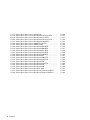
Lexmark Optra E PCL5 printer . . .. . .. . .. .
Lexmark Optra Lx Level 2 PS . .. . .. . .. . .. .
Lexmark Optra Lx PCL5 .. . .. . . .. . .. . .. . .. .
Lexmark Optra Lxi+ Level 2 PS . . .. . .. . .. .
Lexmark Optra Lxi+ PCL5 . .. . . .. . .. . .. . .. .
Lexmark Optra N Level 2 PS . . .. . .. . .. . .. .
Lexmark Optra N PCL5 . .. . .. . . .. . .. . .. . .. .
Lexmark Optra Rt+ Level 2 PS .. . .. . .. . .. .
Lexmark Optra Rt+ PCL5 . . .. . . .. . .. . .. . .. .
Lexmark Optra S 1250 .. . .. . .. . . .. . .. . .. . .. .
Lexmark Optra S 1250 .. . .. . .. . . .. . .. . .. . .. .
Lexmark Optra S 1650 .. . .. . .. . . .. . .. . .. . .. .
Lexmark Optra S 1650 .. . .. . .. . . .. . .. . .. . .. .
Lexmark Optra S 2450 .. . .. . .. . . .. . .. . .. . .. .
Lexmark Optra S 2450 .. . .. . .. . . .. . .. . .. . .. .
Lexmark Optra SC 1275 . .. . .. . . .. . .. . .. . .. .
Lexmark Optra Se 3455 PS .. . . .. . .. . .. . .. .
Lexmark Optra T610 PS . .. . .. . . .. . .. . .. . .. .
Lexmark Optra T612 PS . .. . .. . . .. . .. . .. . .. .
Lexmark Optra T614 PS . .. . .. . . .. . .. . .. . .. .
Lexmark Optra T616 PS . .. . .. . . .. . .. . .. . .. .
Lexmark Optra W810 PS .. . .. . . .. . .. . .. . .. .
Lexmark T620 PS . . . .. . .. . .. . .. . . .. . .. . .. . .. .
Lexmark T622 PS . . . .. . .. . .. . .. . . .. . .. . .. . .. .
Lexmark W820 PS . . .. . .. . .. . .. . . .. . .. . .. . .. .
Ricoh AP2100 PS . . . .. . .. . .. . .. . . .. . .. . .. . .. .
Sun SPARCprinter E Level 2 PS . .. . .. . .. .
Sun SPARCprinter E PCL5 .. . . .. . .. . .. . .. .
Tektronix Phaser 740 PS .. . .. . . .. . .. . .. . .. .
Tektronix Phaser 750 Series PS . . .. . .. . .. .
Tektronix Phaser 780 Series PS . . .. . .. . .. .
Tektronix Phaser 850 Series PS . . .. . .. . .. .
Xerox 4215 MRP Level 2 PS . . . .. . .. . .. . .. .
Xerox 4215 MRP PCL5 . . .. . .. . . .. . .. . .. . .. .
Xerox 4219 MRP Level 2 PS . . . .. . .. . .. . .. .
Xerox 4219 MRP PCL5 . . .. . .. . . .. . .. . .. . .. .
Xerox 4220 MRP Level 2 PS . . . .. . .. . .. . .. .
Xerox 4220 MRP PCL5 . . .. . .. . . .. . .. . .. . .. .
Xerox 4230 MRP Level 2 PS . . . .. . .. . .. . .. .
Xerox 4230 MRP PCL5 . . .. . .. . . .. . .. . .. . .. .
Xerox 4235 Level 1 PS .. . .. . .. . . .. . .. . .. . .. .
Xerox 4235 MRP PCL4 . . .. . .. . . .. . .. . .. . .. .
Xerox 4505 PCL5 . . . .. . .. . .. . .. . . .. . .. . .. . .. .
C–83
C–84
C–85
C–86
C–87
C–88
C–89
C–90
C–91
C–92
C–93
C–94
C–95
C–96
C–97
C–98
C–99
C–100
C–101
C–102
C–103
C–104
C–105
C–107
C–109
C–111
C–112
C–113
C–114
C–115
C–116
C–117
C–118
C–119
C–120
C–121
C–122
C–123
C–124
C–125
C–126
C–127
C–128
Contents xi
C–117
C–118
C–119
C–120
C–121
C–122
C–123
C–124
C–125
C–126
C–127
C–128
C–129
C–130
C–131
C–132
C–133
C–134
C–135
C–136
C–137
C–138
xii Contents
Printer Data Sheet:
Printer Data Sheet:
Printer Data Sheet:
Printer Data Sheet:
Printer Data Sheet:
Printer Data Sheet:
Printer Data Sheet:
Printer Data Sheet:
Printer Data Sheet:
Printer Data Sheet:
Printer Data Sheet:
Printer Data Sheet:
Printer Data Sheet:
Printer Data Sheet:
Printer Data Sheet:
Printer Data Sheet:
Printer Data Sheet:
Printer Data Sheet:
Printer Data Sheet:
Printer Data Sheet:
Printer Data Sheet:
Printer Data Sheet:
Xerox 4510 PCL5 . . . .. . .. . .. . .. . . .. . .. . .. . .. .
Xerox DocuPrint 4517 Level 2 PS .. . .. . .. .
Xerox DocuPrint 4517 PCL5 . . . .. . .. . .. . .. .
Xerox DocuPrint 4520 Level 2 PS .. . .. . .. .
Xerox DocuPrint 4520 PCL5 . . . .. . .. . .. . .. .
Xerox 4700 II Level 1 PS .. . .. . . .. . .. . .. . .. .
Xerox 4700 II PCL5 .. . .. . .. . .. . . .. . .. . .. . .. .
Xerox DocuPrint 4050 NPS .. . . .. . .. . .. . .. .
Xerox DocuPrint 4090 NPS .. . . .. . .. . .. . .. .
Xerox DocuPrint 4635 NPS .. . . .. . .. . .. . .. .
Xerox DocuPrint 4850 NPS .. . . .. . .. . .. . .. .
Xerox DocuPrint 4890 NPS .. . . .. . .. . .. . .. .
Xerox DocuPrint N17 . .. . .. . .. . . .. . .. . .. . .. .
Xerox DocuPrint N2025 PS .. . . .. . .. . .. . .. .
Xerox DocuPrint N2125 PS .. . . .. . .. . .. . .. .
Xerox DocuPrint N24 . .. . .. . .. . . .. . .. . .. . .. .
Xerox DocuPrint N3225 PS .. . . .. . .. . .. . .. .
Xerox DocuPrint N32 . .. . .. . .. . . .. . .. . .. . .. .
Xerox DocuPrint N40 . .. . .. . .. . . .. . .. . .. . .. .
Xerox DocuTech 6135 . .. . .. . .. . . .. . .. . .. . .. .
Xerox Document Centre 432 ST PS . .. . .. .
Xerox Document Centre 470 ST PS . .. . .. .
C–129
C–130
C–131
C–132
C–133
C–134
C–135
C–136
C–137
C–138
C–139
C–140
C–141
C–142
C–143
C–144
C–146
C–147
C–149
C–151
C–152
C–154
About This Manual
This manual describes how to configure and administer Advanced Printing
Software on systems running the HP Tru64 UNIX operating system.
Audience
This manual is intended for system administrators or print system operators.
Administrators should have knowledge of the operating system concepts and
commands and the hardware and software configuration of their systems.
Related Software
Advanced Printing Software features PrintXchange technology developed
and marketed by Xerox Corporation.
Organization
This manual is organized as follows:
Chapter 1
Provides an overview of Advanced Printing Software. It
describes the features and functions of the print system
and describes the components that comprise it.
Chapter 2
Describes what you need to consider when planning
an Advanced Printing Software installation and lists
tasks required to configure a print system.
Chapter 3
Describes how to configure and manage the naming
services for Advanced Printing Software.
Chapter 4
Describes the security features of Advanced Printing
Software and how to set up and configure security.
Chapter 5
Describes how to create and manage spoolers and supervisors.
Chapter 6
Describes how to create and manage queues, logical
printers, and physical printers.
Chapter 7
Describes how to submit and manage print jobs.
Chapter 8
Describes document data filtering.
Chapter 9
Describes how to set the event notification features
of Advanced Printing Software.
About This Manual xiii
Chapter 10
Describes how to configure and manage an
LPD inbound gateway.
Chapter 11
Describes how to configure and manage an LPD
Outbound Gateway.
Chapter 12
Describes common problems that might be encountered
with Advanced Printing Software.
Appendix A
Provides a brief description of the settable object attributes.
Appendix B
Describes the format of the ONC binding entries
used by the naming services.
Appendix C
Contains the printer data sheets for the supported printers.
Glossary
Provides definitions of terms, acronyms, and abbreviations
used in the documentation.
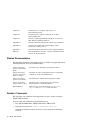
Related Documentation
The following documents and on-line help are available to support Advanced
Printing Software users and administrators.
Advanced Printing
Software Installation
Guide
Describes how to install the print system subsets.
Advanced Printing
Software Command
Reference Guide
Describes all of the command line interface commands
available to users and administrators.
Advanced Printing
Software User Guide
Describes how to submit and monitorjobs for print.
Advanced Printing
Software Release Notes
Describes new or changed features, restrictions,
known problems, and fixed problems.
GUI Help Files
On-line help is accessible from the pdprintadmin,
pdprint, and pdprintinfo GUI client files.
Reader’s Comments
HP welcomes any comments and suggestions you have on this and other
Tru64 UNIX manuals.
You can send your comments in the following ways:
•
Fax: 603-884-0120 Attn: UBPG Publications, ZKO3-3/Y32
•
Internet electronic mail: [email protected]
A Reader’s Comment form is located on your system in the following
location:
xiv About This Manual
/usr/doc/readers_comment.txt
Please include the following information along with your comments:
•
The full title of the manual and the order number. (The order number
appears on the title page of printed and PDF versions of a manual.)
•
The section numbers and page numbers of the information on which
you are commenting.
•
The version of Tru64 UNIX that you are using.
•
If known, the type of processor that is running the Tru64 UNIX software.
The Tru64 UNIX Publications group cannot respond to system problems or
technical support inquiries. Please address technical questions to your local
system vendor or to the appropriate HP technical support office. Information
provided with the software media explains how to send problem reports to
HP.
Conventions
This manual uses the following typographical and symbol conventions:
%
$
A percent sign represents the C shell system prompt.
A dollar sign represents the system prompt for the
Bourne, Korn, and POSIX shells.
% cat
Boldface type in interactive examples indicates
typed user input.
file
Italic (slanted) type indicates variable values,
placeholders, and function argument names.
[|]
{|}
In syntax definitions, brackets indicate items that
are optional and braces indicate items that are
required. Vertical bars separating items inside
brackets or braces indicate that you choose one item
from among those listed.
cat(1)
A cross-reference to a reference page includes
the appropriate section number in parentheses.
For example, cat(1) indicates that you can find
information on the cat command in Section 1 of
the reference pages.
About This Manual xv
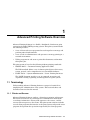
1
Advanced Printing Software Overview
Advanced Printing Software is a flexible, distributed, client/server print
system for the Tru64 UNIX operating system. This print system includes
the following features:
•
A set of client and server programs that work together to manage and
perform print-related functions.
•
A set of tools for administrators and operators to manage printing in a
network environment.
•
Utility programs for end users to print their documents and monitor
their print jobs.
The print system is based on the following industry printing standards:
•
ISO/IEC 10175 — Document Printing Application (DPA)
The DPA standard defines a set of abstract print objects, their states,
syntax, protocol, and a comprehensive set of standard attributes.
•
POSIX 1387.4 — System Administration – Part 4: Printing Interfaces
The POSIX document specifies a set of command operations and
arguments relating to printing and management of a print system.
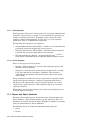
1.1 Terminology
Understanding Advanced Printing Software concepts is beneficial for
simplifying the administration of the system. This section defines and
describes terms used in this manual.
1.1.1 Clients and Servers
Advanced Printing Software employs a client/server printing architecture.
The clients and servers use an interprocess communication mechanism
to exchange information. Clients send requests to the servers, and the
servers return responses to the clients. The print system software includes
several client programs that interface to the print system and provide server
programs that perform the operations requested by the client programs.
Advanced Printing Software Overview 1–1
1.1.1.1 Client Programs
Client programs allow users to initiate print, list, and system administration
operations. Upon receipt of a request, a server performs the operation and
sends a result back to the client. Depending on the request, the result
could be a simple acknowledgment, an error code, or a set of requested
information, such as a formatted list of print jobs.
The following client programs are supported:
•
Command Line Interface (CLI) utilities – Provide a set of commands that
perform the operations supported by server processes.
•
Graphical User Interface (GUI) utilities – Provides graphical interfaces
to perform the operations supported by server processes.
•
LPD Inbound Gateway Daemon – Accepts print jobs from lp and lpr
print systems and submits them to Advanced Printing Software servers.
1.1.1.2 Server Programs
There are two types of server programs:
•
Spoolers – Collect printer jobs, associate them with print queues, and
schedules them for printing.
•
Supervisors – Take jobs from spooler queues and print them according
to the job requirements and printer capabilities. The supervisor
communicates with printers and reports printer status to the spooler
and to clients.
Every configuration includes at least one spooler and one supervisor. Each
spooler and supervisor manages a database of persistent print objects.
All objects in the print system, except for physical printers, are created
and stored in a spooler database. Physical printer objects are stored in a
supervisor database.
The spooler is viewed as the primary server in the system. Supervisors are
nearly invisible to end users.
1.1.2 Objects and Object Attributes
The print system architecture is described in terms of named objects and
object attributes. Objects include printers, queues, print jobs, and so on.
Attributes of an object describe the object. Examples of attributes are printer
names, document formats, and job identifiers.
The following objects are defined in Advanced Printing Software:
•
Server
•
Printer
1–2 Advanced Printing Software Overview
•
Queue
•
Job
•
Document
•
Initial-value-job
•
Initial-value-document
Some attributes are assigned values by the system when you create an
object. Many of those attributes are read only; you cannot set their values.
Other attributes, those that can be defined or modified by you and other
print system users, are called read-write attributes.
The print system supports a great number of attributes; however, you need
not be familiar with all of them. You should become familiar with those
attributes you encounter often.
Attributes have standard names, comprised of one or more words
separated by hyphens. Some examples of common printer attributes are
printer-name, associated-queue-enabled, input-trays-ready,
and sides-supported. Similarly, job-name, job-id, and
job-state-message are examples of job attributes. A document object
can be described by attributes such as document-format, sides, and
number-up.
1.1.3 Operations
Operations are the actions that you perform on objects. For example, users
print documents, list status information, remove jobs, enable or disable a
printer, and set server attributes.
The following operations are supported:
•
Create
•
Delete
•
Clean
•
Enable
•
Disable
•
Pause
•
Resume
•
Set
•
List attributes
•
Shut down servers
•
Print documents
Advanced Printing Software Overview 1–3
•
Remove job
•
Resubmit job
•
List job queue
•
Modify job
•
Promote job
Some operations are intended for use by end-users, while others are
intended solely for administrative purposes. Most operations apply to only
certain objects, while some apply to all. For example, administrators use the
create operation to create new printers, queues, and initial-value objects.
Users create jobs and documents by using the print operation. Similarly,
administrators set printer attributes, but users can modify jobs.
1.1.4 Logical Printers, Physical Printers, and Queues
Advanced Printing Software defines two kinds of printer objects; logical
printers and physical printers. Both terms refer to software representations
of printing devices.
A logical printer object includes characteristics and capabilities of one or
more physical printers. Users specify logical printers when they print jobs
and the logical printer sends the job to a physical printer that can satisfy
the job and document requirements.
A physical printer is a software representation of an actual output device.
The physical printer object contains information about the printer make and
model, connection details, and a list of ready-to-use features.
The logical printer and physical printer are joined by way of queues. By
associating a logical printer and a physical printer with a queue, you
establish a relationship between the logical printer that the user specifies
for printing and the physical printer defined by characteristics of the output
device.
The distinction between the logical printer and the physical printer allows
users to specify printers in terms of capabilities rather than by their
addresses or model numbers. In this way, printer hardware configurations
can evolve with little or no need for users to update their desktop printer
settings. Logical printers are used to provide end users with physical
printers that have certain site-specific, default attribute values. It also
allows setting up fan-in and fan-out queues, where several similar logical
printers can send jobs to one queue, or where one queue can issue jobs to
more than one output device.
1–4 Advanced Printing Software Overview
1.1.5 Documents and Jobs
Documents are files that users print. Some documents are formatted in
a printer language, such as PCL or PostScript, by an application or by a
printer driver. They can also be simple text files with little or no formatting
information.
A request to print one or more documents creates a job in the system. The
print system assigns the job and its documents unique identifiers that are
used for tracking and management. The print system also gives the job a
name and inserts the job at the end of a queue for printing.
1.1.6 Initial-Value Objects
The system supports two objects that supply an initial set of attributes to
jobs and documents:
•
initial-value-job
•
initial-value-document
An initial-value-job object is a set of job attributes that is applied to
jobs upon the job’s submission to the system. You can associate one or more
logical printers on a spooler with an initial-value-job object to cause all
jobs submitted to those printers to take on the initial set of job attributes.
Users can specify an initial-value-job object as part of a print job
submission to cause the job to take on the attributes.
An initial-value-document object is similar to an initial-value-job
object, except that it can contain only document attributes and applises to
the individual documents that comprise jobs.
Initial-value objects apply commonly-used sets of job and document
attributes to their print jobs. You can create as many of them as you like,
and add, remove, or change the attributes and values they contain.
1.1.7 Supported and Ready Attributes
Several attributes declare when certain objects or features are supported
and ready for use. These attributes are referred to as xxx-supported and
xxx-ready attributes. Most of these attributes apply to printers and are set
by administrators and operators. A few of these attributes apply to servers,
but those are set by the servers and are read only.
The spooler schedules jobs for printing based on job requirements and
printing features that are ready to use. Many printing capabilities need to be
declared as supported and ready for use before users can take advantage of
them. Administrators and operators need to set certain xxx-supported and
xxx-ready attributes so that users can use features of an output device or of
Advanced Printing Software Overview 1–5
the printing software. For example, you need to set the sides-supported
and sides-ready attributes of a physical printer so that users can print
two-sided documents .
Physical printers, logical printers, spoolers, and supervisors treat supported
and ready attributes as described in the following list:
•
Physical printers have both xxx-supported and xxx-ready attributes.
When a job specifies input-tray=top, the physical printer attributes
input-trays-supported and input-trays-ready must both contain
“top” as one of their values.
The feature must be both supported and ready to receive jobs that specify
the feature. If the feature is supported but not ready, the job will not
be scheduled until the feature becomes ready. Some xxx-supported
attributes have no xxx-ready counterpart.
•
Logical printers have only xxx-supported attributes. Readiness of a
feature only pertains to physical printers. Jobs can be submitted to a
logical printer when the features it requests are supported.
•
Spoolers have several xxx-supported and xxx-ready attributes that
specify the objects and capabilities, such as logical printers and queues,
defined in the spooler’s database.
•
Supervisors have several xxx-supported and xxx-ready attributes
that specify the objects and capabilities defined on the supervisor and
its database.
See Chapter 5 for more information about the supported and ready
attributes you need to set.
1.1.8 Name Services
In Advanced Printing Software, servers, printers, and queues are identified
by name. Name services make it possible for distributed clients and servers
to find the network address of an object from its name. Clients and servers
use the name services to locate one another when processing requests.
1.1.9 Server Databases
Servers maintain objects, such as printers, queues, and jobs, in a persistent,
on-disk database. That allows you to define attributes for those objects that
remain on the system until changed, even when it is rebooted. You create
printer, queue, and initial-value objects to support the needs of users. Job
and document objects are created when print clients submit jobs. All of these
objects, except for physical printer objects, are stored in a spooler’s database.
Physical printer objects are stored in supervisor databases.
1–6 Advanced Printing Software Overview
In addition to the objects mentioned, each server database holds a server
object that it uses to store attributes that describe the server, such as its
name, whether it is a supervisor or spooler, the names of printers and queues
it supports, and so forth.
1.1.10 User Classes and Access Control
To place limits on which users are permitted to manage the Advanced
Printing Software, the print system defines distinct classes of users and the
operations that each class can perform.
•
Administrators can perform any operation.
•
Operators can perform only certain management operations, such
as enabling and disabling printers and setting supported and ready
attributes.
•
End users are the least privileged users, and are limited to submitting
print jobs and viewing their job and printer status.
Access control lists are used to limit access to spoolers and supervisors.
Administrators define access control lists that specify which users perform
certain kinds of operations on a server by server basis.
1.1.11 Notification Profile and Events
You can stay informed about how your printing environment is functioning
by define notification profiles. Server, printer, queue, job, and document
objects in the system have various events associated with them. For
example, there are events that tell you when a printer changes state, when
a job completes, and when a server is being shut down. In addition to
specifying a list of events, the notification profile specifies the means by
which you will be notified whenever certain events occur. You can choose to
be informed of events by e-mail or on your X/Motif console.
1.2 Software Components
This section describes Advanced Printing Software components in more
detail. It covers the client programs, server programs, server daemons,
printer attribute files, translators, and modification filters.
1.2.1 Client Interfaces
Advanced Printing Software includes a command-line interface (CLI) to the
system and three Graphical User Interfaces (GUIs).
Advanced Printing Software Overview 1–7
1.2.1.1 End-User Interface
The CLI accesses all print, list, and job removal programs that end users
access. In addition to the CLI, end users can use the pdprint and
pdprintinfo GUI interfaces to perform these functions. The installation
procedure integrates the pdprint and pdprintinfo GUIs into the CDE
desktop, making them the default print and print information actions.
1.2.1.2 Administrative Interfaces
All system functions are accessable to print administrators through the CLI,
and many of the same functions can be performed using the pdprintadmin
GUI.
1.2.2 Server Programs
Advacned Printing Software includes three primary server programs that
provide the bulk of the print system capabilities:
•
Spooler (pdsplr)
•
Supervisor (pdspvr)
•
LPD Outbound Gateway Supervisor (pdspvlpr)
These server programs are multithreaded applications, capable
of simultaneously handling many printers, jobs, and requests. In
small-to-medium-sized installations, you might need only one spooler
process and one supervisor process. Larger installations (more than 50
printers) will need to run more than one supervisor process. If you need to
support printing from the print system to existing lpr or lpd systems or
printers, you will need to configure the LPD Outbound Gateway Supervisor.
1.2.2.1 Spooler
The spooler, pdsplr, is a central component in the print system. It performs
the following functions:
•
Collects print jobs in queues
•
Applies initial-value attributes to job and documents
•
Schedules print jobs for printing based on job requirements and printer
capabilities
•
Transfers jobs to supervisors when printers are ready to print
•
Makes status available to clients
•
Notifies users and administrators when significant events occur
1–8 Advanced Printing Software Overview
Clients make requests to submit print jobs to named printers. The
spooler puts the job in a queue associated with the printer and applies
initial-value-job and initial-value-document attributes to the job
and its documents, respectively. The spooler stores the job’s document files
in a spool directory, where it is accessed by or delivered to a supervisor.
When the associated physical printer is ready to accept the job, the spooler
transfers the job to the supervisor for printing.
1.2.2.2
Supervisor
The supervisor, pdspvr, controls and communicates with output devices
connected directly to a host or through network connections. It is responsible
for sending document data to the output device and for returning and
reporting status information about job progress while the job is in the
printing state. It can also report when the device is not responding to
communication attempts.
A supervisor process can control and communicate with as many as 50
output devices of various types and connection methods. Depending on the
printer, its native language, and its connection capabilities, the supervisor
offers bidirectional communication, flexible device control, multiple printer
languages, filters that can translate or modify the document data stream,
and optional formatted separator pages.
1.2.2.3 LPD Outbound Gateway Supervisor
The LPD Outbound Gateway Supervisor, pdspvlpr, allows users to
submit print jobs to existing lp or lpr printers or print systems in your
environment. You can submit jobs to an LPD queue and remove jobs that
have not already printed from the queue.
1.2.3 Server Daemons
The Advanced Printing Software includes the following daemon programs
that work on behalf of the client interfaces and server programs:
•
Protoserver (rpc.pts)
•
Notification Server (pdntfs)
•
Console Notification Daemon (pdconntf)
The protoserver daemon serves as the server registration and lookup
agent for spoolers and supervisors running on a host. Clients must
first communicate with a host’s protoserver to acquire the RPC binding
information for servers specified in an operation. The protoserver registers
itself on a host using a fixed, registered program number.
Advanced Printing Software Overview 1–9
The notification server distributes notification messages issued by spoolers
and supervisors. It is responsible for sending e-mail or displaying messages
on the GUI message areas when significant events occur. The console
notification daemon, pdconntf, is required when you want notification
messages to appear in the CDE system console window.
Only one copy of each of these daemons runs on a host at a time. The
protoserver daemon and the notification server daemon run automatically,
under control of the inetd program.
1.2.4 Printer Attribute Files
Advanced Printing Software supports many printer models. For each
supported printer model, the software includes a printer attribute file. Each
file specifies a set of attributes that describe and pertain to the capabilities
of the respective printer model, without options. Use printer attribute files
to install newly supported printers in your print system. The files have
names that make it easy to identify the printer manufacturer and model
to which they apply.
1.2.5 Translation and Modification Filters
The supervisor can translate or modify the document data stream while
passing it to the output device. Administrators can set up one or more
translation filters to automatically translate documents of one format to a
different format that is compatible with a target printer. Users can specify
modification filters while printing a document. Such a filter might be used to
add line and page numbers, remove unwanted sections of a document, or to
change the code set of the document to conform to a printer’s requirements.
You can configure most programs that take their input from stdin and
sends output to stdout, including most standard UNIX utilities, as a
translation or modification filter. You can also develop and configure your
own filter programs.
Advanced Primting Software includes a translation filter, trn_asciips,
that changes text documents to PostScript. This filter can also format text
with one-, two-, or four-page images per side (number-up), and can print
them in landscape or portrait orientations (content-orientation). You need to
set up your supervisor’s filter-definition attribute to use this feature if users
need to print text files on PostScript printers.
1–10 Advanced Printing Software Overview
2
Planning an Installation
A successful Advanced Printing Software installation requires careful
planning. You should consider the following questions before you create
a print system:
•
What computers will host the server components?
•
What computers will host the client components?
•
Who are the users, operators, and administrators?
•
What name services should be used?
•
How will logical printers map to physical printers?
•
What job and document defaults do you need?
This chapter will help you answer these questions. The chapter provides
only overview information. It does not provide details on the commands to
install the software or create objects. Detailed information on object creation
is provided in subsequent chapters of this guide and the Advanced Printing
Software Installation Guide describes how to install the software.
2.1 Setting Up Software Components
There are many ways to set up the print system software components.
This section helps you decide how and where to install client and server
components, how many servers to install, and how to ensure that all
components can communicate with one another efficiently.
2.1.1 Printer Configurations
You have a great deal of flexibility in the way you can configure servers,
printers, and queues in the system. You can run all print system components
on a single host, or you can distribute them to run on hosts that are
appropriate to their function. For example, you might choose to run server
processes on server hosts and print system clients on user workstations.
2.1.2 Multiple Server Hosts
Advanced Printing Software spoolers and supervisor can communicate with
one another, even when they are located on different hosts. You might choose
to run a supervisor on a host that is located near a set of direct-connected
Planning an Installation 2–1
printers to facilitate cabling but run the spooler on a server host elsewhere
in your building or site.
When you use more than one host to run print system components, you need
to distribute the names of the objects you create to all hosts that use them.
2.1.3 Server Restrictions
The following restrictions apply to how you configure logical printers,
physical printers, and queues on your print system spoolers and supervisors:
•
All logical printers associated with a queue must reside on the same
spooler as the queue.
•
All physical printers on a supervisor can be associated only with queues
and logical printers on one spooler.
2.1.3.1 Logical-to-Physical Printer Associations
When you configure printers, you can choose a close association or a loose
association between logical printers and physical printers.
2.1.3.2 Close Association
For some users, the concepts of and differences between logical printers and
physical printers might be difficult to understand. Or, there might not be a
need to make the distinction between logical printers and physical printers.
In these cases, create a logical printer, a physical printer, and a printer’s
queue as tightly-bound triplets that work together as one printer. Thus,
every output device is represented by exactly one of each of these objects.
2.1.3.3 Loose Association (Fan-in and Fan-Out Queues)
If you need flexibility in your printing environment that allows changing
printer configurations with minimal disruption to users, then you might
want to take advantage of the logical and physical printer abstractions.
For example, you might have several similar output devices in a printer
room, all with the same capabilities. Associating the physical printers with
one queue implements a load-sharing configuration, where users submit
jobs to one logical printer, and the system picks the next available device
for printing. In such a configuration, sometimes called a fan-out queue,
individual printers can be serviced, extra printers can be configured, or
surplus printers can be removed, without affecting the user.
A fan-in queue configuration is several logical printers funnelling jobs to
one queue. You might choose to set up logical printers with specific default
job and document options, using initial-value objects. Each should have
unique job processing capabilities. For example, you could set up a logical
2–2 Planning an Installation
printer that always prints text documents one-up in portrait mode, and
another that prints such documents two-up in landscape mode with line
numbers. By associating each of these logical printers with one queue, the
system directs the documents submitted to the one or more physical printers
associated with that queue.
Fan-in and fan-out queues can be used together to provide a high degree of
flexibility and convenience.
2.1.4 Using Multiple Supervisors on a Single Host
If you intend to support more output devices from one server host than
is specified by the maximum-number-of-printers-supported server
attribute, use more than one supervisor process and object. You might wish
to support more than one supervisor, even before you reach the maximum
number, for the following reasons:
•
Heavily loaded server processes constitute a single point of failure,
should the server host go down.
•
Creating less than the maximum gives you more flexibility for
reconfiguring the system as needs change.
•
Heavily loaded server processes can be less responsive, making them
more difficult to swap, and swapping affects more printers.
2.1.5 Using Supervisors on Direct-Connected Printers
Some output devices are connected through a serial port or parallel port
that is attached directly to a host system’s hardware. Advanced Printing
Software requires that you run a supervisor process on any host that
has such direct-connected printers. If, in your environment, several such
printers are connected to users’ workstations, each workstation will need to
run a supervisor process. Administrators of those workstations can choose
whether to associate the physical printers with queues on a central spooler
or on several distributed spoolers.
2.2 Planning Name Services
As the servers, queues, and printers become more numerous, assigning,
managing, and distributing unique object names becomes a more complex
task. In this environment, it might be benficial to use Network Information
System (NIS) software to distribute a centrally managed printer object
name map.
See Chapter 3, for more information about printer configuration files and
the Network Information System software.
Planning an Installation 2–3
2.3 Event Notification
The print system architecture provides methods for notifying end-users,
operators, and administrators when events occur in the printing system.
See Chapter 9 for more information.
2.4 Security
Security features can be used to control access to job data and management
functions. These features perform authentication and authorization checks
on every operation request to ensure that only authorized users obtain
access to Advanced Printing Software.
•
Authentication is the process of validating that users are who they
claim to be.
•
Authorization is the process of ensuring that an authenticated user has
the permission required to perform specific operations.
Three privilege levels for users identify the permissions allowed them:
•
End user
•
Operator
•
Administrator
The privilege levels have an access order. An administrator can configure
objects plus perform all of the tasks that an operator can. An operator can
control printing plus perform all of the tasks that an end-user can.
The print system uses the access-control-list attribute to specify
the privilege level for each user. Authentication compares the user
identifier (UID) in the domain’s password file for the user who initiated
the operation request to the entries in the access-control-list
attribute. If the comparison is successful, authorization then checks the
access-control-list attribute for the user’s privilege level.
2.5 Configuration Tasks
This section provides an overview of the tasks you need to complete to
initially configure and start your print system. The tasks are listed in the
order that you should complete them and include the mandatory tasks as
well as the optional tasks you can perform.
Each task is described briefly and contains a reference to other sections in
this document that describe in detail how to perform the task.
1.
Create and configure servers, spoolers, and the LPD Outbound Gateway
servers.
2–4 Planning an Installation
Refer to Chapter 5 for information on creating and configuring servers.
Refer to Chapter 11 for information on creating and configuring the
LPD Outbound Gateway.
2.
Create and configure queues and printers.
Refer to Chapter 6 for information about creating and configuring
logical printers, physical printers, and queues.
3.
Set up name service.
Refer to Chapter 3 for more information on setting up the naming
service that you will use to support your system.
4.
Set up security.
Refer to Chapter 4 for more information on print system security.
5.
Optionally, set up event notification.
Refer to Chapter 9 for information on setting up event notification.
The Advanced Printing Software kit includes a character-cell, menu-driven
script that administrators can use to configure a working print system. The
script is supplied in the /usr/pd/scripts/pd_get_started directory
and must be run by the root user when creating new print objects.
Use the pd_get_started script to create spooler and supervisor processes,
logical and physical printers, queues, and associated initial-value objects. It
also provides a means for starting and shutting down server processes and
for displaying your local server configuration.
This script is not intended for everyday administration of Advanced Printing
Software. It is most useful for getting your system up and running quickly.
The CDE pdprintadmin GUI tool is more appropriate for ongoing print
system administration.
Planning an Installation 2–5
3
Managing the Name Space
The name space contains the names and network addresses of the objects
(spoolers, supervisors, logical and physical printers, and queues) that you
create. The name service entry for each object contains information that
includes the address of the server that supports it.
Clients and servers use the name service to locate and bind to the server
that supports a specified network object. When a client or server requires
the binding of a printer name or a server name, it uses the name service to
obtain this information. The name service looks up the requested name and
returns the requested binding to the client. The remote procedure call (RPC)
mechanism uses the returned binding to connect to the server.
Advanced Printing Software supports the following name services:
•
Local File Name Service
•
Network Information Service (NIS)
•
Lightweight Directory Access Protocol (LDAP)
The client and the server processes use Local File Name Service and NIS
services by default.
This chapter also explains how to modify the default behavior through the
configuration file, apx.conf and the protoserver daemon.
3.1 Local File Name Service
The Local File Name Service works in a single, stand-alone system
configuration or in a distributed environment:
In a stand-alone configuration, the client and servers (spooler and
supervisor) reside on the same workstation. When you create printing
objects, the name service makes their binding information immediately
available; when you delete them, the name service immediately removes
their binding information.
The Local File Name Service stores printer binding information in the
/etc/printers.conf file. A separate instance of the file exists on each
host system. The print system does not support multiple hosts sharing
a single /etc/printers.conf file. The following is an example of a
printers.conf file:
Managing the Name Space 3–1
#
# Local namespace datafile for Advanced Printing Software
#
bulldog_sup:\
:saddr=bulldog.gandalf.xyz.com,105004,1,sys,sv,bulldog_sup,1:
bulldog_spl:\
:saddr=bulldog.gandalf.xyz.com,105004,1,sys,sl,bulldog_spl,1:
bulldog1:\
:paddr=bulldog.gandalf.xyz.com,105004,1,sys,pp,bulldog_sup,1:
bulldog_q:\
:qaddr=bulldog.gandalf.xyz.com,105004,1,sys,qu,bulldog_spl,1:
bulldog_log:\
:paddr=bulldog.gandalf.xyz.com,105004,1,sys,lp,bulldog_spl,1:\
:spooling-type=dpa:
cc3:\
:paddr=bulldog.gandalf.xyz.com,105004,1,sys,pp,bulldog_sup,1:
The server startup process automatically generates the printers.conf file
if the server attempts to add an entry to the local file and the file does not
exist. Also, the servers compare the content of the object database to the local
file and add objects to it if they are in the database but not in the local file.
Because the object creation operation updates the local file only on the
host where you executed the operation, the information is not available to
clients or servers on other hosts. Therefore, when using the Local File Name
Service in a distributed environment, you should create the configuration
file in advance and copy it to all hosts that run clients or servers.
You can create the printers.conf file with an editor, or you can create the
file by creating all print objects from a single host. However, in the second
case, because you do not create servers with the create operation, you must
manually add the server entries to the file for each different host. You will
have to update the file on all hosts if you delete an object.
For the Local File Name Service:
•
The printers.conf file must exist in the /etc directory and it must
have the access rights of rw-r--r--.
•
The file owner must be root.
3.2 Network Information Service
Network Information Service (NIS) uses the same format for printer
configuration entries that is used for the Local File Name Service. However,
NIS provides a means for administering and distributing that same printer
configuration data to an entire NIS domain.
The most important difference between using Local File Name Service and
using NIS is that the print system cannot modify NIS entries. Instead, you
must manually update an NIS entry in an NIS file. You must either have
the authority to make changes to the NIS file or have a proxy administrator
with the authority to make the changes.
3–2 Managing the Name Space
NIS requires a coordinated update of configuration changes. That is, you
must add an object name to the NIS file before you create the print system
object. However, unlike the Local File Name Service where you have to
update the local file in each of multiple hosts, you need to update data in
only one place with NIS.
To distribute the names and locations of printers, servers, and queues to
hosts that are set up as NIS clients, gather one or more printers.conf
files from those hosts where the print system server processes run and
merge them into a master map file in /var/yp/src/printers.conf. You
can use a text editor to merge the contents of those files. If the resulting file
contains duplicate entries, use the text editor to remove the duplicates.
To update the NIS map on the NIS server after you have created the master
printers.conf file:
1.
Log in as root.
2.
If you have not done so already, copy /usr/pd/scripts/Makefile.printers to /var/yp/Makefile.printers.
# cp /usr/pd/scripts/Makefile.printers /var/yp/Makefile.printers
Edit the copy of the file to define your NIS domain with the DOM
variable.
3.
Set the current directory to /var/yp/src.
# cd /var/yp/src
4.
Copy all pertinent printers.conf files from various hosts to the
current directory, giving each a unique name.
# cp /etc/printers.conf ./
5.
Use a text editor to merge the contents of these files into a new master
printers.conf file.
# mv printers.conf printers.conf.<date>
# cat printers.conf.host1 printers.conf.host2\
printers.conf > printers.conf
6.
Change the current directory to /var/yp.
# cd ..
7.
Run the Makefile.printers file with the printers.conf (or “all”)
target to remake and redistribute the printers map.
# make -f Makefile.printers
updated printers.conf
pushed printers.conf
8.
Verify that the new printers.conf map is available.
# ypcat printers.conf.byname
Managing the Name Space 3–3
This command produces output similar to the following; one line of
information for each server, printer, and queue listed in the master map:
WS_sharie_PP:paddr=wstent.gandalf.xyz.com,105004,1,sys,pp,wstent_sup,1:
ws_lg_queue:qaddr=wstent.gandalf.xyz.com,105004,1,sys,qu,wstent_spl,1:
WS_cross_PP:paddr=wstent.gandalf.xyz.com,105004,1,sys,pp,wstent_sup,1:
WS_cress_PP:paddr=wstent.gandalf.xyz.com,105004,1,sys,pp,wstent_sup,1:
wstent_sup:saddr=wstent.gandalf.xyz.com,105004,1,sys,sv,wstent_sup,1:
ws_lg04_pp:paddr=wstent.gandalf.xyz.com,105004,1,sys,pp,wstent_sup,1:
glypha_spl:saddr=glypha.gandalf.xyz.com,105004,1,sys,sl,glypha_spl,1:
glypha_obg:saddr=glypha.gandalf.xyz.com,105004,1,sys,sv,glypha_obg,1:
WSQ1:qaddr=wstent.gandalf.xyz.com,105004,1,sys,qu,wstent_spl,1:
BigLinePrinter:paddr=wstent.gandalf.xyz.com,105004,1,sys,lp,wstent_spl,1:\
:spooling-type=dpa:
wstent_spl:saddr=wstent.gandalf.xyz.com,105004,1,sys,sl,wstent_spl,1:
ws_test_lp:paddr=wstent.gandalf.xyz.com,105004,1,sys,lp,wstent_spl,1:\
:spooling-type=dpa:
WS_lps:paddr=wstent.gandalf.xyz.com,105004,1,sys,lp,wstent_spl,1: \
:spooling-type=dpa:
In general, whenever you create or delete an object (server, printer, queue),
you need to update the name space on hosts where print system clients
will be used. With an NIS-based name service, this happens automatically
because the clients read up-to-date maps from the site NIS servers.
In addition, you need to update the name space on the server machines that
communicate with other server hosts. For example, if a spooler on host A has
queues that feed printers on host B, then the name space on both hosts A
and B must contain entries for each other’s objects. If a print system server
host is not an NIS server in the domain, you will need to transfer a copy of
its printers.conf file to the NIS server and push the printers.conf
map whenever you make a change to its printer configuration.
If an NIS map already contains an object, and you delete the object (using
the pddelete command) and then create the same object again (using the
pdcreate command), the object is eliminated from the local file name space.
This is because the name already exists in the NIS name space and servers
do not create new name space entries if they already exist. Therefore, you
need to use caution when you delete and recreate an object because you
could lose the name space entry the next time you gather and push.
To avoid this situation:
•
Gather and push the NIS map immediately after deleting the object, and
immediately after you recreate the object.
•
Merge your printers.conf file with a current snapshot of the NIS
name space before pushing the NIS map:
# cd /var/yp/src
# ypcat printers.conf.byname > printers.conf.NIS
3–4 Managing the Name Space
# cat /etc/printers.conf printers.conf.NIS > printers.conf
Reconcile the entries in the resulting printers.conf file by removing
duplicates and stale entries, and then use the Makefile.printers file
to update the map as described in the previous procedure.
3.3 LDAP Name Service
The LDAP Name Service offers an advantage over NIS by dynamically
updating the name space when print objects are created or deleted. This
section describes what is required to set up the LDAP client.
To set up the LDAP client:
1.
Create a user name and password on hosts containing spoolers and
supervisors so that servers can modify the LDAP databases.
2.
Create or modify the /var/pd/config/apx.conf file so that it
identifies LDAP as a name service you will use and to identify the
LDAP server host. This file must reside on hosts containing spoolers
and supervisors and on Advanced Printing clients.
3.3.1 Creating an LDAP Client Username and Password
Advanced Printing servers need a user name and a password to modify name
entries on the LDAP server. The user name and password must be created
after LDAP_hosts has been defined in the apx.conf file.
Create the user name and password using the pdldappw command:
# /usr/sbin/pdldappw
The command displays the current settings in the /var/pd/config/apx.conf file and prompts you to enter a user ID and password.
Contents of configuration file /var/pd/config/apx.conf:
name-services = ldap
LDAP-path=ou=advprint,o=Organization
LDAP-hosts=toons.xyz.ayy.com
LDAP User ID: advprintid
LDAP password: *********
3.4 Creating or Modifying the apx.conf File
The /var/pd/config/apx.conf file contains information on name
services you will use and contains information about the host system that
is running the LDAP directory services. The following example shows a
/var/pd/config/apx.conf file:
name-services = file nis ldap
LDAP_hosts = system.abc.xyz.com
Managing the Name Space 3–5
LDAP_path
= ou=organizational unit,o=organization
•
name-services – Describes the name services the print system uses
and the order in which they are used. In this example, local file, NIS,
and LDAP are used. Lookups for print objects are done in the local file
(/etc/printers.conf), in the printers.conf.byname NIS map, and
then in the LDAP directory server.
•
LDAP_hosts – Lists up to three hosts on which the LDAP directory
services are running. Multiple hosts are listed when they are providing
replication services. When you list multiple hosts, they must be
separated by colons (:). If the LDAP server is on a system running
TruCluster Version 5.0 or later software, you can use the cluster alias as
the host name.
The standard LDAP services port number is 389. However, LDAP
services can be provided on a nonstandard port number. You specify the
LDAP port number by appending the port number to the host name
within parenthesis, as in the following example:
LDAP_hosts = myhost.xyz.com(8182)
•
LDAP_path lists a directory search path. To access an LDAP-based
database, you must supply a distinguished name path. Printing clients
and servers use this path to create and search for entries in the directory.
With Netscape Directory Server, you start by naming your organization,
and then you create organizational units under the organization. The
distinguished name path to specify for Advanced Printing includes the
organization and organizational unit in distinguished name syntax.
For example, if your top-level organization is named XYZ Corp, and
you define an organizational unit AdvPrint, the distinguished name
path would be:
ou=AdvPrint,o=XYZ Corp
You can specify up to three entries in the LDAP_path expression.
Separate multiple entries with a colon (:) character. For example, if
in XYZ Corp, you create a secondary organizational unit called Test
Environment, your LDAP_path should be specified as follows:
ou=AdvPrint,o=XYZ Corp:ou=Test Environment,o=XYZ Corp
When accessing entries listed in the LDAP_path expression, a search
continues through the entries until a matching entry is found. When
creating or deleting entries, only the first path entry is used; the second
and third entries listed in the LDAP_path expression are read only.
3–6 Managing the Name Space
3.4.1 Protoserver Daemon
The protoserver is a print system daemon that works with the name services
to enable a server process to access name and binding information of print
system objects.
The protoserver is the primary RPC server in the print system. Clients and
servers on remote hosts contact the protoserver on a server host to determine
the RPC binding information for other print system server processes.
The print system installation procedure adds a line to the /etc/inetd.conf
file so that the inetd daemon can automatically execute the protoserver
when it is needed.
Managing the Name Space 3–7
4
Managing Security
This chapter describes the options available to implement a security policy on
Advanced Printing Software. Security options protect against unauthorized
access to administrative functions and protect print jobs and print data from
being accessed, copied, rerouted, or deleted by unauthorized users.
This chapter describes the following security features:
•
System Security (Section 4.1) — Provides an overview of the security
features and a description of how security works.
•
Authorization (Section 4.2) — Describes the different privilege levels
supported by the print system and describes the functions that can be
performed by users possessing each privilege level.
•
Authentication by Access Control Lists (ACL) (Section 4.3) — Describes
what methods the print system uses to identify and authorize users
making requests for print system services.
4.1 System Security
When a request is made to access a server, the request is in the form of
a remote procedure call (RPC). The RPC request contains the UID of the
user making the request. To identify and authenticate the user making
the request, the print system checks the local password file and the NIS
distributed password file to match the requester’s UID with a valid UID.
When this match is successful, the server accesses the server ACL to
determine if the user is authorized to use the services that have been
requested.
The following occurs when authorization is performed:
•
A match of the user name or group name of the requester and those
in the ACL is attempted.
•
If the user name or group name match is successful, a match is made
against the requested services and the privilege level granted to the
user or group in the ACL.
If the user name or group name and the authorization of the requester
and the operation match those in the ACL, the operation is performed.
Users who attempt to access services for which they have not been granted
permission are denied the requested services.
Managing Security 4–1
4.2 Authorization
Advanced Printing Software authorization is based on associating a user
with a privilege level. There are three user levels defined for print system
users:
•
End user — A user that only prints through the print system. This is
the least privileged user.
•
Operator — A user that controls the printers in a facility. Operators have
privileges that allow them to pause and resume printers and servers,
requeue jobs, and shut down servers.
•
Administrator — A user that has the operator privileges and those
required to configure the system.
The print system also grants privileges to the local root account. This is the
root account (UID 0) on the system where the print system server is running.
The local root user has administrator privileges regardless of what is defined
in an ACL, and local root is the only user that has the authorization required
to start a server.
4.2.1 End User Operations
If the client for a print system request has been granted end user
authorization, the client can perform the following operations:
•
Print on a logical printer that is associated with a server where the user
has access rights.
•
Resubmit a job that the user owns, provided that it is being resubmitted
through a server where the client has access rights.
•
Cancel jobs that the user owns.
•
List (pdls) operations on servers, queues, and printers.
•
List (pdls) operations on jobs and documents that the user owns.
•
Set or modify attributes on a job that the user owns.
•
List (pdq) job queue operations. However, the print system limits the
attributes returned for jobs not belonging to the user to those in the
server job-attributes-visible-to-all list.
4.2.2 Operator Operations
Print system operators perform day-to-day printer and job management
functions. If a client for a print system operation has been granted operator
authorization, the client can perform all of the end user operations as well
as the following:
•
Remove print jobs from a (pdclean) a server or queue.
4–2 Managing Security
•
Enable or disable a server, queue, or printer.
•
Pause or resume a server, queue, physical printer, or any job.
•
Promote a job.
•
Set or modify xxx–ready attributes.
•
Shut down a spooler or supervisor.
4.2.3 Administrator Operations
Some print system installations might not have operators, but instead might
have only end users and administrators. In these cases, the administrators
perform the day-to-day print and job management functions.
If a client for a print system request has been granted the administrator
authorization, that client can perform the following operations:
•
Every operation that an operator is authorized to perform.
•
Set (pdset) all read and write attributes of all objects.
•
Create servers, queues, printers, initial-value-jobs, and
initial-value-documents.
•
Delete (pddelete) any object.
4.3 Authentication by Access Control Lists
The operations that end users, operators, and administrators are
authorized to perform are controlled by Access Control Lists (ACLs). These
authorizations and the ACLs control access only to server objects. ACLs do
not limit a user’s access to a particular printer.
ACLs are created by defining the access-control-list attribute for
servers. This attribute is multivalued and can be defined when a server is
created (pdmakedb) or at any time with the pdset command or through
the GUI. In most cases, you will not define all your ACL attributes when you
create a server but will add attributes after the server has been created.
Table 4–1 describes the fields of the access-control-list attribute.
Table 4–1: access-control-list Attribute Fields
Field
Description
name
user name and host name (optional)
name-type
Type of user:
all-users
user
group
Managing Security 4–3
Table 4–1: access-control-list Attribute Fields (cont.)
Field
Description
netgroup
privilege-level
Type of access level:
end-user
operator
administrator
Table 4–2 shows the properties of the name field of the access-controllist attribute and gives their meanings.
Table 4–2: Name Field Properties
Property
Description
name=name
The named user from any client host in the domain.
name=name@host
The named user from the saved name within
the server’s DNS domain. The server looks up
the user in the password map file.
Table 4–3 shows the properties of the name-type field of the
access-control-list attribute and gives their meanings.
Table 4–3: access-control-list Attribute Name-Type Field Properties
Property
Value of Name
User Affected
name-type=user
name is a valid user
name on the server
A user whose client hosts are
members of the same DNS
domain as the server.
name-type=all-users
name has no value
All users on client hosts within the
same DNS domain as the server.
name=@
All users in all DNS domains.
name=@domain
All users on clients in the
specified DNS domain.
name=name@ or
name=name
A user with user name name from
client hosts in any DNS domain
(not authenticated).
4–4 Managing Security
Table 4–3: access-control-list Attribute Name-Type Field Properties (cont.)
Property
Value of Name
User Affected
name-type=group
name is a valid group
on the server
All users who are members of the
named group. The server looks
up the user name associated with
the request in the group map or
file (as specified in /etc/svc.conf)
and verifies that the user is a
member of that group.
name-type=netgroup
A valid netgroup
All users who are members of
the named netgroup.
The following rules apply when a server accesses the ACL to verify
authorization of a user:
•
If name-type is other than all-users, you must specify a value for
name. Also, the name of the user (as determined by looking up the UID
in a password file) making the request must be:
–
An exact match to name, if name-type=user.
–
A member of the group, if name-type=group.
–
A member of the netgroup, if name-type=netgroup.
–
It is likely that you will use the netgroup value of name-type
primarily for operator and administrator privilege levels, because it
restricts specific users to specific hosts.
______________________
Note
_______________________
You should not add root to an ACL, without specifying a host
name (root@host_name), unless you want all root users from all
remote systems in your network environment to have privileged
access to servers.
4.3.1 Managing ACLs
You can create and modify ACLs from the command line or by using the
pdprintadmin GUI. This section describes how to create and manage
ACLs using both interfaces. You can use the abbreviation, a-c-l for the
access-control-list attribute.
•
Use the following command to add user smith as a printer operator
for server red_spl:
# pdset -c server \
-x access-control-list+="{name=smith \
name-type=user privilege-level=operator}" \
Managing Security 4–5
red_spl
•
Use the following command line to remove operator jones from a
supervisor ACL:
# pdset -c server \
-x a-c-l-="{name=jones name-type=user \
privilege-level=operator }" blue_sup
Perform the following steps to create or modify an ACL using the
pdprintadmin GUI::
1.
From the Tools menu, choose User Administration.
2.
From the Components box, select a spooler or supervisor server.
3.
From the Users box, select the User Class you want to add:
Administrator, Operator, or Normal User.
4.
From the User Class, select Everyone or Specified Users.
5.
If you selected Specified Users, click Add to add a new entry, or
click an existing entry to delete it.
6.
The Add New Entry dialog box is displayed.
Select User if you are adding a single user, select Group if you are
adding a group, or select Netgroup to add the name of a netgroup.
7.
Enter the name of the user, group, or netgroup in the text field and
click OK.
4–6 Managing Security
5
Creating and Managing Servers
This chapter describes how to create and manage Advanced Printing
Software spoolers and supervisors. The chapter is divided into the following
sections:
•
Creating Servers (Section 5.1) – Describes the steps you need to perform
to create servers for your print system.
•
Configuring Server Object Attributes (Section 5.2) – Describes the
attributes that can be set on the servers.
•
Configuring Servers in a TruCluster Environment (Section 5.3) –
Describes how to configure highly available servers.
•
Managing Servers (Section 5.4) – Describes the administrative tasks
that you perform on servers.
______________________
NOTE
______________________
The Advanced Printing Software Administrator Utilities
subset includes the script, pd_get_started, that simplifies
the task of creating server databases. You can use either the
pd_get_started script or the utilities described in this chapter
to create server databases.
5.1 Creating Servers
One of the initial steps to configuring a print system is to create a supervisor
and a spooler. These servers control the flow of print jobs submitted by
users. That is, the supervisor and spooler receive jobs submitted by users,
submit the print data to printers, and send and receive control and status
information between the printers and users.
Each print system server process has a database associated with it. This
database contains the configuration attributes of the server.
Creating a running server process consists of two steps:
1.
Creating the object database for the server.
2.
Starting the server.
Creating and Managing Servers 5–1
5.1.1 Creating an Object Database
Use the pdmakedb command to create an object database. You must create
an object database before you can start the server process.
The pdmakedb command creates an object database that initially contains
a single object, the corresponding server object. The name of the database
is also the name of the server object. Note the -n option. The command
adds default attributes to the server object, plus any attributes you specify
by using the options.
If the database you specify already exists, the pdmakedb command displays
an error message and exits.
The pdmakedb command has the following command-line syntax::
pdmakedb [-A adminACL] [- h] [-n serverName] [-s spoolDir] [- t serverType]
-A adminACL
Specifies the access control list (ACL ) for the server. The default is
name group.
-h
Prints a list of the supported options.
-n serverName
Specifies the name of the object database as well as the corresponding
server.
•
Can consist of the following characters: A-Z, a-z, 0–9, –, _.
If you do not specify a server name, the default name for the server is
hostName_spl for a spooler and hostName_sup for a supervisor.
-s spoolDir
Specifies the location where the server spools documents to be printed.
The spool directory can be any valid UNIX directory pathname. The
default is /var/spool/pd/serverName. serverName is as specified with
the -n option.
-t serverType
Specifies the type of object database, spooler or supervisor. The valid
values for serverType are: SPL for a spooler and SUP for a supervisor.
5–2 Creating and Managing Servers
-v
Prints messages as it validates attributes provided on the command
line.
The pdmakedb command provides a default value for any option that you
do not specify on the command line. The following examples show how to
use pdmakedb to create spoolers and supervisors. You must create object
databases from the root account. When you need to add users to the ACL,
you can use the methods described in the Section 4.3 of this book.
The following examples demonstrate use of the pdmakedb command:
•
To create an object database for a supervisor that uses default attributes,
on system blue, issue the following command from the root account:
# pdmakedb -t SUP
•
To create an object database for a spooler that uses default attributes, on
system blue, issue the following command from the root account:
# pdmakedb -t SPL
•
To create an Outbound Gateway Supervisor, use the following command:
# pdmakedb -t SUP -n blue_obg
Issuing the previous commands results in the creation of server databases
blue_sup, blue_spl, and blue_obg.
5.1.2 Displaying Object Database Data
Use the pdshowdb command to display the values of all attributes currently
set on the server object. The attributes displayed include both configuration
and nonconfiguration attributes, and internal as well as user-visible
attributes. The command does not change the object database in any way.
The format that pdshowdb uses to display the server object attributes is the
same format used by pdmakedb and pdmoddb with the -voption set.
The pdshowdb command has the following command-line syntax:
pdshowdb [-e] [-h] [-n serverName]
-e
Displays the absolute path of the executable file used to start the server.
-h
Displays a list of the supported options.
Creating and Managing Servers 5–3
-n serverName
Specifies the name of the object database and the corresponding server.
5.1.3 Modifying an Existing Object Database
Use the pdmoddb command to modify an existing object database. This
command modifies the attributes you specify on the command line if the
attribute already exists in the database. If the specified attribute does not
exist, the pdmoddb command creates the attribute and assigns the specified
value. The command also adds any default attributes that do not already
exist and that you do not specify on the command line.
The pdmoddb command cannot be used to modify a database that is in use
by an operating server. The server must be shut down before pdmoddb can
access the database file.
The pdmoddb command displays an error message and exits if the database
you specify does not exist or is in use.
The pdmoddb command has the following command-line syntax:
pdmoddb [-A adminACL] [- h] [-n serverName] [-s spoolDIR] [- t serverType]
-A adminACL
Specifies the access control list (ACL) for the server. The default is
name group.
-h
Displays a list of the supported options.
-n serverName
Specifies the name of the object database as well as the corresponding
server.
-s spoolDir
Specifies the location where the server spools documents to be
printed. The spool directory spoolDir can be any valid UNIX directory
pathname. The default is /var/spool/pd/serverName ServerName
is as specified with the -n option.
-t serverType
Specifies the type of object database, SPL or SUP.
5–4 Creating and Managing Servers
-v
Prints messages as it validates attributes provided on the command
line.
5.1.4 Backing Up Object Databases
You should make routine backups of your print system object databases to
protect against inadvertent data loss or data corruption. If a failure occurs
and your object databases become inaccessible or corrupt, you can restore
the system from a recent backup and avoid the need to recreate your print
system environment from scratch.
You should consider backing up the following areas:
•
The /var/pd/odb directory contains the server databases. Backing up
this area saves the server, printer, and queue configurations as well as
job and document objects that are stored in the spooler.
•
The /var/spool/pd directory contains the document data files. In most
instances, job data is time sensitive and not as valuable in a system
restoration as the printer and queue information.
•
The /etc/printers.conf file contains the local file name on a server
host. Local name entries are created automatically when servers start
as long as the databases in /var/pd/odb are intact. However, you can
have entries for servers, printers, and queues that reside on other hosts
stored in this file. These entries are not added on startup, so it is wise
to back up this file.
Server databases should be backed up when the servers are not running.
This ensures that the backup copies are internally consistent. Routine
backups can be performed at a time of day or week when the print system
can be temporarily shut down for the duration of the backup.
5.2 Configuring Server Object Attributes
A number of server object attributes can be set or modified. Table 5–1 lists
the attributes and describes what effect they have on the server.
Table 5–1: Server Object Attributes
Attributes
Description
access-control-list
Specifies the authorized users of the
spooler or supervisor.
descriptor
A text string describing the server.
Creating and Managing Servers 5–5
Table 5–1: Server Object Attributes (cont.)
Attributes
Description
job-attributes-visibable-to-all
Lists job and documentation attributes
that are visible to nonowners of the job
with the pdls and pdq commands.
message
A test string indicating the sate
of the server.
notification-profile
Specifies the events for users notification
and specifies the notification method.
job-completion-period
Specifies the amount of time the
spooler maintains job objects after jobs
are completed and retained. This is
different from job retention because
the document files are not kept. When
the retention period is over and the
completion period has begun, a job can
not be resubmitted for re-print
hold-jobs-interrupted-by-printer-failure
Specifies whether jobs returned to the
spooler after a restart should be put
in the hold or pending state.
filter-definition
Defines one or more translation or
modification filters supported by
the supervisor and defines how the
filter is invoked. If you intend to
print text documents on a PostScript
printer, then you need to set up the
text-to-PostScript translation filter,
as described in Section 8.2
5.2.1 Examples of Setting Server Object Attributes
The following examples show how to set some of the more common server
attributes for spoolers and supervisors.
•
The descriptor attribute is a text string that provides a description of
the server. You can modify this attribute using both the Command Line
Interface (CLI) and the pdprintadmin GUI. The following command
line shows how to set the descriptor attribute for a server:
# pdset -c server \
-x ’descriptor="Print spooler on node blue"’ blue_spl
•
The job-attributes-visible-to-all attribute sets specific job
attributes to be available to all users with the pdls command.
To get a detailed description of the print activity when you issue the pdls
command, you can set more job attributes as visible to all. The following
5–6 Creating and Managing Servers
command line sets, as visible, those attributes that are required to have
pdls display the job owner, job size, and the submission time of the job:
# pdset -c server \
-x job-attributes-visible-to-all+="job-owner submission-time \
total-job-octets" \
blue_sup
•
To add the user smith to the list of approved operators on the supervisor
blue_sup, use the following command line:
# pdset -c server -x "access-control-list+=\
{name=smith name-type=user privilege-level=operator}" blue_sup
5.3 Configuring Servers in a TruCluster Server Environment
Spoolers and supervisors (servers) can be configured to run as highly
available, single-instance applications in a TruCluster Server environment.
A single-instance application is one that is installed, configured, and run on
only one member of a cluster but can be seen on all members of the cluster.
A highly available server is configured using the TruCluster Server cluster
application availability (CAA) subsystem. CAA monitors the resources
required by the server in a cluster and ensures that they run on a cluster
member that meets these resource needs. If the cluster member that the
server is running on fails or if a required resource fails, CAA relocates or
“fails over” the server to another member that has the required resources.
To configure and run servers as a highly available, single-instance
applications, you need:
•
A resource profile (Section 5.3.1)
•
An action script (Section 5.3.2)
•
To register the application with CAA (Section 5.3.3)
• To start the application in the CAA environment (Section 5.3.4)
Each of these items is described in the following sections. See the TruCluster
Server Highly Available Applications manual for more information.
5.3.1 apx-default.cap Resource Profile
A resource profile defines how an application is started, managed, and
monitored by CAA.
When the Advanced Printing Software server subset (APXSVRxxx) is
configured, the configuration script determines if TruCluster software is
installed on the system. When the TruCluster Server software is detected,
the configuration script installs the apx-default.cap CAA resource
profile in the /var/cluster/caa/profile directory. This is the resource
Creating and Managing Servers 5–7
profile representing servers and supervisors that are created in your print
environment. Any spooler or supervisor that you create is placed in the
apx-default resource. You can create additional resource profiles and move
spoolers and supervisors from the apx-default resource profile into them.
5.3.2 apx-default.scr Action Script
An action script specifies how to start the application, how to stop the
application and the clean up that occurs before the application fails over, and
how to check the application to see if it is still running.
During the Advanced Printing Software installation when the TruCluster
Server software is detected, the installation process installs the
/var/cluster/caa/script/apx-default.scr action script.
5.3.3 Registering the apx-default Resource Profile
After the resource profile and the action script are in place, you must register
the resource profile with CAA.. Use the caa_register command to register
the apx-default resource profile:
# /usr/sbin/caa_register apx-default
Once you have registered this CAA resource profile, you should use CAA
commands to start and shut down the servers. Do not use the pdsplr,
pdspvr, or pdshutdown commands.
5.3.4 Starting and Stopping the Resource Profile
After you register apx-default with CAA, you can start the resource
profile using the caa_start command:
# /usr/sbin/caa_start apx-default
When the resource starts, a message similar to the following is displayed:
Attempting to start ‘apx-default‘ on member ‘membername‘
Start of ‘apx-default‘ on member ‘membername‘ succeeded.
To stop the application, you use the caa_stop command:
# /usr/sbin/caa_stop apx-default
5.3.5 Adding Servers to the apx-default Resource Profile
After the initial servers are running in the cluster environment, you
might need to add additional spoolers and supervisors to the resource
profile. To add servers to the default resource, first you create and start
the spoolers and supervisors that you want to add. You can use the
5–8 Creating and Managing Servers
/usr/pd/scripts/pd_get_started script or the pdmakedb, pdsplr, and
pdspvr commands. When the new server is created, it becomes a part of
the apx-default resource profile.
5.3.6 Customizing the Advanced Printing Cluster Environment
You can customize your CAA print environment by relocating resource
profiles, creating new resource profiles, and modifying and deleting resource
profiles. The following subsections describe these topics.
5.3.6.1 Relocating Resources
When you relocate a resource profile, you move the resource from one cluster
member to another cluster member. Use the caa_relocate command. to
relocate a resource profile. You can specify which cluster member you want
to relocate the resource profile to, or allow CAA to identify an available
member. When you relocate a resource profile, the associated servers are are
shut down and then restarted on the new member.
The following examples show how to use the caa_relocate command to
relocate a resource profile:
•
To relocate the apx-default resource profile from member goofy to
member daffy, use the following command line:
# caa_relocate apx-default -c daffy
The following message is displayed in response to this command:
Attempting to stop ‘apx-default‘ on member ‘goofy‘
Stop of ‘apx-default‘ on member ‘goofy‘ succeeded.
Attempting to start ‘apx-default‘ on member ‘daffy‘
Start of ‘apx-default‘ on member ‘daffy‘ succeeded.
•
Use the caa_relocate command, without any options, to relocate the
resource profile based on the placement policy defined in the application
resource profile:
# caa_relocate apx-default
5.3.6.2 Using the apx_caa_setup Script to Manage CAA Resource Profiles
Use the apx_caa_setup script to customize your CAA print environment.
This script is located in the /usr/pd/cluster directory and allows you to:
•
Display the current CAA printing resource profile
•
Create new CAA printing resource profile
•
Modify CAA printing resource profile
•
Delete CAA printing resource profile
Creating and Managing Servers 5–9
•
Initialize CAA printing resource profile
The following shows the main menu of the apx_caa_setup script:
Advanced Printing Software Cluster Setup
*** MAIN MENU ***
1
Display CAA printing resources
2
Create CAA printing resource
3
Modify CAA printing resource
4
Delete CAA printing resource
5
Initialize CAA resources for Advanced Printing
6
Exit
Enter the number that corresponds to your choice:[6]
5.3.6.2.1 Displaying CAA Printing Resource Profiles
The Display CAA printing resources function allows you to view
all of the CAA resources for the Advanced Printing environment. The
apx-default resource is shown as well as any resource profiles you have
created. Each resource contains a list of the servers that are part of the
resource profile.
Enter the number that corresponds to your choice:[6] 1
Currently defined Advanced Printing CAA Resources
1
2
3
4
5
mikes: green_spl green_sup
robs: rob_spl rob_sup
orange: orange_spl orange_sup
BLExit: root_sup root_spl
blue: blue_sup blue_spl
apx-default: daffy_spl daffy_sup
5.3.6.2.2 Creating a CAA Printing Resource Profile
When you create a CAA resource profile using the apx_caa_setup script,
the resource profile is created, you are asked which spoolers and supervisors
you want associated with the resource profile, and the resource profile is
registered with CAA. Server processes can be associated with only one CAA
resource profile. Therefore, when you specify spoolers or supervisors to be
associated with a resource profile, you effectively remove those spoolers or
5–10 Creating and Managing Servers
supervisors from the apx-default resource profile. A sample output of
this process follows:
Enter the number that corresponds to your choice:[6] 2
Currently defined Advanced Printing CAA Resources
1
2
3
4
5
mikes: green_spl green_sup
robs: rob_spl rob_sup
orange: orange_spl orange_sup
BLExit: root_sup root_spl
blue: blue_sup blue_spl
apx-default: daffy_spl daffy_sup
Enter a unique name for the new CAA resource: resourceX
Enter the names of one or more Advanced Printing spooler
or supervisors to be associated with the resource "resourceX":
resourceX: orange_sup orange_spl
Creating /var/cluster/caa/script/resourceX.scr ...
Creating /var/cluster/caa/profile/resourceX.cap ...
Registering resourceX with CAA...
5.3.6.2.3 Modifying a CAA Printing Resource Profile
Use the apx_caa_setup script to modify the servers governed by a CAA
printing resource profile. When you modify a resource profile, you are adding
or removing servers from the resource profile. If you remove a server from a
resource profile, the server is placed in the apx-default resource profile.
The following example shows how to add two servers, blue_sup and
blue_spl, to the CAA printing resource orange. Note that servers
orange_spl and orange_sup were originally associated with the resource,
but must be reentered in the list of servers associated with the modified
CAA resource orange. If you do not reenter the original servers, they will be
returned to the apx-default resource profile.
Enter the number that corresponds to your choice:[6] 3
Currently defined Advanced Printing CAA Resources
1
2
3
4
5
6
mikes: green_spl green_sup
robs: rob_spl rob_sup
orange: orange_spl orange_sup
BLExit: root_sup root_spl
blue: blue_sup blue_spl
apx_orange: orange_sup orange_spl
Creating and Managing Servers 5–11
apx-default: daffy_spl daffy_sup
Modify which resource? 3
Modify CAA map entry "orange"? ([y]/n)
Enter the names of one or more Advanced Printing spooler
or supervisors to be associated with the resource "orange":
orange: orange_spl orange_sup blue_spl blue_sup
Modifying resource orange...
5.3.6.2.4 Deleting a CAA Printing Resource Profile
When you delete a CAA printing resource profile using the apx_caa_setup
script, the resource profile is stopped and unregistered, and the action script
and resource profile are deleted.
5.3.6.2.5 Initializing CAA Printing Resource Profiles
Initializing CAA printing resources allows you to set-up CAA on a system
that was not a cluster member when you installed Advanced Printing
Software.
When you initialize the CAA printing resources, the following tasks are
performed:
•
All Advanced Printing servers are disassociated from CAA resources
other than the apx-default resource profile.
•
All printing resources are stopped and unregistered; spoolers and
supervisors continue to run.
•
Resource profiles and action scripts associated with printing resources
defined in the /var/pd/config/apx_caa_map.conf file are deleted.
•
A new, empty /var/pd/config/apx_caa_map.conf file is created.
•
All servers to the apx-default resource profile and the resource profiel
is registered with CAA.are returned.
The following example shows the output displayed during the initialization:
Enter the number that corresponds to your choice:[6] 5
The Advanced Printing CAA map file already exists.
This option performs the following tasks:
- Disassociates all Advanced Printing spoolers and
supervisors from named CAA resources.
- Stops and unregisters printing resources, but leaves
5–12 Creating and Managing Servers
spoolers and supervisors running.
- Deletes resource profiles and action scripts associated
with printing resources defined in the
/var/pd/config/apx_caa_map.conf file.
- Creates a new, empty /var/pd/config/apx_caa_map.conf file.
- Registers the apx-default resource.
Do you want to initialize anyway? (y/[n])
5.3.7 Configuring a Printer to Run on One Member
Some printers are directly connected to the serial or parallel port of a host.
These printers must be controlled by a supervisor running on that host. To
ensure that the supervisor runs on the correct cluster member, you must
create a separate CAA resource profile for the supervisor. The resource
profile must specify:
•
placement=restricted
•
hosting_members=hostname
After you create the physical printer object, set the printer-associatedhost attribute to the name of the host to which the printer is connected.
# pdset -c printer -x printer-associated-host=hostname
printername
In addition, the supervisor that is associated with the printer, must be
running on the host that the printer is restricted to.
If a job is sent to the printer from a supervisor running on a host other
than the one specified by the printer-associated-host attribute, the
supervisor disables the physical printer and sets the following attributes:
•
enabled=false
•
availability=none
•
printer-problem-message= “Printer port associated with a different host”
5.3.8 LPD Inbound Gateway in a Cluster
The LPD Inbound Gateway is not configured as a CAA application but is run
on each member of the cluster. To configure the LPD Inbound Gateway,
run the /usr/pd/scripts/inbound_gw_config.sh script. This script
configures the LPD Inbound Gateway on each member of the cluster and
edits the rc.config file so that each time your system restarts, the LPD
Inbound Gateway restarts.
Creating and Managing Servers 5–13
The /sbin/init.d/apx start and /sbin/init.d/apx stop commands
start and stop the LPD Inbound Gateway.
5.4 Managing Servers
This section describes the administrative tasks that you perform on spoolers
and supervisors. These tasks include starting and stopping, pausing and
resuming, enabling and disabling, and possibly deleting servers.
5.4.1 Server States
The server attributes server-state and enabled determine the state of a
server process. The server process can be in one of the following states:
•
ready — The server is available to accept print jobs. This is the normal
operating state of the server.
•
terminating — The server is in the process of shutting down and exiting.
•
paused — The server has been paused and will not accept jobs until the
server is resumed.
While server-state can be set to ready, if the server is disabled, it will
not receive print jobs.
Use the following command line to determine the state of a server, in this
case blue_sup:
# pdls -c server blue_sup
The default for this command returns both the server-state and the
enabled attributes:
server-name server-state enabled
----------- ------------ -----------blue_sup
ready
yes
5.4.2 Starting a Server
Starting a server consists of running an appropriate executable file for the
server type. The startup syntax represents a string that you can type at a
shell prompt. Generally, however, you will start servers by way of a shell
script, and the host will execute the startup syntax from within the shell
script. The shell script could be part of the startup script that you create or
the one that executes normally when the UNIX system boots, such as the
file /sbin/init.d/apx or a CAA action script.
A print system server behaves like a UNIX daemon. It starts up at boot time
by way of a shell script without user input. Like typical UNIX daemons, the
5–14 Creating and Managing Servers
server starts up in the background and runs relative to a runtime directory.
When you start a spooler or supervisor, you must do so from the root account.
5.4.3 Starting a Spooler
The command syntax for starting a print system spooler is:
/usr/pd/lib/pdsplr [-a] [-c] [-d ODBpath] [-e emailAddress] [ serverName]
-a
Rquired only for server startups taking place after the server had to
repair the object database as part of a crash recovery.
-c
Forces a database integrity check at startup after a normal shutdown.
(The server automatically checks the database integrity when it
restarts after a crash.)
-d ODBpath
Specifies the location of the object database files. The server requires
a server name on startup so that it can locate its object database.
By default, the server assumes that the object database resides in a
standard location for all server object databases (/var/pd/odb).
-e emailAddress
Specifies an e-mail address that should receive notification of server
startup errors.
If you do not specify an e-mail address, server startup errors are
reported to standard error and to syslog.
/usr/pd/lib/pdsplr -e [email protected] myserver
The following examples show how to use the pdsplr command to start a
spooler:
•
To start the spooler red_spl using no options, use the following
command:
# /usr/pd/lib/pdsplr red_spl
•
To start red_spl and have notification of any startup errors
electronically mailed to the root account use the following command:
# /usr/pd/lib/pdsplr -e root red_spl
5.4.4 Starting a Supervisor
The command syntax for starting a print system supervisor is:
Creating and Managing Servers 5–15
/usr/pd/lib/pdspvr [-a] [-c] [-d ODBpath] [-e emailAddress] [ serverName]
-a
Required option for a server startup taking place after the server had
to repair the object database as part of a crash recovery.
-c
Forces a database integrity check at startup after a normal shutdown.
You might want to use the -c option if you suspect that the database
is corrupt. (The server automatically checks the database integrity
when it restarts after a crash.)
-e emailAddress
Specifies an e-mail address that should receive notification of server
startup errors. If you do not specify an e-mail address, server startup
errors are reported to standard error and to syslog.
5.4.5 Starting an Outbound Gatway Supervisor
The options for starting an Outbound Gateway Supervisor arethe same as
that of the supervisor, but the command executable is different. To start an
Outbound Gateway Supervisor use the following command:
#/usr/pd/lib/pdspvlpr server_name
The following examples show use of the pdspvr and pdspvlpr commands
to start supervisors:
•
To start a supervisor (red_sup) using no options, use the following
command:
# /usr/pd/lib/pdspvr red_sup
•
To start a supervisor and have notification of any startup errors
electronically mailed to the root account:
#/usr/pd/lib/pdspvr -e root red_sup
•
To start an LPD Outbound Gateway Server (red_obg), use the following
command:
#/usr/pd/lib/pdspvlpr red_obg
5.4.6 Enabling a Server
After initially creating and starting a server, you must enable the server so
that it is available for use.
pdenable -c server[-m message_txt]server_name
5–16 Creating and Managing Servers
-m message text
Allows you to include a message when the server is enabled. The
message can be retrieved with a pdls command.
The following example shows how to use the pdenable command to enable
a spooler (red_spl):
# pdenable -c server red_spl
5.4.7 Disabling a Server
Use the pddisable command to disable a server.
When a spooler is disabled, all previously submitted jobs are scheduled and
delivered to physical printers, while all requests for new jobs are rejected.
When a supervisor is disabled, jobs that are being processed by the
supervisor are completed, and all new jobs are rejected.
The pddisable command has the following syntax:
pddisable [-c class_name] [-m message_txt] [-x extended_attribute_string]
[-X attribute_filename] server_name
-c class_name
Specifies the class or type of object you are disabling. In this case class
is server.
-m message_text
Allows you to include a message that can be retrieved with a pdls
command.
-x extended_attribute_string
Specifies one or more attribute type=value pairs that are set when
the pddisable command executes.
-X attribute_filename
Use this option to specify a file name that contains a series of attribute
type=value pairs that are set when the pddisable command executes.
The following example shows how to use the pddisable command to disable
the spooler, red_spl:
# pddisable -c server red_spl
Creating and Managing Servers 5–17
5.4.8 Removing Jobs from a Server
There are two commands available to remove jobs from a server; pddelete
and pdclean.
The pdclean command removes all jobs on a server.
The pddelete command removes one or more named jobs from a server.
5.4.8.1 Removing Named Jobs from a Server
Use the pddelete command to delete one or more named jobs from a server.
pddelete -c job job_id
The following example shows how to use the pddelete command:
Delete job 155 on spooler blue_spl:
# pddelete -c job blue_spl:155
5.4.8.2 Removing All Jobs from a Spooler
The pdclean command removes all jobs from a spooler. Consider the
following when using pdclean to remove jobs from a spooler.
•
The clean operation is asynchronous. A new shell prompt appears before
the operation completes. Do not use pdshutdown in scripts unless the
scripts use other commands to monitor the commands progress.
•
Before the operation can be executed, the spooler must be disabled.
•
Jobs that are retained, completed, currently processing, or printing are
deleted.
The pdclean command has the following syntax:
pdclean -c server [-m message_txt] server_name
-m message_txt
Sets the server message text. Users can view the message with the
pdls command.
The following example shows how to use the pdclean command to remove
all jobs from red_spl:
# pdclean -c server red_spl
5–18 Creating and Managing Servers
5.4.9 Pausing Spoolers
Use the pdpause command to pause a spooler. A supervisor cannot be
paused. When a spooler is paused, it will not submit jobs to supervisors, but
the logical printers associated with the spooler continue to accept new jobs.
The pdpause command has the following syntax:
pdpause -c server [-m message_txt] [-x extended_attribute_string] [-X
attribute_filename] server_name
-m message_txt
Allows you to include a message when the server is paused. The
message can be read with the pdls command.
-x extended_attribute_string
Specifies a series of attribute type=value pairs that are set when
the pdpause command executes.
-X attribute_filename
Specifies a file that contains a series of attribute type=value pairs
that are set when the pdpause command executes.
The following example shows how to use the pdpause command to pause a
spooler ( red_spl):
# pdpause -c server red_spl
5.4.10 Resuming a Server
Use the pdresume command to restart operation of a spooler that has been
paused by the pdpause command. The syntax of the pdresume command is:
pdresume -c server [-m message_txt] [-x extended_attribute_string] [-X
attribute_filename] server_name
-m message text
Allows you to include a message when the server operation is resumed.
The message is retrieved with the pdls command.
The following example shows how to use the pdresume command to resume
a spooler and set the server message:
# pdresume -c server \
-m "Spooler operation resumed at 13:00" red_spl
Creating and Managing Servers 5–19
5.4.11 Shutting Down a Server
Use the pdshutdown command to shut down a server process. Both spoolers
and supervisors disable themselves when this command is issued and then
shut down by the method specified by the value of the when_time option.
The shut down operation is asynchronous. Do not use pdshutdown in scripts
unless the scripts use other commands to monitor the commands progress.
pdshutdown -c server [-w when_time] [-x extended_attribute_string] [-X
attribute_filename] server_name
-w when_time
Specifies how much processing can occur before the server is shut
down. The following arguments are allowed:
•
•
•
now
–
If the server is a spooler, it is shut down immediately. Jobs not
fully submitted to the supervisors might not complete.
–
If the server is a supervisor, all jobs are canceled and sent back
to the spooler for processing later.
after-current (default)
–
If the server is a spooler, it stops submitting new jobs to the
supervisors and shuts down after jobs that have been submitted
are completed.
–
If the server is a supervisor, it is shut down after all currently
printing jobs are completed.
after-all
–
If the server is a spooler, it stops accepting new jobs and shuts
down after jobs that are currently printing have completed.
–
If the server is a supervisor, it stops accepting new jobs and
shuts down after all currently printing jobs are completed.
(Note that this is the same as after-current.)
Note that if any printers are paused and print jobs are waiting,
the server will not shut down.
The following example shows how to use the pdshutdown command to
shutdown a spooler after all currently printing jobs are completed:
#pdshutdown red_spl
5–20 Creating and Managing Servers
5.4.12 Deleting a Server
Use the pddelete command to delete a server. When you delete a server,
you should consider the following:
If the server is a spooler:
•
The server must be disabled and all jobs currently on the spooler must
be deleted.
•
Supervisors set the associated-queue and printer-associatedprinters attributes to empty on all physical printers associated with
the spooler.
•
All associated server objects (queues, logical printers, initial-value-jobs,
and initial-value-documents) are deleted.
•
The server exits.
If the server is a supervisor:
•
There must be no active jobs on the supervisor and the server must be
disabled.
•
The associated spooler removes references to the physical printers from
all mapping attributes to update the affected queues and logical printers.
•
All associated physical printer objects and the supervisor database are
deleted.
•
The supervisor exits.
The pddelete command has the following syntax:
pddelete -c server server_name
The following examples show how to use the pddelete command to delete
a server:
•
To delete spooler blue_spl, all associated logical printers, all associated
queues, and any remaining job, use the following commands:
# pddisable -c server blue_spl
# pdclean -c server blue_spl
# pddelete -c server blue_spl
•
To delete a supervisor blue_sup and all of the server’s physical printer
objects.
# pddisable -c server blue_sup
# pddelete -c server blue_sup
Creating and Managing Servers 5–21
6
Creating and Managing Queues and
Printers
This chapter describes:
•
Creating and managing queues (Section 6.1)
•
Creating and managing physical printers (Section 6.2)
•
Creating and managing logical printers (Section 6.3)
•
Specifying job defaults and creating default objects (Section 6.4)
For detailed descriptions of the commands used in this section, refer to the
Advanced Printing Software Command Reference Guide.
6.1 Creating and Managing Queues
The logical and physical printer abstractions are joined by way of queues.
By associating each logical printer and physical printer with a queue object,
you establish a relationship between the printer that the user specifies for
printing and the physical printer defined by characteristics of the output
device.
When you create a queue, you associate it with a spooler. The associated
spooler does the following:
•
Registers the queue with the name service by creating an entry in the
local file /etc/printers.conf
•
Initializes the new queue as disabled
•
Adds the name of the new queue to the spooler attribute
queues-supported.
You can use the pdcreate command or the pdprintadmin GUI to create
queues. When you use the pdprintadmin GUI to create a printer, you are
asked if you want the print system to automatically create the queue.
Use pdcreate to create queues. The pdcreate command has the following
command-line syntax:
pdcreate [-c class_name] [-x extended_attribute_string] [-X
attribute_filename]
Creating and Managing Queues and Printers 6–1
•
The following command creates the queue named production_q and
associate it with the spooler named red_spl:
# pdcreate -c queue red_spl:production_q
6.1.1 Enabling a Queue
Use the pdenable command to enable a queue. When you enable a queue,
the queue accepts print jobs.
The pdenable command has the following command-line syntax:
pdenable -c queue [-m message text] [-x extended_attribute_string] [-X
attribute_filename] queue_name
6.1.2 Disabling a Queue
Use the pddisable command to disable a queue. When you disable a queue,
the queue does not accept print jobs. The pddisable command has the
following command-line syntax:
pddisable -c queue [-m message text] [-x extended_attribute_string] [-X
attribute_filename] queue_name
6.1.3 Removing All Jobs from a Queue
Operators and Administrators can use the pdclean command to remove
all jobs from a queue.
When you use the pdclean command to remove all jobs from a queue, jobs
that are currently printing, retained, or processing at associated physical
printers are deleted. Before the command can be executed, the queue must
be disabled.
•
The following example shows how to remove all jobs from the queue
named production_q:
#pdclean -c queue production_q
6.1.4 Determining Queue States
The attribute state contains the current state of a queue. A queue can be in
one of the two states described below:
•
ready — The normal operating state of the queue
•
paused — The queue is paused and will not submit jobs to physical
printers until it is returned to the ready state.
A queue is paused with the pdpause command and is resumed with the
pdresume command.
6–2 Creating and Managing Queues and Printers
6.1.5 Setting Limits for Queue Backlog Events
You can set the limits at which the queue is considered backlogged and not
backlogged. You can also control whether the spooler disables and enables a
queue when the number of jobs reaches these limits.
By setting the queue-backlog-upper-limit attribute and the
queue-backlog-lower-limit attribute, you specify the number of
pending jobs in a queue that causes an event to be delivered. When the
upper limit number is reached, you receive a notification message. When the
number of pending jobs decreases to the lower limit, the queue is no longer
backlogged and another event is declared.
If you set the disable-backlogged-queue=yes attribute, the spooler
automatically disables the queue when the number of pending jobs reaches
the upper limit that you set; it automatically enables the queue when the
lower limit is reached. If disable-backlogged-queue=no, which is the
default, the spooler does not disable or enable backlogged queues.
You can use the pdset or the pdcreate command to set the queue backlog
upper and lower limits.
•
The following example shows how to use the pdset command to set
the queue-backlogged-upper-limit attribute to 10, to set the
queue-backlogged-lower-limit attribute to 2, to disable the queue
when it becomes backlogged, and to set up e-mail notification for the
queue my_q:
#pdset -c queue -x queue-backlog-upper-limit=10 my_q
#pdset -c queue -x queue-backlog-lower-limit=2 my_q
#pdset -c queue -x disable-backlog-queue=yes my_q
#pdset -c queue -x \
notification-profile="{event-identifier=warning-queue-backlogged \
report-queue-not-backlogged delivery-method=email \
[email protected]}" my_q
You can apply these attributes to all queues on a spooler by replacing
the queue name with the spooler name followed by a colon; for example,
my_splr:.
6.1.6 Listing Queue Attributes
You can use the pdls command to display the attributes of a queue.
•
To display the logical-printers-ready and physical-printersready attributes of the queue named production_q, use the following
command:
# pdls -c queue production_q
This command produces the following output:
Creating and Managing Queues and Printers 6–3
queue-name
---------production_q
•
logical-printers-ready physical-printers-ready
---------------------- ----------------------colorPS
hpcolorPS
To list all of the attributes of the queue mail_q, use the following
command:
# pdls -c queue -r all -s line mail_q
This command produces the following output:
mail_q:
mail_q:
mail_q:
mail_q:
mail_q:
mail_q:
object-class = queue
queue-name = mail_q
associated-server = red_spl
enabled = no
availability = none
state = ready
6.2 Creating and Managing Physical Printers
In a print system, a physical printer is the object that represents an output
device.
Each supported physical printer has a Printer Attribute File (PAF)
for the printer. The PAF file contains the recommended settings for
attributes needed to communicate with and control the printer. You
can determine the appropriate printer attribute file for your new
physical printer by the printer model, because the names of printer
attribute files have the format printer_model.paf. For example
Digital_DEClaser5100_level2PS.paf is the printer attribute file for
the Digital DEClaser5100 printer.
The paf files are stored in the /usr/pd/share/cap directory.
6.2.1 Creating Physical Printers
Use the pdcreate command to create a physical printer. The pdcreate
command-line has the following syntax:
pdcreate -c printer [-x extended_attribute_string] [-X attribute_filename]
printer_name
The attributes that need to be set when you create a physical printer include
the following:
•
printer-model —The model name of the printer
•
printer-address — The device address or network address of the
printer
•
associated-queue — The name of the queue (or queues) that the
printer is associated with
6–4 Creating and Managing Queues and Printers
•
printer-connection-method — Serial, parallel, ip-socket, bsd, or
digital-printserver connections are supported
The printer attribute files include default values for the printer-model,
printer-connection-level, and printer-tcpip-port-number
attributes. You can include values for the other attributes when you create
the physical printer, or you can set or modify the values after you create
the printer.
6.2.1.1 Setting the Printer Address
The supervisor requires a unique value for the printer-address attribute
for any printer connected to it. If this attribute does not have a value
assigned to it, you cannot enable the physical printer.
Table 6–1 lists the general forms of the printer-address attribute that the
supervisor recognizes. The forms indicate a serial, parallel, or IP network
socket connection. IP network socket ports can be simple node names or
addresses with or without dotted domain syntax, and with or without port
numbers.
Table 6–1: Printer Address Formats
Format
Description
Connection Method
Supervisor
/dev/lp<n>
Parallel port n
Parallel
pdspvr
/dev/tty<nn>
Serial port nn
Serial
pdspvr
name[:port]
Hostname
(without domain)
and port
IP Socket
pdspvr
name.dom[:port]
Hostname with
domain and port
IP Socket
pdspvr
address [:port]
Numeric IP
address and port
IP Socket
pdspvr
host, printer,
extension
Outbound
gateway printer
bsd
pdspvlpr
______________________
Note
_______________________
If you do not specify the port number, the supervisor derives it
from the printer-tcpip-port-number attribute. If you specify
the port number as part of printer-address, it supersedes the
value of printer-tcpip-port-number, if any was specified.
Creating and Managing Queues and Printers 6–5
6.2.1.2 Setting the Printer Connection Method
Printer hardware can be attached to a supervisor host in several ways.
Desktop and mid range printers typically have one or more connectors on
the back that allow them to be connected to their source of data such as a
host, a terminal server, or a network. Such a connector, and the hardware
it connects to, is called the printer interconnect.
For some printers, interconnects are hardware options that customers
purchase separately, and are not always the same for a printer model. For
other printers, the possible connections are known and fixed. Examples of
physical interconnects include:
•
RS-232 serial
•
Centronics parallel
•
Ethernet
Some physical interconnects have variants, such as unidirectional and
bidirectional. Some support link-layer protocols, such as TCP/IP, or session
layer protocols such as bsd or lpd.
With the print system, the term connection methods refers to the set
of ways in which the server process can communicate with the printer
output device. The printer-connection-method attribute specifies the
appropriate connection method to be used with the printer. The supported
set of connection methods are:
•
serial
•
parallel
•
ip-socket
•
digital-printserver
•
bsd
One supervisor can support multiple output devices using several connection
methods simultaneously.
If you do not specify the value of printer-connection-method, the
pdspvr supervisor selects a value based on the following:
1.
If the value of printer-address is of the form /dev/lp<n>, then the
connection method is parallel.
2.
If the value of printer-address is of the form /dev/tty<nn>, then the
connection method is serial.
3.
If the value of printer-address is not /dev/something, then the connection
method is ip-socket.
6–6 Creating and Managing Queues and Printers
6.2.1.3 Setting Printer Connection Level
Some printers use more features that a connection offers than do others. For
example, some printers provide status messages on a serial back channel
while others do not. To provide support for a broad range of connection types,
the print system uses the printer-connection-level attribute. The
recognized values are 0 through 5, as listed in Table 6–2.
Table 6–2: Printer Connection Level Values
Value
Description
0
None specified. Use system default.
1
Output-only data (unidirectional). Printers that are unidirectional
only cannot report conditions such as paper-out, jammed, or off-line
to the supervisor process. The supervisor relies on flow control
(if that is available) to prevent the flow of document data when
the printer is powered down or unavailable.
2
Output-only data; status bits returned. Printers that report
status in the form of status bits can supply the supervisor
with some status information, such as when the printer is
offline or when an engine error occurs.
3
Bidirectional, without synchronized session control. PostScript
printers that exploit a bidirectional data connection send a wide
variety of more detailed printer status messages to the host. The print
system supervisor converts many such printer messages to events
and problem text, which is available for display by clients.
4
Bidirectional, with synchronized session control. See note
on PostScript printers for value 3.
5
DIGITAL PrintServer.
The printer attribute files provided with the print system software contain
an appropriate connection level definition for each supported printer.
Under normal circumstances, you should not need to change the value of
the printer-connection-level attribute from its printer attribute file
setting, because the printer and its interconnect typically define the level.
However, use of terminal servers or other special purpose interfaces affect
the level of support that the print system can provide and might require that
you lower the connection level to get reliable, though less capable, support
for a printer.
6.2.1.4 Setting Serial Port Parameter Attributes
Connecting a printer to a serial port requires that you specify several
communications parameters. If you do not specify the attribute
printer-baud-rate, the print system assumes that you have correctly
Creating and Managing Queues and Printers 6–7
set up the port in advance. If you do specify printer-baud-rate, the
supervisor sets the other attributes to values you specified or to the values
listed in Table 6–3, if the attributes are initially empty.
Table 6–3: Serial Port Parameter Values
Attribute
Values
Default Value
printer-baud-rate
300, 1200, 2400, 4800,
9600, 19200, 38400,
57600, 115200
Uses the physical port
settings.
printer-data-bits
5, 6, 7, 8
8
printer-stop-bits
0, 1, 2
1
printer-input-flow-control
none, xoff, dtr
xoff
printer-output-flow-control none, xoff, dtr
xoff
printer-parity
none
none, even, odd, mark,
space
6.2.1.5 Setting the TCP/IP Port Number
Connecting to a TCP/IP socket connection requires knowing the
port number that the printer uses to communicate. The attribute
printer-tcpip-port-number causes the supervisor to use the specified
port number when connecting to a printer on an ip-socket connection.
If you specify the port number as part of the printer-address attribute,
then that port number overrides the printer-tcpip-port-number
attribute value. Printer attribute files include the printer-tcpip-portnumber attribute whenever a printer has a prevailing network connection
option, such as HP JetDirect printers.
Attribute
Valid Values
Default
printer-tcpip-port-number
1 - 65535
9100
6.2.1.6 Using Unsupported Printers
If your printer is not supported and a printer attribute file (PAF) is not
supplied, and if you know the primary document format or the printer
language of the printer device, use one of the generic files.
Generic PAF files are located in /usr/pd/share/cap for printers
that accept PostScript, ANSI, PCL, and HP-GL data. The generic PAF
files describe a minimal configuration with no options installed. Set
the appropriate xxx-supported and xxx-ready attributes for options
such as, duplex, additional input trays, output or finishing options, to make
them available to users.
6–8 Creating and Managing Queues and Printers
The generic files do not specify network port information. If the printer
has a network connection, set the printer-connection-level,
printer-connection-method, and printer-tcpip-port-number
attributes and specify the printer-address. See for information on how
to set the printer-address.
To create a physical printer without a printer attribute file, specify the
printer-model with the pdcreate command:
# pdcreate -c printer -x printer-model=’"XL9000"’ my_sup:my_pp
The printer model name does not affect the way the physical printer object
behaves.
Use the pdset command to specify the values for the following attributes:
native-document-formats-ready
document-formats-supported
document-formats-ready
printer-address
associated-queue
See the Advanced Printing Software Command Reference Guide for valid
values and descriptions of the attributes.
6.2.2 Examples for Creating Physical Printers
The following examples show how to create physical printers:
•
To create the physical printer dec5100 controlled by blue_sup and
associated with the queue production_q:
# pdcreate -c printer \
-X Digital_DEClaser5100_Level2PS.paf \
-x printer-address=61.140.16.20 \
-x associated-queue=production_q \
blue_sup:dec5100
•
To create the physical printer highcap for the Lexmark 4039 10plus
Level 2 PS printer on the supervisor red_supr with printer address
/dev/pts/1, associated queuemail_qand with large-capacity
as an additional value for the input-trays-supported and
input-trays-ready attributes:
# pdcreate -c printer \
-X LXK_4039plus_Level2PS.paf \
-x printer-address=/dev/pts/1 \
-x associated-queue=mail_q \
-x input-trays-supported+=large-capacity \
-x input-trays-ready+=large-capacity \
red_sup:lxk4039
Creating and Managing Queues and Printers 6–9
Note that the printer data sheet for the Lexmark 4039 10plus Level 2
PS printer lists large-capacity as an optional input tray. Because it is
optional, the printer attribute file does not include the value for the
input-trays-supported and input-trays-ready attributes. You
must add the value for the optional tray to the attributes to make the
tray available for your site. The example shows that you can add the
value during the create operation. You can also add attribute values with
the pdset command after you have created the physical printer.
6.2.3 Setting Optional Attributes for Physical Printers
A number of attributes can be set to fully utilize the capabilities of your
printers and print system. These attributes enable use of features such as
duplex printing, separator pages, number up, and so on.
The following examples show how to set some of the more common attributes:
•
To enable the printer to print separator pages between jobs:
# pdset -c printer \
-x ’job-sheets-supported=none job-copy-start job-copy-wrap’ \
<pp-name>
# pdset -c printer \
-x ’job-sheets-ready=none job-copy-start job-copy-wrap’ \
<pp_name>
# pdset -c printer \
-x ’document-sheets-ready=none document-set-start-copy-separate’ \
<pp_name>
•
If the printer is capable of two sided printing and the PAF file does not
set this attribute, add or set the following attributes:
# pdset -c printer -x ’sides-supported=1 2’\
-x ’sides-ready=1 2’ <pp_name>
# pdset -c printer -x ’sides-ready=1 2’ \
-x ’sides-ready=1 2’ <pp_name>
# pdset -c printer -x ’plexes-supported=simplex \
duplex tumble’ <pp_name>
•
If the printer is a PostScript printer and you want to print text files in
landscape and portrait formats, set the following attributes:
# pdset -c printer \
-x ’content-orientations-supported=landscape portrait’ \
<pp_name>
6.2.4 Enabling a Physical Printer
When you enable a physical printer, the printer can accept print jobs from
its associated queue.
6–10 Creating and Managing Queues and Printers
Use the pdenable command to enable a physical printer. When you enable
a physical printer:
•
The queue named in the associated-queue attribute must already
exist.
•
The printer is added to the physical-printers-ready attribute for
the supervisor, spooler, and queue.
The pdenable command has the following command-line syntax:
pdenable [-c class_name] [-mmessage_txt] [-x extended_attribute_string] [-X
attribute_filename server_name printer_name]
Because printer is the default class for the pdenable command, you do not
have to use the -c option to specify a class when you enable a printer.
The following examples who how to enable a physical printer:
•
To enable the printer dec5100:
# pdenable dec5100
•
To enable the printer lxk4039 and include a message describing the
printer and the printer location.
# pdenable -m "High-speed PostScript - Lab 2B" lxk4039
6.2.5 Disabling a Physical Printer
Use the pddisable command to disable a physical printer. When you
disable a physical printer, the printer will not accept new print jobs; however,
any jobs currently printing or processing are completed.
When you disable a physical printer, the name of the printer is removed
from the physical-printers-ready attribute on the supervisor, queue,
and spooler.
The pddisable command has the following command-line syntax:
pddisable [-c printer] [-m message_txt] [-x extended_attribute_string] [-X
attribute_filename server_name printer_name ]
The following example shows how to disable a physical printer lxk4039:
# pddisable lxk4039
6.2.6 Pausing a Physical Printer
Use the pdpause command to pause output on a physical printer. When
you pause a physical printer:
•
The supervisor stops sending print data to the output device.
Creating and Managing Queues and Printers 6–11
•
The output device stops printing as soon as possible.
•
The spooler associated with the printer does not schedule new jobs while
the printer is in the paused state.
If the printer is not printing when paused, it still requires a resume
operation (pdresume) to start printing again.
The pdpause command has the following command-line syntax:
pdpause [-c class_name] [-m message_txt] [-x extended_attribute_string] [-X
attribute_filename] [printer_name]
Because printer is the default class for the pdpause command, you do not
have to use the -c option to specify a class when you enable a printer.
•
To pause the printer dec5100:
# pdpause dec5100
6.2.7 Resuming a Physical Printer
Use the pdresume command to resume operation of a printer that has been
paused by the pdpause command. When you resume a printer, the printer
resumes printing the currently assigned print job, if there is one, from the
point where the job was paused.
The pdresume has the following command-line syntax:
pdresume [-c class_name] [-m message_txt] [-x extended_attribute_string]
[-X attribute_filename printer_name]
The default class for this command is printer.
The following example shows how to restart the printer, hpcolorPS:
#
pdresume hpcolorPS
6.2.8 Deleting a Physical Printer Object
Use the pddelete command to delete a physical printer object.
Before you can delete a physical printer object, the printer must be disabled
and all active jobs must be deleted.
The following attributes are updated when you delete a physical printer:
•
The physical-printers-supported attributes for the supervisor,
spooler, and queue are updated.
•
The printers-ready and printer-associated-printers attributes
for the logical printer are updated.
6–12 Creating and Managing Queues and Printers
•
If the specified printer is the only physical printer associated with
a queue, the spooler stops scheduling jobs in that queue until it is
associated with another physical printer.
The pddelete command has the following command-line syntax:
pddelete [-c class_name] [-x extended_attribute_string] [-X
attribute_filename printer_name]
The following example shows how to delete the printer, hpcolorPS:
# pddelete hpcolorPS
6.3 Creating and Managing Logical Printers
A logical printer object is an abstraction that indicates particular
characteristics and capabilities of one or more physical printers. Users
specify logical printers when they print jobs to direct their print data to a set
of devices that can satisfy the job and document requirements.
Use the pdcreate command to create a logical printer and specify a spooler
server as part of the operand as shown in the following command-line syntax
statement:
pdcreate [-c printer] [-x extended_attribute_string] [-X attribute_filenamespooler_name: printer_name]
When you create a logical printer, the associated spooler:
•
Registers the logical printer with the name service.
•
Initializes the new logical printer as disabled. You must use the
pdenable command to enable the new logical printer.
•
Adds the name of the new logical printer to the logical-printerssupported attribute of the spooler.
The print system requires the name of the queue associated with the logical
printer before you can enable the logical printer. Though you can set the
corresponding associated-queue attribute subsequent to the object
creation, the recommendation is to specify it with the pdcreate command.
If you specify the associated-queue attribute with the
pdcreate command, the associated spooler updates the spooler
logical-printers-supported attribute. If you specify associated-queue, the
specified queue must exist or the operation fails.
You can also specify initial-value-job and initial-value-document
objects to set job and document defaults for the logical printer with the
printer-initial-value-job and printer-initial-value-document
attributes. You can set the attributes with the pdcreate command or with
the pdset command after the object creation.
Creating and Managing Queues and Printers 6–13
6.3.1 Example for Creating a Logical Printer
The following example shows how to create the logical printer doc2 with the
associated queue production_q on the spooler red_spl.
# pdcreate -c printer \
-x "associated-queue=production_q" red_spl:doc2
6.3.2 Setting Optional Logical Printer Attributes
A number of attributes can be set to realize the maximum capabilities of
your printers. These attributes enable use of the features of your printers
and can enable features such as duplex printing, separator pages, number
up, and so on.
Note that these parameters are inherited from the attributes of the physical
printer when the logical printer is enabled. If, before you enable the logical
printer, you set the logical printer attributes to values different from those on
the physical printer, then the physical printer attributes are not inherited.
6.3.3 Performing Management Functions on Logical Printers
The following sections describe the management functions that you can
perform on logical printers in your print environment. These functions
include:
•
Enabling logical printers
•
Disabling logical printers
•
Listing printer attributes
•
Displaying jobs submitted to logical printers
•
Deleting logical printers
6.3.3.1 Enabling a Logical Printer
Use the pdenable command to enable a logical printer. When you enable
a logical printer:
•
The queue named in the associated-queue attribute must already
exist.
•
The printer is added to the logical-printers-ready attribute for
the associated queue and spooler.
•
The printer is added to the printers-ready attribute of all the
associated physical printers.
•
The printer inherits physical printer xxx-supported attributes that
are not already defined on the logical printer.
6–14 Creating and Managing Queues and Printers
The pdenable command has the following command-line syntax:
pdenable [-c printer] [-m message_txt] [-x extended_attribute_string] [-X
attribute_filename printer_name]
The following example shows how to enable the logical printer
log_printer_1 on the default server.
#pdenable log_printer_1
6.3.3.2 Disabling a Logical Printer
Use the pddisable command to disable a logical printer. When you disable
a logical printer, new print job requests are not accepted and the name of the
printer is removed from the logical-printers-ready attribute for the
associated queue and spooler.
The pddisable command has the following command-line syntax:
pddisable [-c printer] [-m message_txt] [-x extended_attribute_string] [-X
attribute_filename printer_name]
The following example shows how to use the pddisable command to disable
a logical printer using no options:
# pddisable logical_printer_1
6.3.3.3 Listing Printer Attributes
Use the pdls command to display a list of the attributes of logical and
physical printers. The pdls command has the following format command-line
syntax:
pdls [-c class_name] [-f filter_txt] [-F] [-g] [-r requested_attribute]
[-s style_name] [-x extended_attribute_string] [-X attribute_filename
printer_name]
The following examples show how to use the pdls command and the output
generated by the command.
•
To display all attributes for logical printer lpx0001, with each attribute
written on a single line, issue the following command:
# pdls -c printer -r all -s line lpx0001
lpx0001: object-class = printer
lpx0001: printer-name = lpx0001
lpx0001: availability = normal
lpx0001: printer-realization = logical
lpx0001: printer-state = idle
lpx0001: enabled = yes
lpx0001: associated-queue = px0001
lpx0001: associated-server = amanda
Creating and Managing Queues and Printers 6–15
lpx0001: printer-associated-printers = px3
pr1
lpx0001: printers-ready = px3
pr1
•
To display only the associated-queue attribute for logical printer lpx0001,
issue the following command:
#pdls -c printer -r associated-queue lpx0001
associated-queue
----------------px0001
6.3.3.4 Displaying Jobs Submitted to Logical Printers
Use the pdq command to generate a list of jobs that have been submitted to a
logical printer. The command can be used to display one or all jobs currently
residing in the queue associated with the printer. Jobs are displayed in
the order in which they are scheduled to print. The following examples
demonstrates the use of the pdq command:
•
To display a list of all jobs queued on lpx0001, issue the following
command:
# pdq -p lpx0001 -r all -s line
amanda:12: object-class = job
amanda:12: job-identifier = amanda:12
amanda:12: assigned-queue = px0001
amanda:12: printer-name-requested = lpx0001
amanda:12: job-originating-host = bulldog
amanda:12: job-owner = grace
amanda:12: print-complete = yes
amanda:12: user-name = grace
amanda:12: number-of-documents = 4
amanda:12: job-submission-complete = yes
amanda:12: submission-time = 26:06:97:11:10:42
amanda:12: total-job-octets = 464786
amanda:12: job-hold = no
amanda:12: results-profile = {job-copies=1}
amanda:12: job-name = cheatsheetCH2.ps
amanda:12: printers-assigned = px3
amanda:12: current-job-state = printing
amanda:12: started-printing-time = 26:06:97:11:10:44
amanda:12: previous-job-state = processing
amanda:12: intervening-jobs = 0
amanda:12: job-copies = 1
Note that the information provided here is for a single job. If multiple
jobs are queued to this printer, the same information is provided for
each job.
6–16 Creating and Managing Queues and Printers
•
To display a brief list of the attributes of jobs submitted to lpx0001
issue the following command.
# pdq -p lpx0001 -r brief -s line
amanda:16: job-identifier = amanda:16
amanda:16: job-name = voicemail.txt
amanda:16: current-job-state = processing
amanda:16: intervening-jobs = 0
amanda:16: printer-name-requested = lpx0001
amanda:16: printers-assigned = pr1
amanda:19: job-identifier = amanda:19
amanda:19: job-name = net.Form.ps
amanda:19: current-job-state = printing
amanda:19: intervening-jobs = 0
amanda:19: printer-name-requested = lpx0001
amanda:19: printers-assigned = px3
6.3.3.5 Deleting a Logical Printer
Use the pddelete command to delete a logical printer. When you delete a
logical printer, you should consider the following:
•
The printer must be disabled, and it must not have any active jobs.
•
The physical-printers-supported attributes for the supervisor,
spooler, and queue are updated.
•
The printers-ready and printer-associated-printers attributes for the
logical printer are updated.
•
If the specified printer is the only physical printer associated with
a queue, the spooler stops scheduling jobs in that queue until it is
associated with another physical printer.
The syntax for the pddelete command is:
pddelete [-c printer] [-m message_txt] [-x extended_attribute_string] [-X
attribute_filename printer_name]
The following command shows how to delete a logical printer printer_1:
# pddelete printer_1
6.4 Specifying Job Defaults and Creating Default Objects
Printing defaults specify attribute values that Advanced Printing Software
applies automatically to jobs and documents, if the corresponding attributes
are not part of the print request. The print system uses two classes of
printing objects to identify sets of default attribute values. The object classes
are:
•
initial-value-job, which contains job attributes with default values
Creating and Managing Queues and Printers 6–17
•
initial-value-document, which contains document attributes with
default values
The default values reflect capabilities of the physical printer that is the
intended destination of a job. Therefore, you should first create the
physical printer and set the desired printer attributes before creating the
initial-value-job and initial-value-document objects.
Note that initial-value-job and initial-value-document objects
are spooler objects, so the associated spooler should already exist before you
can create the initial value objects.
6.4.1 Specifying Defaults for Jobs and Documents
You can create multiple initial-value-job and initial-valuedocument objects to specify different defaults for the same physical
printer to account for the physical printer capabilities. How you apply the
initial-value-job and initial-value-document objects determines
which defaults the physical printer will use for the printed output.
To apply an initial-value-job or initial-value-document object,
you need to do one or both of the following:
•
Administrators can apply the object settings to a logical
printer by setting the printer-initial-value-job and
printer-initial-value-document attributes for the logical printer.
•
Users can apply the object settings by specifying initial-value-job
and initial-value-document attributes with the print request.
When you apply initial-value-job and initial-value-document
objects to both a logical printer and a job, the objects specified with the job
override the objects specified for the logical printer.
As the administrator, you determine how initial-value-job and
initial-value-document objects should be applied:
•
If they are to be applied to logical printers, set the appropriate
logical printer attributes (printer-initial-value-job and
printer-initial-value-document).
•
If they are to be applied with the job submission, set the appropriate job
attributes (initial-value-job and initial-value-document). It is
your responsibility to let the user community know of the availability of
initial-value-job and initial-value-document objects.
The following example might help you determine applicable
initial-value-job and initial-value-document objects for your site.
The initial-value-job object JobDefaults1 includes the job attribute
job-sheets=job-copy-start so that when the print system applies
6–18 Creating and Managing Queues and Printers
JobDefaults1 the printed output includes start sheets for jobs. This might
be the typical case and you might therefore associate JobDefaults1 to
the relevant logical printer:
# pdset -c printer \
-x ’printer-initial-value-job=JobDefault1’ \
[spooler_name:]logical_printer_name
However, you might be aware that there would be times when start
sheets might not be desired, so you create initial-value-job object
JobDefaults2 with the attribute job-sheets=none. Because this might
be a special case, you do not associate JobDefaults2 with the logical
printer. Instead, users can apply JobDefaults2 during job submission:
# pdpr -x ’initial-value-job=JobDefaults2’ file_name
Because JobDefaults2 becomes part of the job submission print request, it
overrides JobDefaults1 associated with the logical printer.
This example focuses only on one attribute (job-sheets). The
initial-value-job objects JobDefaults1 and JobDefaults2 can differ
through more than one attribute.
6.4.2 Creating Default Objects
When you have determined the job and document defaults that you
want for your site, you are ready to create the initial-value-job and
initial-value-document objects.
Use the pdcreate command to create an initial-value-job and
initial-value-document objects. The pdcreate command has the following
format:
pdcreate [-c initial-value-job] spooler_name: iv-job-name
pdcreate [-c initial-value-document] [ spooler_name: iv-doc-name]
The following examples show how to use the pdcreate command to create
an initial-value-job and aninitial-value-document objects:
# pdcreate -c initial-value-job [spooler_name:]iv_job_name
# pdcreate -c initial-value-document
[spooler_name:]iv_document_name
You must specify a spooler name if the object is not being created for your
default server.
If you already know the job and document attributes that you want to
include for the initial-value-job and initial-value-document
objects, you can include -x ’attribute_name=attribute_value’ with the
pdcreate command.
Creating and Managing Queues and Printers 6–19
The pdprintadmin GUI application provides access to the default
settings of a logical printer. You can create initial-value-job and
initial-value-document objects through the default settings if
the logical printer does not already have initial-value-job and
initial-value-document objects applied to it.
The initial-value-job and initial-value-document objects have
two sets of attributes:
•
Attributes that apply to the initial value object; for example:
initial-value-job-identifier
initial-value-document-identifier
associated-server
descriptor
message
object-class
•
Attributes that indicate default values for corresponding jobs or
documents; for example for initial-value-job objects:
job-copies
job-sheets
results-profile
•
For initial-value-document objects:
copy-count
content-orientation
default-medium
document-format
number-up
sides
Use the pdset command to set attributes for initial-value-job and
initial-value-document objects:
#pdset -c initial-value-job \
-x attribute_name=attribute_value iv_job_name
#pdset -c initial-value-document \
-x attribute_name=attribute_value iv_document_name
6.4.3 Creating Printer Setup Modules
Sometimes a form requires a printer to print text in a specific font size or
printer mode. A printer setup module is a file that the supervisor prepends
to the document stream when printing. The command sequences in the
module select the printing mode or format that you want. Refer to the
6–20 Creating and Managing Queues and Printers
printer’s programming documentation to find the escape sequences required
and add them to a printer setup module.
To create a printer setup module:
1.
Create the printer setup file in a user directory.
2.
Create a new directory and copy the printer setup file into it. For
example, /usr/local/pd/setup.
3.
Set the cfg-prologue-path attribute on the supervisor to indicate
where the setup file is stored:
# pdset -c server -x cfg-prologue-path=/usr/local/pd/setup my_sup
Creating and Managing Queues and Printers 6–21
7
Managing Jobs and Documents
You need to consider various aspects of jobs and documents to be able
to manage them properly in Advanced Printing Software. Generally,
three types of attributes reflect the different aspects of job and document
management:
•
Attributes that affect the job or document object itself without regard to
the data that is to appear on the printed output. These attributes include
setting the input and the output trays to be used on the print device.
•
Attributes that determine how the spooler and supervisor process print
data. These attributes might include translation filters.
•
Attributes that determine the look and content of the actual printed
output. These attributes include those that influence how pages are laid
out on each sheet of paper and determine whether separator pages are
output between documents.
7.1 Performing Job and Document Operations
Job and document operations that users perform on a regular basis can
include the following:
Print a job
Print a job after a specified time
List job and document attributes
List the job queue
Modify job and document attributes
Remove or cancel a job
Resubmit a job
Promote a job
Specify job priority
Pause and resume a job
Hold a job
Retain a job
Discard a job
Include messages and even notification
It is important to understand the difference between a job and a document.
A job can contain many documents and can contain a number of different
processing instructions for each document.
Managing Jobs and Documents 7–1
For a detailed description of the commands discussed in this chapter, refer to
the reference page for the command.
7.1.1 Printing a Job
A print operation creates the job object and the document objects from your
print request to print one or more files. The spooler creates a job object
for each print request and a document object for each file a user specifies
as part of a single print request. A job object, therefore, contains one or
more document objects.
For each job, the spooler assigns a unique job identifier (job-identifier)
that is used to identify the job when job operations are performed, such as
pausing the job.
Print requests are made using the pdpr command. The pdpr command has
the following syntax:
pdpr [-f file_name] [-n copies] [-N notification_method]
[-p logical_printer_name] [-t job_name files]
The following examples show how to use the pdpr command to submit print
requests:
•
To print the mail-file.txt file on the default logical printer
(PDPRINTER), use the following command:
# pdpr mail-file.txt
•
To print the mail-file.txt file on printer pr_doc1, use the following
command:
# pdpr -p pr_doc1 mail-file.txt
•
To print the front-page.ps file onesided and the files ch1.ps and
ch2.ps twosided, use the following command:
# pdpr -x sides=1 -f front-page.ps -x sides=2 ch1.ps ch2.ps
The pdpr command can also read document data from standard input,
thereby allowing it to be used in a pipe expression.
•
To print a listing of the current directory, use the following command:
# ls -l | pdpr
7.1.2 Printing a Job After a Specified Time
You can submit a print request and specify that the job be printed after a
specified date and time. You can also specify the print date and time with a
set or modify operation.
7–2 Managing Jobs and Documents
You might want to specify a print date and time for a large job so that it
prints during a low print volume period.
To specify a date and time, use the following syntax:
dd:mm:yyyy:hh:mm:ss
When you set a print date and time for a job, the spooler:
•
Sets the current-job-state attribute to held.
•
Adds the job-print-after-specified value to the attribute
job-state-reasons.
When the specified print date and time has passed, the spooler schedules the
job and changes current-job-state to pending.
The following examples show how to specify a print time for a job:
•
To specify the time to print a job when you submit the job, use the
following command:
#pdpr -x job-print-after=31:12:2002:12:59:59 book1.ps
•
If you submit a job and then decide that you want to modify the job so
that it prints after 7:00 a.m. on January 25, 2002, use the following
command:
#pdmod -x ’job-print-after=25:01:2002:07:00’ red_spl:1258
7.1.3 Listing Job and Document Attributes
You can use the pdls command to display attributes and values of print
system objects, such as printers, queues, jobs, documents, and server
processes. You can use this command to list the following attributes:
•
An object you specify
•
All objects of a class you specify (except the server class)
•
A subset of all objects that you have filtered
The pdls command displays information only about an object for which
you have sufficient access-control privilege. For jobs belonging to other
users, the server returns only those attributes specified in the server
job-attributes-visible-to-all attribute. The command writes its
list of attributes to standard output.
The pdls command has the following syntax:
pdls [-c class_name] [-f filter_expression] [-F] [-g] [-r requested_attributes]
[-s style_name] [ -x extended_attribute_string... ] [ -X attribute_filename ... ]
[ [ object_instance]... ]
Managing Jobs and Documents 7–3
The following examples show how to use the pdls command to display job
attributes and values:
•
To lists the printer attributes of printers lab200 and mimi:
# pdls -c printer lab200 mimi
•
To list all queues on the default spooler:
# pdls -c queue
•
To list the job and document attributes for job status on spooler
blu_spl:
# pdls -c job -x "scope=1" blu_spl:status
7.1.4 Listing a Job Queue
You can use the pdq command to query a logical printer for a list of jobs
that are currently in the printer’s queue. The list displays the jobs in the
scheduled print order. The pdq command writes the list of jobs to standard
output. If you do not use the -p option to specify a printer, pdq lists jobs in
the queue of the printer specified by the PDPRINTER environment variable.
Thepdq command has the following syntax:
pdq [-f filter_expression] [-F] [-g] [-p printer_name] [-r requested_attributes]
[-s style_name] [ -x extended_attribute_string... ] [ -X attribute_filename... ]
[ server_name:] [ job_id [ .doc_int] ]
The following examples show how to use the pdq command to list job queues:
•
Display the jobs you submitted to the queue associated with the default
printer:
# pdq
•
Display all your jobs in the queue associated with the logical printer,
myprinter:
# pdq -p myprinter
•
Display the jobs you have submitted to your default printer, and show
their state and when they were submitted:
# pdq -r "job-ident job-name submission-time current-job-state"
•
Display all information about job 123 and its documents:
pdq -r all -s line -x scope=1 123
•
Display all pending jobs on spooler, sonny_sp1 belonging to user,
copperfield
pdq -f "(job-owner==copperfield) && (cur-job-state==pending)" sonny_spl:
7–4 Managing Jobs and Documents
7.1.5 Modifying Job and Document Attributes
You can use the pdset and the pdmod commands to modify job and document
attributes.
The pdset command sets, adds, or removes values of writable attributes
of printers, queues, servers, jobs, documents, and initial-value objects.
Changes you make to the attribute values of an object are persistent; they
remain in place even after the system is restarted. The specified attribute
values will be set for every object you include as a command operand.
Some object attributes make reference to other objects in your configuration.
To set any of the following print attributes, the new value must refer to
an object that already exists:
associated-queue
printer-initial-value-job
printer-initial-value-document
Administrators can set attribute values of any object in the system. An
operator can set attributes of any job and values of the xxx-ready attributes
for physical printers. An end user can set only attribute values of owned jobs.
The pdset command has the following syntax:
pdset [-c class_name] [-g] [-m message_text] [-r requested_attributes] [-s
style_name] [ -x extended_attribute_string... ] [ -X attribute_filename... ]
object_instance...
The following examples show how to use the pdset command:
•
To connect physical printer ginney to queue les.
# pdset -c printer -x associated-queue=les ginney
•
To add iso-a4-white media to the media-supported attribute for the
printer named samantha. The operand is assumed to be a printer name
because the default class for the pdset command is printer.
# pdset -x "media-supported+=iso-a4-white" samantha
•
To release job 21, which was placed in the held state when it was
submitted for printing:
# pdset -c job -x "job-hold=no" spl:21
The pdmod command modifies job and document attributes of a job that you
have submitted for printing but that has not yet started to print. Changes
you make to the job are persistent; that is, they remain in place after the
system is restarted.
Managing Jobs and Documents 7–5
The job you are modifying does not lose its position in the queue; however, a
resource check of the entire job or document attributes takes place again if
you resubmit the print job.
The pdmod command has the following syntax:
pdmod [-g] [-m message_text] [-n copies] [-N notification_method]
[-r requested_attributes] [-s style_name] [-t job_name] [-x
extended_attribute_string... ] [-X attribute_filename... ] [ server_name: ]
job_id [ .doc_int]
The following examples show how to use the pdmod command:
•
To change the copy count to 4 for the job with an ID of 10 on spooler1:
# pdmod -n 4 spooler1:10
•
To change the job retention period to one hour for job 32704 on the
default spooler:
# pdmod -x "job-retention-period=1:00:00" 32704
•
To change the default media for the third document of job 12987 on the
default spooler:
# pdmod -x "default-medium=a" 12987.3
7.1.6 Removing a Job
You can use the pdrm command to remove or cancel a job that was submitted
for printing. If the job is currently printing, the spooler forwards the
operation to the supervisor and printing is stopped as soon as possible.
The print job is retained, if you specify the -r retention_period option
in the command line, or if the job-retention-period attribute has a
nonzero value. Retained jobs can be resubmitted for printing later.
The pdrm command ihas the following syntax:
pdrm [-m message_text] [-r retention_period] [ -x extended_attribute_string... ] [ -X attribute_filename... ] [ server_name: ] job_id...
The following examples show how to use the pdrm command:
•
To remove job 2127 from the default spooler:
# pdrm 2127
•
To remove and retain job 2002 for one hour before deleting it from the
spooler named ginger.
# pdrm -r 1:00:00 ginger:2002
7–6 Managing Jobs and Documents
7.1.7 Resubmitting a Job
You can resubmit a submitted job for printing to a different printer on the
same spooler.
A job must be in any of the following states to be resubmitted:
•
Pending
•
Held
•
Paused
•
Retained
•
Terminating (provided the state does not contain documents-needed
for the job-state-reasons attribute)
You cannot resubmit a job whose state is completed, processing, or
printing.
The pdresubmit command has the following syntax:
pdresubmit logical_printer_name job_id [ job_id2]...
pdresubmit -c queue logical_printer_name queue_name
The operand is either a job identifier or a queue name. You can resubmit
individual jobs or you can resubmit all jobs in a queue to another logical
printer.
The following examples show how to use the pdresubmit command to
resubmit jobs:
•
To resubmit job 2000 to printer lpx0001:
# pdresubmit -c job lpx0001 2000
•
To resubmit all jobs in a specified queue, you must first disable the queue
and then perform the resubmit operation. To resubmit all jobs from the
queue qpx0001 to the logical printer lpx0001:
# pddisable -c queue qpx0001
# pdresubmit -c queue lpx0001 qpx0001
Note that when you perform this operation, the spooler takes the
following action:
–
Removes all jobs that are pending, paused, or held from the specified
queue and resubmits them to the specified target logical printer.
–
Returns a warning for any jobs that it does not successfully resubmit.
These jobs must be resubmitted manually.
In this example, both printers must be associated with the same
spooler.
Managing Jobs and Documents 7–7
Note that the pdresubmit command is asynchronous. The command
returns a prompt before the server completes the operation.
7.1.8 Promoting a Job
You can move a job to the front of the queue. The job will be printed before
jobs that have not been promoted, regardless of submission time. While you
can promote only one job at a time, promoting several jobs in the same queue
causes the most recently promoted job to be printed first.
The currently printing job continues normally at each of the physical
printers associated with the queue containing the job to be promoted. The
spooler assigns the most recently promoted job to the first physical printer
that completes its current job and that can handle the promoted job.
You can promote jobs that have a current-job-state of pending or held.
The queue state must be either ready or paused.
Administrators and operators can use the pdpromote command to promote
a job. End users cannot promote jobs. The pdpromote command has the
following syntax:
pdpromote [-m message_text] [ server_name:] job_id
The following example shows how to use the pdpromote command:
•
To promote job 2249 on spooler sx0001_spl:
# pdpromote sx0001_spl:2249
7.1.9 Pausing a Job
You can pause a job before it is submitted to a physical printer for printing.
Other jobs in the queue are submitted around the paused job.
Only pending or held jobs can be paused. That is, a job that has started to
print cannot be paused. When you pause a job:
•
A specific document within the job cannot be paused. The whole job is
paused.
•
The job cannot be rescheduled until it is resumed.
•
The operation fails if the job has already been submitted to the
supervisor for printing.
The pdpause command has the following syntax:
pdpause -c job [-m message_text] [ server_name:] job_id
The following example shows how to use the pdpause command:
•
To pause job 11224 on spooler1 and include a message:
7–8 Managing Jobs and Documents
# pdpause -c job -m "Job will be printed later"\
spooler1:11224
7.1.10 Resuming a Job
You can resume paused jobs with the pdresume command. When you
resume a paused job, the job becomes available for scheduling and printing.
The pdresume command has the following syntax:
pdresume -c class_name [-m message_text] [ server_name:] job_id
The following example shows how to use the pdresume command:
•
To resume job 11224:
# pdresume -c job spooler1:11224
7.1.11 Holding a Job
You can hold a job so that the spooler does not schedule it for printing. You
place a job on hold by setting the job-hold attribute to yes.
When you hold a job, the spooler:
•
Sets the current-job-state attribute to held.
•
Adds the job-hold-set value to the job-state-reasons attribute .
Holding a job is similar to pausing a job, except the job remains on hold
indefinitely unless one of the following events occurs:
•
You set the job-hold attribute to no. The spooler can then schedule the
job and set its current-job-state attribute to pending.
•
The job discard time that you previously set passes. The spooler then
deletes the held job.
•
You cleared the associated queue or spooler. The spooler deletes all jobs
in the queue or spooler, including jobs in the held state.
The following examples show how to place a job on hold:
•
The person who owns the job can use the pdmod command to place job
2002 on spooler sx0001_spl on hold:
# pdmod -x ’job-hold=yes’ sx0001_spl:2002
•
An administrator or operator can use the pdset command to hold the
same job:
# pdset -x ’job-hold=yes’ sx0001_spl:2002
•
To remove the hold on a job, use the pdset or pdmod command as shown
in the following examples:
Managing Jobs and Documents 7–9
# pdset -x ’job-hold=no’ sx0001_spl:2002
# pdmod -x ’job-hold=no’ sx0001_spl:2002
7.1.12 Retaining a Job
You can cause the spooler to retain a job for a specified period after the job
completes printing. A retained job is available for possible resubmitting
or examination.
When you retain a job, the spooler:
•
Retains the job object, its attributes, and its documents, even after the
job has completed.
•
Sets the current-job-state attribute to retained.
The job remains in the retained state until one of the following events takes
place:
•
The retention period elapses. The spooler then deletes the retained job.
•
You clean the associated queue or spooler. The spooler deletes all jobs in
the queue or spooler, including jobs in the retained state.
The pdmod, pdset, or pdrm command can cause a job to be retained when
it completes. End users can set the retention period on their jobs with the
pdmod and pdrm commands. Administrators and operators can use the
pdset command to set the retention period of any job.
The following examples use these commands to retain a job:
•
To retain job 3021 on spooler sx0001_spl for 24 hours, issue one of
the following commands:
# pdrm -r ’24:00’ sx0001_spl:3021
# pdmod -x "job-discard-time=24:00" sx0001_spl:3021
# pdset -c job -x "job-discard-time=24:00" sx0001_spl:3021
Note that the pdrm command causes the job to be canceled and removed
from the queue while the job is retained for possible resubmission.
7.1.13 Discarding a Job
You can specify that the spooler delete a job if the job is not printed by a
certain time. The job-discard-time attribute specifies the time.
When the job discard time arrives, the spooler deletes the job whether or not
it has printed and regardless of the job state.
To specify a job discard time, end users can use the pdmod command, and
administrators and operators can use the pdset command.
The following examples show how to set a job discard time:
7–10 Managing Jobs and Documents
•
To discard job 3021 at 5:00 p.m. on January 2, 2002 enter one of the
following commands:
# pdmod -x "job-retention-period=02:01:2002:17:00:00" 3021
# pdset -c job \
-x "job-retention-period=02:01:2002:17:00:00" 3021
7.1.14 Including Messages
You can use the -m option with the following commands to include a message
about a job or a document when you are altering or changing the state:
•
pdclean
•
pdcreate
•
pddelete
•
pddisable
•
pdenable
•
pdmod
•
pdpause
•
pdresume
•
pdrm
•
pdshutdown
If you are an end user, you can include a message only for commands for
which you have access; for example, the pdmod command. However, you can
view a message included by an administrator by issuing the pdls command
and specifying the job or documents.
The following examples show how to include a message:
•
To hange the copy count and include a message:
# pdmod -m "changing copy count" -n 4 spooler1:10
•
To remove a job and include a message:
# pdrm -m "removing job file corrupt" 2127
7.1.15 Including Event Notification
You can receive notification when your job has completed by using the -N
option of the pdpr command and specifying the notification method. The
notification method is either e-mail, which sends you an e-mail message, or
message, which sends a message to the console window.
The following example shows how to specify notification:
Managing Jobs and Documents 7–11
•
Send e-mail notification when the semantics.txt file completes
printing:
# pdpr -N email semantics.txt
7–12 Managing Jobs and Documents
8
Document Data Filtering
Often, document data needs to be modified before it can be printed. For
example, simple text documents need to be translated into PostScript
before they can be printed on a PostScript printer. Or, documents using the
EBCDIC character set might need to be converted to the ASCII character set
before they can be printed on common desktop printers.
Because the need for document data modification varies by customer
and country, the supervisor includes a mechanism for user-written or
platform-supplied programs to modify document data before it is sent to a
printer. These programs are known as filters or data type translators and
can be applied to documents printed as part of a job.
Filters are executed by the supervisor in a child process. The document
data is piped to the filter, and the supervisor reads the data back before
it is sent to the printer. The supervisor controls the communication and
control of the printer.
The information in this chapter applies only to physical printers supported
by the supervisor, pdspvr. The Outbound Gateway Supervisor does not
perform data filtering. It relies on a remote host or printer to perform
filtering tasks.
8.1 Types of Filters
Advanced Printing Software supports translation filters and modification
filters. Translation filters perform the following functions:
•
Translate the document format (PDL) of the document to a document
format supported directly by the printer (a document format included on
the printer native-document-formats-ready attribute).
•
Perform the required document format translation when a supervisor
invokes it.
Modification filters perform the following functions:
•
Perform document data modifications that do not change document
format, such as character set translation or simple text formatting.
•
Perform data modifications only when invoked by a user for a specific
document.
Document Data Filtering 8–1
There is no difference in how the two types of filter programs are written,
and the supervisor does not verify that they are used properly. Both
modification and translation filtering can be applied to a document. When
this occurs, the modification filter receives the original document data, the
output of the modification filter is piped to the translation filter, and the
output from the translation filter is sent by the supervisor to the printer.
The supervisor cannot completely control what the filter does. A filter should
not, for example, write to a file or directly to a device, but there is nothing
the supervisor can do to prevent this.
8.1.1 Filter-Related Attributes
The following attributes provide information about filters:
•
filter-definition
•
excluded-filter
•
modification-filter
•
translation-filter
•
no-filtering
filter-definition Server Attributes
The server filter-definition attribute defines a program as a
filter and contains the information needed to invoke the program. The
filter-definition attribute is a complex attribute with the syntax:
filter-definition={name type input-format output-format
command}
In addition, the filter-definition attribute is multivalued. You can
define any number of named filters.
Each component field of the attribute value is described in the following
table.
Field
Value
Description
name
text
The name of the filter must be unique within
the server. The print system uses the name as
a search key for new filter definitions.
type
translation or
modification
Type of filter. Defines the mechanism used to
invoke the filter. The default is translation.
input-format
Document
format
The document format the filter supports as input.
If omitted, the filter can take any format as input.
Used only for translation filter invocation.
8–2 Document Data Filtering
Field
Value
Description
output-format
Document
format
The document format the filter produces on output.
command
text
The command that the server executes
to invoke the filter.
To use a filter, it must be defined in the supervisor. An administrator
defines filters by setting the filter-definition attribute with the pdset
command. For example, the following command line adds a simple-text to
PostScript translation filter to a list of filters known to the supervisor:
# pdset -c server -x "filter-definition+={name=my-text-to-ps \
type=translation input-format=simple-text \
output-format=PostScript command=’/usr/bin/ttp’}" \
blue_sup
Once the filter-definition attribute has a value, more filters are added
using the += syntax. To remove one filter while retaining others, use the -=
syntax and express all five fields exactly. To remove all filter definitions,
use the == syntax as follows:
# pdset -c server -x filter-definition== blue_sup
______________
Important Security Note
______________
Always specify a command executable that can only be replaced
or modified by the root account. Specifying a filter program
that resides in the directory of a nonprivileged user constitutes
a serious security risk.
excluded-filters Printer Attribute
Use the printer excluded-filters attribute to disallow the use of certain
translation filters for a particular printer. The value of excluded-filters
is a list of filter names. When the supervisor chooses a translation
filter for documents directed to the printer, it excludes any filter listed
on this attribute. The supervisor does not ensure that names on the
excluded- filters list are actually defined filters. The supervisor does
not update the excluded-filters attribute if filters are removed from the
filter-definition list.
modification-filter Document Attribute
Users specify the modification-filter document attribute to apply a
modification filter to documents in a job. The value of this attribute is the
name of a filter to be applied to the document data prior to any translation
Document Data Filtering 8–3
filtering. The print system does not verify that the filter specified is known
to the supervisor when the document is submitted.
translation-filter Document Attribute
Users can specify the translation-filter document attribute to override
the automatic invocation of a translation filter when more than one filter
is available that can perform the specified translation. If this attribute is
specified, the value of this attribute is the name of a filter that is applied
to the document data regardless of the value of the document-format and
native-document-formats-ready attributes.
no-filtering Document Attribute
Users can specify the Boolean document attribute, no-filtering, to
disable both translation and modification filtering. If the no-filtering
attribute is true, the server invokes no translation filters and ignores the
value of the modification-filter attribute.
8.1.2 Command Text Processing
The command field of the filter-definition attribute contains the
command that the supervisor executes to invoke the filter. This command
field can contain variables that name attribute values. The supervisor
replaces the variables with corresponding attribute values. The syntax for a
substitution field is:
# {attribute-name, [default-value], [substitution-expression]}
Items in square brackets are optional. The default-value and
substitution- expression fields can be empty strings. The attribute
name can be any of the document attributes listed in Table 8–1. The
supervisor replaces the substitution field with one of the following:
•
The value of the named attribute, if it has a defined value, and if the
substitution field is not present (fewer than two commas).
•
The characters in the default-value field, if the attribute is not
defined, and the default-value field is present (at least one comma
after attribute-name).
•
The evaluated substitution-expression field if it is present and the
attribute is defined.
Attribute names and values cannot be abbreviated. If the attribute
has no value and default-value is specified, the supervisor replaces the
substitution-expression field with a default-value. If the attribute has
8–4 Document Data Filtering
no value and a default value is not specified, the supervisor replaces #{...}
with an empty string.
Examples:
1.
"-N${number-up,0}"
Evaluates to "-N2" if number-up has the value "2".
2.
"-N${number-up,0}"
Evaluates to "-N0" if number-up is not defined.
3.
"${number-pages,,-P}"
Evaluates to "-P" if number-pages is defined, but to an empty string
("") if number-pages is not defined.
Nested Evaluation
In some instances, it is necessary to include the value of one or
more attributes in the substitution-expression field. This
is done by including attribute substitution arguments within the
substitution-expression field.
Examples:
1.
"${number-up,,-N${number-up}}"
Evaluates to an empty string if number-up is not defined, or -N2 if
number-up is defined with the value "2".
2.
"${top-margin,,-M${${top-margin},${left-margin},${rightmargin},${bottom-margin}}"
Evaluates to "-M4,0,0,4" when top-margin=4, left-margin=0,
right-margin=0, and bottom-margin=4.
Table 8–1 lists the attributes that can be used in command substitution
fields. The print system supports some attributes that are used primarily
with simple-text documents. These attributes include: bottom-margin,
footer-text, header-text, left-margin, length, number-pages,
repeated-tab-stops, right-margin, top-margin, width, and
content-orientation.
OID is the standardized value, Object Identifier. Name or OID indicates that
the attribute can have either a standard value or a site specific-name value.
Document Data Filtering 8–5
Table 8–1: Document Attributes Used in Command Substitution Fields
Attribute Name
Syntax
Description
bottom-margin
Integer
Distance, in characters, between
bottom edge of page and bottom
of text area.
content-orientation
Oid
Portrait or landscape.
default-character-set
NameOrOid
The character set name of the
document.
default-font
Text
A font name.
default-medium
Oid-name or Text
Requested media name.
document-format
Oid
The document’s page description
language.
document-length
Integer
Length, in characters, of a
formatted page.
document-name
Text
The document or file name.
footer-text
Text
The footer line of each page.
header-text
Text
The header line of each page.
left-margin
Integer
Distance, in characters, between
the left edge of the logical page and
left edge of the text area.
number-pages
Boolean
Indicates whether or not to
number the pages.
number-up
Integer
The OIDs will be converted to
their integer values.
page-select
Integer
One or more page ranges separated
by commas.
plex
Oid-name
Simplex, duplex, or tumble.
repeated-tab-stops
Integer
Number of characters between
tab stops
right-margin
Integer
Distance, in characters, between
the right edge of the page and the
right edge of the text area.
top-margin
Integer
Distance, in characters, between
the top of the page and the top
of the text area.
width
Integer
Maximum line width in characters.
For simplification, Table 8–1 excludes attributes intended to control the
printer (such as sides), attributes with complex syntax, and attributes with
multiple values (such as explicit-tab-stops).
8–6 Document Data Filtering
For example, if the command for a translation filter is /usr/pd/my-filter
-d${document-format} and the command for a modification filter is
/usr/pd/your-filter -o${content-orientation} -n${number-up}
and a user requests modification and translation, a child process would be
executed with a command such as the following:
/usr/pd/my-filter -simple-text|/usr/pd/your-filter
-oportrait -n2
8.1.3 Invoking a Filter
The rules the supervisor uses to invoke a filter are the following:
•
If the no-filtering attribute is true, no filters are invoked.
•
If the modification-filter attribute has a value, that filter is chosen
and its command line is processed
•
If the translation-filter attribute has a value, that filter is chosen
and its command line is processed.
•
If the document format is not included on the printer’s
native-document-formats-ready attribute, the list of defined
filters is searched until the supervisor finds a translation filter
whose input-format is the document’s document-format
and whose output-format is any document-formats on the
native-document-formats-ready. This filter’s command line is
processed.
•
If both the translation-filter and modification-filter
attributes have a value, the modification filter is chosen first, and its
output is fed to the translation filter.
•
The supervisor constructs a command to invoke the chosen filter or
filters, forks a child process with this command, and constructs pipes for
transferring document data to and from the filter process.
8.1.4 Error Handling
In general, errors that occur while setting up, invoking, or executing a
filter result in the job (not just the document) being aborted. Some of the
conditions that result in an aborted job include:
•
Invocation of a nonexisting filter.
•
Failure to find an appropriate translation filter.
•
Errors in the child process.
The supervisor notifies the user of these conditions by way of event
notification (job-aborted-by-server), through messages stored in the
Document Data Filtering 8–7
job-state-message attribute, and through an error page that is printed
on the target physical printer. When an error occurs, the job is put into the
retained state on the spooler.
8.1.5 Creating a Filter Program
Filter programs must adhere to the following rules:
•
The program must read from stdin.
•
The program msut write only document data to stdout. No error
messages or other messages are allowed.
•
The program must not emit printer control strings.
•
The command executable cannot be replaced by a non-privileged user.
8.2 Using the Text-to-PostScript Translation Filter
Advanced Printing Software includes one translation filter. This program
translates simple text documents to PostScript and, optionally, performs
number-up processing. This filter is stored during the installation procedure
as /usr/pd/bin/trn_textps.
Simple text format documents sent to printers that handle only the PostScript
language need to be translated to PostScript. This translation occurs when
the document’s document-format attribute value is simple-text and
the physical printer, native-document-formats-ready attribute value
is PostScript. If other formats, in particular PCL, are specified by the
native-document-formats-ready attribute, the supervisor sends the
data directly to the printer.
The print system software includes a command script,
/usr/pd/scripts/pd_get_started, that automatically configures the text-to-PostScript translation filter when you create a supervisor.
Table 8–2 lists all the command options supported by the text-to-PostScript
translator program. Administrators can set up the filter-definition
attribute with command option substitutions that relate print system
attributes to translation options.
The following example shows how the command options are used.
# pdset -c server \
-x filter-definition=\
’{name=text-to-ps \
type=translation \
input-format=simple-text \
output-format=PostScript \
command="/usr/pd/bin/trn_textps -N${number-up,0} \
${content-orientation,,-O${content-orientation}} \
8–8 Document Data Filtering
${top-margin,,-a${top-margin}} \
${bottom-margin,,-b${bottom-margin}} \
${left-margin,,-c${left-margin}} \
${right-margin,,-d${right-margin}} -l \
${length} -w${width} \
${number-pages,,-P} \
${repeated-tab-stops,,-t \
${repeated-tab-stops}}" }’ red_sup
The rules of substitution described in Table 8–2 are applied in the following
example. The command is used on a document that requires number-up=2
and width=80:
# /usr/pd/bin/trn_textps -N2 -w80
The attributes that are not specified in the print request are not represented
or replaced with default values, while those that are specified are converted
to their substitution equivalents.
In addition, if the document attribute, number-up, has a value of 1, 2, or
4, the filter prints 1 (with margins), 2, or 4 pages per sheet. Note that a
number-up value of 0 or none is valid and suppresses number-up processing.
The document attribute, content-orientation, affects number-up
processing in the placement of the logical pages on the sheet of paper.
Table 8–2: Text-to-PostScript Translator Command Options
Option
Corresponding
Attribute
Description
-a
top-margin
The number of lines to add to the default
margin at the top of the page. Valid
value: Integer >= 0
-B
No attribute
Prints alternating grey bars three
lines in width.
-b
bottom-margin
The number of lines to add to the default
margin at the bottom of the page. Valid
values: Integer >= 0
-c
left-margin
The number of characters to add to the
default margin at the left side of the page.
Valid values: Integer >= 0
-d
right-margin
The number of characters to add to the
default margin at the right side of the
page. Valid values: Integer >= 0
–F
footer-text
Prints page footer text.
-L
No attribute
Prints line numbers.
Document Data Filtering 8–9
Table 8–2: Text-to-PostScript Translator Command Options (cont.)
Option
Corresponding
Attribute
Description
-l
document-length
Lines per page, the number of rows to be
printed on a page before a new page is
started. Valid values: Integer > 0
-N
number-up
The number-up value that specifies the
number of page spots to be printed on the
physical sheet. Valid values: 0, 1, 2, or 4
-O
content-orientation
Orientation value that specifies whether
the page is formatted for long- or short-edge
printing: Valid values: landscape, portrait
-P
number-pages
Value that specifies whether page numbers
should be printed at the top of the page.
This option has no arguments. The default
is to not print page numbers.
-p
page-select
One or more page selection ranges separated
by commas. A range can be a integer
page number or two integers separated
by a colon. To print pages 3-6, and 9 use
the following command: 3:6,9
-Q
No attribute
Nowrap; specifies whether lines longer
than allowed for the page (either by an
explicit -w setting or derived from the
sheet size) should be truncated. This option
takes no arguments. Its presence specifies
truncation. The default is linewrap.
-S
default-medium
Sheet size for which the translated page
should be formatted. Default values for
rows and columns are derived, though
they can be overridden by the -w and
-l options. Valid values: a ,b: com10,
legal 7x9; a0, b4: d letter, 9x12_envelope;
a1 , b5: d1_envelope, monarch; a2,
b6: e postcard; a3: business_envelope ,
executive 10x13_envelope; a4: c folio 10x14:
a5: c4_envelope, halfletter, 11x14; a6:
c5_envelope, ledger, 7_envelope
-T
header-text
Prints page header text.
8–10 Document Data Filtering
Table 8–2: Text-to-PostScript Translator Command Options (cont.)
Option
Corresponding
Attribute
Description
-t
repeated-tab-stops
Tab width value that expands tabs to
byte positions number+1, 2*number+1,
3*number+1, and so on. The default value
of number is 8. Tab characters in the
input expand to the appropriate number
of spaces to line up with the next tab
setting. Valid values: Integer > 0
-w
width
Characters per line; the number of columns
to be printed on a line before a line wrap or
truncation occurs. Valid value: integer > 0
Document Data Filtering 8–11
9
Setting Event Notification
Advanced Printing Software reports system problems and events through
notification services. Notification services deliver messages by electronic
mail or to the system console.
The notification-profile attribute specifies the events that are
reported as well as the delivery method of the reports. You can specify a
notification-profile attribute for the following objects:
•
Spooler
•
Supervisor
•
Queue
•
Physical printer
•
Logical printer
•
Job
Only administrators can specify a notification-profile attribute for a
server, queue, and printer objects. End users can specify notification profiles
for a job when they submit the job to print.
9.1 Event Notification Server
Notification messages are delivered by a notification server. The notification
server is a daemon that runs on the host where a spooler resides and on
client systems. The notification server, /usr/pd/lib/pdntfs, distributes
notification messages issued by the spooler and supervisor. It is responsible
for sending e-mail messages and displaying messages in the message areas
of the pdprintadmin and pdprintinfo GUIs.
The notification server starts when needed by way of inetd. An entry in the
inetd.conf file is added when the print system is installed.
9.2 Notification Method
The print system delivers notification messages as an e-mail message or an
immediate message to a GUI or the console.
Setting Event Notification 9–1
9.3 Notification Event Classes
You can specify events individually or by a class of events. When a
notification-profile attribute specifies a class, the notification server
reports all events of that class. The following classes of events are supported:
•
aborted — A job was stopped, cancelled, or aborted.
•
error — An error occurred during job processing
•
report — One of the many events in the report class of events occurred
•
state-changed — The state of an object changed
•
warning — A job or printer warning has been issued.
9.3.1 Server Events
The following table lists the events that are valid attributes for a server
notification profile.
Class
Event
Message
error
error-no-document
A document is not accessible or
available to the server.
error-other
The server has encountered an
unknown error condition.
error-unrecognized-resource
The required resource is not
known to the server.
report-server-clean-complete
The server has completed a
clean operation.
report-server-clean-aborted
The server has aborted a
clean operation.
state-changed
state-changed-server
The state of the server has
changed.
warning
warning-other
The server has encountered an
unknown warning condition.
report
The following example demonstrate the creation of a notification profile
for server objects:
•
To create a notification profile for the red_spl server that contains all
events in the error and report classes and is delivered as console
messages:
#pdset -c server \
-x "{notification-profile=event-identifier=error \
report}" red_spl
9–2 Setting Event Notification
9.3.2 Queue Notification Events
Class
Event
Message
report
report-queue-clean-complete
The queue has completed a
clean operation.
report-queue-clean-aborted
The queue has aborted a
clean operation.
report-queue-resubmit-aborted The queue has aborted a
resubmit operation.
report-queue-not-backlogged
The queue is no longer
backlogged.
state-changed
state-changed-queue
The state of the queue has
changed.
warning
warning-queue-backlogged
The queue is backlogged.
9.3.3 Printer Notification Events
Class
Event
Message
state-changed
state-changed-printer
The state of the printer
has changed.
warning
warning-resource-needs-attention
The required resource
needs attention
warning-resource-needs-operator
The resource needs
attention by an operator.
9.3.4 Job Notification Events
Class
Event
Message
aborted
job-aborted-by-server
The server aborted the print job.
job-cancelled-by-operator
The operator cancelled the job.
job-cancelled-by-user
The user cancelled the print job.
error-job-submission-notcomplete
The server has not received the
final print operation for a job.
error-no-resources
The required resource is not
ready or has become unavailable.
error-past-deadline
The deadline time for the
print job has passed.
error-past-discard-time
The discard time for the print
job has passed.
error
Setting Event Notification 9–3
Class
Event
Message
report
report-file-transferred
The file transfer for the job
has been completed.
report-job-completed
The print job has completed
successfully.
report-job-discarded
The print job has been discarded.
report-job-promoted
The print job has been promoted.
report-job-resumed
The print job has been resumed
report-processing-started
The server has begun processing
the job.
state-changed
state-changed-job
The state of the job has changed.
warning
warning-close-to-discard-time
The retention period is nearing.
warning-job-modified
The job has been modified.
warning-job-paused
The job has been paused.
9–4 Setting Event Notification
10
LPD Inbound Gateway Client Daemon
The Inbound Gateway client daemon allows users to submit print requests
using lp and lpr commands to print system printers. In addition, the LPD
Inbound Gateway client daemon also allows applications and PC integration
software access to Advanced Printing Software even if they are only capable
of printing to the LPD based printing system.
10.1 Configuring an LPD Inbound Gateway Client Daemon
The Advanced Printing Software LPD Inbound Gateway client daemon can
either replace or coexist with the line printer daemon (lpd) of the LPD print
system. Replacing the lpd daemon means that all printing is done through
the Advanced Printing Software. When you configure the system so that the
Inbound Gateway and lpd are both present, you can use lpr commands to
print to local remote printers.
To configure the Inbound Gateway, perform the following steps:
1.
Ensure that the subset Advanced Printing Software lpr/lpd Gateway is
installed on the spooler host or cluster.
2.
Run the script that configures the LPD Inbound Gateway to
run with or without the lpd software. This script is located in
/usr/pd/scripts/inbound_gw_config.sh. When you run the
script, you will need to answer questions about the configuration you
want. The script edits the rc.config file, so that each time your
system restarts or the print system restarts, your Inbound Gateway
configuration is preserved.
3.
You can start the Inbound Gateway daemon with the following
command:
# /sbin/init.d/apx start
The LPD Inbound Gateway is started automatically when the system boots.
10.1.1 Changes to the printcap File
When you configure the Inbound Gateway, you can choose to run both the
Line Printer Daemon (lpd) and the Advanced Printing Inbound gateway
simultaneously on a print server host. This is the most flexible setting;
LPD Inbound Gateway Client Daemon 10–1
it allows users to submit print jobs using either the lpr or lpd client or
Advanced Printing CLI and GUI clients.
To direct incoming lpd print jobs to Advanced Printing printers, you must
create printcap entries on the print server host that associate LPD printers
(specified with the lpr requests) with Advanced Printing logical printers.
Such printcap entries declare the printer as a gateway printer. All jobs
submitted to a gateway printer are converted to Advanced Printing jobs and
are directed to the associated logical printer in an Advanced Printing spooler.
You identify an LPD printer as a gateway printer by including the
expressions rm=@dp and rp=<logical printer> in the print server
host’s printcap entry. You should also include the lp, sd, and mx options
to specify (1) the printer is not on a local port, (2) the spool directory, and
(3) the maximum job size, respectively. All other printcap flags in such
an entry are ignored.
The following example shows an /etc/printcap entry that specifies the
LPD printer bunker as a gateway printer associated with the Advanced
Printing logical printer named archie:
lp1|bunker|archie|Digital LN17ps:\
:lp=:\
:rm=@dpa:\
:rp=archie:\
:sd=/var/spool/printer/archie:\
:mx#0:
When an lpr client or a line printer daemon on another host passes a print
job to printer bunker, lpd passes the job through the Inbound Gateway to
the Advanced Printing logical printer archie.
The following example shows the corresponding printcap entry for the
client host:
lp1|bunker|Digital LN17ps:\
:lp=:\
:rm=<spooler hostname>:\
:rp=bunker:\
:mx#0:
You do not have to install Advanced Printing Software subsets on the client
hosts.
The Inbound Gateway daemon shares spool directories with the Advanced
Printing spooler or spoolers. When a job arrives at the Inbound Gateway,
and the gateway can directly access the spooler’s spool directory, the gateway
stores the document files in that directory for the spooler to access.
10–2 LPD Inbound Gateway Client Daemon
10.2 Cancelling Advanced Printing Jobs
When you use the lpq command to view jobs on a gateway printer, the
output shows you all jobs queued to the printer, regardless of whether
they were submitted through the gateway. In the output from the lpq
command, a job entry number of 000 indicates that the job is a native
Advanced Printing job, one that was submitted using the pdpr command
or the pdprint GUI, not an LPD job. You cannot cancel native Advanced
Printing jobs with the lprm command. You must use the pdrm command to
remove native Advanced Printing jobs .
The following example shows the job cancellation message that is returned
by the lpd Inbound Gateway by way of an lprm command:
# lprm -P gwp 73
fafner_spl:1652 (73) cancelled
This message states that LPD job 73, which had the Advanced Printing
Software job ID, fafner_spl:1652, was removed.
10.3 Mapping LPD Print Jobs to Advanced Printing
Software
When an LPD print job arrives at the LPD Inbound Gateway, the job options,
specified by control file keys and values, are converted to equivalent print
system job and document attributes. The following tables describe the
mappings between the LPD commands and their corresponding Advanced
Printing attributes.
For some Xerox protocol extension options, the Advanced Printing Software
does not supply an equivalent attribute. These extensions are indicated by
the column entry, None in the Print System Attribute column. If a job is
submitted specifying one of these unsupported attributes, the job will fail to
print and the user will receive an e-mail message stating that the selected
option is not supported by Advanced Printing Software.
LPD Inbound Gateway Client Daemon 10–3
Table 10–1: LPD to Advanced Printing Software Job Mapping
Usage
Description
lpr Option
lp Options
Print System
Attribute
C(ClassName)
Class name:
(banner) (job)
-C
None
job-comment
H(Hostname)
Host
submitting
job:
1(job)
None
None
job-originatinghost
J(Jobname)
Name of job:
(banner) (job)
-J
-t
job-name
M(user)
User to mail
when done:
(job)
-m
-m
notificationprofile
N(name)
source of data None
file: (file)
None
document-name
P(name)
requesting
user: (job)
None
None
job-originator,
job-owner
S(dev) (inode)
file info: (file)
-s
Default
None
U(file)
unlink file:
(file)
-r
None
None
None
1(file)
Times Roman
font file:
(roff)(job)
-1
None
None
2(file)
Times Italic
font file:
(roff)(job)
-2
None
None
3(file)
Times Bold
font file:
(roff)(job)
-3
None
None
4(file)
Times Special -4
font file:
(roff)(job)
None
None
10–4 LPD Inbound Gateway Client Daemon
Table 10–2: LPD to Advanced Printing Software Print Message Mapping
Usage
Description
lpr Option
lp Option
Print System Attribute
c(file)
Print/plot as CIF
data
-c
-T cif
document-format
d(file)
Print as DVI data -d
-T dvi
document-format
f(file)
Print as ASCII
(none)
-T ascii
document-format
g(file)
Print as plot data
-g
-T plot
document-format
l(file)
Print converting
non-printables
-l
-y catv_filter document-format
-o nofilebreak
n(file)
Print as ditroff
output
-n
-T ditroff
document-format
o(file)
Print as
PostScript
-o
-T ps -T
PostScript
document-format
p(file)
Print through pr
-p
-T pr
document-format
r(file)
Print as fortran
-f
-T fortran
document-format
t(file)
Print as troff
output
-t
-T troff
document-format
v(file)
Print as raster
image
-v
-T raster
document-format
LPD Inbound Gateway Client Daemon 10–5
Table 10–3: Sun Protocol Extensions to Advanced Printing Software
CF Key
Description
lpr Option
lp Options
Print System
Attribute
O(option_list)
For SVR4 LP -o
option
None
-o option_list
Ignored
5(opt)(value)
For SVR4 LP
features
None
Not an option
5f(form)
For SVR4 Forms
None
-f form_name
5H(handling)
For SVR4
Handling
None
-H -f form_name Ignored
5p(method:end)
For SVR4
Notification
None
-p
Ignored
5P(pagelist)
For SVR4 Pages
None
-P page_list
page-select
5q(priority)
For SVR4 Priority None
-q priority
job-priority
5S(char_set)
For SVR4 Charset None
-S char_set
Ignored
5T(type)
For SVR4 Type
None
-T input_type
Document-format
5y(mode)
For SVR4 Mode
None
-y filter_mode
Ignored
Ignored
Table 10–4: DIGITAL Protocol Extensions
CF Key
Description
lpr Option
<(tray)
Input tray
selection
-I (upper|
None
lower|manual|...)
default-input-tray
>(bin)
Output bin
selection
-o (bin)
None
output-bin
G(nup)
Number up
-N(nup)
None
number-up
K(sides/plex)
Sides
-K (sides/plex)
None
sides, plex
O(options)
Page orientation
-O (options)
None
filter options
6L(length
Page length
-Z (length)
None
length
10–6 LPD Inbound Gateway Client Daemon
lp Options
Print System
Attribute
______________________
NOTE
______________________
Xerox extensions that are not supported by the Advanced Printing
Software are listed as (no mapping) in the Print System Attribute
column of the following table. Any jobs that are submitted
specifying these unsupported extensions will not print. The user
that submits a job using an unsupported extension receives a
mail message stating that the option selected is not supported
and therefore the job did not print.
Table 10–5: Xerox Protocol Extensions - DocuSP and DocuPrint to Advanced
Printing Software
CF Key
Description
C" (doc-format)”
Document format,
doc-format=
ps
postscript
ascii
tiff
pcl
interpress
ip
lcds (not
supported)
-C
Document
orientation,
orientation=
portrait
inverseportrait
iportrait
landscape
inverselandscape
ilandscape
-C
Document
stapling, staple=
staple
nostaple
-C
C" (orientation) "
C" (staple) "
lpr Option
lp Options
-o
Print System
Attribute
documentformat=
PostScript
PostScript
simple-text
TIFF
PCL
Interpress
Interpress
LCDS
-o
content-orientation=
portrait
reverse-portrait
landscape
reverse-landscape
-o
finishing=
staple-top-left
Page order, order= -C
1ton
nto1
-o
C" (simplex)"
One-sided printing -C
-o
sides=1
C" (duplex)"
Two-sided printing -C
-o
sides=2
C" (order)"
page-order-received=
first-to-last
last-to-first
LPD Inbound Gateway Client Daemon 10–7
Table 10–5: Xerox Protocol Extensions - DocuSP and DocuPrint to Advanced
Printing Software (cont.)
CF Key
Description
C" (tumble)"
Head-to-toe
printing
-C
-o
sides=2,
plex=tumble
C" (mediumsize)"
Medium size,
mediumsize=
usletter
uslegal
a4
USLetter
USLegal
usledger
a0
a1
a2
a3
a4
a5
a6
a7
a8
a9
a10
isob0
isob1
isob2
isob3
isob4
isob5
isob6
isob7
isob8
isob9
isob10
jisb0
jisb1
jisb2
jisb3
jisb4
jisb5
jisb6
-C
-o
default-medium=
C" (xshift=x)"
Shift the page in
the x direction
-C
-o
x-image-shift=x
C" (yshift=x)"
Shift the page in
the y direction
-C
-o
y-image-shift=y
C" (font)"
Font name
-C
-o
(no mapping)
10–8 LPD Inbound Gateway Client Daemon
lpr Option
lp Options
Print System
Attribute
na-letter-white
na-legal-white
iso-a4–white
na-letter-white
na-legal-white
ledger-white
iso-a0-white
iso-a1-white
iso-a2-white
iso-a3-white
iso-a4-white
iso-a5-white
iso-a6-white
iso-a7-white
iso-a8-white
iso-a9-white
iso-a10-white
iso-b0-white
iso-b1-white
iso-b2-white
iso-b3-white
iso-b4-white
iso-b5-white
iso-b6-white
iso-b7-white
iso-b8-white
iso-b9-white
iso-b10-white
jis-b0-white
jis-b1-white
jis-b2-white
jis-b3-white
jis-b4-white
jis-b5-white
jis-b6–white
______________________
NOTE
______________________
Xerox extensions that are not supported by the Advanced Printing
Software are listed as (no mapping) in the Print System Attribute
column of the following table. Any jobs that are submitted
specifying these unsupported extensions will not print. The user
that submits a job using an unsupported extension receives a
mail message stating that the option selected is not supported
and therefore the job did not print.
Table 10–6: Xerox Protocol Extensions to Advanced Printing Software- DocuSP
Only
CF Key
Description
lp Option
lpr Options
Print System
Attribute
C" (bind=edge) "
Binding edge,
edge= top
bottom left
right
-C
-o
Binding edge,
edge= top bottom
left right
-C
-o
finishing=
staple-top-left
staple-bottom-left
edge-stitch
C" (stitch=how)"
C" (uncollate) "
Collation
-C
output=no-pagecollate
C" (booklet) "
Finishing
-C
finishing=saddlestitch
C" (signature)"
Signature
option
-C
-o
numberup=simple-2-up
C" (slipsheet)"
Slipsheet
option
-C
-o
job-sheets=jobcopy-wrap
C" (prefinish=
<option>) "
Media
prefinish
option
-C
-o
None
C" (pagestoprint
=<CARDINAL>
<CARDINAL>)"
Pages option
-C
-o
None
C" (media=<size>: Media custom -C
<type>: < color>: option
<weight>)"
-o
None
C" (mediaType=
<type>) "
Media custom -C
option
-o
None
C" (mediatSize=
<size>) "
Media custom -C
option
-o
None
LPD Inbound Gateway Client Daemon 10–9
Table 10–6: Xerox Protocol Extensions to Advanced Printing Software- DocuSP
Only (cont.)
CF Key
Description
C" (mediaColor=
<color>) "
lp Option
lpr Options
Print System
Attribute
Media custom -C
option
-o
None
C" (mediaWeight
=<weight>) "
Media custom -C
option
-o
None
C" (opacity=
transparency|
opaque)"
Miscellaneous -C
option
-o
None
C" (xshift2=x)"
Shifts the back -C
side of the
page in the
x direction
-o
None
C" (yshift2=x)"
Shift the back -C
side of the
page in the
y direction
-o
None
C" (account=
<text>)"
Account option -C
-o
None
C" (hipentry=
<CARDINAL>)"
LCDS index
option
-C
-o
None
C" (recipient=
<name>)"
Recipient
option
-C
-o
None
C" (res=
<CARDINAL>)"
Resolution
option
-C
-o
None
C" (outputbin)"
Miscellaneous -C
option
-o
None
C" (inputbin)"
Miscellaneous -C
option
-o
None
C" (thicken)"
Miscellaneous -C
option
-o
None
C" (offenhance)"
Miscellaneous -C
option
-o
None
C" (onenhance)"
Miscellaneous -C
option
-o
None
C" (bp)"
Miscellaneous -C
option
-o
None
10–10 LPD Inbound Gateway Client Daemon
Table 10–6: Xerox Protocol Extensions to Advanced Printing Software- DocuSP
Only (cont.)
CF Key
Description
C" (ep)"
C" (diagnostic)"
lp Option
lpr Options
Print System
Attribute
Miscellaneous -C
option
-o
None
Miscellaneous -C
option
-o
None
LPD Inbound Gateway Client Daemon 10–11
______________________
NOTE
______________________
Xerox extensions that are not supported by the Advanced Printing
Software are listed as (no mapping) in the Print System Attribute
column of the following table. Any jobs that are submitted
specifying these unsupported extensions will not print. The user
that submits a job using an unsupported extension receives a
mail message stating that the option selected is not supported
and therefore the job did not print.
Table 10–7: Xerox Protocol Extensions to Advanced Printing Software - DocuPrint
Only
CD Key
Description
lpr Option
lp Options
Print System
Attribute
C" (hc=color) "
Highlight colour,
color= red blue
green cyan
magenta yellow
cardinal royalblue
ruby violet
customName
customName
-C
---
Highlight colour,
color= red blue
green cyan magenta
yellow cardinal
royalblue ruby
violet customName
customName
C" (mc=color)"
Highlight mapping -C
color, color values
are same as for
highlight colour,
color
---
Highlight-mappingcolour, values
same as for
highlight-colour
C"
(hcr=rendering)"
Highlight color
rendering
algorithm,
rendering=
automatic
colortohighlight
colortables
presentation
pictorial
-C
---
Highlight color
rendering algorithm,
rendering=
automatic
colortohighlight
colortables
presentation
pictorial
C" (hcm=action)"
Highlight color
mismatch action,
action= abort
ignore operator
-C
---
Highlight color
mismatch action,
action= abort ignore
operator
C" (stitch)"
Document
stapling, stitch=
stitch nostitch
-C
---
finishing=
staple-top-left ---
10–12 LPD Inbound Gateway Client Daemon
Table 10–7: Xerox Protocol Extensions to Advanced Printing Software - DocuPrint
Only (cont.)
CD Key
Description
lpr Option
lp Options
Print System
Attribute
C" (thick=x))"
thickening, x=
01 10
-C
-o
thickeningspecification=
thickeningentire-documents
thickening-bit-mapimages
C" (drilled) "
Media prefinish
option
-C
---
None
C" (media=<size>: Media custom
<type>: <paper
option
color>: <weight>)"
-C
-o
None
C" (<n>x<m>) "
Media custom
option
-C
---
None
C" (size)"
Font size
-C
---
None
C" (fontsize)"
Font size
-C
---
None
C"
(disposition=<>)"
Decomp service
option
-C
---
None
C"
(background=<>)"
Decomp service
option
-C
---
None
C" (bf=<>)"
Decomp service
option
-C
---
None
LPD Inbound Gateway Client Daemon 10–13
11
LPD Outbound Gateway Supervisor
The LPD Outbound Gateway supervisor, pdspvlpr, transfers print job
requests to remote servers and printers using the Line Printer Daemon
(LPD) protocol. To do this, it converts Advanced Printing Software jobs and
their attributes to an LPD request and sends the request to a specified
LPD server.
The LPD supervisor can print jobs on the following:
•
Printers connected to remote hosts when those hosts are running line
printer daemon (lpd) software, and the host is configured to accept
remote jobs
•
Printers that directly support LPD protocol
The LPD supervisor is particularly useful for accessing printers that are not
supported by the regular print system supervisor (pdspvr). For example,
if your environment includes legacy printers that are connected to UNIX
hosts, and those printers require specialized UNIX filters, you might be able
to use the LPD supervisor to pass Advanced Printing Software jobs to them.
Similarly, if you want to submit print jobs to any printers connected to hosts
not running Advanced Printing Software, you might be able to use the LPD
supervisor to pass print jobs to them.
11.1 Specifying Protocol Extensions
The LPD supervisor can communicate with a remote print server using one
of several popular protocol extensions:
•
1179–RFC1179 (LPD) protocol with no extensions
•
Solaris–LPD protocol with Sun Solaris extensions
•
Digital UNIX–LPD protocol with Tru64 UNIX extensions
•
Xerox –LPD protocol with Xerox DocuSP and DocuPrint extensions
Specify the most appropriate protocol designator when you create a physical
printer object on the LPD supervisor. That will allow users to specify job and
document options that take advantage of the various protocol extensions
that are available on your LPD server or printer. Tables 11-1 through
11-4 list command options and arguments available for the protocol and
supported extensions.
LPD Outbound Gateway Supervisor 11–1
11.2 Creating a Physical Printer
The LPD supervisor supports the bsd printer connection method. For each
print system physical printer object you create, you need to specify the
remote machine and the remote printer name of the LPD printer queue.
The LPD supervisor needs to know the name of the printer to communicate
properly with it. The supervisor uses the printer-address attribute to
determine the name of the LPD printer. The supervisor uses this name
to determine the following:
•
Remote host
•
Printer name on the remote host
•
Protocol conformance (the LPD extension to support)
You must specify these three items using the following format:
printer-address=remotehost,printername,protocol_conformance
Protocol conformance keywords are:
1179
Solaris
DigitalUNIX
Xerox
To set up the remote LPD printer big_red on a machine with the IP address
of fafner.xyz.com and define it to use Tru64 UNIX protocol extensions,
you would specify the printer-address attribute as follows:
printer-address="fafner.xyz.com,big_red,DigitalUNIX"
Once you have created a physical printer, you can associate it with a queue
following the procedures outlined in Chapter 6.
11.3 The pdspvr Features Not Supported by the LPD
Supervisor
The LPD supervisor does not support the same set of features as the regular
supervisor (pdspvr). The following features are not supported:
•
Translation or modification Filters – Document data filtering is not
supported.
•
Separator page generation – The LPD supervisor does pass a request for
a banner page to the remote server or printer when the job-sheets
attribute is set to job-copy-start or job-copy-wrap. However, it
does not generate the separator page data itself.
11–2 LPD Outbound Gateway Supervisor
•
Media selecting , except when using the Xerox extensions on a Xerox
DocuSP or DocuPrint printer.
•
Connection attributes, such as printer-baud-rate,
printer-stop-bits, printer-data-bits, printer-parity,
printer-input-flow-control, printer-output-flow-control,
and printer-connection-level, are ignored by the LPD supervisor.
The only valid value for printer-connection-method is bsd.
11.4 LPD Outbound Gateway Mappings
The following tables describe how print system requests and attributes are
converted to LPD commands and attributes.
Table 11–1: Print Job and File Messages
Print System
Attribute
Key
Usage
Description
Default
lpr Option
job-comment
C
C(Classname)
class name:
(banner) (job)
(hostname)
-C
job-originatinghost
H
H (Hostname)
host submitting job:
1(job)
(hostname)
None
job-name
J
J (Jobname)
name of job:
(banner) (job)
(1st file
name)
-J
job-sheets
L
L (user)
banner page
None
None
notificationprofile
M
M (user)
user to mail when done: (job)
None
-m
document-name
N
N (name)
source of data file:
(file)
(file
name)
None
job-originator,
job-owner
P
P (name)
requesting user:
(job)
(user)
None
Table 11–2: Sun Protocol Extensions
Print System
Attribute
Key
Usage
Description
Default lpr
Option
page-select
5P
5P(pagelist)
for SVR4 Pages
None
None
job-priority
5q
5q(priority)
for SVR4 Priority
None
None
document-format
5T
5T(type)
for SVR4 Type
None
None
LPD Outbound Gateway Supervisor 11–3
Table 11–3: DIGITAL Protocol Extensions
Print System Attribute
Key
Usage
Description
Default
default-input-tray
<
<(tray)
Input tray selection None
-I (upper|lower|manual|...) large-capacity
output-bin
>
<(bin)
Output bin
selection
None
-o (bin)
number-up
G
G(nup)
Number up
None
-N (nup)
sides, plex
K
K
(sides/plex)
Sides
None
-K (sides/plex)
content-orientation
O
O
Page orientation
(orientation)
None
-O (orientation)
length
6
L
lpr Option
-Z (length)
Table 11–4: Xerox Protocol Extensions - DocuSP and DocuPrint
Print System
Attribute
Key
Usage
Description
document-format=
PostScript
simple-text TIFF
PCL Interpress
C
C"(doc-format) " 1
Document format, doc-format= None
ps
postscript
ascii
tiff (DocuSP only)
pcl
interpress (DocuPrint only)
-C
contentorientation=
portrait
reverse-portrait
landscape
reverse-landscape
C
C"(orientation) "
Document orientation, orientation=
portrait
inverseportrait
landscape
inverselandscape
None
-C
finishing=
staple-top-left
C
C"(staple) "
Document stapling, staple=
staple
None
-C
page-orderreceived= first-tolast last-to-first
C
C"(order)"
Page order,
order=
1ton
nto1
None
-C
sides=1
C
C"(simplex)"
One-sided printing
None
-C
sides=2
C
C"(duplex)"
Two-sided printing
None
-C
sides=2,
plex=tumble
C
C"(tumble)"
Head-to-toe printing
None
-C
11–4 LPD Outbound Gateway Supervisor
Default
lpr
Option
Table 11–4: Xerox Protocol Extensions - DocuSP and DocuPrint (cont.)
Print System
Attribute
Key
Usage
Description
Default
lpr
Option
default-medium=
na-letter-white
na-legal-white
iso-a4-white
C
C"(mediumsize)"
Medium size, mediumsize=
usletter (DocuPrint only)
uslegal (DocuPrint only)
a4 (DocuPrint only)
The following values
are for DocuSP only:
USLetter
USLegal
usledger
a0
a1
a2
a3
a4
a5
a6
a7
a8
a9
a10
isob0
isob1
isob2
isob3
isob4
isob5
isob6
isob7
isob8
isob9
isob10
jisb0
jisb1
jisb2
jisb3
jisb4
jisb5
jisb6
jisb7
jisb8
jisb9
jisb10
None
-C
x-image-shift=x
C
C"(xshift=x)"
Shift the page in the x direction None
-C
y-image-shift=y
C
C"(yshift=x)"
Shift the page in the y direction None
-C
na-letter-white
na-legal-white
ledger-white
iso-a0-white
iso-a1-white
iso-a2-white
iso-a3-white
iso-a4-white
iso-a5-white
iso-a6-white
iso-a7-white
iso-a8-white
iso-a9-white
iso-a10-white
iso-b0-white
iso-b1-white
iso-b2-white
iso-b3-white
iso-b4-white
iso-b5-white
iso-b6-white
iso-b7-white
iso-b8-white
iso-b9-white
iso-b10-white
jis-b0-white
jis-b1-white
jis-b2-white
jis-b3-white
jis-b4-white
jis-b5-white
jis-b6-white
jis-b7-white
jis-b8-white
jis-b9-white
jis-b10-white
LPD Outbound Gateway Supervisor 11–5
Table 11–5: Xerox Protocol Extensions - DocuSP Only
Print System
Attribute
Key
Usage
Description
Default
lpr
Option
binding-edge=
top-edge bottomedge left-edge
right-edge
C
C" (bind=edge) "
Binding edge, edge=
top
bottom
left
right
None
-C
finishing=
staple-bottom-left
edge-stitch
C
C" (stitch=how)"
Document stapling, how=
None
singlelandscape duallandscape
-C
output=no-pagecollate
C
C" (uncollate) "
Collation
None
-C
finishing=saddlestitch
C
C" (booklet) "
Finishing
None
-C
numberup=simple-2-up
C
C" (signature)"
Signature option
None
-C
job-sheets=jobcopy-wrap
C
C" (slipsheet)"
Slipsheet option
None
-C
11–6 LPD Outbound Gateway Supervisor
12
Troubleshooting
This chapter describes some of the common problems that might be
encountered in Advanced Printing Software and describes what steps can be
taken to correct the problems.
12.1 Solving Server Problems
This section contains descriptions of server errors that can occur during
normal print system operation. Note that these errors are characterized as
server errors, but this does not necessarily mean that they are errors that
are caused only by spooler or supervisor objects; they can be caused by other
problems on the server host or the network environment..
12.1.1 Determining Which Server Processes Are Running
If a supervisor or spooler process is not responding to client requests, you can
use the following command to determine which server processes are running:
# ps -ef | grep pdsp
If you do not see process entries for pdsplr, pdspvr, or pdspvlpr, make
sure that you are looking at the correct host.
To restart the missing server process, use one of the following commands:
# /usr/pd/lib/pdsplr
# /usr/pd/lib/pdspvr
# /usr/pd/lib/pdspvlpr
If the supervisor or spooler process is running but not responding to client
requests, you can use the pdls command to determine the state of the object:
# pdls -c server -r all -s line server_name
If there is no response from the server, determine if the protoserver daemon
is running:
# rpcinfo -u host 105004
If the protoserver is running, the following is displayed:
# program 105004 version 1.2B ready and waiting
Troubleshooting 12–1
12.1.2 Servers Running But Nothing Works
Use the procedure in Section 12.1.1 to determine which components are
running, and which of those respond to the rpcinfo -u or -t commands. If
the protoserver does not respond, perform the following procedure to restart
the print system:
1.
Verify that the /var/pd/pts directory is owned by nobody:
# ld -ld /var/pd/pts
2.
Kill all pdspvr, pdsplr, and pdspvlpr processes.
# kill -9
3.
Send a hangup signal to inetd process:
#
4.
kill -HUP ‘cat /var/run/inetd.pid‘
Try again to communicate with the protoserver daemon:
# rpcinfo -u host 105004
5.
If there is no response or if rpcinfo returns either of the following
messages, “Program not registered” or “Connection refused”, stop and
restart the inetd program:
# kill -9 ‘cat /var/run/inetd.pid‘
# /usr/sbin/inetd
6.
Restart the print system spooler (pdsplr) and check whether you can
now communicate with it:
# /usr/pd/lib/pdsplr servername
# pdls -c server servername
If the spooler responds, then restart the other servers similarly.
If you are using CAA in a TruCluster Server environment, use the caa_stop
and caa_start commands to stop and restart Advanced Printing resources.
For example:
# caa_stop -f apx-default
Attempting to stop ’apx-default’ on member borzoi
Stop of ’apx-default’ on member borzoi succeeded.
# caa_start apx-default
Attempting to start ’apx-default’ on member borzoi
Start of ’apx-default’ on member borzoi succeeded.
12.1.3 Supervisor Will Not Shut Down
In some instances, the pdshutdown command is not fully effective in
stopping a supervisor server. In such cases:
1. Wait at least two minutes for the supervisor to exit.
12–2 Troubleshooting
2. Make sure the server is not actively printing jobs to printers by verifying
that the physical printers are not in the printing state.
3. Check for any paused jobs on printers. The supervisor will not shut down
when jobs are paused unless you specify -w now with the pdshutdown
command.
4. If you still cannot stop the supervisor process, determine the supervisor’s
PID and use kill -9 to terminate it.
# pdls -c printer servername:
printer-name printer-realization
------------ ------------------LN17ps_PP
physical
LGP
physical
Richs_PP
physical
Sharie_PP
physical
LN03R
physical
ln17bert
physical
lps17_sue
physical
Null_PP
physical
printer-state
------------idle
idle
idle
idle
idle
idle
idle
idle
enabled
------yes
no
no
no
no
no
no
no
# ps ax | grep pds
29874 ?? I 0:00.64 /usr/pd/lib/pdsplr merle_spl
30481 ?? S 0:34.69 /usr/pd/lib/pdspvr merle_sup
5008 ttyp7 S + 0:00.02 grep pds
# kill -9 30481
12.1.4 Spooler Will Not Shut Down
Use the same procedure as described in Section 12.1.3, to stop a spooler
process.
12.2 Solving Job and Print Problems
This section contains descriptions of job and print errors that can occur
during normal print system operation. Note that while these errors are
characterized as job and print errors, this does not necessarily mean that
the errors are caused only by print and job objects, they might be caused
by other objects in the print system.
12.2.1 PostScript Documents Print PostScript Program Code
Some applications that produce PostScript code incorrectly omit the
PostScript lead-in sequence %!. If your document does not begin with those
characters, the print system supervisor incorrectly determines that the file
is a text file and translates it to a text listing rather than letting the printer
interpret it.
Troubleshooting 12–3
Re-issue the job and specify document-format=PostScript.
12.2.2 Physical Printer Is Hung in Connecting State
If an output device cannot be accessed when a job is assigned to it, the
physical printer object will remain in the connecting-to-printer state.
There are several reasons for this:
•
The printer is busy printing other jobs.
•
The printer is off line.
•
The printer is powered off.
•
The network path to the printer is inaccessible.
•
The printer is configured for bidirectional session control
(printer-connection-level=4), but the device is not capable of
supporting this level.
The only way to return the printer object to idle is to remove the job.
12.2.3 Jobs Remain in Pending State
Use the following steps to determine why jobs remain in the pending state
after they are submitted.
•
Make sure the physical printer is enabled and that its state is idle.
•
Determine whether all job and document requirements, specified
explicitly when submitting the job or implicitly by way of initial value
objects, are both supported and ready on at least one physical printer
associated with the queue.
For example, if you submitted a job to a logical printer whose initial
value objects specify job-sheets, document-sheets, duplex printing,
number-up, etc., check that the corresponding xxx-supported and
xxx-ready attributes are set on the physical printer:
#
#
#
#
pdls
pdls
pdls
pdls
-c
-c
-c
-c
p
p
p
p
-r
-r
-r
-r
job-sheets-ready pp_name
document-sheets-ready pp_name
plexes-supported pp_name
number-up-supported pp_name
12.3 System Errors and Error Information
This section contains error and resolution scenarios related to subsystems
of the print system other than the printer and server objects. In addition,
this section also contains information about where error information can be
located on the system.
12–4 Troubleshooting
12.3.1 Console Notification Does Not Work
If you do not receive any notification messages on the console, or if mail
notification messages are not being sent, determine if the console notification
daemon, pdconntf, is running by performing the following steps:
1.
Determine if the daemon is running:
# ps aux | grep pdconntf
2.
If it is not running, try running it from a terminal window:
# /usr/pd/lib/pdconntf
12.3.2 Locating System Error Information
When an error occurs, Advanced Printing Software components report
information by way of:
E-mail from failed server startup
Events, sent as e-mail or console notification
Client messages
System log (syslog)
/var/pd/startup/shutdown CAA log files
•
E-mail–The spooler and supervisor executables support an option
that sends e-mail to a designated administrator, when a startup error
occurs. See pdsplr, pdspvr, and pdspvlpr reference pages for more
information.
•
Events–When spooler and supervisor processes are properly running,
they can issue events in the form of e-mail messages or console message
notification. The events can report normal activities, such as jobs
completing and printers changing state, or report problems associated
with specific printers, queues, jobs, and servers.
•
Client messages–Client programs, such as pdpr, pdls, and pdrm, do not
normally display messages unless a problem occurs while processing the
command. However, the message might not be sufficient to correct the
problem. Additional information can be found in the client machine’s
system logs in /var/adm/syslog.dated/current/lpr.log. To
inspect the log files, you need root access. If you have access to the server
host, you can find information logged in lpr.log on that host.
•
syslog–To control the number and severity of messages in
/var/adm/syslog.dated/current/lpr.log set the priority value
associated with lpr in the /etc/syslog.conf file. Hewlett-Packard
Company recommends the setting, lpr.info. See syslog for more
information on how to control the contents of the syslog files.
Troubleshooting 12–5
The following types of information are stored in the system log files:
Advanced Printing Software servers report when an object is created,
deleted, enabled, or disabled in the lpr.log file at the info level.
Advanced Printing Software servers report errors in the lpr.log
file at priority levels err, warning, notice, and alert.
Command-line utilities, CDE GUIs, and the inbound gateway
daemon report certain error and informational conditions in
/var/adm/syslog.dated/current/lpr.log on their respective
hosts.
The protoserver daemon reports errors in the daemon.log file.
At the lpr.debug level, more detailed information is produced,
but its primary use is for software support specialists when they
are diagnosing a problem.
•
CAA log files–On a TruCluster Server system, the Cluster Application
Availability (CAA) subsystem controls the Advanced Printing
Software servers. The CAA subsystem periodically monitors the
spooler, supervisor, and protoserver process to ensure that they are
running and providing services. If a failure occurs, the CAA script
for Advanced Printing Software writes error log information to the
/var/pd/apx_caa_resource_name.log file.
If you encounter a command error and have made sure that the syntax is
correct and the option values are correct, check the system logs for more
information.
12–6 Troubleshooting
A
Attribute Descriptions
This chapter describes the object attributes that can be read or set by end
users, operators, or administrators of the print system. This chapter is
organized by object. Each section describes the attributes that support
a specific object.
A.1 Server ObjectAttributes
The following attributes are related to both supervisors and spoolers.
access-control-list
Specifies the privilege level of specified authorized print system users within
and across domains.
availability
Indicates the general availability of a server. It is set to none if the server
is disabled and normal if the server is enabled.
descriptor
Supplies a textual description of the server.
cfg-prologue-path
Specifies a system directory where printer setup modules and prologues
can be found. The pdspvr supervisor searches directories in the following
order: printer-specific cfg-prologue-path, server-specific cfg-prologue-path,
/usr/local/pd/setup, and /usr/pd/share/prologues.
enabled
Indicates whether the server is accepting print requests from clients. This
attribute is set with the pdenable or pddisable commands.
events-supported
Specifies event types and event classes supported by the server for event
notification.
job-attributes-visible-to-all
Specifies the list of job attributes that a nonowner of the job will be able to
see with the pdls command. By default, intervening-jobs is the only
visible attribute.
Attribute Descriptions A–1
job-completion-period
Specifies the period of time that jobs on the server can be maintained and
marked completed. Note that spool files are not maintained and completed
jobs cannot be reprinted.
locale
Contains the locale specification that the server uses when performing
internationalization tasks such as constructing error, notification, and
logging messages. This attribute is set by the server from the locale
environment variable.
locales-supported
Contains a list of locales that are supported by the server.
message
Readable string associated with the object and intended to indicate to users
something about the object state.
modify-individual-document-supported
Indicates whether a server is capable of modifying individual documents
in a multiple document job.
multiple-documents-supported
Indicates if the object is capable of handling multiple document jobs.
notification-delivery-methods-ready
Indicates the delivery methods for object ready for event notification.
notification-delivery-methods-supported
Indicates the delivery methods supported for this object for event notification.
object-class
Identifies the class of an object.
object-class-supported
Identifies the object classes supported by the server.
physical-printers-ready
Identifies enabled physical printers associated with all of a spooler’s queues,
or refers to a supervisor’s enabled printers.
physical-printers-supported
Identifies the physical printers supported by the server.
server-cluster-member
Contains the host name of the cluster member running the server process. If
the server process is not running on a cluster, this attribute has no value.
A–2 Attribute Descriptions
server-hostname
Contains the name of the server host. If the server is running on a cluster,
this attribute holds the default cluster alias.
server-name
Identifies the name of the server. This attribute is set when the server is
created.
server-state
Identifies the state of the server. The server states include ready,
paused, and terminating.
server-type
Specifies the type of server. Server types include spooler and supervisor.
transfer-methods-supported
Identifies the print file transfer methods supported by the server. The valid
methods are with-request, socket, and file-reference.
A.1.1 Spooler Object Attributes
hold-jobs-interrupted-by-printer-failure
Specifies if jobs returned to the spooler after a restart should be put in the
held or pending state.
job-completion-period
Specifies the period of time that completed jobs will be visible to clients
before they are purged from the system.
logical-printers-ready
Identifies the logical printers.
A.1.2 Supervisor Object Attributes
filter-definition
Defines a program as a filter and contains the information needed to invoke
the program.
maximum-number-of-printers-supported
Specifies the maximum number of printers the supervisor can manage.
Attempts to create physical printers on the supervisor after this limit has
been met will fail.
number-of-printers-supported
Specifies the number of printers the administrator has set the supervisor to
control. Attempts to set the value of number-of-printers-supported to
a value exceeding the limit set by
Attribute Descriptions A–3
maximum-number-of- printers-supported will fail.
printer-connection-methods-supported
Indicates the means by which a printer can be attached to a server host.
A.2 Printer Object Attributes
associated-queue
Identifies the queue associated with the printer.
associated-server
Identifies the name of the server with which the object is associated. The
attribute is set by object when it is created.
availability
Indicates the general availability of an object. It is set to none if the object
is disabled and normal if the object is enabled.
binding-edges-supported
Identifies the binding-edge values supported by this printer.
character-sets-supported
Identifies the character set encodings supported by the printer.
content-orientations-supported
Specifies the document content orientations supported by the printer. The
attribute values must include any content orientation for a document directed
to the printer. If content-orientations-supported for the logical
printer does not contain a value match to the document’s orientation, the
spooler rejects the print request. If content-orientations-supported
for the physical printer does not contain a value match to the document’s
orientation, the spooler leaves the job pending.
default-user-job-priority
Sets the job-priority attribute when the job priority is not
explicitly set. The value must be less than or equal to the value of the
max-user-job-priority attribute.
descriptor
Supplies a textual description of the object.
document-formats-supported
Specifies the document formats supported by the printer.
document-sheets-supported
Specifies the auxiliary sheets supported by the printer.
A–4 Attribute Descriptions
enabled
Indicates whether the specified object is enabled to accept print requests
from clients. Objects are enabled or disabled with the pdenable or
pddisable command.
finishings-supported
Identifies the per-document finishings supported on the printer.
fonts-supported
Identifies the font resources supported by the printer.
highlight-colour-rendering-algorithms-supported
Indicates the highlight color-rendering algorithms supported by the printer.
highlight-colours-supported
Identifies the highlight colors supported by the printer.
Valid values: red, blue, green, cyan, magenta, yellow,
cardinal, royalblue, ruby, violet, or name.
highlight-mapping-colours-supported
Indicates the highlight mapping colors supported.
input-trays-supported
Identifies the input trays supported by the printer.
job-sheets-supported
Identifies job sheets supported for the printer. Valid values are none,
job-copy-start, and job-copy-wrap.
max-user-job-priority
The maximum priority value that a user can set.
maximum-copies-supported
Specifies the auxiliary sheet packages supported by the printer.
media-supported
Identifies the media supported by the printer.
message
Test string associated with the object. This string is intended to indicate to
users something about the state or location of the object.
notification-profile
Specifies events that will be delivered and recipients notified for this object
and identifies the notification method.
numbers-up-supported
Identifies the number-up values supported by the printer.
Attribute Descriptions A–5
Valid values: none or 0, simple-1–up or 1, simple-2–up or 2,
simple-4–up or 4.
object-class
Identifies the class of the specific object.
output-bins-supported
Identifies the output bins supported by the printer.
Valid values: top, middle, bottom, side, face-up, left, right, large.
Unlike several other xxx-supported attributes, you cannot add values to the
output-bins-supported attribute using the CLI += operator. Nor can you
remove individual items using the -= operator. If you need to add or remove
individual output bin values from this attribute, you must redefine it with
all values using the = operator.
For example, if the attribute has the value top side, and you want to add
bottom to this list, you must redefine the entire attribute as follows:
# pdset -c p -x output-bins-supported="top side bottom" printer
outputs-supported
Identifies the output methods supported by the printer.
Valid value: no-page-collate.
page-select-supported
Identifies the type of page numbering supported by the printer.
Valid values: numeric, alphabetic.
plexes-supported
Identifies the plexes supported by the printer.
Valid values: simplex, duplex, tumble.
printer-associated-host
Identifies the host name of a direct-connected physical printer.
printer-associated-printers
Identifies the physical and logical printers associated with this logical
or physical printer. The attribute is updated when the associated queue
attribute is modified. It is checked for end-to-end consistency when the
printer is enabled.
printer-creation-time
Stores the date and time when a printer object is created.
A–6 Attribute Descriptions
printer-multiple-copy-mode
Enables making multiple copies of a document at the printer. This setting
should be used only with printers that have a hard disk that can store the
entire contents of a document. When set false, or not defined (the default),
the supervisor sends document data to the printer for each requested copy.
printer-name
Unique name that identifies the printer. This attribute is set when the
printer is created.
printer-problem-message
For printers capable of creating a text string that describes a problem, the
supervisor places the text string in this attribute.
printer-realization
Identifies whether the printer is a logical printer or a physical printer.
Valid values: logical, physical.
printer-setup-module
Specifies a named module to be sent to the printer prior to printing the
document. The module typically contains printer setup commands.
printer-state
Identifies the current state of the printer.
Valid values: unknown, idle, printing, needs-attention,
paused, shutdown, timed-out, and connecting-to-printer.
printers-ready
Identifies the logical/physical printers ready for use on this physical/logical
printer.
sides-supported
Identifies the value of sides supported on this printer.
Valid values: 1, 2.
thickening-supported
Identifies the darkening specification algorithms supported by the printer.
Valid values: entire-document, bitmap-images.
x-image-shift-range-supported
Identifies the x image shift range supported by the printer.
y-image-shift-range-supported
Identifies the y image shift range supported by the printer.
Attribute Descriptions A–7
A.2.1 Logical Printer Object Attributes
hold-jobs-interrupted-by-printer-failure
Specifies whether jobs returned to the spooler after a restart should be
placed in the held or pending state.
Valid values: true or yes for the held state, false or no for the
pending state.
printer-initial-value-document
Identifies an initial-value document object in the server for use on this
logical printer. The printer’s initial-value document is used if the document
does not specify an initial-value document.
printer-initial-value-job
Identifies an initial-value job object in the server for use on this logical
printer.
A.2.2 Physical Printer Object Attributes
bsd-printer-name
Text string that identifies the name of an LPD printer supported by the
Outbound Gateway.
character-sets-ready
Identifies the character set encodings ready to be used on the printer.
document-formats-ready
Identifies the document formats ready to be handled by the printer and
any associated translators.
document-sheets-ready
Specifies the auxiliary document sheets ready for use on this printer.
Valid values: none, doc-set-start-copies-separate.
excluded-filters
Disallows the use of certain translation filters or modification filters for
a particular printer.
Valid values: a list of filters.
extended-lpd-job-identifiers
Specifies that an Outbound Gateway printer should use extended lpd job
numbers when communicating to an external Tru64 UNIX lpd print queue,
when set to yes. This extends the maximum outgoing job number from
999 to 999999, which reduces the chance of job overflow or job loss on the
target server. However, it does so at the expense of compliance with the
LPD protocol as defined by RFC 1179.
A–8 Attribute Descriptions
finishings-ready
Identifies the per-document finishings ready on this printer.
Valid values: staple, staple-top-left, staple-bottom-left,
staple-top-right, staple-bottom-right, staple-dual-left,
saddle-stitch, edge-stitch, punch, cover-bind.
fonts-ready
Identifies the font resources ready on the printer.
highlight-colours-ready
Identifies the highlight colors ready on the printer.
Valid values: red, blue, green, cyan, magenta, yellow,
cardinal, royalblue, ruby, violet, or name.
input-trays-medium
Identifies the medium in each input tray of the printer.
input-trays-ready
Identifies the input trays ready to be used on this printer.
job-sheets-ready
Identifies the job sheets ready on the printer.
Valid values: none, job-copy-start, and job-copy-wrap.
maximum-printer-speed
Specifies the maximum speed of the printer in pages per minute.
media-ready
Identifies the media types ready for use on this printer.
media-supported
Identifies the media types supported for use on this printer.
native-document-formats-ready
Identifies the document formats supported by the printer hardware.
output-bins-ready
Identifies the output bins ready on the physical printer.
printer-address
A supervisor-specific string that tells the supervisor how to connect to the
printer.
printer-baud-rate
Baud rate for the connected printer.
Valid values: 300, 1200, 2400, 4800, 9600, 19200, 38400, 57600, 76800,
115200, 153600, 230400, 307200, and 460800.
Attribute Descriptions A–9
printer-connection-level
Identifies the level of connectivity supported by the printer.
Valid values: 0 – Not specified (use system default), 1 – Output only
(unidirectional ), 2 – Output only (status bits returned), 3 – Bidirectional
(no synchronized session control), 4 – Bidirectional (synchronized session
control).
printer-connection-method
Indicates how the printer is connected to the server host.
Valid values: serial, parallel, ip-socket, digitalprinterserver, and bsd.
printer-data-bits
Identifies the data bits for the connected printer.
Valid values: 5, 6, 7, and 8.
printer-input-flow-control
Indicates the type of input flow control used by the printer.
Valid values: none, xoff, cts, and dtr.
printer-locations
A text string that can be used to identify the location of the printer.
printer-model
Identifies the make and model of a printer.
printer-output-flow-control
Indicates the type of output flow control used by the printer.
Valid values:
none, xoff, cts, and dtr.
printer-parity
Identifies the parity used by the connected printer.
Valid values: none, even, odd, mark, and space.
printer-stop-bits
Identifies the stop bits used by the printer.
Valid values: 0, 1, and 2.
printer-tcpip-port-number
Identifies the port number the connected printer uses on a TCP/IP socket
connection.
Valid values: 1024 through 65535.
A–10 Attribute Descriptions
printer-timeout-period
Identifies the period of time, in seconds, that a server waits for a response
from a printer before setting printer-state to timed-out.
sides-ready
Indicates the value of sides ready for the printer.
Valid values: 1, 2.
A.3 Queue Object Attributes
associated-server
Identifies the server associated with the queue. This attribute is set when
the queue is created.
availability
Indicates the general availability of the queue. It is set to none when the
queue is disabled and set to normal when the queue is enabled.
descriptor
Supplies the textual description of the queue.
disable-backlogged-queue
Indicates whether a queue is declared disabled when backlogged.
enabled
Indicates whether or not the queue will accept print requests from clients.
This attribute is set with the pdenable and pddisable commands.
Valid values: true or yes (enabled), false or no (disabled).
logical-printers-ready
Identifies the logical printers ready on the queue. The attribute is updated
whenever a logical printer, whose associated-queue attribute points to
the queue, is enabled or disabled.
logical-printers-supported
Identifies the logical printers supported by the queue.
message
A text string intended to indicate the state of the queue to users.
notification-profile
Specifies events that will be delivered and recipients notified for this object
and identifies the notification method.
object-class
Identifies the class of the object.
Attribute Descriptions A–11
physical-printers-ready
Identifies the associated physical printers that are enabled.
physical-printers-supported
Identifies the physical printers that are supported by the queue.
queue-backlog-lower-limit
Lower bound limit for backlogged queue. When the number of pending jobs
decreases to match the specified value of the lower bound limit, the queue is
declared not backlogged, and the report-queue-not-backlogged event
is generated.
queue-backlog-upper-limit
Upper bound limit for backlogged queue. When the number of pending jobs
increases to match the specified value of the upper bound limit, the queue
is declared backlogged, and the warning-queue-backlogged event is
generated.
queue-backlogged-queue
Indicates whether a queue should be declared as disabled (unavailable)
when backlogged.
queue-name
Identifies the name of the queue.
queue-problem-message
Contains a message that indicates when a queue is backlogged.
state
Identifies the state of the queue.
Valid values: ready, paused.
A.4 Job Object Attributes
assigned-queue
Identifies the queue to which a job was assigned.
completion-time
States the time that a job completed printing.
current-job-state
Identifies the current state of a job.
Valid values: unknown, pre-processing, pending, processing, printing,
retained, held, paused, terminating, completed.
A–12 Attribute Descriptions
document-sheets
Specifies if the server inserts document start sheets at the beginning of
each document of a job.
Valid values: none and doc-set-start-copies-separate.
initial-value-job
Identifies an initial value job object to be used for attribute defaulting. The
job initial value job supercedes a printer initial value job.
intervening-jobs
Indicates the number of jobs to be printed before a job is scheduled. It is set
to 0 when the job is at the top of its queue.
job-comment
Text associated with the job and intended to be printed on separator pages.
job-copies
Indicates the number of copies of the job that are to be printed.
job-copies-completed
Indicates the number of job copies that have been printed.
job-discard-time
Specifies the calendar time at which a job should be discarded, whether or
not it has been printed. The spooler cancels or deletes the job, regardless
of the job state, setting the retention period to 0.
job-fault-count
Identifies how many times a job was returned to the supervisor due to a
crash of the spooler or supervisor.
job-hold
Indicates if a job is available for scheduling. If job-hold is true, the job is
not scheduled, job-hold-set is added to the job-state-reasons, and
current-job-state is set to held.
job-identifier
A spooler generated value unique to the spooler that identifies the job.
job-identifier-on-client
A client job identifier, intended for jobs submitted from legacy systems. When
the job originates from the PPD print system, job-identifier-on-client
contains the LPD job number.
job-identifier-on-printer
A job identifier provided by the printer.
Attribute Descriptions A–13
job-message-from-administrator
Provides a message intended to indicate to a user the reason for action
taken on the job.
job-name
Provides a readable string for the print job intended to be printed on start
sheets, notification, and logging. If the user does not specify a job name, the
name of the first file is used.
job-originating-host
Provides an attribute used by the LPD Inbound Gateway and contains the
name of the host that originated the job.
job-originator
Supplies the name of the human originator of the print request; generally,
the same as job owner. It differs if the job was submitted by the originator
on behalf of the owner.
job-owner
Identifies the name of the owner of the job.
job-print-after
Specifies the calendar date and time after which the job can be scheduled.
job-priority
Specifies a print job scheduling priority value. Jobs with higher priorities
are scheduled to print before jobs with lower priorities.
job-promote-time
Specifies the time that a job was promoted.
job-retention-period
Specifies the amount of time that a spooler retains a job after it has printed.
job-sheets
Specifies the auxiliary sheets that the supervisor prints with a job.
Valid values: none, job-copy-start and job-copy-wrap.
job-state-message
Supplies information about a job state. The supervisor places text in this
attribute when a job is completed with errors or is aborted.
job-state-reasons
Identifies the reason that a job is in the held, terminating, retained, or
completed state.
Valid values: documents-needed, job-hold-set, job-printafter-specified, required-resource-not-ready, successfulcompletion, completed-with-warnings, completed-with-errors,
A–14 Attribute Descriptions
cancelled-by-user, cancelled-by-operator, aborted-by-system
(cancelled-by-shutdown, printer-unavailable, wrong-printer,
bad-job), logfile-pending, and logfile-transferring.
job-submission-complete
Indicates that all documents in a job have been submitted.
notification-profile
Specifies the job events for user notification and specifies the notification
delivery method.
number-of-documents
Indicates the number of documents in a job.
object-class
Specifies the class as job.
output-bin
Indicates the printer output bin for the print job.
physical-printers-requested
Identifies the physical printer or printers that will be the only candidates
for printing the job.
previous-job-state
Identifies the state of the job before the last state change.
printer-name-requested
Identifies the logical printer to be used for the print request.
printers-assigned
Indicates the physical printer that a job is assigned. This attribute is set by
the spooler when the job is sent to the supervisor.
started-printing-time
Indicates the time the job started printing.
submission-time
Indicates the time the latest print request for a job was submitted.
total-job-octets
Indicates the size of the job in octets.
user-name
Indicates the name of the user requesting access to print services.
Attribute Descriptions A–15
A.5 Document Object Attributes
additional-production-instructions
Specifies lpd processing options that are not representable as attributes.
Intended for use only by Inbound and Outbound Gateways.
binding-edge
Specifies the edge of the sheet that will be bound.
Valid values: bottom-edge, right-edge, top-edge, left-edge.
bottom-margin
Specifies the distance, in characters, between the bottom edge of the logical
page and the bottom edge of the text area when held in the intended reading
orientation.
content-orientation
Specifies the most significant orientation of the document.
Valid values: portrait, landscape, reverse-portrait, reverse-landscape.
copy-count
Specifies the number of copies of the document to print.
If the value of copy-count exceeds the value of maximum-copiessupported, the job is rejected.
default-character-set
Identifies the coded character set that the server uses as a default for the
pages of the document that require a coded character set specification.
default-font
Identifies the font that is to be used for document pages that do not
otherwise specify a font.
default-input-tray
Specifies the input tray that the supervisor sets as the default before the
document begins printing.
If this attribute is unspecified, the supervisor uses the printer default.
default-medium
Specifies the media type to be used for the document.
The spooler uses this attribute for scheduling, and the ASCII-to-PostScript
translator uses it to determine the size of the paper to print on.
document-file-name
Specifies the name of the file including the complete path to the file.
A–16 Attribute Descriptions
document-format
Specifies the print format of the document.
document-name
Specifies a meaningful name for the document. The attribute is set by the
client to be the file name or it can be set when the job is submitted to print.
document-sequence-number
Specifies the sequence number of a document within a job.
document-state
Identifies the state of a document.
Valid values: transfer-pending, pending, processing, completed, printing.
finishing
Specifies a finishing object or a sequence of finishing processes to be applied
to the document.
Valid values: staple, staple-top-left, staple-bottom-left, staple-top-right,
staple-bottom-right, staple-dual-left, saddle-stitch, edge-stitch, punch,
cover-bind.
footer-text
Specifies the text for the footer of each page.
header-text
Specifies the text for the header of each page.
highlight-colour
Specifies the highlight printing color.
Valid values: red, blue, cyan, magenta, yellow, cardinal, royalblue, ruby,
violet, black, or name.
highlight-colour-mismatch-action
Specifies the highlight color mismatch option.
Valid values: abort, ignore, or operator.
highlight-colour-rendering-algorithm
Specifies the highlight color rendering algorithm.
Valid values: automatic, colourToHighlight, colourTables, presentation, or
pictorial.
highlight-mapping-colour
Specifies a color to be a reference color.
Valid values: red, blue, cyan, magenta, yellow, cardinal, royalblue, ruby,
violet, black, or name.
Attribute Descriptions A–17
initial-value-document
Specifies an initial value document object to be used for attribute defaulting.
The document initial-value-document superscedes a printer
initial-value-document attribute.
left-margin
Specifies the distance, in characters, between the left edge of the logical
page and the left edge of the text area when held in the intended reading
orientation.
length
Specifies the length of the text area in characters.
modification-filter
Specifies the name of a modification filter that is applied to the document
data prior to any translation filtering.
no-filtering
Disables translation or modification filtering.
number-pages
Indicates whether to number pages.
number-up
Specifies the number of page images to print on a single sheet.
Valid values: none or 0, simple-1-up or 1, simple-2-up or 2,
simple-4-up or 4.
object-class
Identifies the class of the object.
octet-count
Specifies the size of the document in octets.
output
Identifies the output processing for the media that the document is printed
on.
Valid values: no-page-collate.
page-media-select
Indicates that the specified pages should be printed on the specified media.
Any page not specified in this attribute will be printed in the default medium.
This attribute is supported only by certain Xerox printers and the Outbound
Gateway supervisor.
page-order-received
Specifies the page order that the pages in a document have been formatted.
A–18 Attribute Descriptions
Valid values: unknown, first-to-last, last-to-first.
page-select
Specifies one or more sequences of pages to be printed.
plex
Specifies whether page images are conditioned for one or two sided printing.
Valid values: simplex, duplex, tumble.
printer-setup-module
Specifies one or more files used to set up printer modes or functions prior to
printing a document.
repeated-tab-stops
Specifies the number of characters between tab stops.
reset-printer
Specifies whether the printer should be reset between adjacent documents in
a job. The default behavior is that the printer is reset before each job.
Valid values: true,yes, false,no.
right-margin
Specifies the distance, in characters, between the right edge of the logical
page and the right edge of the text area when held in the intended reading
orientation.
sides
Specifies if the job should be printed on one or two sides of the paper.
thickening-specification
Sets the darkening parameter for the entire document or for bitmap images
in the document.
Valid values: entire-document, bitmap-images.
top-margin
Specifies the distance in characters between the top edge of the logical page
and the text area.
transfer-method
Indicates how a document is transferred to a server.
Valid values: with-request, socket, and file-reference.
translation-filter
Overrides the automatic invocation of a translation filter.
width
Specifies the width of the text area in characters.
Attribute Descriptions A–19
x-image-shift
Causes the page image to shift in position with respect to the medium on
which page images are rendered. The direction of the shift is parallel to
the x axis of the image.
y-image-shift
Causes the page image to shift in position with respect to the medium on
which page images are rendered. The direction of the shift is parallel to
the y axis of the image.
A–20 Attribute Descriptions
B
ONC Binding Entries
B.1 ONC Binding Entries
Local file and NIS naming services use entries in ONC binding entry format
to identify printing objects. The print system stores and retrieves these
entries from the /etc/printers.conf file.
The syntax of the ONC binding entry format is similar to that used in
/etc/printcap and /etc/remote files except that the ONC binding entry format
uses different key names.
The syntax for a printer-configuration is:
ONCEntry::=NameList{: KeyValuePair}+
NameList::=PrimaryName{‘|’ Alias}+
KeyValuePair::=Name={ValueDP | ...}
ValueDP::=Hostname, ProgramNumber, ProgramVersion,
Authentication, SubType, ServerName[, Protoserver], spooling-type
Where:
{...}+ = one or more
|
= or
| = the symbol |
[...] = optional
Where:
Parameter
Description
ONCEntry
A printer table entry that consists of a PrimaryName, optional
Aliases, and one or more KeyValuePairs.
PrimaryName The primary name for identifying an object.
of Object
Aliases
Zero or more aliases of the object (optional).
KeyValuePair
An attribute that consists of an attribute name and its value.
Here we show only the values of type ValueDP.
ValueDP
Server bindings for: printer address binding (paddr), server
address binding (saddr), queue address binding (qaddr)
Hostname
Name of the host machine that holds the object and
its associated server.
ONC Binding Entries B–1
ProgramNum- RPC program number of either a server or ProtoServer. A server
ber
program number can be one that a server creates dynamically,
or it can be the special one for a spooler.
ProgramVersion
RPC version number of the Protoserver
Authentication
RPC authentication method that is used. The print
system only supports sys.
SubType
Describes the object: lp = Logical printer object; pp =
Physical printer object; qu = Queue object; sl = Spooler
server object; sv = Supervisor server object
ServerName
Name of the server associated with the object.
ProtoServer
Optional. If the parameter value is 1, then the ProtoServer is
used; if the value is 0, the ProtoServer is not used. The value
of this field must be 1 for local file and NIS naming.
Spooling-type
The name of the printing paradigm for which an inbound gateway
translation is to occur. The print system only supports dpa.
Printer Configuration Example
elmtree:paddr=papers,105004,1,sys,lp,wooden,1,dpa
The following list describes the fields in this example.
•
elmtree is the name of the object, and it contains printer address binding
information.
•
The printer address binding information includes the RPC binding
information with an RPC hostname of papers, with a program number of
105004 (the Protoserver RPC number) and a program version number
of 1.
•
The elmtree object has authentication method of sys.
•
elmtree is a logical printer object that has an associated server object
named woden.
•
The Protoserver daemon (on the UNIX host machine ’papers’) determines
the proper RPC Dynamic Program Number that will be used to connect
to the spooler server (wooden).
•
dpa is the printing paradigm for LPD Inbound Gateway jobs.
For a configuration that consists of a spooler with two logical printers and a
single queue on hostC, and a supervisor with two physical printers on hostD,
the complete configuration file would be:
spooler1:saddr=hostC,105004,1,sys,sl,spooler1,1,dpa
superv1:saddr=hostD,105004,1,sys,sv,superv1,1,dpa
lp1:paddr=hostC,105004,1,sys,lp,spooler1,1,dpa
lp2:paddr=hostC,105004,1,sys,lp,spooler1,1,dpa
q1:qaddr=hostC,105004,1,sys,qu,spooler1,1,dpa
B–2 ONC Binding Entries
pp1:paddr=hostD,105004,1,sys,pp,superv1,1,dpa
pp2:paddr=hostD,105004,1,sys,pp,superv1,1,dpa
This configuration file would need to be present on all hosts in a local
file naming environment or used to update the NIS database in an NIS
environment. Refer to Chapter 3 for information on configuring naming
service.
Note that, in a local file environment, the print system does not use the
naming component of ONC, but the system still relies on ONC RPC.
ONC Binding Entries B–3
C
Printer Data Sheets
This appendix contains printer data sheets for each printer that can be
enabled by a print system supervisor. Data sheets are included for the
following printers:
Compaq LG Series ANSI
Compaq LN16 PS
Compaq LN32 PS
Compaq LNM40 PS
Digital Colorwriter LSR 2000 Level2 PS
Digital DEClaser1150 Level1 PS
Digital DEClaser1152 Level2 PS
Digital DEClaser2150 Level1 PS
Digital DEClaser2250 Level1 PS
Digital DEClaser3250 Level1 PS
Digital DEClaser3500 Level2 PS
Digital DEClaser3500 PCL5
Digital DEClaser5100 Level2 PS
Digital DEClaser5100 PCL5
Digital LA75
Digital LG04
Digital LG08
Digital LG12
Digital LG Series ANSI
Digital LN03R Level1 PS
Digital LN17 Level2 PS
Digital LN17 PCL5
Digital LN20 PS
Digital LN40 PS
Digital PrintServer17 Level2 PS
Digital PrintServer20 Level2 PS
Digital PrintServer32 Level2 PS
Generic ANSI
Generic HPGL Plotter
Generic Level1 PS
Generic Level2 PS
Generic PCL
Genicom LA36
Genicom LA450
Printer Data Sheets C–1
Genicom LN45 PS
Genicom mL450 PS
HP ColorLaserJet Level2 PS
HP ColorLaserJet PCL5
HP DesignJet755CM Level2 PS
HP DeskJet1600CM Level2 PS
HP DeskJet1600CM PCL5
HP LaserJet2100TN PS
HP LaserJet2200 PS
HP LaserJet4000 Level2 PS
HP LaserJet4050 Level2 PS
HP LaserJet4100 PS
HP LaserJet4550 PS
HP LaserJet4MPlus Level2 PS
HP LaserJet4MPlus PCL5
HP LaserJet4Si Level2 PS
HP LaserJet4Si PCL5
HP LaserJet5000 PS
HP LaserJet5Si Level2 PS
HP LaserJet5Si PCL5
HP LaserJet8000 PS
HP LaserJet8100 PS
HP LaserJet8150 PS
HP LaserJet8550 PS
HP LaserJet9000 PS
HP LaserJetIIISi Level1 PS
HP LaserJetIIISi Level2 PS
HP LaserJetIIISi PCL5
Lexmark 4039plus Level2 PS
Lexmark 4039plus PCL5
Lexmark 4079plus Level2 PS
Lexmark C720 PS
Lexmark C910 PS
Lexmark Forms 2380plus
Lexmark Forms 4227plus
Lexmark OptraC1200 PS
Lexmark OptraC710 PS
Lexmark OptraC Level2 PS
Lexmark OptraC PCL5
Lexmark OptraE PCL5
Lexmark OptraLx Level2 PS
Lexmark OptraLx PCL5
Lexmark OptraLxiPlus Level2 PS
Lexmark OptraLxiPlus PCL5
Lexmark OptraN Level2 PS
C–2 Printer Data Sheets
Lexmark OptraN PCL5
Lexmark OptraRtPlus Level2 PS
Lexmark OptraRtPlus PCL5
Lexmark OptraS1250 Level2 PS
Lexmark OptraS1250 PCL6
Lexmark OptraS1650 Level2 PS
Lexmark OptraS1650 PCL6
Lexmark OptraS2450 Level2 PS
Lexmark OptraS2450 PCL6
Lexmark OptraSC1275 Level2 PS
Lexmark OptraSe3455 PS
Lexmark OptraT610 PS
Lexmark OptraT612 PS
Lexmark OptraT614 PS
Lexmark OptraT616 PS
Lexmark OptraW810 PS
Lexmark T620 PS
Lexmark T622 PS
Lexmark W820 PS
Ricoh AP2100 PS
SUN SPARCprinterE Level2 PS
SUN SPARCprinterE PCL5
Tektronix Phaser740 PS
Tektronix Phaser750 PS
Tektronix Phaser780 PS
Tektronix Phaser850 PS
Xerox 4215 Level2 PS
Xerox 4215 PCL5
Xerox 4219 Level2 PS
Xerox 4219 PCL5
Xerox 4220 Level2 PS
Xerox 4220 PCL5
Xerox 4230 Level2 PS
Xerox 4230 PCL5
Xerox 4235 Level1 PS
Xerox 4235 PCL4
Xerox 4505 PCL5
Xerox 4510 PCL5
Xerox 4517 Level2 PS
Xerox 4517 PCL5
Xerox 4520 Level2 PS
Xerox 4520 PCL5
Xerox 4700II Level1 PS
Xerox 4700II PCL5
Xerox DocuPrint4050NPS
Printer Data Sheets C–3
Xerox
Xerox
Xerox
Xerox
Xerox
Xerox
Xerox
Xerox
Xerox
Xerox
Xerox
Xerox
Xerox
Xerox
DocuPrint4090NPS
DocuPrint4635NPS
DocuPrint4850NPS
DocuPrint4890NPS
DocuPrintN17 Level2 PS
DocuPrintN2025 PS
DocuPrintN2125 PS
DocuPrintN24 Level2 PS
DocuPrintN3225 PS
DocuPrintN32 Level2 PS
DocuPrintN40 Level2 PS
DocuTech6135
Document Centre 432ST PS
Document Centre 470ST PS
C–4 Printer Data Sheets
Table C–1: Printer Data Sheet: Compaq LG Line Matrix Printer (ANSI)
Printer attribute file name:
Compaq_LG_Series_ANSI.paf
printer-model
Compaq LG Line Matrix Printer (ANSI)
printer-connection-method
serial
parallel
socket
printer-connection-level
2
2
1
printer-tcpip-port-number
undefined
xxx-supported attributes
document-formats-supported = DEC-PPL simple-text
xxx-ready attributes
document-formats-ready = DEC-PPL simple-text
native-document-formats-ready = DEC-PPL simple-text
Printer Data Sheets C–5
Table C–2: Printer Data Sheet: Compaq Laser Printer LN16 (PS)
Printer attribute file name:
Compaq_LN16_PS.paf
printer-model
Compaq Laser Printer LN16 (PS)
printer-connection-method
serial
parallel
socket
printer-connection-level
4
2
4
printer-tcpip-port-number
9100
xxx-supported attributes
document-formats-supported = PostScript simple-text
input-trays-supported = main manual [ bottom envelope ]
output-bins-supported = top
sides-supported = 1 [ 2 ]
xxx-ready attributes
document-formats-ready = PostScript simple-text
native-document-formats-ready = PostScript
input-trays-ready = main manual [ bottom envelope ]
output-bins-ready = top
sides-ready = 1 [ 2 ]
C–6 Printer Data Sheets
Table C–3: Printer Data Sheet: Compaq Laser Printer LN32 PS
Printer attribute file name:
Compaq_LN32_PS.paf
printer-model
Compaq Laser Printer LN32 PS
printer-connection-method
serial
parallel
socket
printer-connection-level
3
2
3
printer-tcpip-port-number
9100
xxx-supported attributes
document-formats-supported = PostScript simple-text
input-trays-supported = main manual side top [ bottom envelope large-capacity
middle 1 2 3 4 5 ]
output-bins-supported = face-down top [ bottom face-up large mailbox-1
mailbox-2 mailbox-3 mailbox-4 mailbox-5 mailbox-6 mailbox-7 mailbox-8
mailbox-9 mailbox-10 middle side stacker-1 stacker-2 stacker-3 ]
sides-supported = 1 [ 2 ]
xxx-ready attributes
document-formats-ready = PostScript simple-text
native-document-formats-ready = PostScript
input-trays-ready = main manual side top [ bottom envelope large-capacity
middle 1 2 3 4 5 ]
output-bins-ready = face-down top [ bottom face-up large mailbox-1 mailbox-2
mailbox-3 mailbox-4 mailbox-5 mailbox-6 mailbox-7 mailbox-8 mailbox-9
mailbox-10 middle side stacker-1 stacker-2 stacker-3 ]
sides-ready = 1 [ 2 ]
Printer Data Sheets C–7
Table C–4: Printer Data Sheet: Compaq Laser Printer LNM40 PS
Printer attribute file name:
Compaq_LNM40_PS.paf
printer-model
Compaq Laser Printer LNM40 PS
printer-connection-method
serial
parallel
socket
printer-connection-level
3
2
3
printer-tcpip-port-number
9100
xxx-supported attributes
document-formats-supported = PostScript simple-text
input-trays-supported = main manual side top [ bottom envelope large-capacity
middle 1 2 3 4 5 ]
output-bins-supported = face-down top [ bottom face-up large mailbox-1
mailbox-2 mailbox-3 mailbox-4 mailbox-5 mailbox-6 mailbox-7 mailbox-8
mailbox-9 mailbox-10 middle side stacker-1 stacker-2 stacker-3 ]
sides-supported = 1 [ 2 ]
xxx-ready attributes
document-formats-ready = PostScript simple-text
native-document-formats-ready = PostScript
input-trays-ready = main manual side top [ bottom envelope large-capacity
middle 1 2 3 4 5 ]
output-bins-ready = face-down top [ bottom face-up large mailbox-1 mailbox-2
mailbox-3 mailbox-4 mailbox-5 mailbox-6 mailbox-7 mailbox-8 mailbox-9
mailbox-10 middle side stacker-1 stacker-2 stacker-3 ]
sides-ready = 1 [ 2 ]
C–8 Printer Data Sheets
Table C–5: Printer Data Sheet: Digital Colorwriter LSR 2000
Printer attribute file name:
Digital_Colorwriter_LSR_2000_Level2PS.paf
printer-model
Digital Colorwriter LSR 2000
printer-connection-method
parallel
bsd
printer-connection-level
2
N/A
xxx-supported attributes
document-formats-supported = PostScript simple-text
input-trays-supported = main manual [ bottom envelope large-capacity middle
side top ]
output-bins-supported = top [ bottom large left middle right side ]
sides-supported = 1 [ 2 ]
xxx-ready attributes
document-formats-ready = PostScript simple-text
native-document-formats-ready = PostScript simple-text
input-trays-ready = main manual [ bottom envelope large-capacity middle
side top ]
output-bins-ready = top [ bottom large left middle right side ]
sides-ready = 1 [ 2 ]
Implementation notes
The bsd network connection requires an LPD Gateway Supervisor.
Printer Data Sheets C–9
Table C–6: Printer Data Sheet: DEClaser 1150 Level 1 PS
Printer attribute file name:
Digital_DEClaser1150_Level1PS.paf
printer-model
DEClaser 1150 Level 1 PS
printer-connection-method
serial
parallel
printer-connection-level
4
2
xxx-supported attributes
document-formats-supported = PostScript simple-text
input-trays-supported = manual top [ bottom large-capacity main ]
output-bins-supported = top [ bottom large left middle right side ]
sides-supported = 1 [ 2 ]
xxx-ready attributes
document-formats-ready = PostScript simple-text
native-document-formats-ready = PostScript
input-trays-ready = manual top [ bottom large-capacity main ]
output-bins-ready = top [ bottom large left middle right side ]
sides-ready = 1 [ 2 ]
C–10 Printer Data Sheets
Table C–7: Printer Data Sheet: DEClaser 1152 Level 2 PS
Printer attribute file name:
Digital_DEClaser1152_Level2PS.paf
printer-model
DEClaser 1152 Level 2 PS
printer-connection-method
serial
parallel
printer-connection-level
4
2
xxx-supported attributes
document-formats-supported = PostScript simple-text
input-trays-supported = manual top [ bottom large-capacity main ]
output-bins-supported = top [ bottom large left middle right side ]
sides-supported = 1 [ 2 ]
xxx-ready attributes
document-formats-ready = PostScript simple-text
native-document-formats-ready = PostScript
input-trays-ready = manual top [ bottom large-capacity main ]
output-bins-ready = top [ bottom large left middle right side ]
sides-ready = 1 [ 2 ]
Printer Data Sheets C–11
Table C–8: Printer Data Sheet: DEClaser 2150 Level 1 PS
Printer attribute file name:
Digital_DEClaser2150_Level1PS.paf
printer-model
DEClaser 2150 Level 1 PS
printer-connection-method
serial
parallel
printer-connection-level
4
2
xxx-supported attributes
document-formats-supported = PostScript simple-text
input-trays-supported = main [ bottom large-capacity manual middle side ]
output-bins-supported = top [ bottom large left middle right side ]
sides-supported = 1 [ 2 ]
xxx-ready attributes
document-formats-ready = PostScript simple-text
native-document-formats-ready = PostScript
input-trays-ready = main [ bottom large-capacity manual middle side ]
output-bins-ready = top [ bottom large left middle right side ]
sides-ready = 1 [ 2 ]
C–12 Printer Data Sheets
Table C–9: Printer Data Sheet: DEClaser 2250 Level 1 PS
Printer attribute file name:
Digital_DEClaser2250_Level1PS.paf
printer-model
DEClaser 2250 Level 1 PS
printer-connection-method
serial
parallel
printer-connection-level
4
2
xxx-supported attributes
document-formats-supported = PostScript simple-text
input-trays-supported = bottom top [ envelope large-capacity main manual
middle side ]
output-bins-supported = top [ bottom large left middle right side ]
sides-supported = 1 2
xxx-ready attributes
document-formats-ready = PostScript simple-text
native-document-formats-ready = PostScript
input-trays-ready = bottom top [ envelope large-capacity main manual middle
side ]
output-bins-ready = top [ bottom large left middle right side ]
sides-ready = 1 2
Printer Data Sheets C–13
Table C–10: Printer Data Sheet: DEClaser 3250 Level 1 PS
Printer attribute file name:
Digital_DEClaser3250_Level1PS.paf
printer-model
DEClaser 3250 Level 1 PS
printer-connection-method
printer-connection-level
serial
parallel
4
2
xxx-supported attributes
document-formats-supported = PostScript simple-text
input-trays-supported = bottom top [ envelope large-capacity main manual
middle side ]
output-bins-supported = top [ bottom large left middle right side ]
sides-supported = 1 2
xxx-ready attributes
document-formats-ready = PostScript simple-text
native-document-formats-ready = PostScript
input-trays-ready = bottom top [ envelope large-capacity main manual middle
side ]
output-bins-ready = top [ bottom large left middle right side ]
sides-ready = 1 2
Implementation notes
The multipurpose feeder is the "top" tray.
C–14 Printer Data Sheets
Table C–11: Printer Data Sheet: DEClaser 3500 Level 2 PS
Printer attribute file name:
Digital_DEClaser3500_Level2PS.paf
printer-model
DEClaser 3500 Level 2 PS
printer-connection-method
serial
parallel
socket
printer-connection-level
1
2
1
printer-tcpip-port-number
10001
xxx-supported attributes
document-formats-supported = PostScript simple-text
input-trays-supported = main manual top [ bottom large-capacity ]
output-bins-supported = top [ bottom large left middle right side ]
sides-supported = 1 [ 2 ]
xxx-ready attributes
document-formats-ready = PostScript simple-text
native-document-formats-ready = PostScript
input-trays-ready = main manual top [ bottom large-capacity ]
output-bins-ready = top [ bottom large left middle right side ]
sides-ready = 1 [ 2 ]
Printer Data Sheets C–15
Table C–12: Printer Data Sheet: DEClaser 3500 PCL5
Printer attribute file name:
Digital_DEClaser3500_PCL5.paf
printer-model
DEClaser 3500 PCL5
printer-connection-method
serial
parallel
socket
printer-connection-level
1
2
1
printer-tcpip-port-number
10001
xxx-supported attributes
document-formats-supported = PCL simple-text
input-trays-supported = main manual top [ bottom ]
output-bins-supported = top
sides-supported = 1
character-sets-supported = HP-Roman8 ISO-Latin1 PC8-page-437-US
xxx-ready attributes
document-formats-ready = PCL simple-text
native-document-formats-ready = PCL
input-trays-ready = main manual top [ bottom ]
output-bins-ready = top
sides-ready = 1
character-sets-ready = HP-Roman8 ISO-Latin1 PC8-page-437-US
C–16 Printer Data Sheets
Table C–13: Printer Data Sheet: DEClaser 5100 Level 2 PS
Printer attribute file name:
Digital_DEClaser5100_Level2PS.paf
printer-model
DEClaser 5100 Level 2 PS
printer-connection-method
printer-connection-level
serial
parallel
socket
4
2
1
printer-tcpip-port-number
10001
xxx-supported attributes
document-formats-supported = PostScript simple-text
input-trays-supported = main manual top [ bottom envelope large-capacity
middle side ]
output-bins-supported = top [ bottom large left middle right side ]
sides-supported = 1 [ 2 ]
xxx-ready attributes
document-formats-ready = PostScript simple-text
native-document-formats-ready = PostScript
input-trays-ready = main manual top [ bottom envelope large-capacity middle
side ]
output-bins-ready = top [ bottom large left middle right side ]
sides-ready = 1 [ 2 ]
Implementation notes
The multipurpose feeder is the "top" tray.
Printer Data Sheets C–17
Table C–14: Printer Data Sheet: DEClaser 5100 PCL5
Printer attribute file name:
Digital_DEClaser5100_PCL5.paf
printer-model
DEClaser 5100 PCL5
printer-connection-method
printer-connection-level
serial
parallel
socket
1
2
1
printer-tcpip-port-number
10001
xxx-supported attributes
document-formats-supported = PCL simple-text
input-trays-supported = main manual top [ bottom ]
output-bins-supported = top
sides-supported = 1
character-sets-supported = HP-Roman8 ISO-Latin1 PC8-page-437-US
xxx-ready attributes
document-formats-ready = PCL simple-text
native-document-formats-ready = PCL
input-trays-ready = main manual top [ bottom ]
output-bins-ready = top
sides-ready = 1
character-sets-ready = HP-Roman8 ISO-Latin1 PC8-page-437-US
Implementation notes
The multipurpose feeder is the "top" tray.
C–18 Printer Data Sheets
Table C–15: Printer Data Sheet: Digital LA75
Printer attribute file name:
Digital_LA75.paf
printer-model
Digital LA75
printer-connection-method
serial
parallel
printer-connection-level
2
2
xxx-supported attributes
document-formats-supported = DEC-PPL simple-text
xxx-ready attributes
document-formats-ready = DEC-PPL simple-text
native-document-formats-ready = DEC-PPL simple-text
Printer Data Sheets C–19
Table C–16: Printer Data Sheet: Digital LG04
Printer attribute file name:
Digital_LG04.paf
printer-model
Digital LG04
printer-connection-method
serial
printer-connection-level
2
xxx-supported attributes
document-formats-supported = DEC-PPL simple-text
xxx-ready attributes
document-formats-ready = DEC-PPL simple-text
native-document-formats-ready = DEC-PPL
C–20 Printer Data Sheets
Table C–17: Printer Data Sheet: Digital LG08
Printer attribute file name:
Digital_LG08.paf
printer-model
Digital LG08
printer-connection-method
serial
printer-connection-level
2
xxx-supported attributes
document-formats-supported = DEC-PPL simple-text
xxx-ready attributes
document-formats-ready = DEC-PPL simple-text
native-document-formats-ready = DEC-PPL simple-text
Printer Data Sheets C–21
Table C–18: Printer Data Sheet: Digital LG12
Printer attribute file name:
Digital_LG12.paf
printer-model
Digital LG12
printer-connection-method
serial
printer-connection-level
2
xxx-supported attributes
document-formats-supported = DEC-PPL simple-text
xxx-ready attributes
document-formats-ready = DEC-PPL simple-text
native-document-formats-ready = DEC-PPL simple-text
C–22 Printer Data Sheets
Table C–19: Printer Data Sheet: Digital LG Line Matrix Printer (ANSI)
Printer attribute file name:
Digital_LG_Series_ANSI.paf
printer-model
Digital LG Line Matrix Printer (ANSI)
printer-connection-method
serial
parallel
socket
printer-connection-level
2
2
1
printer-tcpip-port-number
undefined
xxx-supported attributes
document-formats-supported = DEC-PPL simple-text
xxx-ready attributes
document-formats-ready = DEC-PPL simple-text
native-document-formats-ready = DEC-PPL simple-text
Printer Data Sheets C–23
Table C–20: Printer Data Sheet: Digital LN03R ScriptPrinter
Printer attribute file name:
Digital_LN03R_Level1PS.paf
printer-model
Digital LN03R ScriptPrinter
printer-connection-method
serial
printer-connection-level
4
xxx-supported attributes
document-formats-supported = PostScript simple-text
input-trays-supported = main [ bottom large-capacity manual middle side ]
output-bins-supported = top [ bottom large left middle right side ]
sides-supported = 1 [ 2 ]
xxx-ready attributes
document-formats-ready = PostScript simple-text
native-document-formats-ready = PostScript
input-trays-ready = main [ bottom large-capacity manual middle side ]
output-bins-ready = top [ bottom large left middle right side ]
sides-ready = 1 [ 2 ]
C–24 Printer Data Sheets
Table C–21: Printer Data Sheet: Digital LN17ps Level 2 PS
Printer attribute file name:
Digital_LN17_Level2PS.paf
printer-model
Digital LN17ps Level 2 PS
printer-connection-method
serial
parallel
socket
printer-connection-level
4
2
1
printer-tcpip-port-number
2501
xxx-supported attributes
document-formats-supported = PostScript simple-text
input-trays-supported = main side [ bottom envelope Front large-capacity
Lower1 Lower2 manual ]
output-bins-supported = top [ large mailbox-1 mailbox-2 mailbox-3 mailbox-4
mailbox-5 mailbox-6 mailbox-7 mailbox-8 mailbox-9 mailbox-10 ]
sides-supported = 1 [ 2 ]
xxx-ready attributes
document-formats-ready = PostScript simple-text
native-document-formats-ready = PostScript
input-trays-ready = main side [ bottom envelope Front large-capacity Lower1
Lower2 manual ]
output-bins-ready = top [ large mailbox-1 mailbox-2 mailbox-3 mailbox-4
mailbox-5 mailbox-6 mailbox-7 mailbox-8 mailbox-9 mailbox-10 ]
sides-ready = 1 [ 2 ]
Printer Data Sheets C–25
Table C–22: Printer Data Sheet: Digital LN17 PCL5
Printer attribute file name:
Digital_LN17_PCL5.paf
printer-model
Digital LN17 PCL5
printer-connection-method
serial
parallel
socket
printer-connection-level
1
2
1
printer-tcpip-port-number
2501
xxx-supported attributes
document-formats-supported = PCL simple-text
input-trays-supported = main side [ bottom envelope large-capacity manual ]
output-bins-supported = top [ large ]
sides-supported = 1 [ 2 ]
character-sets-supported = HP-Roman8 ISO-Latin1 PC8-page-437-US
xxx-ready attributes
document-formats-ready = PCL simple-text
native-document-formats-ready = PCL
input-trays-ready = main side [ bottom envelope large-capacity manual ]
output-bins-ready = top [ large ]
sides-ready = 1 [ 2 ]
character-sets-ready = HP-Roman8 ISO-Latin1 PC8-page-437-US
C–26 Printer Data Sheets
Table C–23: Printer Data Sheet: Digital Laser Printer LN20 PS
Printer attribute file name:
Digital_LN20_PS.paf
printer-model
Digital Laser Printer LN20 PS
printer-connection-method
serial
parallel
socket
printer-connection-level
4
2
4
printer-tcpip-port-number
6869
xxx-supported attributes
document-formats-supported = PostScript simple-text
input-trays-supported = manual side top [ bottom ]
output-bins-supported = top
sides-supported = 1 [ 2 ]
xxx-ready attributes
document-formats-ready = PostScript simple-text
native-document-formats-ready = PostScript
input-trays-ready = manual side top [ bottom ]
output-bins-ready = top
sides-ready = 1 [ 2 ]
Printer Data Sheets C–27
Table C–24: Printer Data Sheet: Digital Laser Printer LN40 PS
Printer attribute file name:
Digital_LN40_PS.paf
printer-model
Digital Laser Printer LN40 PS
printer-connection-method
serial
parallel
socket
printer-connection-level
4
2
4
printer-tcpip-port-number
6869
xxx-supported attributes
document-formats-supported = PostScript simple-text
input-trays-supported = bottom middle top [ side ]
output-bins-supported = top [ face-down face-up ]
sides-supported = 1 2
xxx-ready attributes
document-formats-ready = PostScript simple-text
native-document-formats-ready = PostScript
input-trays-ready = bottom middle top [ side ]
output-bins-ready = top [ face-down face-up ]
sides-ready = 1 2
C–28 Printer Data Sheets
Table C–25: Printer Data Sheet: Digital PrintServer 17
Printer attribute file name:
Digital_PrintServer17_Level2PS.paf
printer-model
Digital PrintServer 17
printer-connection-method
digital-printserver
printer-connection-level
5
xxx-supported attributes
document-formats-supported = PostScript simple-text
input-trays-supported = bottom top [ envelope large-capacity manual middle ]
output-bins-supported = side top [ bottom large left middle right ]
sides-supported = 1 [ 2 ]
xxx-ready attributes
document-formats-ready = PostScript simple-text
native-document-formats-ready = PostScript
input-trays-ready = bottom top [ envelope large-capacity manual middle ]
output-bins-ready = side top [ bottom large left middle right ]
sides-ready = 1 [ 2 ]
Printer Data Sheets C–29
Table C–26: Printer Data Sheet: Digital PrintServer 20
Printer attribute file name:
Digital_PrintServer20_Level2PS.paf
printer-model
Digital PrintServer 20
printer-connection-method
digital-printserver
printer-connection-level
5
xxx-supported attributes
document-formats-supported = PostScript simple-text
input-trays-supported = large-capacity middle top [ bottom envelope manual ]
output-bins-supported = side top [ bottom large left middle right ]
sides-supported = 1 2
xxx-ready attributes
document-formats-ready = PostScript simple-text
native-document-formats-ready = PostScript
input-trays-ready = large-capacity middle top [ bottom envelope manual ]
output-bins-ready = side top [ bottom large left middle right ]
sides-ready = 1 2
C–30 Printer Data Sheets
Table C–27: Printer Data Sheet: Digital PrintServer 32
Printer attribute file name:
Digital_PrintServer32_Level2PS.paf
printer-model
Digital PrintServer 32
printer-connection-method
digital-printserver
printer-connection-level
5
xxx-supported attributes
document-formats-supported = PostScript simple-text
input-trays-supported = large-capacity middle top [ bottom envelope manual ]
output-bins-supported = side top [ bottom large left middle right ]
sides-supported = 1 2
xxx-ready attributes
document-formats-ready = PostScript simple-text
native-document-formats-ready = PostScript
input-trays-ready = large-capacity middle top [ bottom envelope manual ]
output-bins-ready = side top [ bottom large left middle right ]
sides-ready = 1 2
Printer Data Sheets C–31
Table C–28: Printer Data Sheet: ANSI Compatible Printer
Printer attribute file name:
Generic_ANSI.paf
printer-model
ANSI Compatible Printer
printer-connection-method
serial
parallel
socket
printer-connection-level
2
2
1
printer-tcpip-port-number
undefined
xxx-supported attributes
document-formats-supported = DEC-PPL simple-text
xxx-ready attributes
document-formats-ready = DEC-PPL simple-text
native-document-formats-ready = DEC-PPL simple-text
C–32 Printer Data Sheets
Table C–29: Printer Data Sheet: HP-GL Plotter
Printer attribute file name:
Generic_HPGL_Plotter.paf
printer-model
HP-GL Plotter
printer-connection-method
printer-connection-level
serial
parallel
socket
1
2
1
printer-tcpip-port-number
9100
xxx-supported attributes
document-formats-supported = HPGL
xxx-ready attributes
document-formats-ready = HPGL
native-document-formats-ready = HPGL
Implementation notes
This paf file provides only the ability to pass preformatted HP-GL data to
an HP-GL capable plotter or printer. It does not provide any device control
features or data translation, such as translation of text data to HP-GL.
Printer Data Sheets C–33
Table C–30: Printer Data Sheet: PostScript Printer
Printer attribute file name:
Generic_Level1PS.paf
printer-model
PostScript Printer
printer-connection-method
serial
parallel
socket
printer-connection-level
1
2
1
printer-tcpip-port-number
undefined
xxx-supported attributes
document-formats-supported = PostScript simple-text
input-trays-supported = main
output-bins-supported = top
sides-supported = 1 [ 2 ]
xxx-ready attributes
document-formats-ready = PostScript simple-text
native-document-formats-ready = PostScript
input-trays-ready = main
output-bins-ready = top
sides-ready = 1 [ 2 ]
C–34 Printer Data Sheets
Table C–31: Printer Data Sheet: PostScript Printer
Printer attribute file name:
Generic_Level2PS.paf
printer-model
PostScript Printer
printer-connection-method
serial
parallel
socket
printer-connection-level
1
2
1
printer-tcpip-port-number
undefined
xxx-supported attributes
document-formats-supported = PostScript simple-text
input-trays-supported = main [ bottom envelope large-capacity manual middle
side top ]
output-bins-supported = top [ bottom large left middle right side ]
sides-supported = 1 [ 2 ]
xxx-ready attributes
document-formats-ready = PostScript simple-text
native-document-formats-ready = PostScript
input-trays-ready = main [ bottom envelope large-capacity manual middle
side top ]
output-bins-ready = top [ bottom large left middle right side ]
sides-ready = 1 [ 2 ]
Printer Data Sheets C–35
Table C–32: Printer Data Sheet: PCL Printer
Printer attribute file name:
Generic_PCL.paf
printer-model
PCL Printer
printer-connection-method
serial
parallel
socket
printer-connection-level
2
2
1
printer-tcpip-port-number
undefined
xxx-supported attributes
document-formats-supported = PCL simple-text
input-trays-supported = envelope main manual [ bottom large-capacity ]
sides-supported = 1 [ 2 ]
character-sets-supported = HP-Roman8 ISO-Latin1 PC8-page-437-US
xxx-ready attributes
document-formats-ready = PCL simple-text
native-document-formats-ready = PCL
input-trays-ready = envelope main manual [ bottom large-capacity ]
sides-ready = 1 [ 2 ]
character-sets-ready = HP-Roman8 ISO-Latin1 PC8-page-437-US
C–36 Printer Data Sheets
Table C–33: Printer Data Sheet: Genicom LA36 Series
Printer attribute file name:
Genicom_LA36.paf
printer-model
Genicom LA36 Series
printer-connection-method
serial
parallel
printer-connection-level
2
2
xxx-supported attributes
document-formats-supported = DEC-PPL simple-text
xxx-ready attributes
document-formats-ready = DEC-PPL simple-text
native-document-formats-ready = DEC-PPL simple-text
Printer Data Sheets C–37
Table C–34: Printer Data Sheet: Genicom LA450
Printer attribute file name:
Genicom_LA450.paf
printer-model
Genicom LA450
printer-connection-method
serial
parallel
printer-connection-level
2
2
xxx-supported attributes
document-formats-supported = DEC-PPL simple-text
xxx-ready attributes
document-formats-ready = DEC-PPL simple-text
native-document-formats-ready = DEC-PPL simple-text
C–38 Printer Data Sheets
Table C–35: Printer Data Sheet: GENICOM LN45 PS
Printer attribute file name:
Genicom_LN45_PS.paf
printer-model
GENICOM LN45 PS
printer-connection-method
serial
parallel
socket
printer-connection-level
3
2
3
printer-tcpip-port-number
9100
xxx-supported attributes
document-formats-supported = PostScript simple-text
input-trays-supported = main manual [ bottom large-capacity middle top 1
2345]
output-bins-supported = top [ stacker-1 1 2 ]
media-supported = [ a a3 a4 b ledger letter tabloid ]
sides-supported = 1 [ 2 ]
finishings-supported = [ bind punch staple staple-bottom-left staple-dual-left
staple-top-left ]
Printer Data Sheets C–39
Table C–35: Printer Data Sheet: GENICOM LN45 PS (cont.)
xxx-ready attributes
document-formats-ready = PostScript simple-text
native-document-formats-ready = PostScript
input-trays-ready = main manual [ bottom large-capacity middle top 1 2 3 4 5 ]
output-bins-ready = top [ stacker-1 1 2 ]
media-ready = [ a a3 a4 b ledger letter tabloid ]
sides-ready = 1 [ 2 ]
finishings-ready = [ bind punch staple staple-bottom-left staple-dual-left
staple-top-left ]
Implementation notes
This printer supports an optional stapler, punch, and stacker finishing
unit. To enable these options set finishings-supported="staple
staple-top-left staple-bottom-left staple-dual-left
punch bind" on the logical and physical printers, and set
finishings-ready="staple staple-top-left staple-bottom-left
staple-dual-left punch bind" on the physical printer object.
To print a document with a finishing feature select one of the following options:
finishing=staple, Single staple the top edge of each document.
finishing=staple-top-left, Single staple the top edge of each document.
finishing=staple-bottom-left, Single
staple the bottom edge of each document.
finishing=staple-dual-left, Two
staples on the long-edge of each document.
finishing=punch, Three hole punch the long-edge of each document.
finishing=bind, Punch and single staple each document.
Stapling and punching requires that you specify output-bin=stacker-1 with a
print request. These options are not available in V1.1 or earlier releases.
C–40 Printer Data Sheets
Table C–36: Printer Data Sheet: GENICOM mL450 PS
Printer attribute file name:
Genicom_mL450_PS.paf
printer-model
GENICOM mL450 PS
printer-connection-method
serial
parallel
socket
printer-connection-level
3
2
3
printer-tcpip-port-number
9100
xxx-supported attributes
document-formats-supported = PostScript simple-text
input-trays-supported = main manual [ bottom large-capacity middle top 1
2345]
output-bins-supported = top [ stacker-1 1 2 ]
media-supported = [ a a3 a4 b ledger letter tabloid ]
sides-supported = 1 [ 2 ]
finishings-supported = [ bind punch staple staple-bottom-left staple-dual-left
staple-top-left ]
Printer Data Sheets C–41
Table C–36: Printer Data Sheet: GENICOM mL450 PS (cont.)
xxx-ready attributes
document-formats-ready = PostScript simple-text
native-document-formats-ready = PostScript
input-trays-ready = main manual [ bottom large-capacity middle top 1 2 3 4 5 ]
output-bins-ready = top [ stacker-1 1 2 ]
media-ready = [ a a3 a4 b ledger letter tabloid ]
sides-ready = 1 [ 2 ]
finishings-ready = [ bind punch staple staple-bottom-left staple-dual-left
staple-top-left ]
Implementation notes
This printer supports an optional stapler, punch, and stacker finishing
unit. To enable these options set finishings-supported="staple
staple-top-left staple-bottom-left staple-dual-left
punch bind" on the logical and physical printers, and set
finishings-ready="staple staple-top-left staple-bottom-left
staple-dual-left punch bind" on the physical printer object.
To print a document with a finishing feature select one of the following options:
finishing=staple, Single staple the top edge of each document.
finishing=staple-top-left, Single staple the top edge of each document.
finishing=staple-bottom-left, Single
staple the bottom edge of each document.
finishing=staple-dual-left, Two
staples on the long-edge of each document.
finishing=punch, Three hole punch the long-edge of each document.
finishing=bind, Punch and single staple each document.
Stapling and punching requires that you specify output-bin=stacker-1 with a
print request. These options are not available in V1.1 or earlier releases.
C–42 Printer Data Sheets
Table C–37: Printer Data Sheet: HP Color LaserJet Level 2 PS
Printer attribute file name:
HP_ColorLaserJet_Level2PS.paf
printer-model
HP Color LaserJet Level 2 PS
printer-connection-method
serial
parallel
socket
printer-connection-level
4
2
1
printer-tcpip-port-number
9100
xxx-supported attributes
document-formats-supported = PostScript simple-text
input-trays-supported = top [ bottom envelope large-capacity main manual
middle side ]
output-bins-supported = side top [ bottom large left middle right ]
sides-supported = 1 [ 2 ]
xxx-ready attributes
document-formats-ready = PostScript simple-text
native-document-formats-ready = PostScript
input-trays-ready = top [ bottom envelope large-capacity main manual middle
side ]
output-bins-ready = side top [ bottom large left middle right ]
sides-ready = 1 [ 2 ]
Implementation notes
The rear feeder is the "side" tray.
Printer Data Sheets C–43
Table C–38: Printer Data Sheet: HP Color LaserJet PCL5
Printer attribute file name:
HP_ColorLaserJet_PCL5.paf
printer-model
HP Color LaserJet PCL5
printer-connection-method
serial
parallel
socket
printer-connection-level
1
2
1
printer-tcpip-port-number
9100
xxx-supported attributes
document-formats-supported = PCL simple-text
input-trays-supported = top [ bottom envelope large-capacity main manual
middle side ]
output-bins-supported = side top [ bottom large left middle right ]
sides-supported = 1 [ 2 ]
character-sets-supported = HP-Roman8 ISO-Latin1 PC8-page-437-US
xxx-ready attributes
document-formats-ready = PCL simple-text
native-document-formats-ready = PCL
input-trays-ready = top [ bottom envelope large-capacity main manual middle
side ]
output-bins-ready = side top [ bottom large left middle right ]
sides-ready = 1 [ 2 ]
character-sets-ready = HP-Roman8 ISO-Latin1 PC8-page-437-US
Implementation notes
The rear feeder is the "side" tray.
C–44 Printer Data Sheets
Table C–39: Printer Data Sheet: HP DesignJet 755CM Level 2 PS
Printer attribute file name:
HP_DesignJet755CM_Level2PS.paf
printer-model
HP DesignJet 755CM Level 2 PS
printer-connection-method
serial
parallel
socket
printer-connection-level
1
2
1
printer-tcpip-port-number
9100
xxx-supported attributes
document-formats-supported = PostScript simple-text
input-trays-supported = top [ bottom manual ]
output-bins-supported = top [ side ]
sides-supported = 1
xxx-ready attributes
document-formats-ready = PostScript simple-text
native-document-formats-ready = PostScript
input-trays-ready = top [ bottom manual ]
output-bins-ready = top [ side ]
sides-ready = 1
Printer Data Sheets C–45
Table C–40: Printer Data Sheet: HP DeskJet 1600CM Level 2 PS
Printer attribute file name:
HP_DeskJet1600CM_Level2PS.paf
printer-model
HP DeskJet 1600CM Level 2 PS
printer-connection-method
serial
parallel
socket
printer-connection-level
3
2
4
printer-tcpip-port-number
9100
xxx-supported attributes
document-formats-supported = PostScript simple-text
input-trays-supported = manual top
output-bins-supported = top [ side ]
sides-supported = 1 [ 2 ]
xxx-ready attributes
document-formats-ready = PostScript simple-text
native-document-formats-ready = PostScript
input-trays-ready = manual top
output-bins-ready = top [ side ]
sides-ready = 1 [ 2 ]
C–46 Printer Data Sheets
Table C–41: Printer Data Sheet: HP DeskJet 1600CM PCL5
Printer attribute file name:
HP_DeskJet1600CM_PCL5.paf
printer-model
HP DeskJet 1600CM PCL5
printer-connection-method
serial
parallel
socket
printer-connection-level
1
2
1
printer-tcpip-port-number
9100
xxx-supported attributes
document-formats-supported = PCL simple-text
input-trays-supported = manual top
output-bins-supported = top
sides-supported = 1
character-sets-supported = HP-Roman8 ISO-Latin1 PC8-page-437-US
xxx-ready attributes
document-formats-ready = PCL simple-text
native-document-formats-ready = PCL
input-trays-ready = manual top
output-bins-ready = top
sides-ready = 1
character-sets-ready = HP-Roman8 ISO-Latin1 PC8-page-437-US
Printer Data Sheets C–47
Table C–42: Printer Data Sheet: HP LaserJet 2100TN PS
Printer attribute file name:
HP_LaserJet2100TN_PS.paf
printer-model
HP LaserJet 2100TN PS
printer-connection-method
parallel
socket
printer-connection-level
2
1
printer-tcpip-port-number
9100
xxx-supported attributes
document-formats-supported = PostScript simple-text
input-trays-supported = bottom main manual top
output-bins-supported = top
xxx-ready attributes
document-formats-ready = PostScript simple-text
native-document-formats-ready = PostScript
input-trays-ready = bottom main manual top
output-bins-ready = top
C–48 Printer Data Sheets
Table C–43: Printer Data Sheet: HP LaserJet 2200 Series PS
Printer attribute file name:
HP_LaserJet2200_PS.paf
printer-model
HP LaserJet 2200 Series PS
printer-connection-method
parallel
socket
printer-connection-level
2
3
printer-tcpip-port-number
9100
xxx-supported attributes
document-formats-supported = PostScript simple-text
input-trays-supported = main manual top [ bottom 1 2 3 ]
output-bins-supported = top
xxx-ready attributes
document-formats-ready = PostScript simple-text
native-document-formats-ready = PostScript
input-trays-ready = main manual top [ bottom 1 2 3 ]
output-bins-ready = top
Printer Data Sheets C–49
Table C–44: Printer Data Sheet: HP LaserJet 4000 Series PS
Printer attribute file name:
HP_LaserJet4000_Level2PS.paf
printer-model
HP LaserJet 4000 Series PS
printer-connection-method
serial
parallel
socket
printer-connection-level
3
2
3
printer-tcpip-port-number
9100
xxx-supported attributes
document-formats-supported = PostScript simple-text
input-trays-supported = middle top [ bottom envelope manual ]
output-bins-supported = top
sides-supported = 1 [ 2 ]
xxx-ready attributes
document-formats-ready = PostScript simple-text
native-document-formats-ready = PostScript
input-trays-ready = middle top [ bottom envelope manual ]
output-bins-ready = top
sides-ready = 1 [ 2 ]
C–50 Printer Data Sheets
Table C–45: Printer Data Sheet: HP LaserJet 4050 Series PS
Printer attribute file name:
HP_LaserJet4050_Level2PS.paf
printer-model
HP LaserJet 4050 Series PS
printer-connection-method
serial
parallel
socket
printer-connection-level
3
2
3
printer-tcpip-port-number
9100
xxx-supported attributes
document-formats-supported = PostScript simple-text
input-trays-supported = middle top [ bottom envelope large-capacity manual ]
output-bins-supported = top
sides-supported = 1 [ 2 ]
xxx-ready attributes
document-formats-ready = PostScript simple-text
native-document-formats-ready = PostScript
input-trays-ready = middle top [ bottom envelope large-capacity manual ]
output-bins-ready = top
sides-ready = 1 [ 2 ]
Printer Data Sheets C–51
Table C–46: Printer Data Sheet: HP LaserJet 4100 Series PS
Printer attribute file name:
HP_LaserJet4100_PS.paf
printer-model
HP LaserJet 4100 Series PS
printer-connection-method
parallel
socket
printer-connection-level
2
3
printer-tcpip-port-number
9100
xxx-supported attributes
document-formats-supported = PostScript simple-text
input-trays-supported = manual top [ bottom middle 1 2 3 4 ]
output-bins-supported = top
media-supported = [ a a4 letter ]
sides-supported = 1 [ 2 ]
xxx-ready attributes
document-formats-ready = PostScript simple-text
native-document-formats-ready = PostScript
input-trays-ready = manual top [ bottom middle 1 2 3 4 ]
output-bins-ready = top
media-ready = [ a a4 letter ]
sides-ready = 1 [ 2 ]
C–52 Printer Data Sheets
Table C–47: Printer Data Sheet: HP LaserJet 4550 Series PS
Printer attribute file name:
HP_LaserJet4550_PS.paf
printer-model
HP LaserJet 4550 Series PS
printer-connection-method
serial
parallel
socket
printer-connection-level
3
2
3
printer-tcpip-port-number
9100
xxx-supported attributes
document-formats-supported = PostScript simple-text
input-trays-supported = main manual top [ bottom 1 2 3 ]
sides-supported = 1 [ 2 ]
xxx-ready attributes
document-formats-ready = PostScript simple-text
native-document-formats-ready = PostScript
input-trays-ready = main manual top [ bottom 1 2 3 ]
sides-ready = 1 [ 2 ]
Printer Data Sheets C–53
Table C–48: Printer Data Sheet: HP LaserJet 4M Plus Level 2 PS
Printer attribute file name:
HP_LaserJet4MPlus_Level2PS.paf
printer-model
HP LaserJet 4M Plus Level 2 PS
printer-connection-method
serial
parallel
socket
printer-connection-level
3
2
4
printer-tcpip-port-number
9100
xxx-supported attributes
document-formats-supported = PostScript simple-text
input-trays-supported = main manual top [ bottom envelope ]
output-bins-supported = top
sides-supported = 1 [ 2 ]
xxx-ready attributes
document-formats-ready = PostScript simple-text
native-document-formats-ready = PostScript
input-trays-ready = main manual top [ bottom envelope ]
output-bins-ready = top
sides-ready = 1 [ 2 ]
C–54 Printer Data Sheets
Table C–49: Printer Data Sheet: HP LaserJet 4MPlus PCL5
Printer attribute file name:
HP_LaserJet4MPlus_PCL5.paf
printer-model
HP LaserJet 4MPlus PCL5
printer-connection-method
serial
parallel
socket
printer-connection-level
1
2
1
printer-tcpip-port-number
9100
xxx-supported attributes
document-formats-supported = PCL simple-text
input-trays-supported = main manual top [ bottom envelope large-capacity ]
output-bins-supported = top
sides-supported = 1 [ 2 ]
character-sets-supported = HP-Roman8 ISO-Latin1 PC8-page-437-US
xxx-ready attributes
document-formats-ready = PCL simple-text
native-document-formats-ready = PCL
input-trays-ready = main manual top [ bottom envelope large-capacity ]
output-bins-ready = top
sides-ready = 1 [ 2 ]
character-sets-ready = HP-Roman8 ISO-Latin1 PC8-page-437-US
Printer Data Sheets C–55
Table C–50: Printer Data Sheet: HP LaserJet 4Si Level 2 PS
Printer attribute file name:
HP_LaserJet4Si_Level2PS.paf
printer-model
HP LaserJet 4Si Level 2 PS
printer-connection-method
serial
parallel
socket
printer-connection-level
3
2
4
printer-tcpip-port-number
9100
xxx-supported attributes
document-formats-supported = PostScript simple-text
input-trays-supported = bottom manual top [ envelope ]
output-bins-supported = side top
sides-supported = 1 2
xxx-ready attributes
document-formats-ready = PostScript simple-text
native-document-formats-ready = PostScript
input-trays-ready = bottom manual top [ envelope ]
output-bins-ready = side top
sides-ready = 1 2
C–56 Printer Data Sheets
Table C–51: Printer Data Sheet: HP LaserJet 4Si PCL5
Printer attribute file name:
HP_LaserJet4Si_PCL5.paf
printer-model
HP LaserJet 4Si PCL5
printer-connection-method
serial
parallel
socket
printer-connection-level
1
2
1
printer-tcpip-port-number
9100
xxx-supported attributes
document-formats-supported = PCL simple-text
input-trays-supported = bottom manual top [ envelope ]
output-bins-supported = side top
sides-supported = 1 [ 2 ]
character-sets-supported = HP-Roman8 ISO-Latin1 PC8-page-437-US
xxx-ready attributes
document-formats-ready = PCL simple-text
native-document-formats-ready = PCL
input-trays-ready = bottom manual top [ envelope ]
output-bins-ready = side top
sides-ready = 1 [ 2 ]
character-sets-ready = HP-Roman8 ISO-Latin1 PC8-page-437-US
Printer Data Sheets C–57
Table C–52: Printer Data Sheet: HP LaserJet 5000 Series PS
Printer attribute file name:
HP_LaserJet5000_PS.paf
printer-model
HP LaserJet 5000 Series PS
printer-connection-method
serial
parallel
socket
printer-connection-level
3
2
3
printer-tcpip-port-number
9100
xxx-supported attributes
document-formats-supported = PostScript simple-text
input-trays-supported = main manual top [ bottom middle ]
sides-supported = 1 [ 2 ]
xxx-ready attributes
document-formats-ready = PostScript simple-text
native-document-formats-ready = PostScript
input-trays-ready = main manual top [ bottom middle ]
sides-ready = 1 [ 2 ]
C–58 Printer Data Sheets
Table C–53: Printer Data Sheet: HP LaserJet 5SiMX Level 2 PS
Printer attribute file name:
HP_LaserJet5Si_Level2PS.paf
printer-model
HP LaserJet 5SiMX Level 2 PS
printer-connection-method
serial
parallel
socket
printer-connection-level
4
2
4
printer-tcpip-port-number
9100
xxx-supported attributes
document-formats-supported = PostScript simple-text
input-trays-supported = bottom manual side top [ envelope large-capacity
main middle ]
output-bins-supported = side top [ bottom large left middle right ]
sides-supported = 1 [ 2 ]
xxx-ready attributes
document-formats-ready = PostScript simple-text
native-document-formats-ready = PostScript
input-trays-ready = bottom manual side top [ envelope large-capacity main
middle ]
output-bins-ready = side top [ bottom large left middle right ]
sides-ready = 1 [ 2 ]
Printer Data Sheets C–59
Table C–54: Printer Data Sheet: HP LaserJet 5SiMX PCL5
Printer attribute file name:
HP_LaserJet5Si_PCL5.paf
printer-model
HP LaserJet 5SiMX PCL5
printer-connection-method
serial
parallel
socket
printer-connection-level
1
2
1
printer-tcpip-port-number
9100
xxx-supported attributes
document-formats-supported = PCL simple-text
input-trays-supported = bottom manual side top [ envelope large-capacity
main middle ]
output-bins-supported = side top [ bottom large left middle right ]
sides-supported = 1 [ 2 ]
character-sets-supported = HP-Roman8 ISO-Latin1 PC8-page-437-US
xxx-ready attributes
document-formats-ready = PCL simple-text
native-document-formats-ready = PCL
input-trays-ready = bottom manual side top [ envelope large-capacity main
middle ]
output-bins-ready = side top [ bottom large left middle right ]
sides-ready = 1 [ 2 ]
character-sets-ready = HP-Roman8 ISO-Latin1 PC8-page-437-US
C–60 Printer Data Sheets
Table C–55: Printer Data Sheet: HP LaserJet 8000 Series PS
Printer attribute file name:
HP_LaserJet8000_PS.paf
printer-model
HP LaserJet 8000 Series PS
printer-connection-method
serial
parallel
socket
printer-connection-level
3
2
3
printer-tcpip-port-number
9100
xxx-supported attributes
document-formats-supported = PostScript simple-text
input-trays-supported = main manual middle top 1 2 3 [ bottom envelope
large-capacity 4 5 ]
output-bins-supported = left top [ collator face-up mailbox-1 mailbox-2
mailbox-3 mailbox-4 mailbox-5 mailbox-6 mailbox-7 mailbox-8 private right
side stapler 1 2 3 4 5 6 7 8 ]
media-supported = [ a a3 a4 b ledger letter tabloid ]
sides-supported = 1 [ 2 ]
Printer Data Sheets C–61
Table C–55: Printer Data Sheet: HP LaserJet 8000 Series PS (cont.)
xxx-ready attributes
document-formats-ready = PostScript simple-text
native-document-formats-ready = PostScript
input-trays-ready = main manual middle top 1 2 3 [ bottom envelope
large-capacity 4 5 ]
output-bins-ready = left top [ collator face-up mailbox-1 mailbox-2 mailbox-3
mailbox-4 mailbox-5 mailbox-6 mailbox-7 mailbox-8 private right side stapler
12345678]
media-ready = [ a a3 a4 b ledger letter tabloid ]
sides-ready = 1 [ 2 ]
Implementation notes
The bin 1 output tray is the "side" tray, and bin 2 is the "private" tray.
To enable the optional stapler, set finishings-supported=staple on
the logical and physical printers, and finishings-ready=staple on the
physical printer object. To make multiple stapled copies of a document, use
the copy-count attribute when submitting a print job.
To disable "mopy" mode, set printer-multiple-copy-mode=no.
C–62 Printer Data Sheets
Table C–56: Printer Data Sheet: HP LaserJet 8100 Series PS
Printer attribute file name:
HP_LaserJet8100_PS.paf
printer-model
HP LaserJet 8100 Series PS
printer-connection-method
serial
parallel
socket
printer-connection-level
3
2
3
printer-tcpip-port-number
9100
xxx-supported attributes
document-formats-supported = PostScript simple-text
input-trays-supported = main manual middle top 1 2 3 [ bottom envelope
large-capacity 4 5 ]
output-bins-supported = left top [ collator face-up mailbox-1 mailbox-2
mailbox-3 mailbox-4 mailbox-5 mailbox-6 mailbox-7 mailbox-8 private right
side stapler 1 2 3 4 5 6 7 8 ]
media-supported = [ a a3 a4 b ledger letter tabloid ]
sides-supported = 1 [ 2 ]
Printer Data Sheets C–63
Table C–56: Printer Data Sheet: HP LaserJet 8100 Series PS (cont.)
xxx-ready attributes
document-formats-ready = PostScript simple-text
native-document-formats-ready = PostScript
input-trays-ready = main manual middle top 1 2 3 [ bottom envelope
large-capacity 4 5 ]
output-bins-ready = left top [ collator face-up mailbox-1 mailbox-2 mailbox-3
mailbox-4 mailbox-5 mailbox-6 mailbox-7 mailbox-8 private right side stapler
12345678]
media-ready = [ a a3 a4 b ledger letter tabloid ]
sides-ready = 1 [ 2 ]
Implementation notes
The bin 1 output tray is the "side" tray, and bin 2 is the "private" tray.
To enable the optional stapler, set finishings-supported=staple on
the logical and physical printers, and finishings-ready=staple on the
physical printer object. To make multiple stapled copies of a document, use
the copy-count attribute when submitting a print job.
To disable "mopy" mode, set printer-multiple-copy-mode=no.
C–64 Printer Data Sheets
Table C–57: Printer Data Sheet: HP LaserJet 8150 Series PS
Printer attribute file name:
HP_LaserJet8150_PS.paf
printer-model
HP LaserJet 8150 Series PS
printer-connection-method
serial
parallel
socket
printer-connection-level
3
2
3
printer-tcpip-port-number
9100
xxx-supported attributes
document-formats-supported = PostScript simple-text
input-trays-supported = middle side top [ bottom envelope large-capacity 1
2345]
output-bins-supported = face-down face-up left top [ collator mailbox-1
mailbox-2 mailbox-3 mailbox-4 mailbox-5 mailbox-6 mailbox-7 mailbox-8 side
12345678]
sides-supported = 1 [ 2 ]
xxx-ready attributes
document-formats-ready = PostScript simple-text
native-document-formats-ready = PostScript
input-trays-ready = middle side top [ bottom envelope large-capacity 1 2 3 4 5 ]
output-bins-ready = face-down face-up left top [ collator mailbox-1 mailbox-2
mailbox-3 mailbox-4 mailbox-5 mailbox-6 mailbox-7 mailbox-8 side 1 2 3 4
5678]
sides-ready = 1 [ 2 ]
Printer Data Sheets C–65
Table C–58: Printer Data Sheet: HP LaserJet 8550 Series PS
Printer attribute file name:
HP_LaserJet8550_PS.paf
printer-model
HP LaserJet 8550 Series PS
printer-connection-method
serial
parallel
socket
printer-connection-level
3
2
3
printer-tcpip-port-number
9100
xxx-supported attributes
document-formats-supported = PostScript simple-text
input-trays-supported = manual side top [ bottom middle 1 2 3 4 ]
output-bins-supported = left top [ collator face-down face-up mailbox-1
mailbox-2 mailbox-3 mailbox-4 mailbox-5 mailbox-6 mailbox-7 mailbox-8 side
12345678]
media-supported = [ a a3 a4 b ledger letter ]
sides-supported = 1 [ 2 ]
xxx-ready attributes
document-formats-ready = PostScript simple-text
native-document-formats-ready = PostScript
input-trays-ready = manual side top [ bottom middle 1 2 3 4 ]
output-bins-ready = left top [ collator face-down face-up mailbox-1 mailbox-2
mailbox-3 mailbox-4 mailbox-5 mailbox-6 mailbox-7 mailbox-8 side 1 2 3 4
5678]
media-ready = [ a a3 a4 b ledger letter ]
sides-ready = 1 [ 2 ]
C–66 Printer Data Sheets
Table C–59: Printer Data Sheet: HP LaserJet 9000 Series PS
Printer attribute file name:
HP_LaserJet9000_PS.paf
printer-model
HP LaserJet 9000 Series PS
printer-connection-method
parallel
socket
printer-connection-level
2
3
printer-tcpip-port-number
9100
xxx-supported attributes
document-formats-supported = PostScript simple-text
input-trays-supported = middle side top [ bottom 1 2 3 4 ]
output-bins-supported = face-up top [ stacker-1 1 2 ]
media-supported = [ a a3 a4 b ledger letter tabloid ]
sides-supported = 1 [ 2 ]
finishings-supported = [ bind edge-stitch staple staple-bottom-left
staple-dual-left staple-top-left ]
Printer Data Sheets C–67
Table C–59: Printer Data Sheet: HP LaserJet 9000 Series PS (cont.)
xxx-ready attributes
document-formats-ready = PostScript simple-text
native-document-formats-ready = PostScript
input-trays-ready = middle side top [ bottom 1 2 3 4 ]
output-bins-ready = face-up top [ stacker-1 1 2 ]
media-ready = [ a a3 a4 b ledger letter tabloid ]
sides-ready = 1 [ 2 ]
finishings-ready = [ bind edge-stitch staple staple-bottom-left staple-dual-left
staple-top-left ]
Implementation notes
This printer supports an optional stapler and stacker finishing unit. To enable
the stapler set finishings-supported="staple staple-top-left
staple-bottom-left staple-dual-left bind edge-stitch" on
the logical and physical printers, and set finishings-ready="staple
staple-top-left staple-bottom-left staple-dual-left bind
edge-stitch" on the physical printer object.
To print a document with a finishing feature select one of the following options:
finishing=staple, Single staple the top corner of each document.
finishing=staple-top-left, Single staple the top corner of each document.
finishing=staple-bottom-left, Single
staple the bottom corner of each document.
finishing=staple-dual-left, Two staples on the edge of each document.
finishing=bind, Three staples on the edge of each document.
finishing=edge-stitch, Six staples on the edge of each document.
Stapling requires that you specify output-bin=stacker-1 with a print request.
These options are not available in V1.1 or earlier releases.
This printer is capable of making multiple original document copies ("mopy"
mode). To make multiple stapled copies of a document, use the copy-count
attribute (not job-copies) when submitting a print job. To disable "mopy" mode,
set printer-multiple-copy-mode=no.
C–68 Printer Data Sheets
Table C–60: Printer Data Sheet: HP LaserJet IIISi Level 1 PS
Printer attribute file name:
HP_LaserJetIIISi_Level1PS.paf
printer-model
HP LaserJet IIISi Level 1 PS
printer-connection-method
serial
parallel
socket
printer-connection-level
3
2
4
printer-tcpip-port-number
9100
xxx-supported attributes
document-formats-supported = PostScript simple-text
input-trays-supported = bottom manual top [ envelope ]
output-bins-supported = side top
sides-supported = 1 [ 2 ]
xxx-ready attributes
document-formats-ready = PostScript simple-text
native-document-formats-ready = PostScript
input-trays-ready = bottom manual top [ envelope ]
output-bins-ready = side top
sides-ready = 1 [ 2 ]
Printer Data Sheets C–69
Table C–61: Printer Data Sheet: HP LaserJet IIISi Level 2 PS
Printer attribute file name:
HP_LaserJetIIISi_Level2PS.paf
printer-model
HP LaserJet IIISi Level 2 PS
printer-connection-method
serial
parallel
socket
printer-connection-level
3
2
4
printer-tcpip-port-number
9100
xxx-supported attributes
document-formats-supported = PostScript simple-text
input-trays-supported = bottom manual top [ envelope large-capacity ]
output-bins-supported = side top
sides-supported = 1 [ 2 ]
xxx-ready attributes
document-formats-ready = PostScript simple-text
native-document-formats-ready = PostScript
input-trays-ready = bottom manual top [ envelope large-capacity ]
output-bins-ready = side top
sides-ready = 1 [ 2 ]
C–70 Printer Data Sheets
Table C–62: Printer Data Sheet: HP LaserJet IIISiMX PCL5
Printer attribute file name:
HP_LaserJetIIISi_PCL5.paf
printer-model
HP LaserJet IIISiMX PCL5
printer-connection-method
serial
parallel
socket
printer-connection-level
1
2
1
printer-tcpip-port-number
9100
xxx-supported attributes
document-formats-supported = PCL simple-text
input-trays-supported = bottom manual top [ envelope ]
output-bins-supported = side top
sides-supported = 1 [ 2 ]
character-sets-supported = HP-Roman8 ISO-Latin1 PC8-page-437-US
xxx-ready attributes
document-formats-ready = PCL simple-text
native-document-formats-ready = PCL
input-trays-ready = bottom manual top [ envelope ]
output-bins-ready = side top
sides-ready = 1 [ 2 ]
character-sets-ready = HP-Roman8 ISO-Latin1 PC8-page-437-US
Printer Data Sheets C–71
Table C–63: Printer Data Sheet: Lexmark 4039 10plus Level 2 PS
Printer attribute file name:
Lexmark_4039plus_Level2PS.paf
printer-model
Lexmark 4039 10plus Level 2 PS
printer-connection-method
serial
parallel
socket
printer-connection-level
3
2
4
printer-tcpip-port-number
9100
xxx-supported attributes
document-formats-supported = PostScript simple-text
input-trays-supported = manual top [ bottom envelope side ]
output-bins-supported = top
sides-supported = 1 [ 2 ]
xxx-ready attributes
document-formats-ready = PostScript simple-text
native-document-formats-ready = PostScript
input-trays-ready = manual top [ bottom envelope side ]
output-bins-ready = top
sides-ready = 1 [ 2 ]
C–72 Printer Data Sheets
Table C–64: Printer Data Sheet: Lexmark 4039 10plus PCL5
Printer attribute file name:
Lexmark_4039plus_PCL5.paf
printer-model
Lexmark 4039 10plus PCL5
printer-connection-method
serial
parallel
socket
printer-connection-level
1
2
1
printer-tcpip-port-number
9100
xxx-supported attributes
document-formats-supported = PCL simple-text
input-trays-supported = manual top [ bottom envelope side ]
output-bins-supported = top
sides-supported = 1 [ 2 ]
xxx-ready attributes
document-formats-ready = PCL simple-text
native-document-formats-ready = PCL
input-trays-ready = manual top [ bottom envelope side ]
output-bins-ready = top
sides-ready = 1 [ 2 ]
Printer Data Sheets C–73
Table C–65: Printer Data Sheet: Lexmark 4079 plus Level 2 PS
Printer attribute file name:
Lexmark_4079plus_Level2PS.paf
printer-model
Lexmark 4079 plus Level 2 PS
printer-connection-method
serial
parallel
printer-connection-level
4
2
xxx-supported attributes
document-formats-supported = PostScript simple-text
input-trays-supported = top [ bottom envelope large-capacity main manual
middle side ]
output-bins-supported = top [ bottom large left middle right side ]
sides-supported = 1 [ 2 ]
xxx-ready attributes
document-formats-ready = PostScript simple-text
native-document-formats-ready = PostScript
input-trays-ready = top [ bottom envelope large-capacity main manual middle
side ]
output-bins-ready = top [ bottom large left middle right side ]
sides-ready = 1 [ 2 ]
C–74 Printer Data Sheets
Table C–66: Printer Data Sheet: Lexmark C720 Color PS
Printer attribute file name:
Lexmark_C720_PS.paf
printer-model
Lexmark C720 Color PS
printer-connection-method
serial
parallel
socket
printer-connection-level
3
2
3
printer-tcpip-port-number
9100
xxx-supported attributes
document-formats-supported = PostScript simple-text
input-trays-supported = top 1 [ bottom 2 ]
output-bins-supported = top
media-supported = [ a a4 letter ]
sides-supported = 1 [ 2 ]
xxx-ready attributes
document-formats-ready = PostScript simple-text
native-document-formats-ready = PostScript
input-trays-ready = top 1 [ bottom 2 ]
output-bins-ready = top
media-ready = [ a a4 letter ]
sides-ready = 1 [ 2 ]
Printer Data Sheets C–75
Table C–67: Printer Data Sheet: Lexmark C910 PS
Printer attribute file name:
Lexmark_C910_PS.paf
printer-model
Lexmark C910 PS
printer-connection-method
parallel
socket
printer-connection-level
2
3
printer-tcpip-port-number
9100
xxx-supported attributes
document-formats-supported = PostScript simple-text
input-trays-supported = main manual [ bottom large-capacity middle top 1
2345]
output-bins-supported = side top [ 1 2 ]
media-supported = [ a a3 a4 b ledger letter tabloid ]
sides-supported = 1 [ 2 ]
xxx-ready attributes
document-formats-ready = PostScript simple-text
native-document-formats-ready = PostScript
input-trays-ready = main manual [ bottom large-capacity middle top 1 2 3 4 5 ]
output-bins-ready = side top [ 1 2 ]
media-ready = [ a a3 a4 b ledger letter tabloid ]
sides-ready = 1 [ 2 ]
C–76 Printer Data Sheets
Table C–68: Printer Data Sheet: Lexmark Forms Printer 2380 plus
Printer attribute file name:
Lexmark_Forms_2380plus.paf
printer-model
Lexmark Forms Printer 2380 plus
printer-connection-method
serial
parallel
printer-connection-level
1
2
xxx-supported attributes
document-formats-supported = PPDS simple-text
xxx-ready attributes
document-formats-ready = PPDS simple-text
native-document-formats-ready = PPDS simple-text
Printer Data Sheets C–77
Table C–69: Printer Data Sheet: Lexmark Forms Printer 4227 plus
Printer attribute file name:
Lexmark_Forms_4227plus.paf
printer-model
Lexmark Forms Printer 4227 plus
printer-connection-method
serial
parallel
printer-connection-level
1
2
xxx-supported attributes
document-formats-supported = PPDS simple-text
xxx-ready attributes
document-formats-ready = PPDS simple-text
native-document-formats-ready = PPDS simple-text
C–78 Printer Data Sheets
Table C–70: Printer Data Sheet: Lexmark Optra C1200 Color PS
Printer attribute file name:
Lexmark_OptraC1200_PS.paf
printer-model
Lexmark Optra C1200 Color PS
printer-connection-method
serial
parallel
socket
printer-connection-level
3
2
3
printer-tcpip-port-number
9100
xxx-supported attributes
document-formats-supported = PostScript simple-text
input-trays-supported = main manual [ bottom envelope middle 1 2 3 ]
output-bins-supported = face-down face-up top
media-supported = [ a a3 a4 b ledger letter ]
xxx-ready attributes
document-formats-ready = PostScript simple-text
native-document-formats-ready = PostScript
input-trays-ready = main manual [ bottom envelope middle 1 2 3 ]
output-bins-ready = face-down face-up top
media-ready = [ a a3 a4 b ledger letter ]
Printer Data Sheets C–79
Table C–71: Printer Data Sheet: Lexmark Optra C710 Color PS
Printer attribute file name:
Lexmark_OptraC710_PS.paf
printer-model
Lexmark Optra C710 Color PS
printer-connection-method
serial
parallel
socket
printer-connection-level
3
2
3
printer-tcpip-port-number
9100
xxx-supported attributes
document-formats-supported = PostScript simple-text
input-trays-supported = envelope main manual side 1 [ bottom middle
multi-purpose 2 3 ]
output-bins-supported = top
sides-supported = 1 [ 2 ]
xxx-ready attributes
document-formats-ready = PostScript simple-text
native-document-formats-ready = PostScript
input-trays-ready = envelope main manual side 1 [ bottom middle
multi-purpose 2 3 ]
output-bins-ready = top
sides-ready = 1 [ 2 ]
C–80 Printer Data Sheets
Table C–72: Printer Data Sheet: Lexmark Optra C Level 2 PS
Printer attribute file name:
Lexmark_OptraC_Level2PS.paf
printer-model
Lexmark Optra C Level 2 PS
printer-connection-method
serial
parallel
socket
printer-connection-level
3
2
4
printer-tcpip-port-number
9100
xxx-supported attributes
document-formats-supported = PostScript simple-text
input-trays-supported = side top [ bottom ]
output-bins-supported = top
sides-supported = 1 [ 2 ]
xxx-ready attributes
document-formats-ready = PostScript simple-text
native-document-formats-ready = PostScript
input-trays-ready = side top [ bottom ]
output-bins-ready = top
sides-ready = 1 [ 2 ]
Implementation notes
The multipurpose feeder is the "side" tray. The side output tray is manually
activated.
Printer Data Sheets C–81
Table C–73: Printer Data Sheet: Lexmark Optra C PCL5
Printer attribute file name:
Lexmark_OptraC_PCL5.paf
printer-model
Lexmark Optra C PCL5
printer-connection-method
serial
parallel
socket
printer-connection-level
1
2
1
printer-tcpip-port-number
9100
xxx-supported attributes
document-formats-supported = PCL simple-text
input-trays-supported = side top [ bottom ]
output-bins-supported = top
xxx-ready attributes
document-formats-ready = PCL simple-text
native-document-formats-ready = PCL simple-text
input-trays-ready = side top [ bottom ]
output-bins-ready = top
Implementation notes
The multipurpose feeder is the "side" tray. The side output tray is manually
activated.
C–82 Printer Data Sheets
Table C–74: Printer Data Sheet: Lexmark Optra E PCL5 printer
Printer attribute file name:
Lexmark_OptraE_PCL5.paf
printer-model
Lexmark Optra E PCL5 printer
printer-connection-method
serial
parallel
printer-connection-level
1
2
xxx-supported attributes
document-formats-supported = PCL simple-text
input-trays-supported = manual top [ bottom envelope large-capacity main
middle side ]
output-bins-supported = top [ bottom large left middle right side ]
sides-supported = 1 [ 2 ]
xxx-ready attributes
document-formats-ready = PCL simple-text
native-document-formats-ready = PCL
input-trays-ready = manual top [ bottom envelope large-capacity main middle
side ]
output-bins-ready = top [ bottom large left middle right side ]
sides-ready = 1 [ 2 ]
Printer Data Sheets C–83
Table C–75: Printer Data Sheet: Lexmark Optra Lx Level 2 PS
Printer attribute file name:
Lexmark_OptraLx_Level2PS.paf
printer-model
Lexmark Optra Lx Level 2 PS
printer-connection-method
serial
parallel
socket
printer-connection-level
3
2
4
printer-tcpip-port-number
9100
xxx-supported attributes
document-formats-supported = PostScript simple-text
input-trays-supported = manual top [ bottom envelope side ]
output-bins-supported = top
sides-supported = 1 [ 2 ]
xxx-ready attributes
document-formats-ready = PostScript simple-text
native-document-formats-ready = PostScript
input-trays-ready = manual top [ bottom envelope side ]
output-bins-ready = top
sides-ready = 1 [ 2 ]
Implementation notes
The rear feeder is the "side" tray.
C–84 Printer Data Sheets
Table C–76: Printer Data Sheet: Lexmark Optra Lx PCL5
Printer attribute file name:
Lexmark_OptraLx_PCL5.paf
printer-model
Lexmark Optra Lx PCL5
printer-connection-method
serial
parallel
socket
printer-connection-level
1
2
1
printer-tcpip-port-number
9100
xxx-supported attributes
document-formats-supported = PCL simple-text
input-trays-supported = manual top [ bottom envelope side ]
output-bins-supported = top
sides-supported = 1 [ 2 ]
xxx-ready attributes
document-formats-ready = PCL simple-text
native-document-formats-ready = PCL
input-trays-ready = manual top [ bottom envelope side ]
output-bins-ready = top
sides-ready = 1 [ 2 ]
Printer Data Sheets C–85
Table C–77: Printer Data Sheet: Lexmark Optra Lxi+ Level 2 PS
Printer attribute file name:
Lexmark_OptraLxiPlus_Level2PS.paf
printer-model
Lexmark Optra Lxi+ Level 2 PS
printer-connection-method
serial
parallel
socket
printer-connection-level
3
2
4
printer-tcpip-port-number
9100
xxx-supported attributes
document-formats-supported = PostScript simple-text
input-trays-supported = bottom manual top [ envelope side ]
output-bins-supported = top
sides-supported = 1 [ 2 ]
xxx-ready attributes
document-formats-ready = PostScript simple-text
native-document-formats-ready = PostScript
input-trays-ready = bottom manual top [ envelope side ]
output-bins-ready = top
sides-ready = 1 [ 2 ]
Implementation notes
The rear feeder is the "side" tray.
C–86 Printer Data Sheets
Table C–78: Printer Data Sheet: Lexmark Optra Lxi+ PCL5
Printer attribute file name:
Lexmark_OptraLxiPlus_PCL5.paf
printer-model
Lexmark Optra Lxi+ PCL5
printer-connection-method
serial
parallel
socket
printer-connection-level
1
2
1
printer-tcpip-port-number
9100
xxx-supported attributes
document-formats-supported = PCL simple-text
input-trays-supported = bottom manual top [ envelope side ]
output-bins-supported = top
sides-supported = 1 [ 2 ]
xxx-ready attributes
document-formats-ready = PCL simple-text
native-document-formats-ready = PCL
input-trays-ready = bottom manual top [ envelope side ]
output-bins-ready = top
sides-ready = 1 [ 2 ]
Implementation notes
The rear feeder is the "side" tray.
Printer Data Sheets C–87
Table C–79: Printer Data Sheet: Lexmark Optra N Level 2 PS
Printer attribute file name:
Lexmark_OptraN_Level2PS.paf
printer-model
Lexmark Optra N Level 2 PS
printer-connection-method
serial
parallel
socket
printer-connection-level
3
2
4
printer-tcpip-port-number
9100
xxx-supported attributes
document-formats-supported = PostScript simple-text
input-trays-supported = bottom manual side top [ envelope large-capacity
main middle ]
output-bins-supported = side top [ bottom large left middle right ]
sides-supported = 1 [ 2 ]
xxx-ready attributes
document-formats-ready = PostScript simple-text
native-document-formats-ready = PostScript
input-trays-ready = bottom manual side top [ envelope large-capacity main
middle ]
output-bins-ready = side top [ bottom large left middle right ]
sides-ready = 1 [ 2 ]
C–88 Printer Data Sheets
Table C–80: Printer Data Sheet: Lexmark Optra N PCL5
Printer attribute file name:
Lexmark_OptraN_PCL5.paf
printer-model
Lexmark Optra N PCL5
printer-connection-method
serial
parallel
socket
printer-connection-level
1
2
1
printer-tcpip-port-number
9100
xxx-supported attributes
document-formats-supported = PCL simple-text
input-trays-supported = bottom manual side top [ envelope large-capacity ]
output-bins-supported = side top
sides-supported = 1 [ 2 ]
xxx-ready attributes
document-formats-ready = PCL simple-text
native-document-formats-ready = PCL simple-text
input-trays-ready = bottom manual side top [ envelope large-capacity ]
output-bins-ready = side top
sides-ready = 1 [ 2 ]
Printer Data Sheets C–89
Table C–81: Printer Data Sheet: Lexmark Optra Rt+ Level 2 PS
Printer attribute file name:
Lexmark_OptraRtPlus_Level2PS.paf
printer-model
Lexmark Optra Rt+ Level 2 PS
printer-connection-method
serial
parallel
socket
printer-connection-level
4
2
4
printer-tcpip-port-number
9100
xxx-supported attributes
document-formats-supported = PostScript simple-text
input-trays-supported = bottom manual top [ envelope large-capacity main
middle side ]
output-bins-supported = top [ bottom large left middle right side ]
sides-supported = 1 [ 2 ]
xxx-ready attributes
document-formats-ready = PostScript simple-text
native-document-formats-ready = PostScript
input-trays-ready = bottom manual top [ envelope large-capacity main middle
side ]
output-bins-ready = top [ bottom large left middle right side ]
sides-ready = 1 [ 2 ]
Implementation notes
The rear feeder is the "side" tray. The front output tray is manually activated.
C–90 Printer Data Sheets
Table C–82: Printer Data Sheet: Lexmark Optra Rt+ PCL5
Printer attribute file name:
Lexmark_OptraRtPlus_PCL5.paf
printer-model
Lexmark Optra Rt+ PCL5
printer-connection-method
serial
parallel
socket
printer-connection-level
1
2
1
printer-tcpip-port-number
9100
xxx-supported attributes
document-formats-supported = PCL simple-text
input-trays-supported = bottom manual top [ envelope large-capacity main
middle side ]
output-bins-supported = top [ bottom large left middle right side ]
sides-supported = 1 [ 2 ]
xxx-ready attributes
document-formats-ready = PCL simple-text
native-document-formats-ready = PCL
input-trays-ready = bottom manual top [ envelope large-capacity main middle
side ]
output-bins-ready = top [ bottom large left middle right side ]
sides-ready = 1 [ 2 ]
Implementation notes
The rear feeder is the "side" tray. The front output tray is manually activated.
Printer Data Sheets C–91
Table C–83: Printer Data Sheet: Lexmark Optra S 1250
Printer attribute file name:
Lexmark_OptraS1250_Level2PS.paf
printer-model
Lexmark Optra S 1250
printer-connection-method
serial
parallel
socket
printer-connection-level
3
2
3
printer-tcpip-port-number
9100
xxx-supported attributes
document-formats-supported = PostScript simple-text
input-trays-supported = manual top [ bottom envelope ]
output-bins-supported = top
sides-supported = 1 [ 2 ]
xxx-ready attributes
document-formats-ready = PostScript simple-text
native-document-formats-ready = PostScript
input-trays-ready = manual top [ bottom envelope ]
output-bins-ready = top
sides-ready = 1 [ 2 ]
C–92 Printer Data Sheets
Table C–84: Printer Data Sheet: Lexmark Optra S 1250
Printer attribute file name:
Lexmark_OptraS1250_PCL6.paf
printer-model
Lexmark Optra S 1250
printer-connection-method
serial
parallel
socket
printer-connection-level
1
2
1
printer-tcpip-port-number
9100
xxx-supported attributes
document-formats-supported = PCL simple-text
input-trays-supported = manual top [ bottom ]
output-bins-supported = top [ large ]
sides-supported = 1 [ 2 ]
xxx-ready attributes
document-formats-ready = PCL simple-text
native-document-formats-ready = PCL
input-trays-ready = manual top [ bottom ]
output-bins-ready = top [ large ]
sides-ready = 1 [ 2 ]
Printer Data Sheets C–93
Table C–85: Printer Data Sheet: Lexmark Optra S 1650
Printer attribute file name:
Lexmark_OptraS1650_Level2PS.paf
printer-model
Lexmark Optra S 1650
printer-connection-method
serial
parallel
socket
printer-connection-level
3
2
3
printer-tcpip-port-number
9100
xxx-supported attributes
document-formats-supported = PostScript simple-text
input-trays-supported = manual top [ bottom ]
output-bins-supported = top [ large ]
sides-supported = 1 [ 2 ]
xxx-ready attributes
document-formats-ready = PostScript simple-text
native-document-formats-ready = PostScript
input-trays-ready = manual top [ bottom ]
output-bins-ready = top [ large ]
sides-ready = 1 [ 2 ]
C–94 Printer Data Sheets
Table C–86: Printer Data Sheet: Lexmark Optra S 1650
Printer attribute file name:
Lexmark_OptraS1650_PCL6.paf
printer-model
Lexmark Optra S 1650
printer-connection-method
serial
parallel
socket
printer-connection-level
1
2
1
printer-tcpip-port-number
9100
xxx-supported attributes
document-formats-supported = PCL simple-text
input-trays-supported = manual top [ bottom ]
output-bins-supported = top [ large ]
sides-supported = 1 [ 2 ]
xxx-ready attributes
document-formats-ready = PCL simple-text
native-document-formats-ready = PCL
input-trays-ready = manual top [ bottom ]
output-bins-ready = top [ large ]
sides-ready = 1 [ 2 ]
Printer Data Sheets C–95
Table C–87: Printer Data Sheet: Lexmark Optra S 2450
Printer attribute file name:
Lexmark_OptraS2450_Level2PS.paf
printer-model
Lexmark Optra S 2450
printer-connection-method
serial
parallel
socket
printer-connection-level
3
2
3
printer-tcpip-port-number
9100
xxx-supported attributes
document-formats-supported = PostScript simple-text
input-trays-supported = manual top [ bottom ]
output-bins-supported = top [ large ]
sides-supported = 1 [ 2 ]
xxx-ready attributes
document-formats-ready = PostScript simple-text
native-document-formats-ready = PostScript
input-trays-ready = manual top [ bottom ]
output-bins-ready = top [ large ]
sides-ready = 1 [ 2 ]
C–96 Printer Data Sheets
Table C–88: Printer Data Sheet: Lexmark Optra S 2450
Printer attribute file name:
Lexmark_OptraS2450_PCL6.paf
printer-model
Lexmark Optra S 2450
printer-connection-method
serial
parallel
socket
printer-connection-level
1
2
1
printer-tcpip-port-number
9100
xxx-supported attributes
document-formats-supported = PCL simple-text
input-trays-supported = manual top [ bottom ]
output-bins-supported = top [ large ]
sides-supported = 1 [ 2 ]
xxx-ready attributes
document-formats-ready = PCL simple-text
native-document-formats-ready = PCL
input-trays-ready = manual top [ bottom ]
output-bins-ready = top [ large ]
sides-ready = 1 [ 2 ]
Printer Data Sheets C–97
Table C–89: Printer Data Sheet: Lexmark Optra SC 1275
Printer attribute file name:
Lexmark_OptraSC1275_Level2PS.paf
printer-model
Lexmark Optra SC 1275
printer-connection-method
serial
parallel
socket
printer-connection-level
3
2
4
printer-tcpip-port-number
9100
xxx-supported attributes
document-formats-supported = PostScript simple-text
input-trays-supported = envelope manual side top [ bottom ]
output-bins-supported = top [ collator ]
xxx-ready attributes
document-formats-ready = PostScript simple-text
native-document-formats-ready = PostScript
input-trays-ready = envelope manual side top [ bottom ]
output-bins-ready = top [ collator ]
C–98 Printer Data Sheets
Table C–90: Printer Data Sheet: Lexmark Optra Se 3455 PS
Printer attribute file name:
Lexmark_OptraSe3455_PS.paf
printer-model
Lexmark Optra Se 3455 PS
printer-connection-method
serial
parallel
socket
printer-connection-level
3
2
3
printer-tcpip-port-number
9100
xxx-supported attributes
document-formats-supported = PostScript simple-text
input-trays-supported = main middle top [ bottom envelope large-capacity
manual 1 2 3 4 5 ]
output-bins-supported = top [ bottom large middle 1 2 3 ]
sides-supported = 1 [ 2 ]
xxx-ready attributes
document-formats-ready = PostScript simple-text
native-document-formats-ready = PostScript
input-trays-ready = main middle top [ bottom envelope large-capacity manual
12345]
output-bins-ready = top [ bottom large middle 1 2 3 ]
sides-ready = 1 [ 2 ]
Printer Data Sheets C–99
Table C–91: Printer Data Sheet: Lexmark Optra T610 PS
Printer attribute file name:
Lexmark_OptraT610_PS.paf
printer-model
Lexmark Optra T610 PS
printer-connection-method
serial
parallel
socket
printer-connection-level
3
2
3
printer-tcpip-port-number
9100
xxx-supported attributes
document-formats-supported = PostScript simple-text
input-trays-supported = main top [ bottom envelope large-capacity manual
middle MP side 1 2 3 4 5 ]
output-bins-supported = top [ mailbox-1 mailbox-2 mailbox-3 mailbox-4
mailbox-5 mailbox-6 mailbox-7 mailbox-8 mailbox-9 mailbox-10 ]
sides-supported = 1 [ 2 ]
xxx-ready attributes
document-formats-ready = PostScript simple-text
native-document-formats-ready = PostScript
input-trays-ready = main top [ bottom envelope large-capacity manual middle
MP side 1 2 3 4 5 ]
output-bins-ready = top [ mailbox-1 mailbox-2 mailbox-3 mailbox-4 mailbox-5
mailbox-6 mailbox-7 mailbox-8 mailbox-9 mailbox-10 ]
sides-ready = 1 [ 2 ]
C–100 Printer Data Sheets
Table C–92: Printer Data Sheet: Lexmark Optra T612 PS
Printer attribute file name:
Lexmark_OptraT612_PS.paf
printer-model
Lexmark Optra T612 PS
printer-connection-method
serial
parallel
socket
printer-connection-level
3
2
3
printer-tcpip-port-number
9100
xxx-supported attributes
document-formats-supported = PostScript simple-text
input-trays-supported = main top [ bottom envelope large-capacity manual
middle MP side 1 2 3 4 5 ]
output-bins-supported = top [ mailbox-1 mailbox-2 mailbox-3 mailbox-4
mailbox-5 mailbox-6 mailbox-7 mailbox-8 mailbox-9 mailbox-10 ]
sides-supported = 1 [ 2 ]
xxx-ready attributes
document-formats-ready = PostScript simple-text
native-document-formats-ready = PostScript
input-trays-ready = main top [ bottom envelope large-capacity manual middle
MP side 1 2 3 4 5 ]
output-bins-ready = top [ mailbox-1 mailbox-2 mailbox-3 mailbox-4 mailbox-5
mailbox-6 mailbox-7 mailbox-8 mailbox-9 mailbox-10 ]
sides-ready = 1 [ 2 ]
Printer Data Sheets C–101
Table C–93: Printer Data Sheet: Lexmark Optra T614 PS
Printer attribute file name:
Lexmark_OptraT614_PS.paf
printer-model
Lexmark Optra T614 PS
printer-connection-method
serial
parallel
socket
printer-connection-level
3
2
3
printer-tcpip-port-number
9100
xxx-supported attributes
document-formats-supported = PostScript simple-text
input-trays-supported = main top [ bottom envelope large-capacity manual
middle MP side 1 2 3 4 5 ]
output-bins-supported = top [ mailbox-1 mailbox-2 mailbox-3 mailbox-4
mailbox-5 mailbox-6 mailbox-7 mailbox-8 mailbox-9 mailbox-10 ]
sides-supported = 1 [ 2 ]
xxx-ready attributes
document-formats-ready = PostScript simple-text
native-document-formats-ready = PostScript
input-trays-ready = main top [ bottom envelope large-capacity manual middle
MP side 1 2 3 4 5 ]
output-bins-ready = top [ mailbox-1 mailbox-2 mailbox-3 mailbox-4 mailbox-5
mailbox-6 mailbox-7 mailbox-8 mailbox-9 mailbox-10 ]
sides-ready = 1 [ 2 ]
C–102 Printer Data Sheets
Table C–94: Printer Data Sheet: Lexmark Optra T616 PS
Printer attribute file name:
Lexmark_OptraT616_PS.paf
printer-model
Lexmark Optra T616 PS
printer-connection-method
serial
parallel
socket
printer-connection-level
3
2
3
printer-tcpip-port-number
9100
xxx-supported attributes
document-formats-supported = PostScript simple-text
input-trays-supported = main side top [ bottom envelope large-capacity
manual middle MP 1 2 3 4 5 ]
output-bins-supported = top [ mailbox-1 mailbox-2 mailbox-3 mailbox-4
mailbox-5 mailbox-6 mailbox-7 mailbox-8 mailbox-9 mailbox-10 ]
sides-supported = 1 [ 2 ]
xxx-ready attributes
document-formats-ready = PostScript simple-text
native-document-formats-ready = PostScript
input-trays-ready = main side top [ bottom envelope large-capacity manual
middle MP 1 2 3 4 5 ]
output-bins-ready = top [ mailbox-1 mailbox-2 mailbox-3 mailbox-4 mailbox-5
mailbox-6 mailbox-7 mailbox-8 mailbox-9 mailbox-10 ]
sides-ready = 1 [ 2 ]
Printer Data Sheets C–103
Table C–95: Printer Data Sheet: Lexmark Optra W810 PS
Printer attribute file name:
Lexmark_OptraW810_PS.paf
printer-model
Lexmark Optra W810 PS
printer-connection-method
serial
parallel
socket
printer-connection-level
3
2
3
printer-tcpip-port-number
9100
xxx-supported attributes
document-formats-supported = PostScript simple-text
input-trays-supported = bottom middle top [ large-capacity ]
output-bins-supported = top [ collator mailbox-1 mailbox-2 mailbox-3
mailbox-4 mailbox-5 mailbox-6 mailbox-7 mailbox-8 mailbox-9 mailbox-10
stacker-1 stacker-2 stacker-3 ]
sides-supported = 1 [ 2 ]
xxx-ready attributes
document-formats-ready = PostScript simple-text
native-document-formats-ready = PostScript
input-trays-ready = bottom middle top [ large-capacity ]
output-bins-ready = top [ collator mailbox-1 mailbox-2 mailbox-3 mailbox-4
mailbox-5 mailbox-6 mailbox-7 mailbox-8 mailbox-9 mailbox-10 stacker-1
stacker-2 stacker-3 ]
sides-ready = 1 [ 2 ]
C–104 Printer Data Sheets
Table C–96: Printer Data Sheet: Lexmark T620 PS
Printer attribute file name:
Lexmark_T620_PS.paf
printer-model
Lexmark T620 PS
printer-connection-method
serial
parallel
socket
printer-connection-level
3
2
3
printer-tcpip-port-number
9100
xxx-supported attributes
document-formats-supported = PostScript simple-text
input-trays-supported = main manual [ bottom envelope large-capacity middle
top 1 2 3 4 5 ]
output-bins-supported = top [ mailbox-1 mailbox-2 mailbox-3 mailbox-4
mailbox-5 mailbox-6 mailbox-7 mailbox-8 mailbox-9 mailbox-10 1 2 3 4 5 6 7
8 9 10 ]
media-supported = [ a a3 a4 b ledger letter ]
sides-supported = 1 [ 2 ]
finishings-supported = [ staple staple-top-left ]
Printer Data Sheets C–105
Table C–96: Printer Data Sheet: Lexmark T620 PS (cont.)
xxx-ready attributes
document-formats-ready = PostScript simple-text
native-document-formats-ready = PostScript
input-trays-ready = main manual [ bottom envelope large-capacity middle
top 1 2 3 4 5 ]
output-bins-ready = top [ mailbox-1 mailbox-2 mailbox-3 mailbox-4 mailbox-5
mailbox-6 mailbox-7 mailbox-8 mailbox-9 mailbox-10 1 2 3 4 5 6 7 8 9 10 ]
media-ready = [ a a3 a4 b ledger letter ]
sides-ready = 1 [ 2 ]
finishings-ready = [ staple staple-top-left ]
Implementation notes
This printer supports an optional stapler and is capable of making
multiple original document copies (mopies). To enable the optional
stapler set finishings-supported="staple staple-top-left" on
the logical and physical printers, and set finishings-ready="staple
staple-top-left" on the physical printer object. To staple a document use
the finishing=staple attribute when submitting a print job.
To make multiple stapled copies of a document use the copy-count attribute,
not job-copies, when submitting a print job. To disable multiple copy mode set
printer-multiple-copy-mode=no.
C–106 Printer Data Sheets
Table C–97: Printer Data Sheet: Lexmark T622 PS
Printer attribute file name:
Lexmark_T622_PS.paf
printer-model
Lexmark T622 PS
printer-connection-method
serial
parallel
socket
printer-connection-level
3
2
3
printer-tcpip-port-number
9100
xxx-supported attributes
document-formats-supported = PostScript simple-text
input-trays-supported = main manual [ bottom envelope large-capacity middle
top 1 2 3 4 5 ]
output-bins-supported = top [ mailbox-1 mailbox-2 mailbox-3 mailbox-4
mailbox-5 mailbox-6 mailbox-7 mailbox-8 mailbox-9 mailbox-10 1 2 3 4 5 6 7
8 9 10 ]
media-supported = [ a a3 a4 b ledger letter ]
sides-supported = 1 [ 2 ]
finishings-supported = [ staple staple-top-left ]
Printer Data Sheets C–107
Table C–97: Printer Data Sheet: Lexmark T622 PS (cont.)
xxx-ready attributes
document-formats-ready = PostScript simple-text
native-document-formats-ready = PostScript
input-trays-ready = main manual [ bottom envelope large-capacity middle
top 1 2 3 4 5 ]
output-bins-ready = top [ mailbox-1 mailbox-2 mailbox-3 mailbox-4 mailbox-5
mailbox-6 mailbox-7 mailbox-8 mailbox-9 mailbox-10 1 2 3 4 5 6 7 8 9 10 ]
media-ready = [ a a3 a4 b ledger letter ]
sides-ready = 1 [ 2 ]
finishings-ready = [ staple staple-top-left ]
Implementation notes
This printer supports an optional stapler and is capable of making
multiple original document copies (mopies). To enable the optional
stapler set finishings-supported="staple staple-top-left" on
the logical and physical printers, and set finishings-ready="staple
staple-top-left" on the physical printer object. To staple a document use
the finishing=staple attribute when submitting a print job.
To make multiple stapled copies of a document use the copy-count attribute,
not job-copies, when submitting a print job. To disable multiple copy mode set
printer-multiple-copy-mode=no.
C–108 Printer Data Sheets
Table C–98: Printer Data Sheet: Lexmark W820 PS
Printer attribute file name:
Lexmark_W820_PS.paf
printer-model
Lexmark W820 PS
printer-connection-method
parallel
socket
printer-connection-level
2
3
printer-tcpip-port-number
9100
xxx-supported attributes
document-formats-supported = PostScript simple-text
input-trays-supported = main manual side top [ bottom envelope large-capacity
middle 1 2 3 4 5 ]
output-bins-supported = top [ mailbox-1 mailbox-2 mailbox-3 mailbox-4
mailbox-5 mailbox-6 mailbox-7 mailbox-8 mailbox-9 mailbox-10 stacker-1
stacker-2 1 2 3 4 5 6 7 8 9 10 ]
media-supported = [ a a3 a4 b ledger letter tabloid ]
sides-supported = 1 [ 2 ]
finishings-supported = [ bind edge-stitch punch staple staple-dual-left
staple-top-left ]
Printer Data Sheets C–109
Table C–98: Printer Data Sheet: Lexmark W820 PS (cont.)
xxx-ready attributes
document-formats-ready = PostScript simple-text
native-document-formats-ready = PostScript
input-trays-ready = main manual side top [ bottom envelope large-capacity
middle 1 2 3 4 5 ]
output-bins-ready = top [ mailbox-1 mailbox-2 mailbox-3 mailbox-4 mailbox-5
mailbox-6 mailbox-7 mailbox-8 mailbox-9 mailbox-10 stacker-1 stacker-2 1 2 3
4 5 6 7 8 9 10 ]
media-ready = [ a a3 a4 b ledger letter tabloid ]
sides-ready = 1 [ 2 ]
finishings-ready = [ bind edge-stitch punch staple staple-dual-left
staple-top-left ]
Implementation notes
This printer supports an optional stapler, punch, and stacker finishing
unit. To enable these options set finishings-supported="staple
staple-top-left staple-dual-left punch bind edge-stitch" on
the logical and physical printers, and set finishings-ready="staple
staple-top-left staple-dual-left punch bind edge-stitch" on
the physical printer object.
To print a document with a finishing feature select one of the following options:
finishing=staple, Single staple the corner of each document.
finishing=staple-top-left, Single staple the corner of each document.
finishing=staple-dual-left, Two
staples on the long edge of each document.
finishing=punch, Three hole punch the long edge of each document.
finishing=bind, Punch and single staple each document.
finishing=edge-stitch, Punch and dual staple each document.
Stapling and punching requires output-bin=stacker-1 or stacker-2 be
specified with the print request.
This printer is capable of making multiple original document copies (mopies).
To make multiple stapled copies of a document use the copy-count attribute,
not job-copies, when submitting a print job. To disable multiple copy mode set
printer-multiple-copy-mode=no.
C–110 Printer Data Sheets
Table C–99: Printer Data Sheet: Ricoh AP2100 PS
Printer attribute file name:
Ricoh_AP2100_PS.paf
printer-model
Ricoh AP2100 PS
printer-connection-method
parallel
socket
printer-connection-level
2
1
printer-tcpip-port-number
10001
xxx-supported attributes
document-formats-supported = PostScript simple-text
input-trays-supported = main top [ bottom envelope middle 1 2 3 4 ]
output-bins-supported = top
xxx-ready attributes
document-formats-ready = PostScript simple-text
native-document-formats-ready = PostScript
input-trays-ready = main top [ bottom envelope middle 1 2 3 4 ]
output-bins-ready = top
Printer Data Sheets C–111
Table C–100: Printer Data Sheet: Sun SPARCprinter E Level 2 PS
Printer attribute file name:
SUN_SPARCprinterE_Level2PS.paf
printer-model
Sun SPARCprinter E Level 2 PS
printer-connection-method
serial
parallel
socket
printer-connection-level
4
2
4
printer-tcpip-port-number
9100
xxx-supported attributes
document-formats-supported = PostScript simple-text
input-trays-supported = manual top [ bottom envelope large-capacity main
middle side ]
output-bins-supported = top [ bottom large left middle right side ]
sides-supported = 1 [ 2 ]
xxx-ready attributes
document-formats-ready = PostScript simple-text
native-document-formats-ready = PostScript
input-trays-ready = manual top [ bottom envelope large-capacity main middle
side ]
output-bins-ready = top [ bottom large left middle right side ]
sides-ready = 1 [ 2 ]
C–112 Printer Data Sheets
Table C–101: Printer Data Sheet: Sun SPARCprinter E PCL5
Printer attribute file name:
SUN_SPARCprinterE_PCL5.paf
printer-model
Sun SPARCprinter E PCL5
printer-connection-method
serial
parallel
socket
printer-connection-level
1
2
1
printer-tcpip-port-number
9100
xxx-supported attributes
document-formats-supported = PCL simple-text
input-trays-supported = manual top
output-bins-supported = top
sides-supported = 1 [ 2 ]
xxx-ready attributes
document-formats-ready = PCL simple-text
native-document-formats-ready = PCL
input-trays-ready = manual top
output-bins-ready = top
sides-ready = 1 [ 2 ]
Printer Data Sheets C–113
Table C–102: Printer Data Sheet: Tektronix Phaser 740 PS
Printer attribute file name:
Tektronix_Phaser740_PS.paf
printer-model
Tektronix Phaser 740 PS
printer-connection-method
parallel
socket
printer-connection-level
2
3
printer-tcpip-port-number
9100
xxx-supported attributes
document-formats-supported = PostScript simple-text
input-trays-supported = manual [ bottom middle top ]
sides-supported = 1 [ 2 ]
xxx-ready attributes
document-formats-ready = PostScript simple-text
native-document-formats-ready = PostScript
input-trays-ready = manual [ bottom middle top ]
sides-ready = 1 [ 2 ]
C–114 Printer Data Sheets
Table C–103: Printer Data Sheet: Tektronix Phaser 750 Series PS
Printer attribute file name:
Tektronix_Phaser750_PS.paf
printer-model
Tektronix Phaser 750 Series PS
printer-connection-method
parallel
socket
printer-connection-level
2
3
printer-tcpip-port-number
9100
xxx-supported attributes
document-formats-supported = PostScript simple-text
input-trays-supported = manual top [ bottom middle 1 2 3 ]
output-bins-supported = [ face-down face-up left top ]
sides-supported = 1 [ 2 ]
xxx-ready attributes
document-formats-ready = PostScript simple-text
native-document-formats-ready = PostScript
input-trays-ready = manual top [ bottom middle 1 2 3 ]
output-bins-ready = [ face-down face-up left top ]
sides-ready = 1 [ 2 ]
Printer Data Sheets C–115
Table C–104: Printer Data Sheet: Tektronix Phaser 780 Series PS
Printer attribute file name:
Tektronix_Phaser780_PS.paf
printer-model
Tektronix Phaser 780 Series PS
printer-connection-method
parallel
socket
printer-connection-level
2
3
printer-tcpip-port-number
9100
xxx-supported attributes
document-formats-supported = PostScript simple-text
input-trays-supported = main side [ bottom middle top 1 2 3 4 ]
output-bins-supported = [ face-down face-up left top ]
sides-supported = 1 [ 2 ]
xxx-ready attributes
document-formats-ready = PostScript simple-text
native-document-formats-ready = PostScript
input-trays-ready = main side [ bottom middle top 1 2 3 4 ]
output-bins-ready = [ face-down face-up left top ]
sides-ready = 1 [ 2 ]
C–116 Printer Data Sheets
Table C–105: Printer Data Sheet: Tektronix Phaser 850 Series PS
Printer attribute file name:
Tektronix_Phaser850_PS.paf
printer-model
Tektronix Phaser 850 Series PS
printer-connection-method
parallel
socket
printer-connection-level
2
3
printer-tcpip-port-number
9100
xxx-supported attributes
document-formats-supported = PostScript simple-text
input-trays-supported = manual top [ bottom middle 1 2 3 ]
sides-supported = 1 [ 2 ]
xxx-ready attributes
document-formats-ready = PostScript simple-text
native-document-formats-ready = PostScript
input-trays-ready = manual top [ bottom middle 1 2 3 ]
sides-ready = 1 [ 2 ]
Printer Data Sheets C–117
Table C–106: Printer Data Sheet: Xerox 4215 MRP Level 2 PS
Printer attribute file name:
Xerox_4215_Level2PS.paf
printer-model
Xerox 4215 MRP Level 2 PS
printer-connection-method
serial
parallel
socket
printer-connection-level
4
2
1
printer-tcpip-port-number
2000
xxx-supported attributes
document-formats-supported = PostScript simple-text
input-trays-supported = bottom manual top [ envelope large-capacity main
middle side ]
output-bins-supported = top [ bottom large left middle right side ]
sides-supported = 1 [ 2 ]
xxx-ready attributes
document-formats-ready = PostScript simple-text
native-document-formats-ready = PostScript
input-trays-ready = bottom manual top [ envelope large-capacity main middle
side ]
output-bins-ready = top [ bottom large left middle right side ]
sides-ready = 1 [ 2 ]
C–118 Printer Data Sheets
Table C–107: Printer Data Sheet: Xerox 4215 MRP PCL5
Printer attribute file name:
Xerox_4215_PCL5.paf
printer-model
Xerox 4215 MRP PCL5
printer-connection-method
serial
parallel
socket
printer-connection-level
1
2
1
printer-tcpip-port-number
2000
xxx-supported attributes
document-formats-supported = PCL simple-text
input-trays-supported = bottom manual top [ envelope large-capacity main
middle side ]
output-bins-supported = top [ bottom large left middle right side ]
sides-supported = 1 [ 2 ]
xxx-ready attributes
document-formats-ready = PCL simple-text
native-document-formats-ready = PCL
input-trays-ready = bottom manual top [ envelope large-capacity main middle
side ]
output-bins-ready = top [ bottom large left middle right side ]
sides-ready = 1 [ 2 ]
Implementation notes
The front output tray is manually activated.
Configure the network card using rarp, then telnet host 2002.
Printer Data Sheets C–119
Table C–108: Printer Data Sheet: Xerox 4219 MRP Level 2 PS
Printer attribute file name:
Xerox_4219_Level2PS.paf
printer-model
Xerox 4219 MRP Level 2 PS
printer-connection-method
serial
parallel
socket
printer-connection-level
4
2
1
printer-tcpip-port-number
2000
xxx-supported attributes
document-formats-supported = PostScript simple-text
input-trays-supported = bottom manual middle top [ envelope large-capacity
main side ]
output-bins-supported = top [ bottom large left middle right side ]
sides-supported = 1 [ 2 ]
xxx-ready attributes
document-formats-ready = PostScript simple-text
native-document-formats-ready = PostScript
input-trays-ready = bottom manual middle top [ envelope large-capacity
main side ]
output-bins-ready = top [ bottom large left middle right side ]
sides-ready = 1 [ 2 ]
Implementation notes
The front output tray is manually activated.
Configure the network card using rarp, then telnet host 2002.
C–120 Printer Data Sheets
Table C–109: Printer Data Sheet: Xerox 4219 MRP PCL5
Printer attribute file name:
Xerox_4219_PCL5.paf
printer-model
Xerox 4219 MRP PCL5
printer-connection-method
serial
parallel
socket
printer-connection-level
1
2
1
printer-tcpip-port-number
2000
xxx-supported attributes
document-formats-supported = PCL simple-text
input-trays-supported = bottom manual top [ envelope large-capacity main
middle side ]
output-bins-supported = top [ bottom large left middle right side ]
sides-supported = 1 [ 2 ]
xxx-ready attributes
document-formats-ready = PCL simple-text
native-document-formats-ready = PCL
input-trays-ready = bottom manual top [ envelope large-capacity main middle
side ]
output-bins-ready = top [ bottom large left middle right side ]
sides-ready = 1 [ 2 ]
Implementation notes
Wait for manual feed to be displayed before inserting paper.
Printer Data Sheets C–121
Table C–110: Printer Data Sheet: Xerox 4220 MRP Level 2 PS
Printer attribute file name:
Xerox_4220_Level2PS.paf
printer-model
Xerox 4220 MRP Level 2 PS
printer-connection-method
serial
parallel
socket
printer-connection-level
1
2
1
printer-tcpip-port-number
2000
xxx-supported attributes
document-formats-supported = PostScript simple-text
input-trays-supported = bottom middle side top [ main ]
output-bins-supported = side top [ large ]
sides-supported = 1 2
xxx-ready attributes
document-formats-ready = PostScript simple-text
native-document-formats-ready = PostScript
input-trays-ready = bottom middle side top [ main ]
output-bins-ready = side top [ large ]
sides-ready = 1 2
C–122 Printer Data Sheets
Table C–111: Printer Data Sheet: Xerox 4220 MRP PCL5
Printer attribute file name:
Xerox_4220_PCL5.paf
printer-model
Xerox 4220 MRP PCL5
printer-connection-method
serial
parallel
socket
printer-connection-level
1
2
1
printer-tcpip-port-number
2000
xxx-supported attributes
document-formats-supported = PCL simple-text
input-trays-supported = bottom middle side top [ main ]
output-bins-supported = side top [ large ]
sides-supported = 1 2
xxx-ready attributes
document-formats-ready = PCL simple-text
native-document-formats-ready = PCL
input-trays-ready = bottom middle side top [ main ]
output-bins-ready = side top [ large ]
sides-ready = 1 2
Printer Data Sheets C–123
Table C–112: Printer Data Sheet: Xerox 4230 MRP Level 2 PS
Printer attribute file name:
Xerox_4230_Level2PS.paf
printer-model
Xerox 4230 MRP Level 2 PS
printer-connection-method
serial
parallel
socket
printer-connection-level
1
2
1
printer-tcpip-port-number
2000
xxx-supported attributes
document-formats-supported = PostScript simple-text
input-trays-supported = bottom main middle side top
output-bins-supported = side top [ large ]
sides-supported = 1 2
xxx-ready attributes
document-formats-ready = PostScript simple-text
native-document-formats-ready = PostScript
input-trays-ready = bottom main middle side top
output-bins-ready = side top [ large ]
sides-ready = 1 2
C–124 Printer Data Sheets
Table C–113: Printer Data Sheet: Xerox 4230 MRP PCL5
Printer attribute file name:
Xerox_4230_PCL5.paf
printer-model
Xerox 4230 MRP PCL5
printer-connection-method
serial
parallel
socket
printer-connection-level
1
2
1
printer-tcpip-port-number
2000
xxx-supported attributes
document-formats-supported = PCL simple-text
input-trays-supported = bottom main middle side top
output-bins-supported = side top [ large ]
sides-supported = 1 2
xxx-ready attributes
document-formats-ready = PCL simple-text
native-document-formats-ready = PCL
input-trays-ready = bottom main middle side top
output-bins-ready = side top [ large ]
sides-ready = 1 2
Printer Data Sheets C–125
Table C–114: Printer Data Sheet: Xerox 4235 Level 1 PS
Printer attribute file name:
Xerox_4235_Level1PS.paf
printer-model
Xerox 4235 Level 1 PS
printer-connection-method
serial
parallel
printer-connection-level
4
2
xxx-supported attributes
document-formats-supported = PostScript simple-text
input-trays-supported = bottom large-capacity middle top [ main side ]
output-bins-supported = large top [ bottom ]
sides-supported = 1 2
xxx-ready attributes
document-formats-ready = PostScript simple-text
native-document-formats-ready = PostScript
input-trays-ready = bottom large-capacity middle top [ main side ]
output-bins-ready = large top [ bottom ]
sides-ready = 1 2
C–126 Printer Data Sheets
Table C–115: Printer Data Sheet: Xerox 4235 MRP PCL4
Printer attribute file name:
Xerox_4235_PCL4.paf
printer-model
Xerox 4235 MRP PCL4
printer-connection-method
serial
parallel
printer-connection-level
1
2
xxx-supported attributes
document-formats-supported = PCL simple-text
input-trays-supported = bottom large-capacity middle top [ main side ]
output-bins-supported = large top [ side ]
sides-supported = 1 2
xxx-ready attributes
document-formats-ready = PCL simple-text
native-document-formats-ready = PCL
input-trays-ready = bottom large-capacity middle top [ main side ]
output-bins-ready = large top [ side ]
sides-ready = 1 2
Printer Data Sheets C–127
Table C–116: Printer Data Sheet: Xerox 4505 PCL5
Printer attribute file name:
Xerox_4505_PCL5.paf
printer-model
Xerox 4505 PCL5
printer-connection-method
serial
parallel
printer-connection-level
1
2
xxx-supported attributes
document-formats-supported = PCL simple-text
input-trays-supported = main [ large-capacity ]
output-bins-supported = top
xxx-ready attributes
document-formats-ready = PCL simple-text
native-document-formats-ready = PCL
input-trays-ready = main [ large-capacity ]
output-bins-ready = top
C–128 Printer Data Sheets
Table C–117: Printer Data Sheet: Xerox 4510 PCL5
Printer attribute file name:
Xerox_4510_PCL5.paf
printer-model
Xerox 4510 PCL5
printer-connection-method
serial
parallel
printer-connection-level
1
2
xxx-supported attributes
document-formats-supported = PCL simple-text
input-trays-supported = main
output-bins-supported = top
xxx-ready attributes
document-formats-ready = PCL simple-text
native-document-formats-ready = PCL
input-trays-ready = main
output-bins-ready = top
Printer Data Sheets C–129
Table C–118: Printer Data Sheet: Xerox DocuPrint 4517 Level 2 PS
Printer attribute file name:
Xerox_4517_Level2PS.paf
printer-model
Xerox DocuPrint 4517 Level 2 PS
printer-connection-method
serial
parallel
socket
printer-connection-level
4
2
1
printer-tcpip-port-number
2501
xxx-supported attributes
document-formats-supported = PostScript simple-text
input-trays-supported = side top [ bottom envelope large-capacity main
manual middle ]
output-bins-supported = top [ bottom large left middle right side ]
sides-supported = 1 [ 2 ]
xxx-ready attributes
document-formats-ready = PostScript simple-text
native-document-formats-ready = PostScript
input-trays-ready = side top [ bottom envelope large-capacity main manual
middle ]
output-bins-ready = top [ bottom large left middle right side ]
sides-ready = 1 [ 2 ]
C–130 Printer Data Sheets
Table C–119: Printer Data Sheet: Xerox DocuPrint 4517 PCL5
Printer attribute file name:
Xerox_4517_PCL5.paf
printer-model
Xerox DocuPrint 4517 PCL5
printer-connection-method
serial
parallel
socket
printer-connection-level
1
2
1
printer-tcpip-port-number
2501
xxx-supported attributes
document-formats-supported = PCL simple-text
input-trays-supported = side top [ bottom envelope large-capacity main
manual middle ]
output-bins-supported = top [ bottom large left middle right side ]
sides-supported = 1 [ 2 ]
xxx-ready attributes
document-formats-ready = PCL simple-text
native-document-formats-ready = PCL
input-trays-ready = side top [ bottom envelope large-capacity main manual
middle ]
output-bins-ready = top [ bottom large left middle right side ]
sides-ready = 1 [ 2 ]
Printer Data Sheets C–131
Table C–120: Printer Data Sheet: Xerox DocuPrint 4520 Level 2 PS
Printer attribute file name:
Xerox_4520_Level2PS.paf
printer-model
Xerox DocuPrint 4520 Level 2 PS
printer-connection-method
serial
parallel
socket
printer-connection-level
1
2
1
printer-tcpip-port-number
2501
xxx-supported attributes
document-formats-supported = PostScript simple-text
input-trays-supported = bottom manual middle top
output-bins-supported = top
sides-supported = 1 [ 2 ]
xxx-ready attributes
document-formats-ready = PostScript simple-text
native-document-formats-ready = PostScript
input-trays-ready = bottom manual middle top
output-bins-ready = top
sides-ready = 1 [ 2 ]
C–132 Printer Data Sheets
Table C–121: Printer Data Sheet: Xerox DocuPrint 4520 PCL5
Printer attribute file name:
Xerox_4520_PCL5.paf
printer-model
Xerox DocuPrint 4520 PCL5
printer-connection-method
serial
parallel
socket
printer-connection-level
1
2
1
printer-tcpip-port-number
2501
xxx-supported attributes
document-formats-supported = PCL simple-text
input-trays-supported = bottom manual middle top [ envelope large-capacity ]
output-bins-supported = top [ bottom large left middle right side ]
sides-supported = 1 [ 2 ]
xxx-ready attributes
document-formats-ready = PCL simple-text
native-document-formats-ready = PCL
input-trays-ready = bottom manual middle top [ envelope large-capacity ]
output-bins-ready = top [ bottom large left middle right side ]
sides-ready = 1 [ 2 ]
Printer Data Sheets C–133
Table C–122: Printer Data Sheet: Xerox 4700 II Level 1 PS
Printer attribute file name:
Xerox_4700II_Level1PS.paf
printer-model
Xerox 4700 II Level 1 PS
printer-connection-method
serial
parallel
printer-connection-level
4
2
xxx-supported attributes
document-formats-supported = PostScript simple-text
input-trays-supported = bottom top [ large-capacity main side ]
output-bins-supported = large [ bottom top ]
sides-supported = 1 [ 2 ]
xxx-ready attributes
document-formats-ready = PostScript simple-text
native-document-formats-ready = PostScript
input-trays-ready = bottom top [ large-capacity main side ]
output-bins-ready = large [ bottom top ]
sides-ready = 1 [ 2 ]
C–134 Printer Data Sheets
Table C–123: Printer Data Sheet: Xerox 4700 II PCL5
Printer attribute file name:
Xerox_4700II_PCL5.paf
printer-model
Xerox 4700 II PCL5
printer-connection-method
serial
parallel
printer-connection-level
1
2
xxx-supported attributes
document-formats-supported = PCL simple-text
input-trays-supported = bottom top [ large-capacity main side ]
output-bins-supported = large [ bottom top ]
sides-supported = 1 [ 2 ]
xxx-ready attributes
document-formats-ready = PCL simple-text
native-document-formats-ready = PCL
input-trays-ready = bottom top [ large-capacity main side ]
output-bins-ready = large [ bottom top ]
sides-ready = 1 [ 2 ]
Printer Data Sheets C–135
Table C–124: Printer Data Sheet: Xerox DocuPrint 4050 NPS
Printer attribute file name:
Xerox_DocuPrint4050NPS.paf
printer-model
Xerox DocuPrint 4050 NPS
printer-connection-method
bsd
printer-connection-level
N/A
xxx-supported attributes
document-formats-supported = Interpress PCL PostScript simple-text
media-supported = na-letter-white na-legal-white iso-a4-white
x-image-shift-range-supported = -432:432
y-image-shift-range-supported = -364:364
xxx-ready attributes
document-formats-ready = Interpress PCL PostScript simple-text
media-ready = na-letter-white na-legal-white
Implementation notes
The bsd network connection requires an LPD Gateway Supervisor.
C–136 Printer Data Sheets
Table C–125: Printer Data Sheet: Xerox DocuPrint 4090 NPS
Printer attribute file name:
Xerox_DocuPrint4090NPS.paf
printer-model
Xerox DocuPrint 4090 NPS
printer-connection-method
bsd
printer-connection-level
N/A
xxx-supported attributes
document-formats-supported = Interpress PCL PostScript simple-text
media-supported = na-letter-white na-legal-white iso-a4-white
x-image-shift-range-supported = -432:432
y-image-shift-range-supported = -364:364
xxx-ready attributes
document-formats-ready = Interpress PCL PostScript simple-text
media-ready = na-letter-white na-legal-white
Implementation notes
The bsd network connection requires an LPD Gateway Supervisor.
Printer Data Sheets C–137
Table C–126: Printer Data Sheet: Xerox DocuPrint 4635 NPS
Printer attribute file name:
Xerox_DocuPrint4635NPS.paf
printer-model
Xerox DocuPrint 4635 NPS
printer-connection-method
bsd
printer-connection-level
N/A
xxx-supported attributes
document-formats-supported = Interpress PCL PostScript simple-text
media-supported = na-letter-white na-legal-white iso-a4-white
x-image-shift-range-supported = -432:432
y-image-shift-range-supported = -364:364
xxx-ready attributes
document-formats-ready = Interpress PCL PostScript simple-text
media-ready = na-letter-white na-legal-white
Implementation notes
The bsd network connection requires an LPD Gateway Supervisor.
C–138 Printer Data Sheets
Table C–127: Printer Data Sheet: Xerox DocuPrint 4850 NPS
Printer attribute file name:
Xerox_DocuPrint4850NPS.paf
printer-model
Xerox DocuPrint 4850 NPS
printer-connection-method
bsd
printer-connection-level
N/A
xxx-supported attributes
document-formats-supported = Interpress PCL PostScript simple-text
media-supported = na-letter-white na-legal-white iso-a4-white
x-image-shift-range-supported = -432:432
y-image-shift-range-supported = -364:364
xxx-ready attributes
document-formats-ready = Interpress PCL PostScript simple-text
media-ready = na-letter-white na-legal-white
Implementation notes
The bsd network connection requires an LPD Gateway Supervisor.
Printer Data Sheets C–139
Table C–128: Printer Data Sheet: Xerox DocuPrint 4890 NPS
Printer attribute file name:
Xerox_DocuPrint4890NPS.paf
printer-model
Xerox DocuPrint 4890 NPS
printer-connection-method
bsd
printer-connection-level
N/A
xxx-supported attributes
document-formats-supported = Interpress PCL PostScript simple-text
media-supported = na-letter-white na-legal-white iso-a4-white
x-image-shift-range-supported = -432:432
y-image-shift-range-supported = -364:364
xxx-ready attributes
document-formats-ready = Interpress PCL PostScript simple-text
media-ready = na-letter-white na-legal-white
Implementation notes
The bsd network connection requires an LPD Gateway Supervisor.
C–140 Printer Data Sheets
Table C–129: Printer Data Sheet: Xerox DocuPrint N17
Printer attribute file name:
Xerox_DocuPrintN17_Level2PS.paf
printer-model
Xerox DocuPrint N17
printer-connection-method
serial
parallel
socket
printer-connection-level
3
2
3
printer-tcpip-port-number
2000
xxx-supported attributes
document-formats-supported = PostScript simple-text
input-trays-supported = main manual [ bottom envelope large-capacity side ]
output-bins-supported = top [ large ]
sides-supported = 1 [ 2 ]
xxx-ready attributes
document-formats-ready = PostScript simple-text
native-document-formats-ready = PostScript
input-trays-ready = main side [ bottom envelope large-capacity manual ]
output-bins-ready = top [ large ]
sides-ready = 1 [ 2 ]
Printer Data Sheets C–141
Table C–130: Printer Data Sheet: Xerox DocuPrint N2025 PS
Printer attribute file name:
Xerox_DocuPrintN2025_PS.paf
printer-model
Xerox DocuPrint N2025 PS
printer-connection-method
parallel
socket
printer-connection-level
2
3
printer-tcpip-port-number
9100
xxx-supported attributes
document-formats-supported = PostScript simple-text
input-trays-supported = main top [ bottom middle 1 2 3 ]
sides-supported = 1 [ 2 ]
xxx-ready attributes
document-formats-ready = PostScript simple-text
native-document-formats-ready = PostScript
input-trays-ready = main top [ bottom middle 1 2 3 ]
sides-ready = 1 [ 2 ]
C–142 Printer Data Sheets
Table C–131: Printer Data Sheet: Xerox DocuPrint N2125 PS
Printer attribute file name:
Xerox_DocuPrintN2125_PS.paf
printer-model
Xerox DocuPrint N2125 PS
printer-connection-method
parallel
socket
printer-connection-level
2
3
printer-tcpip-port-number
9100
xxx-supported attributes
document-formats-supported = PostScript simple-text
input-trays-supported = main top [ bottom envelope middle 1 2 3 ]
sides-supported = 1 [ 2 ]
xxx-ready attributes
document-formats-ready = PostScript simple-text
native-document-formats-ready = PostScript
input-trays-ready = main top [ bottom envelope middle 1 2 3 ]
sides-ready = 1 [ 2 ]
Printer Data Sheets C–143
Table C–132: Printer Data Sheet: Xerox DocuPrint N24
Printer attribute file name:
Xerox_DocuPrintN24_Level2PS.paf
printer-model
Xerox DocuPrint N24
printer-connection-method
serial
parallel
socket
printer-connection-level
3
2
3
printer-tcpip-port-number
2000
xxx-supported attributes
document-formats-supported = PostScript simple-text
input-trays-supported = main manual side top [ bottom envelope large-capacity
middle 1 2 3 4 5 ]
output-bins-supported = face-up side top [ large mailbox-1 mailbox-2 mailbox-3
mailbox-4 mailbox-5 mailbox-6 mailbox-7 mailbox-8 mailbox-9 mailbox-10
stacker-1 stacker-2 stacker-3 1 2 3 4 5 6 7 8 9 10 ]
media-supported = [ a a3 a4 b ledger letter ]
sides-supported = 1 [ 2 ]
finishings-supported = [ staple staple-dual-left staple-top-left ]
C–144 Printer Data Sheets
Table C–132: Printer Data Sheet: Xerox DocuPrint N24 (cont.)
xxx-ready attributes
document-formats-ready = PostScript simple-text
native-document-formats-ready = PostScript
input-trays-ready = main manual side top [ bottom envelope large-capacity
middle 1 2 3 4 5 ]
output-bins-ready = face-up side top [ large mailbox-1 mailbox-2 mailbox-3
mailbox-4 mailbox-5 mailbox-6 mailbox-7 mailbox-8 mailbox-9 mailbox-10
stacker-1 stacker-2 stacker-3 1 2 3 4 5 6 7 8 9 10 ]
media-ready = [ a a3 a4 b ledger letter ]
sides-ready = 1 [ 2 ]
finishings-ready = [ staple staple-dual-left staple-top-left ]
Implementation notes
This printer supports an optional stapler and stacker finishing unit capable
of making multiple original document copies (mopies). To enable the
optional stapler set finishings-supported="staple staple-top-left
staple-dual-left" on the logical and physical printers, and
finishings-ready="staple staple-top-left staple-dual-left" on
the physical printer object.
To single staple a document specify finishing=staple or
finishing-staple-top-left with the print request. For two staples on
the long-edge side of a document specify finishing=staple-dual-left.
Stapling requires output-bin=stacker-1, stacker-2, or stacker-3 be
specified with the print request.
To make multiple stapled copies of a document use the copy-count attribute,
not job-copies, when submitting a print job. To disable multiple copy mode set
printer-multiple-copy-mode=no.
Printer Data Sheets C–145
Table C–133: Printer Data Sheet: Xerox DocuPrint N3225 PS
Printer attribute file name:
Xerox_DocuPrintN3225_PS.paf
printer-model
Xerox DocuPrint N3225 PS
printer-connection-method
parallel
socket
printer-connection-level
2
3
printer-tcpip-port-number
9100
xxx-supported attributes
document-formats-supported = PostScript simple-text
input-trays-supported = main manual top [ bottom envelope large-capacity
middle 1 2 3 4 5 ]
output-bins-supported = top [ bottom collator face-down face-up mailbox-1
mailbox-2 mailbox-3 mailbox-4 mailbox-5 mailbox-6 mailbox-7 mailbox-8
mailbox-9 mailbox-10 middle 1 2 3 4 5 6 7 8 ]
sides-supported = 1 [ 2 ]
xxx-ready attributes
document-formats-ready = PostScript simple-text
native-document-formats-ready = PostScript
input-trays-ready = main manual top [ bottom envelope large-capacity middle
12345]
output-bins-ready = top [ bottom collator face-down face-up mailbox-1
mailbox-2 mailbox-3 mailbox-4 mailbox-5 mailbox-6 mailbox-7 mailbox-8
mailbox-9 mailbox-10 middle 1 2 3 4 5 6 7 8 ]
sides-ready = 1 [ 2 ]
C–146 Printer Data Sheets
Table C–134: Printer Data Sheet: Xerox DocuPrint N32
Printer attribute file name:
Xerox_DocuPrintN32_Level2PS.paf
printer-model
Xerox DocuPrint N32
printer-connection-method
serial
parallel
socket
printer-connection-level
3
2
3
printer-tcpip-port-number
2000
xxx-supported attributes
document-formats-supported = PostScript simple-text
input-trays-supported = main manual side top [ bottom envelope large-capacity
middle 1 2 3 4 5 ]
output-bins-supported = face-up side top [ large mailbox-1 mailbox-2 mailbox-3
mailbox-4 mailbox-5 mailbox-6 mailbox-7 mailbox-8 mailbox-9 mailbox-10
stacker-1 stacker-2 stacker-3 1 2 3 4 5 6 7 8 9 10 ]
media-supported = [ a a3 a4 b ledger letter ]
sides-supported = 1 [ 2 ]
finishings-supported = [ staple staple-dual-left staple-top-left ]
Printer Data Sheets C–147
Table C–134: Printer Data Sheet: Xerox DocuPrint N32 (cont.)
xxx-ready attributes
document-formats-ready = PostScript simple-text
native-document-formats-ready = PostScript
input-trays-ready = main manual side top [ bottom envelope large-capacity
middle 1 2 3 4 5 ]
output-bins-ready = face-up side top [ large mailbox-1 mailbox-2 mailbox-3
mailbox-4 mailbox-5 mailbox-6 mailbox-7 mailbox-8 mailbox-9 mailbox-10
stacker-1 stacker-2 stacker-3 1 2 3 4 5 6 7 8 9 10 ]
media-ready = [ a a3 a4 b ledger letter ]
sides-ready = 1 [ 2 ]
finishings-ready = [ staple staple-dual-left staple-top-left ]
Implementation notes
This printer supports an optional stapler and stacker finishing unit capable
of making multiple original document copies (mopies). To enable the
optional stapler set finishings-supported="staple staple-top-left
staple-dual-left" on the logical and physical printers, and
finishings-ready="staple staple-top-left staple-dual-left" on
the physical printer object.
To single staple a document specify finishing=staple or
finishing-staple-top-left with the print request. For two staples on
the long-edge side of a document specify finishing=staple-dual-left.
Stapling requires output-bin=stacker-1, stacker-2, or stacker-3 be
specified with the print request.
To make multiple stapled copies of a document use the copy-count attribute,
not job-copies, when submitting a print job. To disable multiple copy mode set
printer-multiple-copy-mode=no.
C–148 Printer Data Sheets
Table C–135: Printer Data Sheet: Xerox DocuPrint N40
Printer attribute file name:
Xerox_DocuPrintN40_Level2PS.paf
printer-model
Xerox DocuPrint N40
printer-connection-method
serial
parallel
socket
printer-connection-level
3
2
3
printer-tcpip-port-number
2000
xxx-supported attributes
document-formats-supported = PostScript simple-text
input-trays-supported = main manual side top [ bottom envelope large-capacity
middle 1 2 3 4 5 ]
output-bins-supported = face-up side top [ large mailbox-1 mailbox-2 mailbox-3
mailbox-4 mailbox-5 mailbox-6 mailbox-7 mailbox-8 mailbox-9 mailbox-10
stacker-1 stacker-2 stacker-3 1 2 3 4 5 6 7 8 9 10 ]
media-supported = [ a a3 a4 b ledger letter ]
sides-supported = 1 [ 2 ]
finishings-supported = [ staple staple-dual-left staple-top-left ]
Printer Data Sheets C–149
Table C–135: Printer Data Sheet: Xerox DocuPrint N40 (cont.)
xxx-ready attributes
document-formats-ready = PostScript simple-text
native-document-formats-ready = PostScript
input-trays-ready = main manual side top [ bottom envelope large-capacity
middle 1 2 3 4 5 ]
output-bins-ready = face-up side top [ large mailbox-1 mailbox-2 mailbox-3
mailbox-4 mailbox-5 mailbox-6 mailbox-7 mailbox-8 mailbox-9 mailbox-10
stacker-1 stacker-2 stacker-3 1 2 3 4 5 6 7 8 9 10 ]
media-ready = [ a a3 a4 b ledger letter ]
sides-ready = 1 [ 2 ]
finishings-ready = [ staple staple-dual-left staple-top-left ]
Implementation notes
This printer supports an optional stapler and stacker finishing unit capable
of making multiple original document copies (mopies). To enable the
optional stapler set finishings-supported="staple staple-top-left
staple-dual-left" on the logical and physical printers, and
finishings-ready="staple staple-top-left staple-dual-left" on
the physical printer object.
To single staple a document specify finishing=staple or
finishing-staple-top-left with the print request. For two staples on
the long-edge side of a document specify finishing=staple-dual-left.
Stapling requires output-bin=stacker-1, stacker-2, or stacker-3 be
specified with the print request.
To make multiple stapled copies of a document use the copy-count attribute,
not job-copies, when submitting a print job. To disable multiple copy mode set
printer-multiple-copy-mode=no.
C–150 Printer Data Sheets
Table C–136: Printer Data Sheet: Xerox DocuTech 6135
Printer attribute file name:
Xerox_DocuTech6135.paf
printer-model
Xerox DocuTech 6135
printer-connection-method
bsd
printer-connection-level
N/A
xxx-supported attributes
document-formats-supported = PCL PostScript simple-text TIFF
media-supported = na-letter-white na-legal-white ledger iso-a0-white
iso-a1-white iso-a2-white iso-a3-white iso-a4-white iso-a5-white iso-a6-white
iso-a7-white iso-a8-white iso-a9-white iso-a10-white iso-b0-white iso-b1-white
iso-b2-white iso-b3-white iso-b4-white iso-b5-white iso-b6-white iso-b7-white
iso-b8-white iso-b9-white iso-b10-white jis-b0-white jis-b1-white jis-b2-white
jis-b3-white jis-b4-white jis-b5-white jis-b6-white jis-b7-white jis-b8-white
jis-b9-white jis-b10-white
x-image-shift-range-supported = -432:432
y-image-shift-range-supported = -364:364
xxx-ready attributes
document-formats-ready = PCL PostScript simple-text TIFF
media-ready = na-letter-white na-legal-white
Implementation notes
The bsd network connection requires an LPD Gateway Supervisor.
Printer Data Sheets C–151
Table C–137: Printer Data Sheet: Xerox Document Centre 432 ST PS
Printer attribute file name:
Xerox_Document_Centre_432ST_PS.paf
printer-model
Xerox Document Centre 432 ST PS
printer-connection-method
parallel
socket
printer-connection-level
2
3
printer-tcpip-port-number
9100
xxx-supported attributes
document-formats-supported = PostScript simple-text
input-trays-supported = bottom main manual middle top 1 2 3 4 [ envelope
large-capacity 5 ]
output-bins-supported = top [ mailbox-1 mailbox-2 mailbox-3 mailbox-4
mailbox-5 mailbox-6 mailbox-7 mailbox-8 mailbox-9 mailbox-10 side stacker-1
1 2 3 4 5 6 7 8 9 10 ]
media-supported = [ a a3 a4 b ledger letter tabloid ]
sides-supported = 1 2
finishings-supported = [ staple staple-top-left ]
C–152 Printer Data Sheets
Table C–137: Printer Data Sheet: Xerox Document Centre 432 ST PS (cont.)
xxx-ready attributes
document-formats-ready = PostScript simple-text
native-document-formats-ready = PostScript
input-trays-ready = bottom main manual middle top 1 2 3 4 [ envelope
large-capacity 5 ]
output-bins-ready = top [ mailbox-1 mailbox-2 mailbox-3 mailbox-4 mailbox-5
mailbox-6 mailbox-7 mailbox-8 mailbox-9 mailbox-10 side stacker-1 1 2 3
4 5 6 7 8 9 10 ]
media-ready = [ a a3 a4 b ledger letter tabloid ]
sides-ready = 1 2
finishings-ready = [ staple staple-top-left ]
Implementation notes
This printer supports an optional stapler and stacker finishing unit capable of
making multiple original document copies (mopies). To enable the optional
stapler set finishings-supported="staple staple-top-left" on
the logical and physical printers, and finishings-ready="staple
staple-top-left" on the physical printer object.
This printer applies finishing features by job, not by documents. Specifying
the staple attribute on a print request containing multiple documents will
result in all the documents being stapled together. To single staple a job
specify finishing=staple or finishing-staple-top-left with the
print request.
To make multiple stapled copies of a document use the copy-count attribute,
not job-copies, when submitting a print job. To disable multiple copy mode set
printer-multiple-copy-mode=no.
Printer Data Sheets C–153
Table C–138: Printer Data Sheet: Xerox Document Centre 470 ST PS
Printer attribute file name:
Xerox_Document_Centre_470ST_PS.paf
printer-model
Xerox Document Centre 470 ST PS
printer-connection-method
parallel
socket
printer-connection-level
2
3
printer-tcpip-port-number
9100
xxx-supported attributes
document-formats-supported = PostScript simple-text
input-trays-supported = bottom large-capacity main manual middle top 1
2345
output-bins-supported = side stacker-1 top 1 2
media-supported = [ a a3 a4 b ledger letter tabloid ]
sides-supported = 1 2
finishings-supported = [ staple staple-dual-left staple-top-left ]
C–154 Printer Data Sheets
Table C–138: Printer Data Sheet: Xerox Document Centre 470 ST PS (cont.)
xxx-ready attributes
document-formats-ready = PostScript simple-text
native-document-formats-ready = PostScript
input-trays-ready = bottom large-capacity main manual middle top 1 2 3 4 5
output-bins-ready = side stacker-1 top 1 2
media-ready = [ a a3 a4 b ledger letter tabloid ]
sides-ready = 1 2
finishings-ready = [ staple staple-dual-left staple-top-left ]
Implementation notes
This printer supports an optional stapler and stacker finishing unit capable
of making multiple original document copies (mopies). To enable the
optional stapler set finishings-supported="staple staple-top-left
staple-dual-left" on the logical and physical printers, and
finishings-ready="staple staple-top-left staple-dual-left" on
the physical printer object.
This printer applies finishing features by job, not by documents. Specifying
the staple attribute on a print request containing multiple documents
will result in all the documents being stapled together. To single staple a
job specify finishing=staple or finishing-staple-top-left with
the print request. For two staples on the long-edge side of a job specify
finishing=staple-dual-left.
To make multiple stapled copies of a document use the copy-count attribute,
not job-copies, when submitting a print job. To disable multiple copy mode set
printer-multiple-copy-mode=no.
Printer Data Sheets C–155
Glossary
The glossary includes definitions of terms used in the Advanced Printing
Software documentation.
Access Control List (ACL)
A list of entities (such as users, operators, administrators, and servers) used
to determine whether a certain entity has authorization to perform some
operation or function.
administrator
A class of user that is enforced by security. An administrator sets policy
and can create, modify, and delete persistent print system objects such as
printers and servers. See also operator and user.
attribute
Characteristics of an object relating to its identity, physical makeup, or
status. Every print system object contains a collection of attributes that
provide information about that object. See also object.
authentication
The process of identifying and verifying the user making a request by
checking and validating the user’s credentials.
authorization
The process whereby an access policy determines whether an authenticated
entity can perform a particular operation.
logical printer
A named object of class printer that is used to group one or more physical
printer objects for load balancing and for specifying alternative default
attributes to those specified by the physical printer object.
LPD Client
The client that communicates by LPD protocol.
LPD protocol
Line printer daemon protocol for print systems used by the Berkeley versions
of the UNIX operating system. It is described in RFC 1179.
name service
A set of capabilities provided throughout a network environment by
servers that allow client applications access to names of user-defined and
system-defined objects.
Glossary–1
notification
Result and error reporting by a server to the client that had requested
its services. Generally, the mechanisms needed to implement notification
are provided by the system infrastructure. In most system environments,
electronic mail can be used as a crude means for notification.
object
An abstraction used to represent various entities, such as printers and
queues. Each print system object contains a collection of attributes. See
also attributes.
operator
A class of user, defined by POSIX and X/OPEN, enforced by security.
An operator can perform day-to-day operations, such as pausing and
resuming jobs and printers and disabling and enabling printers. See also
administrator, user.
output device
A printer. A physical device or hardware that is capable of rendering images
or documents. A marking engine.
physical device
An actual output device with specific characteristics and capabilities. See
also physical printer.
physical printer
A software representation of a physical device. Physical printer objects
reside in supervisor processes and their databases. See also physical device.
POSIX
The IEEE standards body that is chartered with standardizing portable
operating system interfaces. In this document, POSIX refers to the
operating system interface standard for printing: POSIX 1387.4-System
Administration-Part 4: Printing Interfaces.
queue
A spooler object that partitions logical and physical printers. A given printer
can only exist in a single queue, thus queues partition printers into disjoint
sets. The default print system spooler configuration is a single queue.
Within a queue, a logical printer can be associated with one or more of
the physical printers of the queue. The default association is to all of the
physical printers.
Additionally, queues impose an ordering on the jobs submitted to the logical
printers of the queue. This imposed order is known as selection order. The
algorithm for this ordering is configurable (FIFO or shortest job first).
Glossary–2
server
A software component that manages printing facilities on behalf of a client
or clients on the same computer or over a network. For the print system, the
term is generally used to refer to the print server that is either the spooler
or the supervisor, but not both. Specifically, the spooler is a print server to
the various API, CLI, and GUI clients that access it directly. However, the
spooler is also a client of the supervisor for which the supervisor is a print
server to the spooler.
spooler
An ISO DPA and POSIX object of class server. A specialization of a server
object. A named server that accepts print system operations from print
clients and schedules print jobs on appropriate printer supervisors. The
typical spooler is multithreaded and is capable of processing multiple print
operations concurrently.
supervisor
An ISO DPA and POSIX object of class server. A specialization of a server
object. A static process or software to drive a specific printer for the printing
of print jobs. A supervisor is entirely responsible for interpreting the job
request. This includes interpreting the content of each file and reconciling
the instructions provided in the print request parameters with the contents
of each file. The supervisor has complete control over the printing of the job,
including the loading of fonts, forms, and other electronic resources into the
printer, as well as over transferring each file to the printer.
user
A class of user, defined by POSIX and X/OPEN, that is enforced by security.
A user (unprivileged) who submits print jobs and gets status. See also
administrator, operator.
Glossary–3
Index
A
E
access control
description, 1–7
ACL
creating, 4–5
description, 1–7
apx_caa_setup, 5–9
/etc/printcap, 10–1
event notification, 7–11
description, 1–7
event classes, 9–2
job events, 9–3
notification method, 9–1
notification servers, 9–1
printer events, 9–3
queue events, 9–3
server events, 9–2
C
Command Line Client Programs
description, 1–8
Console notification daemon
description, 1–9
H
Highly Available Application
configuring, 5–7
resource profile, 5–7
D
document
description, 1–5
listing attributes, 7–3
modifying attributes, 7–5
Document attributes
no-filtering, 8–4
translation-filter, 8–4
Document data filters
creating, 8–8
description, 8–1
error handling, 8–7
excluded-filters attribute, 8–3
filter-definition attribute, 8–2
invoking a filter, 8–7
modification-filter attribute, 8–3
no-filtering attribute, 8–4
translation-filter attribute, 8–4
trn_textps, 8–8
I
Initial value document
description, 1–5
Initial value job
description, 1–5
J
job
canceling, 7–6
listing attributes, 7–3
modifying attributes, 7–5
removing, 7–6
resubmitting a job, 7–7
specifying a print time, 7–2
Job
Index–1
description, 1–5
discarding a job, 7–10
holding a job, 7–9
pausing, 7–8
printing, 7–2
promoting, 7–8
resuming a job, 7–9
retaining a job, 7–10
Job attributes
job-discard-time, 7–10
job-hold, 7–9
job-retention-period, 7–10
LPD Outbound Gateway
Supervisor
description, 1–8
M
messages
including, 7–11
modification filters, 8–1
creating, 8–8
defining, 8–3
description, 1–10
N
L
LDAP
configuring, 3–5
Lightweight directory access
protocol, 3–5
Local File Name Service
configuring, 3–1
description, 3–1
printers.conf, 3–1
Logical printer
creating, 6–13
deleting, 6–17
description, 1–4
disabling, 6–15
enabling, 6–14
list attributes, 6–15
listing submitted jobs, 6–16
LPD Inbound Gateway
configuring, 10–1
/etc/printcap file, 10–1
LPD Inbound Gateway mappings
DEC protocol extensions, 10–6t
job and file messages, 10–3
print messages, 10–4
Sun protocol extensions, 10–6
Xerox DocuPrint extensions,
10–12t
Xerox DocuSP protocol extensions,
10–9t
Xerox protocol extensions, 10–7t
Index–2
Name Service
configuring, 3–1
name services
LDAP, 3–5
NIS
configuring, 3–2
Notification server
description, 1–9
O
Outbound Gateway
description, 11–3
Outbound Gateway mappings
DIGITAL protocol extensions,
11–4t
job and file messages, 11–3t
Sun protocol extensions, 11–3t
Xerox DocuSP protocol extensions,
11–6t
Xerox protocol extensions, 11–4t
Outbound Gateway Supervisor
starting, 5–16
P
PAF
description, 1–10
pdclean
cleaning a queue, 6–2
cleaning a server, 5–18
pdconntf
description, 1–9
pdcreate
create logical printer, 6–14
create physical printer, 6–9
create queue, 6–1
pddelete
deleting a logical printer, 6–17
deleting a server, 5–21
deleting jobs from a server, 5–18
physical printer, 6–12
pddisable
disable queue, 6–2
disabling a physical printer, 6–11
disabling servers, 5–17
logical printer, 6–15
pdenable
enable queue, 6–2
enabling servers, 5–16
logical printer, 6–14
physical printer, 6–10
pdls, 7–3
listing logical printer attributes,
6–15
pdmakedb, 5–2
examples, 5–3
pdmod, 7–5
pdmoddb, 5–4
pdntfs, 9–1
description, 1–9
pdpause
pause a physical printer, 6–11
pausing a job, 7–8
pausing a queue, 6–2
pausing a server, 5–19
pdpr, 7–11
printing a job, 7–2
pdpromote, 7–8
pdq, 7–4
listing jobs on logical printers, 6–16
pdresubmit, 7–7
pdresume
resuming a job, 7–9
resuming a physical printer, 6–12
resuming a queue, 6–2
resuming a server, 5–19
pdrm, 7–6
pdset, 7–5
create ACL, 4–5
defining data filters, 8–3
setting server attributes, 5–6
pdshowdb, 5–3
pdshutdown, 5–20
pdsplr, 5–15
pdspvr, 5–15
Physical printer, 6–8
creating, 6–4
creation examples, 6–9
deleting, 6–12
description, 1–4
disabling, 6–11
enabling, 6–10
pausing, 6–11
printer connection level, 6–7
printer connection method, 6–6
resume, 6–12
serial port attributes, 6–7
setting optional attributes, 6–10
setting the printer address, 6–5
unsupported printers, 6–8
Printer Attribute Files
description, 1–10
Printer attributes
modification-filter, 8–3
printers.conf
local file name service, 3–1
NIS name service, 3–2
Privileges
description, 1–7
Protoserver
description, 1–9
Index–3
Q
queue
backlog events, 6–2
backlogged, 6–2
creating, 6–1
description, 1–4
disable, 6–2
enable, 6–2
listing a job, 7–4
listing queue attributes, 6–3
removing jobs, 6–2
states, 6–2
R
Ready attributes
description, 1–5
Resource profile, 5–7
rpc.pts
description, 1–9
S
Scripts
apx_caa_setup, 5–9
server
creating, 5–2
delete, 5–21
disabling, 5–17
enabling, 5–16
pausing, 5–19
resuming a server, 5–19
server states, 5–14
setting server attributes, 5–6
shutdown, 5–20
starting, 5–14
server daemons
description, 1–9
server database
Index–4
creating, 5–2
modifying field values, 5–4
viewing field values, 5–3
server programs
description, 1–8
spooler
enabling, 5–16
Spooler
creating, 5–2
description, 1–8
disabling, 5–17
starting, 5–15
supervisor
creating, 5–2
description, 1–8
disabling, 5–17
enabling, 5–16
invoking a filter, 8–7
starting, 5–15
supervisor attributes
filter-definition, 8–2, 8–3
Supported attributes
description, 1–5
T
Translation filters, 8–1
creating, 8–8
defining, 8–3
description, 1–10
trn_asciips, 1–10
trn_textps, 8–8
TruCluster
configuring in a, 5–7
X
xxx-ready-attributes, 1–5
xxx-supported-attributes, 1–5