1
Installation Guide
Creative DSL USB 7410
RFC1483
1.2.
Hardware Installation
This section provides information about the components of your Creative DSL 7410 as
well as the hardware installation. It includes the following:
•
•
•
Jacks on your Creative DSL 7410
Indicator LEDs
Hardware Installation
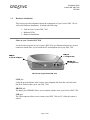
Jacks on your Creative DSL 7410
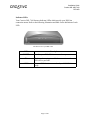
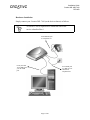
Located at the rear panel of your Creative DSL 7410 (see illustration below) are several
connectors which allow you to attach the PC and telephone set to your DSL 7410.
LINE jack
(to a telephone line)
USB jack
(to your PC USB port)
PHONE jack
(to a telephone set)
The rear view of your Creative DSL 7410
LINE jack
Using the provided phone cable, connect your telephone line from the wall jack to the
line jack, located at the rear of your DSL 7410.
PHONE jack
The phone jack (PHONE) allows you to connect a phone set to your Creative DSL 7410.
USB jack
The USB connector allows you to connect your DSL 7410 to a PC while the system is
still on.
Page 4 of 40