1
TO LOAD A DEFAULT SET:
While in Program mode, press ✻97, then enter a number 1-4 corresponding to the default table desired. See
the Installation Instructions for the default tables. Enter 0 if you are not selecting a default table.
TO EXIT PROGRAMMING MODE:
✻98 Exits programming mode and prevents re-entry by: Installer Code + 8+ 0 + 0. If ✻98 is used to exit
programming mode, system must be powered down, then press [✻] and [#] within 50 seconds of power
up to re-enter programming mode.
✻99 Exits programming mode and allows re-entry by: Installer Code + 8 + 0 + 0 or: Power-up, then press
[✻] and [#] within 50 seconds of power up.
DATA FIELDS
Field
Function
Programmed Values
[ ] = Table 1 Default Values
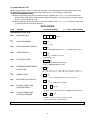
SYSTEM SETUP (✱ 20– ✱ 30)
✱20
INSTALLER CODE
[4112]
Enter 4 digits, 0–9
✱21
QUICK ARM ENABLE
†
[1]
0 = no; 1 = yes
✱22
KEYPAD BACKLIGHT TIMEOUT
[0]
0 = none (backlighting always on); 1 = backlight off after 10secs
✱23
FORCED BYPASS
†
[0]
0 = none; 1 = bypass open zones
UL installations = 0
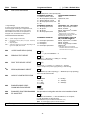
✱24
RF HOUSE ID CODE
|
[00]
00 = disable all wireless keypad usage;
01–31 = 5804BD/5804BDV house ID
✱25
✱26
POWERLINE CARRIER DEVICE
HOUSE CODE
CHIME BY ZONE
[0]
0 = A; 1 = B, 2 = C, 3 = D, 4 = E, 5 = F, 6 = G, 7 = H, 8 = I,
9 = J, #10 = K, #11 = L, #12 = M, #13 = N, #14 = O, #15 = P
† [0]
0 = no; 1 = yes (program zones to chime on zone list 3)
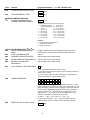
✱27
REAL TIME CLOCK DISPLAY
† [1]
0 = no; 1 = yes, display time on keypad
✱29
✱30
DAYLIGHT SAVING TIME
START/END MONTH
DAYLIGHT SAVING TIME
START/END WEEKEND
[4, 10]
Start
End
1-9, #+10,#+11,#+12. Enter 0,0 if no daylight savings time used.
[1,5]
Start
End
0=disable; 1=first; 2=second; 3=third; 4=fourth;
5=last; 6=next to last; 7=third from last
† Entering a number other than the one specified may give unpredictable results.
-3-