1
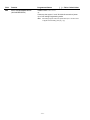
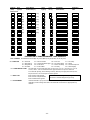
Field
Function
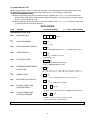
✱75
RF XMTR LO BAT RST RPT CODE
|
[1,0]
✱76
TEST RESTORE RPT CODE
|
[0,0]
|
[0, 0]
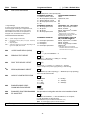
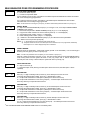
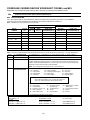
DYNAMIC SIGNALING FIELD ✻77
✱77
DYNAMIC SIGNALING DELAY/
DYNAMIC SIGNALING PRIORITY
Programmed Values[
] = Table 1 Default Value
1st Entry (delay before switch CS reporting path)
0 = Redundant reporting
7 = 105 seconds
on dialer and LRR/IP
8 = 120 seconds
device
9 = 135 seconds
1 = 15 seconds
#10 = 150 seconds
2 = 30 seconds
#11 = 165 seconds
3 = 45 seconds
#12 = 180 seconds
4 = 60 seconds
#13 = 195 seconds
5 = 75 seconds
#14 = 210 seconds
6 = 90 seconds
#15 = 225 seconds
2nd Entry
0 = Primary Dialer Preferred Channel
1 = LRR/IP Preferred Channel
2 = LRR/IP reporting only
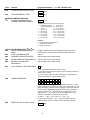
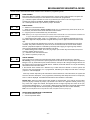
OUTPUT AND SYSTEM SETUP (✱80–✱92)
✱80
DEVICE PROGRAMMING MENU
MODE
✱81
ZONE LISTS MENU MODE
Program ✻80 and ✻81 only if Powerline Carrier Devices or
chime by zone are to be used. See procedure later in this
manual.
✱83
ENHANCED SEQUENTIAL MODE
See procedure later in this manual.
✱84
ASSIGN ZONE VOICE DESCRIPTOR
See procedure later in this manual.
✱85
RECORD CUSTOM VOICE
DESCRIPTOR
See procedure later in this manual.
✱87
AUX FUNCTION/ 1-BUTTON PAGING
[0]
0 = Aux key performs defined function (macro);
1 = Aux key sends message to pager or voice message to follow me
system phone number.
If 1, you must also select an option 6-9 in field ✻49 for the pager or
10-13 for the follow me system announcement.
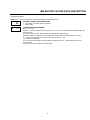
✱88
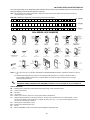
PAGER CHARACTERS
Up to 16 digits can be entered that will appear in front of the 7-digit
pager message sent by the control (either upon system event or upon
pressing AUX key [if programmed for paging]; see field ✻87 and ✻49
for other options regarding the paging feature). See the Installation
Instructions (fields ✻87, ✻88 and ✻49) for full descriptions of the
paging feature. You do not need to fill all 16 digits (press [✻] to
advance to next field). To clear entries, enter ✻88✻.
To enter “✻” = [#] + [11]; To enter “#” = [#] + 12]
To enter 2-second pause = [#] + [13] (some pagers require an
additional delay [pause] in order to receive the entire message)
✱89
EVENT LOG 80% FULL RPT CODE
|
[0,0]
-8-