1
Using POTS Splitters and Microfilters
Warning Only trained and qualified personnel should be allowed to install or replace this
equipment.
Warning Before working on a chassis or working near power supplies, unplug the power
cord on AC units; disconnect the power at the circuit breaker on DC units.
Warning Before working on equipment that is connected to power lines, remove jewelry
(including rings, necklaces, and watches). Metal objects will heat up when connected to
power and ground and can cause serious burns or weld the metal object to the terminals.
Warning Ultimate disposal of this product should be handled according to all national
laws and regulations.
Warning Before opening the chassis, disconnect the telephone-network cables to avoid
contact with telephone-network voltages.
Warning Do not work on the system or connect or disconnect cables during periods of
lightning activity.
Do not place anything on top of the router that weighs more than 10 pounds
(4.5 kg). Excessive weight on top of the router could damage the chassis.
Caution
Using POTS Splitters and Microfilters
Note This section applies only to the Cisco 1407 and Cisco 1417 routers.
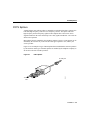
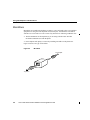
POTS splitters and microfilters are used on telephone lines to ensure voice- and data-call
quality. This section describes splitters and microfilters and how and when to use them with
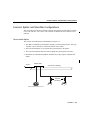
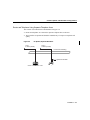
the Cisco 1407 and Cisco 1417 routers. POTS splitters result in the best data and voice
performance when the router and the telephone are used on the same telephone line, and
we recommend that you use a splitter.
2-2
Cisco 1400 Series Router Installation and Configuration Guide