1
Identifying External Hardware
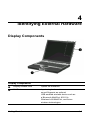
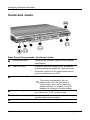
Function and Keypad Keys
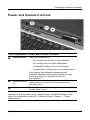
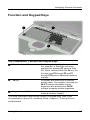
Top Components: Function and Keypad Keys
1
Function keys (12)
2
Fn key
3
Keypad keys (15)*
Perform system and application tasks.
For example, in Windows and many
applications, pressing F1 opens a Help
file. When combined with the Fn key, the
function keys F2 through F4 and F7
through F12 perform additional tasks as
hotkeys.*
Combines with other keys to perform
system tasks. For example, pressing the
Fn+F7 hotkeys decreases screen
brightness and pressing the Fn+F8
hotkeys increases screen brightness.
Can be used like the keys on an
external numeric keypad.
*For more information about using hotkeys or keypad keys, refer to the
Documentation Library CD, Hardware Guide, Chapter 2, “Pointing Device
and Keyboard.”
Getting Started
4-7